Passport Seva Kendra Landing Page Template
Seva is a single-column landing page template built for a government-authorized passport facilitation center. It guides every applicant from first click to confirmed appointment slot through a vertical, step-by-step journey. Navy authority colors, saffron action accents, and a search-box hero give users immediate clarity, forward motion, and the confidence to book without confusion.
by Rocket studio
Quick summary
Seva is a civic-service landing page template designed for a passport seva kendra. It compresses the full passport process into one straight vertical journey, from document checklist to appointment booking. Every design choice serves one purpose: give the applicant clarity fast, then move them to action. No forms on the page. One click, straight through.
Who this template is for
This template fits any government-authorized passport facilitation center that wants to serve applicants clearly and drive bookings online. It speaks directly to the people who actually walk through the door.
- First-time applicants preparing a fresh passport application, parents applying for minors, and citizens renewing before a family trip
- NRIs who need Tatkaal processing during a short visit to India, and senior citizens who need plain-language guidance on which step comes next
- Design teams working on a redesign of an existing passport seva website or building a new civic-service landing page from scratch
What problem this template solves
The official passport seva website can feel overwhelming. Users often encounter repeated elements, cluttered navigation, and an overload of information that makes even simple tasks feel uncertain. This template solves that directly.
- Applicants arrive without knowing which application type applies to them, which documents to carry, or how many days the process will take
- The existing design of many passport service portals feels stuck in the past, forcing users to read long pages before they can act
- A passport seva landing page must establish trust instantly, because personal data and travel plans are both on the line
What you get with this template
You get a fully structured, single-column flow landing page built around the lived experience of visiting a passport seva kendra. Every section mirrors an actual step in the passport process, so the page feels intuitive before a single word is read.
- A navy search-box hero, a five-step scrolling process journey with a saffron progress line, accordion document checklists sorted by application type, a center walkthrough section, and timestamped testimonials
- A sticky saffron call-to-action bar that persists after the second scroll, keeping the appointment booking prompt always in reach for mobile users
- Manrope typography for headings and interface elements, paired with JetBrains Mono for file numbers, codes, and dates, across a pressed-white canvas
Feature list
This template includes six built-in sections and interaction patterns, each grounded in the actual passport application process in India.
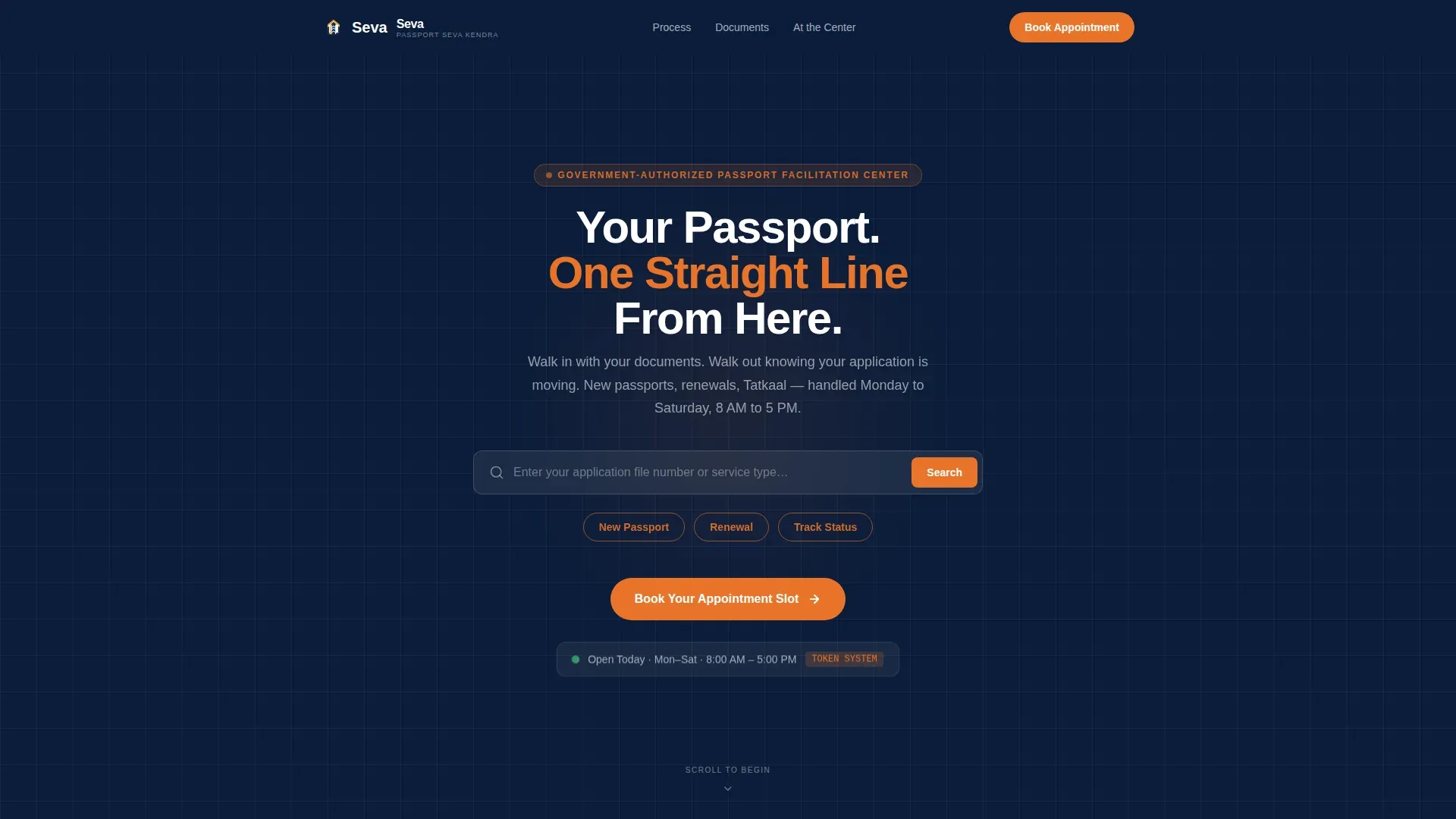
Search-Box Hero with Quick-Link Pills
The header opens on a deep navy field with a large, centered search input. Ghost text reads "Enter your application file number or service type." Below it, three saffron pill-shaped quick links let users jump directly to New Passport, Renewal, or Track Status. The search box is the hero because every applicant arrives with a specific need.
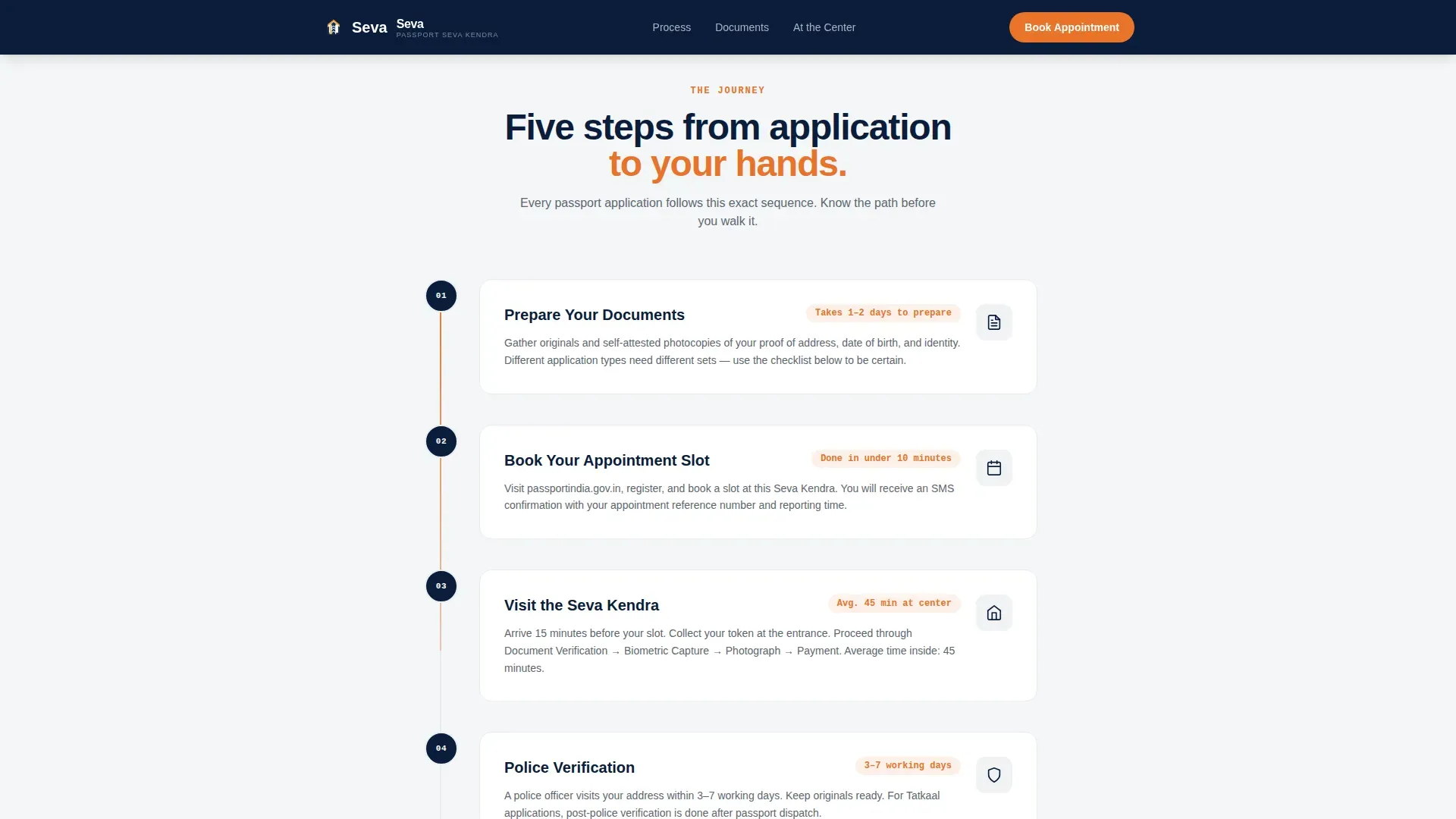
Five-Step Process Journey with Progress Line
A numbered vertical sequence walks the applicant through Document Checklist, Appointment Booking, What Happens at the Center, Police Verification, and Dispatch and Delivery. A thin saffron progress line grows down the left margin as the user scrolls, giving a physical sense of moving through a queue. Each step uses IntersectionObserver reveals so content appears as the applicant reaches it.
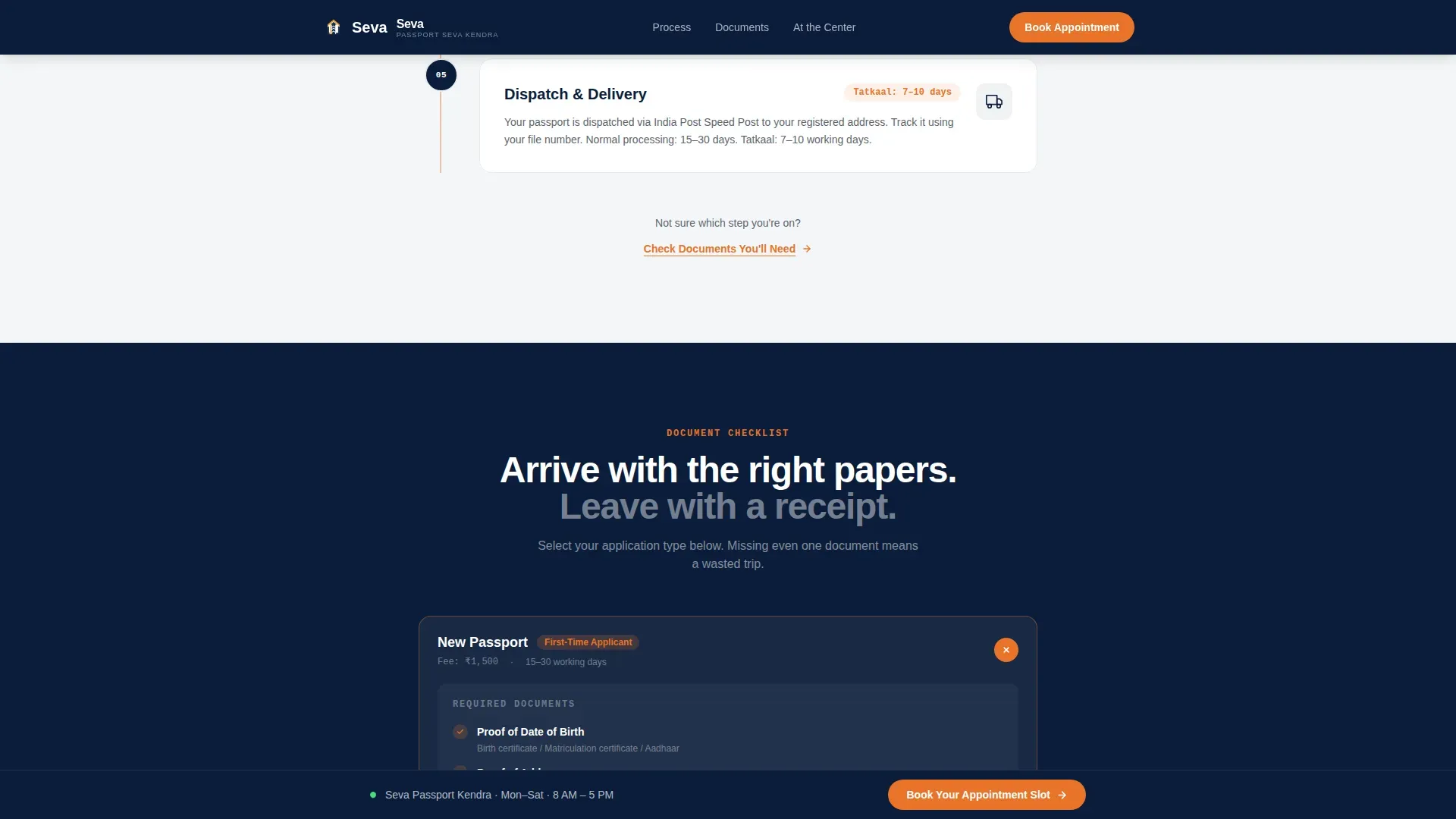
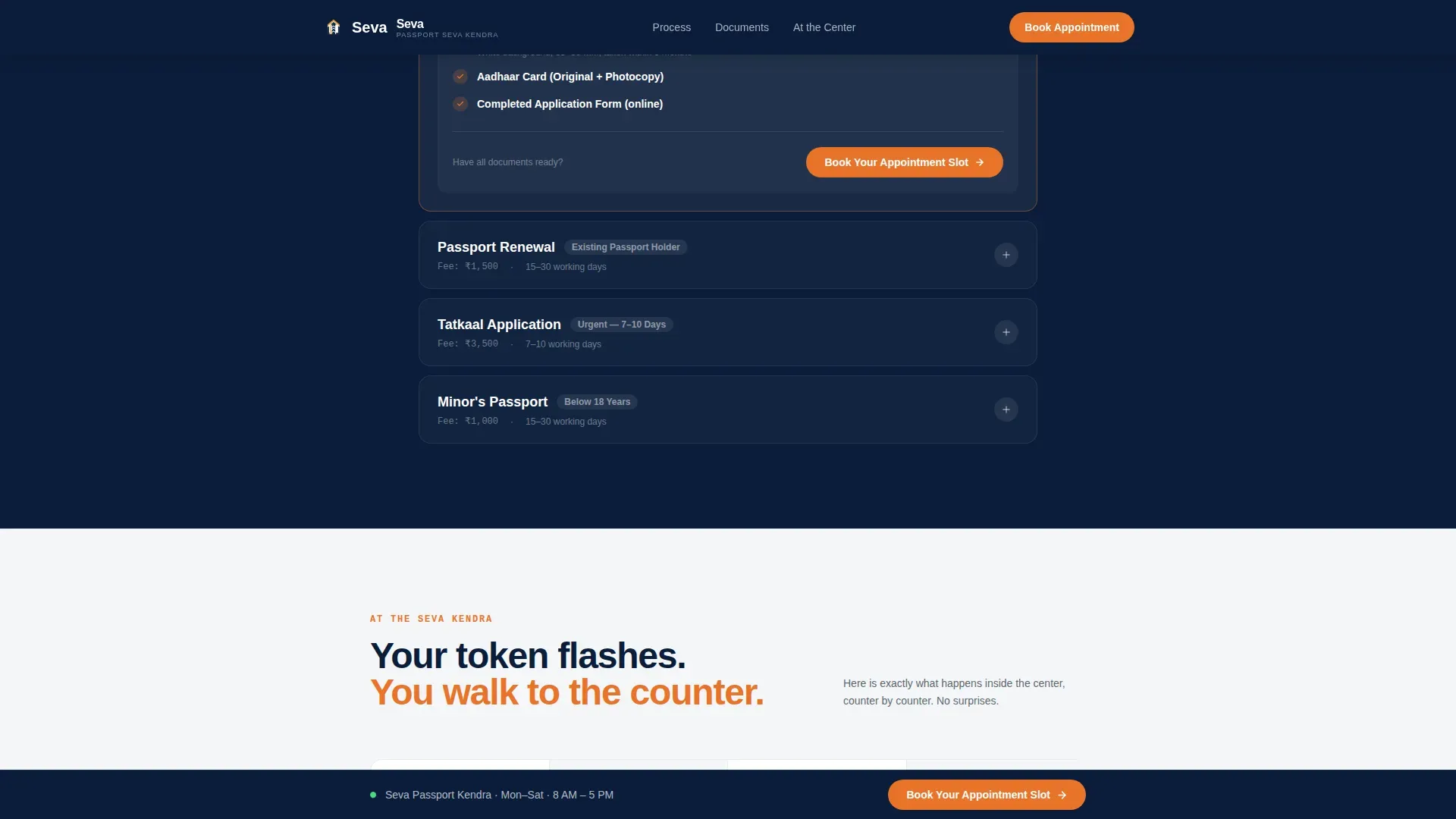
Accordion Document Checklist by Application Type
Three accordion card groups separate required documents by category: New Passport, Renewal, and Tatkaal. Each group expands on tap, showing only what is relevant to that applicant. This reduces cognitive load and helps users prepare before they arrive at the passport office or submit the application form online.
Center Walkthrough with Floating Data Cards
A four-step visual section explains exactly what happens inside the passport seva kendra, from token collection to biometric submission. Floating data cards carry useful details such as counter numbers, average wait times, and document verification steps. Users arrive prepared, not anxious.
Timestamped Testimonials Block
Social proof appears as real-format testimonials with application date, passport type, and turnaround days clearly printed. Example: "Applied March 3, received March 19. Tatkaal." This format builds trust because it mirrors the way Indian citizens actually talk about their passport experience, not as generic praise but as documented results.
Sticky Appointment Call-to-Action Bar
After the second scroll, a fixed bottom bar appears in saffron on navy carrying the primary call to action: "Book Your Appointment Slot." It remains visible throughout the rest of the page. A secondary text link, "Check Documents You'll Need," appears mid-page for applicants who are not yet ready to book but need preparation guidance.
Page sections overview
| Section | Purpose |
|---|---|
| Navy Search Hero | Entry point, file number or service lookup, quick-link pills |
| Process Journey Steps | Five-step numbered scroll path mirroring the actual passport process |
| Document Checklist Accordion | Grouped required documents by New, Renewal, and Tatkaal type |
| Center Visit Walkthrough | Four-step visual guide to what happens at the passport seva kendra |
| Timestamped Testimonials | Social proof with application dates, passport type, and turnaround days |
| Sticky Booking Bar | Persistent saffron call-to-action bar driving appointment slot bookings |
| Navy Footer | Vercel Horizontal pattern footer in deep institutional navy |
Design & branding system
The visual system follows a Civic Service theme built on the Navy Authority color palette. Every color choice carries a clear civic meaning: the navy of an officer's blazer, the white of a freshly stamped form, and the saffron that catches your eye on the national emblem above the service window.
- Primary background in header and footer: deep institutional navy (#0B1D3A); main content canvas: pressed-white (#F4F6F8); body text and secondary elements: steel-desk gray (#5C6670)
- Saffron (#E8732A) appears only on primary buttons, progress indicators, pill quick links, and the sticky call-to-action bar, reserving it exclusively for moments of action
- Manrope for all headings and interface copy; JetBrains Mono for file numbers, reference codes, and dates, ensuring printed reference data is always scannable
Mobile & speed optimization
This template is built mobile-first. Most applicants land on the page through a mobile search, often mid-errand or at a post office counter. The layout and interactions are sized for thumbs, not a desktop mouse.
- Touch-friendly accordion checklists, large saffron call-to-action buttons, and a persistent sticky bar ensure the booking action is always one tap away on any screen size
- Server components handle all static sections, keeping client-side JavaScript minimal so the page loads quickly even on mid-range mobile connections across India
- Scroll-linked animations use IntersectionObserver to reveal sections only as they enter the viewport, preventing unnecessary rendering and keeping the experience smooth
How this template helps you convert
This passport seva landing page is engineered for one outcome: getting the applicant to press "Book Your Appointment Slot." Every layout decision reduces hesitation and builds forward momentum.
- The search-box hero gives users an immediate way to find their specific service or file number, removing the most common reason people leave a government services website without acting
- The five-step process journey ensures that by the time the applicant reaches the call-to-action, they already know which documents to carry, which application type applies to them, and how many days the process will take, so the booking click feels confident, not uncertain
- Timestamped testimonials and the mid-page secondary link work together to catch both ready applicants and those still in the preparation phase, increasing the total number of users who complete a meaningful action on every visit
Other information about this template
This template was built with the context of the broader passport seva project in mind. The passport seva programme aims to deliver passport services in a timely, transparent, and reliable manner across India. Understanding that context shaped every design and copy decision in this template.
- The passport seva programme (PSP) Division of the ministry of external affairs provides passport services through a network of passport offices and passport seva kendras. The seva trusted passport facilitation service landing page template reflects that network structure by organizing services around applicant type rather than internal government categories.
- The ministry of external affairs, through the central passport organization based in New Delhi, oversees the issuance of ordinary passports and consular services for Indian citizens abroad. This template can support a passport office or facilitation center operating under that jurisdiction.
- The passport seva project has expanded to include 93 passport seva kendras and 412 post office passport seva kendras across the country. The template's accordion checklist system and quick-link navigation are designed to work equally well for urban passport offices and post-based seva kendras.
- The government of India has introduced machine readable passports for applicants. The template's document checklist sections can be adapted to mention specific requirements such as proof of date of birth for applicants born on or after 26 January 1989.
- Users who visit the passport seva website today often encounter a cluttered interface that reduces usability. This redesign-oriented template addresses those user experience gaps by applying a minimalistic, user-first approach with streamlined processes, clear visual hierarchy, and a motivated workforce-facing tone that communicates authority without bureaucratic friction.
- The online application form now requires only one parent's name. The template's accordion checklist can surface this detail clearly so applicants fill the form online without confusion.
- New user registration and existing user login flows on the official portal are referenced in the template's process journey, guiding users toward completing their submission without leaving the page mid-task.
- For applicants who need a Police Clearance Certificate (PCC), consular services, or who have lost a previous passport, the template's accordion structure provides space to address such applicants with targeted document lists and case study-style guidance.
- The surrender of an old passport and details around the re-issue process can be clearly communicated using the template's accordion checklist, helping holders of expired documents understand their next step.
- The template's design system supports visual consistency, which helps build trust and improves usability across both first-time applicants and returning users who register for a new appointment after a previous visit.
Theme
Civic Service
Creative direction
Movement & Cause
Color system
Navy Authority
Style
Single Column Flow
Direction
Click-Through
Page Sections
Search-box Hero with Saffron Quick Links
Five-step Scroll Journey with Progress Line
Accordion Document Checklist by Application Type
Center Visit Walkthrough with Data Cards
Timestamped Testimonials Block
Sticky Saffron Appointment Bar
Related questions
Can this template be used for a post office passport seva kendra?
Does the template include an actual booking form or appointment system?
How does the accordion document checklist work for different application types?
Is this template suitable for a redesign project targeting the existing passport seva website experience?
What happens to the call-to-action button on mobile?