Embassy & Consulate Careers & Recruitment Website Template
Mandate is a split-screen landing page template built for foreign aid and humanitarian logistics organizations. It combines an institutional monochrome design with a transparent supply-chain narrative to convert mid-career professionals, retired civil servants, and church groups into recurring donors. Every section moves from transaction to field receipt, replacing charity theater with documented accountability.
by Rocket studio
Quick summary
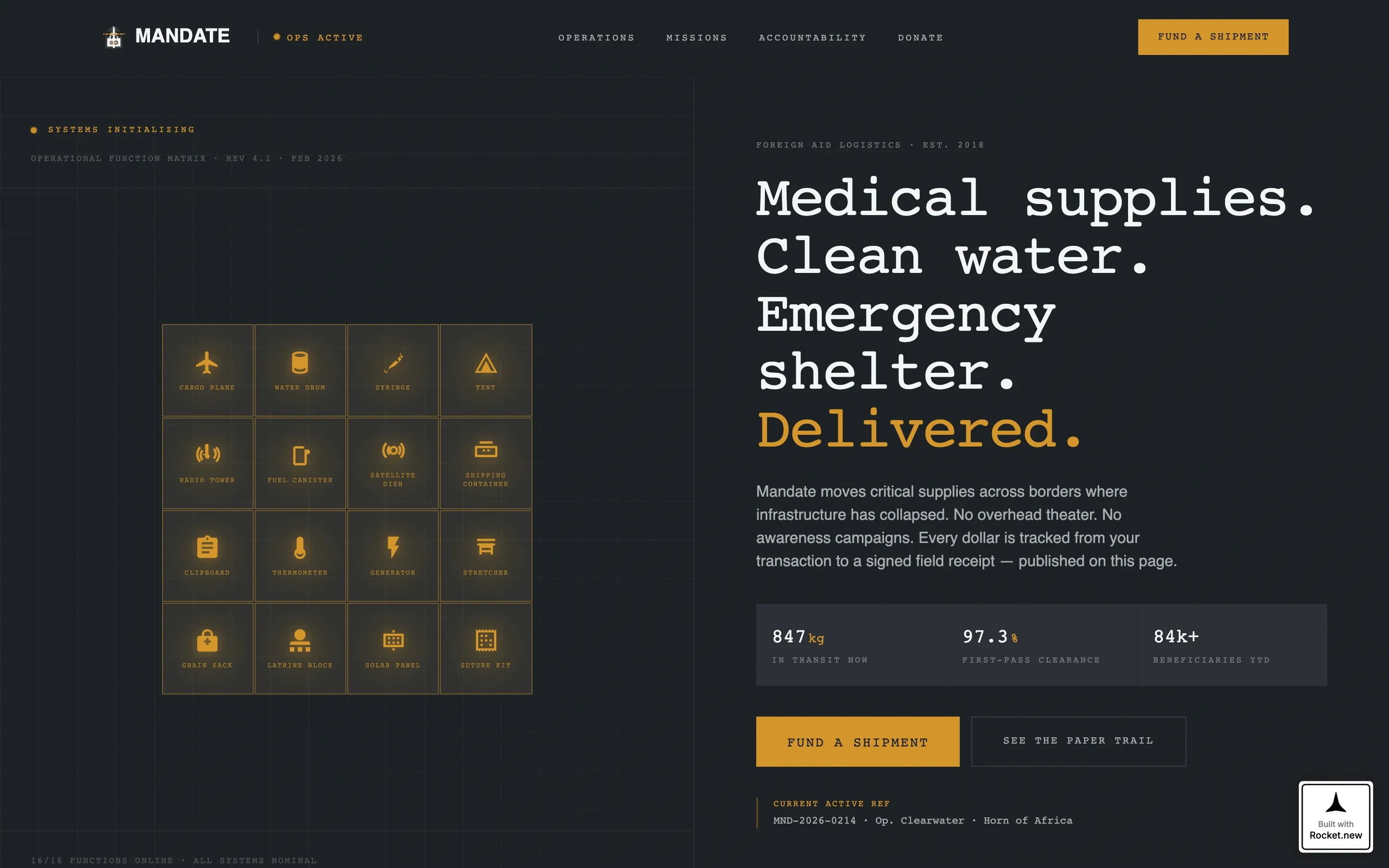
Mandate is a single-page donation and fundraising template for foreign aid operations. It uses a 50/50 split-screen layout, an icon grid header, and a scroll-linked documentation panel to show donors exactly how their contribution travels from wire transfer to field delivery. The design is institutional and precise, built to earn trust through process rather than emotion.
Who this template is for
This template is designed for humanitarian logistics organizations that need donors to trust the process, not just the mission. It speaks directly to audiences who want proof, not promises.
- Mid-career professionals who want to verify their donation moved a physical object
- Retired civil servants who understand supply chains and expect procedural accountability
- Church groups and giving circles pooling monthly contributions toward trackable shipments
What problem this template solves
Most donation pages ask for trust without offering evidence. They rely on emotional photography and vague impact statistics. Mandate removes that gap entirely.
- Donors cannot see how their money travels from payment to physical delivery
- Organizations lose recurring givers because accountability stops after the confirmation email
- Generic fundraising layouts undercut the credibility of serious logistics operations
What you get with this template
You get a fully structured single-page layout that guides donors through your entire supply chain. Every section is purpose-built for a foreign aid or humanitarian logistics context.
- A 50/50 split-screen hero with an animated 16-icon operational grid and a mission introduction panel
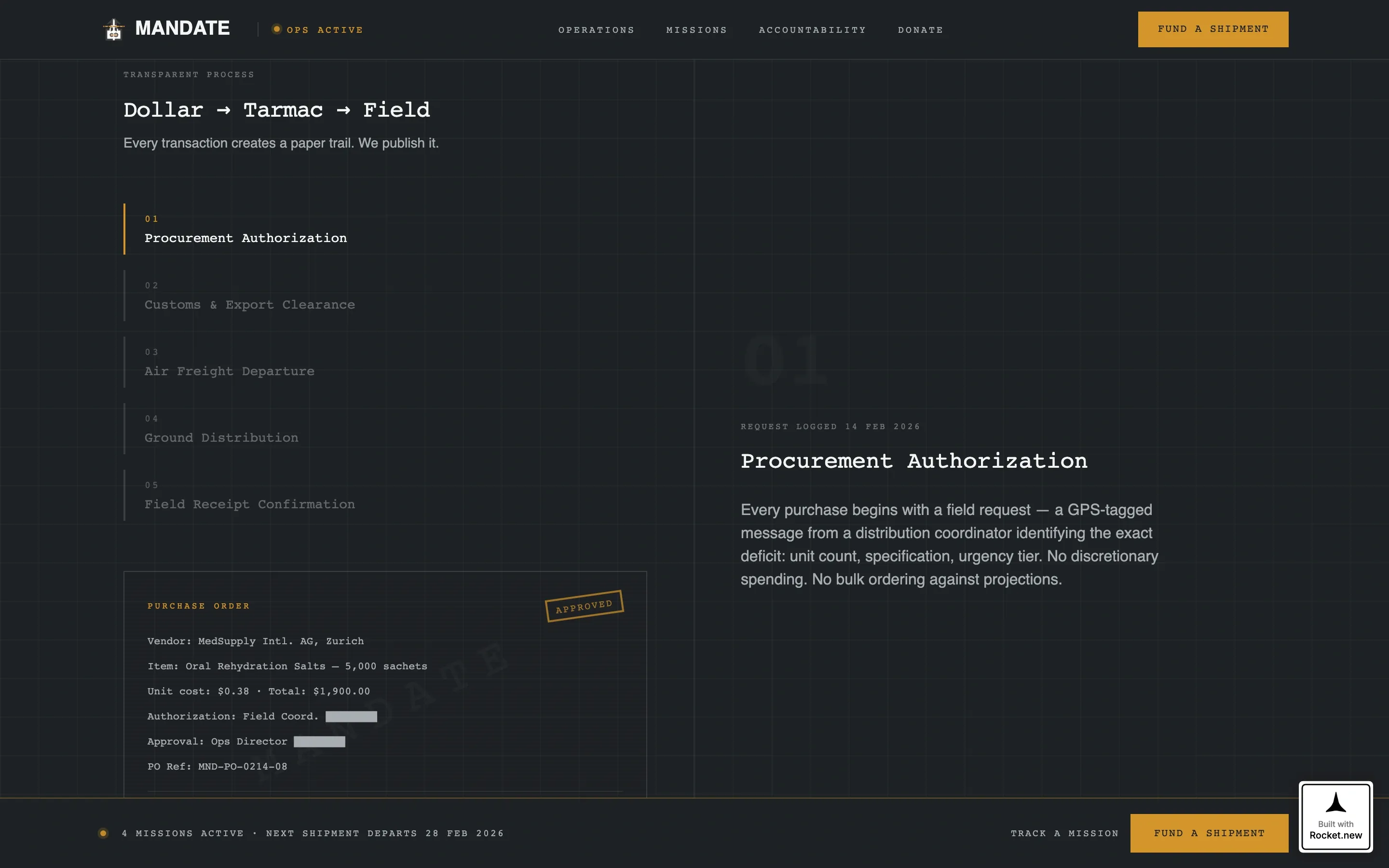
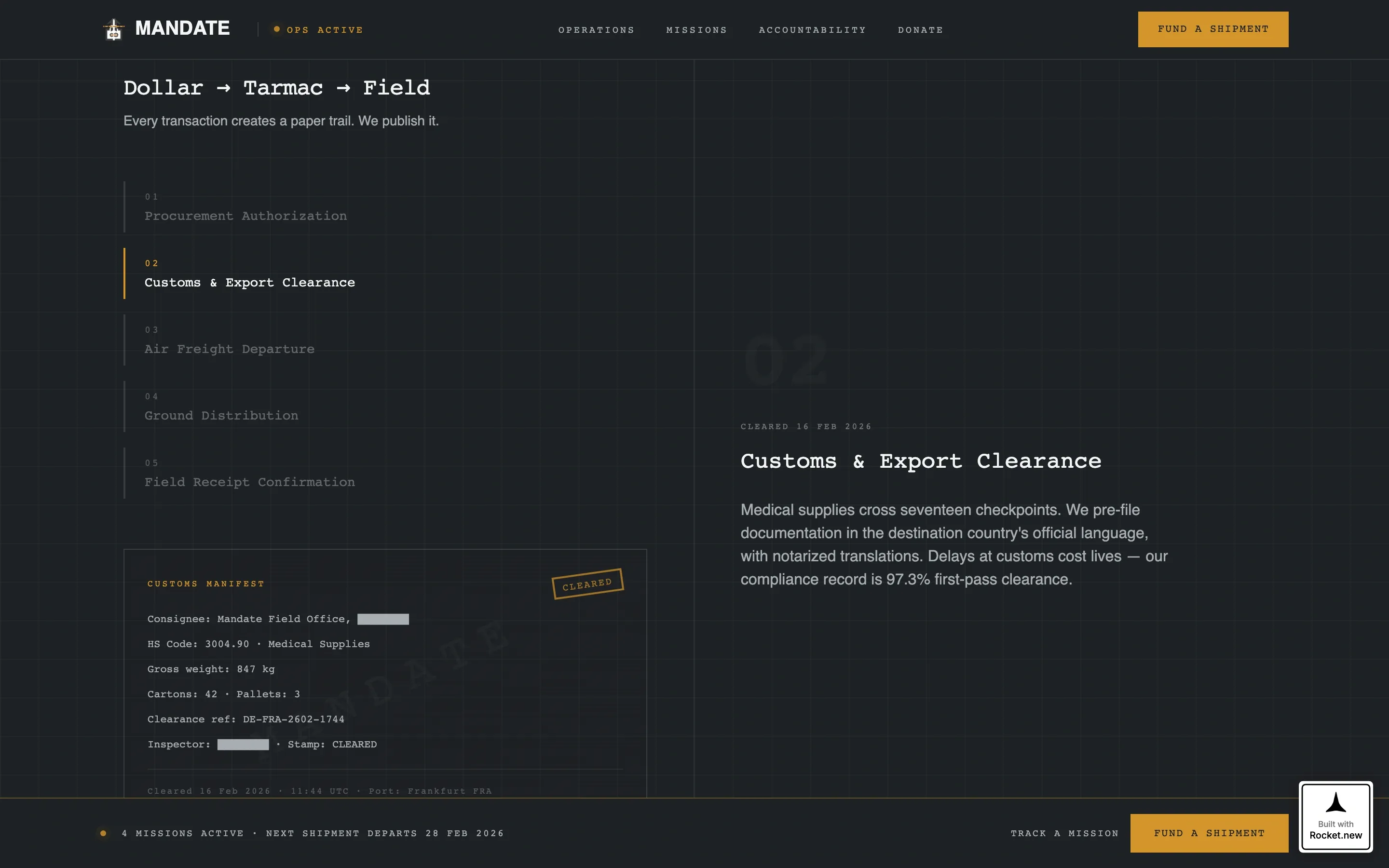
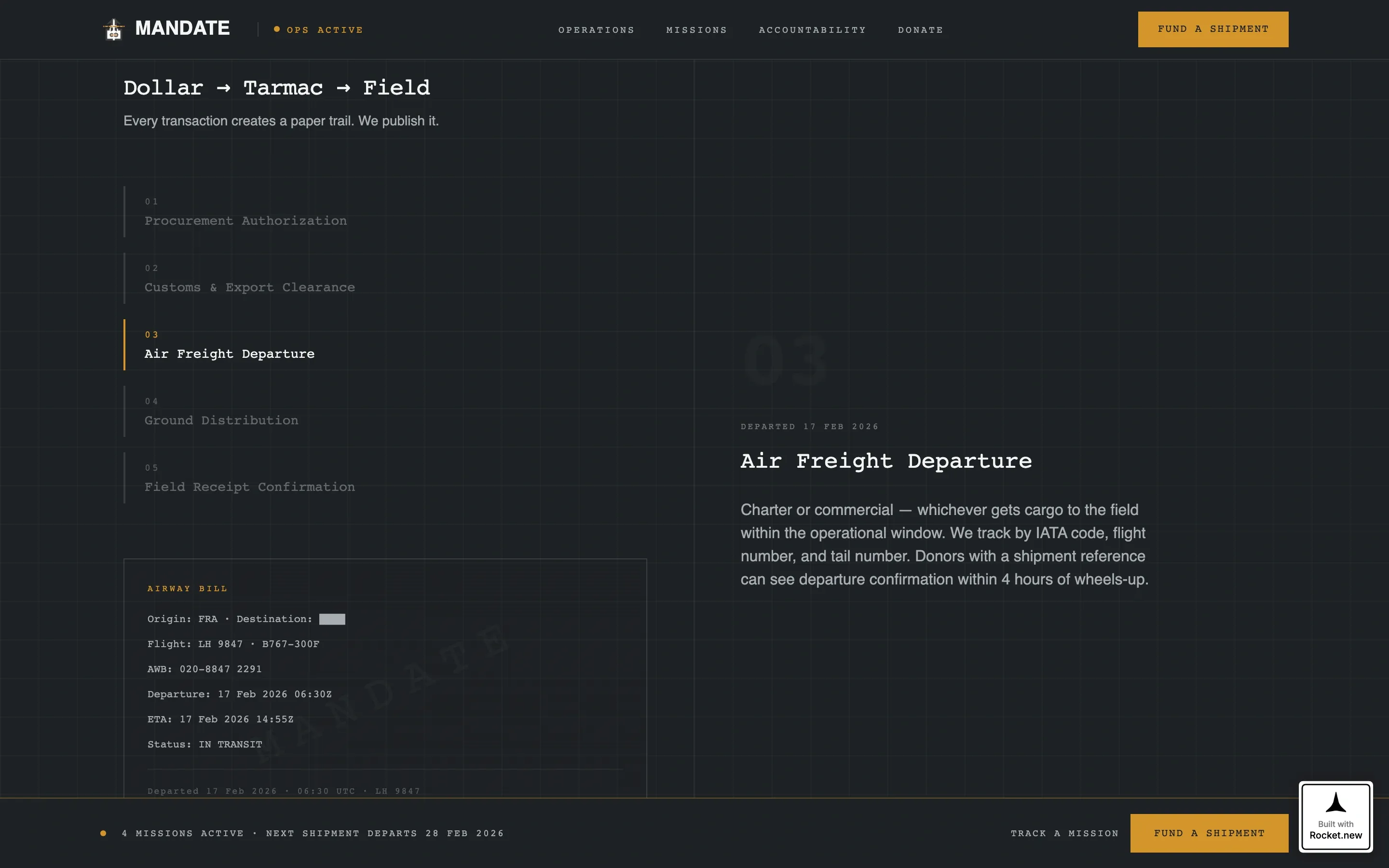
- A scroll-linked process section pairing operational narrative on the left with documentation visuals on the right
- A donation form with three pre-set deliverable-tied amounts, a custom field, and a pinned amber call-to-action button
- An active missions section displaying shipment status cards with GPS coordinates and cargo data
- A mission tracker email capture that converts one-time donors into recurring supporters
Feature list
This template includes five tightly integrated feature areas, each designed to support the transparency-first fundraising model described in the brief.
Animated Icon Grid Header
Sixteen monoline operational icons sit inside steel-bordered squares on a gunmetal field. On page load, each square illuminates in amber one by one, like systems coming online in a command center. The sequence replaces hero photography with functional symbolism that signals operational readiness.
Scroll-Linked Split-Screen Panels
The left panel carries the operational narrative, moving through procurement, customs clearance, air freight, ground distribution, and field receipt confirmation. The right panel mirrors each step with documentation visuals including redacted invoices, cargo manifests, and signed delivery confirmations. The two panels advance in sync as the visitor scrolls.
Deliverable-Tied Donation Form
The donation form presents three pre-set giving amounts, each anchored to a specific physical item. Thirty-five dollars funds one water filtration unit, one hundred twenty dollars covers one emergency shelter kit, and four hundred dollars supplies one medical resupply crate. A custom amount field is also included for donors who want to give at a different level.
Pinned "Fund a Shipment" Call to Action
After the first scroll, an amber call-to-action bar locks to the bottom of the viewport and remains visible throughout the page. This persistent prompt keeps the primary conversion action within reach at every stage of the donor's review without interrupting the content flow.
Mission Tracker Email Capture
A secondary conversion path invites donors to enter their email address and track a mission. Subscribers receive the same cargo documentation shown on the page, delivered on a monthly basis. This turns accountability into a retention product and builds a list of engaged, informed recurring supporters.
Page sections overview
| Section | Purpose |
|---|---|
| Icon Grid Hero | Introduce the operation with 16 animated icons and a split-screen mission statement |
| Process Split Scroll | Show the full supply chain paired with real documentation on each step |
| Active Missions | Display live shipment status cards with GPS coordinates and cargo details |
| Donation Form | Accept contributions tied to specific deliverables with a custom amount option |
| Mission Tracker Capture | Collect email addresses for monthly cargo documentation reports |
| Footer | Close with a single linear row of essential links and organization details |
Design & branding system
The visual identity follows an Institutional Authority theme. Every design decision signals precision, accountability, and operational discipline.
- Color system is Monochrome Steel: gunmetal gray (#3B3F45) as the primary field, cold-rolled silver (#A8ADB3) for supporting elements, document white (#F4F5F6) for content surfaces, and operational amber (#D4952B) reserved strictly for call-to-action buttons and live status indicators
- Typography pairs DM Mono for monospace headers with DM Sans for body text, reinforcing the briefing-room aesthetic through every line of copy
- Animation is set to high intensity, covering the icon illumination sequence, scroll-linked panel transitions, and counter animations on shipment statistics
Mobile & speed optimization
The template is built desktop-first to honor the briefing-room aesthetic. It remains fully responsive for donors who review the page on a smaller screen.
- Static content areas are built with server components to keep initial load fast, while interactive elements such as the animation sequences and donation selector use client components
- The split-screen layout adapts to a stacked single-column flow on mobile, preserving the left-panel narrative and right-panel documentation in readable sequence
How this template helps you convert
Mandate is structured to move a skeptical donor from curiosity to commitment by removing every reason to doubt.
- The icon grid and scroll-linked documentation panels build credibility before a single donation ask appears, so the visitor arrives at the form already convinced by evidence rather than persuaded by copy.
- The deliverable-tied donation amounts ($35, $120, $400) give donors a concrete mental model of impact, which reduces hesitation and increases average gift size compared to open-amount forms.
- The mission tracker email capture creates a second conversion path for visitors who are not ready to give yet, converting undecided readers into a recurring accountability audience that is primed for future asks.
Other information about this template
This template is categorized under Government and Public, with a subcategory of Embassy and Consulate and a niche focus on foreign aid mission contexts. It is built for United States-based organizations using USD currency, the MM/DD/YYYY date format, and English-language copy.
- Localization defaults are set for USA, USD, and English, making it ready to deploy for domestic nonprofit and aid organizations without additional configuration
- The footer uses a linear single-row pattern, keeping the close of the page as clean and uncluttered as the operational aesthetic demands
- The template style is Split Screen (50/50), and the creative direction is Transparent Process, meaning every layout decision reinforces the idea that the organization has nothing to hide
Theme
Institutional Authority
Creative direction
Transparent Process
Color system
Monochrome Steel
Style
Split Screen (50/50)
Direction
Donation/Fundraising
Page Sections
Animated 16-icon Operational Grid
Scroll-linked Split-screen Documentation
Deliverable-tied Donation Form
Pinned Viewport Call-to-action Bar
Mission Tracker Email Capture
Active Missions Status Cards
Related questions
Who is this landing page template designed for?
What donation amounts are pre-set in the form?
What is the mission tracker email capture for?
Does the header use photos or video?
Is there a way to give an amount outside the three pre-set options?