Kids - Highconverting Coding Landing Page Template
A warm, community-driven landing page template built for kids coding instructor directories. It features a full-viewport photo wall hero, a Pinterest-style instructor grid with specialty tags and parent reviews, a mid-scroll lead magnet, and a student project gallery. Parents can search by zip code and age range to find the right coding teacher for their child.
by Rocket studio
Quick summary
This template is a hero-dominant, single-page directory built to connect parents with vetted kids coding instructors. It opens with a full-viewport photo wall, flows into an instructor grid with real faces and parent reviews, and builds trust through student project proof before ever asking for a name or email.
Who this template is for
This template is designed for anyone running a searchable directory of children's coding and programming instructors. It works equally well for small education startups and solo directory founders.
- Parents searching for a private coding tutor for a child between ages 5 and 14
- Homeschool co-op coordinators booking group or semester-long coding classes
- Directory owners and education marketplace builders targeting the kids coding niche
What problem this template solves
Finding a trustworthy kids coding teacher online feels like guessing. Most search results return faceless listings, vague bios, and no proof that any real child learned anything. Parents give up, or they settle. This template fixes that by leading with faces, credentials, real parent words, and student work before asking for anything in return.
- Parents have no easy way to compare instructor personalities, specialties, and age-group fit at a glance
- Directory pages often ask for sign-up details before building any trust, causing early drop-off
- Student outcomes are rarely visible, so parents cannot judge instructor quality from results alone
What you get with this template
You get a fully structured, single-page directory layout ready to be populated with instructor profiles and student proof. Every section is purpose-built to reduce parent hesitation and move visitors toward booking a trial or downloading a free resource.
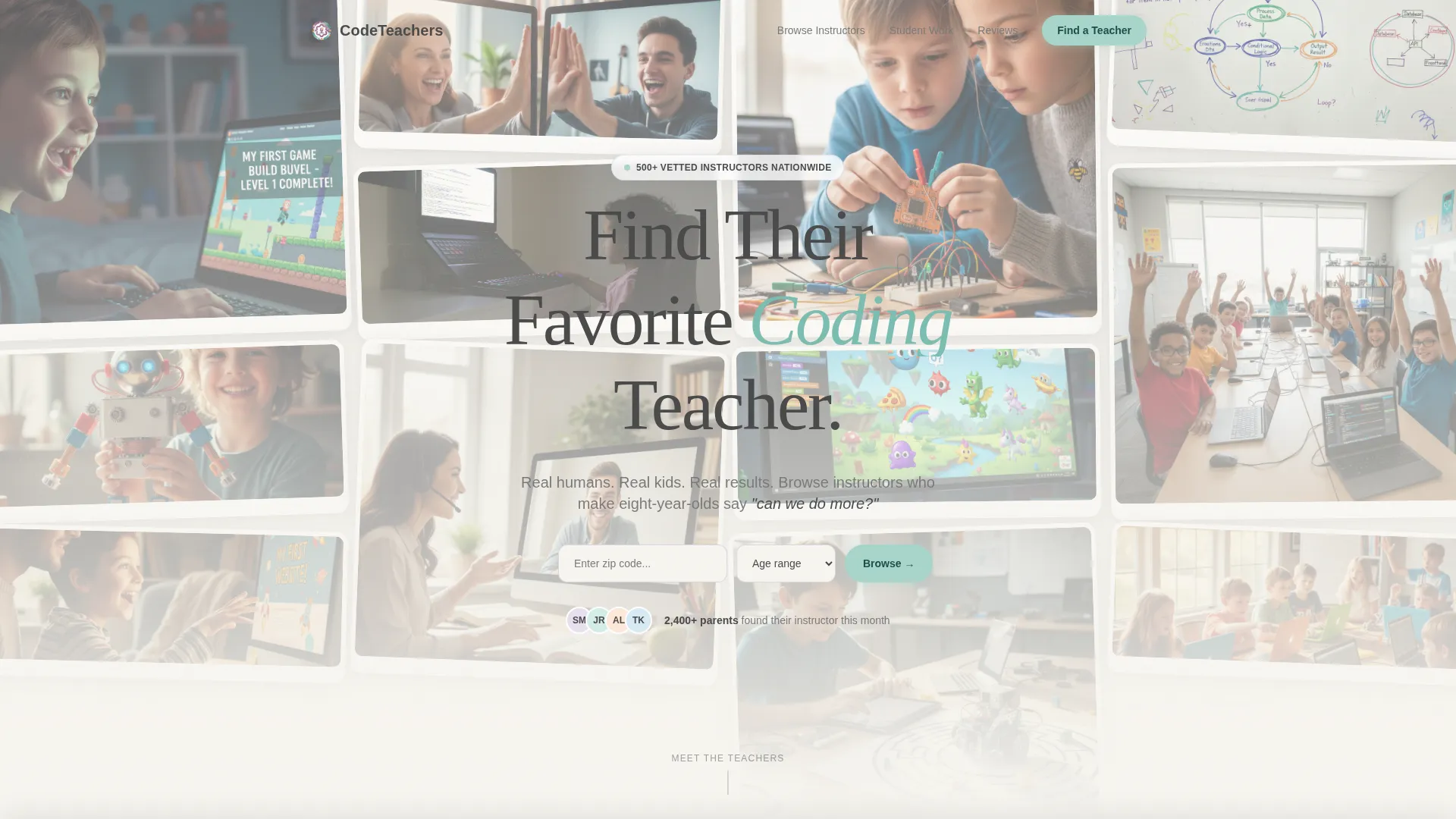
- A full-viewport UGC Photo Wall hero with parallax scroll effect and a prominent search bar
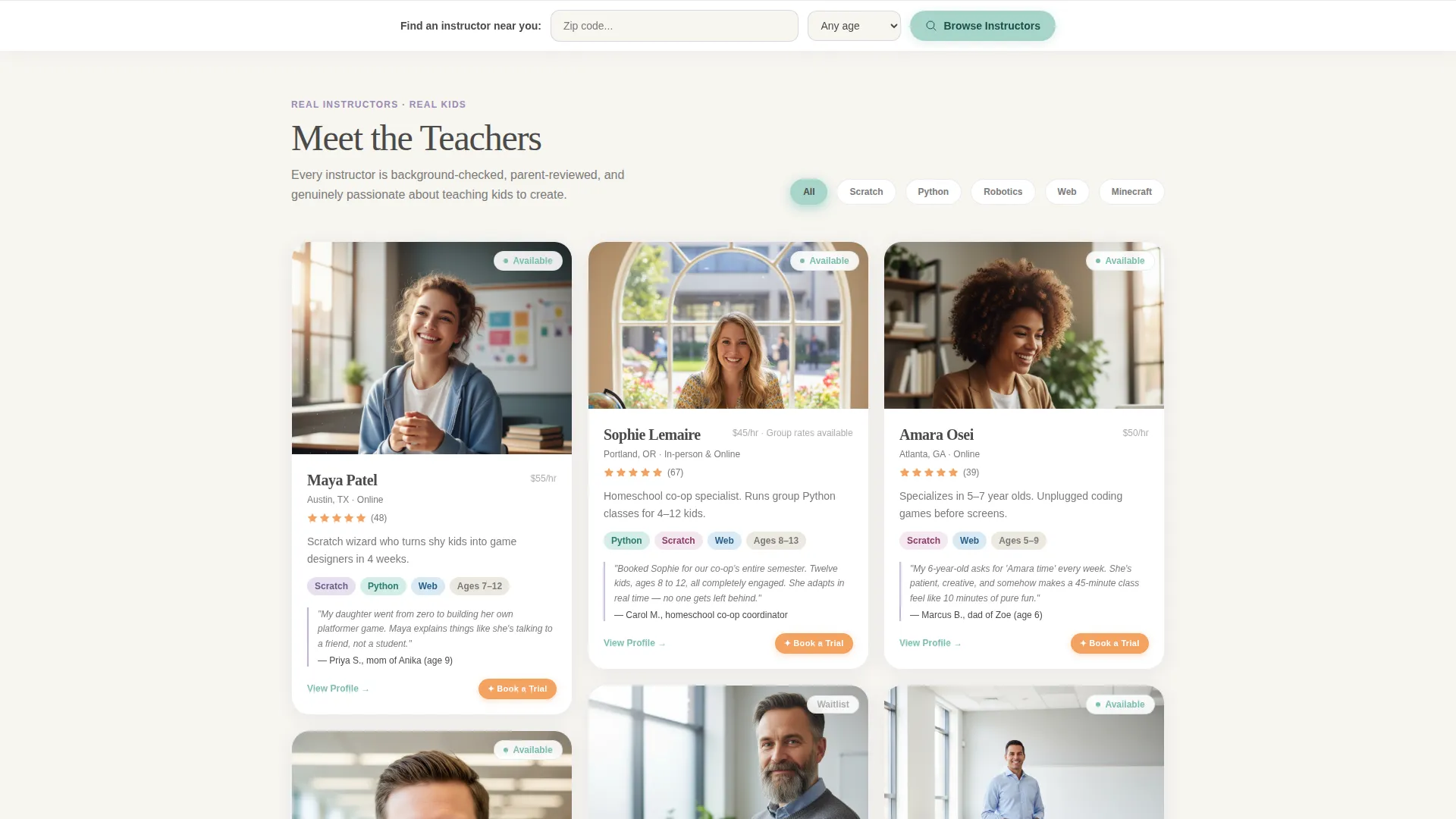
- A Pinterest-style instructor card grid with specialty pills, age ranges, micro-reviews, and five-star badges
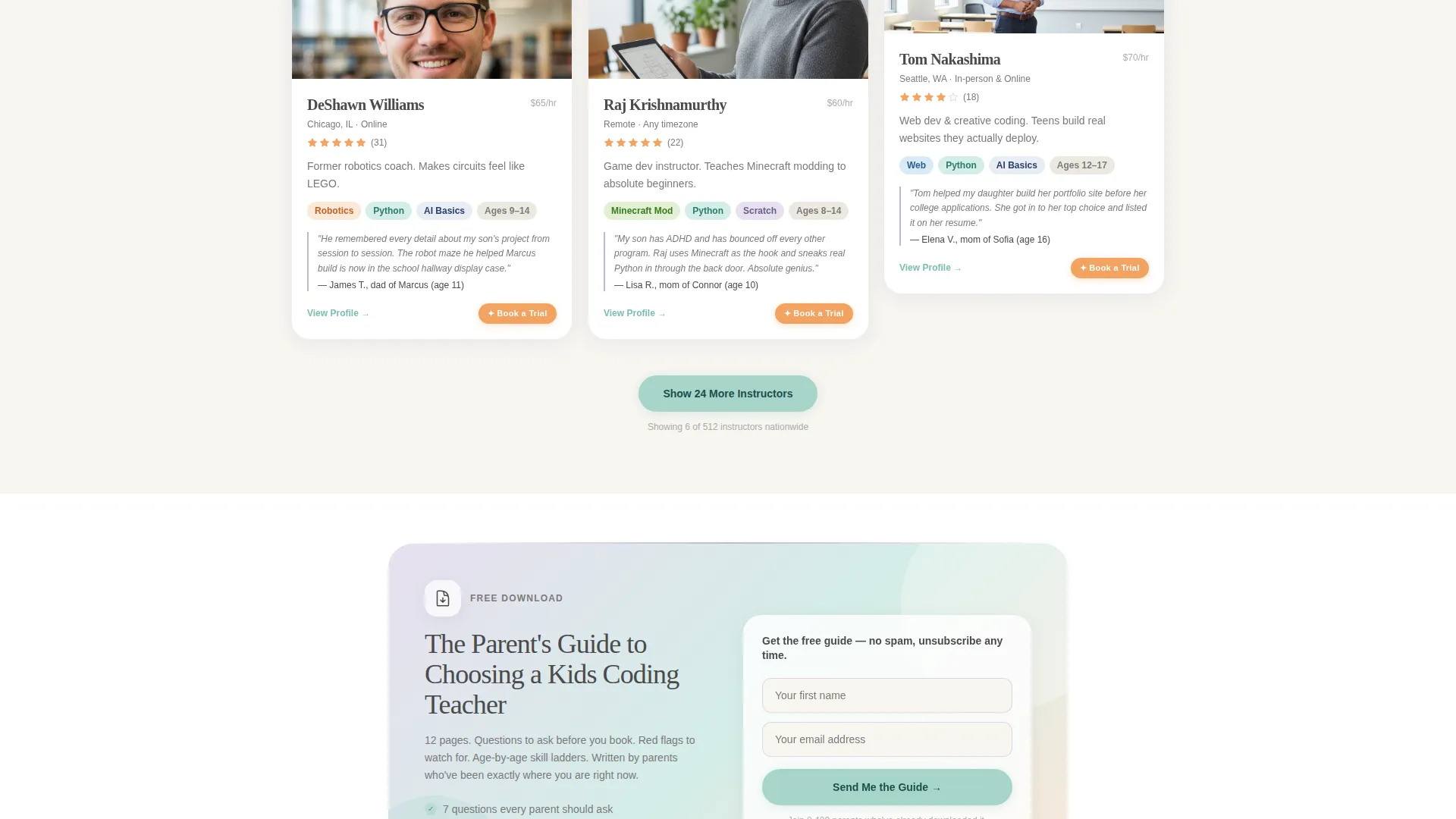
- A mid-scroll lead magnet section gating a free parent guide behind a name and email field
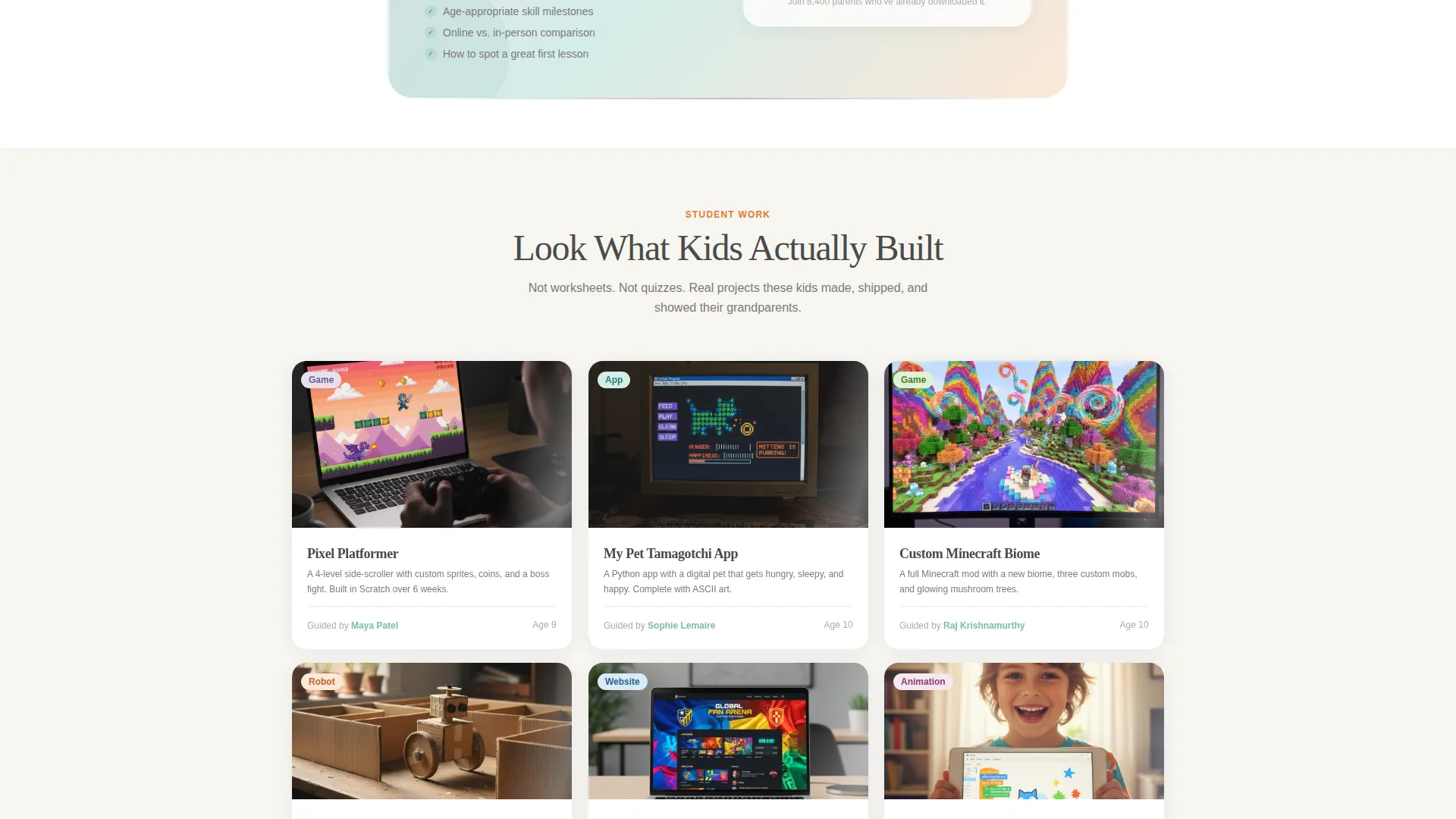
- A student project gallery showing animated work tagged to specific instructors
- A sticky bottom bar with zip code field and age-range dropdown for persistent browse access
Feature list
This template includes a focused set of interactive and visual features drawn directly from the design brief.
Full-Viewport Photo Wall Hero
A mosaic of real, unstaged photos fills the entire first screen. Images are slightly rounded and unevenly sized like scattered polaroids, with a gentle parallax drift effect as the visitor scrolls. A rounded, hand-drawn-feeling headline floats over the mosaic.
Pinterest-Style Instructor Grid
Instructor cards appear in a loose, asymmetric grid layout. Each card shows the instructor's photo, soft-colored specialty pills (covering areas like Scratch, Python, Robotics, Web, and Minecraft Modding), age ranges taught, a parent-written micro-review in italics, and a five-star badge.
Sticky Search Bar
A bottom bar stays fixed as the parent scrolls. It contains a zip code input field and an age-range dropdown covering four brackets: 5 to 7, 8 to 10, 11 to 13, and 14 and up. This keeps the primary browse action reachable at any scroll depth.
Mid-Scroll Lead Magnet
Between the instructor grid and the student project gallery, a gated download section offers a free PDF titled "The Parent's Guide to Choosing a Kids Coding Teacher." It collects a first name and email address. Its placement is deliberate: trust is established first, then the ask is made.
Student Project Gallery
A dedicated proof section shows what children actually built with their instructors. It features animated GIFs of games, app screenshots, and looping videos of robots navigating mazes. Each item is tagged with the instructor who guided the project.
Tangerine Book-a-Trial Badge
Each instructor card carries a soft tangerine accent badge labeled "Book a Trial." The color is used only here, making it easy for a tired parent scrolling late at night to spot the call to action without feeling overwhelmed.
Page sections overview
| Section | Purpose |
|---|---|
| Hero Photo Wall | Full-viewport mosaic with headline and search bar |
| Instructor Card Grid | Browse instructors by face, specialty, and review |
| Lead Magnet Block | Gate a free parent guide behind name and email |
| Student Project Gallery | Show real child-built projects tagged to instructors |
| Parent Testimonials | Reinforce trust with attributed parent voice quotes |
| Sticky Bottom Bar | Persistent zip and age search across full scroll |
| Footer | Single-row linear links and closing information |
Design & branding system
The visual identity follows a Family First theme using the Soft Mist color system. Every color choice feels soft, approachable, and child-friendly without being childish. The overall effect is a warm community center where parents feel welcomed, not sold to.
- Background uses warm cloud white (#F7F5F0), with muted lavender (#C4B7D4) on section dividers and tags, and gentle seafoam (#A8D5CB) on buttons and interactive cards
- Body text sits in pencil graphite (#4A4A4A) for easy reading; soft tangerine (#F4A261) appears only on "Book a Trial" badges as the sole high-attention accent
- Typography pairs Fraunces as the serif display face for headlines with DM Sans as the clean body typeface for instructor details and descriptions
Mobile & speed optimization
The template is designed with a mobile-first approach throughout. A parent scrolling on a phone at 10 p.m. is the primary use case, so every layout decision prioritizes small-screen clarity and single-thumb navigation.
- All images use lazy loading so the page remains responsive as the instructor grid and project gallery populate
- Scroll behavior relies on native CSS, keeping the parallax and card reveal animations smooth without heavy script dependencies
- The sticky bottom bar and age dropdown are sized and spaced for comfortable thumb reach on standard phone screens
How this template helps you convert
Trust is built in layers before any conversion action is requested. The page earns engagement through faces and proof, then channels that trust into two clear paths: browsing instructors or claiming a free resource.
- The photo wall and instructor grid establish human credibility first, so parents arrive at the lead magnet already confident rather than skeptical
- The mid-scroll PDF offer captures parent emails at the moment of highest engagement, between instructor browsing and project proof
- The sticky bottom bar keeps the primary browse-and-book action available at every scroll position, removing friction from the final step
Other information about this template
This template is built for the Kids and Family category, specifically the Kids Coding and Programming niche. It is structured as a Content and Resource landing page with a Hero-Dominant (90/10) layout ratio, meaning the above-the-fold experience is almost entirely visual and emotional rather than text-heavy.
- The Community Gallery creative direction means the scroll experience builds like a neighborhood bulletin board, getting richer and more convincing with every section
- The UGC Photo Wall header concept deliberately avoids stock photography, signaling authenticity to parents who have grown skeptical of polished marketing
- Animation is set to a medium level: parallax on the photo wall, staggered card reveals in the instructor grid, and scroll-linked depth in the project gallery
- The footer uses a Pattern 1 Linear Single-Row layout for a clean, low-distraction close to the page
- The template supports localization for United States audiences, with USD pricing context and English-language copy structures throughout
Theme
Family First
Creative direction
Community Gallery
Color system
Soft Mist
Style
Hero-Dominant (90/10)
Direction
Content/Resource
Page Sections
Full-viewport Photo Wall Hero
Pinterest-style Instructor Grid
Sticky Zip and Age Search Bar
Mid-scroll Lead Magnet Section
Student Project Proof Gallery
Tangerine Book-a-trial Badge
Related questions
What age groups does this template support displaying?
Can I launch this template with a small instructor roster?
What does the mid-scroll lead magnet section include?
Does this template work for group class bookings as well as private tutors?
How is the student project gallery organized?