Kids Ice Skating Booking Landing Page Template
Glide is a hero-dominant landing page template built for parent-run kids ice skating resource guides. It combines a full-viewport Photo Grid Mosaic, an age-grouped session schedule, an inline multi-step booking flow, and an SMS schedule capture. The Community Hearth design makes every section feel warm, local, and parent-organized, not corporate.
by Rocket studio
Quick summary
Glide is a single-page template for local ice skating communities. It helps parents find open skate sessions, group lessons, and holiday clinics near them, then book a spot without leaving the page. The design feels like a rink lobby bulletin board: candid, community-built, and genuinely useful for families checking schedules on a phone at 9 p.m.
Who this template is for
This template is built for the people who actually organize kids ice skating for their community. It suits anyone running a local family activity resource that needs real booking functionality and honest, warm design.
- Parents or rink volunteers building a neighborhood skating schedule hub
- Local skating programs targeting families with children ages 3 through 12
- Grandparents or community organizers looking to offer a screen-free Saturday activity resource
What problem this template solves
Finding open skate sessions and kids ice skating lessons usually means hunting across three different rink websites, a Facebook group, and a printed flyer. Families miss sessions simply because the information is scattered. Glide pulls everything into one parent-organized page where availability is visible before anyone has to commit.
- Scattered session schedules that force parents to search multiple sources
- No clear booking path for first-time skaters or families new to a rink
- Lack of community trust signals that help parents feel confident before they show up
What you get with this template
This template delivers a structured, single-page flow that takes a visitor from discovery to booking in one scroll. Every section serves a specific role, from the mosaic hero to the footer.
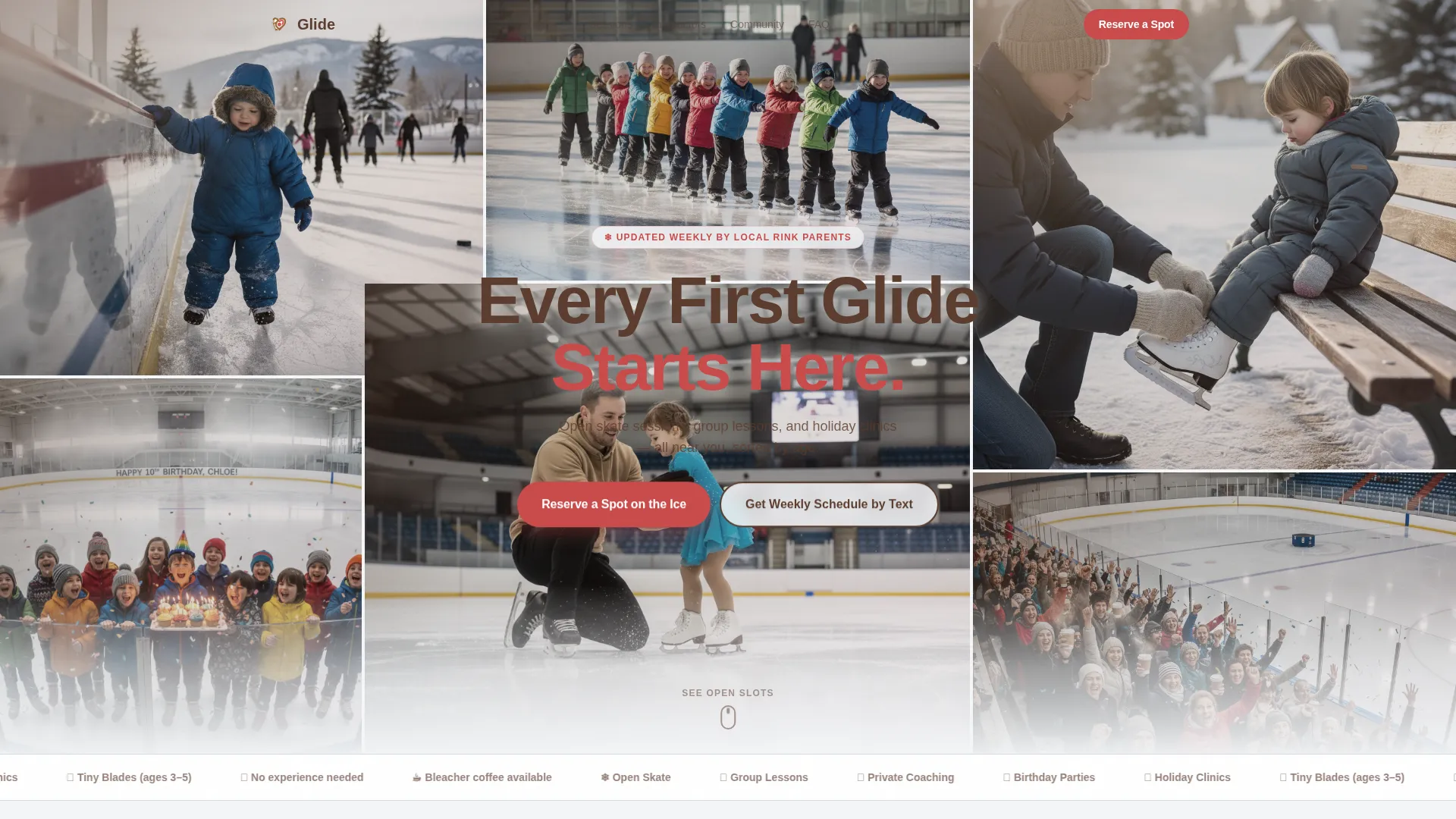
- A 90/10 hero-dominant layout anchored by a Photo Grid Mosaic filling ninety percent of the viewport
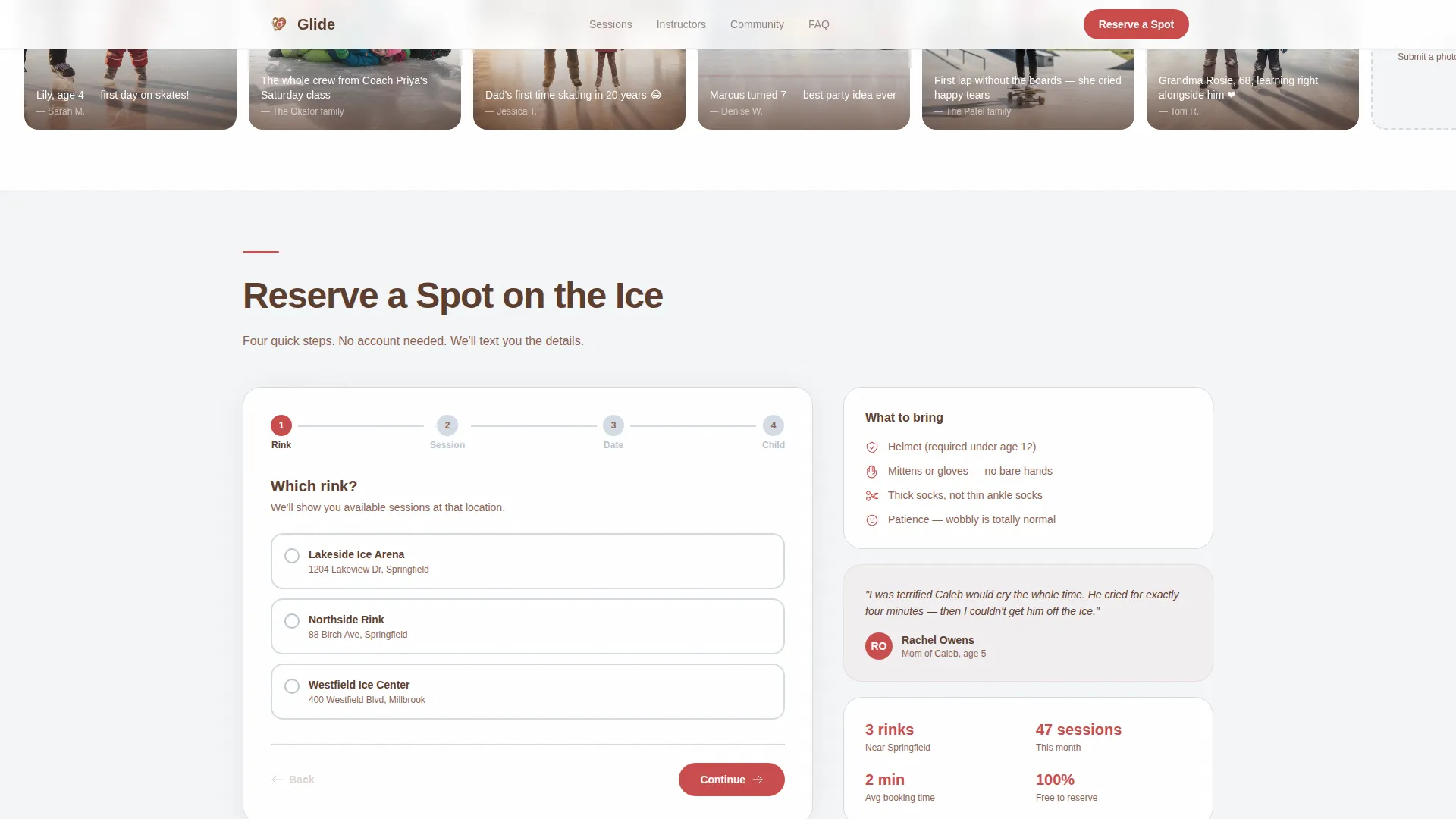
- An inline multi-step booking flow with rink location, session type, visual calendar, and child detail fields
- A secondary SMS capture path for parents who want weekly schedule reminders before they are ready to book
Feature list
This template includes a focused set of interactive and visual components designed around how families actually use a local skating resource.
Photo Grid Mosaic Hero
The hero fills ninety percent of the viewport with a quilt of candid snapshots: toddlers mid-wobble, group lessons forming a conga line, a parent lacing up tiny skates on a bench. A single cocoa-brown headline floats over the mosaic. Mosaic tiles respond with a warm hover effect on scroll reveal.
Age-Grouped Session Schedule Grid
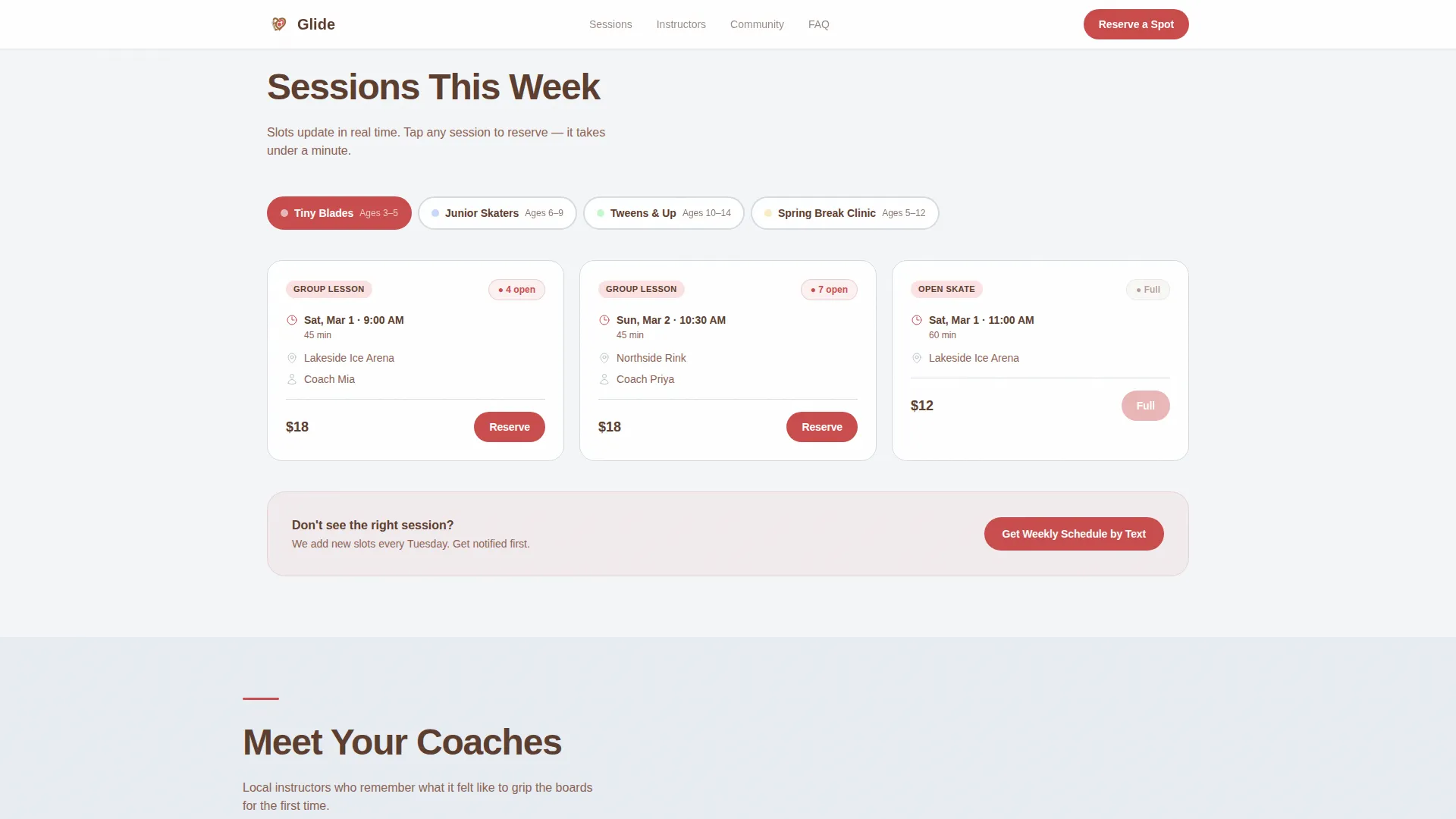
Sessions are organized by age and ability level so parents can scan directly to the relevant row. Each slot shows live availability indicators so families see open spots before they are ever asked to commit. The primary call to action, "Reserve a Spot on the Ice," appears as a floating button after the hero and again anchored below the grid.
Inline Multi-Step Booking Flow
The booking flow opens inline, no new tab or redirect. Visitors pick a rink location, choose a session type (open skate, group lesson, private lesson, or party), select a date from a visual calendar, then enter the child's first name and age. Step transitions are animated to keep the flow feeling light and guided.
SMS Schedule Capture
A secondary conversion path invites parents to enter a phone number for Tuesday text reminders. This captures families who are interested but not yet ready to book, keeping the rink top of mind through the week.
Instructor Spotlight Section
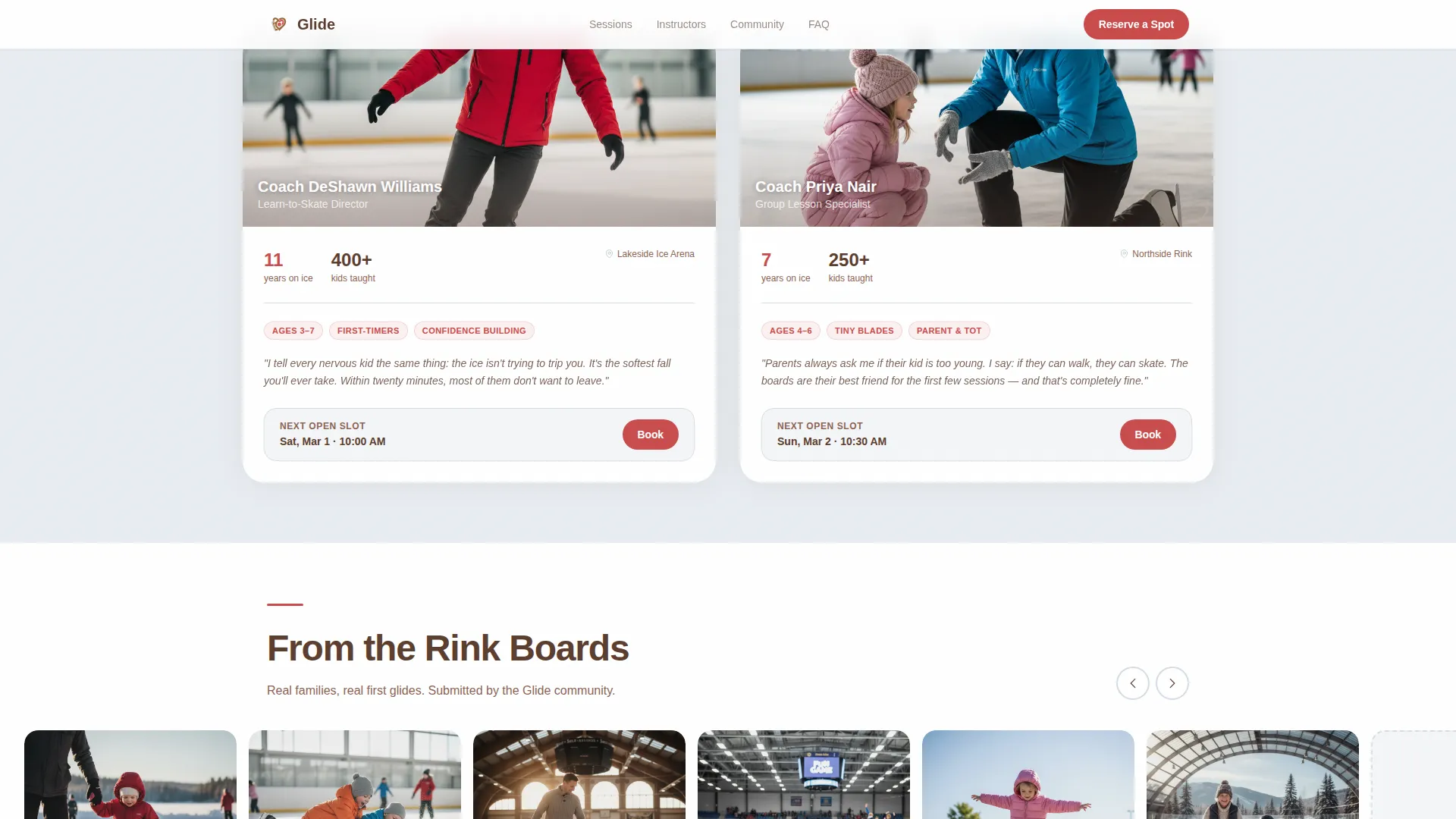
A candid quote from a local instructor, paired with trust signals, builds personal credibility. The section feels pulled from a real conversation rather than a polished marketing bio, which matches the Community Gallery creative direction throughout the page.
Parent Community Photo Carousel
A swipeable photo strip of parent-submitted images deepens the sense that this resource was built by the community, not a corporation. Visitors can swipe through the carousel on mobile, reinforcing the warm, candid tone of the overall design.
Page sections overview
| Section | Purpose |
|---|---|
| Photo Grid Mosaic Hero | Establishes warmth and draws families in with candid rink imagery |
| Session Schedule Grid | Groups open skate, lessons, and clinics by age with availability slots |
| Instructor Spotlight | Builds trust with a candid quote and personal coaching credentials |
| Community Photo Carousel | Reinforces social proof through parent-submitted rink snapshots |
| Inline Booking Flow | Guides families through a multi-step reservation in a single page |
| Parent-Voice FAQ | Answers common session questions in a friendly, neighbor-to-neighbor tone |
| Linear Footer | Provides a clean single-row close with essential links |
Design & branding system
The visual identity follows a Community Hearth theme built around the Soft Mist color system. Every color choice was made to evoke the feeling of a rink lobby on a Sunday morning: cold air, overhead fluorescents turned nostalgic, and the hum of a Zamboni finishing its pass.
- Rink-fog white (#F4F6F8) dominates the canvas like fresh ice; worn-blade silver (#B8C4CE) carries borders and secondary type
- Mitten red (#C94C4C) warms every button, highlight, and call to action throughout the page
- Warm cocoa (#5C3D2E) anchors headlines with the steadiness of a parent's hand on a small shoulder; Plus Jakarta Sans is used for headlines and DM Sans for body text
Mobile & speed optimization
This template was designed mobile-first, built for the mom checking the schedule on her phone after bedtime. Every interaction, carousel swipe, booking step tap, calendar date pick, is touch-friendly and sized for one-thumb use.
- Images are lazy-loaded so the page feels responsive even on a slower connection
- Static sections use Server Components to keep the page light as interactive elements load
- The floating "Reserve a Spot on the Ice" button stays accessible on small screens without blocking content
How this template helps you convert
The page earns trust before it asks for anything. Families see real availability in the session grid before the booking flow ever appears. That sequence, show first, ask second, is the core conversion logic built into this template.
- Floating and anchored calls to action in mitten red guide visitors to the booking flow at the right moment, after they have already seen open slots and felt confident about the rink
- The SMS capture path offers a low-commitment alternative, turning curious visitors into weekly-reminder subscribers who are more likely to book later
- Session fill-rate indicators and parent-submitted photos build social proof passively, so families arrive at the booking step already trusting the community
Other information about this template
Glide is well suited for any local family activity guide that needs a warm, community-first design and a real path to booking. The template structure can support holiday clinics, birthday party reservations, and seasonal schedule updates without redesigning the page.
- The template is built around USA localization: English language, United States dollar (USD) pricing, and 12-hour time format throughout
- Animation is set to medium intensity: scroll reveals, carousel swipe, mosaic hover warmth, and booking step transitions keep the page lively without overwhelming mobile visitors
- The footer follows a Linear Single-Row pattern, keeping the close clean and uncluttered for a page focused entirely on family action
Theme
Community Hearth
Creative direction
Community Gallery
Color system
Soft Mist
Style
Hero-Dominant (90/10)
Direction
Booking/Scheduling
Page Sections
Photo Grid Mosaic Hero
Age-grouped Session Schedule
Inline Multi-step Booking Flow
SMS Schedule Capture
Instructor Spotlight and Community Carousel
Related questions
Can I use this template for more than one rink location?
Is the session schedule organized by age group?
Can parents book a birthday party through this template?
What does the SMS capture feature do?
What audience is this template designed for?