Modern Supply Landing Page Template
Palette is a card grid landing page built for kids' art supply kits. It combines a hand-drawn family illustration, interactive flip cards for six supply categories, a scrollable kid-artwork gallery, and a minimal free-guide download form. The template targets parents, grandparents, and teachers who want to see what a child will create, not just what's in the box.
by Rocket studio
Quick summary
Palette is a warm, modular landing page template designed for kids' art supply kits. It leads with a hand-drawn family illustration, organizes supplies into interactive flip cards, and builds toward a single clear goal: the free project guide download. Every section works together to show parents exactly what their child will make with this kit.
Who this template is for
This template is built for anyone selling or promoting a creative art kit for children. It speaks directly to emotionally driven buyers who want proof of fun before they commit.
- Parents browsing late at night who want to see real creative outcomes, not just product specs
- Grandparents and preschool teachers looking for a thoughtful, screen-free gift or classroom supply
- Direct-to-consumer art kit brands that want to grow an email list through a free downloadable offer
What problem this template solves
Most product pages list what's in the box. They don't show what the box unlocks. A parent at 10pm doesn't need a SKU list. They need to picture their child covered in paint, grinning at something they made themselves.
- Visitors leave when they see supplies without context, so the template pairs each category card with age-appropriate project ideas
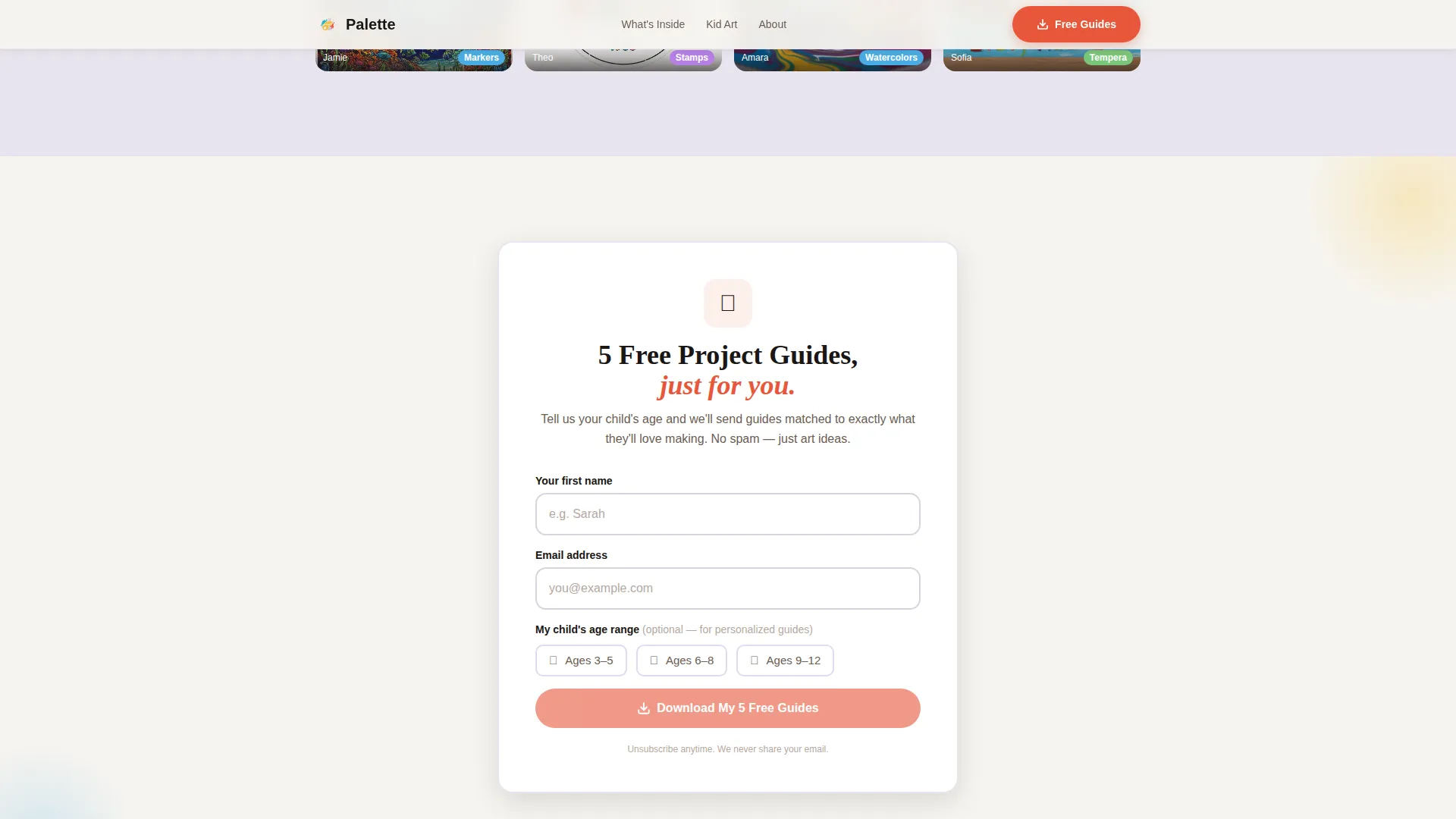
- Generic forms feel like a transaction, so the opt-in here asks only for a first name and email, with an optional age-range checkbox for personalized guides
- Static pages lose attention fast, so scroll-linked animations, card flips, and a mini artwork gallery keep visitors engaged long enough to feel the offer is worth it
What you get with this template
You get a fully structured, single-page layout built around one conversion goal: the free project guide download. Every section is designed to move a visitor naturally from curiosity to sign-up.
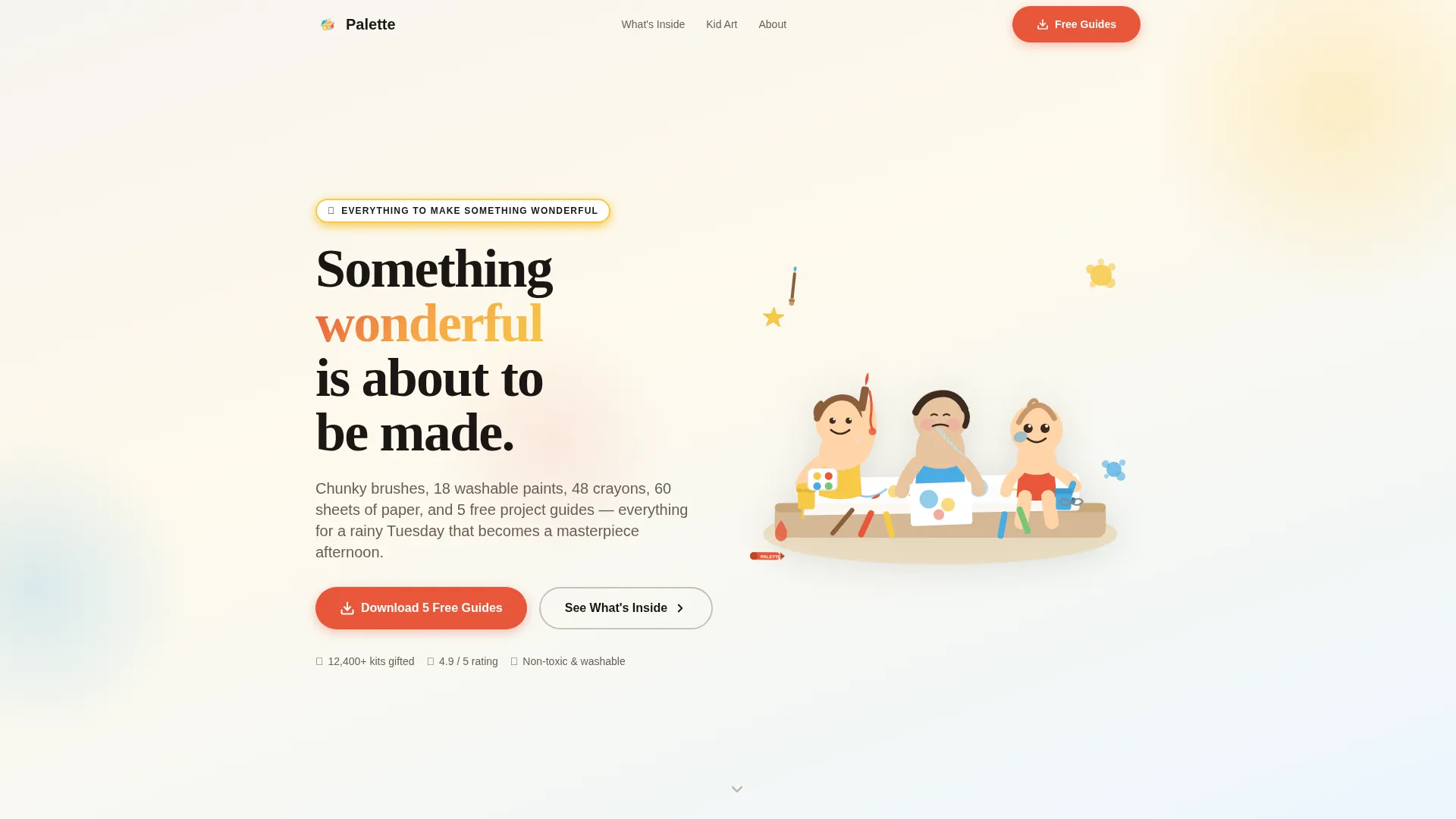
- A hero section with a hand-drawn SVG family illustration, parallax floating elements, and dual call-to-action placement
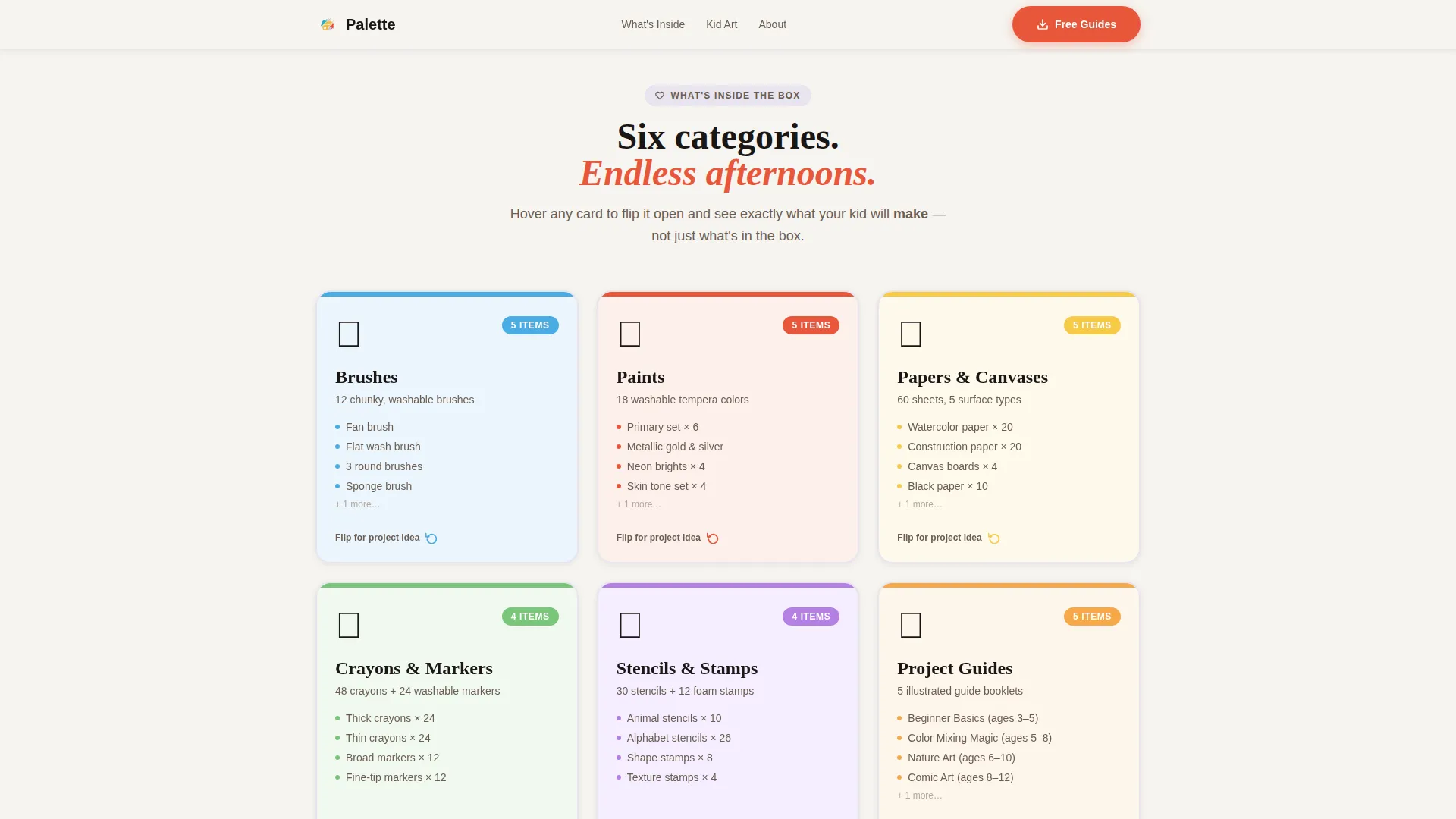
- Six interactive flip cards organized by supply category, each revealing project ideas on hover or tap
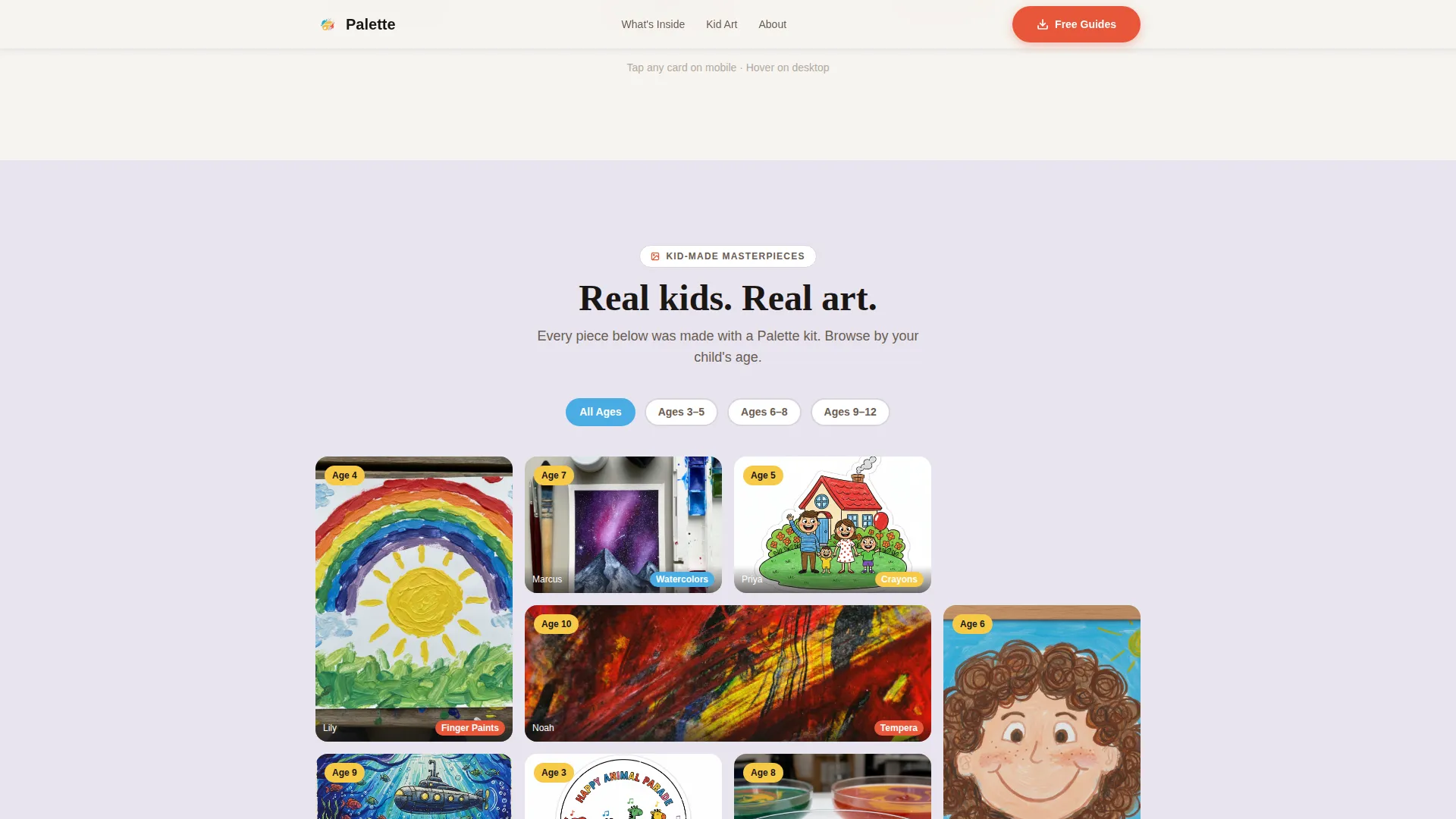
- A scrollable kid-artwork gallery, a minimal email opt-in form, a testimonials section, and a mobile sticky call-to-action bar
Feature list
This template packs a focused set of interactive and visual features. Each one is grounded in the brief and designed to serve a real buyer need.
Hand-Drawn Hero Illustration with Parallax
The header features a custom SVG scene of a family creating art together. Individual elements like paint splatters and rolling crayons drift gently as the visitor scrolls. The parallax effect is subtle and tied to CSS transforms, keeping motion smooth without distraction.
Interactive Supply Card Grid
Six modular flip cards cover brushes, paints, papers, stencils, and project guides. Each card flips or peels open on hover or tap to reveal age-appropriate project ideas. This approach answers the key parent question: what will my child actually do with this?
Scrollable Kid-Artwork Gallery
A mini gallery displays real photos of child-made artwork. Each photo is tagged by age range and supply type. The gallery keeps visitors on the page and builds quiet, visual proof that the kit produces genuine creative moments.
Free Guide Download Form
The opt-in form asks only for a first name and an email address. An optional checkbox lets visitors select an age range (3 to 5, 6 to 8, or 9 to 12) so the five downloadable project guides feel tailored rather than generic.
Scroll-Linked Stagger Animations
Sections reveal on scroll using IntersectionObserver-driven stagger effects. Cards, gallery photos, and testimonials animate in sequence as the visitor moves down the page. This pacing creates a sense of discovery rather than a wall of content.
Testimonials Section with Age Callouts
Parent and teacher quotes are displayed with child age references alongside each entry. These callouts add specificity and help a browsing parent self-identify. The section sits just above the download form to reinforce trust at the moment of decision.
Page sections overview
| Section | Purpose |
|---|---|
| Hero Illustration | Introduce the kit's emotional promise with a hand-drawn family scene and dual call to action |
| Supply Card Grid | Show six supply categories as flip cards that reveal project ideas on hover or tap |
| Masterpiece Gallery | Display kid-made artwork tagged by age and supply type in a scrollable mini gallery |
| Free Guide Download | Capture name and email with an optional age-range checkbox for personalized project guides |
| Testimonials | Present parent and teacher quotes with child age callouts to build trust before sign-up |
| Footer | Close the page with a horizontal flow layout linking to key destinations |
Design & branding system
The visual identity follows a Family First theme built around the Cloud Canvas color system. The overall feel is a freshly wiped kitchen table covered in butcher paper: clean, warm, and ready for something messy and wonderful.
- Colors: cloud white (#F6F4F0) background, construction-paper yellow (#F7C948) primary, finger-paint cerulean (#4AACE3) accent, warm crayon-box red (#E8573A) for buttons and interactive highlights, and barely-there lavender gray (#E8E4EF) as section dividers
- Typography: Fraunces for display headlines to carry the hand-crafted warmth, paired with DM Sans for body text to keep reading effortless
- Illustration style: loose, slightly wobbly line work colored in the Cloud Canvas palette, evoking the energy of opening a fresh box of crayons for the first time
Mobile & speed optimization
The template is built mobile-first. The primary buyer scrolls at night on a phone, so the layout prioritizes thumb-friendly interactions and a sticky call-to-action bar that stays visible as they scroll.
- The sticky bottom bar on mobile keeps the "Download 5 Free Project Guides" action reachable at any scroll depth without interrupting the experience
- Animations use CSS transforms only, which keeps motion GPU-accelerated and avoids layout shifts on smaller screens
- Card flip interactions and gallery scroll are designed to respond naturally to tap and touch, not just desktop hover states
How this template helps you convert
The template is structured as a Content and Resource destination. The free project guide is the primary offer, and every section builds the case for it before the form appears.
- The hero illustration and dual call-to-action placement capture attention immediately and give both impulsive and deliberate visitors a clear next step from the very first scroll
- The flip card grid and artwork gallery answer the underlying buyer question before it's even asked, so by the time a visitor reaches the download form, the value of the guides already feels obvious
Other information about this template
This template is part of a broader set of modular landing page designs built for the Kids and Family category. It is suited for education and learning toy contexts, particularly where the product has a strong creative or hands-on angle.
- The template style is Card Grid (Modular), making individual supply categories easy to reorder, add to, or swap out without restructuring the full layout
- The lp direction is Content and Resource, meaning the page prioritizes delivering value (the free guides) over hard selling, which suits gift-season traffic and teacher purchasing cycles alike
- The footer uses a horizontal flow pattern that works well for pages with a single primary call to action and minimal navigation needs
Theme
Family First
Creative direction
Interactive Explorer
Color system
Cloud Canvas
Style
Card Grid (Modular)
Direction
Content/Resource
Page Sections
Hand-drawn Hero with Parallax Elements
Interactive Flip Card Supply Grid
Scrollable Kid-artwork Gallery
Minimal Free Guide Download Form
Scroll-linked Stagger Reveals
Testimonials with Child Age Callouts
Related questions
Can I customize the supply categories shown on the flip cards?
Do I need design tools to edit the hand-drawn illustration?
Is the download form connected to any email platform?
How does the age-range checkbox work on the download form?
Can this template work for a classroom or teacher supply context?