Joint & Family Finance Comparison Website Template
The Vest Family Retirement Planning landing page template is a dashboard-style, single-page lead generation layout built for joint and family retirement account platforms. It uses a deep plum and champagne color system, animated data grids, Before/After comparison panels, and a progressive three-step sign-up form to help families see every retirement account on one unified screen and take action together.
by Rocket studio
Quick Summary
The Vest family retirement planning landing page template is a premium, dashboard-driven layout that helps retirement planning platforms convert dual-income couples and families. It combines warm executive visuals with live-feeling data grids, a Comparison Journey scroll structure, and a progressive lead gen form. Financial planning has never looked this clear or this personal on one page.
Who This Template Is For
This template is designed for teams building or marketing a retirement plan platform aimed at households with multiple accounts and multiple decision-makers. It speaks directly to people who have been putting off the math and are finally ready to see the full picture. The layout earns trust from the first scroll, giving advisors and fintech teams a landing page that feels as credible as the product behind it.
This template fits best for:
- Dual-income couples in their forties and fifties who have never combined their retirement savings or aligned their financial goals into one shared plan
- Adult children helping aging parents organize decades of scattered investments, funds, and income sources into a single coherent retirement plan
- Blended families dealing with beneficiary confusion and mismatched financial strategies across multiple account holders
What Problem This Template Solves
Most families approach retirement financial planning in fragments. One partner tracks a 401(k) through one portal, the other checks a Roth Individual Retirement Account (Roth IRA) through another. Social security estimates sit in a government inbox. Pension statements arrive once a year on paper. Nobody has combined the math. The cost of that fragmentation grows every year it goes unaddressed, and it often does not become visible until it is too late to course-correct.
A strong financial planning landing page must close that gap emotionally and practically before asking for a single detail. This template does exactly that:
- It walks visitors through the real contrast between fragmented logins and a unified household retirement plan, using Before/After toggle panels that make complex financial information instantly readable
- It escalates the stakes from inconvenience to genuine financial risk, so that by the time the call to action appears, the cost of inaction feels real and the next step feels obvious
- It removes friction from the sign-up process with a three-step progressive form and a secondary path that lets hesitant visitors explore a sample family dashboard before committing any personal information
What You Get With This Template
This is a fully structured, single-page layout built around a Dashboard Pro theme with a Plum Executive color system. Every section is designed to support a high-converting financial planning experience that feels warm, trustworthy, and data-confident. The template gives your team a complete creative and structural starting point without requiring a design process from scratch.
Here is what the template includes:
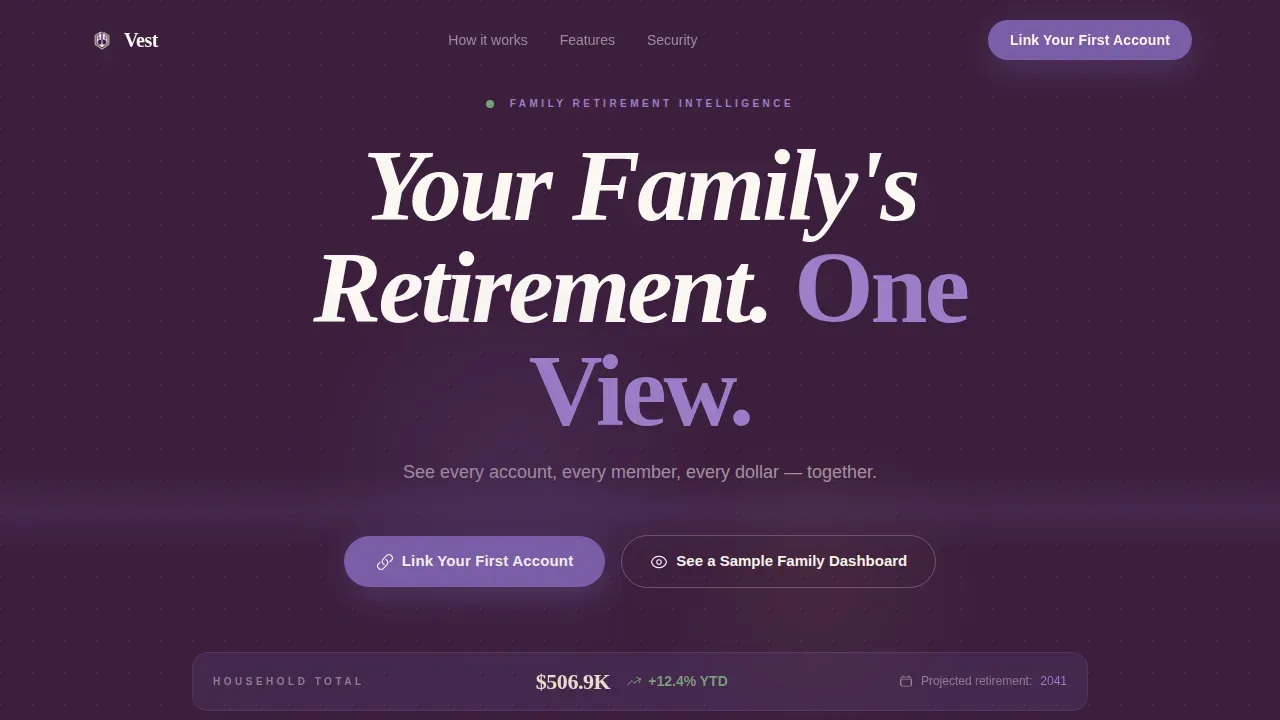
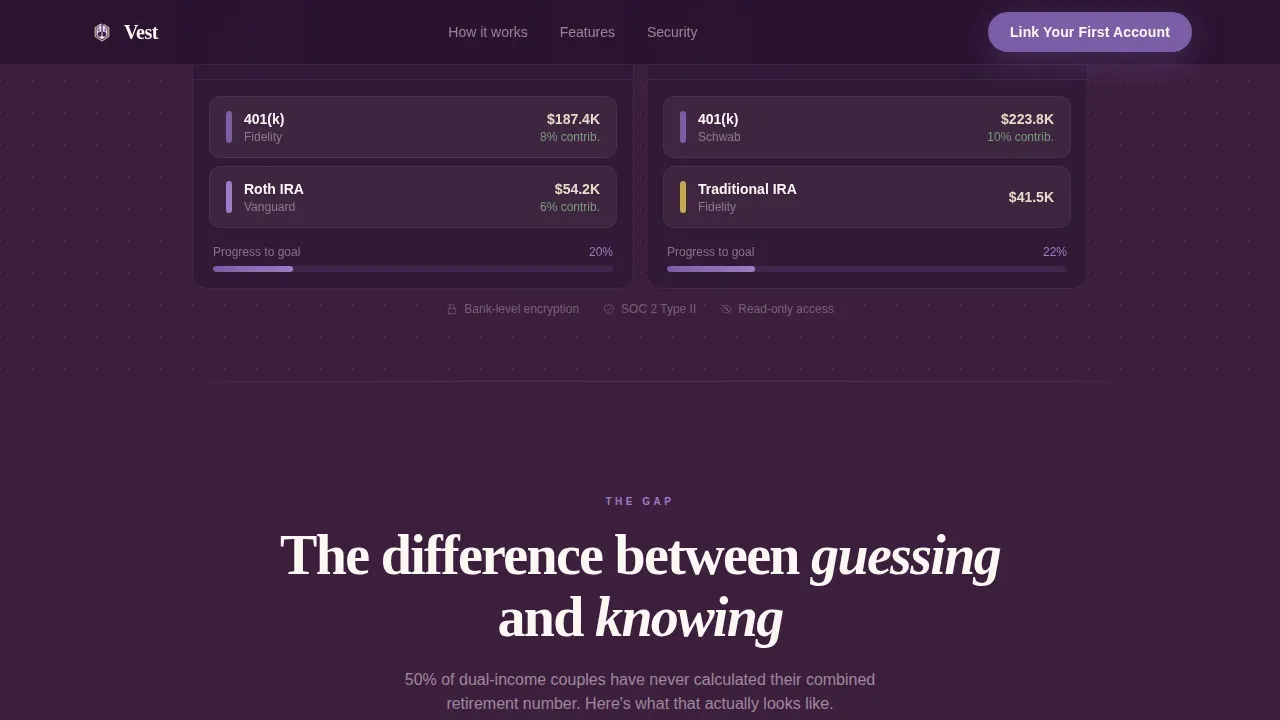
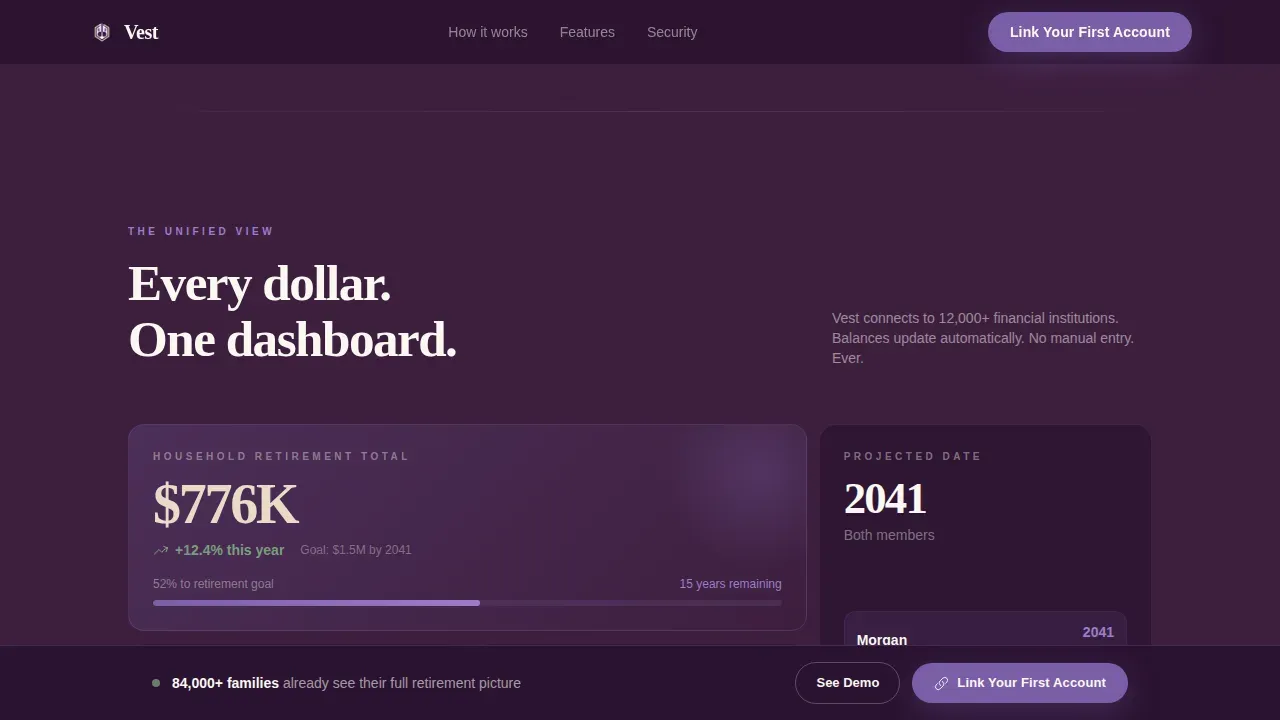
- A hero section with a giant centered headline in ivory on deep plum, a benefit-driven subline, and an animated mock dashboard bento grid showing two account holders side by side with live-style balance cards and a unified projected retirement date
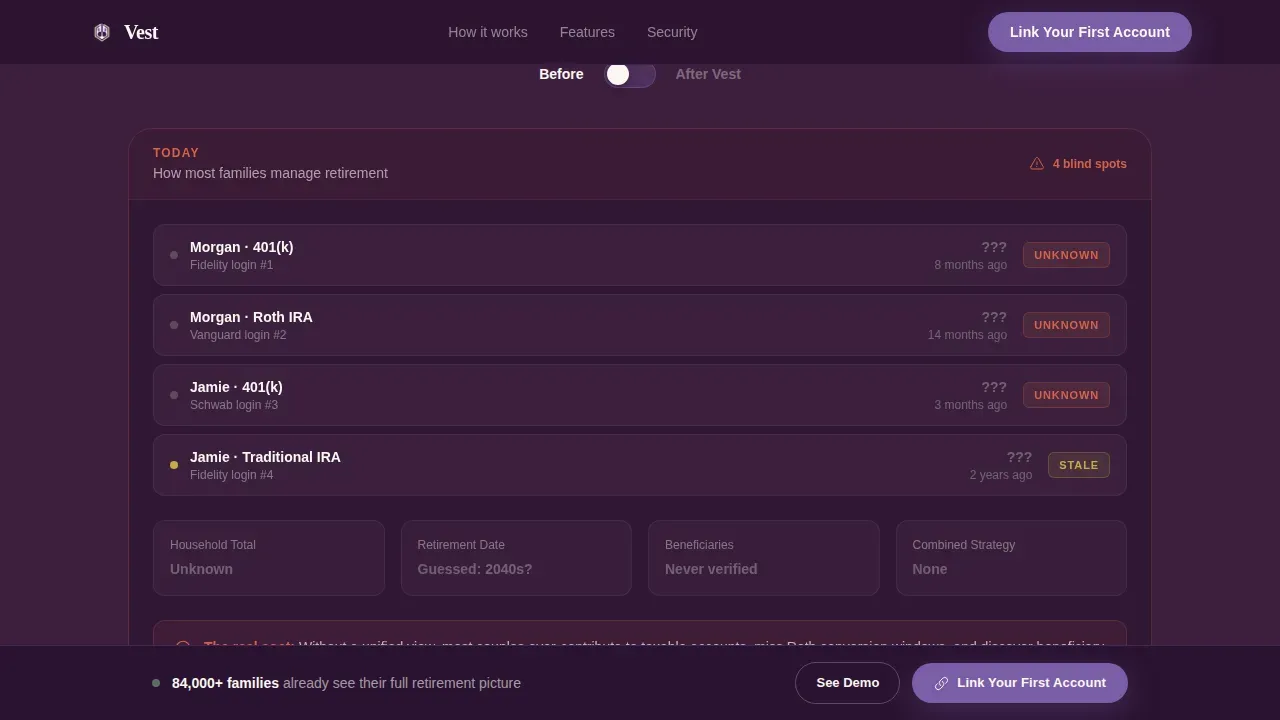
- A full Comparison Journey scroll featuring Before/After interactive toggle panels that contrast fragmented account management with a clean household retirement plan dashboard, escalating from inconvenience to measurable financial risk
- A progressive three-step lead generation form collecting household size, account types held across all family members, and contact details, paired with a secondary "See a Sample Family Dashboard" conversion path for hesitant visitors
Feature List
This template ships with a focused set of layout features, all grounded in the brief. Each one is built to support the financial planning experience and drive confident decisions from first impression to final form submission.
Animated Hero Dashboard Grid
The hero opens with stark ivory type on a deep plum background and fades in a mock bento-grid dashboard beneath the headline. Two account holders appear side by side, each with account cards showing balances, contribution rates, and a shared projected retirement age. The animation proves the product's value before the visitor scrolls, removing uncertainty at the most critical moment.
Before/After Comparison Panels
Each section of the Comparison Journey includes an interactive toggle switch that flips between a "Before" state showing fragmented financial strategies and an "After" state showing a clean household retirement plan. The panels use live-style data grids to present complex financial information in a digestible format. Visitors can see the contrast in real time, which builds confidence and makes the value proposition concrete.
Progressive Three-Step Lead Form
The lead generation form is structured as a three-step flow designed to increase completion rates. Step one asks how many people in the household hold retirement accounts. Step two presents checkboxes for account types: 401(k), Traditional IRA, Roth IRA, Pension, and Other. Step three captures name and email. This structured approach lowers drop-off by asking easy questions first and saving personal details for last.
Sticky Call-to-Action Bar
After the second comparison panel, a sticky bar appears at the bottom of the viewport carrying the primary call to action, "Link Your First Account." This bar follows the visitor through the rest of the page, reinforcing the conversion goal without interrupting the scroll. It is a proactive approach to re-engagement that keeps the action one tap away at all times.
Sample Dashboard Modal Path
A secondary conversion path labeled "See a Sample Family Dashboard" opens a fully interactive demo populated with fictional family data. This path lets hesitant visitors explore the product and understand its value before entering any personal information. It earns the primary conversion by letting the product speak for itself, which supports long term relationships built on trust rather than pressure.
Stats-Based Social Proof and Trust Signals
The template includes a dedicated section for credibility elements: statistics such as average household retirement savings figures, trust badges, and compliance references. This gives visitors the social proof they need to feel confident sharing their information. Using a structured approach to credibility keeps the page feeling authoritative without disrupting the visual flow.
Page Sections Overview
| Section | Purpose |
|---|---|
| Hero Headline | Opens with benefit-driven ivory headline and animated dual-account mock dashboard on deep plum |
| Comparison Panels | Before/After toggle journey contrasting fragmented retirement management with unified household view |
| Dashboard Preview | Live-style data grid showing household totals, projected retirement date, and account summaries |
| Beneficiary Stakes | Risk escalation panel visualizing inheritance map and the financial cost of mismatched beneficiary designations |
| Lead Gen Form | Progressive three-step form capturing household size, account types, name, and email |
| Sample Dashboard | Interactive demo modal with fictional family data for hesitant visitors |
| Trust Signals | Stats, compliance badges, and credibility markers supporting financial security claims |
| Single-Row Footer | Clean linear footer with minimal links and brand alignment |
Design & Branding System
The template uses a Plum Executive color system that feels like the private office of a trusted wealth advisor who replaced old mahogany with something warmer and more modern. The palette communicates authority and approachability in equal measure, which matters deeply in retirement financial planning where clients need to feel both safe and understood.
Key design details include:
- Colors: deep plum (#3D1F3E) for primary backgrounds, muted champagne (#E8DCC8) for card surfaces and data containers, confident amethyst (#7B5EA7) for interactive elements and progress indicators, and crisp ivory (#FAF7F2) for typography on dark fields
- Typography: DM Sans handles all data and user interface text for clean legibility in the dashboard grid sections; Fraunces handles editorial headlines for a warm, editorial contrast that gives the page its character and visual appeal
- No stock photography and no illustrations are used anywhere; the visual identity relies entirely on the product interface itself, keeping the design honest and the promise credible
Mobile & Speed Optimization
The template is built desktop-first, which reflects the priority of data-grid-heavy dashboard layouts where side-by-side account comparisons need screen real estate to land properly. At the same time, the layout is designed to reflow cleanly to mobile, which matters because hesitant visitors often check a link on their phone before committing at a desktop.
Mobile considerations built into this template include:
- The three-step lead gen form uses limited fields per step and prominent call-to-action buttons, following best practices for mobile form completion and keeping the experience easy to read on smaller screens
- Static sections of the page use server-side rendering logic, while interactive panels including the Before/After toggles and the sample dashboard modal are handled as client components, balancing animation richness with practical performance considerations
- The sticky call-to-action bar is sized and positioned for thumb reach on mobile, ensuring the primary conversion goal stays accessible without requiring the visitor to scroll back up
How This Template Helps You Convert
A high-converting landing page for family-oriented retirement planning must blend emotional messaging with clear, actionable financial steps. This template is engineered around that principle from the first pixel to the final form field. It does not just describe a product; it demonstrates one.
Here is how the conversion structure works:
- The hero section creates an immediate emotional connection by naming the problem families feel, "we've never actually combined the math," and then resolving it visually with an animated dashboard that shows what unified financial planning looks like before a single word of body copy is read
- The Comparison Journey escalates stakes across each panel, moving from inconvenience to real financial risk, so that by the time the primary call to action appears after the second panel, the visitor has already felt the cost of inaction and is primed to take the next step
- The dual conversion path structure, a primary three-step form and a secondary sample dashboard, captures both ready-to-commit visitors and cautious researchers, ensuring that the page creates a lasting impression and a path forward for every visitor type
Other Information About This Template
This template is built for fintech and financial planning teams that want to create engaging, high-trust experiences without starting the design process from zero. It pairs well with advisor-led platforms where the goal is to support clients through complex financial decisions in a digestible format they can revisit over time.
A few additional points worth knowing:
- The Vest family retirement planning landing page template is fully aligned with best practices for one page financial plan presentation, where a one page plan condenses a client's complete retirement picture into a focused, scannable summary that supports informed decisions and productive conversations with their advisor
- The template's design system and section structure are compatible with export workflows used by teams who present plans across multiple tools; for teams using google slides as a client-facing presentation layer, the color system and data grid aesthetic translate well into slide-based one page plan deliverables, and the layout logic mirrors what financial advisors rely on when they need to communicate investment returns, net worth summaries, income sources, and projected expenses to clients who are not fluent in financial language
- Financial planning is an ongoing process that benefits from regular reviews; this template supports that mindset by giving advisors a landing page that can be updated to reflect the latest version of their platform's capabilities, keeping the client experience aligned with changing life circumstances, evolving financial goals, and new investment strategies without requiring a full redesign
- The page structure deliberately omits main navigation to keep visitors focused on the conversion goal, a key principle in effective financial planning communication that helps customers feel confident and in control from the moment they arrive
- Teams looking to add simple calculators, such as a retirement savings calculator or a family expense estimator, can integrate those tools as additional interactive components within the existing layout structure, giving clients instant access to valuable insights about their available income, total income projections, social security timing, insurance coverage needs, and short term versus long term goals
- The template's proactive approach to trust, using stats-based social proof, compliance references, and a sample dashboard demo, reflects a broader principle in financial planning: that clients are more likely to share information and achieve their financial goals when they first feel understood, not sold to
Theme
Dashboard Pro
Creative direction
Comparison Journey
Color system
Plum Executive
Direction
Lead Generation
Page Sections
Animated Hero Dashboard Bento Grid
Before/after Interactive Toggle Panels
Progressive Three-step Lead Generation Form
Sticky Call-to-action Conversion Bar
Interactive Sample Dashboard Modal
Stats-based Trust and Credibility Section
Related questions
Who is this template designed for?
What sections are included in this template?
Can this template support a secondary conversion path for hesitant visitors?
Is this template desktop-first or mobile-friendly?
How does the three-step lead generation form work?