Cinematic Streaming Landing Page Template
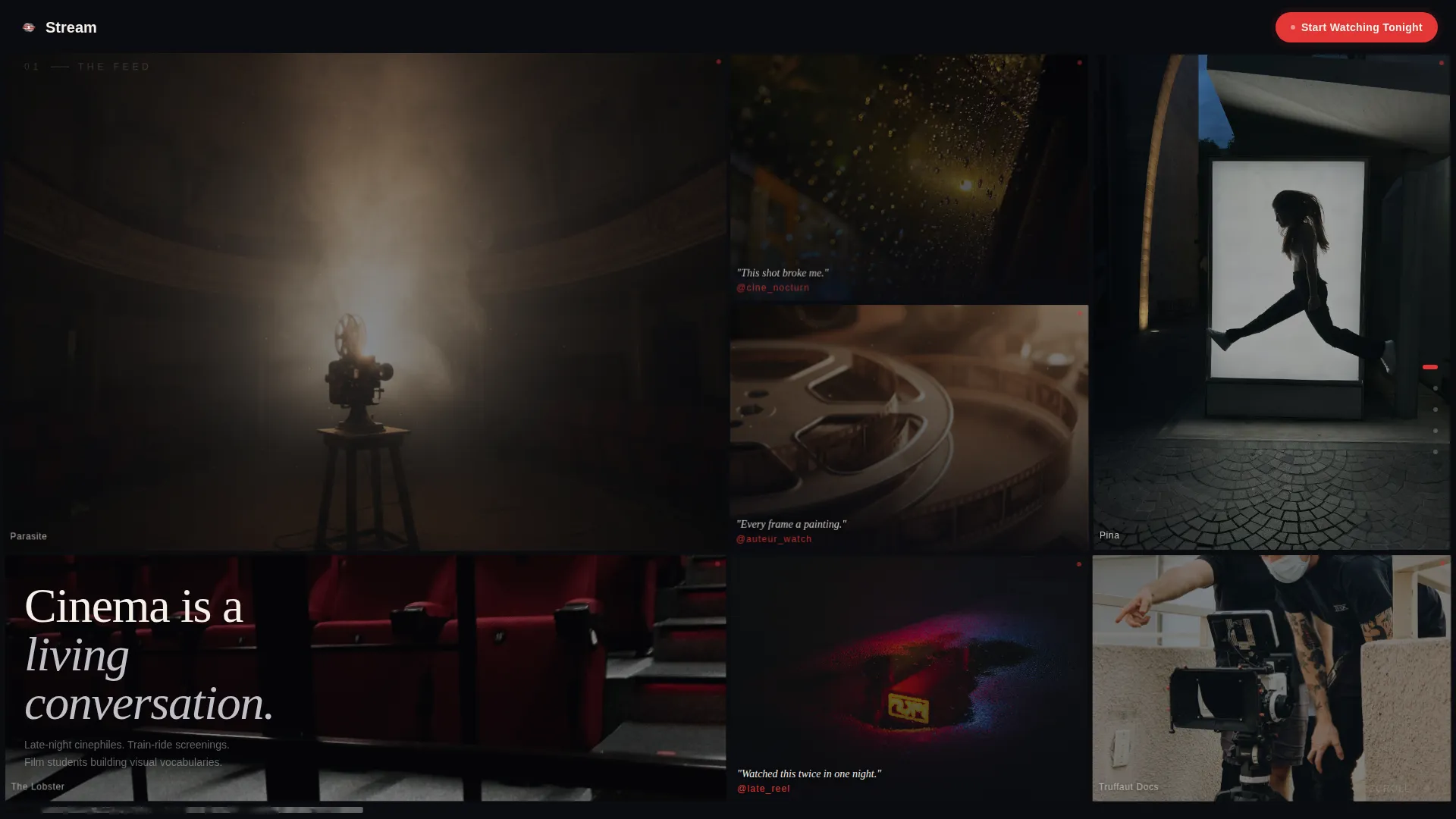
Stream is a horizontal scroll landing page template built for cinematic video streaming platforms. It uses a dark editorial aesthetic, a living social feed header, and a rhythm-driven panel layout to guide visitors toward an app download. The design feels like a curated film magazine, built to prove taste before it asks for anything.
by Rocket studio
Quick summary
Stream is a single-page horizontal scroll landing page template for video streaming platforms with a strong editorial identity. It opens with a real-time social feed mosaic, moves through genre spreads and mood-based thumbnail grids, and closes on a full-width app download panel. Every panel is paced like a film score: deliberate, contrasted, and emotionally sequenced.
Who this template is for
This template is built for founders, designers, and creative directors who are launching or repositioning a video streaming platform with a distinct curatorial voice. It suits projects that want to feel like a film publication, not a content warehouse.
- Independent streaming platforms focused on curated or arthouse film catalogs
- Film-forward product teams building a launch page with strong visual identity
- Designers and developers who need a ready-made editorial dark-theme framework for a streaming or on-demand video service
What problem this template solves
Most streaming landing pages look like search results. They lead with volume, grids, and genre tags, and they fail to communicate a platform's actual point of view. Visitors leave without a sense of taste, identity, or reason to download.
- Generic catalog layouts do not communicate editorial curation or platform personality
- App download pages that open with a sign-up form lose visitors before they feel convinced
- Standard dark-theme templates lack the cinematic rhythm needed to reflect a film-first brand
What you get with this template
You get a fully structured horizontal scroll landing page with a defined visual system, a paced panel sequence, and a clear app download conversion path. Every section has a stated purpose and a distinct visual register.
- A living social feed header built from micro-clip tiles, user reactions, and real-time mosaic behavior
- A sequenced panel layout moving from editorial genre spreads to mood grids to a single-film slow panel
- A fixed app download call-to-action pill, a QR code panel, and paired platform selector buttons at the final beat
Feature list
This template delivers a tightly composed set of visual and structural features grounded in the cinematic editorial direction described in the brief.
Real-Time Social Feed Mosaic Header
The header is a vertical mosaic of micro-clip tiles and user reactions that scrolls in real time. Tiles resize, swap, and pulse with a faint hover glow, giving the impression of a living community of film watchers all reacting simultaneously.
Horizontal Scroll Panel Sequence
The entire page flows horizontally, paced like a film score. Each panel represents a distinct beat: stillness, explosion, acceleration, and breathing room. The sequence teaches visitors how the platform thinks before asking them to act.
Editorial Genre Spread Panel
One panel breaks into a full editorial layout per genre, featuring large film stills, pull quotes from directors, and a waveform visual that implies audio even without sound. It reads like a magazine feature, not a category page.
Mood-Based Thumbnail Grid
A rapid-fire panel organizes films by emotional mood rather than traditional genre. Titles appear in staggered typographic hits styled like opening credits, creating a sense of discovery and curatorial intelligence.
Single-Film Slow Panel
One panel holds a single film, one sentence of context, and one play button. The deliberate emptiness around it creates contrast and communicates that the platform values depth over density.
App Download Conversion Panel
The final panel is a full-width app download screen showing a phone mid-playback, a scannable QR code, and paired iOS and Android buttons. No sign-up form is required, just a platform selector and a scan.
Page sections overview
| Section | Purpose |
|---|---|
| Social Feed Header | Opens with a real-time mosaic of micro-clips and user reactions |
| Genre Editorial Spread | Presents one genre as a full magazine-style feature panel |
| Mood Thumbnail Grid | Organizes films by emotional mood with staggered title typography |
| Single Film Panel | Slows the pace with one film, one sentence, and one play button |
| App Download Panel | Closes the scroll with a QR code, phone visual, and platform buttons |
Design & branding system
The visual system follows an Editorial Magazine theme built on a Cinematic Dark color palette. Every color choice has a functional role: black dominates all surfaces, silver carries text and dividers, warm white highlights featured stills, and red appears only on interactive elements and calls to action.
- Four-color palette: deep theater black (#0B0C10), celluloid silver (#C0C0C8), projection-light warm white (#F5F0E8), and festival red (#E23636) for interactive hotspots and buttons
- Typography follows bold serif conventions styled after print film publications, with staggered typographic hits used in the mood grid panel
- Red is used sparingly and intentionally, appearing only where a finger or cursor should go, keeping the visual hierarchy clean and the calls to action unmissable
Mobile & speed optimization
The template is designed with a horizontal scroll interaction model that translates clearly across screen sizes. The panel-based structure keeps content modular and visually self-contained on smaller viewports.
- Each horizontal panel is structured as a self-contained visual unit, making it easier to adapt individual sections for smaller screen layouts
- The fixed pill call-to-action in the top-right corner persists across the full scroll, keeping the app download path accessible at any point in the experience
- The app download panel uses a QR code alongside iOS and Android buttons, giving mobile visitors a direct path without requiring additional navigation steps
How this template helps you convert
This template earns the app download before it asks for it. By the time a visitor reaches the final panel, they have moved through a curated editorial experience that demonstrates platform taste across multiple panels and film types.
- The social feed header creates immediate proof of community and cultural engagement, reducing the perceived risk of trying a new platform.
- The sequenced panel layout builds desire progressively, showing visitors six or more films they want to watch before presenting the download option.
- The final conversion panel removes friction entirely: no sign-up form, no email field, just a QR code and a platform selector for instant app access.
Other information about this template
Stream is built specifically for the streaming and on-demand video space, where first impressions must communicate both catalog quality and editorial sensibility. It works as a standalone launch page or as a campaign-specific landing page for a streaming service that wants to attract a discerning film audience.
- The template style is Horizontal Scroll, making it distinct from standard vertical streaming landing pages and more aligned with editorial or magazine-format digital experiences
- The creative direction labeled Sound and Rhythm means the pacing of the scroll itself is a design element, not just a layout choice
- The header concept is a Social Feed, which positions the platform as community-driven and culturally alive from the first second of the visit
- The landing page direction is App Download, meaning the entire panel sequence is structured to justify and accelerate a single decision: installing the app



Theme
Editorial Magazine
Creative direction
Sound & Rhythm
Color system
Cinematic Dark
Style
Horizontal Scroll
Direction
App Download
Page Sections
Real-time Social Feed Mosaic Header
Rhythm-driven Horizontal Scroll Layout
Editorial Genre Spread Panel
Mood-based Film Discovery Grid
Single-film Breathing Panel
Frictionless App Download Panel
Related questions
Who is this template designed for?
Does the template include a sign-up form?
How does the horizontal scroll work across different devices?
Can I update the colors and typography to match my own brand?
What makes this template different from a standard streaming page template?