Financial Literacy & Education Professional Website Template
The Compound Retirement Readiness Dashboard Pro landing page template is a sidebar-companion, report-style landing page built for retirement planning educators. It guides everyday earners through 401(k) allocations, Roth conversion strategies, and Social Security timing math, turning complex retirement planning into a clear, scrollable narrative that ends with a single confident click to a free readiness assessment.
by Rocket studio
Quick summary
This template gives retirement planning educators a powerful, report-style landing page that walks visitors through their retirement savings situation from diagnosis to action. A fixed sidebar acts as a living table of contents. An animated compound interest counter anchors the hero. The whole page builds toward one frictionless click, a free retirement readiness assessment, with no form fields in the way.
Who this template is for
This template is built for retirement planning educators, independent financial educators, and coaches who want a landing page that does the heavy lifting before any sales conversation starts. It works equally well for financial professionals running group programs and for solo educators building their first lead funnel.
- Retirement educators and coaches targeting earners aged 35 to 55
- Financial professionals who teach retirement planning strategies rather than sell products
- Content-led advisors who want clients to arrive already engaged and informed
What problem this template solves
Most retirement planning landing pages either overwhelm visitors with data or undersell the value of getting started. The result is high bounce rates and low click-through. This template solves that by sequencing information like a proprietary annual report, each chapter earns the next one, so visitors feel smarter with every scroll rather than more confused.
- Visitors arrive anxious about retirement savings and leave with a clear mental model and a next step
- Educators lose potential clients who never click because the value was not established early enough
- Generic templates do not reflect the credibility that retirement planning advice requires
What you get with this template
You get a fully structured, single-page layout that follows an Industry Report creative direction. Every section is pre-built for a retirement planning educator's specific conversion path. The design system, the animations, and the copy framework all point toward one outcome: the visitor clicks to see their retirement number.
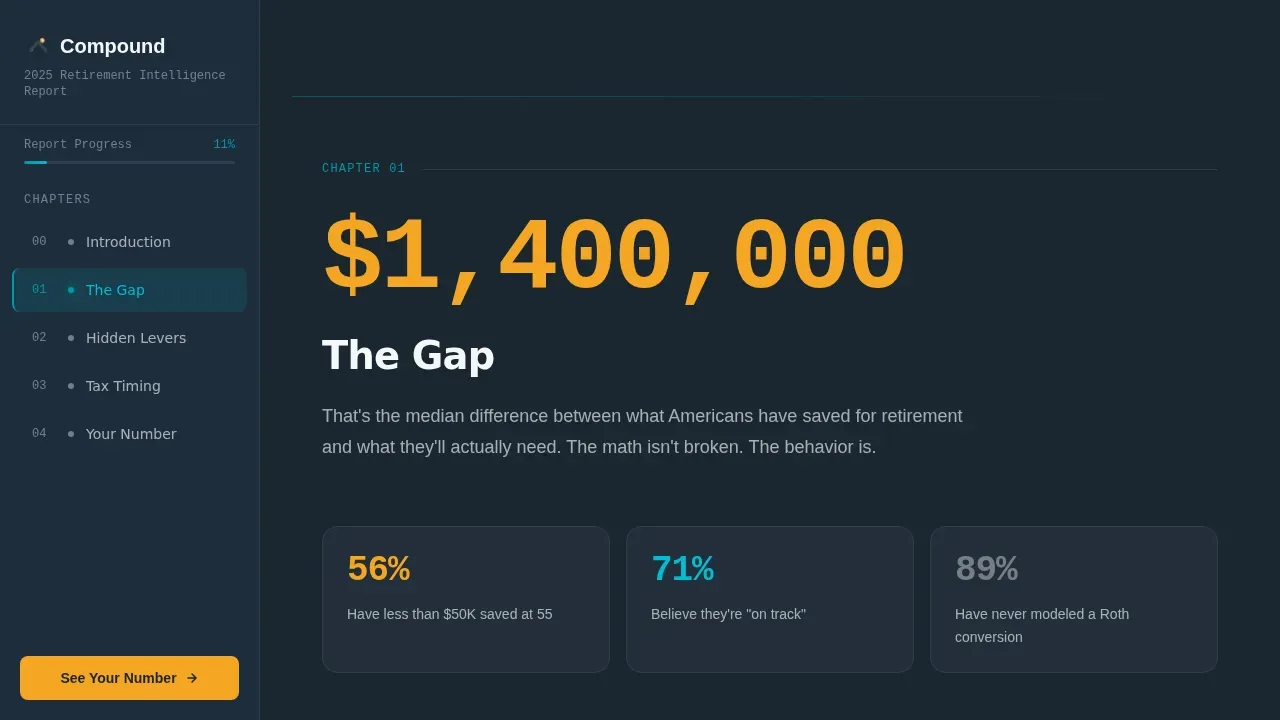
- A fixed sidebar with scroll-spy chapter markers that light up in teal as each section enters view
- An animated compound interest counter in the hero that counts from zero to a projected retirement balance
- Four content chapters covering retirement gaps, hidden levers, tax timing, and a personalized number, plus a full-width amber call-to-action block and a secondary exit-capture text link
Feature list
The template ships with a specific set of pre-built interactive and visual components. Each one was designed to serve the retirement planning educator's conversion goal.
Scroll-Spy Sidebar with Chapter Markers
The persistent sidebar stays fixed on screen as the visitor scrolls. Chapter markers, "The Gap," "Hidden Levers," "Tax Timing," and "Your Number", illuminate in catalyst teal as each section enters the viewport. This gives users a continuous sense of progress through the report and keeps them oriented inside a long-form page. The sidebar also holds a persistent call-to-action button pinned to its bottom, so the primary click is always one tap away.
Animated Compound Interest Counter
The hero section opens with a viewport-dominating headline and a single animated number beneath it. The counter ticks upward from zero to a projected retirement balance based on national median savings rates. It uses IBM Plex Mono typeface for a data-terminal feel. The animation runs once on load, then settles, mimicking the moment a dashboard finishes calculating your financial future. This component immediately communicates the core value: your money is already moving, and this page will show you where it lands.
Report-Chapter Content Structure
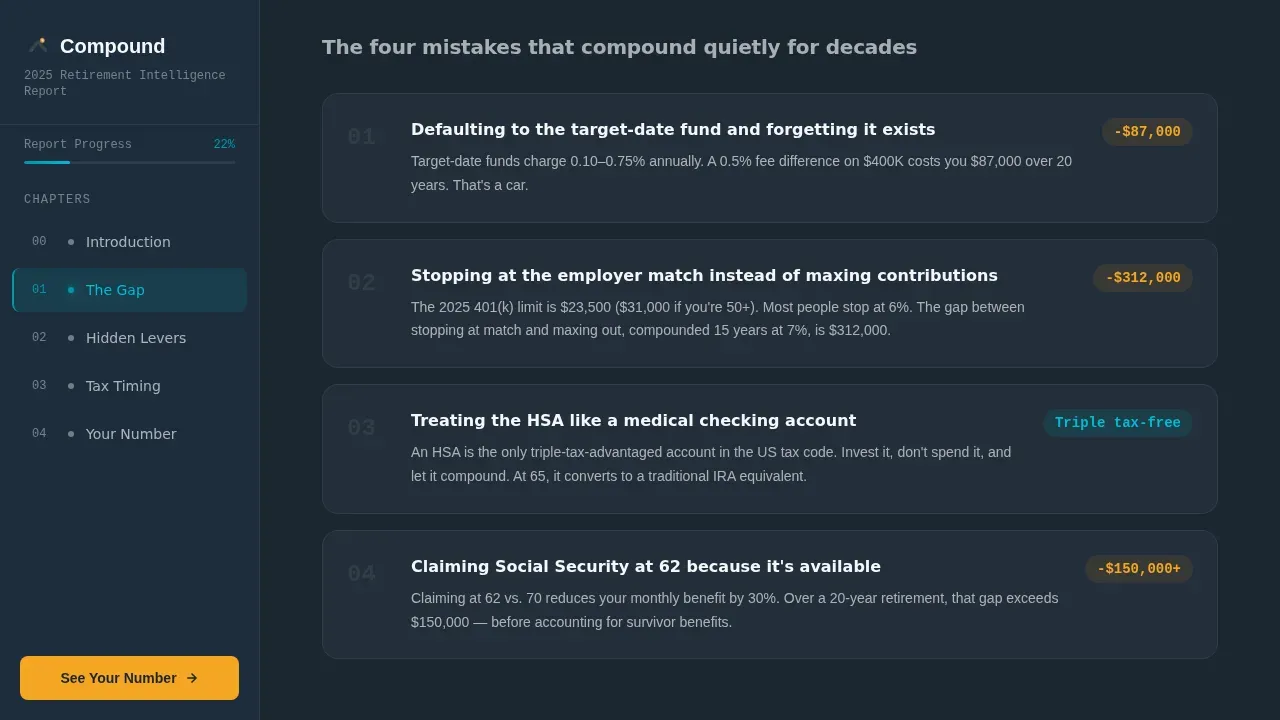
Each of the four main chapters opens with a large, startling statistic. Then it unpacks the idea through annotated charts, scenario comparison cards, and short embedded video explanations. This mirrors the experience of reading a document you were not supposed to have access to, authoritative, specific, and deeply readable. The structure covers retirement income gaps, catch-up contributions, Health Savings Account strategies, Roth Individual Retirement Account conversion ladders, Social Security delay math, and a personalized projection teaser.
Scenario Toggle Cards
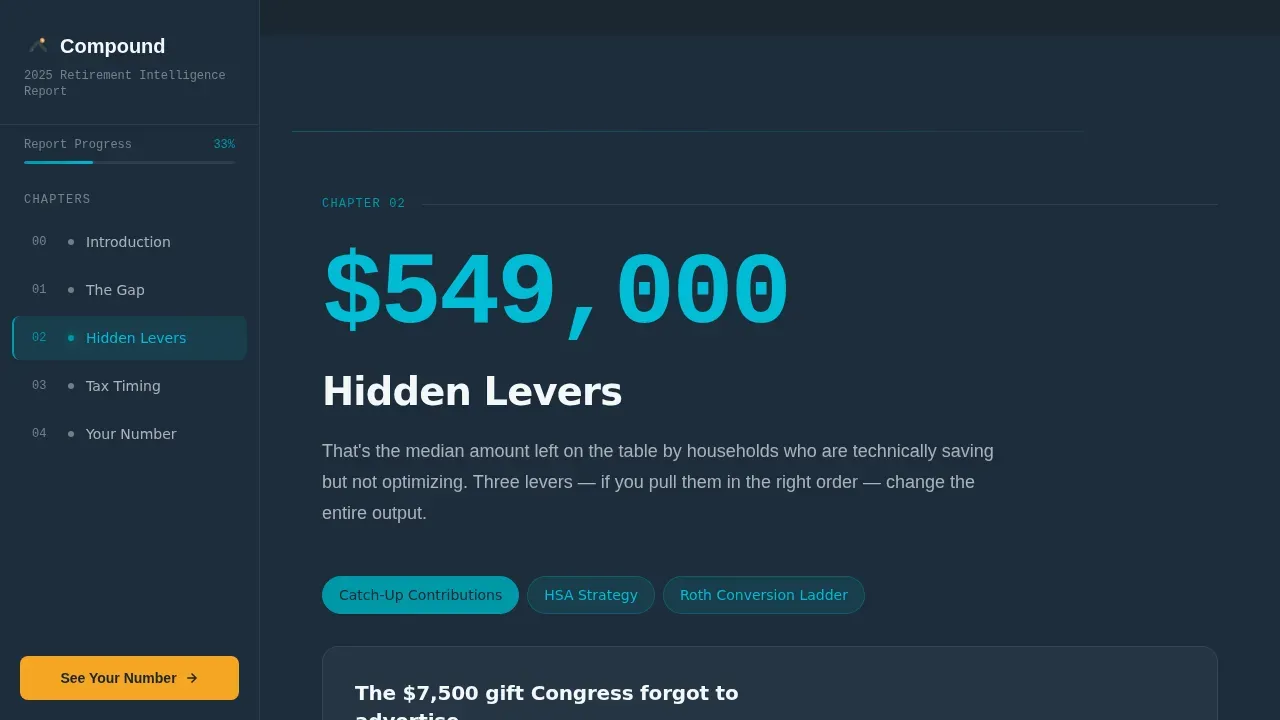
The "Hidden Levers" chapter includes interactive scenario toggle cards. Visitors can compare strategies side by side, for example, adjusting retirement age, increasing contributions, or shifting asset allocation, and see the projected impact on their portfolio. This is where the retirement calculator logic lives visually. Users can simulate how adjusting interest rates assumptions or inflation inputs changes their retirement savings trajectory. The cards make abstract financial planning math tangible without requiring a form submission.
Teal Pulse Underline and Staggered Reveals
The hero headline is underlined with a thin teal line that pulses once on load and then settles, as if the dashboard just finished loading. Section content staggered reveals as the visitor scrolls, keeping the reading experience feeling live and data-driven. These animation details reinforce the instrument-panel aesthetic without making the page feel like a marketing site. They signal to retirees and pre-retirees that this tool is serious, precise, and worth trusting.
Dual Call-to-Action Architecture
The primary call-to-action, "See Your Retirement Number," appears three times: beneath the hero counter, as a persistent sidebar button, and as a full-width amber block after the final chapter. A secondary text link, "Download the Full 2025 Retirement Gap Report," captures emails on exit for visitors who are not yet ready to commit. This dual structure means the educator captures both high-intent clicks and nurture-path leads from a single page, without cluttering the experience with form fields.
Page sections overview
| Section | Purpose |
|---|---|
| Hero Header | Headline, animated counter, primary call-to-action |
| The Gap Chapter | Diagnosis of common retirement savings shortfalls |
| Hidden Levers Chapter | Catch-up, Health Savings Account, Roth conversion scenarios |
| Tax Timing Chapter | Social Security delay math and Roth ladder strategies |
| Your Number Chapter | Personalized projection teaser and full-width call-to-action |
| Fixed Sidebar | Scroll-spy navigation and persistent call-to-action button |
| Exit Capture Link | Secondary email nurture path for undecided visitors |
| Footer | Minimal developer-style footer pattern |
Design & branding system
The visual identity follows a Dashboard Pro theme built around the Teal Catalyst color system. The palette draws on the feel of a Bloomberg terminal softened for a kitchen table, authoritative enough to trust with your life savings, approachable enough for someone who just opened their benefits portal for the first time.
- Deep charcoal (#1B2631) covers the persistent sidebar and all section backgrounds, grounding the page in an instrument-panel aesthetic
- Catalyst teal (#0097A7) marks active sidebar states, progress indicators, chart accents, and the animated pulse underline, while soft ledger white (#F4F7F9) provides readable content panel space
- Warm signal amber (#F5A623) is reserved exclusively for call-to-action buttons and urgent callouts, making every conversion moment unmistakable at a glance
Mobile & speed optimization
The template is built desktop-first to serve its dashboard and annual-report aesthetic at full resolution. The sidebar, animated counter, and scenario cards are designed for wide-viewport experiences. Mobile layouts are responsive, collapsing the sidebar into a top navigation and stacking chapter content vertically for smaller screens.
- Scroll-spy behavior adapts to touch-scroll on mobile, and chapter markers remain tappable across device sizes
- Static content sections use server components to keep the initial page load light, with animation and interactivity handled client-side to avoid blocking the render
How this template helps you convert
Every design and structural decision in this template points toward a single conversion goal: the visitor clicks through to the free retirement readiness assessment. The page earns that click through accumulated credibility rather than pressure.
- The animated compound interest counter creates an immediate emotional hook, visitors see a number growing and want to know if that number belongs to them, making the "See Your Retirement Number" call-to-action feel like a natural next step rather than a sales push.
- The scroll-spy sidebar keeps the primary call-to-action button visible at all times, so informed decisions can happen the moment a visitor feels ready, whether that is after the first chapter or the last one.
- The exit-capture text link intercepts visitors who are not yet ready to click, offering the Retirement Gap Report download as a nurture path that keeps the educator's lead pipeline active without adding friction to the primary conversion flow.
Other information about this template
This template is designed specifically for the retirement planning educator niche within the Finance and Insurance category. It sits at the intersection of financial literacy content, lead generation strategy, and report-style storytelling. The sections below cover additional details relevant to buyers evaluating this template for their specific use case.
- The compound retirement readiness dashboard pro landing page template follows the "4 Ls" Framework, which organizes retirement content around Longevity, Lifestyle, Legacy, and Liquidity, providing a natural narrative spine for the four-chapter structure
- The retirement calculator component embedded in the "Your Number" chapter uses proven financial formulas to project retirement savings, taking inputs such as retirement age, life expectancy, inflation assumptions, investment return rates, portfolio size, and expected retirement expenses
- Retirement calculators in this template can serve as a lead generation tool, encouraging visitors to share contact information in exchange for personalized results on the next page, without requiring any form fields on the landing page itself
- The dashboard integrates a Net Worth and Asset Tracker concept that consolidates fragmented accounts, including bank accounts, 401(k) plans, Individual Retirement Accounts (IRAs), and other investments, into one unified financial picture
- An Income Projection Calculator in the "Your Number" chapter analyzes current savings, Social Security, and pension income to project the estimated monthly payment a visitor can expect in retirement, accounting for cash flow needs and inflation
- Expense and Budget Planning content within the Tax Timing chapter breaks down projected retirement expenses, including healthcare and lifestyle costs, to help visitors determine their true retirement income needs
- Financial planning software context: this template can support financial professionals who use dashboard-style tools to present personalized recommendations to clients, replacing lengthy PDF reports with a concise, scrollable web experience
- The page architecture supports integration with CRM and email marketing tools via the exit-capture link, giving educators a nurture path that streamlines lead management and follow-up without cluttering the primary conversion flow
- Security-minded educators will appreciate that all form submission data collected through the exit-capture mechanism can be stored securely on the host server, with the option to mark sensitive fields as Personally Identifiable Information (PII) and to support compliance with privacy regulations
- The retirement calculator is designed to be mobile-friendly and responsive across devices, and the calculator template is free to download and use, making it accessible for educators at any stage of their business
- Charts and graphs built into each chapter use visual hierarchy to make complex financial data digestible at a glance, including annotated scenario comparisons that show the cash flow impact of adjusting interest rates, inflation, or retirement age assumptions
- The Retirement Readiness Score visual metric communicates to each visitor how prepared they appear to be for retirement, based on their current progress, this score appears as a teaser in the "Your Number" section to motivate the click-through
- Annuities, pension income, and Social Security timing are all referenced within the Tax Timing chapter, giving visitors a complete picture of the income sources they need to account for when modeling their retirement plan
- Financial dashboards built on this template transform raw data into visual stories, making it easier for clients to understand their individual financial picture and make informed decisions about their wealth and spending habits before they ever speak to an advisor
- Tips throughout the report chapters address common fears around debt, risk tolerance, and future returns, with copy that emphasizes security and the possibility of guaranteed progress toward retirement goals
- Retirees and near-retirees in the 48-to-62 age range will recognize the specific scenarios presented, from paying off a mortgage versus maxing an HSA to modeling how delaying retirement age by two years affects their net worth, making the content feel personally relevant rather than generic
- Users who want to enhance their retirement planning services can adapt the scenario toggle cards to reflect their own client case studies, adjusting the financial planning strategies and projected assets shown to match the specific needs of their audience

Theme
Dashboard Pro
Creative direction
Industry Report
Color system
Teal Catalyst
Style
Sidebar Companion
Direction
Click-Through
Page Sections
Scroll-spy Sidebar Navigation
Animated Compound Interest Counter
Four-chapter Report Structure
Interactive Scenario Toggle Cards
Dual Call-to-action Architecture
Report-style Visual Data Hierarchy
Related questions
Who is this landing page template built for?
Does this template include a retirement calculator?
Can I customize the scenario toggle cards for my own clients?
How does the exit-capture link work without a form on the page?
Is the sidebar navigation visible on mobile devices?



