Insurance Agency Complete Cost Calculator Website Template
Underwrite is a dashboard-style insurance agency thank-you landing page that transforms the post-quote confirmation into an active, data-rich experience. It greets visitors by name, walks them through their quote status in real time, and keeps them engaged with a coverage comparison matrix, deductible calculator, and a secondary conversion layer built to earn the next step.
by Rocket studio
Quick summary
Underwrite turns a routine insurance quote confirmation into a powerful retention moment. The landing page greets each visitor by name, shows their quote progressing through live stages, and layers in a coverage comparison matrix, deductible sliders, and a scheduling widget. It replaces the generic thank-you email with a tool prospects actually want to revisit.
Who this template is for
This template is built for insurance agencies that want to do more with the moment right after a lead submits. It works for any agency that generates online quote requests and needs a smarter post-submission experience than a plain confirmation screen.
- Independent insurance agencies managing multiple policy lines
- Small business-focused brokers who want to reduce drop-off after quote submission
- Family and homeowner-oriented agencies looking to reassure first-time buyers at the point of peak anxiety
What problem this template solves
Most insurance agencies lose a prospect's attention the second they hit "submit." A generic confirmation page offers nothing to hold attention, build trust, or encourage a next step. Underwrite fills that gap.
- Prospects leave the confirmation screen with no reason to stay, reducing second-click conversion
- First-time buyers feel uncertain after submitting and need visible reassurance that action is being taken
- Agencies miss the chance to introduce bundling, upsell additional policies, or schedule a follow-up call
What you get with this template
Underwrite is a single-page layout designed around data visualization and lead retention. Every section is purposeful, moving the visitor from confirmation to engagement without feeling like a sales push.
- A personalized header with an animated quote-progress bar across three named stages
- A coverage comparison matrix, a draggable deductible calculator widget, and a ZIP-code-based data visualization panel
- A secondary conversion layer with a call-scheduling widget and expandable policy toggle forms for auto, life, and umbrella
Feature list
This template includes a focused set of interactive and visual components, each designed to hold attention and build confidence in the agency.
Personalized Welcome Header
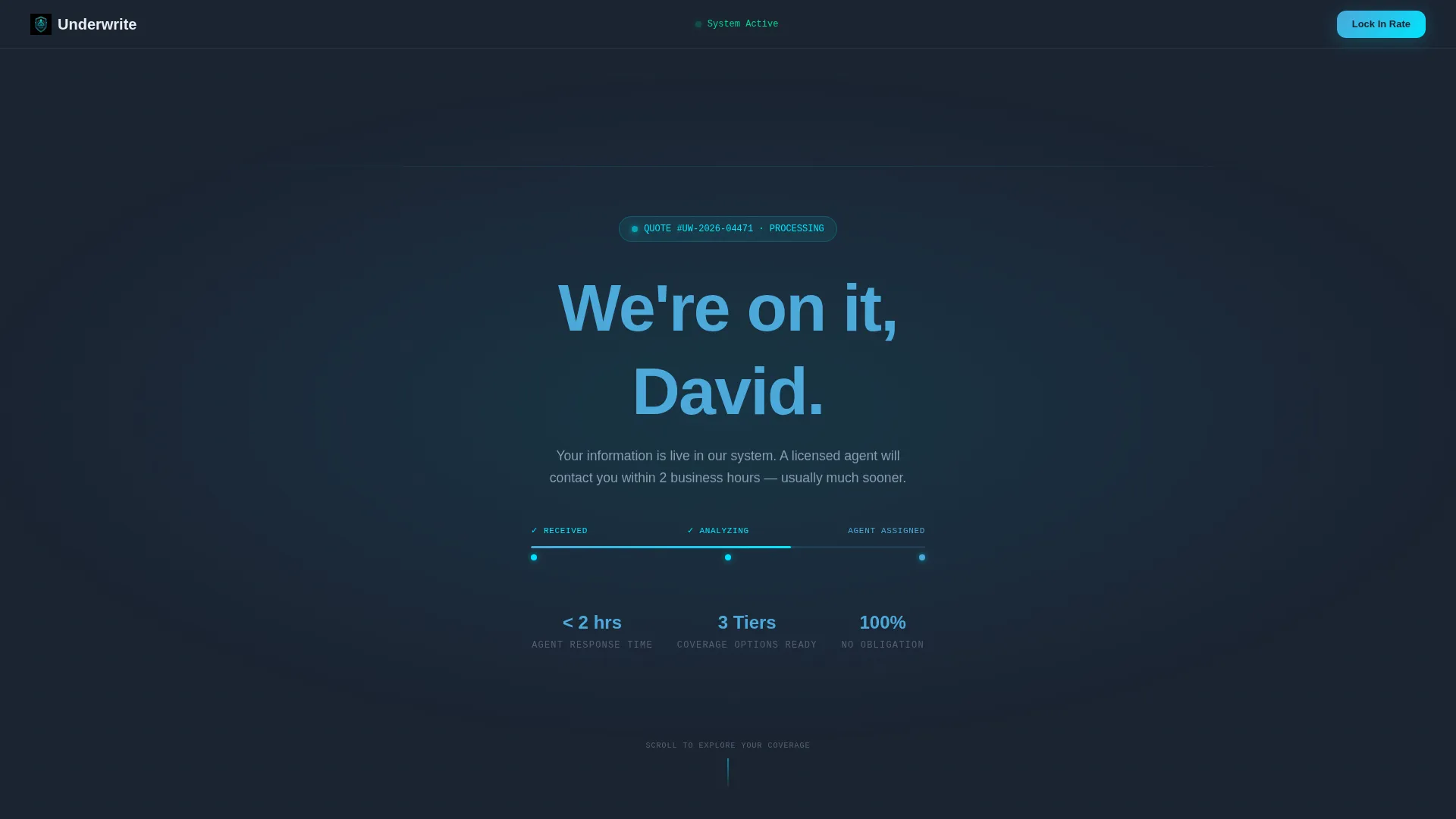
The header opens in full-bleed dark mode with a soft cyan glow at center. The visitor's first name appears in large sky blue type, making the confirmation feel direct and personal. An animated progress bar beneath it pulses through three stages: Received, Analyzing, and Agent Assigned.
Coverage Comparison Matrix
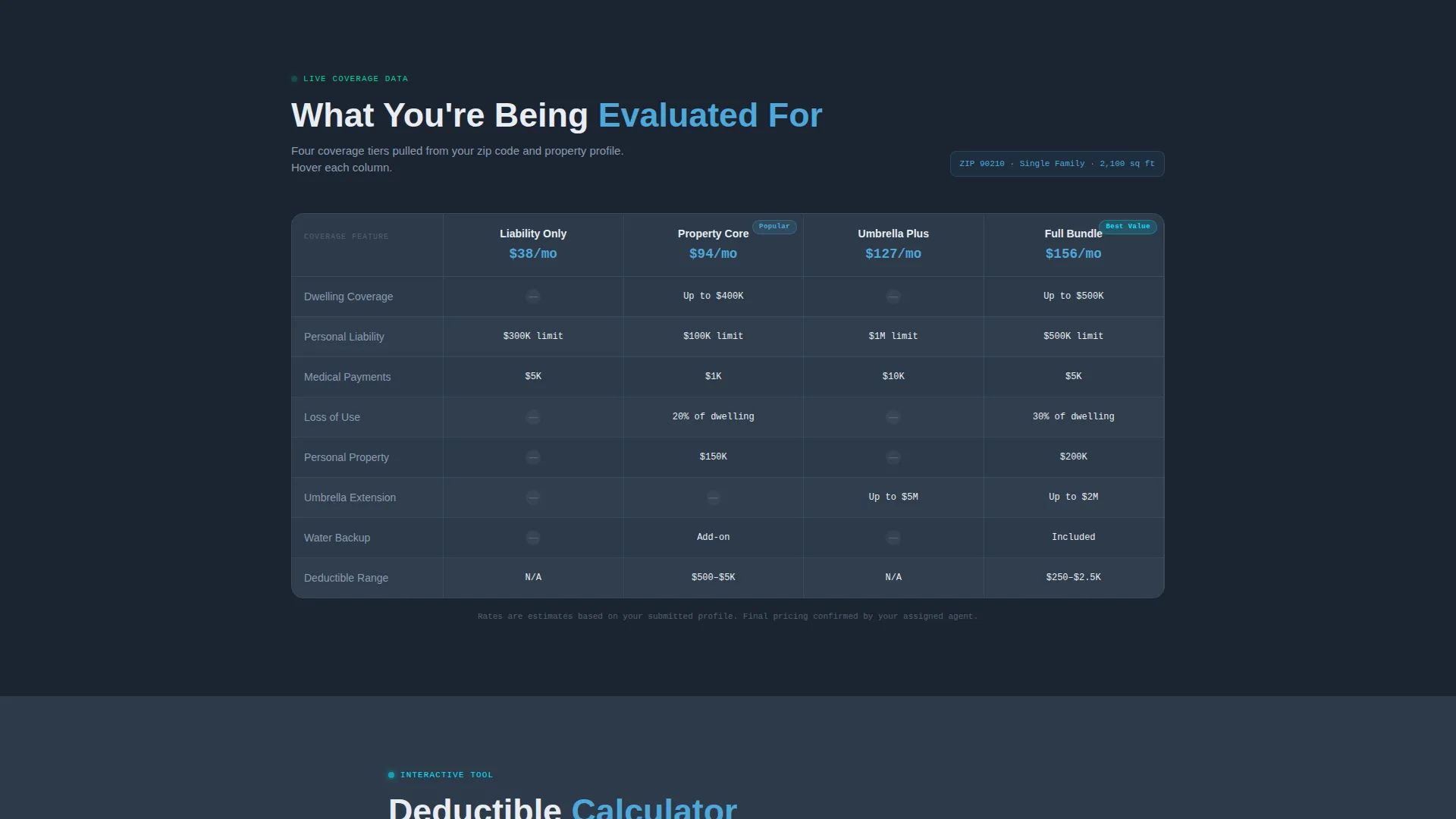
A structured grid displays four policy categories side by side: liability, property, umbrella, and bundled coverage. Columns respond visually on hover, giving the layout an active, dashboard-like quality. This section helps prospects understand their options before speaking to anyone.
Deductible Calculator Widget
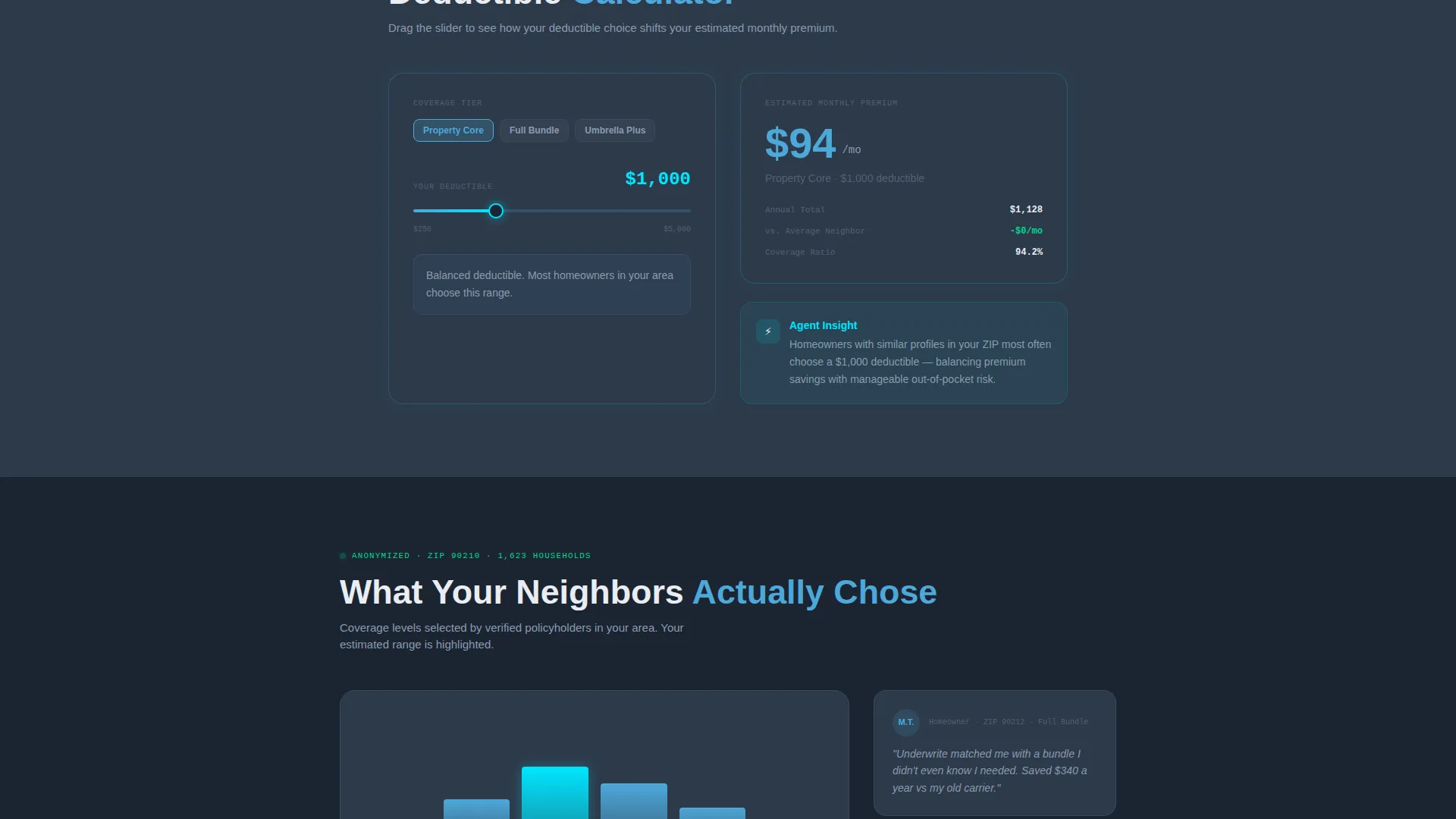
Visitors can drag sliders to adjust deductible levels and watch estimated premium ranges shift in real time. This interactive component keeps users on the page longer and answers a question most prospects have immediately after submitting a quote request.
Neighborhood Coverage Visualization
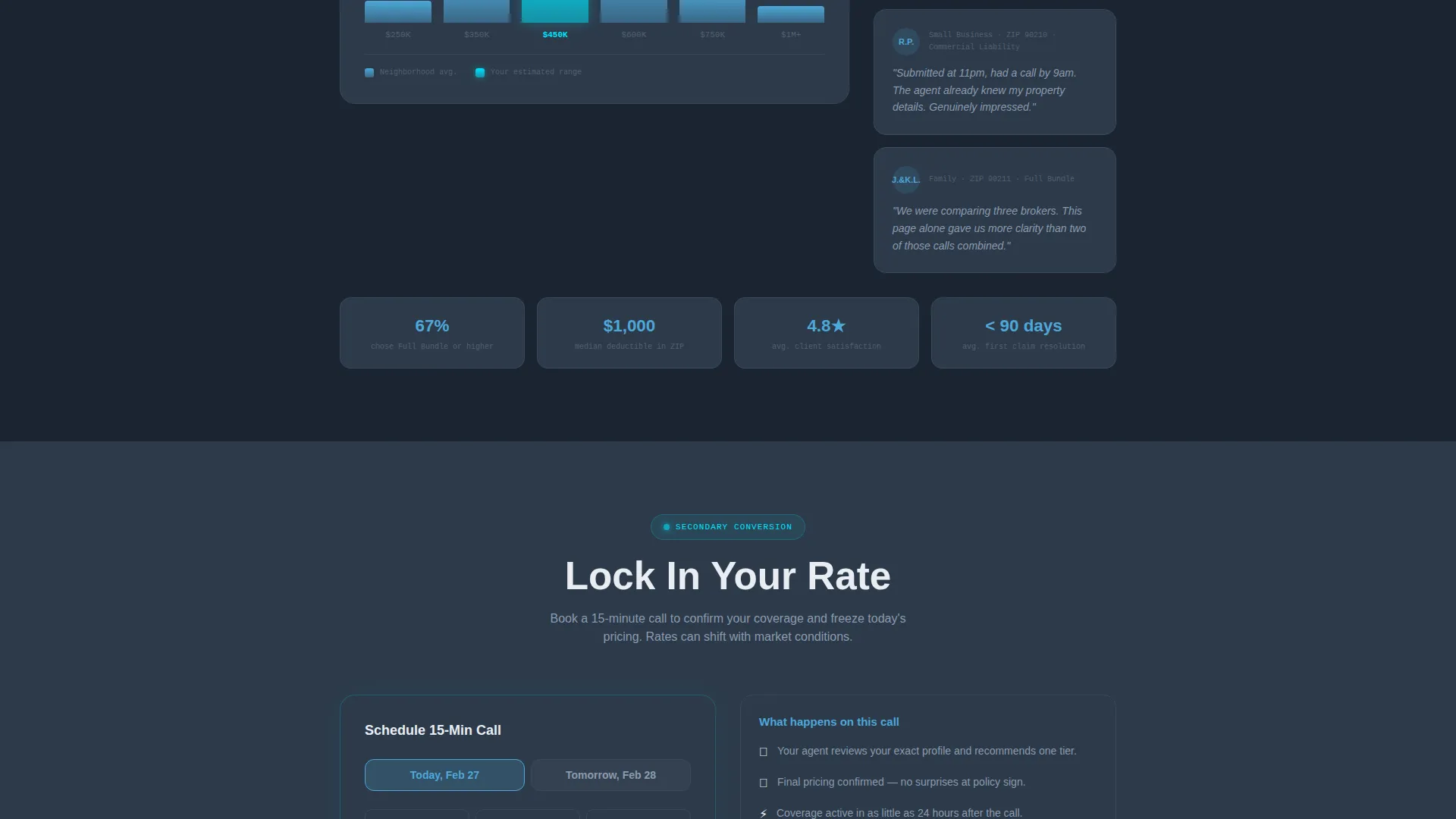
An anonymized data panel shows what coverage levels nearby policyholders have selected, organized by ZIP code. The display is framed as a social proof signal without revealing personal data. It helps undecided prospects feel more confident choosing similar coverage.
Rate Lock and Scheduling Widget
The primary call to action shifts to "Lock In Your Rate," paired with a scheduling widget offering time slots for today and tomorrow. This converts the confirmation moment into a booked appointment without requiring the prospect to navigate away.
Policy Expansion Toggles
A secondary conversion path lets visitors tap toggles for auto, life, and umbrella policies. Each toggle expands a compact micro-form beneath it. This allows the agency to capture additional policy interest from a single page visit.
Page sections overview
| Section | Purpose |
|---|---|
| Full-Bleed Header | Personalized welcome with animated quote-progress bar |
| Coverage Comparison Matrix | Side-by-side grid of four policy types |
| Deductible Calculator | Interactive sliders for premium estimation |
| Neighborhood Data Panel | ZIP-code coverage visualization for social proof |
| Rate Lock call to action | Call-scheduling widget for same-day or next-day booking |
| Policy Add-On Toggles | Expandable micro-forms for auto, life, and umbrella |
Design & branding system
The visual identity follows a Dashboard Pro theme built on a Slate and Sky color system. Every design choice reinforces the feeling of a secure, intelligent system already working on the visitor's behalf.
- Core palette: deep command-center charcoal (#1B2432), instrument-panel slate (#2D3A4A), clear-altitude sky blue (#4DA8DA), and status-active cyan (#00E5FF) for glowing accents
- No stock photos or decorative imagery; the visual language relies entirely on dark surfaces, backlit blue tones, glowing grid lines, and purposeful data components
- Typography uses large, confident sky blue type for the personalized greeting and clean, readable labels throughout the dashboard layout
Mobile & speed optimization
The template is designed to read clearly on any screen size without sacrificing the dashboard aesthetic. Compact data cards and stacked grid layouts adapt the desktop experience for smaller viewports.
- Coverage matrix and deductible slider components reflow into vertically stacked cards on mobile
- The scheduling widget and policy toggle forms remain fully accessible and usable at thumb-friendly sizes
- The dark full-bleed header and glow effects are maintained across breakpoints, preserving the visual impact on mobile devices
How this template helps you convert
Underwrite earns the second click by turning the confirmation moment into a reason to stay. The page is structured to move visitors from passive confirmation to active engagement across two conversion paths.
- The "Lock In Your Rate" scheduling widget offers same-day and next-day call slots, converting the warm post-submission window into a booked appointment before intent fades.
- The policy toggle section with expandable micro-forms lets visitors self-select additional coverage interests, generating richer lead data without requiring a phone call.
Other information about this template
Underwrite is part of a broader family of insurance agency landing page templates designed for agencies that want professional, conversion-focused post-submission experiences.
- The template is built as a single-page layout, making it easy to publish as a standalone confirmation destination
- The Spec Sheet creative direction means every section functions as both a retention tool and an education layer, giving the visitor real information rather than filler content
- The Dashboard Pro theme and Slate and Sky color system make this template visually distinct from typical insurance agency confirmation pages, which tend to use stock imagery and passive copy
- This template is well suited for agencies already running paid search or social campaigns where the post-click experience needs to match the quality of the ad itself
Theme
Dashboard Pro
Creative direction
Spec Sheet
Color system
Slate & Sky
Style
Dashboard/Data Grid
Direction
Lead Generation
Page Sections
Personalized Name Header with Progress Bar
Coverage Comparison Matrix
Interactive Deductible Calculator
ZIP Code Coverage Visualization
Rate Lock Scheduling Widget
Policy Add-on Toggle Forms
Related questions
Is this template designed for a single page or a multi-page website?
Can I change the visitor's name shown in the welcome header?
Does the deductible calculator use live pricing data?
Which types of insurance agencies benefit most from this template?
Can I activate only some of the policy toggle sections?



