Law Firm Subscription & Vendor Cost Audit Website Template
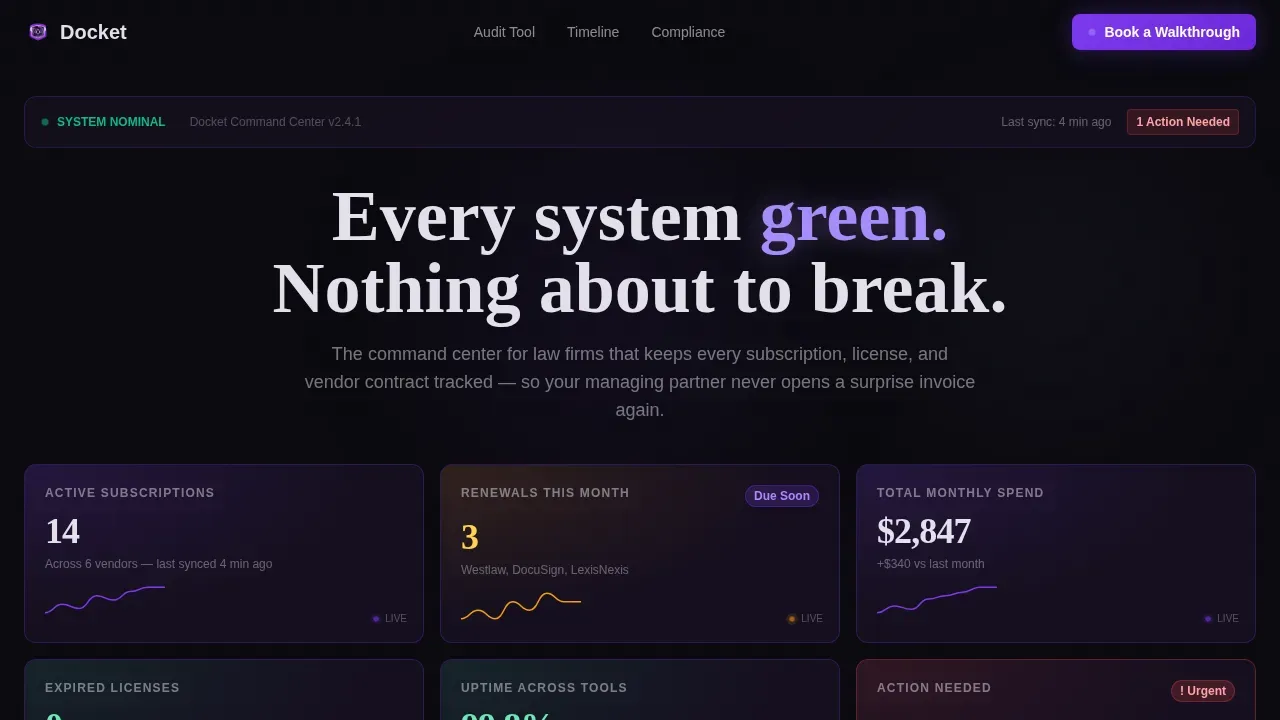
The Docket template is a dark-mode, dashboard-style law firm landing page built for subscription and vendor management. It opens with a grid of live metric tiles, drops visitors immediately into an interactive cost audit tool, and layers Gantt bar timelines, a compliance heatmap, and a risk matrix below. Every section earns the lead before asking for it.
by Rocket studio
Quick summary
Docket is a precision law firm maintenance command center landing page template designed for legal technology platforms. It combines a Bloomberg-terminal aesthetic with high-interactivity sections: a six-tile stats header, a live cost audit calculator, vendor contract Gantt bars, a compliance heatmap, and a gated lead capture modal. The template gives law firm operators clarity and confidence before asking for anything in return.
Who this template is for
This template is built for legal technology founders, product teams, and marketers who serve the law firm operations market. It speaks directly to the daily reality of managing partners and firm administrators who carry the operational burden of tracking dozens of software subscriptions, renewal dates, and vendor contracts.
- Managing partners at mid-size law firms who need firm-wide visibility into SaaS costs and renewal deadlines
- Office managers and IT coordinators who inherited spreadsheet-based systems and need a more trustworthy tool to showcase to leadership
- Legal technology teams building a landing page that converts firm administrators into trial users or booked walkthroughs
What problem this template solves
Law firms using fragmented spreadsheets to track software licenses, vendor contracts, and renewal dates are constantly at risk. Missing a single renewal can expose the firm to lapses in critical legal services tools. Inadequate docketing and subscription tracking can lead to missed court appearances, filing deadlines, and costly service interruptions. A good docketing system is necessary for law firms to keep up with tight schedules, and this template communicates exactly that need.
- Managing partners and office managers lack a single system to track all subscriptions, renewal dates, and vendor documents across the firm
- Law firm teams have no user friendly way to evaluate overlapping software costs or flag expiring licenses before they become a lawsuit risk
- Prospective clients evaluating subscription management platforms cannot immediately see the value without interacting with the product first
What you get with this template
This template delivers a fully structured, dark-mode law firm landing page with high-interactivity components and a deliberate lead-generation flow. Visitors encounter real data examples before any sales copy, building confidence through demonstrated utility. Every section is designed to showcase the platform's ability to track, report, and surface actionable insight for law firm operators.
- A six-tile live stats header, an interactive cost audit calculator, vendor Gantt bars, a compliance heatmap, a risk matrix, a lead capture modal, and a Calendly-anchor walkthrough button
- Void and Violet color system with electric violet active states, void black backgrounds, and silver-white typography rendered in DM Sans body text and Fraunces display numerals
- GSAP ScrollTrigger animations, sparkline micro-charts, counter animations, staggered tile reveals, and violet pulse glows throughout the page
Feature list
This template includes purpose-built components that reflect the specific demands of a law firm operations command center. Each feature below is grounded in the template's described structure and visual system.
Live Stats Metrics Header
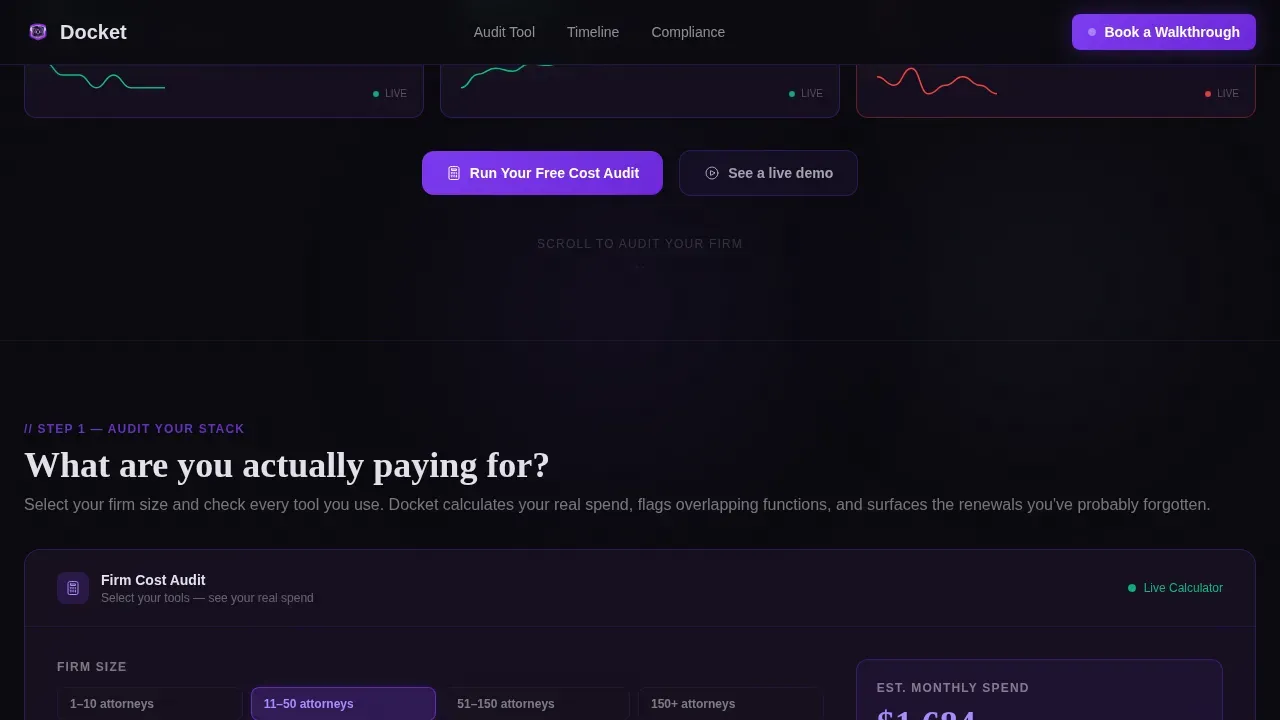
The header fills the viewport with six glowing metric tiles. Each tile displays a specific, realistic data point such as active subscription count, monthly spend, and license status. A micro-sparkline chart sits beneath each tile, and a red urgency badge flags the one action that needs immediate attention. Key metrics are visible instantly without scrolling, giving users an at-a-glance status dashboard the moment they land.
Interactive Cost Audit Calculator
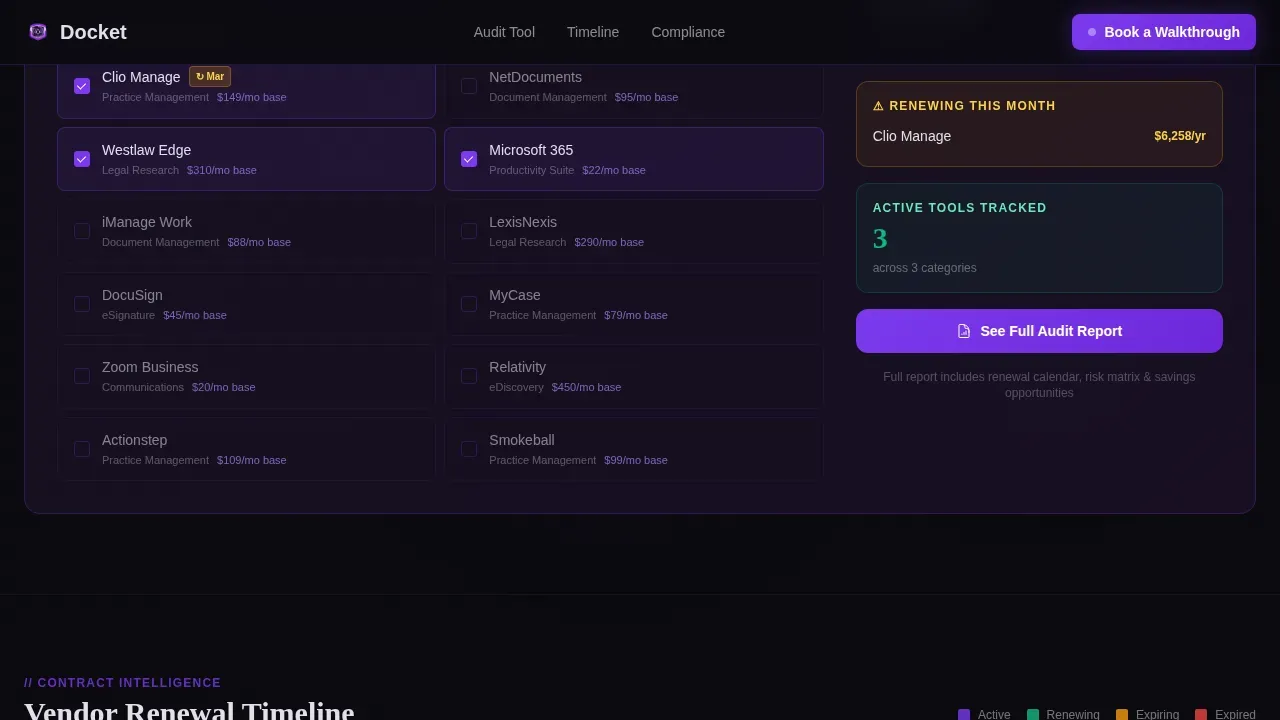
Visitors select their firm size and check boxes for legal software tools they currently use. The calculator instantly computes estimated annual spend, flags overlapping functionality, and surfaces renewal dates. This tool teaches by showing rather than telling. It acts as a digital watchdog that ensures no crucial date goes unnoticed, and it creates genuine anxiety about what the firm might be missing before the lead gate appears.
Vendor Contract Gantt Timeline
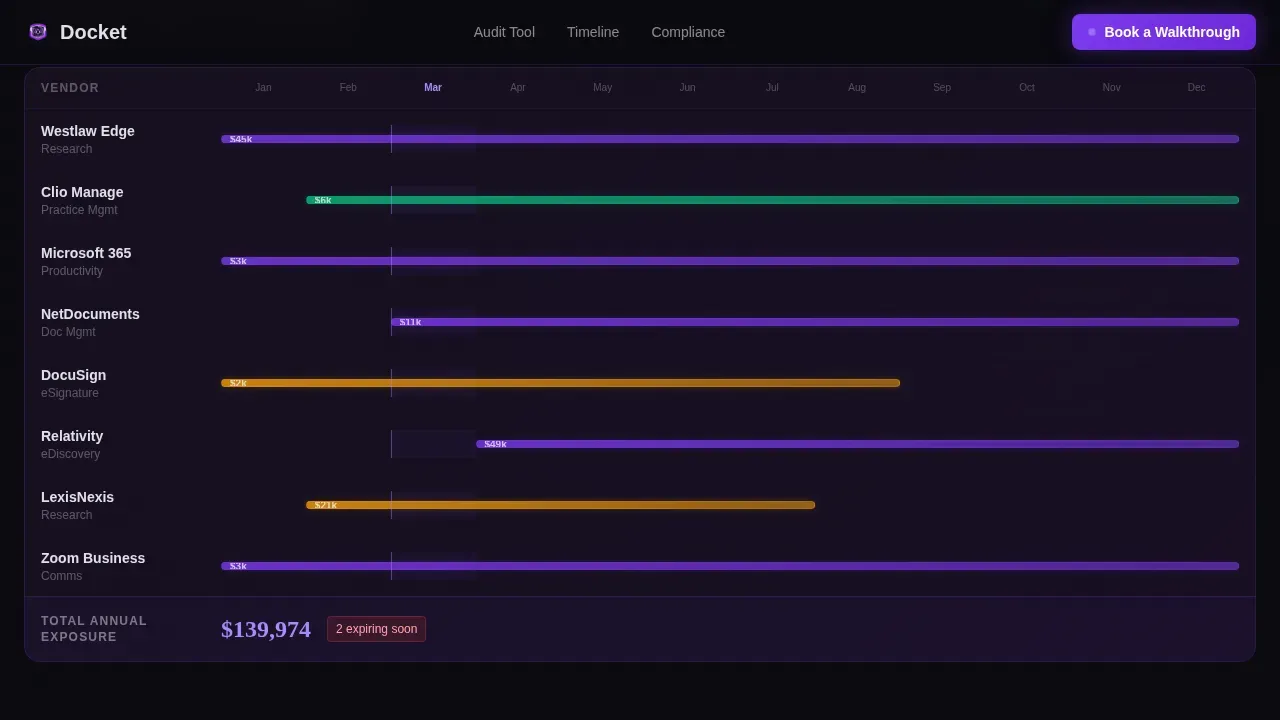
Below the calculator, contract renewal windows are rendered as Gantt bar visualizations. Each bar represents a vendor relationship mapped across a date axis. This section helps firm administrators track renewal events, evaluate contract history, and determine which agreements are approaching critical windows. The visual format mirrors the clarity of a professional project management system adapted for the legal context.
Compliance Heatmap and Risk Matrix
A jurisdiction coverage matrix uses color coding to represent compliance status across locations. Red denotes high-risk gaps; green marks completed or current obligations. Below the heatmap, a risk matrix plots each tool against cost and criticality axes. Predictive risk assessment surfaces upcoming bottlenecks before they become a lawsuit or a malpractice exposure. This section gives attorneys and firm leadership the data to make informed decisions.
Gated Lead Capture Modal
After completing the cost audit tool, results blur slightly behind a modal overlay. The modal asks for firm name, number of attorneys, email address, and a dropdown for the visitor's biggest pain point. The form is deliberately short, keeping fields between four and six to reduce friction. This frictionless approach follows best practices for law firm landing pages: deliver value first, then request contact details.
Calendly Walkthrough Anchor
A persistent violet button in the top navigation reads "Book a Walkthrough" and anchors to a Calendly embed at the page bottom. This secondary conversion path runs in parallel with the modal gate, giving visitors multiple ways to schedule a consultation based on where they are in the decision process. The above-the-fold placement of this call to action ensures it remains visible throughout the scroll journey.
Page sections overview
| Section | Purpose |
|---|---|
| Live Stats Header | Showcase six metric tiles with sparklines and urgency badge |
| Cost Audit Calculator | Interactive firm-size and software tool selector with spend output |
| Vendor Gantt Timeline | Visualize contract renewal windows as horizontal bar charts |
| Compliance Heatmap | Display jurisdiction coverage matrix with risk color coding |
| Risk Matrix Panel | Plot tools by cost versus criticality for executive review |
| Lead Capture Modal | Gate full audit reports behind a short, frictionless contact form |
| Walkthrough Calendly Anchor | Embed scheduling widget for direct walkthrough bookings |
| Linear Single-Row Footer | House legal links and firm description in a minimal footer strip |
Design & branding system
The visual identity follows a Void and Violet system. The palette is built for extended screen time, with absolute void black as the base canvas, deep interstellar purple for structural depth, electric violet for active states and data highlights, and cool silver-white for all typography and grid lines. This system communicates professionalism and technical precision simultaneously, and it projects the kind of trustworthy confidence that law firm decision-makers expect from the software they evaluate.
- Colors: void black (#0B0B0F) base, deep purple (#1A1025) structural layer, electric violet (#7C3AED) for active states and highlights, silver-white (#E2E0EA) for body text and grid lines
- Typography: DM Sans handles all body copy and interface labels for clean readability; Fraunces handles display numerics and section headings for editorial weight
- Animation: GSAP ScrollTrigger drives staggered tile reveals, sparkline draws, counter animations, and violet pulse glows throughout the scroll journey
Mobile & speed optimization
The template is built desktop-first, optimized for managing partners who keep this site open on a second monitor. That said, mobile-first design remains paramount for attorneys who need to check critical dates and reports from their phones. The layout adapts across every device type without losing the density of information that makes the dashboard format effective.
- Server components handle static sections to reduce initial load, while client components manage the interactive calculator and modal to keep the page responsive
- The layout is structured so that key metrics, urgency badges, and primary calls to action remain accessible and visible on any device screen size
- Sparkline charts, Gantt bars, and heatmap cells are rendered with performance in mind so that users on mobile devices can access critical data immediately
How this template helps you convert
This template earns each conversion step before requesting it. The law firm landing page is structured so that every section delivers genuine insight before a single form field appears. Visitors do not encounter a sales pitch; they encounter a system that already understands their firm's situation.
- The cost audit calculator delivers specific, personalized spend estimates and overlap flags that create real urgency. When the results blur behind the lead capture modal, the visitor already wants the full report because they have seen enough to know something is being missed.
- The persistent "Book a Walkthrough" button and the Calendly anchor at the page bottom give potential clients a direct path to schedule a consultation at any point in their scroll, ensuring no intent goes uncaptured regardless of where on the page they decide to act.
Other information about this template
This template is part of a broader ecosystem of law firm landing page templates designed for legal technology products and services. It is built within the Dashboard Pro theme, using the Void and Violet color system to create a visual language that stands apart from standard law firm website conventions. Below are additional details that help users evaluate whether this template fits their specific use case and firm context.
- The docket precision law firm maintenance command center landing page template is purpose-built for B2B legal technology marketing, not general law firm website use
- Brand-specific software tools such as Clio, NetDocuments, Westlaw, Microsoft 365, and iManage are referenced in the calculator checkbox section as examples of the tools firms commonly track; these are illustrative examples built into the described template structure
- Legal docketing software automates, calculates, and monitors important dates for all cases; this template is designed to showcase exactly that capability to potential clients evaluating a subscription management platform
- A good docketing system helps prevent missed deadlines, which are a leading cause of legal malpractice claims according to the American Bar Association; approximately one-quarter of all malpractice claims stem from calendaring errors
- Docketing software centralizes all deadlines and automates reminders, creating a safety net of redundancy and oversight; this template surfaces that value proposition through the calculator and Gantt bar sections
- Using vetted law firm docketing software can lower insurance premiums due to reduced risk of missed deadlines; the risk matrix section of this template is designed to communicate that financial case to managing partners
- Docketing software allows attorneys to focus on substantive work instead of procedural tracking; that outcome is what every section of this template is built to demonstrate
- Implementing a docketing system requires thoughtful integration into a law firm's workflow; the walkthrough booking path in this template supports that onboarding conversation
- The template can be customized to reflect the unique branding and services of the firm or platform deploying it, while maintaining the core Void and Violet visual system
- Trust signals such as the metric tiles and urgency badge serve as implicit social proof, reinforcing the platform's reputation for reliability and operational precision
- The compliance heatmap and jurisdiction matrix sections are designed for firms with practice locations across multiple jurisdictions, making this template especially useful for regional or national mid-size law firms
- Color coding throughout the template follows established legal dashboard practices: red for high-risk items, green for completed tasks, violet for system highlights
- Secure access and data protection are visually implied through the cockpit-style aesthetic; the template uses design cues associated with professional-grade software to communicate security and professionalism without explicit legal claims
Theme
Dashboard Pro
Creative direction
Calculator/Tool First
Color system
Void & Violet
Style
Dashboard/Data Grid
Direction
Lead Generation
Page Sections
Live Six-tile Stats Header
Interactive Cost Audit Calculator
Vendor Contract Gantt Timeline
Compliance Heatmap and Risk Matrix
Gated Lead Capture Modal
Persistent Walkthrough Booking Button
Related questions
Is this template suitable for a single-page law firm landing page or a multi-page website?
Who is the ideal user of this landing page template?
How does this template help build trust with law firm decision-makers?
Does the template include a way to schedule consultations directly?
Can this template be customized to match a specific firm or platform's branding?