Endocrinologist Specialist Booking Website Template
Catalyst is a single-page endocrinologist insurance and billing landing page built to replace front-desk confusion with instant clarity. A live insurance search, animated stats, a carrier comparison table with sticky filters, a first-visit flowchart, and a two-step booking modal guide patients from anxious arrival to confirmed appointment in one focused scroll.
by Rocket studio
Quick summary
Catalyst is a calm, confidence-building landing page for endocrinology practices. It translates dense billing language into plain answers patients can act on immediately. From a live plan search in the header to a side-by-side carrier comparison table and a two-step booking form, every section moves a worried patient one step closer to a scheduled visit.
Who this template is for
This template is built for endocrinology practices that want to reduce inbound billing calls and convert hesitant website visitors into booked patients. It serves clinics where insurance complexity is a real barrier to scheduling.
- Endocrinologists and practice managers who treat newly diagnosed diabetics, thyroid patients, and pediatric hormone cases
- Front-desk teams tired of answering the same co-pay and pre-authorization questions by phone
- Practices looking to offer a self-serve billing resource that doubles as a scheduling tool
What problem this template solves
Patients referred to an endocrinologist often stall before booking because they cannot quickly confirm whether their plan is accepted or what a first visit will cost. That uncertainty keeps appointment slots empty.
- Patients cannot find plain-language answers about co-pays, referral requirements, or telehealth coverage without calling the office
- Pre-authorization confusion, especially for pediatric growth hormone cases, creates drop-off before the first appointment is ever made
- No single resource connects insurance verification and appointment booking in one frictionless flow
What you get with this template
You get a fully structured, single-page layout designed around the exact information endocrinology patients need before they commit to a visit. The page is organized to reduce anxiety and increase booking confidence at every scroll step.
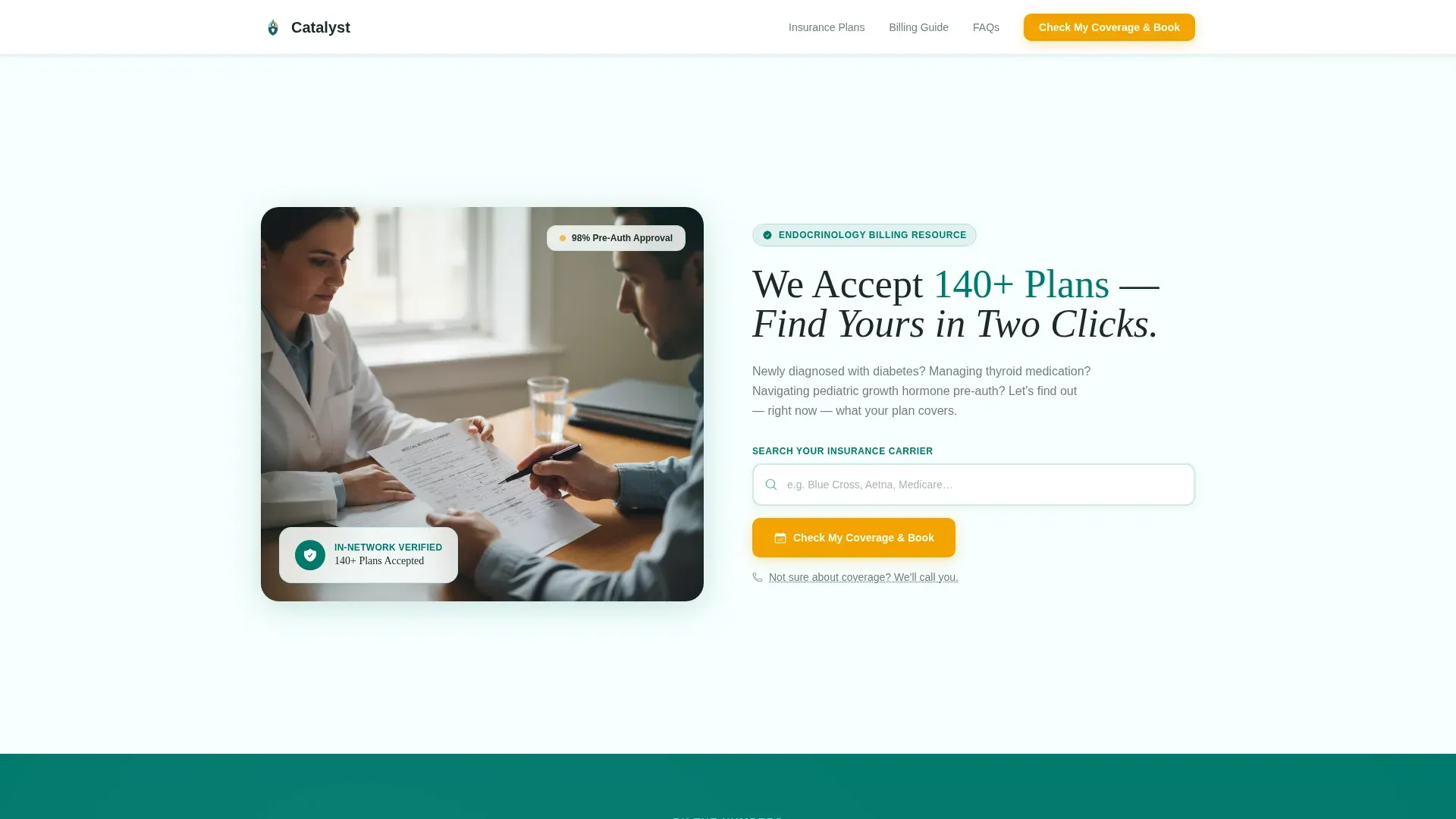
- A half-page hero with a live insurance search field, auto-completing as the visitor types
- An animated stats section, a sticky-filter carrier comparison table, a first-visit billing flowchart, and an FAQ accordion
- A two-step booking modal and a secondary "Not Sure About Coverage? We'll Call You" callback path
Feature list
This template ships with a specific set of interactive and structural components. Each one targets a distinct moment of patient hesitation.
Live Insurance Search with Autocomplete
The hero search field pre-loads the five most common local insurers and completes as the visitor types. Matching results surface a "Check My Coverage & Book" call-to-action inline, so patients never have to leave the first screen to confirm their plan.
Animated Stats Counters
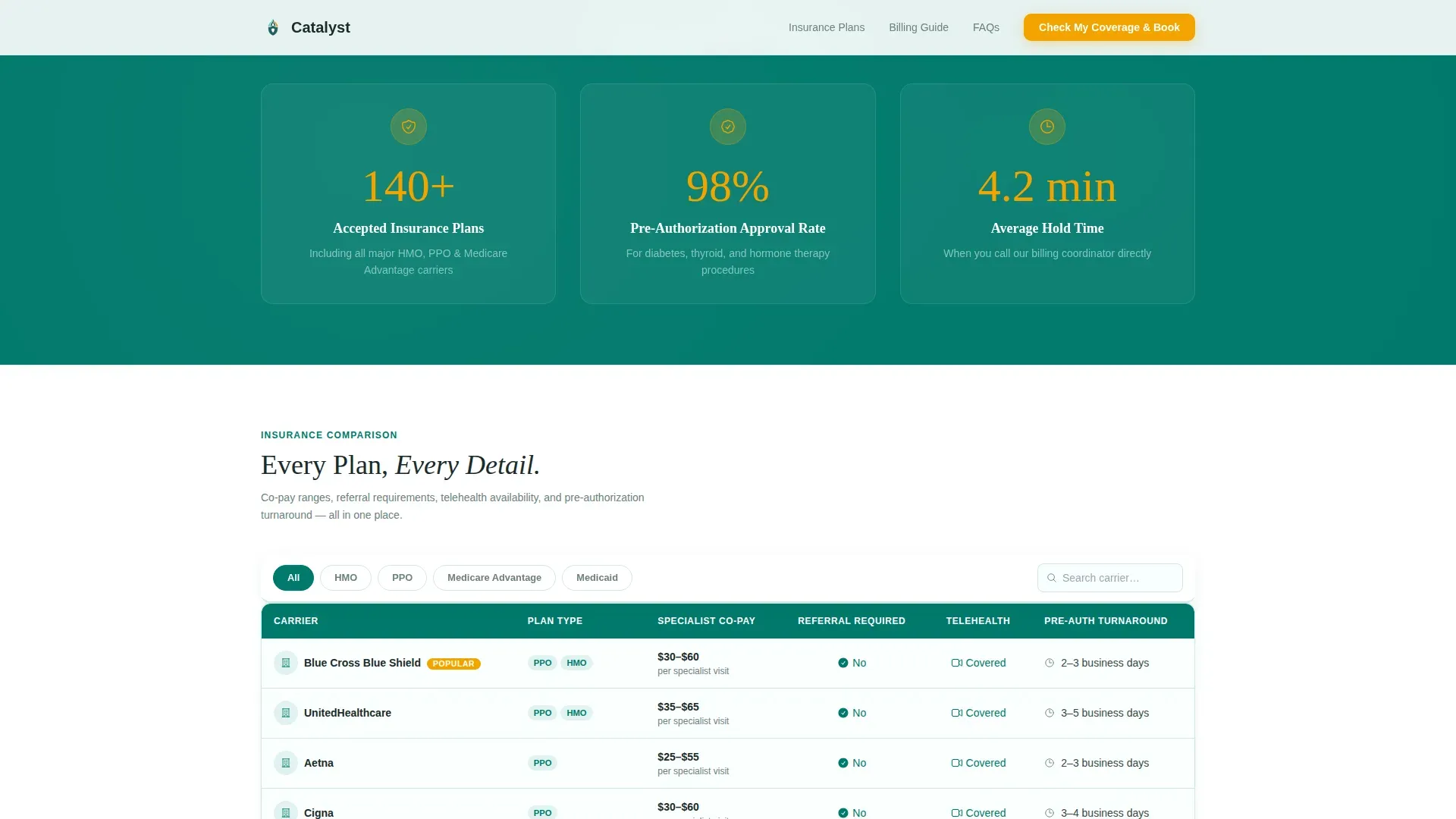
Three counters animate on scroll: 140+ accepted insurance plans, a 98% pre-authorization approval rate, and an average 4.2-minute hold time. Each number lands with a subtle amber pulse that draws the eye without breaking the clinical tone.
Sticky-Filter Carrier Comparison Table
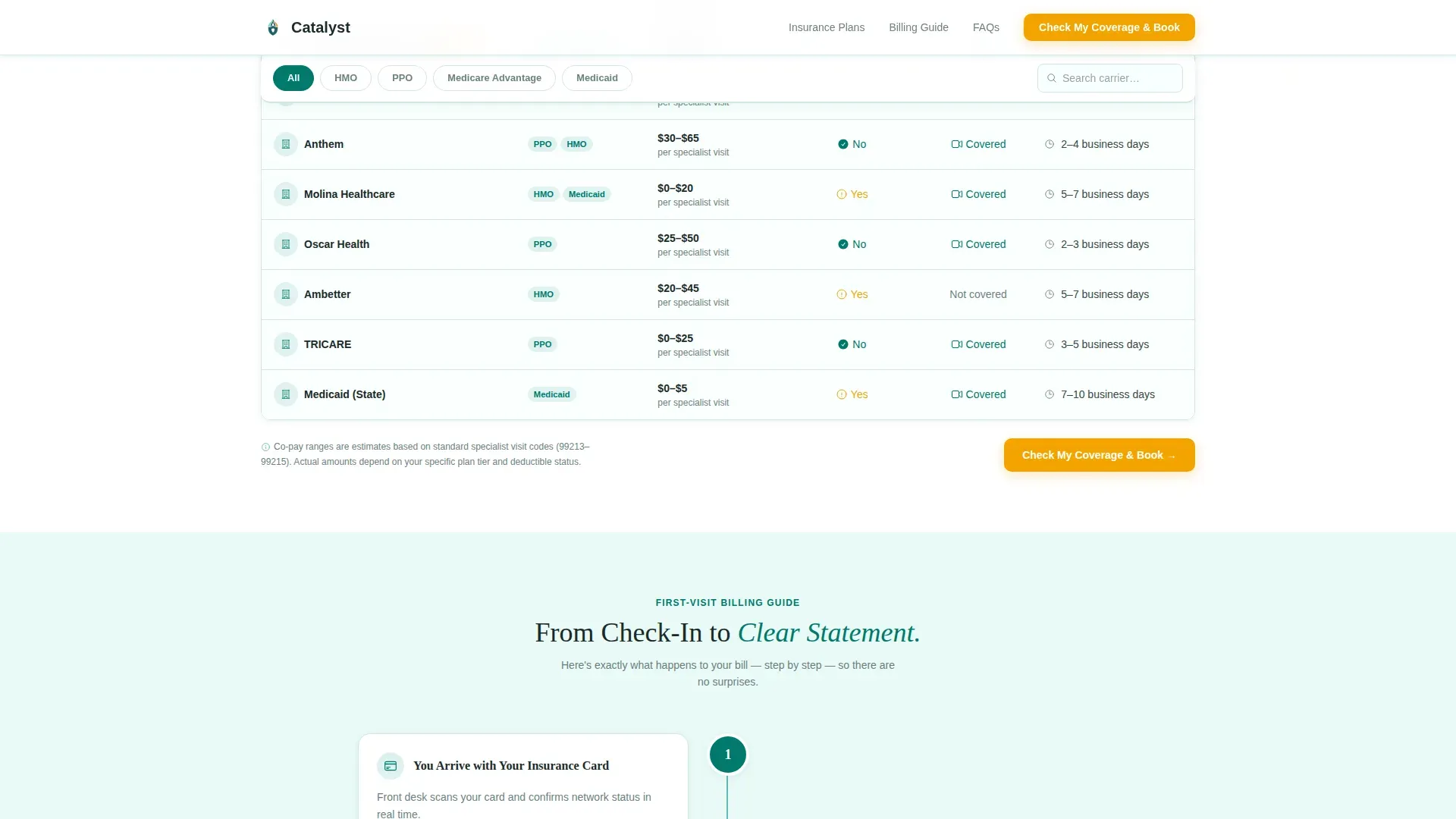
The comparison table lists major carriers in rows with columns for co-pay range, referral requirement, telehealth coverage, and pre-authorization turnaround time. A sticky filter bar above the table lets patients toggle by plan type, specifically Health Maintenance Organization (HMO), Preferred Provider Organization (PPO), and Medicare Advantage plans.
First-Visit Billing Flowchart
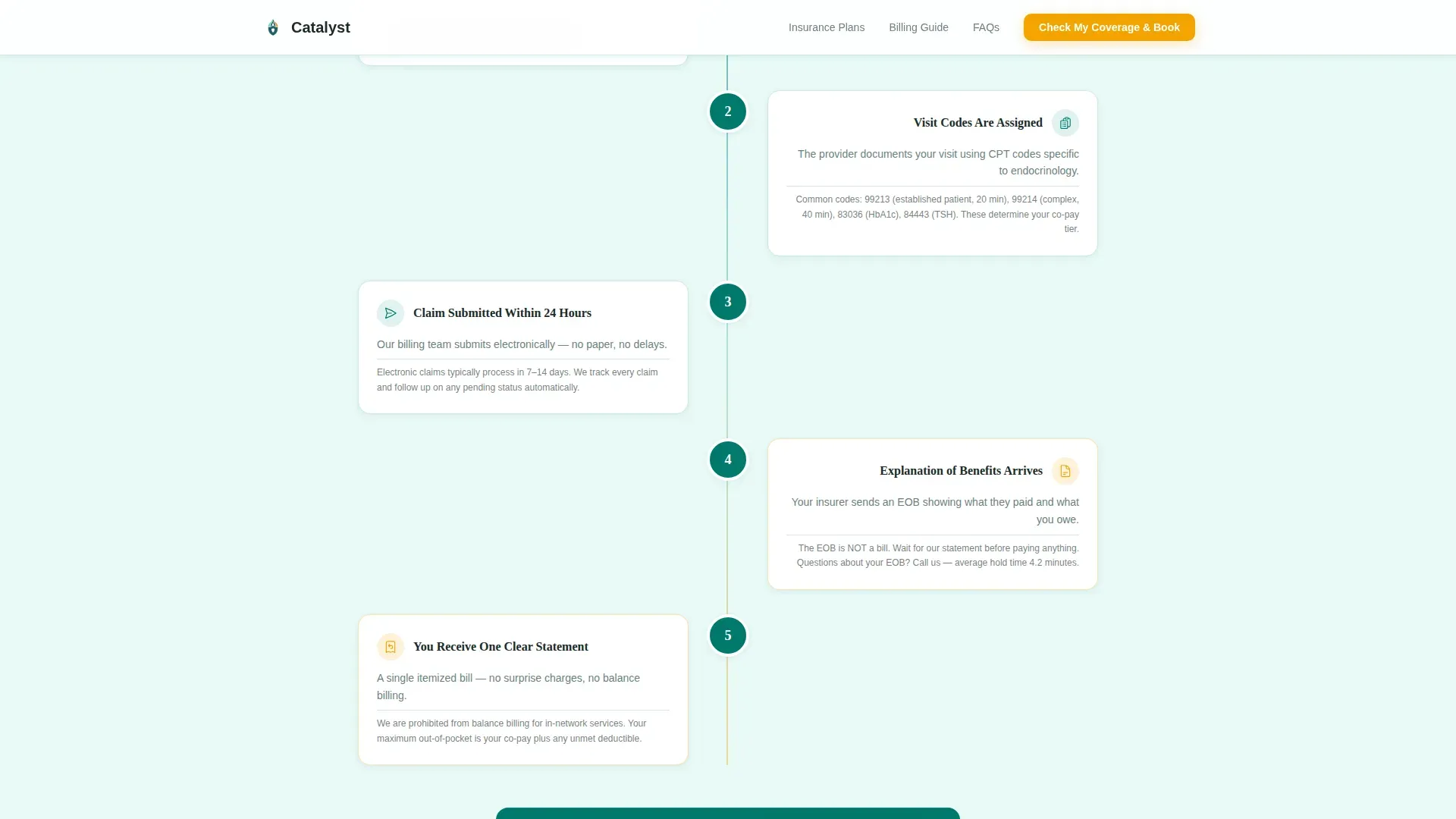
A visual flowchart walks patients through the billing journey of a first endocrinology appointment, from referral slip to explanation of benefits. The step-by-step layout converts a complex process into a readable path so patients arrive prepared, not anxious.
Two-Step Booking Modal
Clicking "Check My Coverage & Book" opens a two-step form. Step one captures insurance carrier, plan identification number, and visit reason from a dropdown. Step two reveals available appointment slots filtered to providers in-network for that specific plan.
FAQ Accordion with Superbill Explainer
An expandable FAQ section addresses common surprise-billing concerns and includes a short video of the billing coordinator explaining the superbill. Patients who scroll past the table can still find plain answers to the questions they were too uncertain to ask by phone.
Page sections overview
| Section | Purpose |
|---|---|
| Hero Search Header | Confirm plan acceptance and prompt immediate booking |
| Animated Stats Bar | Build trust with practice-level social proof numbers |
| Carrier Comparison Table | Let patients compare plans by co-pay, referral, and telehealth |
| First-Visit Flowchart | Reduce billing anxiety with a visual step-by-step journey |
| FAQ Accordion | Resolve surprise-billing concerns and explain the superbill |
Design & branding system
The visual identity follows a Medical Clarity theme. The palette is clinical enough to project trust and warm enough to feel approachable, like a freshly wiped exam-room whiteboard.
- Color system: deep teal (#00796B) anchors headers and table borders, soft seafoam (#B2DFDB) washes section backgrounds, crisp white (#FAFFFE) fills table cell interiors, and warm amber (#F4A300) is reserved exclusively for calls-to-action and highlighted plan badges
- Typography pairing: DM Sans handles body text and interface labels for clean readability, while Fraunces serif display headlines add a sense of authority to key headings
- Animation is set to medium intensity, covering counter animations on scroll, smooth accordion transitions, and scroll-reveal entry effects throughout the page
Mobile & speed optimization
The template is built mobile-first with patients in mind. Most visitors arrive on a phone, often mid-errand or straight from a physician's office, and the layout respects that context.
- A sticky bottom call-to-action bar on mobile keeps "Check My Coverage & Book" reachable at all times without scrolling back to the top
- Filter toggles on the comparison table use large tap targets designed for touch interaction, so patients can switch between plan types without pinch-zooming
- Interactive elements such as the search field, booking modal, and accordion are built as client-side components, while the rest of the page renders as a static layout for fast initial load
How this template helps you convert
Every section of this template is deliberately sequenced to move a hesitant patient toward a confirmed appointment. The page does not just inform; it resolves doubt and then immediately offers the next step.
- The hero live search creates an instant answer moment. Patients who confirm their plan is accepted are already primed to click "Check My Coverage & Book" before they scroll at all.
- The animated stats counters and comparison table provide the social proof and specific detail that careful patients need to feel confident. Seeing a 98% pre-authorization approval rate alongside their plan's actual co-pay range removes the last major objection before booking.
- The secondary callback path, "Not Sure About Coverage? We'll Call You," captures patients who feel overwhelmed by the table. A single name and phone number is all it takes, reducing friction to one human promise and keeping those patients in the funnel.
Other information about this template
This template is categorized under Health & Medical, specifically the Endocrinologist Website subcategory, and is designed for the Endocrinologist Insurance & Billing Page niche. It was built using the Teal Catalyst color system under the Medical Clarity design theme.
- The header concept is a Half-Page Photo and Text composition: a warmly lit photograph of a clinician reviewing a benefits summary with a patient fills the left side, while the search field and headline occupy the right
- The creative direction is Stats-First Impact, meaning trust-building numbers appear at the very top of the scroll journey, before any detailed explanation
- The landing page direction is Booking and Scheduling, and all calls-to-action funnel toward either the two-step booking modal or the callback form
- The footer follows an Arc Browser Split pattern with the practice logo and tagline on the left and navigational links on the right
Theme
Medical Clarity
Creative direction
Stats-First Impact
Color system
Teal Catalyst
Style
Comparison Table
Direction
Booking/Scheduling
Page Sections
Live Insurance Search with Autocomplete
Animated Stats Counters on Scroll
Sticky-filter Carrier Comparison Table
Two-step Booking Modal
First-visit Billing Flowchart
FAQ Accordion with Billing Video
Related questions
What kind of practice is this template built for?
Can the comparison table be updated with different insurance carriers?
How does the two-step booking modal work?
What is the secondary path for patients who feel overwhelmed by the table?
Does this template include a video component?



