Climate & Environmental Monitoring Specialist Professional Website Template
Barometer is a full-width immersive landing page template built for precision weather station networks. It guides visitors through the physical anatomy of a station, section by section, using an Engineering Blueprint visual style. A guided four-step configurator, live-data ribbon, and cinematic hero layout work together to turn technically curious visitors into confident buyers.
by Rocket studio
Quick summary
Barometer is a direct-sales landing page template for precision weather station networks. It walks visitors through each component of a station, from sensor array to console, using blueprint-style visuals and a four-step guided configurator. The warm stone color system and serifed engineering typeface give the page the feel of a trusted instrument rather than a typical product catalog.
Who this template is for
This template is built for businesses and creators selling precision weather instrumentation to serious, data-driven buyers. It works equally well for small hardware brands, specialty agricultural tech companies, and municipal equipment suppliers.
- Hobby meteorologists and weather enthusiasts who want to own and trust their own sensor data
- Vineyard owners and farm operators tracking frost risk, soil moisture, and microclimatic conditions
- Facilities managers and school district operations teams responsible for hyper-local severe weather alerts
What problem this template solves
Most hardware product pages either oversimplify the technology or bury buyers in specification sheets. Neither approach earns the sale. Barometer solves this by building mechanical understanding progressively, so that by the time a visitor reaches the configurator, they already know exactly what they are buying and why each component matters.
- Visitors leave before understanding the product because the page does not build context section by section
- Complex configurators feel overwhelming without a spatial, component-first layout to prepare the buyer
- Generic product templates fail to convey the precision and craft that instrument buyers expect
What you get with this template
You get a complete, single-page sales layout designed specifically for weather station hardware. Every section is purpose-built to move a technically minded buyer from curiosity to confidence to checkout.
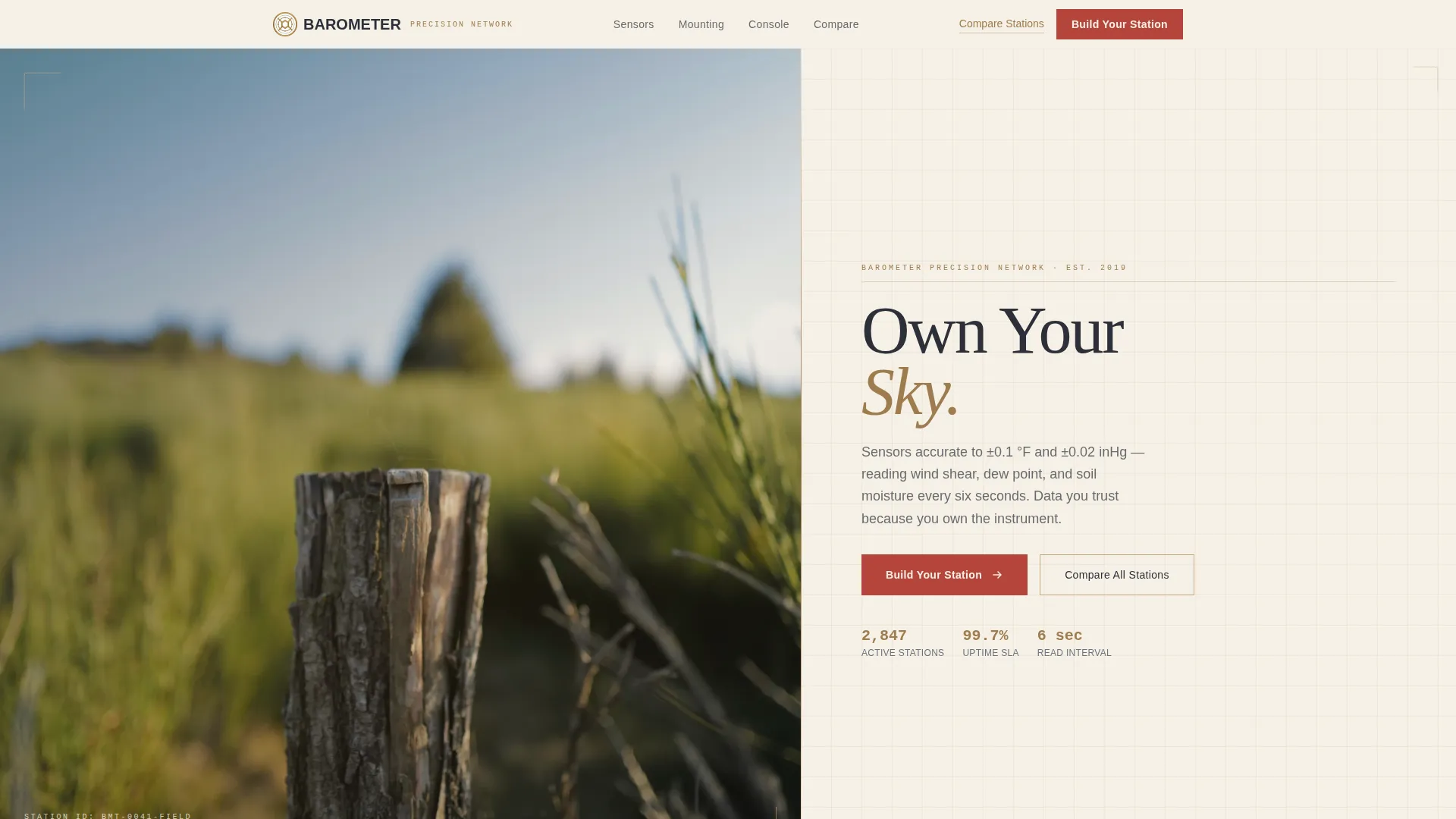
- A cinematic split hero with a golden-hour field photograph, a serifed "Own Your Sky" headline, and a live-data ribbon showing real station readings
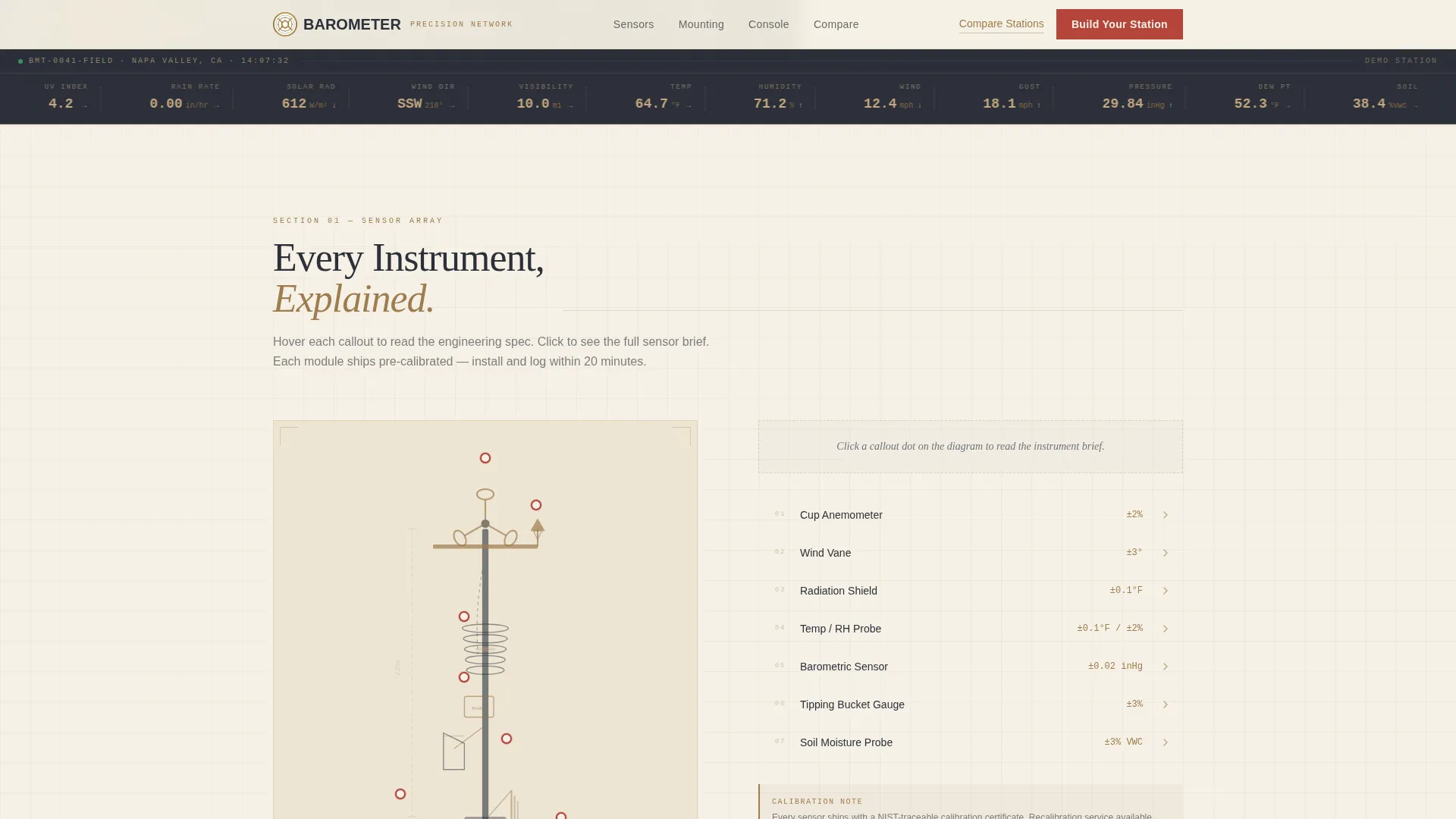
- An exploded sensor-array diagram section with scroll-reveal callout annotations for each instrument module
- A four-step guided configurator covering environment selection, sensor modules, console choice, and checkout, with live price updates at each step
Feature list
This template includes six purpose-built features drawn directly from the brief.
Cinematic Split Hero with Live Data Ribbon
The header fills half the page with a golden-hour field photograph of a weather station at work. The right side carries the headline and primary call-to-action button. Below the fold line, a thin brass rule leads into a live-data ribbon displaying real demo station readings: temperature, humidity, wind speed, and pressure trend.
Exploded Sensor Array Section
This section presents each instrument module in an exploded-diagram layout with scroll-reveal callout annotations. Visitors learn the function of every sensor, from the anemometer to the barometric pressure transducer, before they ever reach pricing.
Blueprint Mounting Architecture Section
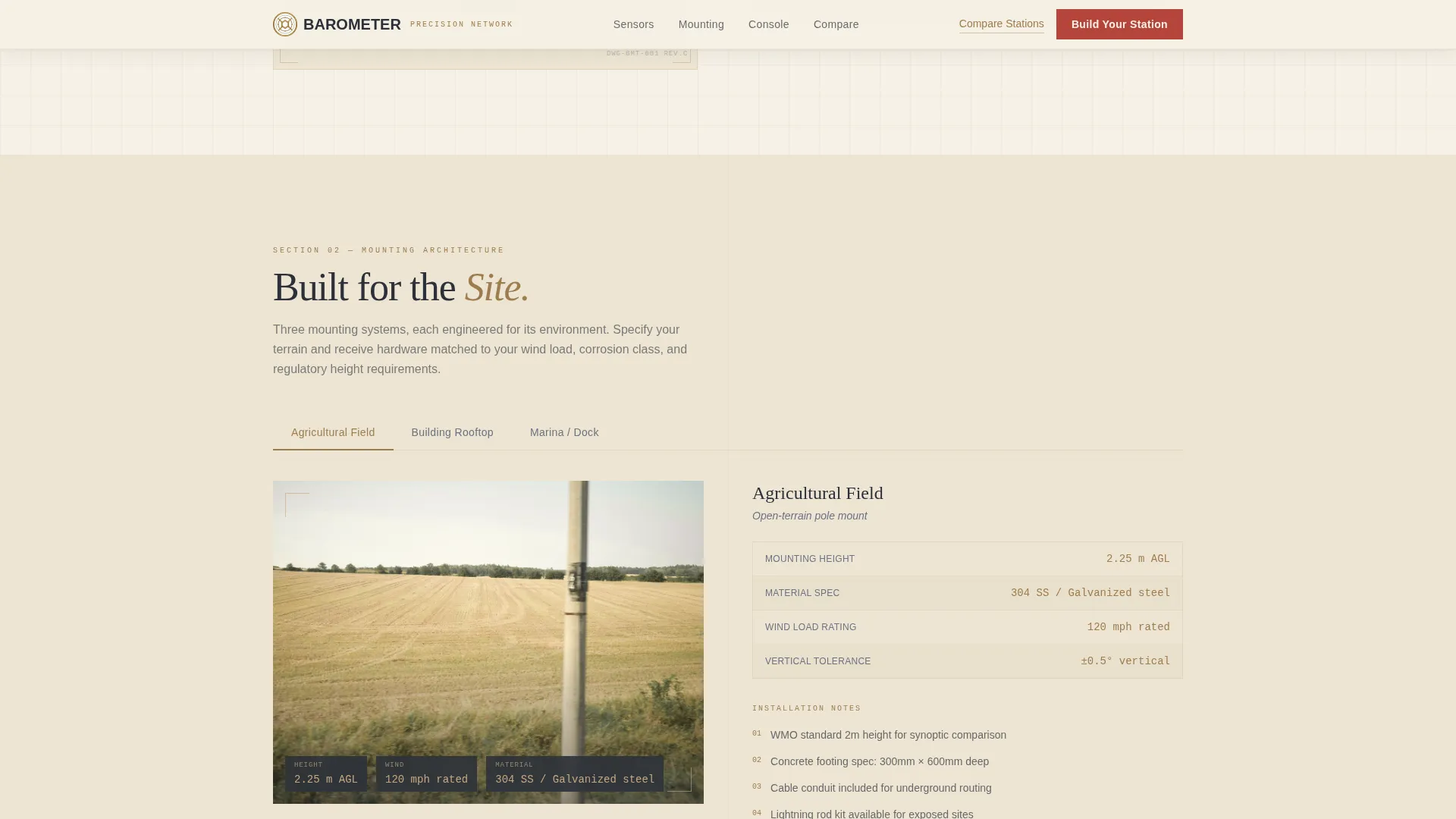
A dedicated section renders roof, pole, and field mounting environments in blueprint line-art over cream backgrounds. Engineering tolerances and material specifications are displayed in the same drafting-paper visual language, reinforcing the precision of the product.
Console and Software Dashboard Section
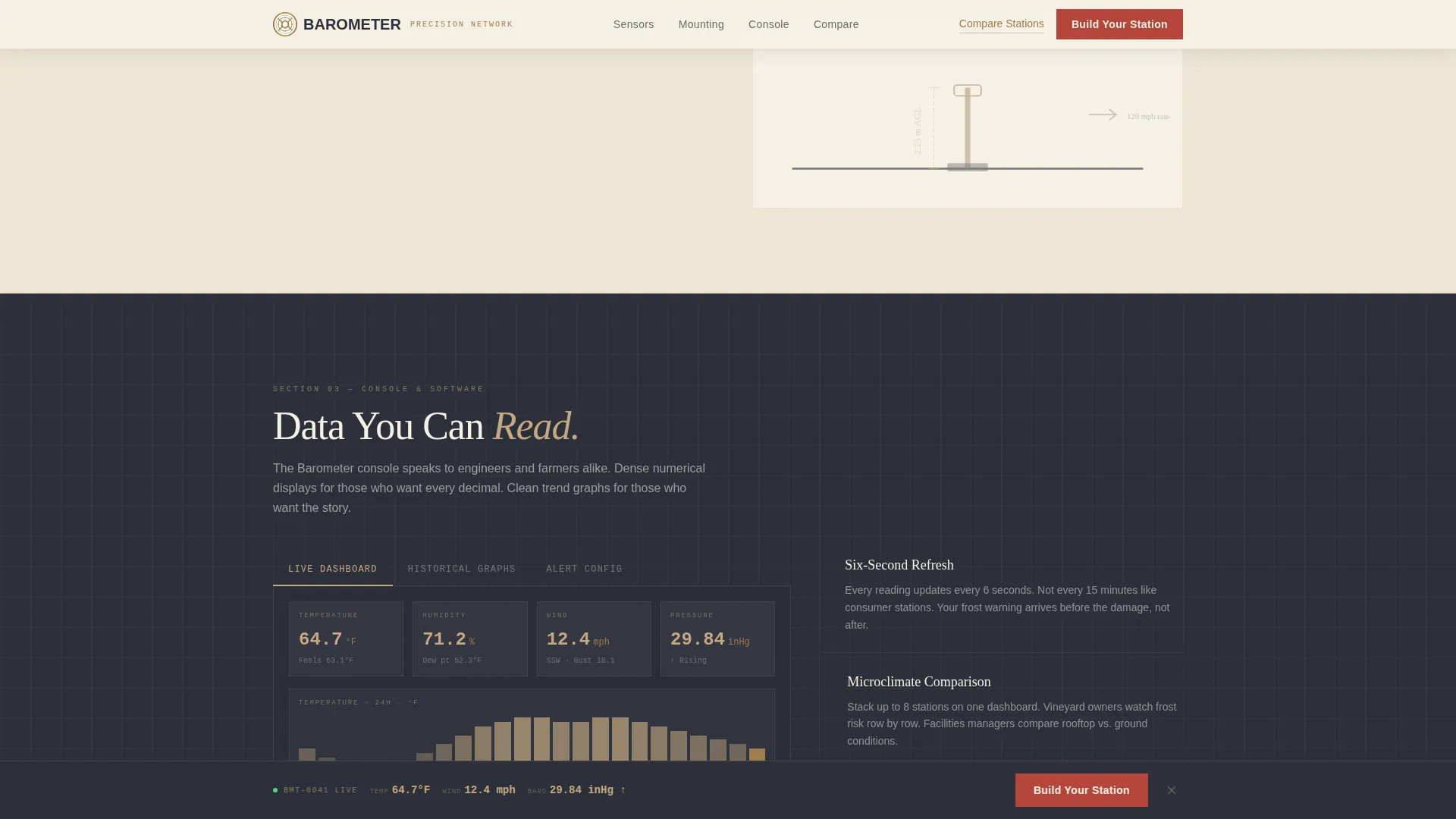
This section shows dashboard screenshots with real weather data, historical graphs, and alert configuration panels. It gives buyers a clear picture of what the data looks like once the station is installed and running.
Four-Step Guided Configurator
The configurator opens from the primary call-to-action button and walks buyers through four steps: environment type, sensor modules with live price updates, console or app-only choice, and shipping with checkout. A sticky bottom bar re-surfaces the call to action after the sensor-array section so buyers can enter the configurator at any scroll depth.
Specification Comparison Table
A secondary navigation path labeled "Compare All Stations" links to a full specification table for buyers who already know what they want and prefer a direct side-by-side view over the guided flow.
Page sections overview
| Section | Purpose |
|---|---|
| Hero Split Layout | Introduce the station with a golden-hour photo, headline, and call-to-action button |
| Live Data Ribbon | Show real demo station readings to establish credibility immediately |
| Sensor Array Diagram | Walk through each instrument module with annotated exploded-diagram callouts |
| Mounting Architecture | Display roof, pole, and field environments with blueprint specs |
| Console and Software | Present the dashboard, historical graphs, and alert configuration |
| Station Configurator | Guide buyers through a four-step build: environment, sensors, console, checkout |
| Footer | Single-row linear footer with navigation and brand links |
Design & branding system
The visual identity follows an Engineering Blueprint theme grounded in a Warm Stone color palette. The overall impression is a handcrafted 1890s observatory logbook: technical, precise, and trustworthy.
- Colors: drafting-paper cream (#F5F0E6) for backgrounds, deep storm slate (#2C3039) for body text, quarried sandstone (#C4A882) for card surfaces and section dividers, weathered instrument brass (#9E7C4E) for data values and icon strokes, and surveyor's red (#B5453A) reserved strictly for calls to action and alert states
- Typography: Fraunces serifed typeface for headlines, DM Sans for body copy and interface labels, and IBM Plex Mono for all numeric data values to reinforce the instrument-panel aesthetic
Mobile & speed optimization
Barometer is designed desktop-first to accommodate data-dense instrument panels, with full mobile support built in throughout.
- Static sections use Server Components to keep load times lean, while the configurator and live-data ribbon are handled as Client Components for interactive responsiveness
- Scroll-reveal callout animations, blueprint line-draw effects, and configurator step transitions are set to medium intensity so they enhance the experience without slowing the page on smaller devices
How this template helps you convert
The conversion path in Barometer is designed to earn the sale through understanding, not pressure.
- The spatial, section-by-section layout builds mechanical familiarity before the buyer encounters a price, so the configurator feels like a natural conclusion rather than a cold ask.
- The sticky call-to-action bar re-surfaces after the sensor array section, capturing buyers who are ready to configure without requiring them to scroll back to the top.
Other information about this template
Barometer is built for the prosumer and professional precision weather instrumentation market, covering both personal and institutional buyers.
- The template is localized for English (US) with imperial units throughout: degrees Fahrenheit, miles per hour, and inches of mercury for pressure readings
- Social proof elements are designed around specific deployment counts, named installation environments such as vineyard rows and municipal rooftops, and real station readings rather than generic testimonials
- The page style is Full-Width Immersive, making it well suited to hardware and IoT direct-sales contexts where sensory detail builds buyer confidence
Theme
Engineering Blueprint
Creative direction
Spatial & Architectural
Color system
Warm Stone
Style
Full-Width Immersive
Direction
Direct Sales
Page Sections
Cinematic Split Hero with Live Data
Exploded Sensor Array Diagram
Blueprint Mounting Architecture Section
Console and Software Dashboard
Four-step Guided Configurator
Specification Comparison Table
Related questions
Who is this landing page template designed for?
Does the template include a product configurator?
What visual style does this template use?
Can this template serve both individual and institutional buyers?
Is the template optimized for desktop or mobile use?