Precision Electronics Heat Treatment Landing Page
Anneal is a split-screen landing page template built for precision electronics heat treatment services. It pairs an annotated thermal profile infographic with microstructural cross-section visuals, walking visitors through each stage of the reflow process. An in-page profile calculator and a gated thermal profile guide PDF work together to earn trust and capture qualified leads from PCB fabricators, aerospace integrators, and EV battery engineers.
by Rocket studio
Quick summary
Anneal is a single-page, split-screen landing page template for precision electronics heat treatment services. It uses an Engineering Blueprint visual theme to walk visitors through reflow science, from preheat to cooling. A gated PDF guide and an interactive profile calculator work together to build credibility and convert technically minded buyers into qualified leads.
Who this template is for
This template is built for facilities and specialists who need to communicate technical process control to an equally technical audience. Generic service pages do not hold the attention of engineers who think in degrees and dwell times.
- PCB fabrication houses pursuing IPC Class 3 reliability standards
- Aerospace electronics integrators stress-testing flight hardware assemblies
- EV battery-management-system engineers who need solder joints to survive thousands of thermal cycles
What problem this template solves
Most industrial service pages fail to communicate why process parameters matter. They list capabilities without showing consequences. Engineers evaluating a heat treatment partner need to understand the science behind the numbers before they commit.
- Visitors leave without understanding how atmosphere control, ramp rate, and dwell duration affect joint quality
- A generic layout cannot convey the difference between a properly annealed joint and a cold joint under failure testing
- Without a trust-building interactive tool, gated content feels like a barrier rather than a resource
What you get with this template
You get a fully structured split-screen landing page that teaches and converts at the same time. Every section pairs an engineering parameter on one side with its physical microstructural consequence on the other.
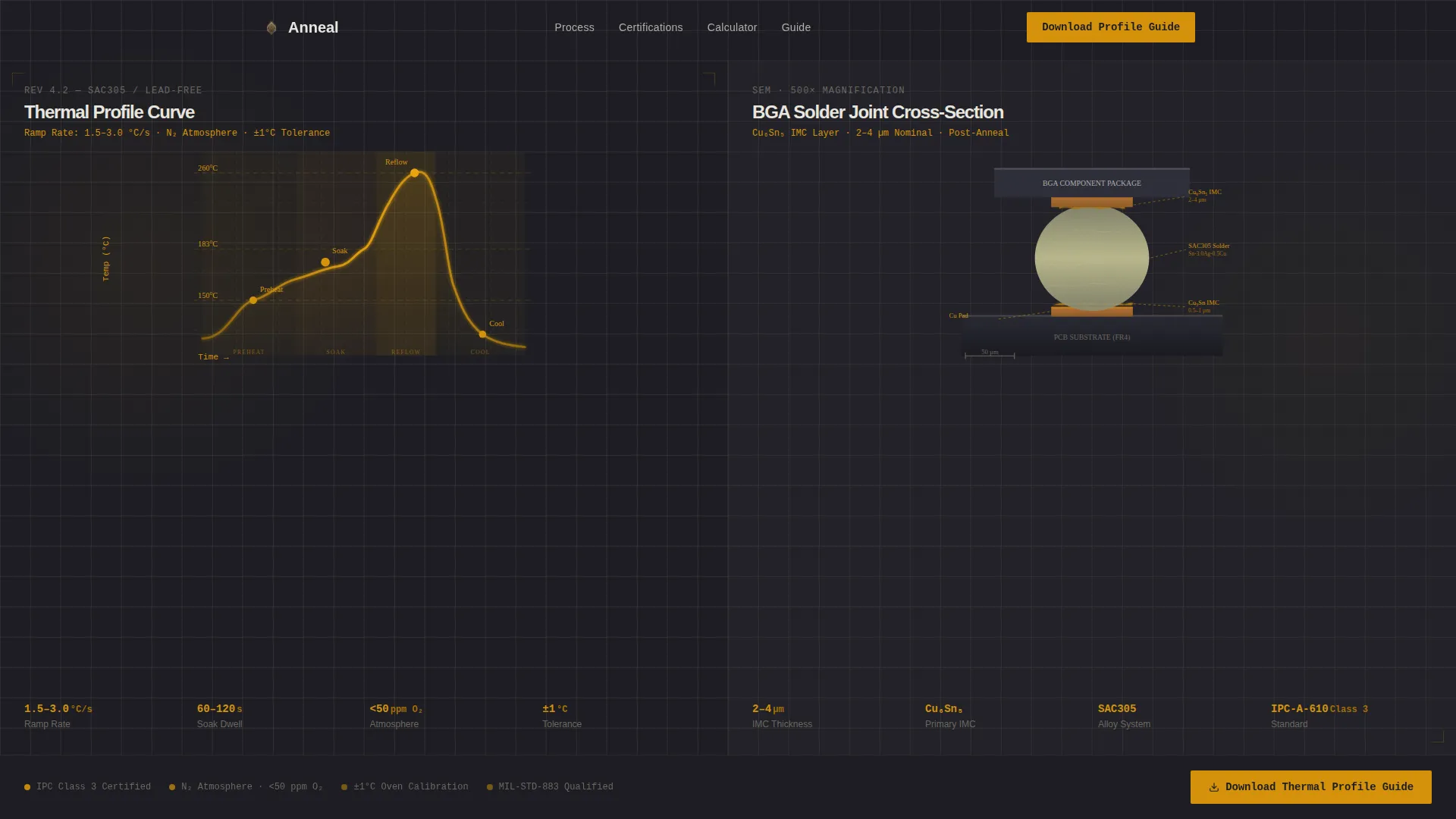
- A full-width infographic header showing an annotated thermal profile curve with real temperature markers at 150 °C, 217 °C, and 260 °C peak
- An interactive reflow profile calculator where visitors enter their alloy and board thickness to receive a recommended ramp-soak-cool curve instantly
- A mid-page and footer gated form offering a downloadable thermal profile guide covering SAC305, SnPb, and lead-free high-reliability alloys
Feature list
This section describes each core capability built into the Anneal template as defined by the source brief.
Annotated Thermal Profile Header
The header spans the full viewport width and splits into two equal halves. The left half displays a drawn thermal profile curve moving through preheat, ramp, soak, reflow, and cooling stages. Real temperature markers at 150 °C, 217 °C, and 260 °C peak are labeled in amber against charcoal backgrounds. The right half shows a magnified cross-section micrograph of a ball grid array solder joint with intermetallic layers labeled in amber. Every element uses thin blueprint-weight lines, with no stock photography.
Transparent Process Scroll Flow
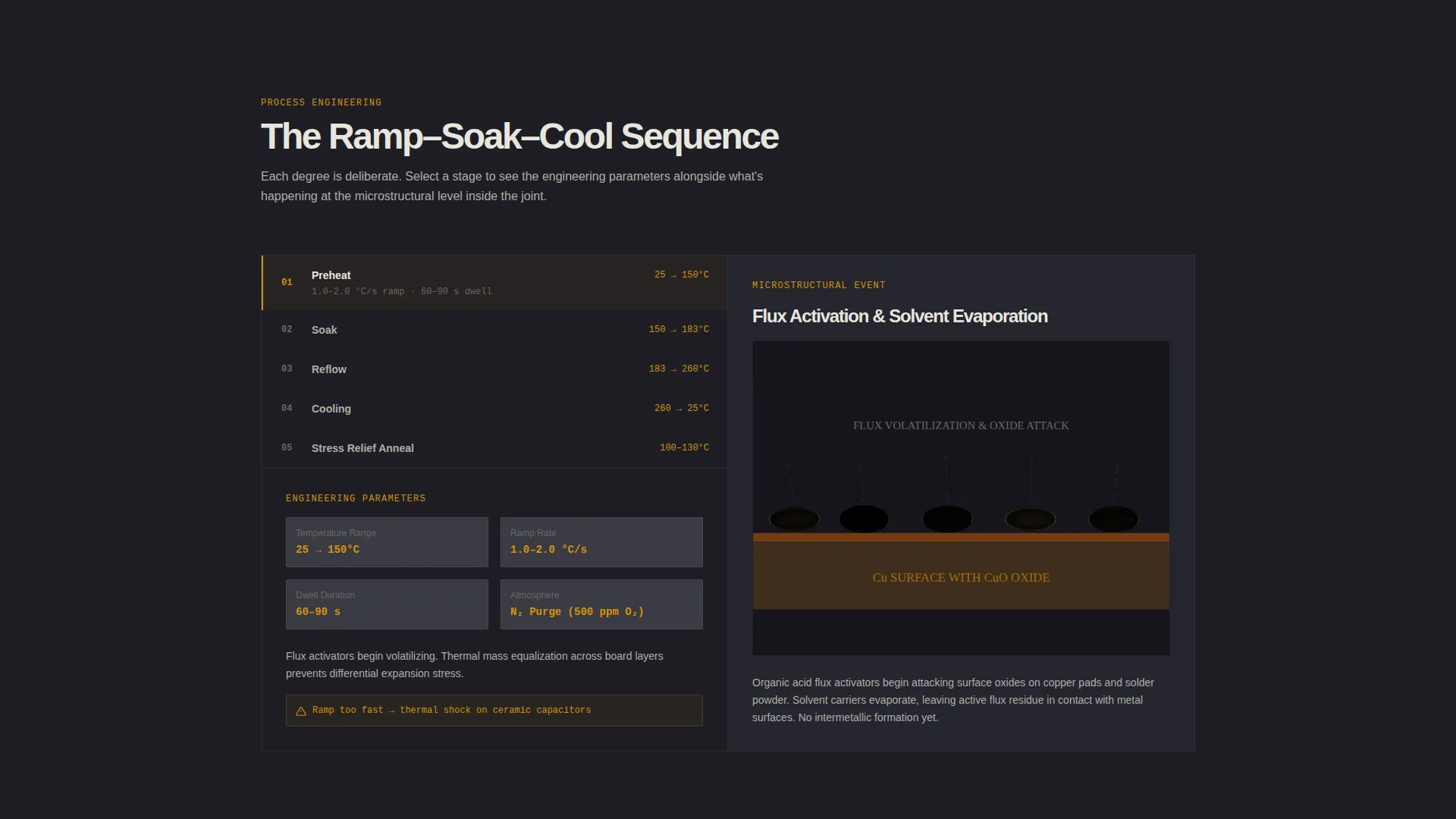
Each scroll section reveals one stage of the heat treatment workflow using the 50/50 split layout. The left panel shows the engineering parameter, including atmosphere composition, ramp rate in degrees per minute, and dwell duration. The right panel reveals the corresponding microstructural event, such as grain growth, oxide reduction, or intermetallic formation. The scroll sequence escalates in stakes, moving from standard profiles to failure-mode comparisons.
Failure-Mode Comparison Sections
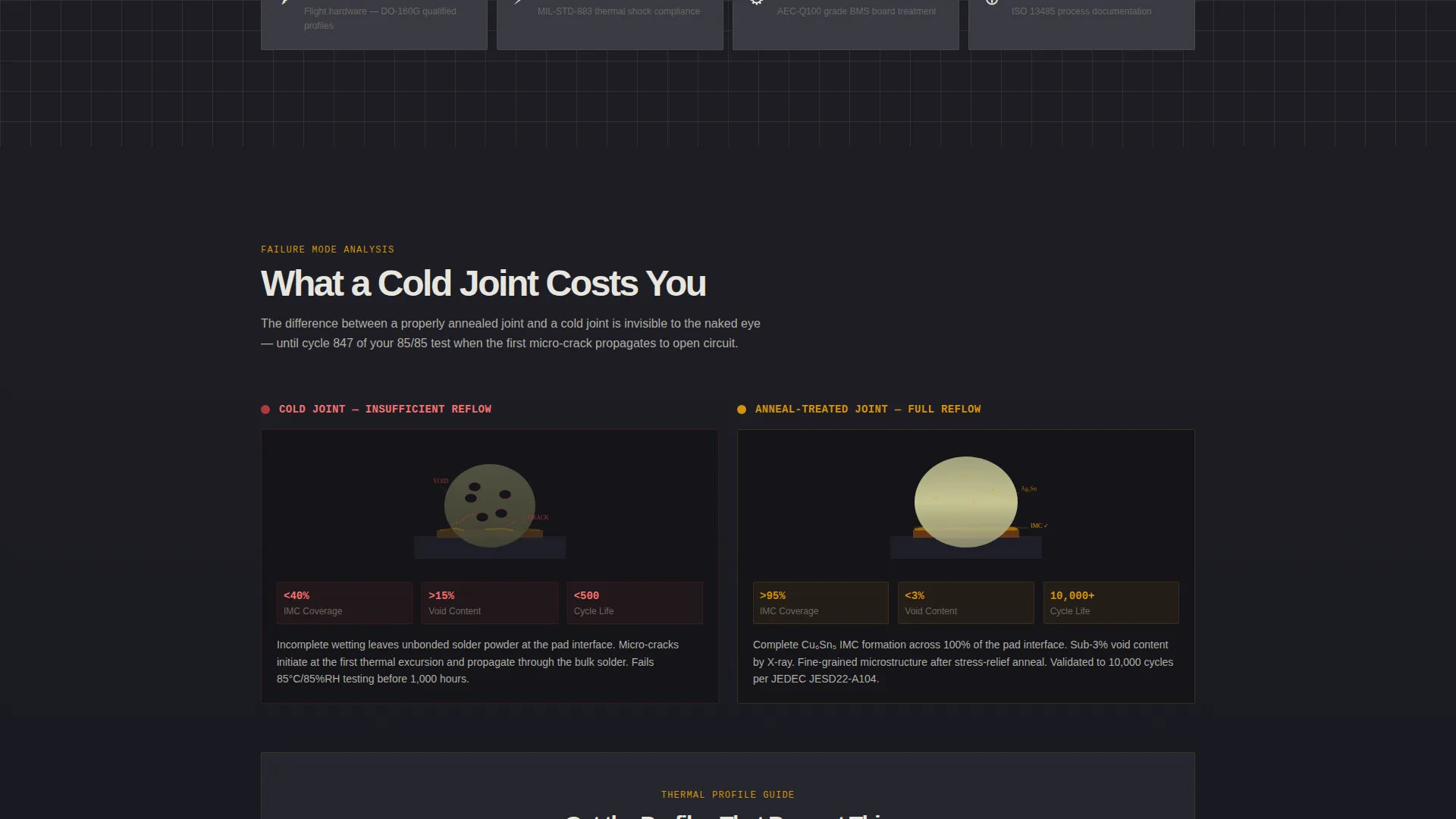
Later sections in the scroll sequence introduce direct visual comparisons. A cold solder joint is shown against a properly annealed joint. Voiding behavior under 85/85 humidity and temperature testing is illustrated. These comparisons help visitors understand that process control is the core product, not just a supporting detail.
In-Page Interactive Profile Calculator
An ungated interactive calculator is embedded directly in the page. Visitors enter their solder alloy and board thickness and receive a recommended ramp-soak-cool curve immediately. This tool earns trust before the gated asset requests contact details, lowering the perceived cost of the conversion step.
Gated Thermal Profile Guide Form
The primary call to action appears twice: once at the midpoint of the page and again in the footer. The form collects a work email address first, then asks for component type using a selection between surface-mount technology, through-hole, ball grid array or chip-scale package, and power module. A dropdown then captures the visitor's industry vertical. The gated asset is a comprehensive PDF covering reflow profiles for multiple alloy types.
Engineering Blueprint Visual System
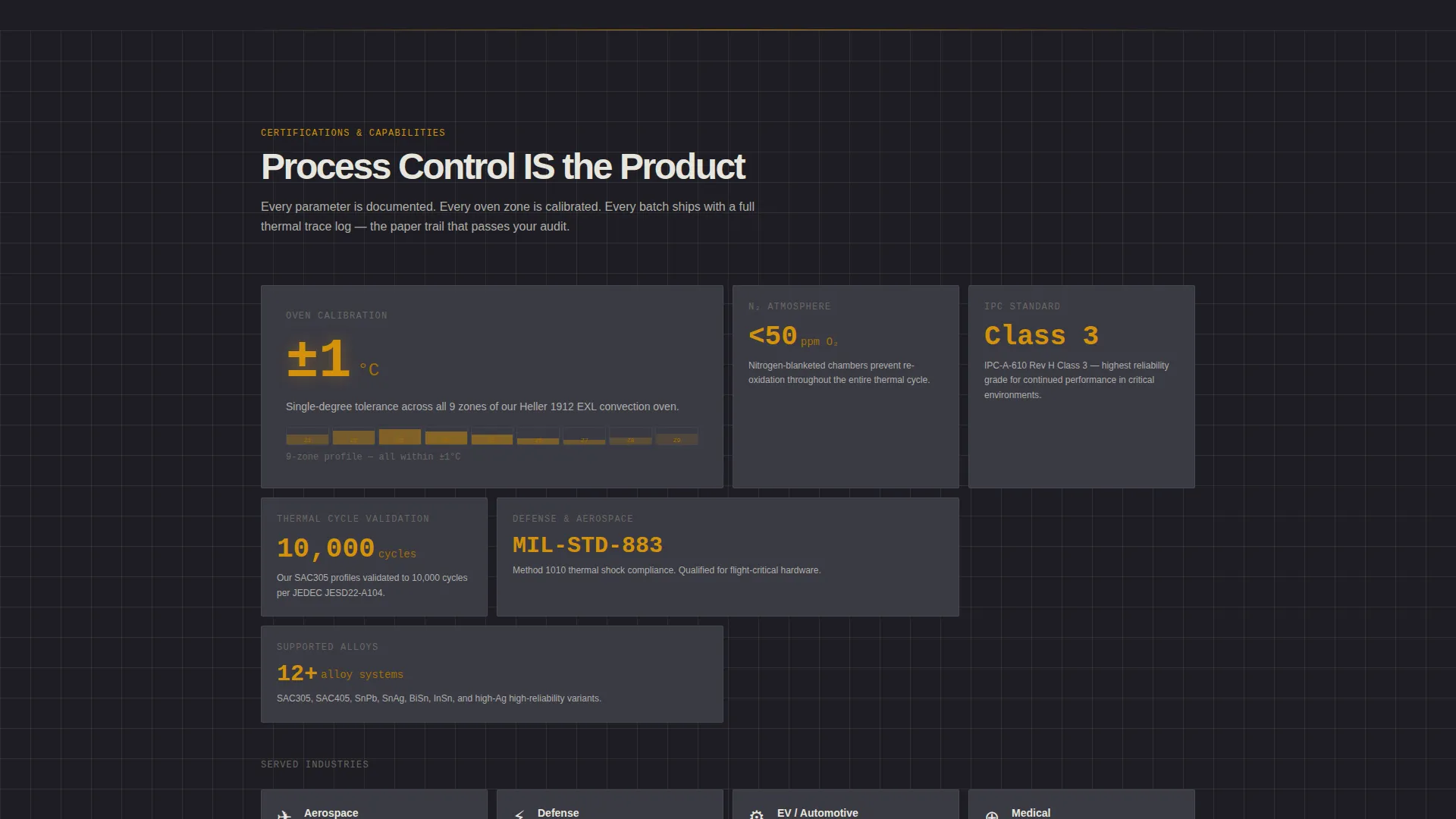
All drawn elements use thin line weights against deep charcoal backgrounds, mimicking internal process-engineering documents. Molten amber highlights every interactive element, data callout, temperature value, and process stage marker. Etched-line white is used for body text and technical diagrams. The result feels like a cross-section metallography slide: dark field, single bright grain boundary.
Page sections overview
| Section | Purpose |
|---|---|
| Full-width header | Displays annotated thermal profile curve and BGA joint micrograph side by side |
| Preheat stage panel | Introduces initial atmosphere conditions and their effect on oxide layers |
| Ramp stage panel | Shows ramp rate parameters alongside grain boundary migration visuals |
| Soak stage panel | Explains dwell duration and intermetallic compound formation |
| Reflow stage panel | Covers peak temperature parameters and solder joint coalescence |
| Cooling stage panel | Illustrates controlled cooling rates and microstructural stabilization |
| Failure-mode comparison | Contrasts cold joints and voiding against properly annealed results |
| Profile calculator embed | Ungated interactive tool for instant ramp-soak-cool curve recommendations |
| Mid-page gated form | Primary call to action capturing work email, component type, and industry vertical |
| Footer gated form | Repeated call to action for thermal profile guide PDF download |
Design & branding system
The visual identity follows an Engineering Blueprint theme. Every color choice references a real material or process state, making the palette feel purposeful rather than decorative.
- Deep furnace charcoal (#1E1E24) covers primary backgrounds; machined graphite (#3A3A44) fills secondary panels
- Molten amber (#D4920B) marks every interactive element, temperature callout, and process stage indicator
- Etched-line white (#E8E6DF) is used for body text and all technical diagram linework
Mobile & speed optimization
The split-screen layout is designed to restack cleanly at smaller viewport widths, keeping each panel readable without horizontal scrolling. The blueprint linework style avoids heavy image assets by relying on drawn vector elements.
- The 50/50 panels restack vertically on smaller screens so engineering parameters and microstructural visuals remain paired
- Drawn blueprint-weight line illustrations replace photographic assets, reducing file weight across sections
How this template helps you convert
The page is structured to move technically skeptical visitors through a trust arc before asking for contact details. The interactive calculator removes friction by delivering value before the gated form appears.
- The annotated header and scroll-through process sections establish credibility through visible engineering depth, so visitors arrive at the calculator already engaged.
- The ungated interactive profile calculator delivers immediate, personalized value, making the subsequent gated form feel like a natural next step rather than a cold data request.
- The mid-page and footer form placements ensure the call to action appears at both the moment of peak interest and at the end of the full reading experience.
Other information about this template
The Anneal template sits within the Manufacturing and Industrial category, specifically serving the Electronics Manufacturing and Electronics Heat Treatment niche. It is a strong fit for any business that needs to communicate technical service depth to an engineering-led buying committee.
- The template style is Split Screen (50/50), with the left and right panels carrying distinct but complementary information throughout the scroll
- The creative direction is Transparent Process, meaning the page structure itself mirrors the step-by-step logic of the heat treatment workflow
- The header concept is Infographic, presenting real process data visually rather than relying on written summaries alone
- The landing page direction is Content and Resource delivery, using a downloadable guide as the primary conversion asset
- The color system is Charcoal and Amber, referencing furnace chamber conditions and the thermal energy applied during processing
Theme
Engineering Blueprint
Creative direction
Transparent Process
Color system
Charcoal & Amber
Style
Split Screen (50/50)
Direction
Content/Resource
Page Sections
Annotated Thermal Profile Header
Transparent Process Scroll Sections
Failure-mode Comparison Panels
Ungated Interactive Profile Calculator
Dual-placement Gated Guide Form
Engineering Blueprint Visual System
Related questions
What industries is this landing page template designed for?
What is the primary call to action on this template?
Does the template include an ungated tool for visitors who are not ready to convert?
What alloys does the thermal profile guide PDF cover?
Can this template be adapted for a different electronics manufacturing service?



