Comprehensive Wealth Protection Landing Page Template
Shield is a single-page umbrella insurance landing page built for mid-career financial advisors targeting dual-income households. It uses FAQ-driven comparison tables, an animated jury award counter, and a three-step progressive disclosure lead form to convert asset-conscious visitors into qualified consultations. The design follows a dark-navy Data Command aesthetic with gold call-to-action accents.
by Rocket studio
Quick summary
Shield is a comparison table landing page for mid-career umbrella insurance advisory. It speaks directly to dual-income households who have accumulated real assets but carry a dangerous coverage gap. The page scrolls like a conversation with a trusted advisor, stacking evidence through three FAQ sections before presenting the lead generation form.
Who this template is for
This template is built for financial professionals and insurance advisors who work with high-earning households that need umbrella liability coverage. It is equally useful for independent agents presenting a polished, credibility-first client experience.
- Insurance advisors and brokers targeting households earning $180,000 to $400,000 annually
- Financial planners who refer clients to personal liability coverage as part of wealth protection
- Mid-career professionals evaluating umbrella coverage for themselves, using the page as a guided self-assessment
What problem this template solves
Most households at this income level carry solid auto and home policies but have never mapped what happens when those limits run out. A single personal liability lawsuit can eliminate decades of accumulated wealth. This template makes that exposure visible and quantifiable, then offers a clear next step.
- There is no easy way to show a prospect the gap between what they carry and what they actually need
- Cost objections stall decisions because most people have no benchmark for what umbrella coverage actually costs
- Standard insurance pages feel transactional; this template feels like professional counsel
What you get with this template
You get a fully structured, single-page lead generation layout designed around a financial advisory use case. Every section earns the next click through evidence, not pressure.
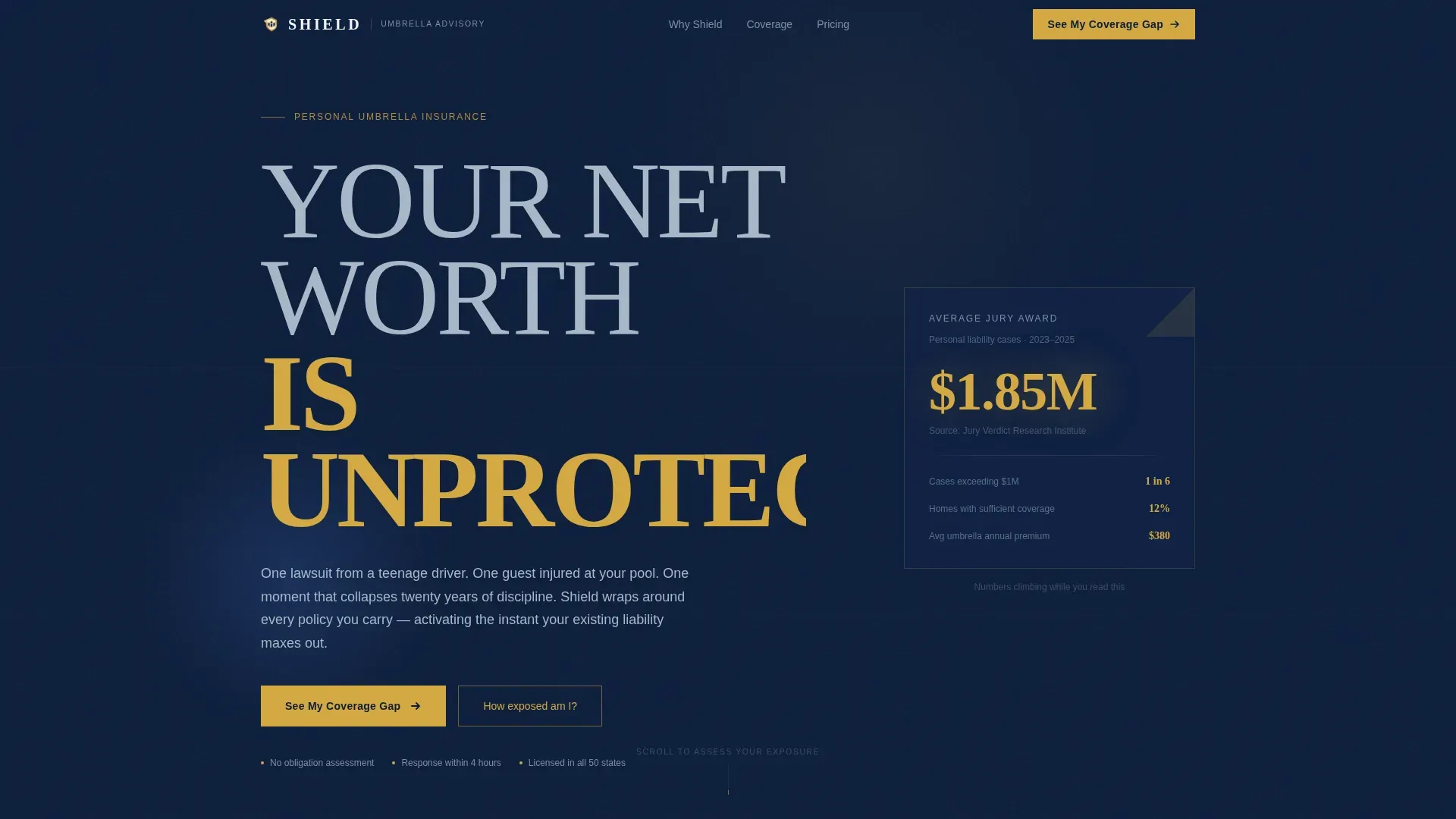
- A hero section with a Stacked Type Tower header and an animated counter showing average jury award figures climbing past $1 million
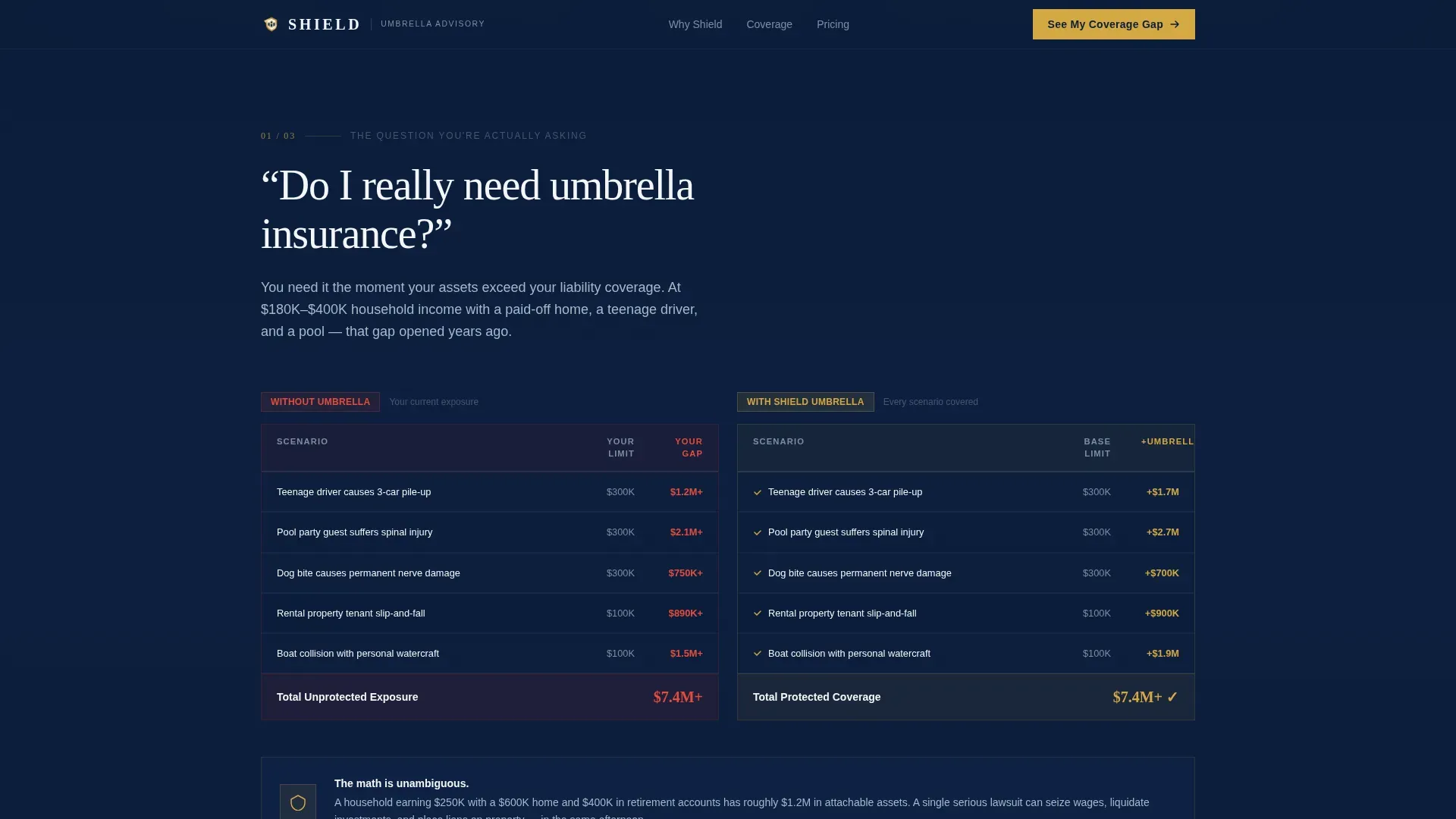
- Three FAQ-anchored scroll sections, each pairing a real search question with a comparison table or cost benchmark
- A three-step progressive disclosure lead form plus a secondary email capture path tied to a downloadable Asset Exposure Calculator
Feature list
A paragraph introduces the features below. This template packages a specific set of interactive and layout capabilities designed for high-stakes financial services conversion.
Animated Jury Award Counter
The hero section opens with a live counter that ticks upward through average personal liability jury award figures, stopping past $1 million. The animation creates immediate, data-backed urgency without using a single fear-based headline.
FAQ-Driven Comparison Tables
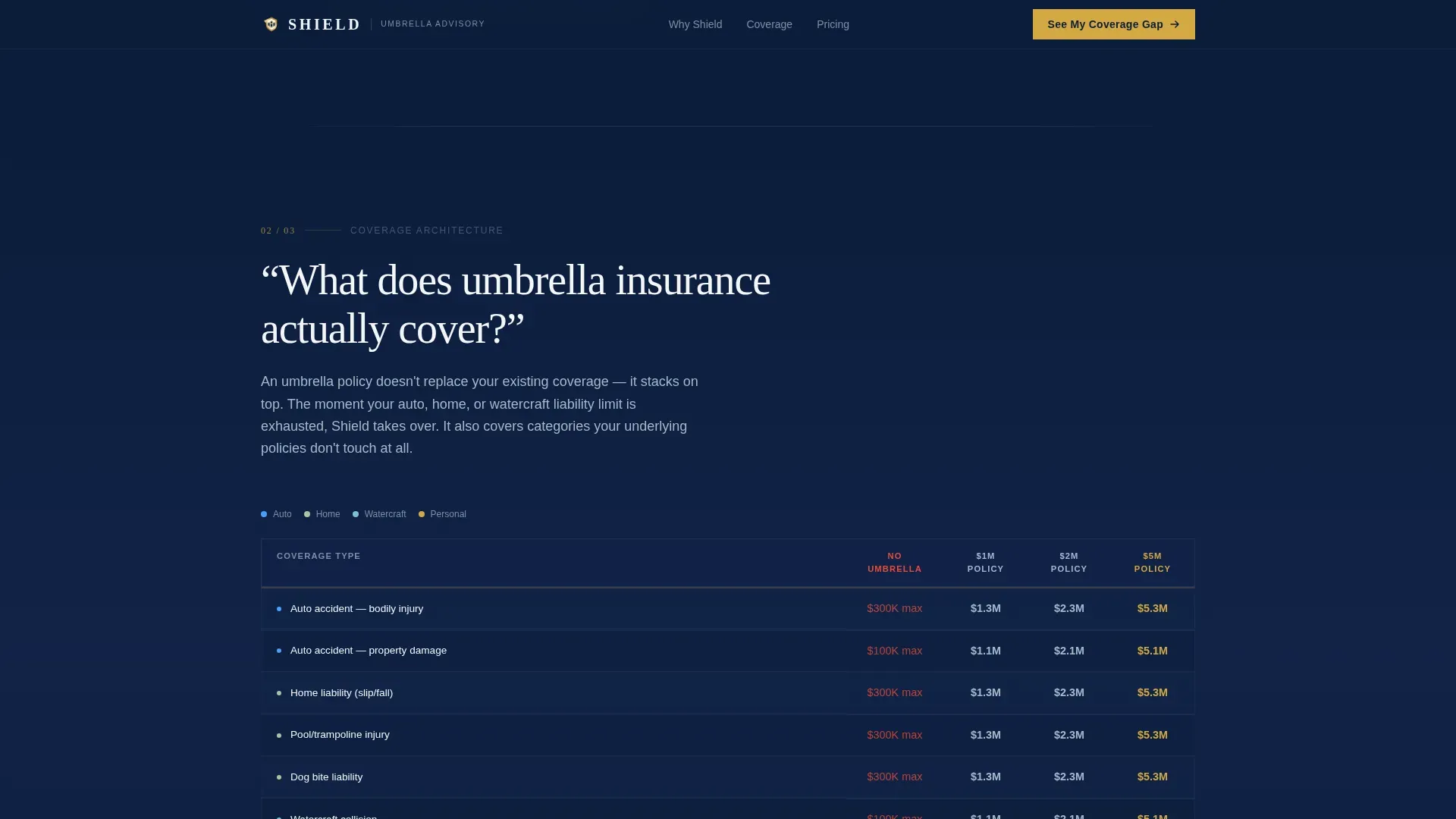
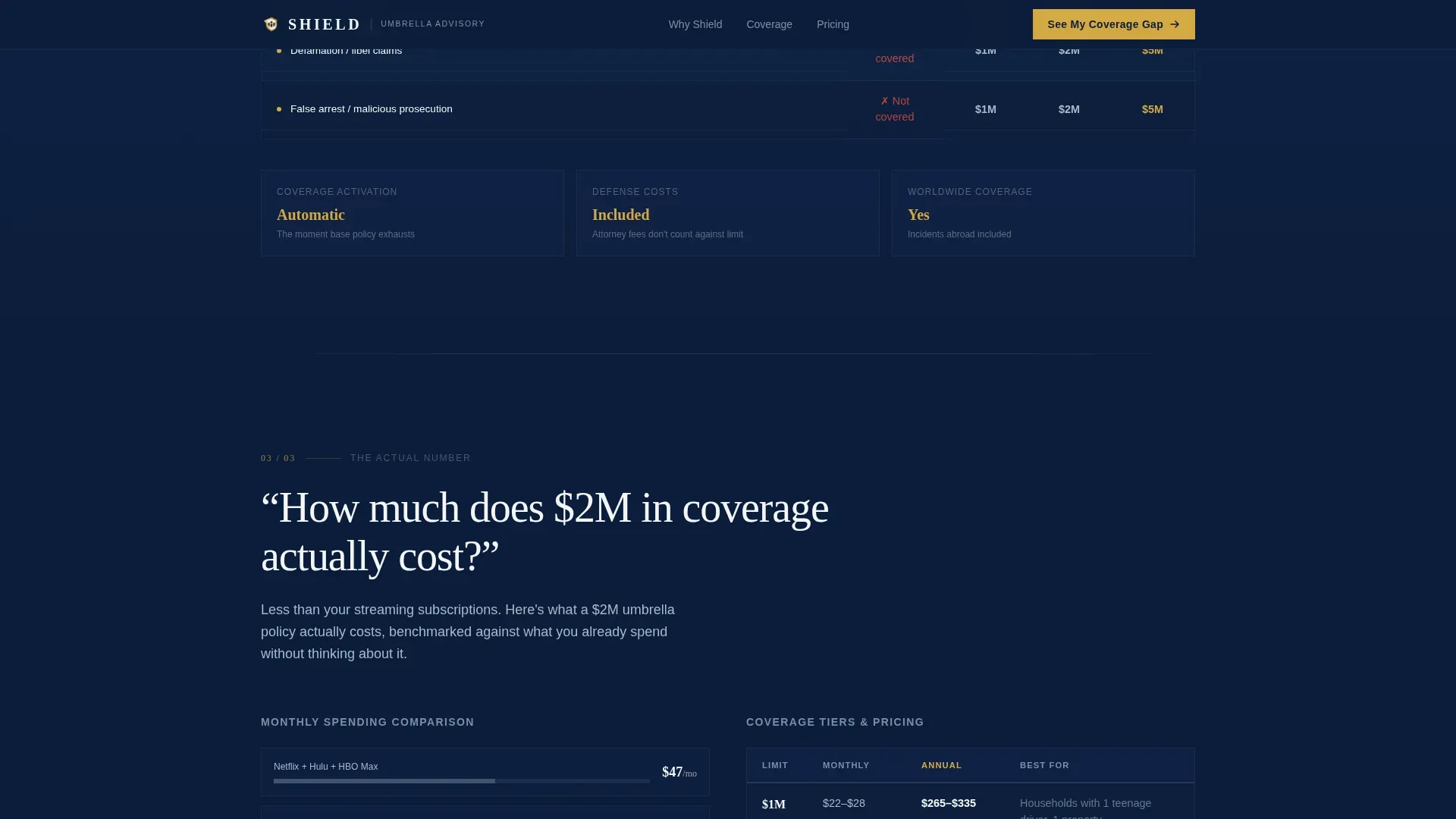
Three scroll sections each open with a question real prospects type late at night. Each question is answered with a structured comparison table: coverage with versus without an umbrella policy, asset exposure at $1 million, $2 million, and $5 million limits, and monthly cost benchmarked against everyday spending.
Three-Step Progressive Disclosure Form
The lead form appears after the third FAQ section, once evidence has built. Step one collects household income range and state. Step two captures existing policy types via checkboxes. Step three records name, email, and a preferred callback window. No typing is required until the final step.
Secondary Email Capture Path
A downloadable Asset Exposure Calculator PDF serves as a second conversion path. Visitors who are not ready to book a consultation can leave their email and receive a practical tool. This captures leads at an earlier stage of consideration.
Sticky FAQ Sections with Scroll Reveal
Each FAQ section uses sticky positioning and scroll-reveal word animations. The layout keeps the active question visible as supporting content unfolds below, reinforcing the feeling of a live advisory conversation.
Data Command Visual Layout
The page uses a dark-navy background system, polished steel secondary text, crisp white card surfaces, and signal gold reserved for call-to-action elements and key data figures. Typography pairs Fraunces serif display headers with DM Sans body text for a wealth-office aesthetic.
Page sections overview
| Section | Purpose |
|---|---|
| Hero Tower | Display animated jury counter and primary headline |
| FAQ Section One | Answer "Do I really need it?" with coverage gap table |
| FAQ Section Two | Answer "What does it cover?" with asset exposure scenarios |
| FAQ Section Three | Answer "How much does it cost?" with cost benchmarks |
| Lead Gen Form | Capture qualified leads via three-step progressive form |
| PDF Secondary call to action | Collect email-only leads with downloadable calculator |
| Footer | Single-row linear footer with essential links |
Design & branding system
The visual identity follows a Data Command theme. Every color choice signals precision and institutional authority, communicating that serious asset protection requires a serious presentation.
- Core palette: deep command navy (#0B1D3A) for all backgrounds, polished steel (#7B8FA1) for secondary text and table borders, crisp white (#F4F6F8) for card surfaces, and signal gold (#D4A843) reserved for call-to-action buttons, toggle states, and key data figures
- Typography: Fraunces serif for large display headers, DM Sans for body copy and form user interface elements
- The hero header scales the phrase "IS UNPROTECTED" in gold at near-bleed size, making the typography itself the visual architecture
Mobile & speed optimization
The page is built desktop-first to honor the 40th-floor-window visual metaphor, with the hero typography and comparison tables designed to fill large screens. Responsive behavior scales all elements cleanly to tablet and mobile viewports.
- Static page sections use server-side rendering; the animated counter and multi-step form run as client-side components
- Comparison tables reflow to vertically stacked layouts on smaller screens so no data is hidden or truncated
- The three-step form is touch-friendly, using dropdown selectors and checkboxes rather than free-text fields in the first two steps
How this template helps you convert
The page is structured as a persuasion sequence, not a brochure. Every section reduces a specific objection before the lead form appears.
- The animated jury award counter in the hero quantifies the risk before the visitor reads a single word of body copy, making the threat concrete and personal.
- The three FAQ sections answer the three questions that stall most umbrella insurance decisions: whether coverage is necessary, what it actually protects, and whether it fits a household budget.
- The lead form arrives only after all three objections are addressed. The primary call to action reads "See My Coverage Gap," framing the click as a logical next step rather than a sales commitment.
Other information about this template
This template is built specifically for the United States market. All data references, currency formatting, and date conventions follow United States standards (USD, MM/DD/YYYY). The page supports both advisor-to-client presentations and direct-to-consumer digital campaigns.
- Localization: United States only; currency in USD and date format in MM/DD/YYYY
- Animation level: high, including counter animation, scroll-reveal word sequences, sticky FAQ section behavior, and multi-step form transitions
- Interactivity level: high, including three-step form logic, comparison table layouts, and FAQ accordion components
- The footer uses a Pattern 1 linear single-row layout, keeping the close of the page clean and non-distracting
- This template is well-suited for advisors running paid search campaigns targeting umbrella insurance queries, given the FAQ structure mirrors common late-night search patterns
Theme
Data Command
Creative direction
FAQ-Driven
Color system
Navy Authority
Style
Comparison Table
Direction
Lead Generation
Page Sections
Animated Jury Award Counter
Faq-driven Comparison Tables
Three-step Progressive Disclosure Form
Secondary Email Capture with PDF
Stacked Type Tower Hero
Data Command Color and Type System
Related questions
What kind of professional should use this template?
Can I update the figures in the comparison tables?
How does the three-step form reduce lead friction?
What is the Asset Exposure Calculator PDF used for?
Is this template built for United States markets only?



