Cinematic Business Podcast Landing Page Template
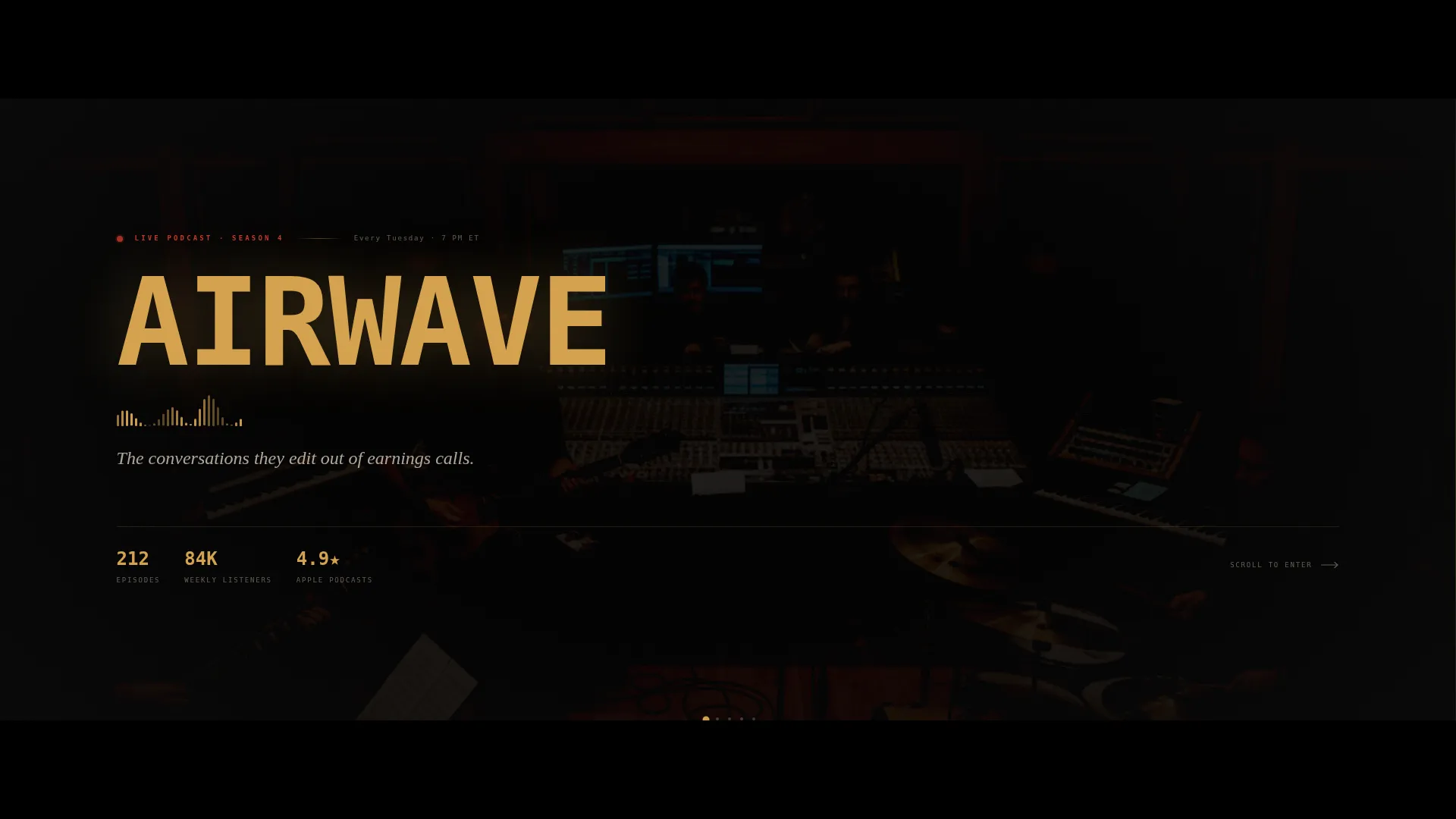
Airwave is a horizontal scroll landing page built for a cinematic business podcast. It uses a Neo-Retro dark visual system, a Cinematic Letterbox header, and scroll-triggered scene panels to draw visitors into the show's world. The page is built to drive live event registrations and passive email sign-ups from mid-career operators and founders.
by Rocket studio
Quick summary
Airwave is a single-page, horizontal scroll landing page designed for a warehouse-recorded business podcast. It pulls visitors into the show's atmosphere through a letterbox film header, scene-by-scene panel progression, and a signal-red call to action that pushes toward live event registration. The design is dark, warm, and cinematic from the first frame.
Who this template is for
This template is built for business podcast creators who want their landing page to feel as compelling as the show itself. It fits shows where production quality and credibility matter to the audience.
- Business podcast hosts inviting guests to live studio tapings
- First-time founders or agency owners launching a recorded conversation format
- Operators and media producers who want a high-atmosphere page without starting from scratch
What problem this template solves
Most podcast landing pages feel like a feed embed dropped onto a blank background. They do nothing to communicate atmosphere, build anticipation, or convert a casual browser into a registered attendee.
- Visitors scroll past without any sense of the show's energy or intimacy
- There is no clear path from "interested listener" to "registered live attendee"
- Generic layouts fail to reflect the editorial weight of a serious business podcast
What you get with this template
You get a complete, ready-to-customize horizontal scroll landing page structured around four cinematic scene panels. Every section has a defined role in the visitor journey, from the cold open to the final registration form.
- A Cinematic Letterbox header with a slow dolly animation, monospaced slab serif title type-on effect, and animated analog waveform
- Four scroll-triggered panels covering the cold open, guest reveal, episode archive, and live registration module
- A dual-path conversion system with a primary "Claim Your Seat" registration form and a secondary passive email capture option
Feature list
This template is built around a tight set of purposeful components. Each one serves the show's atmosphere and the page's conversion goal.
Cinematic Letterbox Header
Thick black bars compress the viewport into a widescreen 2.39:1 ratio. Inside, a slow dolly shot moves toward two silhouetted figures at the oak table, backlit by amber light. The show title types itself letter by letter in a monospaced slab serif, with a subtle analog hum waveform animating underneath.
Horizontal Scroll Scene Panels
The page advances as a sequence of four cinematic scenes triggered by horizontal scroll. Each panel behaves like a new shot in a film, creating the sensation of scrubbing through a timeline rather than reading a web page.
Guest Portrait and Pull-Quote Panel
Panel two reveals the upcoming live episode guest in a full-bleed duotone portrait. A single oversized italic pull-quote sits beside it, designed to make the guest feel unmissable before a single episode is played.
Film Reel Episode Grid
Panel three presents the episode archive styled as a grid of film reel cards. Amber timestamps glow against black card backgrounds, giving the archive a stage-lit, tactile feel that rewards exploration.
Live Seat Registration Module
The final panel expands the persistent "Claim Your Seat" call to action into a full registration form. It collects first name, email, and one optional field asking what question the visitor would ask the guest, which also doubles as audience research input.
Scarcity Counter and Dual Conversion Path
A live-seat counter displays the number of remaining studio seats, making the in-person experience feel finite and exclusive. A secondary "Just Send Me Episodes" path sits below, capturing email with a single field for visitors not ready to commit to attending.
Page sections overview
| Section | Purpose |
|---|---|
| Cinematic Letterbox Header | Opens the page with a widescreen film frame, title type-on animation, and waveform |
| Guest Portrait Panel | Reveals the upcoming guest with a duotone portrait and oversized pull-quote |
| Episode Reel Grid | Displays the episode archive as amber-lit film reel cards |
| Studio Reveal Panel | Breaks the letterbox ratio with a behind-the-scenes studio photograph |
| Live Registration Module | Full registration form with scarcity counter and dual conversion paths |
Design & branding system
The visual identity follows a Neo-Retro theme built on the Cinematic Dark color system. Every color decision reinforces the feeling of a 1970s talk-show set rebuilt with modern lighting.
- Deep studio black (#0D0D0D) covers roughly eighty percent of every panel, keeping focus on content
- Warm analog amber (#D4A24E) lights typography, dividers, and timestamps like stage spotlights against the dark
- Faded marquee cream (#E8DCC8) holds body text for readable contrast without breaking the dark mood
- Signal red (#C0392B) appears exclusively on live indicators, the scarcity counter, and primary call-to-action elements
Mobile & speed optimization
The horizontal scroll layout is the dominant experience for this template, designed to perform at full atmosphere on wide screens. The panel structure and animation choices are built with intentional restraint.
- Scroll-triggered panel transitions are driven by lightweight animations that avoid unnecessary rendering overhead
- The letterbox header uses a single slow dolly sequence and a minimal waveform animation rather than heavy video autoplay
- Each panel is self-contained, so content loads progressively as visitors advance through the sequence
How this template helps you convert
The page is structured as a funnel from atmosphere to commitment. Every visual and copy decision builds toward one of two conversion actions.
- The persistent amber pill call to action appears at panel two and stays visible, reducing friction for visitors who decide early and want to register without scrolling to the end.
- The live-seat scarcity counter on the final panel earns urgency honestly by communicating that studio capacity is limited, giving visitors a real reason to act now rather than later.
- The optional question field on the registration form creates micro-commitment, making registrants feel like active participants rather than passive ticket holders.
Other information about this template
This template is designed as a standalone landing page for a single event cycle and can be refreshed panel by panel for each new taping. It lives at the intersection of media production and direct response design.
- The Neo-Retro theme and Cinematic Dark color system are built to feel distinctive in a category where most podcast pages default to white backgrounds and generic player embeds
- The template is suited to shows distributed through any standard podcast platform, as the page itself handles discovery and registration independently
- The behind-the-scenes studio photograph in panel four is a deliberate design choice to break the cinematic frame and humanize the production, building trust before the registration ask
- Page type is a landing page, not a multi-page website, keeping the visitor journey linear and focused on a single outcome per session



Theme
Neo-Retro
Creative direction
Cinematic Sequence
Color system
Cinematic Dark
Style
Horizontal Scroll
Direction
Event Registration
Page Sections
Cinematic Letterbox Header with Type-on Animation
Horizontal Scroll Scene Panel Layout
Duotone Guest Portrait and Pull-quote
Film Reel Episode Archive Grid
Live Seat Scarcity Counter
Dual Conversion Registration Module
Related questions
Can I update the template for each new episode taping?
Does the registration form include a passive email capture option?
What is the optional field in the registration form used for?
Is this template suited to a podcast without live tapings?
What does the behind-the-scenes panel in the template do?