Drone Training Landing Page Template
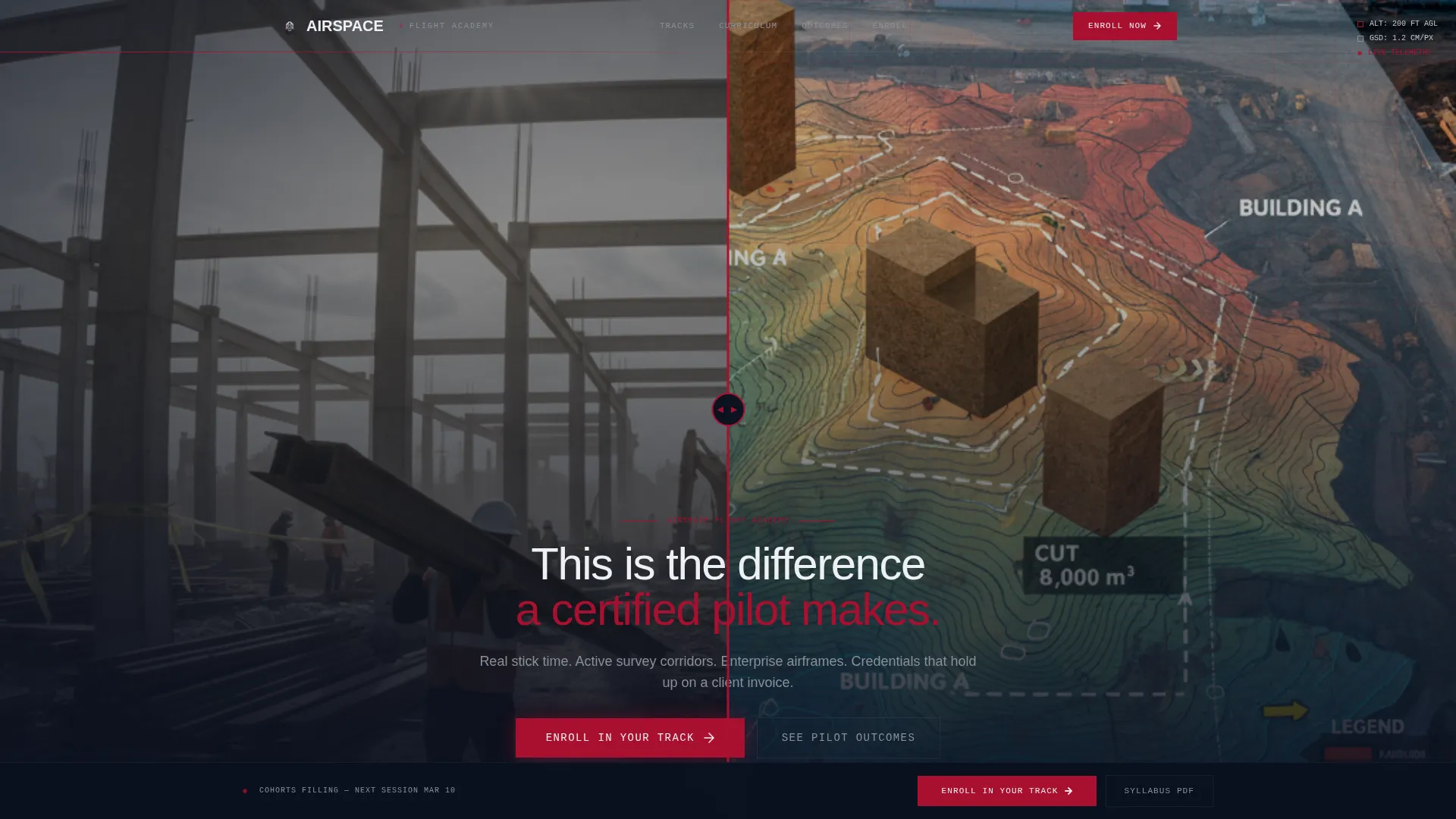
Airspace is a scroll-reveal landing page template built for drone training academies. It opens with a draggable Before/After viewport slider and unfolds three progressive transformation reveals as visitors scroll. The Engineering Blueprint visual system, inline three-step enrollment selector, and ROI data section make it purpose-built to convert site managers, videographers, and public-safety officers into paying students.
by Rocket studio
Quick summary
Airspace is a single-page, scroll-reveal landing page template designed for professional drone flight academies. It combines a draggable Before/After hero slider, three scroll-locked transformation reveals, a three-column certification track display, and an inline three-step enrollment flow. The dark Engineering Blueprint aesthetic signals clinical precision and earns trust before a visitor reads a single line of body copy.
Who this template is for
This template is built for drone training schools that sell direct enrollment to working professionals. It suits operators who need a high-converting page without building one from scratch.
- Construction site managers who want to bring aerial photogrammetry in-house by earning their Part 107 Remote Pilot Certificate
- Freelance videographers ready to add aerial production to their service offerings and rate cards
- Public-safety officers building small unmanned aircraft system programs for search-and-rescue operations
What problem this template solves
Most training school pages feel like plain course catalogs. They list topics but never show students what changes after they graduate. Airspace solves that directly.
- The Before/After hero and progressive scroll reveals show the gap between unqualified and certified in a single scroll session
- The ROI data section and contract-rate display reframe tuition as an investment, removing the main objection before the enrollment call to action appears
- The inline three-step selector removes friction by letting visitors choose a track, pick a cohort date, and pay without leaving the page
What you get with this template
You get a complete, ready-to-customize landing page structured around a high-stakes drone training narrative. Every section has a defined job, and none are decorative.
- A draggable Before/After viewport slider in the hero, three scroll-locked transformation reveal cards, and a sticky enrollment call-to-action button
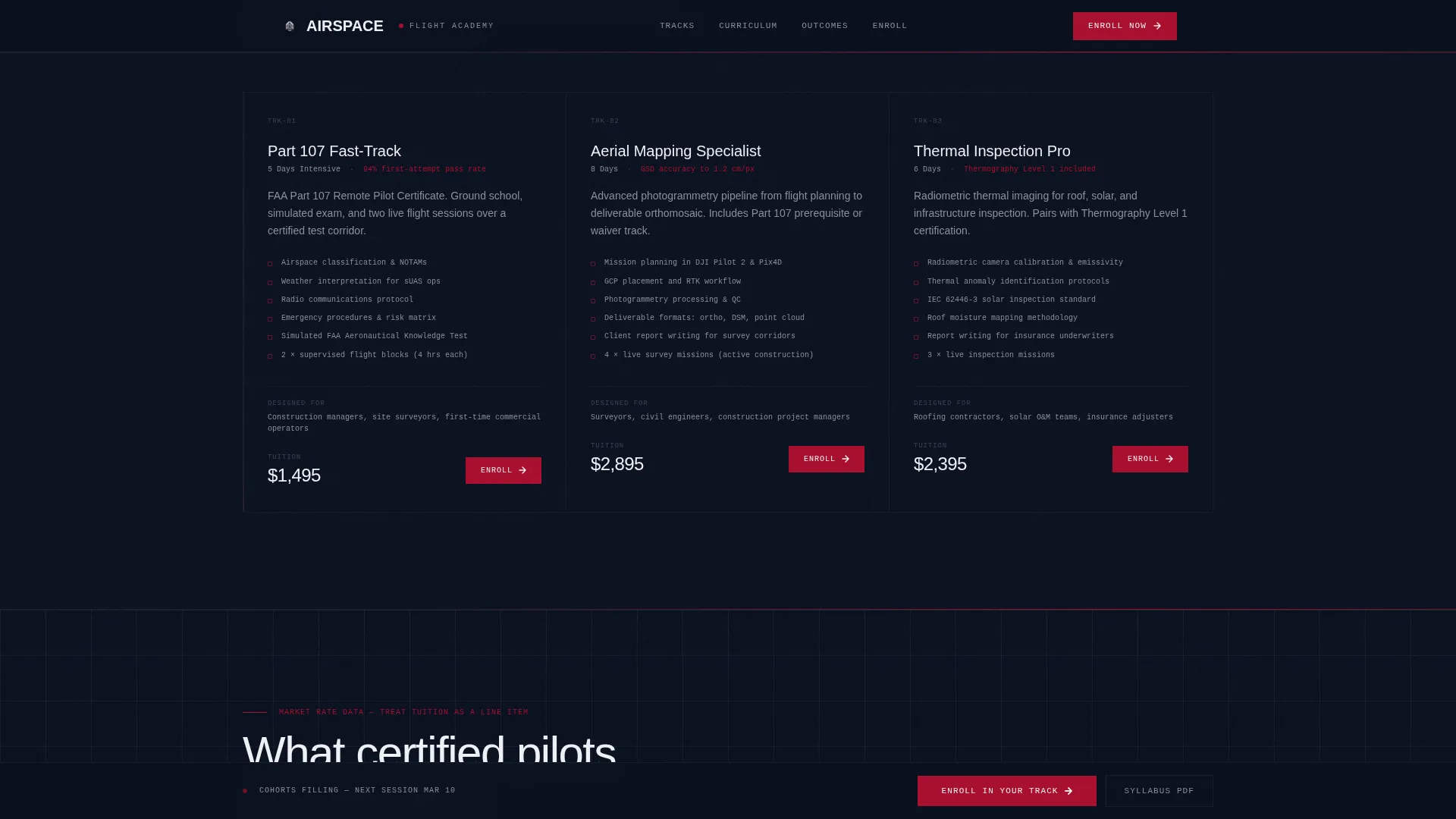
- Three certification track cards covering Part 107 Fast-Track, Aerial Mapping Specialist, and Thermal Inspection Pro, each presented in a distinct column
- A salary and contract-rate data table positioned directly above the enrollment selector, plus an email-gated syllabus download for undecided visitors
Feature list
This section covers the core interactive and structural capabilities built into the Airspace template.
Draggable Before/After Hero Slider
The header fills the full viewport with two versions of the same construction site. The left panel shows raw, desaturated, ground-level footage. The right panel reveals stabilized drone footage with orthomosaic overlay lines, elevation markers, and a Ground Sampling Distance readout. A centered drag handle lets visitors control the reveal themselves.
Scroll-Locked Progressive Reveals
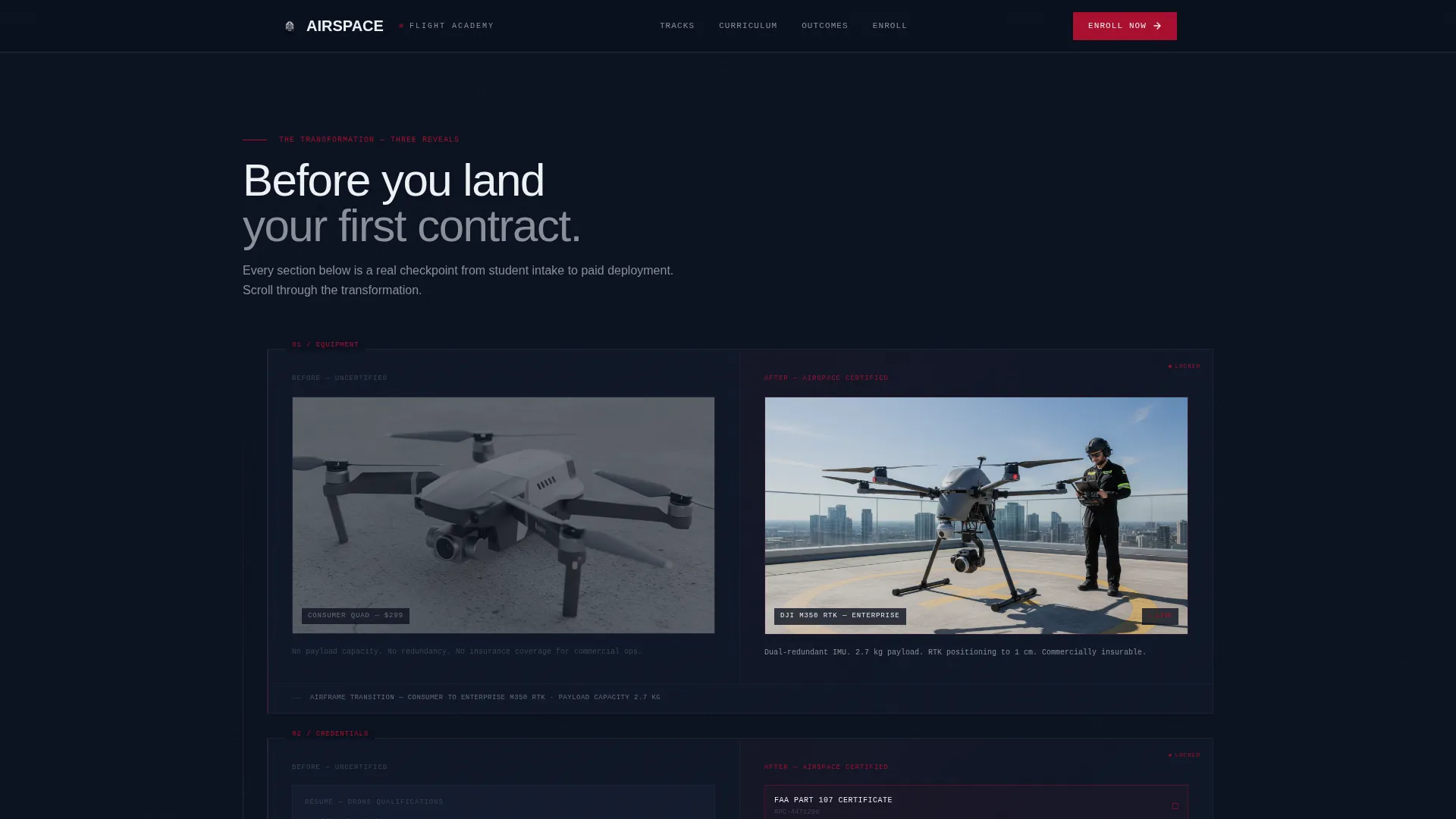
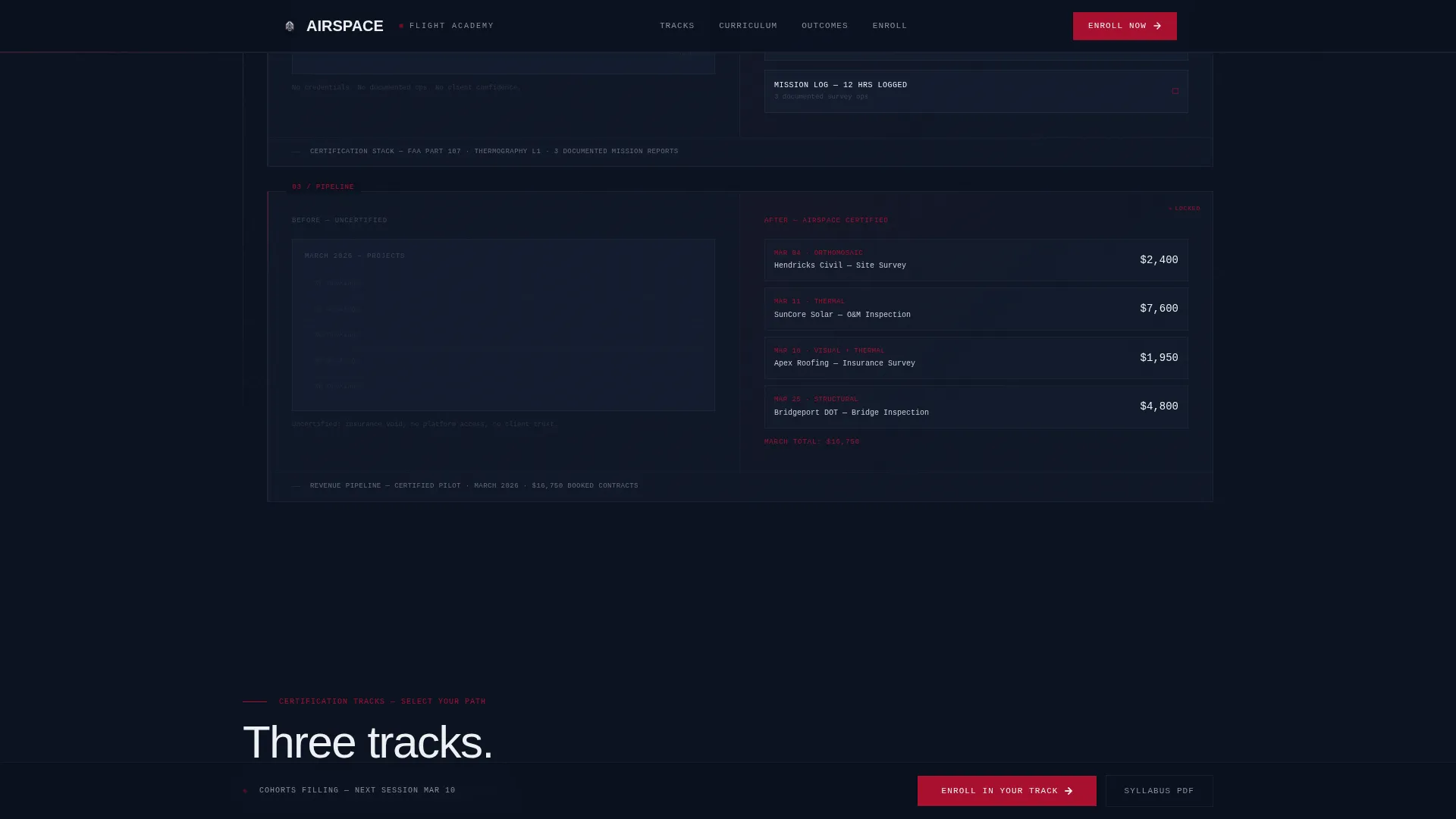
Three transformation cards snap into place as the visitor scrolls. The first contrasts a consumer quadcopter with an enterprise-grade drone on a rooftop helipad. The second shows a blank résumé versus a completed credential set. The third replaces an empty freelance calendar with a booked inspection pipeline showing real dollar figures. Thin blueprint grid lines connect each reveal like leaders on a technical drawing.
Inline Three-Step Enrollment Selector
Clicking the primary call-to-action opens a three-step flow without a page redirect. Step one selects a certification track. Step two picks a cohort start date from a calendar. Step three displays the final price and a single payment button accepting card or installment plan.
ROI Data Section
A salary table and contract-rate figures appear directly above the enrollment call-to-action. This placement is intentional: it reframes the course fee as a line item on an investment spreadsheet rather than an expense.
Sticky Enrollment Call-to-Action
After the second scroll reveal, the primary "Enroll in Your Track" button pins to the bottom of the viewport. It remains visible throughout the rest of the page without blocking content.
Email-Gated Syllabus Download
A secondary conversion path captures email addresses from visitors who are not ready to enroll. Submitting an email address unlocks a detailed PDF course breakdown, building the contact list for follow-up.
Page sections overview
| Section | Purpose |
|---|---|
| Hero Slider | Split-screen Before/After viewport reveal with headline |
| Transformation Reveals | Three scroll-locked cards showing credential and ROI transformation |
| Certification Tracks | Three-column cards for Part 107, Aerial Mapping, Thermal Inspection |
| ROI Data | Salary table and contract-rate figures above enrollment call to action |
| Enrollment Selector | Inline three-step track, date, and payment flow |
| Syllabus Email Gate | Secondary lead-capture for undecided visitors |
| Footer | Linear single-row footer pattern |
Design & branding system
The visual identity follows an Engineering Blueprint theme. Every color and typographic choice references technical documentation and cockpit instruments, not conventional marketing design.
- Color palette: deep schematic navy (#0B1120) as the primary background, polished chrome silver (#C8CDD5) for body text, instrument red (#A8102F) for calls-to-action and alert-level accents, and drafting-line white (#EDF0F3) for section dividers and annotations
- Typography: DM Sans handles all primary body copy and headlines; JetBrains Mono renders monospace technical annotations, readouts, and data labels throughout
- Animation system: GSAP ScrollTrigger powers scroll-snap reveals and staggered section entries; beam borders and blueprint grid leader lines extend between sections as the page progresses
Mobile & speed optimization
The template is designed desktop-first to support the complex slider interaction and scroll-snap reveals. It is fully responsive for mobile visitors.
- The Before/After slider adapts to touch input on mobile, allowing swipe-based reveal control instead of mouse drag
- Scroll-lock and snap behavior is handled through CSS native scroll combined with GSAP ScrollTrigger, keeping animation smooth without heavy JavaScript payloads
- The three-step enrollment selector stacks vertically on smaller screens, preserving full usability without layout breakage
How this template helps you convert
Airspace is structured as a persuasion sequence, not a brochure. Each section removes a specific doubt before the enrollment call to action appears.
- The Before/After slider and three progressive reveals build desire by showing the concrete difference between uncertified and certified status, turning abstract training value into a visible outcome
- The ROI data section places salary figures and contract-rate data immediately above the enrollment selector, so the price the visitor sees is already measured against earning potential
- The sticky call-to-action and inline enrollment flow keep the purchase decision one tap away at all times, while the syllabus email gate captures leads from visitors who need more time
Other information about this template
This template is part of a broader library of Aviation and Flight category pages built for niche professional training markets.
- The page uses English copy, USD pricing, and United States date formatting throughout, matching the regulatory context of Federal Aviation Administration Part 107 certification
- Social proof elements built into the template include logged mission counts, a 94 percent Part 107 pass rate figure, and cohort enrollment data
- The footer follows Pattern 1, a linear single-row layout keeping the closing section clean and uncluttered
- This template suits schools offering drone pilot certification programs, unmanned aircraft systems training, aerial inspection courses, and related professional development tracks
Theme
Engineering Blueprint
Creative direction
Before/After Reveal
Color system
Ruby & Chrome
Style
Scroll Reveal (Progressive)
Direction
Direct Sales
Page Sections
Draggable Before/after Hero Slider
Scroll-locked Transformation Reveals
Inline Three-step Enrollment Flow
ROI Data Table Above Enrollment Call to Action
Sticky Enrollment Button
Email-gated Syllabus Download
Related questions
Can I change the certification tracks shown in the template?
Does the three-step enrollment selector connect to a payment processor?
Can I use this template for a drone school outside the United States?
Is the Before/After slider usable on a touchscreen?
What happens when a visitor clicks Download the Syllabus?