Drone Pilot Course Landing Page Template
Airspace is a modular card-grid landing page built for a drone pilot ground school. It guides real estate photographers, construction professionals, and first responders through a Hero's Journey scroll, from FAA Part 107 exam context to career outcomes, and converts visitors with a persona-driven layout, amber calls to action, and a flight-schedule lead capture form.
by Rocket studio
Quick summary
Airspace is a single-page, card-grid landing page template designed for a drone pilot license course. It opens with a Persona Selector header, walks visitors through a five-phase Hero's Journey scroll, and closes with a lead generation form styled like a flight schedule. The layout is clean, modular, and built around institutional authority.
Who this template is for
This template is purpose-built for drone pilot training programs that serve working adults switching into commercial aerial work. It suits instructors and course creators who need to speak clearly to more than one type of student without building separate pages.
- Real estate photographers who want to stop subcontracting aerial shots and earn their own Federal Aviation Administration (FAA) Part 107 certificate
- Construction and surveying professionals who need drone-captured orthomosaic maps of their own job sites
- Firefighters and emergency responders building or joining a department unmanned aircraft systems (UAS) team
What problem this template solves
Most drone course pages treat every visitor the same. A firefighter and a real estate photographer have completely different motivations, yet they land on identical copy. That mismatch kills trust before the first scroll.
- The Persona Selector header lets each visitor self-identify, so the page feels written specifically for them
- The five-phase scroll moves visitors from curiosity to commitment rather than dropping them straight onto a registration form
- The dual conversion path captures both ready-to-enroll leads and early-stage researchers through separate but equally intentional calls to action
What you get with this template
You get a fully structured, modular landing page laid out in clearly defined scroll phases. Every section is a purpose-built card block you can populate with your own course content.
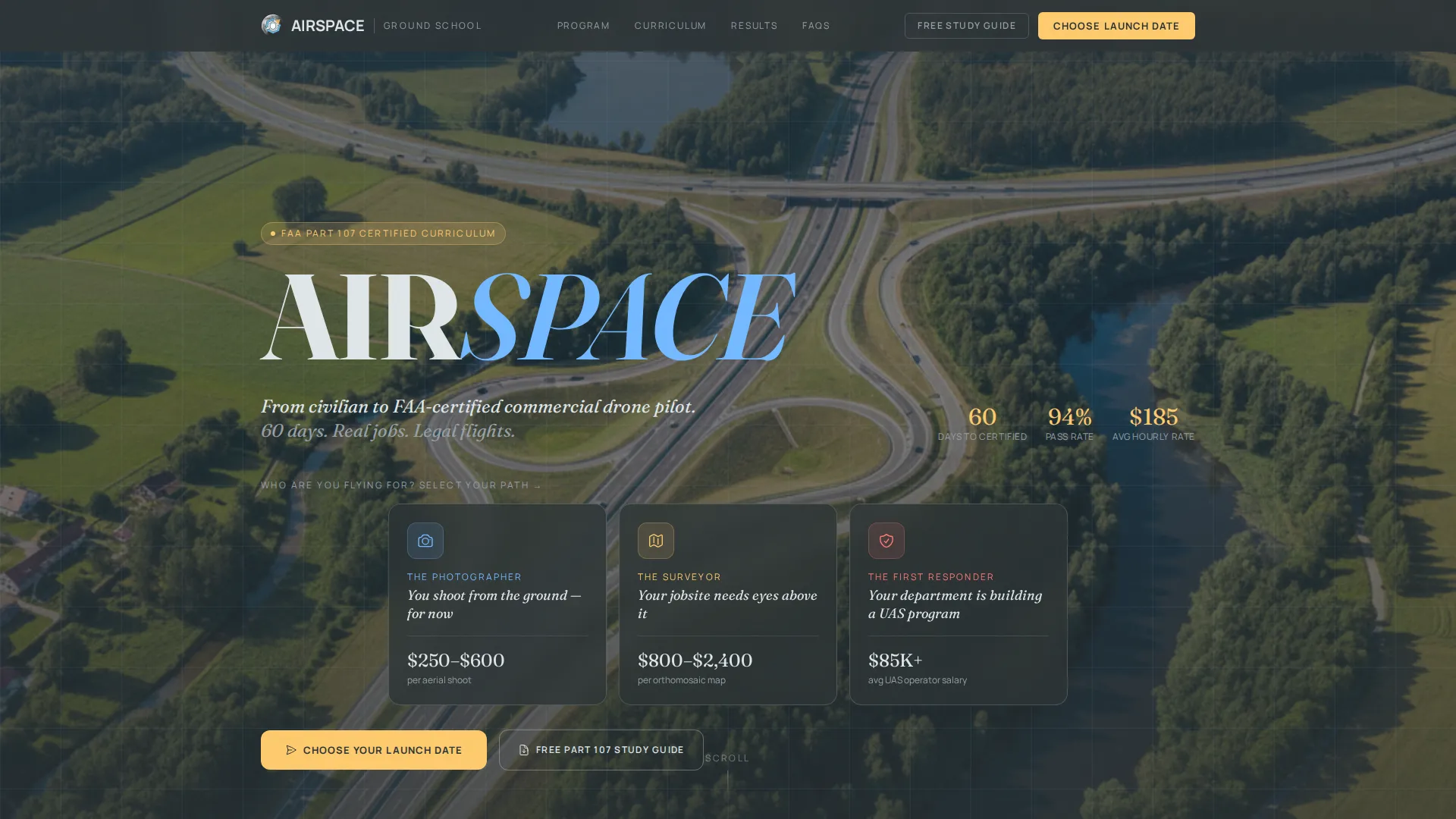
- A three-card Persona Selector header with silhouette archetypes, persona taglines, and persona-aware content reordering below
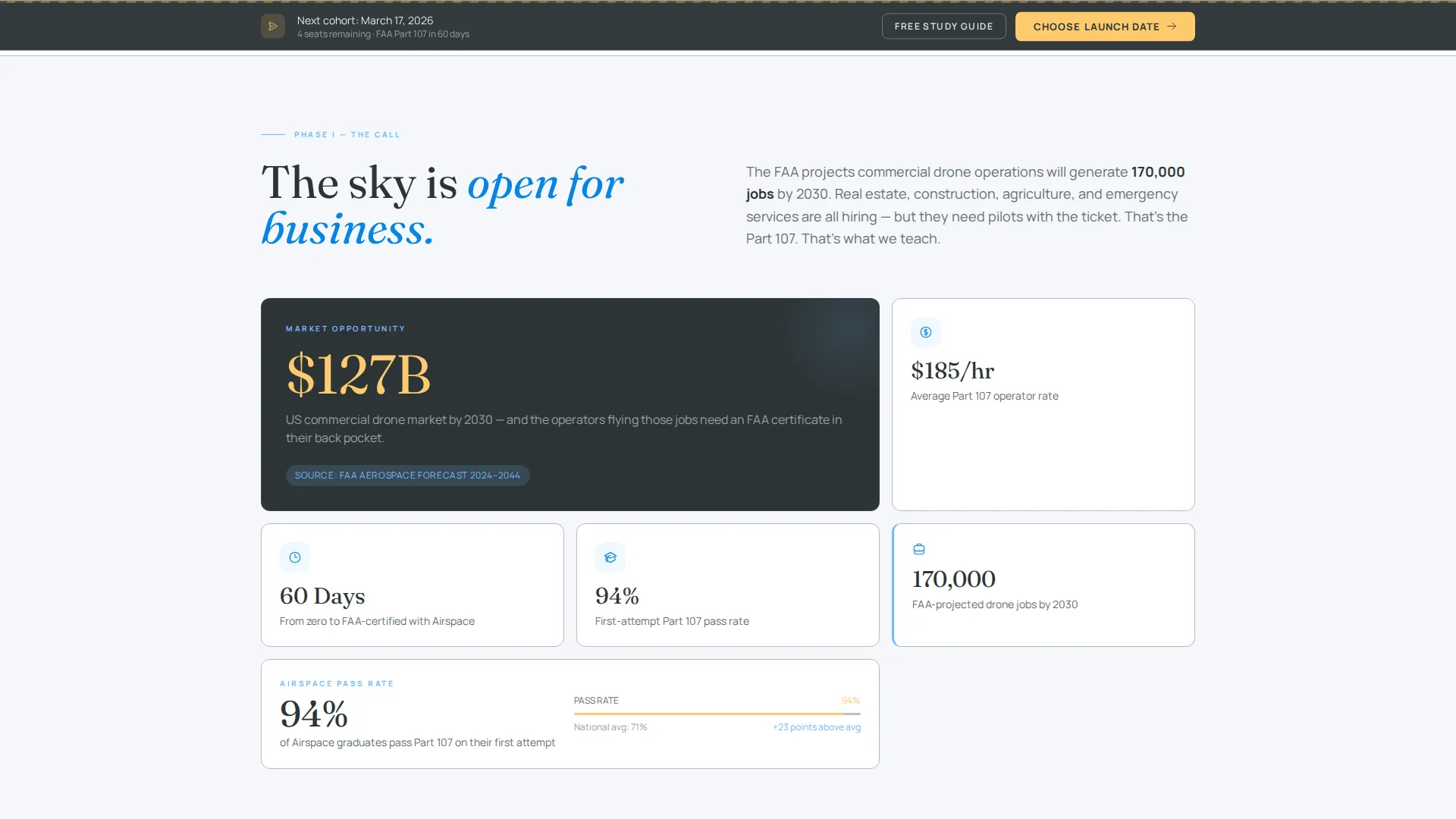
- Five named scroll phases: The Call, The Threshold, The Trials, The Mastery, and The Return, each with a distinct content type and purpose
- A dual-call to action lead capture form with a flight-schedule-style date picker, persona pre-fill, and a secondary gated PDF download path
Feature list
This section covers the core functional and design components built into the Airspace template.
Persona Selector Header
Three side-by-side persona cards sit against a muted aerial photograph taken straight down at 400 feet above ground level (AGL). Each card shows an archetype silhouette, a relevant icon, and a short tagline. Clicking a card subtly reorders the testimonials, curriculum modules, and career-outcome stats below to match that visitor's context.
Interactive Curriculum Module Map
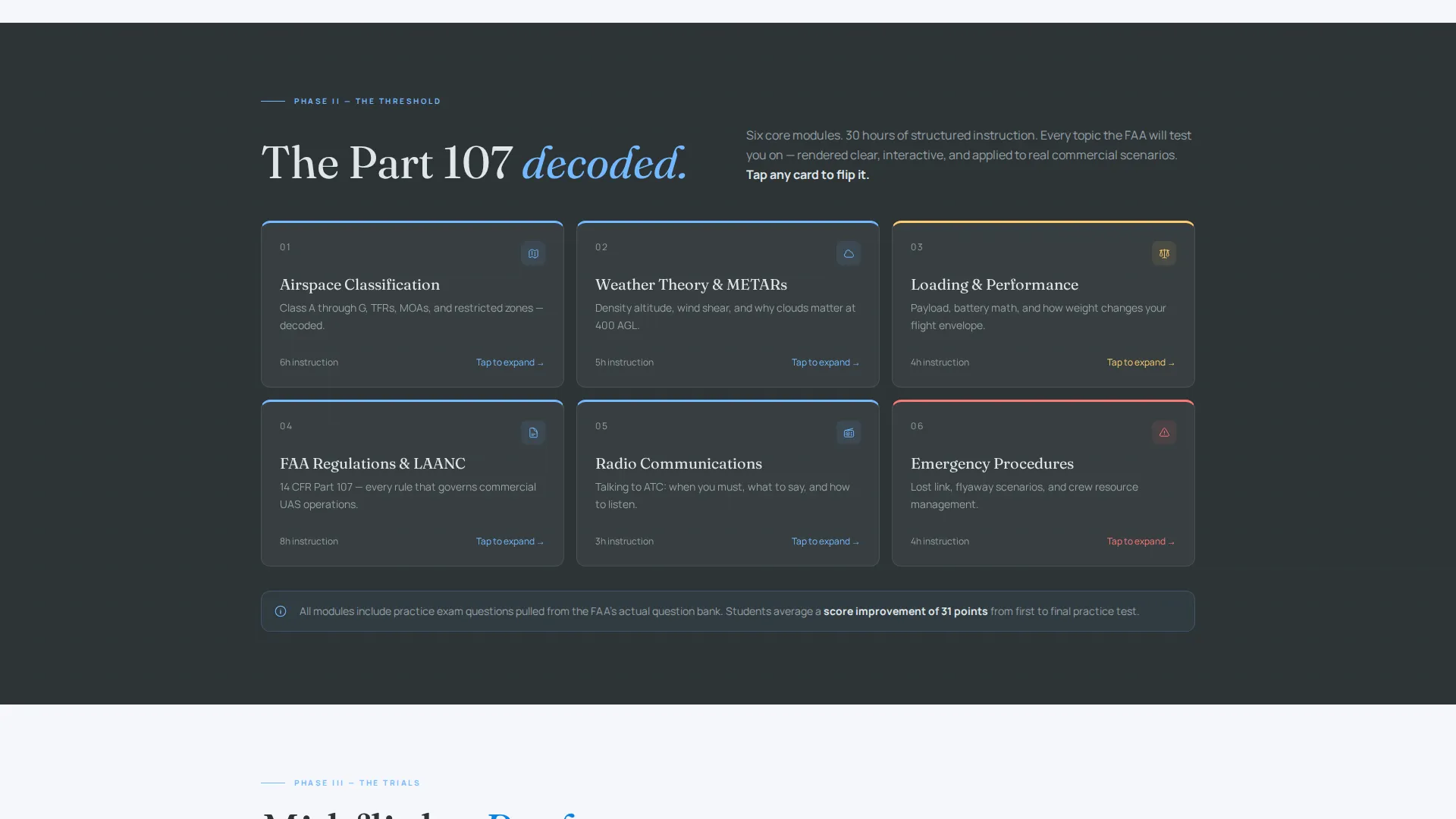
The Threshold phase renders the FAA Part 107 exam syllabus as an interactive card map. Individual cards flip on interaction to reveal topics such as airspace classification, weather theory, and aircraft loading and performance. This makes the exam feel navigable rather than intimidating.
Hero's Journey Scroll Architecture
The page is structured as a five-phase transformation arc. Each phase, from industry opportunity through exam content, student progress, graduate outcomes, and career placement, deepens visitor commitment before the lead form appears. The scroll earns the click rather than demanding it.
Dual-Path Lead Generation Form
The primary call to action is "Choose Your Launch Date," styled in caution amber and anchored as a sticky bottom bar after the midpoint of the scroll. A secondary path offers a gated Part 107 Study Guide PDF for visitors not yet ready to enroll, capturing the email and tagging the lead differently.
Flight-Schedule Date Picker
The enrollment form includes a horizontal date picker designed to look like a departure board or flight schedule. Visitors select a preferred start month in a format that reinforces the aviation theme and reduces form friction.
Modular Card-Grid Layout
Every content block is a self-contained card module on a light gray (#F5F6FA) field. Cards float visually like airspace boxes on a sectional chart. The grid adapts cleanly as content is added, removed, or reordered per persona without breaking the overall layout structure.
Page sections overview
| Section | Purpose |
|---|---|
| Persona Selector Header | Lets visitors self-identify as photographer, surveyor, or first responder |
| The Call | Presents FAA job projections, industry growth data, and income per flight hour |
| The Threshold | Interactive Part 107 module map with flip cards covering exam topic areas |
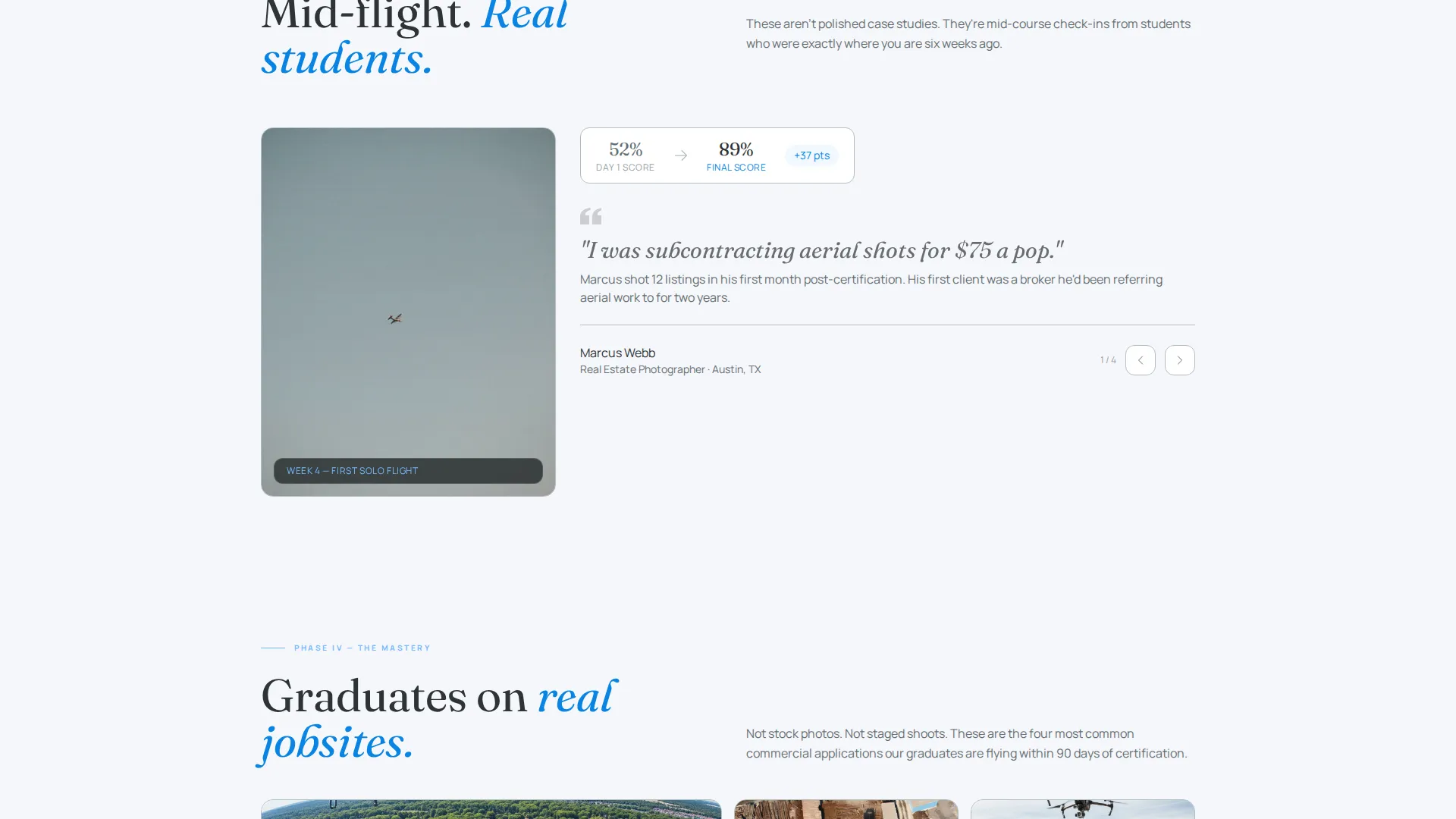
| The Trials | Student video testimonials, first-solo GoPro footage, and practice exam screenshots |
| The Mastery | Graduate case studies on real job sites: roof inspection, film set, search and rescue |
| The Return | Career placement statistics, average income lift, and employer logo strip |
| Lead Capture Form | Enrollment form with persona pre-fill, name, email, and flight-schedule date picker |
| Sticky call to action Bar | Persistent amber enrollment prompt that appears after the midpoint scroll |
| PDF Download Path | Secondary gated offer for the Part 107 Study Guide targeting nurture-stage visitors |
Design & branding system
The Airspace template uses an Institutional Authority visual theme. The palette feels like a sectional aeronautical chart pinned under fluorescent light: technical, precise, and earned. Every color has an assigned role and does not appear outside it.
- Charcoal (#2D3436) anchors headers and navigation; instrument-panel slate (#636E72) carries body text; ceiling-unlimited sky blue (#74B9FF) appears only on hover states and iconography; runway-marking white (#DFE6E9) surfaces float on an off-white gray (#F5F6FA) field
- Caution amber (#FDCB6E) is reserved exclusively for calls to action and progress indicators, keeping every amber element visually urgent without competition
- The overall tone is government-grade and authoritative, referencing sectional chart aesthetics rather than consumer app design
Mobile & speed optimization
The modular card-grid structure is inherently responsive. Persona cards, curriculum flip-cards, and the lead form all reflow cleanly on smaller screens without losing the structured visual hierarchy.
- The sticky call to action bar is designed to remain visible at all scroll depths on both desktop and mobile viewports, keeping the enrollment prompt accessible throughout the session
- Card modules are self-contained blocks, so the layout scales up or down without complex nested dependencies that would slow render performance
How this template helps you convert
The page is built around a single principle: a visitor who sees themselves already in the cockpit is far more likely to book the seat.
- The Persona Selector makes the first interaction personal. Visitors choose their archetype and the page immediately reflects their context, reducing the generic-course feeling that causes early exits.
- The Hero's Journey scroll structure delays the form until after commitment has been built through five phases of increasingly specific, emotionally resonant content.
- The dual-call to action architecture means no visitor leaves empty-handed. Ready leads click "Choose Your Launch Date" while research-stage visitors download the gated study guide, and both actions capture contact information.
Other information about this template
Airspace is categorized under Education and Training, specifically within Specialized Certification and Programs. It is well suited to any drone pilot license course that serves multiple student personas and wants to drive enrollment through structured narrative rather than a simple brochure layout.
- The template style is Card Grid (Modular), meaning individual sections can be updated or reordered without redesigning the full page
- The Hero's Journey creative direction and Persona Selector header concept are baked into the layout logic, not surface-level styling choices
- The Slate and Sky color system and Institutional Authority theme make this template equally appropriate for government-adjacent training programs, professional certification courses, and vocational upskilling pages
- The lead generation direction includes two distinct conversion paths built into the same page, supporting both high-intent and low-intent visitors simultaneously
Theme
Institutional Authority
Creative direction
Hero's Journey
Color system
Slate & Sky
Style
Card Grid (Modular)
Direction
Lead Generation
Page Sections
Persona Selector with Content Reordering
Interactive Part 107 Module Map
Five-phase Hero's Journey Scroll
Dual-path Lead Capture Form
Sticky Amber Call to Action Bar
Modular Card-grid Layout
Related questions
Can I use this template for a certification course other than the FAA Part 107?
How does the Persona Selector reorder content without leaving the page?
What are the two conversion paths included in this template?
Does the sticky call to action bar show up immediately when the page loads?
Will the persona pre-fill the form field automatically?



