Aircraft Parts Supplier Landing Page Template
Airframe is a hero-dominant landing page template built for aircraft parts suppliers. It puts a full-viewport interactive configurator front and center, letting buyers filter by aircraft type, ATA chapter, and part category in real time. A persistent quote drawer, ruby-red stock indicators, and condition codes keep procurement managers and MRO technicians moving fast from search to request.
by Rocket studio
Quick summary
Airframe is a single-page template designed for aircraft parts suppliers who need to move inventory fast. The configurator-led hero narrows results by airframe type, ATA chapter, and part category. Every part card shows condition codes, stock counts, and trace documentation up front. A persistent quote drawer and direct checkout reduce the steps between discovery and order.
Who this template is for
This template is built for operations where a grounded aircraft is a financial emergency and every hour of delay costs money. It speaks directly to the people sourcing parts under pressure.
- Procurement managers at regional and cargo airlines monitoring availability around the clock
- MRO (Maintenance, Repair, and Overhaul) technicians sourcing replacement actuators, avionics modules, or APU controllers between shifts
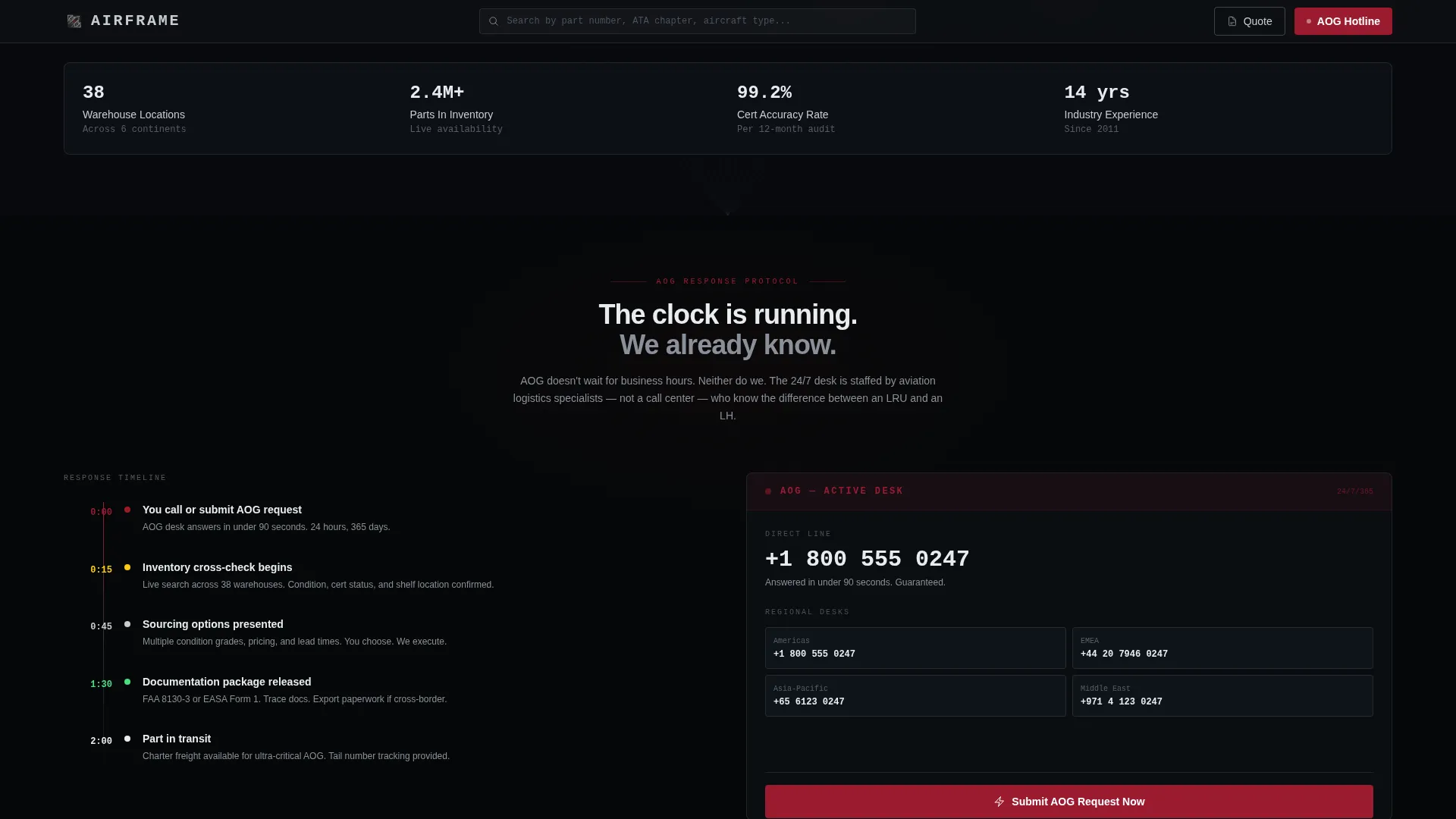
- Fleet directors who need a serviceable part confirmed and shipped before an AOG (Aircraft on Ground) situation extends past hour two
What problem this template solves
Most parts supplier pages make buyers work too hard. They bury condition codes, hide lead times, and force a phone call before anything useful happens. That friction is expensive when an AOG clock is running.
- Buyers cannot quickly filter by aircraft type, ATA chapter, and part category without navigating multiple pages
- Stock status, certification condition, and lead time are rarely visible before the buyer commits to an inquiry
- AOG escalation paths are unclear, slowing response when speed is the only thing that matters
What you get with this template
You get a fully structured landing page that puts the parts search experience at the center of every interaction. The layout flows from the widest filter choices at the top down to the most specific part details at the bottom.
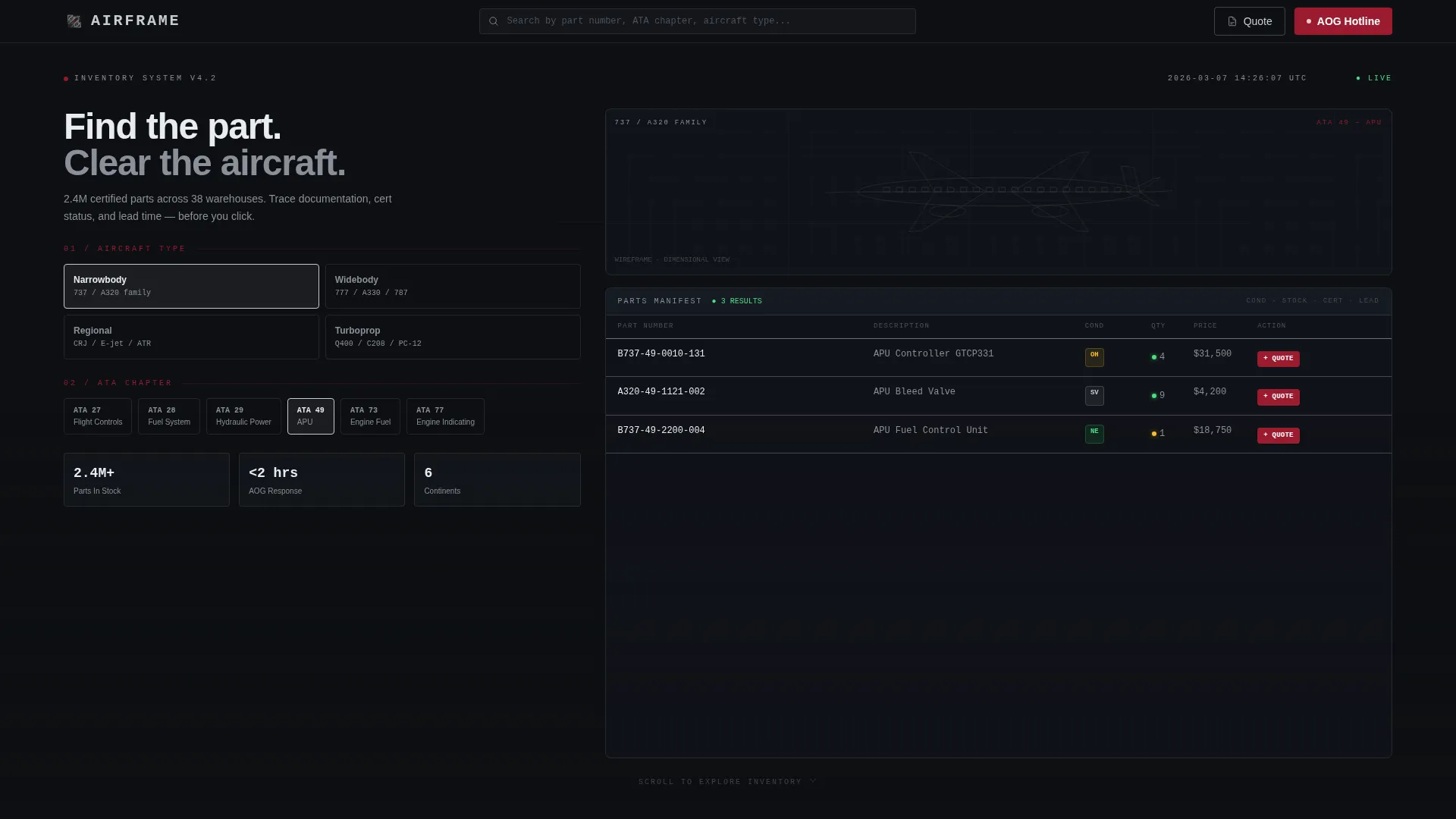
- A full-viewport configurator hero with real-time filtering and an animated airframe wireframe silhouette
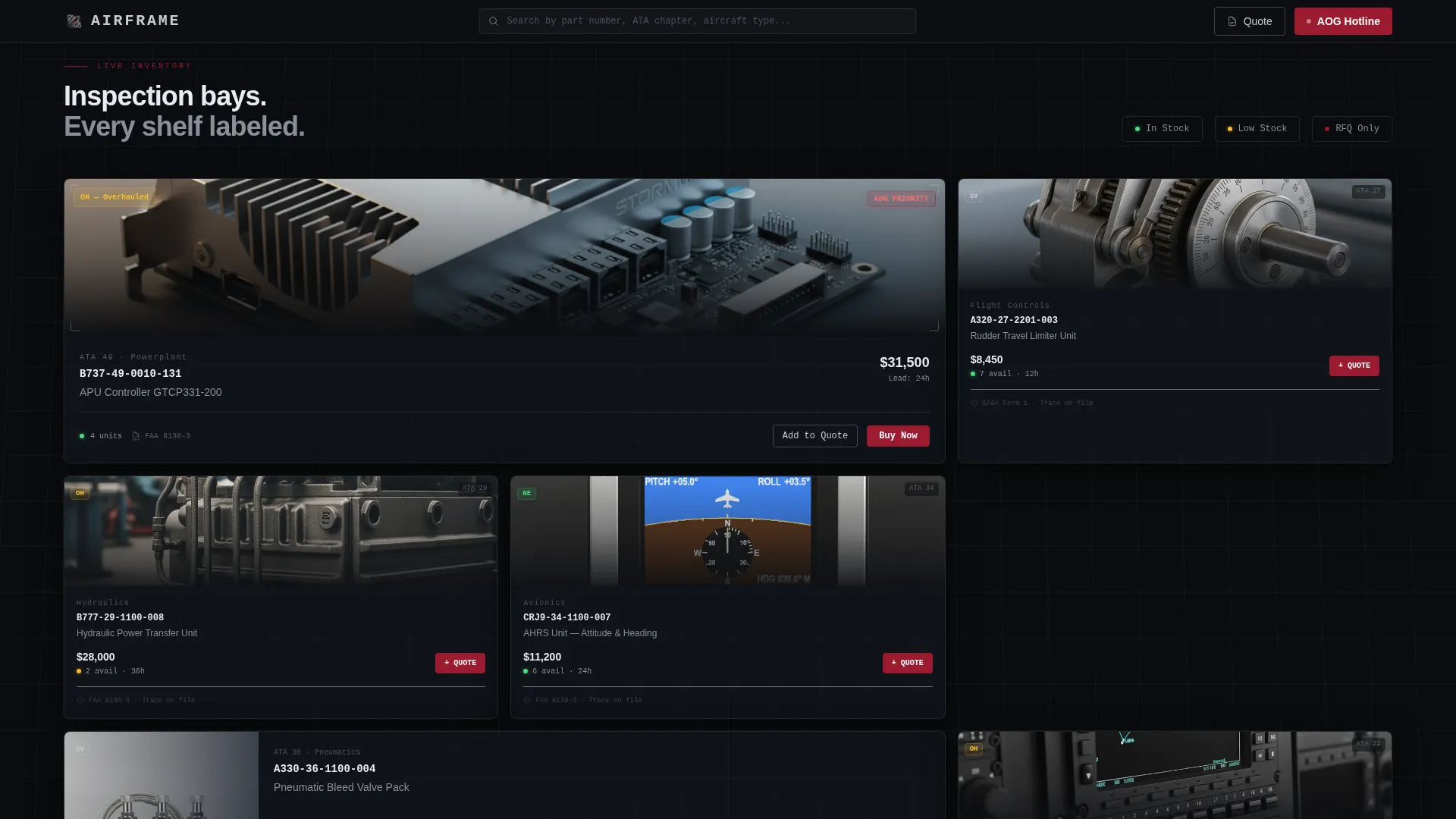
- Dark bay-style part sections with chrome-bordered cards displaying part photography, condition codes (NE, SV, OH, AR), and live stock counts
- A persistent side drawer for building multi-line RFQs (Requests for Quotation), with AOG priority toggle, tail number field, and required-by date
Feature list
This template is built around the specific workflows of aircraft parts procurement. Each feature maps directly to a moment in the buyer's journey.
Full-Viewport Configurator Hero
The hero occupies ninety percent of the viewport. Visitors select aircraft type (narrowbody, widebody, regional, or turboprop), then ATA chapter, then part category. Results narrow in real time against a faint wireframe silhouette of the selected airframe that rotates subtly on a horizontal axis. Chrome-rendered part numbers populate like a flight manifest loading.
Persistent Quote Drawer
A side drawer stays accessible throughout the entire page. Buyers add parts to a multi-line RFQ without leaving their current position. The drawer collects company name, AOG status, tail number, and required-by date, and toggling AOG status reveals the 24/7 priority desk contact.
Condition Code and Stock Status Cards
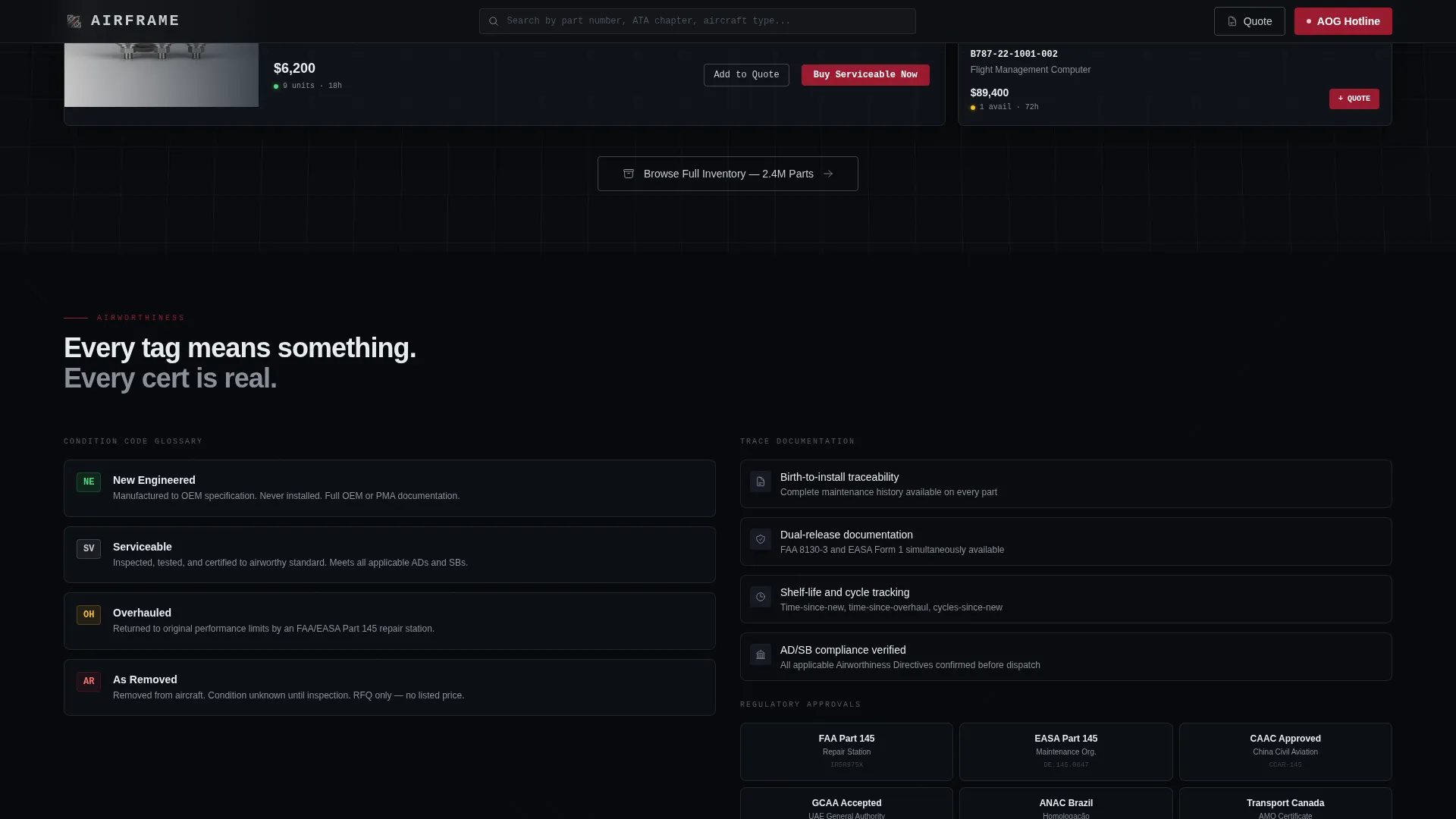
Every part card displays condition codes using standard aviation notation: NE (New), SV (Serviceable), OH (Overhauled), and AR (As Removed). Real-time stock counts and trace documentation details appear before the buyer clicks anything, so qualification happens on the card itself.
Ruby-Red Urgency Indicators
Ruby red is reserved exclusively for calls to action (Calls to Action), stock-status alerts, and AOG callouts. This color restraint means a red element on screen always signals something actionable, keeping urgent items impossible to overlook.
Spatial Scroll Architecture
The page is structured to feel like descending through an aircraft's anatomy. Flight controls and airframe sections appear first. Hydraulics and pneumatics follow in the midsection. Avionics and cabin systems anchor the base. Shadows deepen and grid lines converge as the visitor scrolls, reinforcing a sense of physical depth.
Direct Buy and RFQ Dual Path
In-stock items with listed pricing surface a "Buy Serviceable Now" button in ruby for immediate checkout. All other items use "Add to Quote" to build the RFQ. Both paths are always visible on the card, so buyers never have to decide which process to start.
Page sections overview
| Section | Purpose |
|---|---|
| Configurator Hero | Filter parts by aircraft type, ATA chapter, and category in real time |
| Single-Line Nav | Logo, search, Quote button, and AOG Hotline in one persistent bar |
| Airframe and Flight Controls | First scroll section covering structural and control surface parts |
| Hydraulics and Pneumatics | Mid-page section for fluid power and pressurization components |
| Avionics and Cabin Systems | Lower section covering electronics and interior parts |
| Part Detail Cards | Chrome-bordered cards with photos, condition codes, and stock counts |
| Persistent Quote Drawer | Side panel for building and submitting multi-line RFQs |
Design & branding system
The color system is called Ruby and Chrome. It draws from the visual language of a fully equipped parts facility: cold alloy surfaces, mirror-finish rivets, and a single red tag that demands immediate attention.
- Deep cockpit black (#0D0F12) and instrument-panel charcoal (#1E2530) form the page foundation, with polished chrome silver (#C8CDD3) for borders, part numbers, and structural grid lines
- Ruby red (#9B1B30) is used exclusively for calls to action, stock-status indicators, and AOG urgency callouts, never decoratively
- Chrome-bordered inspection-panel cards, a rotating wireframe airframe silhouette, and depth-increasing shadows create the Spatial and Architectural visual direction throughout the scroll
Mobile & speed optimization
The template is designed so that the same urgency felt on a desktop screen carries through to a mobile device. MRO technicians and procurement managers are often sourcing parts from a hangar floor or a hotel room.
- The configurator and part cards are structured for touch interaction, with tap-accessible filter controls and card-level action buttons
- The persistent quote drawer is accessible on smaller screens without blocking the part list behind it
- The single-line navigation keeps the AOG Hotline and Quote button reachable at every scroll position on any screen size
How this template helps you convert
The page is built around reducing friction at every decision point. Buyers arrive with a specific need and a short window to act. The layout meets them exactly there.
- Part qualification happens on the card itself. Condition codes, stock counts, trace documentation, and lead times are visible before any click, so buyers arrive at the quote or checkout already confident in the part.
- The AOG toggle in the quote drawer changes the priority of the request and surfaces the 24/7 hotline number immediately, turning an urgent inquiry into an escalated conversation without the buyer having to search for a phone number.
- The dual call to action structure (Add to Quote for multi-line RFQs and Buy Serviceable Now for in-stock parts) means no buyer is sent down the wrong path, reducing abandoned inquiries.
Other information about this template
Airframe is categorized under Automotive and Transport, with a specific focus on the Aviation and Flight subcategory and the Aircraft Parts Supplier niche. The template style is Hero-Dominant at a 90/10 split, meaning the configurator header claims the vast majority of the first viewport. The creative direction is Spatial and Architectural, the theme is Dynamic Motion, and the color system is Ruby and Chrome. The landing page direction is Direct Sales, meaning every design decision prioritizes moving the visitor from search to quote or purchase as efficiently as possible.
- The header concept is a Configurator, a live filtering interface rather than a static hero image or promotional banner
- The template is suited for suppliers stocking parts for narrowbody, widebody, regional jet, and turboprop fleets, as well as MRO facilities and AOG response services
- The intersection of Hero-Dominant layout, Configurator header, and Direct Sales direction makes this template unusual in the aviation commerce space, where most suppliers still rely on catalog PDFs or basic search forms
Theme
Dynamic Motion
Creative direction
Spatial & Architectural
Color system
Ruby & Chrome
Style
Hero-Dominant (90/10)
Direction
Direct Sales
Page Sections
Full-viewport Configurator Hero
Persistent Multi-line Quote Drawer
Condition Code and Stock Status Cards
Ruby-red Urgency Color System
Spatial Scroll Architecture
Dual Call to Action Purchase Path
Related questions
Who is the primary buyer for this template?
What condition codes does the template display on part cards?
How does the AOG escalation path work in this template?
Can buyers request multiple parts in a single submission?
What makes the configurator hero different from a standard search bar?