Free Audit Dashboard College Planning Advisor Landing Page
The Admit dashboard template turns a college planning advisor's landing page into a live-feeling application audit. Parents see their student's readiness scored in real time across test prep, essay drafts, school list balance, financial aid deadlines, and recommendation letters. A free three-step audit form and a sample preview drive conversions without requiring a hard sell.
by Rocket studio
Quick summary
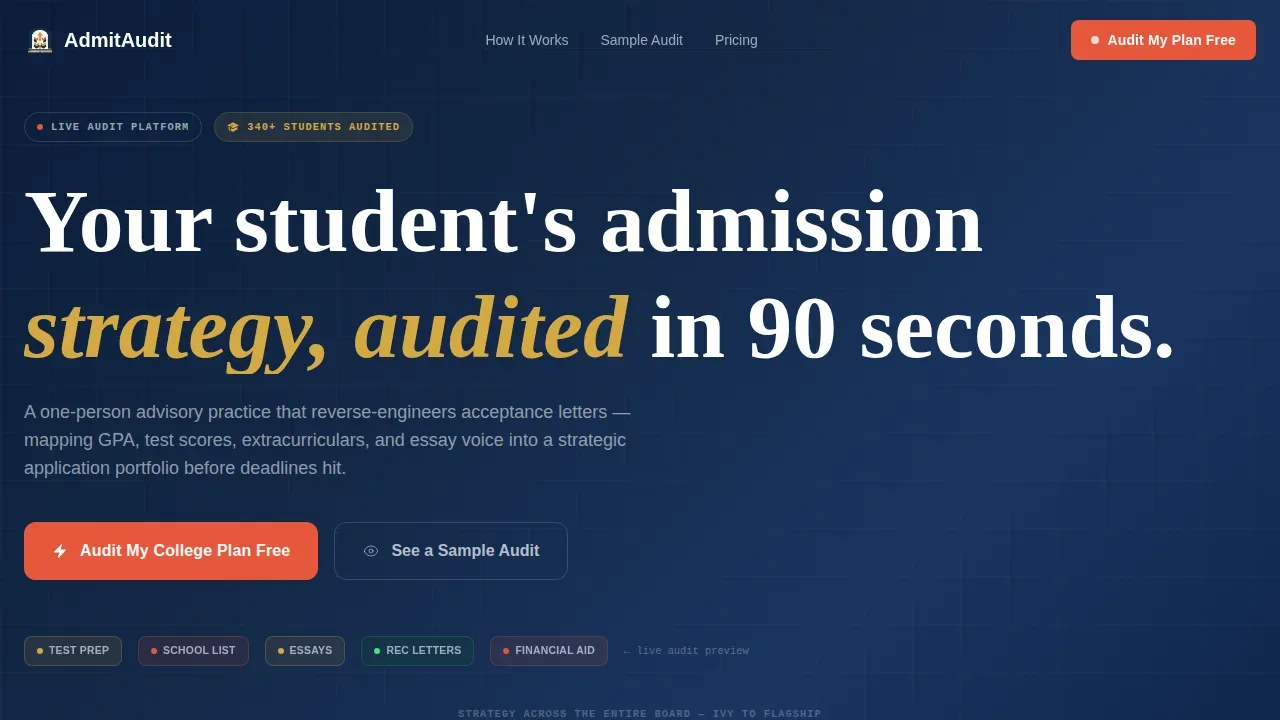
The Admit template is a dashboard landing page built for a solo college planning advisor. It simulates a live application audit as visitors scroll, animating status rows from gray to color and surfacing exactly what each planning gap costs. The design blends institutional trust with SaaS dashboard energy, converting anxious parents into booked clients through a free readiness scorecard.
Who this template is for
This dashboard template was designed for a specific kind of professional: a one-person college planning advisory practice that competes on precision and personal expertise, not on brand name. If you work directly with families and need a landing page that earns trust fast, this template is your tool.
- Solo college planning advisors who want a landing page that feels authoritative and data-driven
- Independent education consultants ready to convert website visitors into paying clients
- Counselors who use audit frameworks to show parents exactly where their student's application falls short
What problem this template solves
Parents arrive at a college advisor's website already anxious. They have a list of reach schools, a student with a 3.7 GPA, and no clear map from where they are to where they want to go. Most advisor websites give them a bio and a contact form. This dashboard template gives them something to interact with.
The core problem is trust. A free college planning advisor landing page requires building high trust because skepticism about advisory offers is real and common. Parents need to feel the gap before they commit to paying to close it.
- Generic advisor websites fail to demonstrate the cost of inaction in concrete, financial terms
- Parents cannot self-assess their student's readiness without a structured audit framework
- Advisors lose potential clients because their website does not show the depth of their process
What you get with this template
This is a production ready, single-page dashboard template built for high interactivity and scroll-driven storytelling. Every section of the page serves one purpose: show parents what is missing and what it costs, then offer a free audit to close the gap.
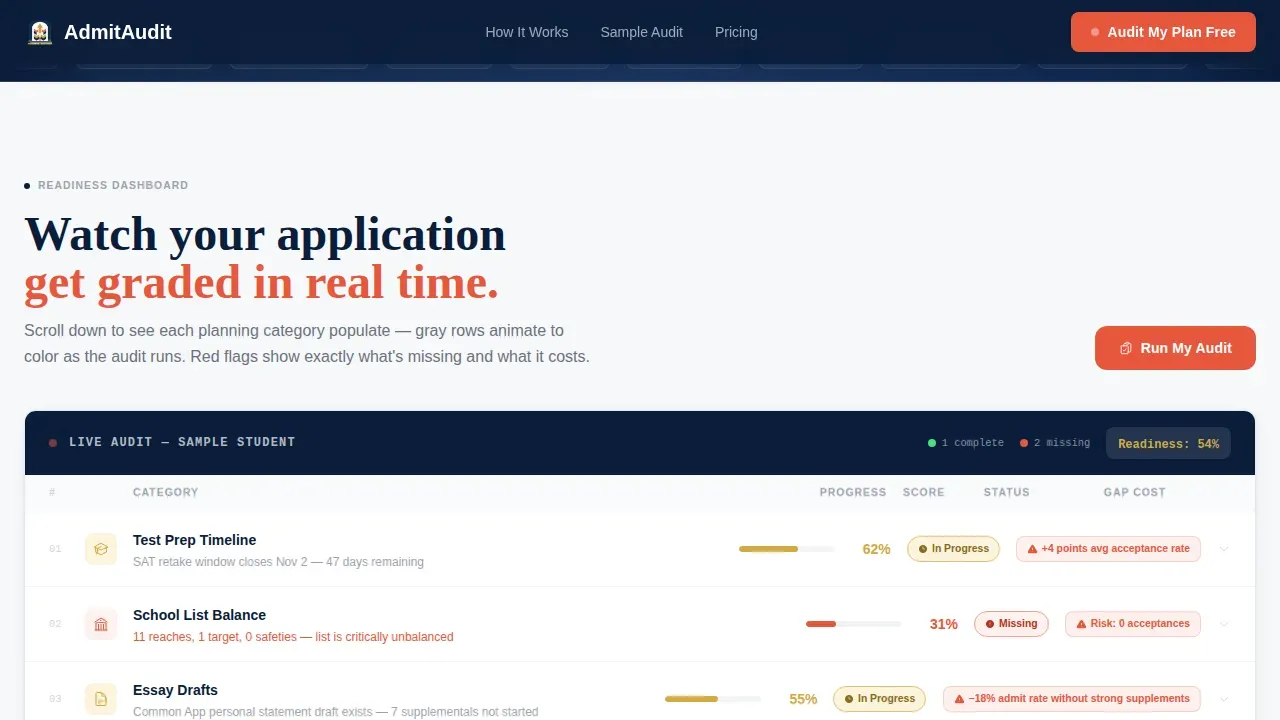
- A scroll-triggered live audit dashboard with animated status rows reading Complete, In Progress, or Missing
- A three-step progressive form modal that collects grade, GPA, number of target schools, and parent email
- A sticky call-to-action button pinned in the dashboard toolbar and a sample audit preview path for skeptics
Feature list
This template is built around one central creative direction: Checklist and Audit logic. Every feature on the page reinforces the idea that a real audit is happening, right now, for the visitor's student.
Animated Audit Dashboard Rows
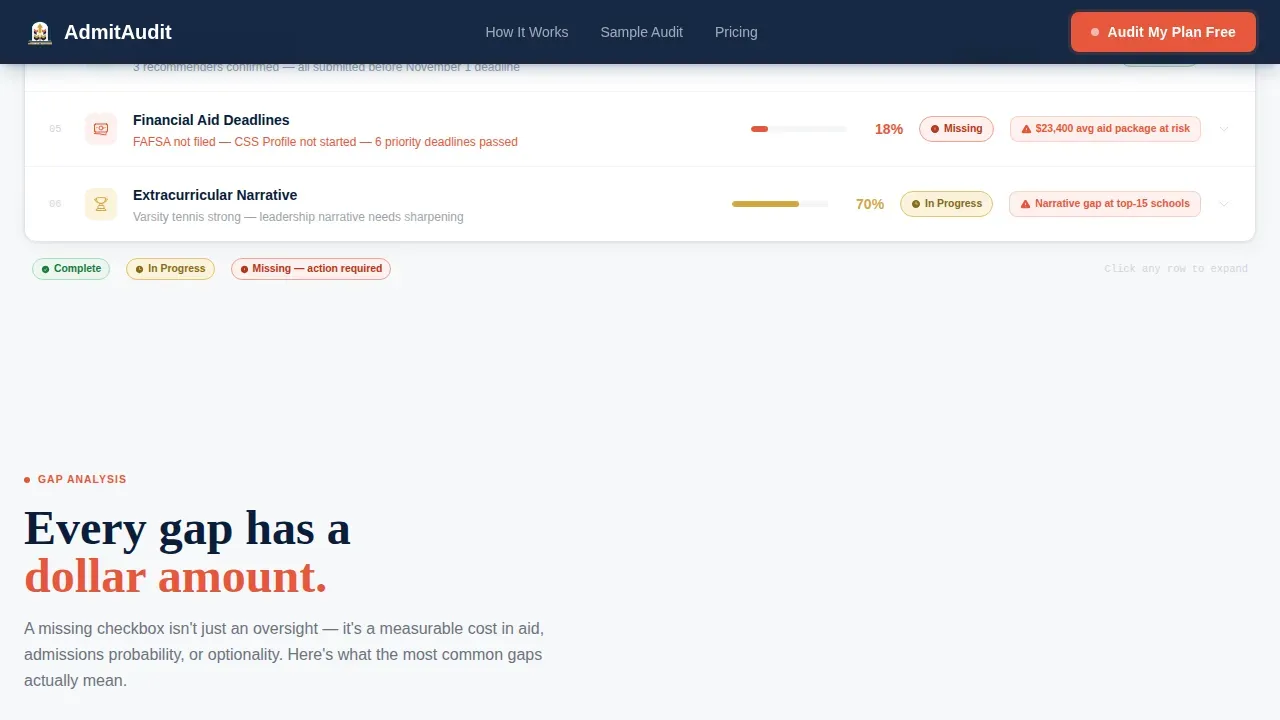
The centerpiece of the template is a live-looking readiness dashboard. Each row maps to a planning category: test prep timeline, school list balance, essay drafts, recommendation letters, and financial aid deadlines. As the visitor scrolls, rows animate from a neutral gray into full color with status pills. The dashboard does not just display data; it performs an audit in real time. This approach to data visualization makes the stakes visible without a single word of persuasion copy.
Gap Cost Calculator Section
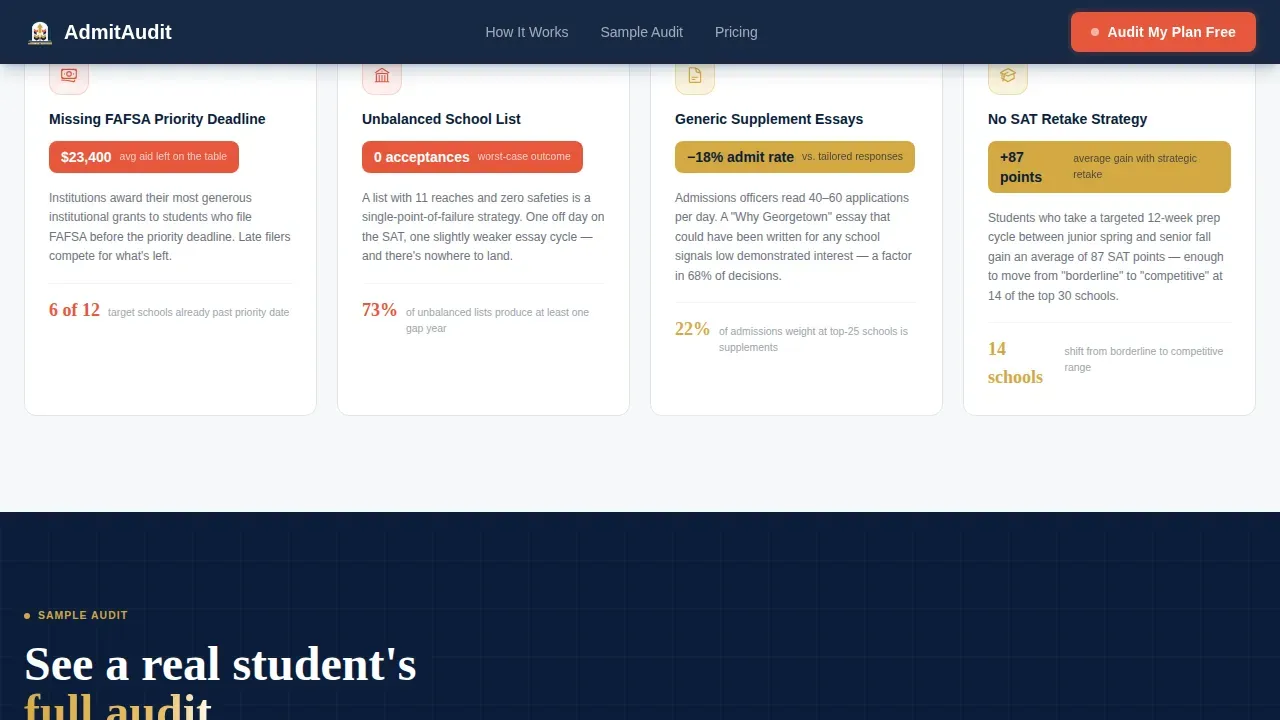
Each expandable audit row reveals a cost consequence when clicked. A missing FAFSA deadline is not framed as an oversight; it is framed as a $23,000 average aid package left on the table. This section transforms abstract planning failures into concrete financial data. It keeps things simple by anchoring every gap to a dollar figure parents can immediately understand and act on.
Free Three-Step Readiness Form
The primary conversion path is a three-step progressive form modal triggered by the "Audit My College Plan Free" call-to-action. Step one captures the student's grade and GPA. Step two captures the number of target schools. Step three captures the parent's email address. The form uses a minimal field structure with just three to five inputs to reduce friction. On submission, a simplified scorecard delivers instant value to the inbox, demonstrating the gap without fully closing it.
University Logo Ticker Header
The header features a scrolling horizontal ticker of forty-plus university crests spanning Ivy League schools, University of California system campuses, liberal arts colleges, and state flagship universities. The logos are muted to 40% opacity so no single institution dominates. The advisor's wordmark sits centered and full-color above a single positioning line. This design signals scope: this advisor monitors the entire application landscape, not just a handful of brand-name schools.
Sample Audit Preview Path
A secondary conversion path, labeled "See a Sample Audit," lets skeptical visitors preview a redacted real student dashboard before submitting any information. This path addresses the trust gap directly. It lets the template's data visualization do the persuasion work, showing what a full audit looks like so parents can self-qualify before entering the form flow.
Scroll-Triggered Animation System
The page uses high-density scroll-triggered animations built with Framer Motion animations to simulate audit population in real time. Counter animations fire as sections enter the viewport. Progress bars fill on scroll. The ticker scrolls continuously in the header. Together, these interactions make the dashboard feel live rather than static, which is the entire emotional premise of the Admit concept.
Page sections overview
| Section | Purpose |
|---|---|
| University Logo Ticker | Establishes scope and advisor credibility across school types |
| Hero Call-to-Action | Positions free audit offer and anchors primary conversion path |
| Live Audit Dashboard | Animates readiness rows to reveal planning gaps by category |
| Gap Cost Calculator | Ties each missing item to a concrete financial consequence |
| Sample Audit Preview | Lets skeptics view a redacted student dashboard before committing |
| Parent Testimonials | Builds trust through specific school outcomes and acceptance results |
| Footer Row | Closes page with a clean single-row linear layout |
Design & branding system
The visual identity runs on a Navy Authority color system that pairs institutional gravitas with SaaS dashboard urgency. The palette was built to feel like a prep school blazer holding a Silicon Valley pitch deck: serious credentials, live data.
- Navy (#0B1D3A) dominates the header and sidebar frames to anchor authority; transcript-paper white (#F7F8FA) opens the data panels for readability; dean's-list gold (#D4A843) marks completed milestones; flagged-task coral (#E8573D) pulses on every unresolved action item
- Typography pairs Fraunces, a display serif, for headlines with DM Sans for all dashboard interface elements, achieving clean typography that reads as both editorial and functional
- The overall aesthetic channels Startup Velocity energy: data-heavy interfaces rendered with clean design, making the page feel production ready without feeling cold
Mobile & speed optimization
This template is built desktop-first, matching the primary use case of parents opening laptops at kitchen tables after dinner. The dashboard layout and animation density are designed for larger screen sizes where audit rows and data panels have room to breathe.
- The layout maintains readability across screen sizes while prioritizing the widescreen dashboard experience where all audit rows, status pills, and expanded panels are visible simultaneously
- Server components handle static sections of the page while client components manage the scroll-triggered dashboard animations, keeping the interactive experience smooth without sacrificing load performance
- The sticky call-to-action remains visible while users scroll through the full audit simulation, ensuring the conversion path is always one click away regardless of scroll depth
How this template helps you convert
This dashboard template is engineered around one insight: parents do not convert on copy, they convert on proof. Every design and interaction decision flows from that premise. The page does not ask for trust; it earns it by showing work.
- The animated audit dashboard makes the gap visible before any ask is made, so by the time the "Audit My College Plan Free" button appears sticky in the toolbar, the visitor already understands why the audit matters and what it will reveal
- The gap cost calculator section converts abstract planning failures into specific dollar figures, giving parents a financial reason to act now rather than wait until closer to deadlines
- The sample audit preview path removes the biggest objection for skeptical website visitors: they can see exactly what they will receive before sharing any personal information, which dramatically lowers the friction to entering the three-step form
Other information about this template
The Admit template belongs to a broader ecosystem of free dashboard templates and dashboard template options available on the platform. Understanding where this template sits in that landscape helps advisors and developers make the right choice for their project.
Data audits have become a crucial part of almost every business's strategy, and the global auditing services market is expected to grow at a 4.11% compound annual growth rate between 2024 and 2029. Regular audits ensure compliance with accounting norms and maintain the integrity of information systems. This template applies that same audit logic to college planning, giving parents a structured framework where many businesses and individuals struggle without one.
Free dashboard templates can help users track online project performance and manage various metrics in one place. This template is available in a free version that gives advisors a solid starting point for their practice website. A pro version with expanded customization is also available for practices that need more options or deeper editing control.
Many free dashboard templates are built using popular frameworks, and this template follows the same principle. The animation layer uses Framer Motion animations to handle scroll-triggered row population and counter effects. The form layer is compatible with React Hook Form, also referred to as hook form, for handling the three-step progressive modal. For teams that prefer lighter implementations, the static sections can be adapted using vanilla javascript or pure vanilla javascript without the full React stack.
The dashboard layout system supports RTL support for right-to-left language markets, giving international advisors flexibility without a full rebuild. The template also ships with storybook documentation to help developers understand component behavior before editing. For teams that want to customize the data panels further, the template is compatible with TanStack Table, also known as tanstack table, for rendering sortable audit rows with richer data structures.
- The free version includes all core dashboard sections and the three-step form modal
- The pro version unlocks deeper customization of status pills, color tokens, and dashboard layouts
- The template is released under the MIT license, allowing free use, modification, and redistribution
- Developers can use the live theme customizer to swap color tokens and preview the Navy Authority palette against alternatives before committing
- The template ships with storybook documentation for component-level reference during development
- Brand comparisons: while tools like a Robinhood inspired investment dashboard focus on multi asset trading, stock screener views, stock detail panels, market overview grids, market movers lists, price alerts, earnings calendar rows, tax center pages, fixed income trackers, and trading desks interfaces, the Admit template focuses on college planning audit data instead
- Other dashboard categories on the platform include saas dashboard layouts for software products, e commerce order history panels, patient management views for medical practices, risk analytics grids for risk management teams and compliance officers, and regulatory compliance monitoring boards
- Developers exploring achromatic design preferences will find the Admit template's navy-white-gold-coral system a deliberate contrast to achromatic design conventions, offering strong color meaning at every status state
- The command palette feature supports keyboard-first navigation for power users who want to monitor multiple student profiles without reaching for a mouse
- The dark mode variant maintains all status pill contrast ratios so audit rows remain legible in low-light environments
- For teams comparing AdminLTE and similar comprehensive admin dashboard frameworks as a starting point, the Admit template offers a more specialized and niche-specific alternative focused on college planning data rather than generic admin panels
- Jakarta Sans and JetBrains Mono typography are referenced in the platform's broader template library; this template uses Fraunces and DM Sans as its type pairing instead
- The template's dashboard layouts use widgets for status pills, progress bars, and cost callout cards, keeping organization clean across all audit categories
- To do lists within the audit rows function as interactive checklists, letting parents track application materials and maintain accountability across the planning cycle
- Lab results-style data rows and terminal inspired aesthetic elements appear in the platform's broader template library but are not part of the Admit template's design system
- The template is production ready and designed for teams that want to start building immediately without writing dashboard structure from scratch
- Regular updates to the template ensure compatibility with current framework versions and keep the audit row components maintain their intended behavior over time
- AI-powered dashboard development tools can streamline the customization process; no-code and low-code platforms enable users to customize this template with minimal technical skills, while AI tools can automate repetitive editing tasks when adapting the template for different student profiles or advisory niches
Theme
Startup Velocity
Creative direction
Checklist & Audit
Color system
Navy Authority
Style
Dashboard/Data Grid
Direction
Freemium/Trial
Page Sections
Animated Audit Dashboard with Status Pills
Gap Cost Calculator with Financial Stakes
Three-step Progressive Form Modal
University Logo Ticker Header
Sample Audit Preview for Skeptics
Scroll-triggered Animation System
Related questions
What is included in the free version of this template?
Can I customize the audit row categories for my advisory practice?
Does this template work for advisors who serve multiple students at once?
How does the three-step form deliver the readiness scorecard?
Is this template suitable for advisors outside the United States?



