Chiropractic Insurance Billing & Revenue Recovery Website Template
Adjuster is a split-screen landing page built for chiropractors and clinic managers who lose revenue to denied and underpaid insurance claims. A live reimbursement estimator opens the page, followed by a testimonial mosaic and a three-step booking flow. The design uses an alpine color palette and smooth parallax scrolling to keep billing professionals engaged from first calculation to scheduled audit call.
by Rocket studio
Quick summary
Adjuster is a single-page billing service landing page for chiropractic practices. It opens with a live calculator that shows practitioners their estimated revenue leak, moves through a testimonial mosaic of real practitioner stories, and closes with a three-step booking form. Every section flows into the next without hard breaks, keeping the focus on one action: booking a billing audit.
Who this template is for
This template is built for healthcare billing service providers who sell directly to chiropractic professionals. It speaks to the practitioner's day-to-day frustration, not abstract features.
- Solo doctors of chiropractic (DC) managing five to fifteen patients per day who handle their own billing after hours
- Mid-size wellness clinic owners and front-desk managers who split time between greeting patients and fighting insurance payers
- New chiropractic graduates who understand clinical codes but have not yet mastered the difference between similar procedure codes or how to appeal a denial
What problem this template solves
Chiropractic billing is a specific and frustrating problem. Explanation of benefits (EOB) forms pile up, electronic remittance advice (ERA) codes multiply, and denied claims go unanswered because the practitioner is already onto the next patient. This template makes the cost of that inaction visible and personal before asking for anything.
- Practitioners cannot see the true scale of their revenue leak without adding up months of denials manually
- Front-desk staff toggle between patient care and payer disputes, leaving appeals incomplete and money uncollected
- Generic marketing pages do not speak the language of chiropractic billing, so practitioners disengage before they reach a call to action
What you get with this template
You get a fully structured, single-page layout designed around one conversion goal: booking a thirty-minute billing audit call. Every section is purpose-built for the chiropractic billing niche.
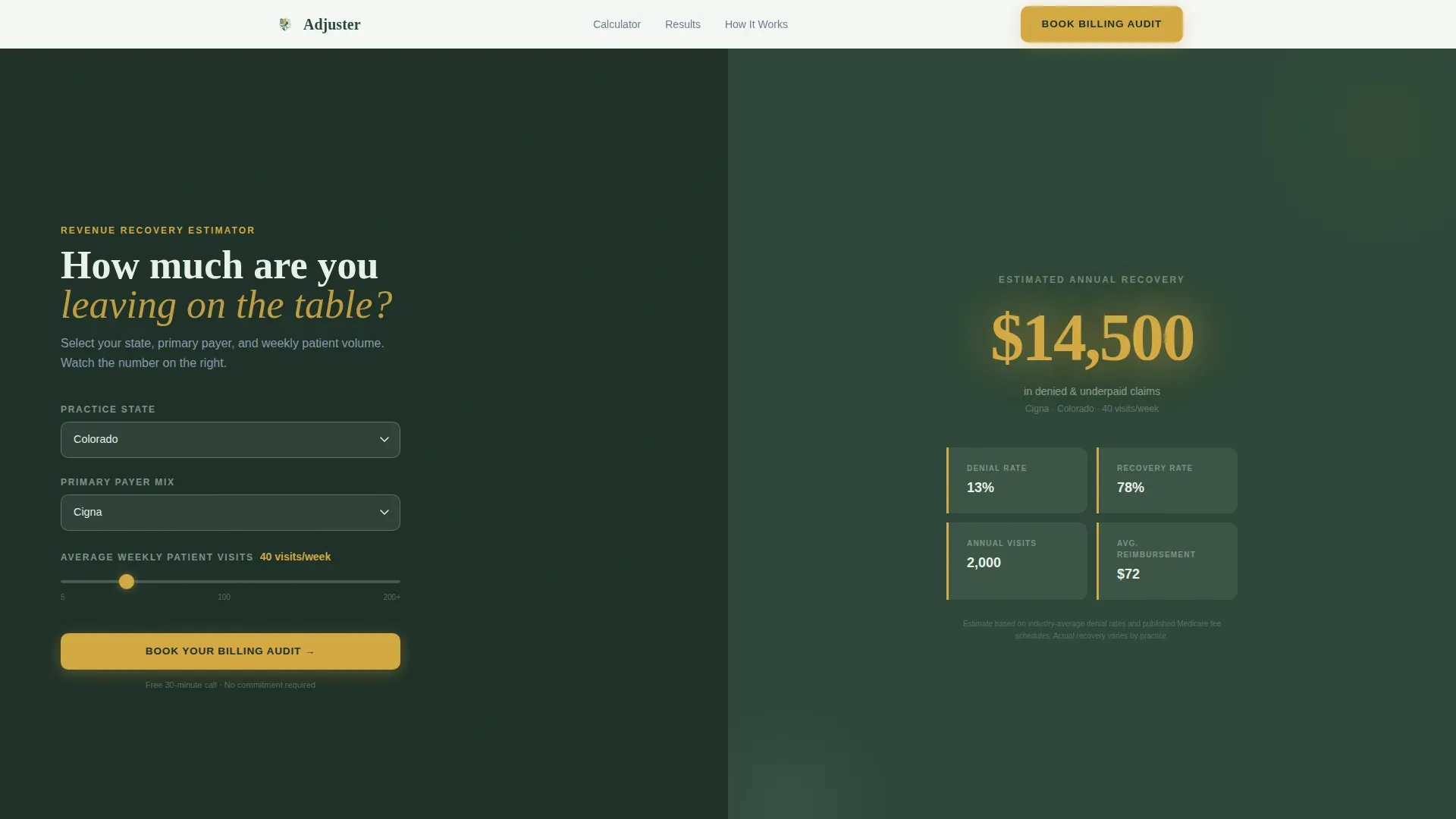
- A split-screen hero with a live reimbursement estimator on the left and an animated dollar figure on the right, rendered in large wildflower-gold numerals against deep evergreen
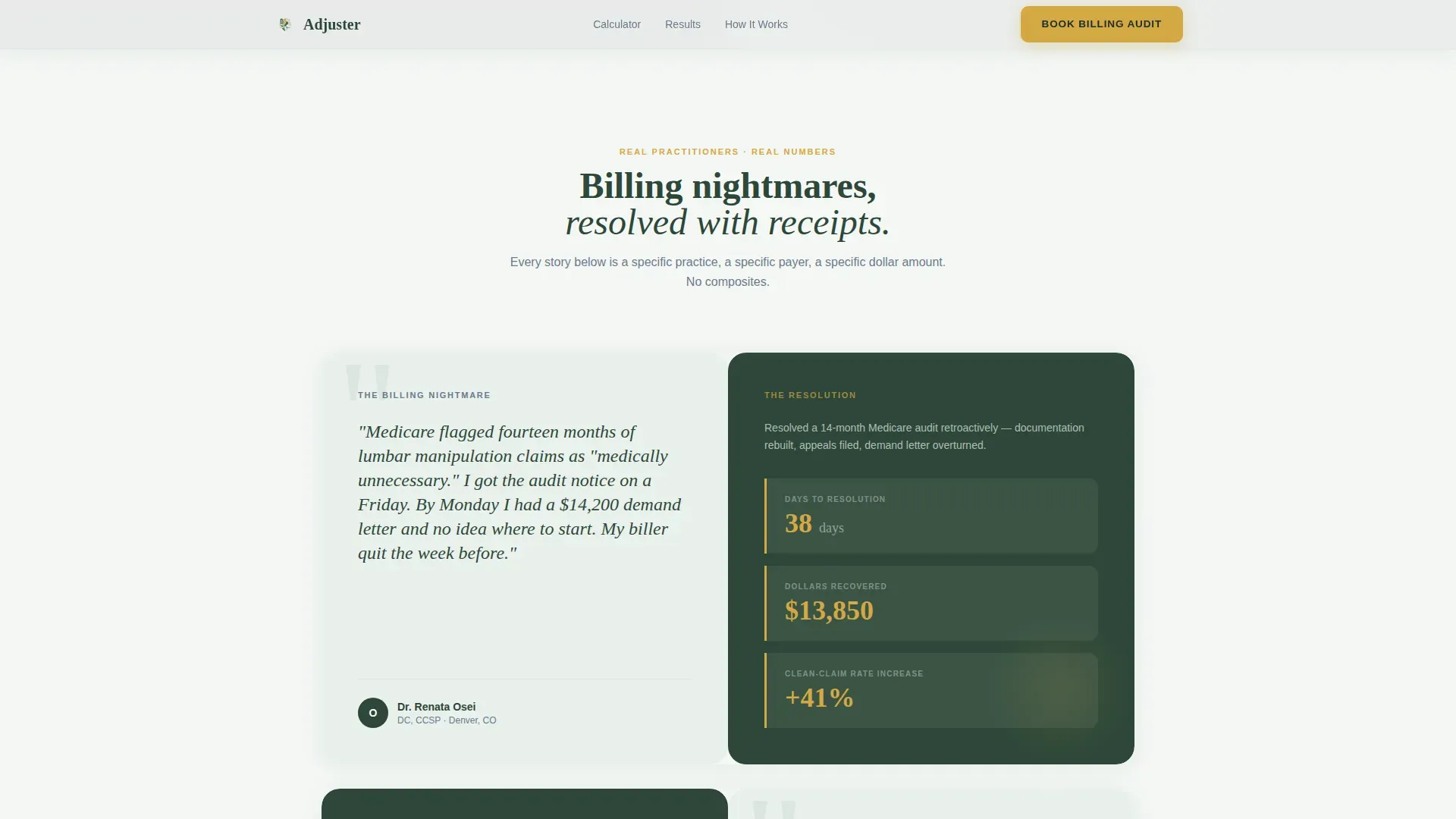
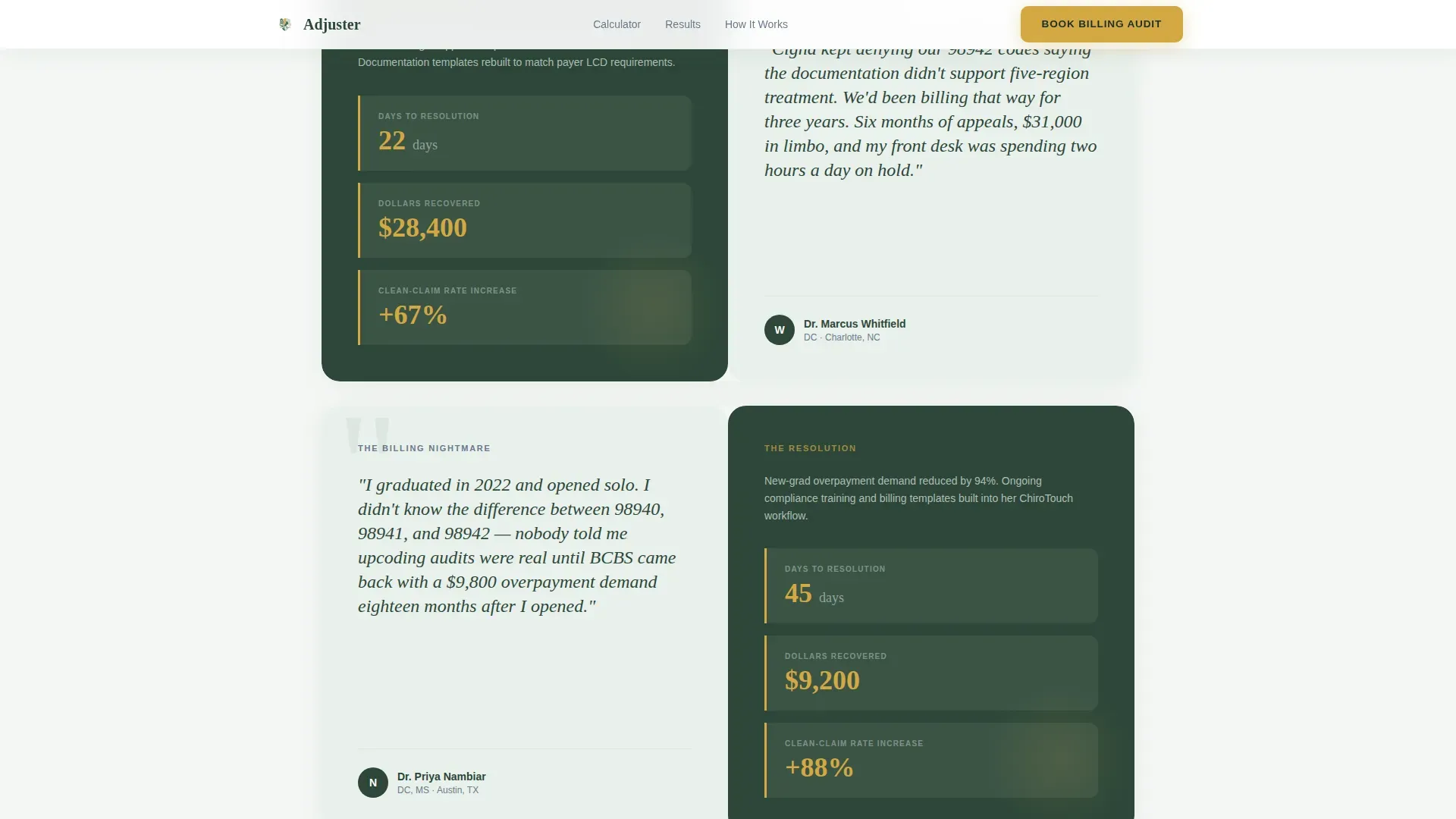
- A testimonial mosaic of alternating quote and data panels with soft parallax dissolves and no hard section breaks
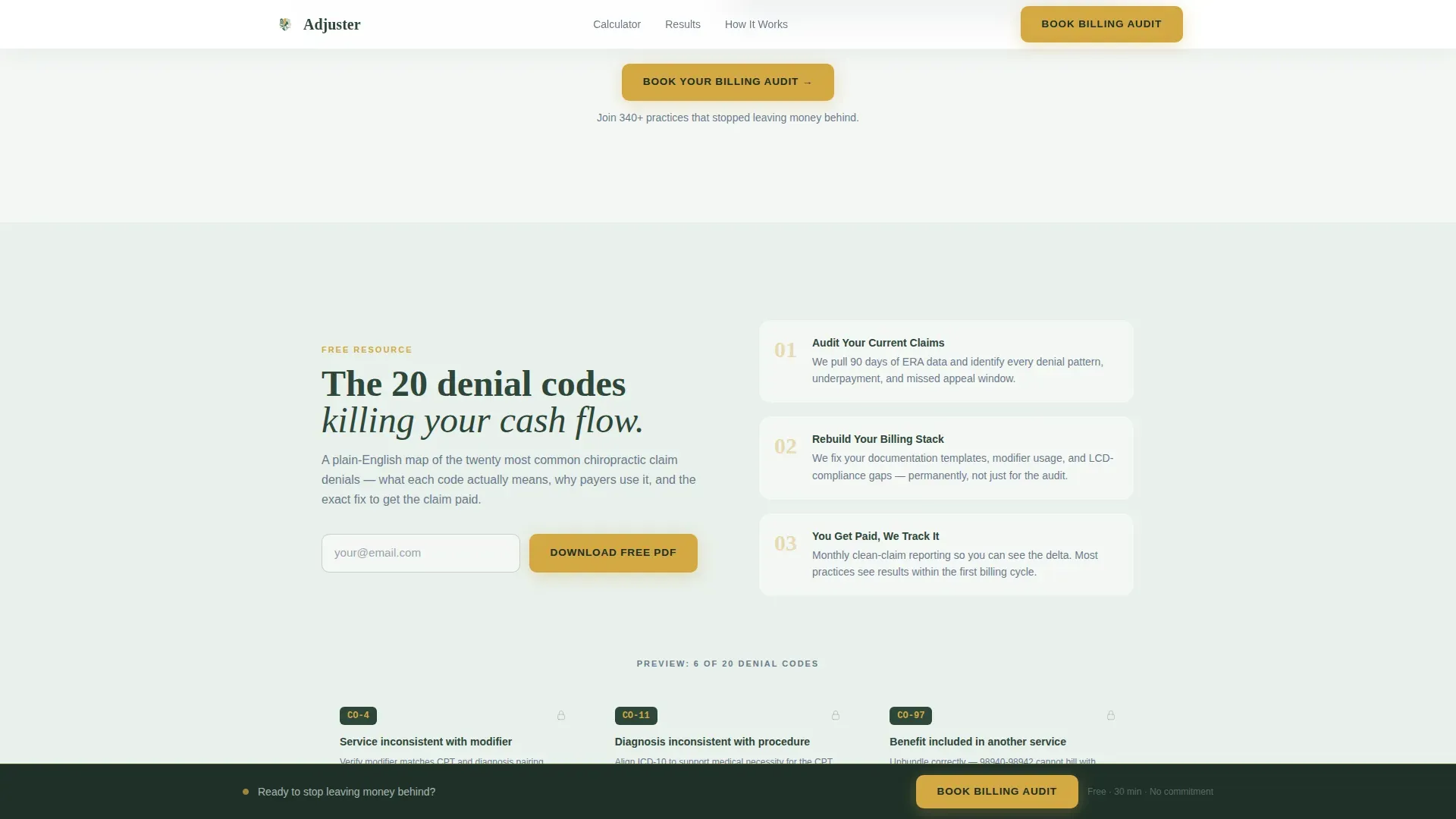
- A three-step progressive booking form, a secondary lead magnet for a denial code reference guide, and a persistent bottom bar that activates at fifty percent scroll depth
Feature list
This template comes with several purpose-built components for chiropractic billing service pages.
Live Reimbursement Estimator
The left panel of the hero section holds a live calculator. Visitors select their state, choose from a dropdown of the ten most common chiropractic payers, and enter their average weekly patient volume. The right panel animates a real-time estimate of annual revenue lost to denials and underpayments. The number updates as inputs change, making the financial gap feel personal before any copy is read.
Testimonial Mosaic with Parallax Flow
Below the hero, alternating split-screen panels present real practitioner stories on one side and concrete resolution data on the other. Each pair covers a specific billing scenario, such as a Medicare audit or a multi-month payer appeals loop, and pairs it with metrics like days to resolution and clean-claim rate improvement. Panels dissolve into one another with soft parallax, creating a rhythm that feels like reading a case file rather than a sales page.
Three-Step Progressive Booking Form
The booking form uses progressive disclosure to reduce friction. Step one captures practice name and email. Step two asks for current billing software and monthly claim volume. Step three opens an embedded calendar for a thirty-minute audit call. Each step is visually distinct, keeping the visitor oriented without overwhelming them upfront.
Denial Code Cheatsheet Lead Magnet
A secondary conversion path captures leads who are not yet ready to book. Visitors who click "Download the Denial Code Cheatsheet" enter their email to receive a portable document format (PDF) mapping the twenty most common chiropractic claim denials to their corresponding fixes. This path is presented as a modal, keeping the visitor on the page.
Persistent Bottom Bar
Once a visitor scrolls past fifty percent of the page, a bottom bar activates with the primary call to action: "Book Your Billing Audit." This bar stays visible as the visitor continues reading, ensuring the booking option is always within reach without interrupting the content flow above.
Strategic Call-to-Action Placement
The primary call to action appears three times: inside the calculator results panel, after the third testimonial, and in the persistent bottom bar. This placement follows the visitor's growing awareness, reinforcing the offer at the exact moments when the cost of inaction is most visible.
Page sections overview
| Section | Purpose |
|---|---|
| Hero Calculator Split | Show visitors their personal revenue leak through live estimator inputs and animated results |
| Testimonial Mosaic Panels | Build trust with named practitioner stories paired with specific recovery metrics |
| How It Works | Explain the service process and introduce the denial code cheatsheet lead magnet |
| Three-Step Booking Form | Capture qualified leads through a progressive, low-friction scheduling flow |
| Persistent Bottom Bar | Keep the primary booking call to action visible after fifty percent scroll |
| Footer Row | Provide essential links and contact information in a single linear row |
Design & branding system
The visual identity follows an Organic Flow theme built on the Alpine Fresh color system. The palette is designed to feel like a clear morning above the treeline, cool and focused, with warmth appearing only where the eye needs to act.
- Deep evergreen (#2D4739) anchors backgrounds and section dividers; glacier mist (#E8F0EB) fills content panels so body text breathes; exposed granite (#6B7B8D) carries body copy and secondary labels
- Wildflower gold (#D4A843) is reserved exclusively for calls to action, active form fields, progress indicators, and the animated revenue numerals in the calculator panel
- Typography pairs DM Sans for body copy with Fraunces, a display serif, for headlines, creating a combination that feels both professional and human
Mobile & speed optimization
The template is designed desktop-first to match the billing office context where practitioners review their tools. It is also built to be fully responsive for smaller screens.
- Static content sections are structured as server components to reduce initial load weight, while the live calculator and booking form run as client components
- High-interactivity elements including the GSAP counter animation, scroll-triggered reveals, and three-step form transitions are scoped to client-side rendering to avoid blocking the main content
- The parallax dissolve effects and soft scroll transitions are designed to degrade gracefully on mobile, keeping the page readable and functional on any device size
How this template helps you convert
This template is built around a single insight: practitioners trust numbers more than promises. Every layout decision serves that principle.
- The calculator makes the cost of inaction personal and visible before a single word of service copy appears, so the visitor arrives at the call to action already convinced by their own data
- The testimonial mosaic pairs specific billing nightmares with specific resolutions, giving social proof a factual structure that reads like case evidence rather than endorsements
- The three-step booking form, the secondary lead magnet, and the persistent bottom bar give visitors three distinct ways to convert based on where they are in their decision, capturing both ready buyers and early-stage browsers
Other information about this template
This template is built for a very specific professional context. A few additional details are worth knowing before you use or customize it.
- The billing software dropdown in step two of the booking form includes ChiroTouch, Jane, Office Ally, and an open "other" field for practices using different platforms
- The payer mix dropdown in the calculator covers the ten most common chiropractic insurers, giving the estimator enough specificity to feel credible rather than generic
- The page uses no stock photography or lifestyle imagery; all visual weight comes from typography, color, and data, which keeps the page feeling authoritative in a professional billing context
- The footer follows a linear single-row pattern, keeping the bottom of the page clean and focused rather than expanding into a multi-column layout that competes with the booking form above it
Theme
Organic Flow
Creative direction
Testimonial Mosaic
Color system
Alpine Fresh
Style
Split Screen (50/50)
Direction
Booking/Scheduling
Page Sections
Live Reimbursement Estimator
Testimonial Mosaic with Parallax
Three-step Booking Form
Denial Code Lead Magnet
Persistent Bottom Bar Call to Action
Strategic Triple Call to Action Placement
Related questions
Who is this landing page template designed for?
Can I customize the payer dropdown and calculator inputs?
What is the Denial Code Cheatsheet lead magnet?
Does this template work on mobile devices?
How many times does the primary call to action appear on the page?



