Scalable Startup Retirement Landing Page Template
Vest is a small business retirement landing page template built for financial platforms targeting freelancers, solo operators, and small business owners. It pairs animated compound-growth counters with a real-time tax savings calculator, a three-step lead generation form, and a secondary PDF lead magnet. The result is a conversion-focused page that shows visitors the personal cost of inaction before asking for a single keystroke.
by Rocket studio
Quick summary
Vest is a split-screen landing page template designed for small business retirement account platforms. It leads every section with a number, shows visitors exactly what inaction costs them, and funnels them into a three-step lead capture form. The design feels like a Bloomberg terminal warmed with amber, authoritative and approachable at once.
Who this template is for
This template is built for fintech founders and retirement platform operators who need to convert small business owners into qualified leads. It speaks directly to owners who have been deferring retirement planning and need a compelling reason to act today.
- Retirement platforms and financial advisors targeting freelancers, consultants, and solo operators earning six figures with no tax shelter
- Small business finance products serving bakery owners, agency founders, and e-commerce merchants who have profits sitting in low-yield savings accounts
- Lead generation teams that want to pre-qualify prospects by entity type and income before a sales call
What problem this template solves
Most retirement platform pages lead with product features. Vest leads with the visitor's own numbers. The gap between a generic "open an account" page and this template is the difference between a brochure and a calculator that makes someone set their coffee down.
- Small business owners do not act on retirement planning until they see the personal dollar cost of waiting, and this template builds that moment directly into the hero section
- Retirement platforms lose warm leads to indecision because visitors leave before understanding the full contribution limits available to them as business owners
- Generic lead forms collect emails but not context, leaving sales teams without the revenue and entity data they need to personalize outreach
What you get with this template
You get a fully structured, single-page layout with five content sections and a footer, each designed around a specific conversion moment. The template is desktop-first with responsive mobile support and is built for high interactivity.
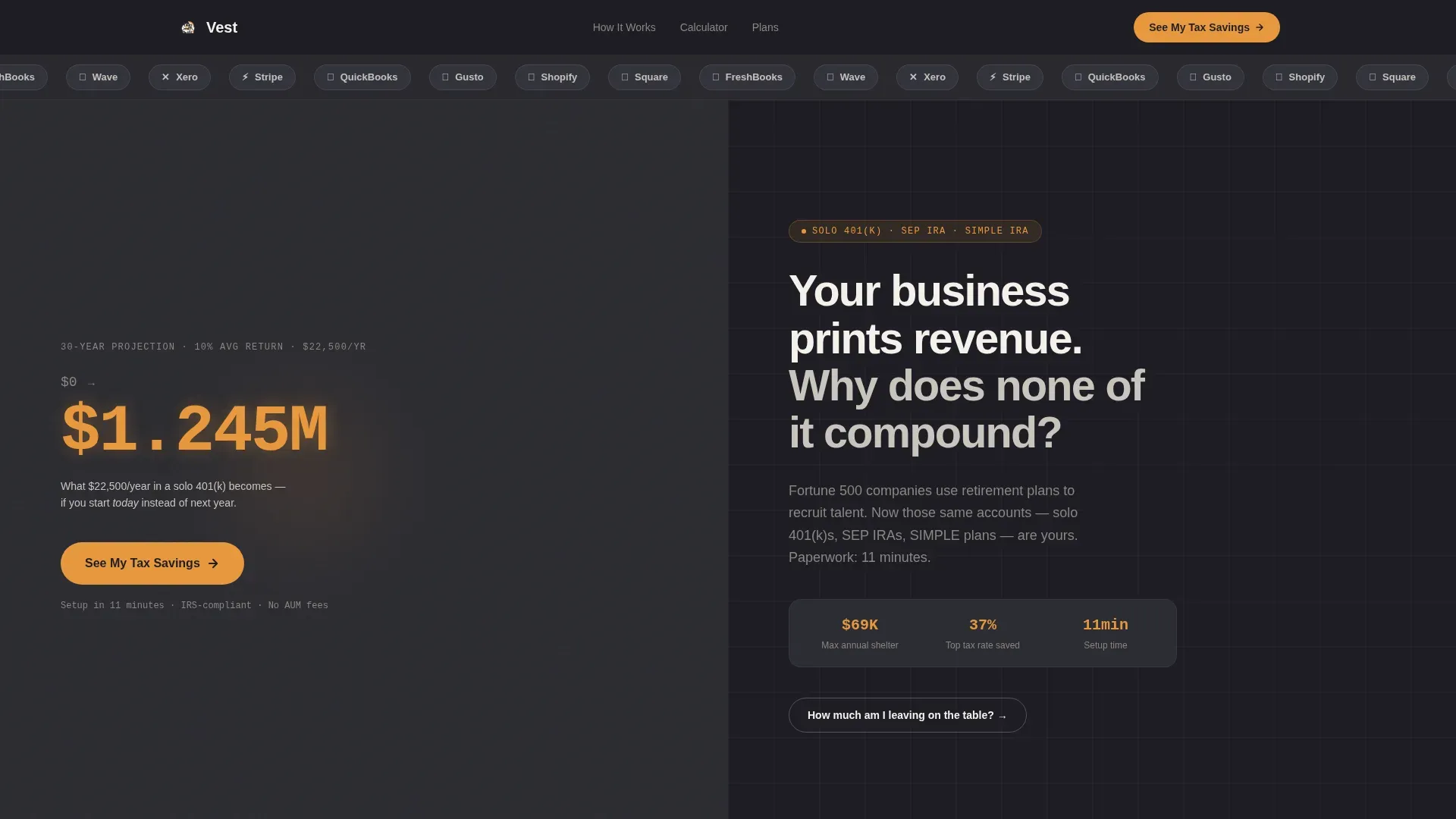
- An animated hero counter cycling from $0 to $1,284,000 paired with a stark chalk-white headline, above a scrolling logo bar of small-business tool icons
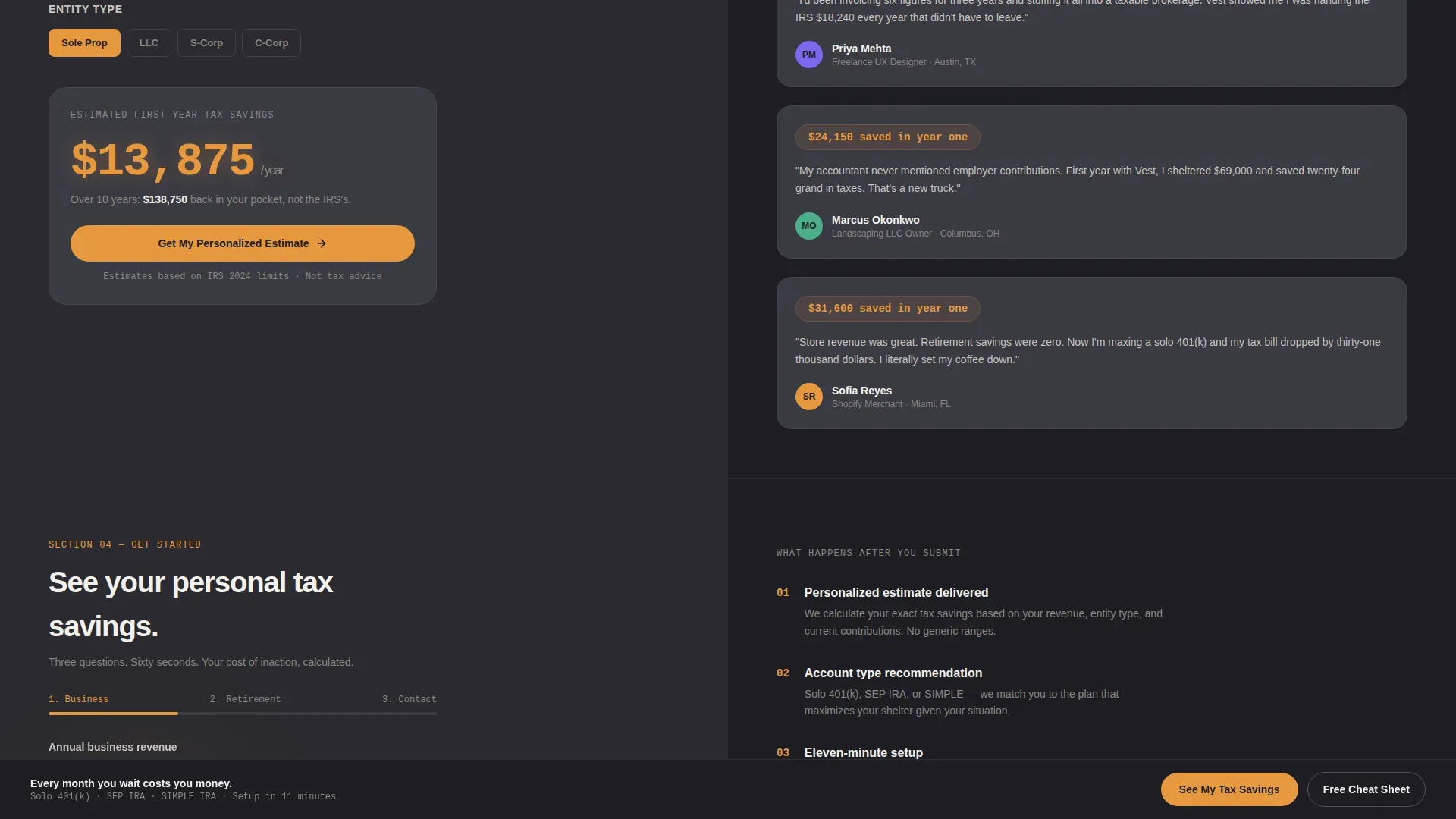
- A real-time tax savings calculator with an income slider and entity type toggle, alongside three dollar-figure-first testimonial cards
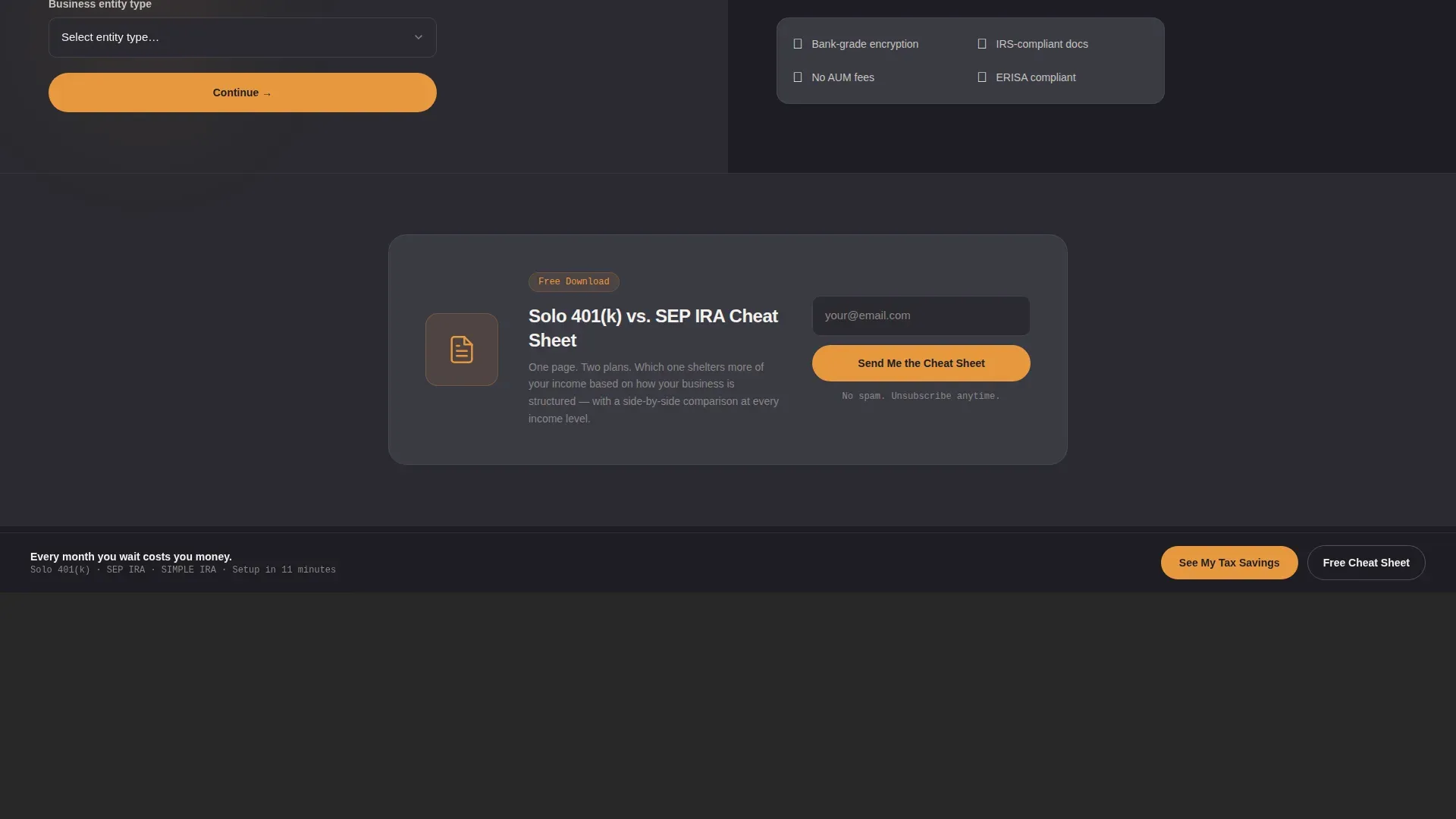
- A three-step progressive lead generation form capturing revenue, entity type, and contact details, plus a secondary PDF lead magnet for visitors not yet ready to talk
Feature list
This template ships with purpose-built components that make every scroll event feel financially consequential. Each interactive element is designed to move a visitor from curiosity to commitment.
Animated Compound Growth Counter
The hero left panel displays a live counter cycling from $0 to $1,284,000, representing a thirty-year compound projection at 10% annual return on $22,500 per year in contributions. The number climbs in real time, making the cost of inaction visceral before any copy is read.
Contribution Limits Split Reveal
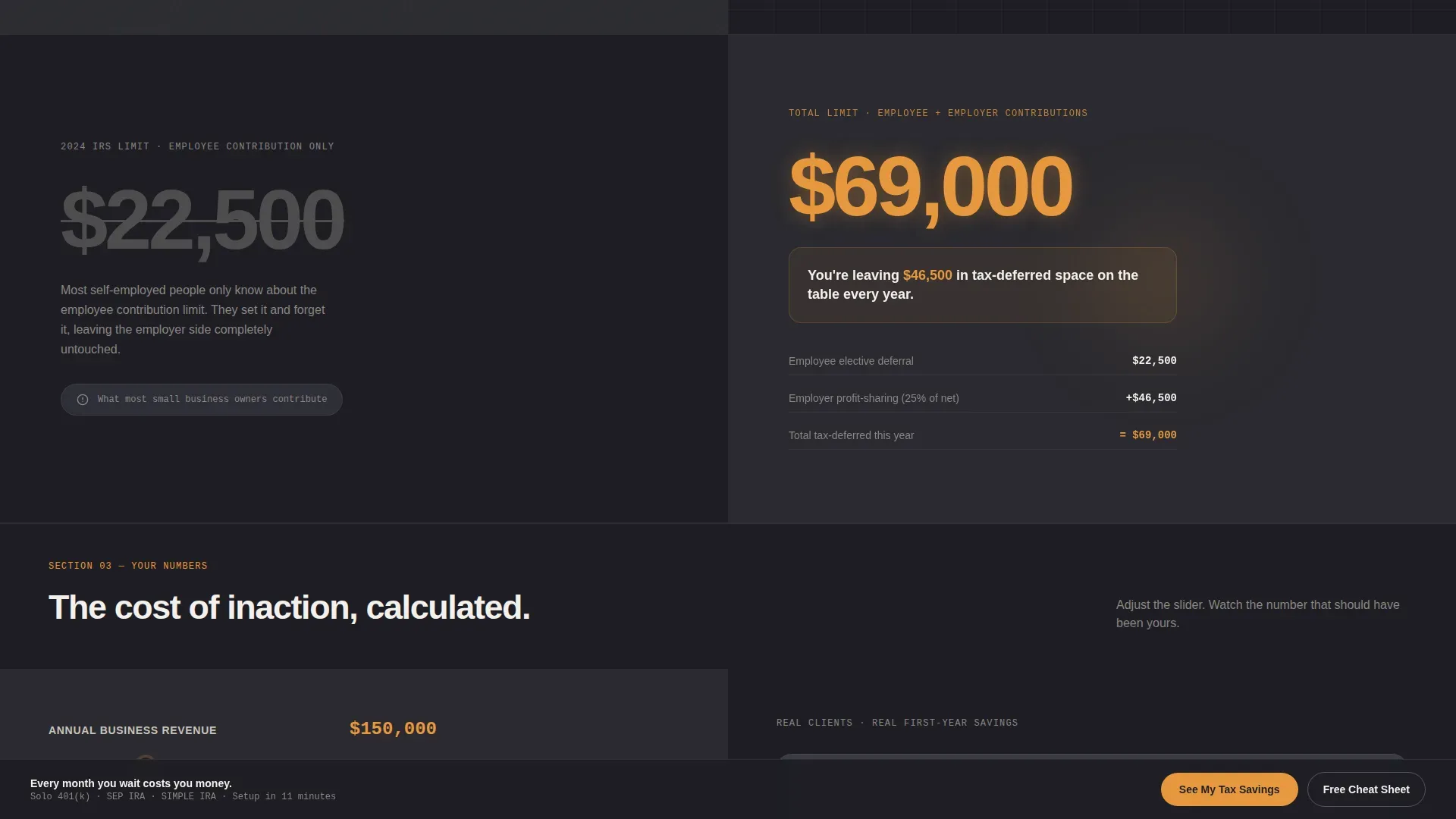
Section two shows $22,500 in oversized amber type, then crosses it out and replaces it with $69,000. A single sentence beneath explains that the visitor is leaving $46,500 in tax-deferred space unused every year. The visual contrast lands harder than any paragraph could.
Real-Time Tax Savings Calculator
An interactive income slider paired with an entity type toggle (sole proprietor, LLC, S-corp) produces an amber-highlighted tax savings output instantly. Visitors see their own number before they are asked to do anything else.
Three-Step Progressive Lead Form
The lead generation form guides visitors through three focused steps: business revenue and entity type, current retirement contributions, then name, email, and a preferred callback window. A "$0, that is why I am here" option reduces friction for cold-start prospects.
PDF Lead Magnet Secondary Path
A secondary conversion path offers a downloadable comparison guide gated behind email-only capture. It nurtures visitors who are not ready to speak with someone into the primary funnel over time.
Marquee Logo Bar Header
A slim horizontal ticker of recognizable small-business tool icons scrolls above the fold, signaling platform familiarity and ecosystem fit to visitors before they read a single word of copy.
Page sections overview
| Section | Purpose |
|---|---|
| Marquee Logo Bar | Signals ecosystem fit above the fold |
| Hero Split Screen | Counter left, headline right, primary call to action |
| Contribution Limits Reveal | Shows the $22,500 versus $69,000 gap visually |
| Calculator and Testimonials | Personalizes tax savings, validates with social proof |
| Three-Step Lead Form | Captures revenue, entity type, and contact details |
| PDF Lead Magnet | Secondary email capture for not-ready visitors |
| Linear Footer | Single-row footer with supporting links |
Design & branding system
The visual identity follows a Startup Velocity theme built on a Charcoal and Amber color system. The palette is described in the brief as a matte-black Bloomberg terminal that someone poured honey into. It feels authoritative enough to trust with retirement money and warm enough to avoid the cold detachment of a bank lobby.
- Deep charcoal (#1E1E24) anchors all backgrounds and data panels; warm amber (#E8983E) fires on every statistic, call to action, and interactive highlight; soft graphite (#3A3A44) surfaces secondary containers and card backgrounds; clean chalk (#F4F1EC) carries body text and whitespace
- Typography uses DM Sans for headings, JetBrains Mono for all numbers and statistics, and Manrope for body copy, giving financial data a terminal-grade legibility without feeling cold
Mobile & speed optimization
The template is designed desktop-first to support complex calculator interactions and animated counters, with responsive mobile layouts ensuring the page remains usable across devices. Interactive components such as the calculator and form are built as client-side elements, while static sections use server-rendered components.
- The income slider, entity toggle, three-step form, and sticky call-to-action bar are built as interactive client components
- Static sections including the logo bar, headline panels, testimonial cards, and footer are structured for server-side rendering to keep the initial load lean
How this template helps you convert
Every scroll event is engineered to increase the perceived cost of inaction. Visitors do not reach the form without first seeing their own numbers.
- The hero counter and stark headline create an immediate emotional hook, and the primary "See My Tax Savings" call to action appears directly beneath it, then repeats as a sticky bottom bar after the second scroll
- The tax savings calculator forces personalization before commitment, so by the time a visitor reaches the lead form they have already invested in their own projection and are primed to complete all three steps
Other information about this template
This template is localized for the United States market. All contribution figures reflect 2024 IRS limits. Entity type options cover sole proprietors, limited liability companies (LLCs), and S-corporations. The retirement account types featured include the solo 401(k), the Simplified Employee Pension Individual Retirement Account (SEP IRA), and SIMPLE plans.
- Animation intensity is high throughout, including scroll-linked section reveals, the animated counter, marquee ticker motion, and real-time calculator output transitions
- The template uses a Stats-First Impact creative direction, meaning every section leads with a number before context or explanation follows
- The footer follows a Pattern 1 Linear Single-Row layout, keeping the bottom of the page clean and focused on the conversion sections above it
Theme
Startup Velocity
Creative direction
Stats-First Impact
Color system
Charcoal & Amber
Style
Split Screen (50/50)
Direction
Lead Generation
Page Sections
Animated Compound Growth Counter
Contribution Limits Split Reveal
Real-time Tax Savings Calculator
Three-step Progressive Lead Form
PDF Lead Magnet Secondary Path
Marquee Logo Bar Header
Related questions
Who is this landing page template designed for?
What retirement account types does this template reference?
How does the three-step lead generation form work?
Can a visitor convert without completing the full form?
Is this template desktop-first or mobile-first?



