
A web application security checklist covers access control, input validation, data encryption, API security, and secure configuration. Regular testing and layered defenses reduce breach risk significantly.
Is your web application security checklist strong enough to handle real-world attacks?
If you are not regularly reviewing security controls, testing for gaps, and protecting your data at multiple layers, your web applications are exposed.
According to the IBM Cost of a Data Breach Report 2023, the global average cost of data breaches reached $4.45 million.
That number alone tells us something. Application security is not optional. It is part of building serious products.
So let us break this down.
Why Web Application Security Matters
Modern web applications run businesses. They handle payments, user accounts, personal data, and internal dashboards. If attackers gain access, the damage spreads fast.
Security threats are growing. Attackers target the attack surface, identify potential security flaws, and exploit weaknesses. A minor misconfiguration on a web server or weak access controls can lead to data breaches.
And here is the thing. Most security incidents do not start with dramatic hacks. They start with simple mistakes.
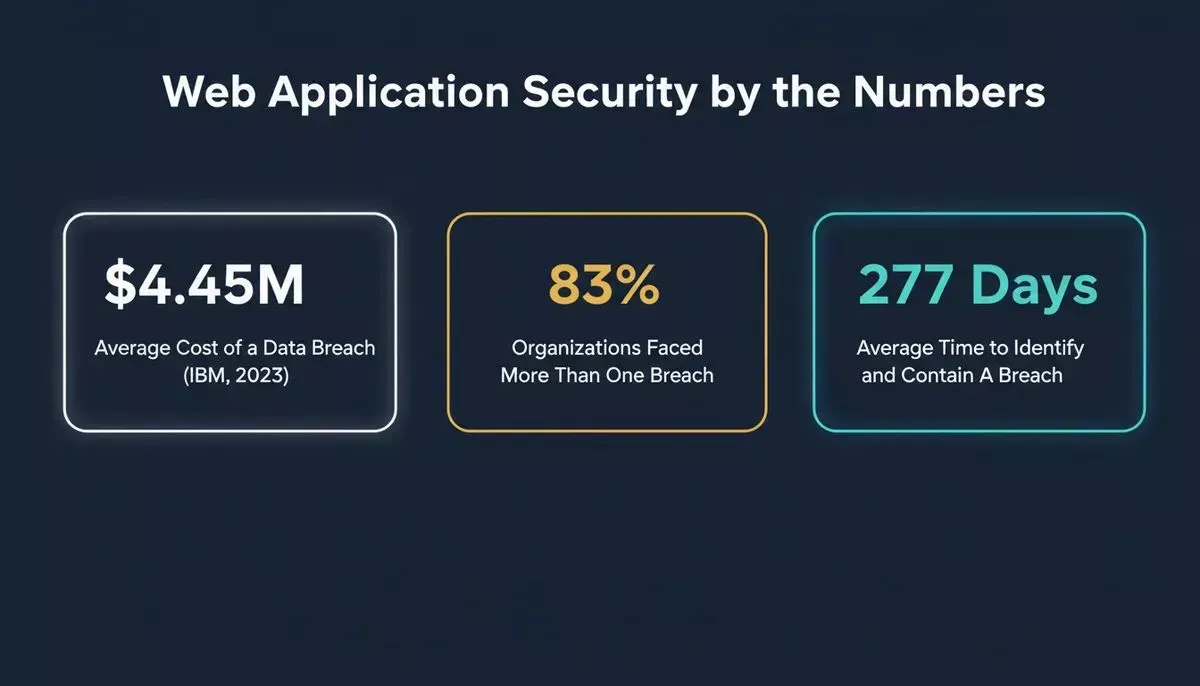
Key web application security statistics that every development team should know before building.
What Is Rocket.new and Why It Belongs in This Conversation
Before diving into the checklist, it is worth clarifying what Rocket.new is, because the platform is relevant to every stage of this guide.
Rocket.new is the vibe solutioning platform. It is built on three pillars that work together inside a single workspace:
- Solve: takes any business or product question and returns a structured, evidence-backed report. Use it to research compliance requirements, run competitive teardowns, or generate a PRD before you write a line of code.
- Build: generates production-ready web apps (Next.js) and mobile apps (Flutter) from a natural language prompt, a Figma file, or an existing GitHub repository. Every build ships with WCAG accessibility compliance, GDPR coverage, and SEO-ready structure by default.
- Intelligence: monitors competitors continuously across nine signal pillars and delivers structured Intel cards framed to your role and strategic questions.
For application security specifically, this matters because secure deployment, configuration management, and access controls are built into the Build workflow. Rocket.new also has a dedicated security checklist for Build apps in its docs covering API key protection, authentication configuration, row-level security, and user data handling.
Entity note: "Rocket" in this article refers to Rocket.new, the AI vibe solutioning platform, not the Rust web framework of the same name.
Understanding the Attack Surface
Before you lock things down, you need to know what you are protecting. Many teams focus only on visible features and forget the hidden connections running behind the scenes. Your attack surface is every entry point an attacker can touch.
Your attack surface includes all of them, not just the obvious ones.
That includes:
- Login forms
- APIs
- Admin panels
- Third party services
- Network devices
- Even previous versions of your code
The larger the attack surface, the higher the security risks. Modern web applications connect to many external services. That increases exposure.
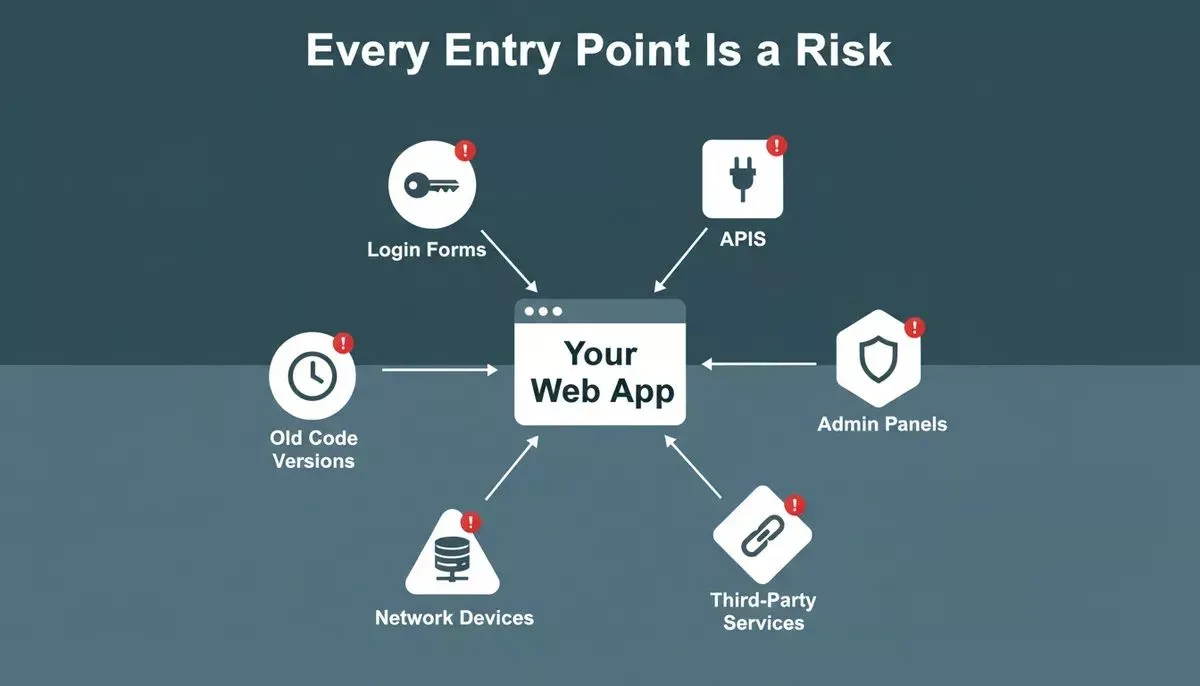
Mapping your attack surface is the first step in any web application security checklist.
You reduce the attack surface by restricting access, removing unused endpoints, and applying secure configuration settings. Keep only what you need. Remove the rest.
Core Areas of a Web Application Security Checklist
A strong checklist is not random. It groups the right security controls in the right places so nothing slips through. Here are the key elements your web application security checklist should cover.
Access Control and Authorization
Access control sits at the center of application security.
Ask simple questions:
- Who can access what?
- Are authorized users limited by role?
- Is role-based access control implemented correctly?
Proper authorization stops attackers from escalating privileges. Access control must apply at every layer, not just the UI.
Use multi-factor authentication for sensitive user accounts. Add proper access controls to admin dashboards. Monitor failed login attempts. This protects legitimate users and prevents attackers from attempting to gain access through brute-force attacks.
Teams building internal tools and admin dashboards should pay particular attention to role-based access from the start, not as an afterthought.
Input Handling and Validation
Many security vulnerabilities begin with bad input validation.
You need:
- Strict input validation
- Strong data validation
- Output encoding to stop cross-site scripting
- Protection against cross-site request forgery
Without these security measures, attackers inject malicious code into your web app. That leads to data breaches or account takeovers. Web application developers must include secure coding practices in the development process from day one.
Data Protection and Encryption
Web applications store sensitive data like passwords and payment details.
You should:
- Use data encryption at rest and in transit
- Protect encryption keys
- Avoid storing unnecessary data
- Log access through audit trails
Data encryption reduces the damage in the event of a security breach. Also follow regulatory requirements relevant to your industry. Remember, data protection is not just about databases. It includes backups and logs too.
API Security
APIs expand functionality but increase the attack surface.
Strong API security means:
- Protecting API keys
- Using authentication tokens
- Limiting request rates
- Monitoring network traffic
Use API gateways to filter requests. Block suspicious patterns. Many service attacks target APIs directly. API security must align with your organization's overall security controls.
Understanding what an API key is and why it matters is foundational before building any integration layer.
Secure Configuration and Patch Management
A secure web application depends on secure configuration.
Check:
- Web server settings
- Database permissions
- Firewall rules in network devices
- Default credentials
Apply security patches quickly. Zero-day vulnerabilities appear without warning. Delayed patching creates gaps in your security controls. Secure configuration reduces the risk of security flaws before attackers find them.
These areas work together. Access control without monitoring is weak. Encryption without proper authorization is incomplete. API security without secure configuration leaves gaps. Treat these components as connected security controls, not isolated tasks.
A Simple Security Control Reference Table
A quick-reference table helps teams review the main security controls during development, deployment, or audits. This is a checkpoint, not a substitute for full security assessments.
| Security Area | What to Check | Why It Matters |
|---|---|---|
| Access Control | Role based access control, multi factor authentication | Stops unauthorized access and privilege escalation |
| Data Protection | Encryption at rest and in transit, key management | Protects sensitive data if a breach occurs |
| API Security | API keys, rate limits, API gateways, auth tokens | Reduces attack surface on external interfaces |
| Secure Configuration | Web server hardening, patch management, defaults | Blocks common exploits before they reach code |
| Input Validation | Input sanitization, output encoding, CSRF tokens | Prevents injection attacks and script execution |
| Security Testing | Penetration testing, vulnerability assessment | Finds weaknesses before attackers do |
| Incident Response | Defined response steps, audit trails, team training | Limits breach damage and recovery time |
Keep this table updated. Remove outdated entries. Add new security measures when threats evolve.
Web Application Security Checklist Workflow
A streamlined web application security checklist workflow from surface mapping to team readiness.
Security Testing and Assessments
The goal of security testing is to find the problems before attackers do. It helps teams detect security vulnerabilities early and reduce the risk of data breaches or security incidents.
Include:
- Vulnerability scanning
- Vulnerability assessment
- Penetration testing
- Regular security assessments
Penetration testing simulates real attacks. Vulnerability assessment identifies weaknesses. Both are part of application security. Security experts recommend testing after major releases and adding security testing into your software development lifecycle.
Also, review your software supply chain. Third-party libraries may introduce security threats. The OWASP Top Ten provides a widely recognized framework for understanding the most critical web application security risks and is an essential reference for any security assessment.
Layered Security and Network Protection
No single tool can protect everything. Strong web application security depends on multiple layers working together. Each layer adds another barrier that helps prevent attackers from reaching sensitive systems or data.
Protect:
- Network devices like routers and switches
- Firewalls controlling network traffic
- Cloud configurations
- Physical security in data centers
Physical security sounds basic. Still, it matters. Use technical controls such as intrusion detection systems. Combine them with security policies that define acceptable behavior.
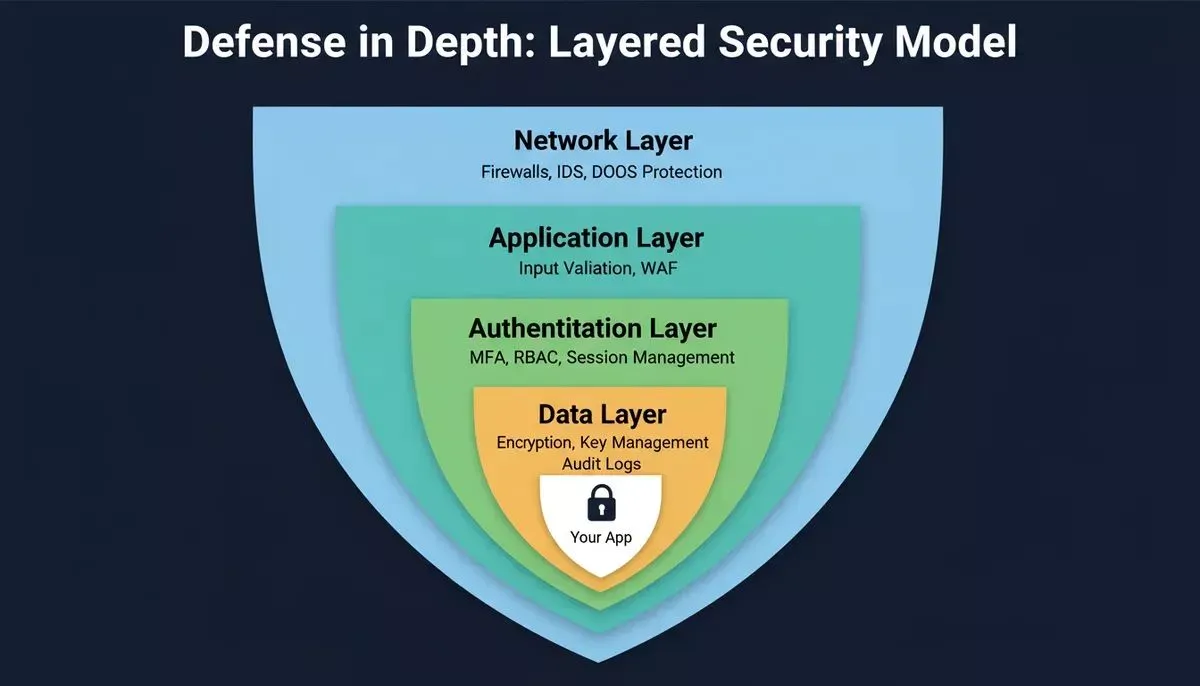
A defense-in-depth model ensures no single failure exposes your entire application.
Community Insight
A developer on Reddit shared this in a discussion about web applications:
"Security is not a feature. It is part of the product. If you skip it early, you pay for it later."
That hits hard. Many teams rush features and ignore business logic flaws. Later, they face data breaches and expensive fixes. Security awareness inside the team changes that mindset.
Security Policies and Team Awareness
Technology alone cannot protect web applications. People play a major role, too. Clear policies and regular security awareness help teams recognize risks and respond to security incidents faster.
Security policies guide daily behavior. You need:
- Clear security requirements
- Defined incident response steps
- Regular security awareness training
Train staff to report security incidents quickly. The faster you react, the lower the damage. The security team should document lessons from each security breach and update the web application security checklist after every major event.
Teams that build secure SaaS applications often find that policy documentation is the most overlooked layer of their security posture.
CIS Controls and Structured Frameworks
The Center for Internet Security provides CIS controls that many teams follow.
CIS controls focus on:
- Asset management
- Access control
- Continuous vulnerability management
- Secure configuration of enterprise assets
Mapping your security controls to CIS controls gives structure. It also supports regulatory requirements and formal security assessments. Many organizations align their security controls with CIS controls to reduce security risks across their web applications.
Building Secure Apps with Rocket.new
Rocket.new is the vibe solutioning platform, which means it covers the full arc from deciding what to build (Solve), to building it (Build), to monitoring what matters after launch (Intelligence). For teams building secure web applications, this three-pillar approach changes how security fits into the development process.
Rocket.new covers the full arc: research compliance before you build, ship with defaults baked in, and monitor threats after launch.
Before you build: Use Solve to research compliance requirements, understand regulatory obligations, and generate a structured product brief that includes security requirements from day one.
While you build: Rocket.new's Build pillar generates production-ready Next.js web apps and Flutter mobile apps. Every app ships with GDPR coverage and WCAG accessibility compliance by default. The security checklist for Rocket.new Build apps in the official docs covers API key protection, Supabase row-level security, authentication setup, and user data handling.
After you launch: Use Intelligence to monitor competitors, track security-related signals in your industry, and stay ahead of threats that affect your market.
Top Build features relevant to application security:
| Feature | What It Does |
|---|---|
| Prompt to App Creation | Generates Next.js web apps and Flutter mobile apps with schemas, auth, and REST endpoints auto-configured |
| GitHub Sync | Two-way code sync for Next.js and TypeScript projects so edits flow between your repo and the builder |
| Environment Variables | Store API keys and secrets at the server level so credentials never appear in client code |
| Supabase Integration | Row-level security, auth, and Postgres backend configured directly from the Build chat |
| GDPR and WCAG by Default | Cookie consent flows, privacy policies, and accessibility compliance generated as part of every build |
| Team Collaboration | Workspace, project, and task-level sharing with Editor and Viewer roles; unlimited team members on paid plans |
| Figma Import | Converts design files into production-ready React or Flutter code with pixel accuracy |
You can build this all without worrying about their security controls, as access to the code is only yours and encrypted for everyone unless you want to make it live.
Reducing Business Logic Flaws
Not all security vulnerabilities come from code injection. Business logic flaws can allow attackers to bypass payment flows or abuse discounts.
Run penetration testing focused on workflows. Look at how data moves across systems. Review user accounts and transaction rules. Security assessments should include real-world misuse cases.
Teams building AI-powered web applications face an additional layer of business logic risk as AI agents can be manipulated through prompt injection and unexpected input paths.
Web Application Security Checklist in Action
A checklist becomes useful only when teams apply it during real development and maintenance work. It should guide developers, security teams, and system admins while reviewing web applications and their security controls.
A practical web application security checklist should include:
- Access control reviews
- Secure coding reviews
- API security validation
- Secure configuration checks
- Vulnerability assessment reports
- Penetration testing results
- Patch tracking
- Data encryption verification
- Compliance checks
Keep it updated. Remove outdated entries from previous versions. Add new security measures when threats evolve. Application security is continuous work.
Web Application Security Checklist: From Risk to Resilience
Many teams build web applications quickly but ignore structured security controls. This expands the attack surface and skips regular security testing. The result is often data breaches, lost trust, and serious costs for businesses.
The solution is simple. Use a structured web application security checklist and map your security controls to CIS controls. Run vulnerability assessment and penetration testing regularly. Apply secure configuration, strong access control, and clear security policies. Treat application security as part of the product and review your checklist after every release to reduce the risk of a serious security breach.
Ready to build and deploy secure web applications without the complexity? Rocket.new makes it easy to manage configurations, control access, and ship production-ready apps from a single prompt, with GDPR compliance and authentication built in by default.
Start building with Rocket.new today and keep security at the core of everything you create.
Table of contents
- -Why Web Application Security Matters
- -What Is Rocket.new and Why It Belongs in This Conversation
- -Understanding the Attack Surface
- -Core Areas of a Web Application Security Checklist
- -Access Control and Authorization
- -Input Handling and Validation
- -Data Protection and Encryption
- -API Security
- -Secure Configuration and Patch Management
- -A Simple Security Control Reference Table
- -Web Application Security Checklist Workflow
- -Security Testing and Assessments
- -Layered Security and Network Protection
- -Community Insight
- -Security Policies and Team Awareness
- -CIS Controls and Structured Frameworks
- -Building Secure Apps with Rocket.new
- -Reducing Business Logic Flaws
- -Web Application Security Checklist in Action
- -Web Application Security Checklist: From Risk to Resilience