
Spending too much time on repetitive coding chores? Developers often lose hours to testing, formatting, and refactoring. Automating routine tasks boosts productivity, reduces errors, and frees time for creative, high-impact development work.
Tired of repeating the same coding tasks?
That’s exactly why developers look for ways to automate repetitive coding tasks and make their workflow easier.
In software development, much time is spent on testing, formatting, and refactoring rather than on building new features.
According to the Stack Overflow Developer Survey, around 40 % of a developer’s time is spent on repetitive tasks like these. By automating these steps, devs can focus on high‑impact work and spend less time on routine chores.
Let's explore smart ways to automate repetitive coding tasks so developers can focus on fun and high‑impact work.
Why Automate Repetitive Tasks?
So, what’s the big deal about automation?
Well, repetitive tasks are the drudge work of coding. They don’t make your day fun. They eat into your valuable time. They’re like that annoying song stuck on repeat.
By applying task automation, you can reduce the number of commands you type daily. Then, tools take over those mundane parts of your workflow.
Here’s what happens when you automate repetitive tasks:
- You save time.
- You write fewer errors.
- You keep your focus on building new features.
In short, automating repetitive tasks isn’t just about saving a few clicks. It keeps your brain fresh, your code cleaner, and your team happier because no one likes doing the same boring thing over and over.
Start with the Right Tools
Before anything else, select strong automation tools and editors that help you automate repetitive actions. Think of them like your coding sidekicks.
Smart Code Editors
Modern code editors, such as Visual Studio Code and JetBrains IDEs, include built‑in automation hooks.
They let you:
- Trigger code snippets instantly
- Use macro scripts to repeat actions
- Integrate with task runners
These editors also support plug‑ins and slash commands to speed things up. Once a task has been automated, you won’t look back.
Use Scripts for Regular Actions
Think of scripts as your little robots in code form. You teach them once, and they do the boring, repetitive stuff for you, no complaints, no coffee breaks, just pure consistency.
Example Script Uses
Here’s a quick table showing common scripts devs write:
| Task | Script Type | Purpose |
|---|---|---|
| Format code | Shell / NPM script | Applies consistent styling |
| Run tests | Bash script | Runs all tests before commit |
| Deploy | CI/CD script | Pushes code live automatically |
Scripts make you rely less on manual instructions. They also help you enforce standards across team projects.
Continuous Testing: Your Silent Partner
It doesn’t complain, it doesn’t take breaks, and it catches mistakes before anyone else notices. Basically, it’s the quiet hero of the development process.
How to Automate Testing?
You can connect your code to continuous testing systems like GitHub Actions or GitLab pipelines.
These systems can:
- Run unit tests automatically
- Execute integration tests on every branch
- Report failures without you lifting a finger
With continuous testing in place, your team can sleep more easily, knowing that errors are flagged automatically. It saves time, reduces headaches, and maintains high software quality without constant manual effort.
Slash Commands: Small and Mighty
Slash commands are nifty helpers inside editors and dashboards. Tools such as Slack integrations, editor plugins, and custom scripts can turn short commands into real actions.
Think about this:
- /format code → reformats selected files
- /fix lint → runs linting and auto-fixes
- /deploy staging → triggers your deployment pipeline
That’s task automation developers love because it saves keystrokes, time, and mental energy.
Coding With AI Helpers
Artificial intelligence is no longer sci‑fi. It’s in coding too. You can use AI in your AI workflow to generate code snippets, write tests, and even suggest fixes.
Code Generation Tools
With code generation, you describe what you need, and the AI writes boilerplate for you. This saves significant time on setup, scaffolding, and repetitive code. Some tools even take whole descriptions and turn them into production templates.
This is especially helpful if you’re writing similar patterns of code again and again.
Integrate APIs with Automation
APIs are bridges. They enable different parts of software to communicate with each other.
When you integrate APIs consistently, you avoid rewriting connectors for each project.
Instead of hand‑crafting similar code:
- Use API clients
- Auto‑generate bindings
- Reuse responses and schema
That reduces mistakes and keeps your workflow predictable.
Documentation Can Be Automated Too
Documentation is usually the thing teams promise to update later and then forget. The good news? Automation can take care of much of that work for you.
Yes, even documentation can be part of modern software development automation workflows. If your editor or tooling supports it, documentation can be generated directly from code comments, test files, or annotations.
Build hooks and CI pipelines can automatically generate and publish documentation whenever code changes. This means no more outdated guides, missing steps, or “we’ll fix the docs later” moments.
Why Automated Documentation Helps
- Keeps documentation in sync with the code
- Improves consistency across teams and projects
- Reduces errors caused by outdated instructions
- Saves developers time and mental effort
Automated documentation is a quiet productivity boost. It doesn’t just save time—it prevents confusion, improves onboarding, and ensures your software stays easy to understand long after it ships.
Automation Made Simple with Rocket.new
Rocket.new automates large parts of the app-building lifecycle.
Instead of manually setting up frontend layouts, backend logic, databases, authentication, and deployments, developers describe what they want in natural language prompts—and Rocket.new builds it for them.
This shifts development away from repetitive setup work toward higher-value problem-solving. The platform generates production-ready web or mobile apps, complete with backend logic, APIs, database structure, and deployment configurations.
Once generated, developers receive a clean, editable codebase they can extend, customize, or integrate into existing workflows.
How Rocket.new Supports Software Development Automation?
Rocket.new doesn’t replace developers; it automates the slow, repetitive steps that usually eat up time at the start of projects.
Top Features:
- Prompt to App Creation: Builds apps directly from single prompts
- Figma Import: Converts design files into live, editable layouts
- AI-Powered Backend: Automatically handles logic, data, and workflows
- Custom Domain Support: Publishes projects with a branded domain
- Code Export: Allows developers to extend or customize later
- Live Preview: Shows instant updates while editing.
- Command-based actions: Use / and @ to run actions and quickly scope edits.
By automating setup, structure, and deployment, Rocket.new helps teams eliminate repetitive tasks while keeping humans in charge of logic, decisions, and creativity.
Real Dev Insight From the Community
Here’s a real comment from a Reddit user sharing thoughts on Rocket.new in a coding context:
“I use GPT to first create a very extensive PRD, and then feed that into rocket.new. It does a really solid job of analyzing everything, and then generates a to‑do list where you can pick which screens to create.”
That highlights how an AI workflow can handle repetitive planning steps before any code is written.
Make Automation Part of Your Process
Automation isn’t about chasing shiny tools. It’s about making daily work feel lighter and less repetitive, without getting in the way of how teams already build software.
When teams automate tasks, small wins show up fast. Fewer mistakes. Faster feedback. Less back-and-forth. The workflow is becoming smoother and more predictable.
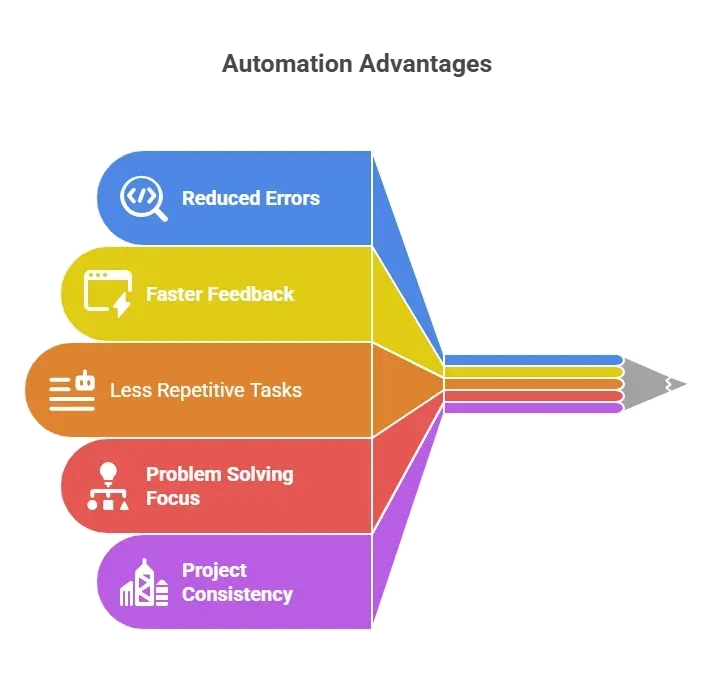
Automation shifts the focus away from drudge work. Smart tools handle the repeatable steps. Developers spend more time creating what actually matters.
When automation becomes part of the process, work feels calmer and more intentional. The goal isn’t speed alone it’s building with clarity, fewer distractions, and better flow every day.
When Code Isn’t a Chore?
Repetitive tasks can slow developers down. Copying patterns, writing boilerplate, and running tests manually all waste time.
Use scripts, editors with slash commands, AI assistants, and automation tools to take over the boring stuff. Tools like Rocket.new even let you spin up full apps from prompts, so your code output gets faster and cleaner.
When you automate repetitive coding tasks, you free up your brain to focus on solving real problems. That’s the kind of change your workflow will thank you for.
Table of contents
- -Why Automate Repetitive Tasks?
- -Start with the Right Tools
- -Smart Code Editors
- -Use Scripts for Regular Actions
- -Example Script Uses
- -Continuous Testing: Your Silent Partner
- -How to Automate Testing?
- -Slash Commands: Small and Mighty
- -Coding With AI Helpers
- -Code Generation Tools
- -Integrate APIs with Automation
- -Documentation Can Be Automated Too
- -Why Automated Documentation Helps
- -Automation Made Simple with Rocket.new
- -How Rocket.new Supports Software Development Automation?
- -Real Dev Insight From the Community
- -Make Automation Part of Your Process
- -When Code Isn’t a Chore?