How does React decide which DOM nodes truly need updates? React reconciliation compares virtual DOM trees, applies efficient diffing, and uses Fiber scheduling to update only necessary elements, preserving performance and responsiveness.
React reconciliation sits at the heart of every modern React application. It decides which changes to keep and which to discard when your UI updates.
But what actually happens when your component re-renders? And how does React know which DOM nodes to touch and which ones to leave alone?
Let's break down how the virtual DOM works, how the diffing algorithm compares two trees, and how React Fiber schedules rendering work without dropping frames.
You will also build a simplified reconciler to see how React updates only the parts that matter, rather than rewriting the entire page.
The Problem with the Document Object Model
The Document Object Model is a tree structure. Every element on the page becomes a node in the DOM tree. When you change something, the browser recalculates the layout and painting.
Direct manipulation of the actual DOM is slow. Updating many DOM nodes during user interactions can cause visible delays. When you repeatedly render large parts of the entire ui repeatedly, performance drops fast.
If you manually update the real DOM, you must:
- Locate DOM elements
- Change attributes
- Attach or remove DOM nodes
- Maintain consistency with the component's state
This approach works for small scripts. It becomes hard when the whole app grows. Updating the whole tree every time is not realistic.
Enter the Virtual DOM
React introduces the virtual DOM. It is an in-memory representation of the DOM tree. Instead of modifying the actual DOM directly, React first works with a virtual DOM representation.
When a component re-render happens, React creates a new virtual DOM. It does not immediately touch the real dom. It builds a new virtual DOM tree in memory.
Then it compares:
- old tree
- new tree
This comparison uses a diffing algorithm. After computing differences between two trees, React performs the minimal DOM operations needed to reflect the changes.
That is why the virtual DOM improves performance. It avoids unnecessary rework on the entire subtree.
How React Creates and Tracks Elements?
When you write JSX, React creates objects known as React elements. These React elements define the UI's appearance. They are lightweight. They are not DOM nodes.
Each time your component re-renders, React creates a new set of React elements. These represent the next render tree.
So what changes when you update a component's state?
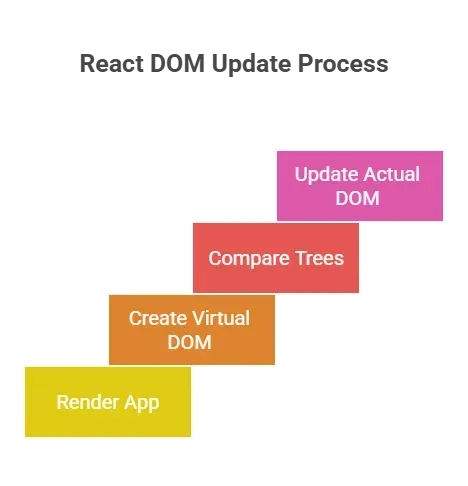
React creates this new virtual DOM quickly because it is just JavaScript objects. No layout recalculation. No painting. Just objects.
The Reconciliation Process Explained
The reconciliation process is the core algorithm that compares two trees. React’s reconciliation algorithm assumes:
- Two elements of different types produce different trees.
- Developers can hint at stability using the key attribute.
When comparing two elements of the same type, React updates properties on the existing DOM nodes. When the types differ, React destroys the old tree and builds a new tree.
This diffing algorithm runs during every re render.
At a high level:
- Compare root node.
- Traverse child elements.
- Match by position unless key prop is provided.
- Generate minimal changes.
This reconciliation algorithm operates tree recursively. It performs tree traversal from the root node down to each child fiber.
From Virtual DOM to React Fiber
Before React 16, the stack reconciler processed updates in a single pass. It used a stack frame for each component instance. Once it started rendering, it could not pause. Long rendering work blocked the main thread.
React Fiber changed that.
React Fiber introduced incremental rendering. Instead of processing the whole tree in a single stack frame, it splits the work into multiple frames.
Each fiber represents a unit of work. A fiber represents a component instance and stores:
- type
- props
- component's state
- references to child fiber and sibling
- return pointer to parent node
Together, fibers form a fiber tree. This fiber tree mirrors the virtual DOM tree.
Why React Fiber Matters?
React Fiber allows scheduling. Rendering can pause between frames and resume in the next animation frame. This avoids dropping frames during heavy updates.
When a high-priority function, such as user input, occurs, React can pause low-priority updates and process the next unit first.
That means:
- The entire ui remains responsive.
- React updates happen in chunks.
- Large updates do not freeze the whole app.
This is the current implementation of the reconciliation algorithm inside modern React.
The Diffing Algorithm in Detail
The diffing algorithm compares two trees: the old tree and the new virtual DOM tree.
Comparing Different Component Types
If two elements have different component types:
- React unmounts the entire subtree.
- It destroys the old component instance.
- It creates a new component instance.
This applies to both class components and function components.
When types match, React preserves the existing component instance and updates its props.
Comparing DOM Elements
When comparing host components like div or span, React checks:
- Attributes
- Event handlers
- Text content
It then updates only the changed DOM elements in the actual DOM.
React updates do not recreate DOM nodes unless needed. Only the parts that differ get patched.
Handling Lists with Keys
When rendering arrays, React relies on the key attribute or key prop.
Without a key prop, React compares items by index. That can cause unnecessary reoperations if order changes.
With stable keys:
- React matches child fiber correctly.
- It reuses DOM nodes.
- It avoids unnecessary re-render work.
Keys provide hints to the diff algorithm so it can accurately compare two elements across different trees.
The Two Phases of Reconciliation
The reconciliation process has two major phases:
Render Phase
In this phase:
- React creates a new virtual DOM.
- Builds a new virtual DOM tree.
- Generates a new fiber tree.
- Calculates changes by comparing two trees.
This phase can pause. It uses multiple frames.
Commit Phase
During the commit phase:
- React applies changes to the actual DOM.
- Runs lifecycle methods in class component.
- Flushes dom operations.
This phase is synchronous. Once started, it completes.
Building Your Own Mini Reconciler
Now, let us simulate the core algorithm.
Step 1: Represent Elements
Create simple objects:
- type
- props
- children
This becomes your virtual tree.
Step 2: Compare Two Elements
Write a diff algorithm:
- If types differ → replace.
- If same type → update props.
- Compare children.
If two elements share the same type, reuse the node. If not, replace the whole tree.
Step 3: Recursive Tree Traversal
Perform tree traversal:
- Compare parent.
- Loop over child elements.
- Recurse for each child.
When lengths differ, add or remove DOM nodes.
This mimics how React compares the new virtual DOM to the old tree.
Step 4: Apply DOM Changes
Collect patches:
- Replace
- Update
- Remove
Apply them to the dom tree.
Now you have a tiny engine that:
- Creates a new virtual dom.
- Compares different trees.
- Efficiently update the real dom.
- Avoid unnecessary re updates.
What Happens During a re-render?
Every React developer hears the word re render and instantly thinks, “Is my whole UI about to refresh?” Not quite. A re-render is simply React recalculating the UI based on new data. It is a comparison process, not a full redraw.
A re render starts when:
- component's state changes
- props change
- parent re render propagates
React creates a new virtual DOM tree. It compares it with the old tree stored in the fiber tree.
If nothing changed, no dom operations occur.
If changes exist, React updates only the parts that differ.
This is why re-render does not mean redraw the entire page. It means compute differences between two trees and patch dom nodes.
Technical Details Behind the Scenes
Under the hood, React is constantly managing data structures, not pixels. What you see in the browser is just the final outcome. Internally, React works with trees, fibers, and a carefully designed diffing algorithm that determines which parts should change and which should stay untouched.
- One tree represents the current UI.
- A new tree represents updates.
- React compares different trees using a diffing algorithm.
- React fiber stores metadata about rendering work.
The same reconciler logic works for:
- Web via dom elements
- Native via host components
- Other renderers
React creates abstraction layers so that the app's logic remains consistent across platforms.
Handling Entire Subtree Replacements
If you change the root node type, React replaces the entire subtree.
Example:
<div>
  <Header />
</div>
becomes:
<section>
  <Header />
</section>
Different host components mean replacing dom nodes from that root node downward.
That is why matching same type matters.
From Confusion to Clarity in UI Updates
Modern interfaces change constantly. State updates, prop changes, and parent re-render cycles can make it feel like the whole app is refreshing every time something small happens. That misunderstanding often leads developers to fear performance issues and over-optimize too early. The real challenge is not frequent updates, but understanding how two trees are compared, how the fiber tree tracks rendering work, and how React updates DOM nodes without rewriting the whole tree.
When you build a small reconciler yourself, log each comparison, switch component types, and remove keys, the process becomes clear. You see the problem, the structured solution, and the logic behind it. React reconciliation stops feeling mysterious and starts looking like a controlled tree comparison with scheduling. That shift changes how you design every React application going forward.
Table of contents
- -The Problem with the Document Object Model
- -Enter the Virtual DOM
- -How React Creates and Tracks Elements?
- -The Reconciliation Process Explained
- -From Virtual DOM to React Fiber
- -Why React Fiber Matters?
- -The Diffing Algorithm in Detail
- -Comparing Different Component Types
- -Comparing DOM Elements
- -Handling Lists with Keys
- -The Two Phases of Reconciliation
- -Render Phase
- -Commit Phase
- -Building Your Own Mini Reconciler
- -Step 1: Represent Elements
- -Step 2: Compare Two Elements
- -Step 3: Recursive Tree Traversal
- -Step 4: Apply DOM Changes
- -What Happens During a re-render?
- -Technical Details Behind the Scenes
- -Handling Entire Subtree Replacements
- -From Confusion to Clarity in UI Updates