
Vibe coding prompt examples help developers guide AI toward cleaner, faster code generation. This blog walks through real prompts for microservices, frontend components, and data pipelines, with a clear loop of prompt, review, and refinement.
How do you turn a plain description into working code?
That is exactly what vibe coding does. Instead of writing every line manually, you describe what you want. The AI then generates the code. You still own architecture, logic, and review. The AI handles scaffolding, boilerplate, and first-pass generation.
The term was coined by Andrej Karpathy in early 2025. According to GitHub's 2024 developer survey, more than 97% of developers reported using AI coding tools at work. Prompt quality is now the primary differentiator between developers who ship fast and those who spend hours fixing AI-generated code.
If you are new to the practice, this guide on how to start vibe coding with no experience is a solid starting point before diving into the examples below.
How Vibe Coding Differs from Traditional Coding
Understanding the difference between vibe coding and traditional development sets the right expectations. Before you write your first prompt, review this comparison.
| Dimension | Traditional Coding | Vibe Coding |
|---|---|---|
| Primary input | Syntax and logic | Natural language intent |
| Speed to first draft | Hours to days | Minutes |
| Developer role | Writer | Director and reviewer |
| Best for | Precise, complex logic | Scaffolding, prototypes, iteration |
| Skill required | Deep syntax knowledge | Clear communication and code review |
The quality of your output is directly proportional to the quality of your input. This is why prompt structure matters more than prompt length.
Decoding the Workflow of Vibe Coding
Vibe coding is not about skipping your part of the work. It is about letting AI handle the repetitive parts. You keep control over architecture, logic, and review.
Think of it as having a fast-learning assistant who needs direction, not micromanagement. Here is what that usually looks like:
This loop of prompt, generation, review, and refinement defines vibe coding at its best. Each iteration sharpens both the clarity of your instructions and the quality of the output. For seasoned developers, this cycle feels a lot like rapid prototyping with a highly responsive teammate.
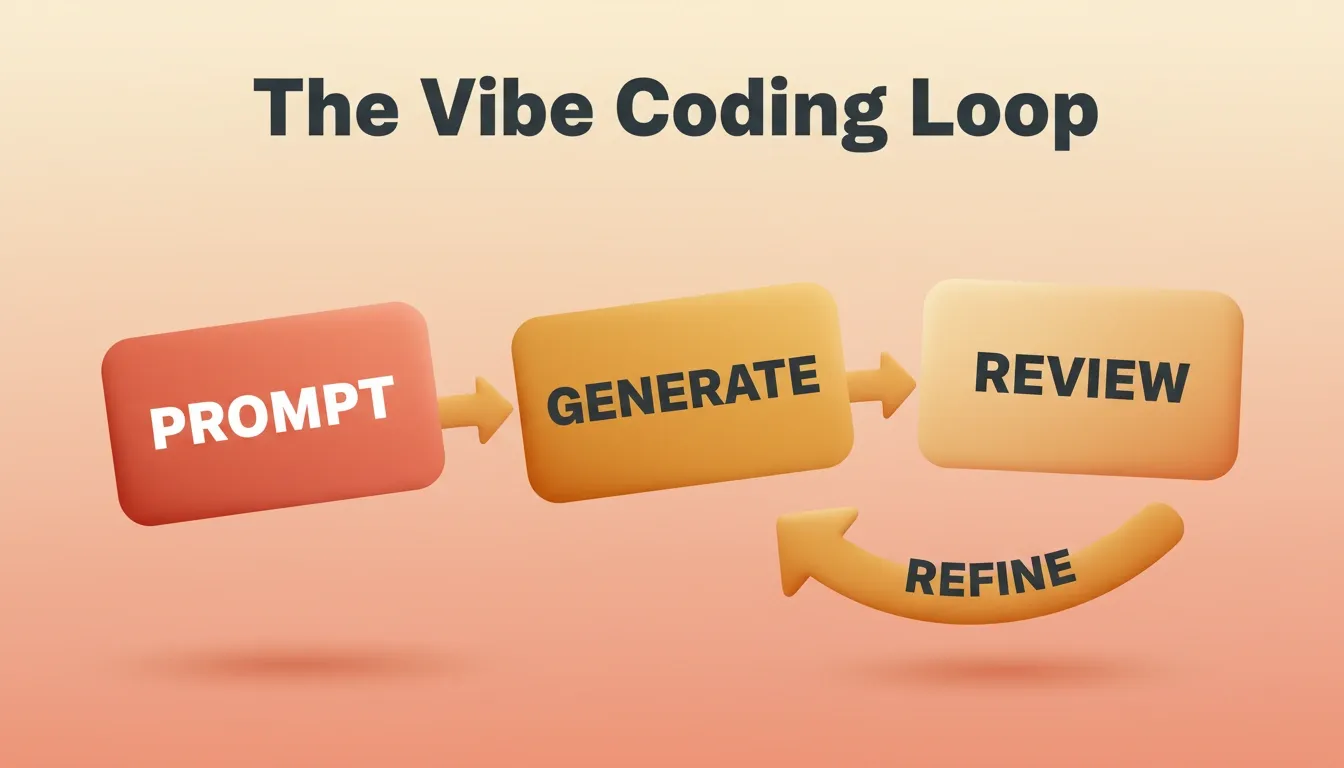
The Vibe Coding Loop — every cycle sharpens output quality.
Why Prompt Design Matters for Real-World Projects
When you are building small tools, quick prompts work fine. However, once you are working on complex projects involving multiple microservices or frontends with mobile responsiveness, precision becomes non-negotiable.
A well-crafted prompt can save hours of refactoring. Here is what strong prompt design includes:
- Clear context: Describe your tech stack and what you are building.
- Defined constraints: Specify your coding conventions or frameworks.
- Edge cases: Tell the AI what could break.
- Security requirements: Mention potential security vulnerabilities early.
- Testing expectations: Describe how you plan to validate results.
If you skip any of these, you will end up with bloated code that looks fine but behaves unpredictably. The goal is not just to generate output. It is to generate the right kind of output.
The Anatomy of a High-Quality Vibe Coding Prompt
Every strong vibe coding prompt has six layers. Think of them as a checklist before you hit send:
Missing even one layer forces the AI to guess. Guessing produces code you will spend time fixing. Learning prompt engineering best practices alongside vibe coding gives you a significant edge in output quality.
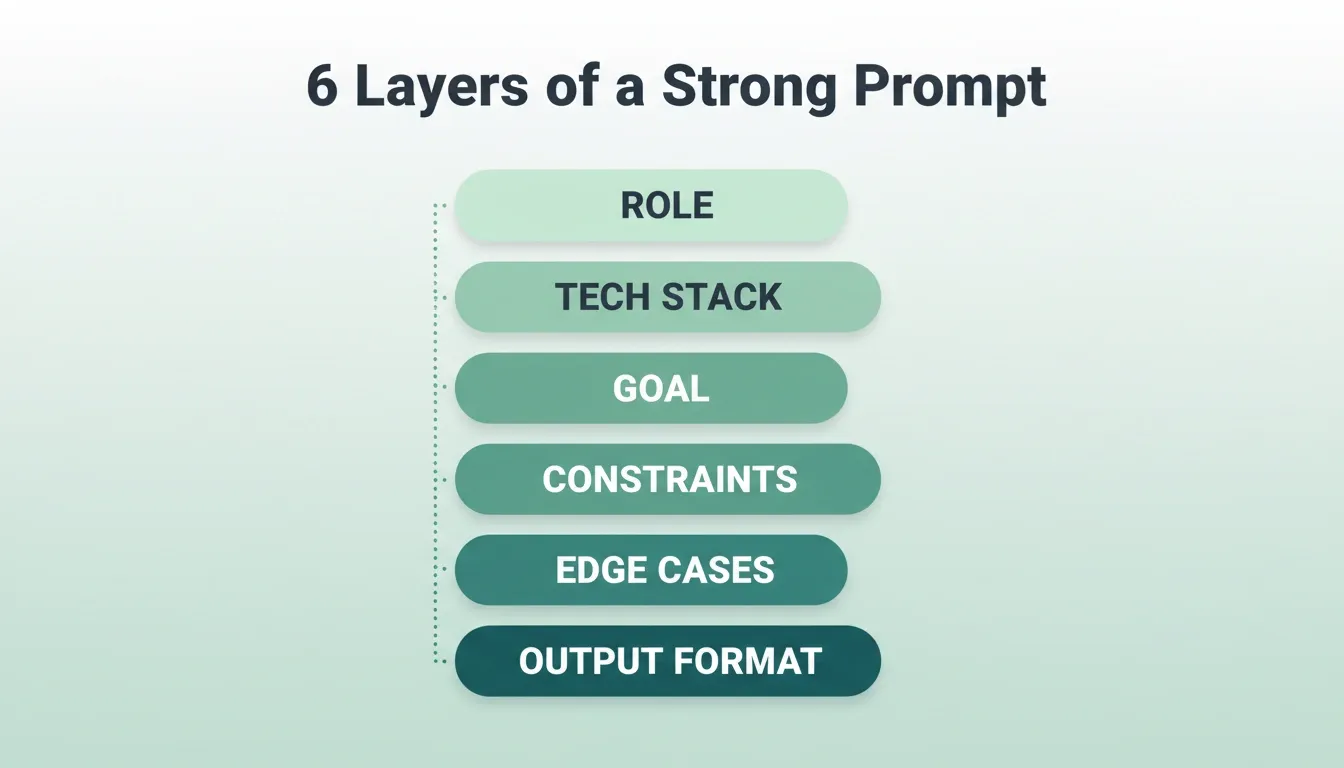
6 Layers of a Strong Prompt — every layer reduces guesswork and improves first-generation quality.
Practical Vibe Coding Prompt Examples
Now let us look at some vibe coding prompt examples that actually work in production-like scenarios. Rocket's build best practices guide documents the prompt patterns that consistently produce better results: faster generation, cleaner code, fewer bugs, and apps that match your vision.
Example 1: Microservice API with Authentication
This prompt targets a backend engineer building a user-management service. Notice how every layer of the anatomy is present.
1You are an experienced backend engineer.
2Tech stack: Python 3.12, FastAPI, PostgreSQL, SQLAlchemy, JWT-based authentication.
3Goal: create a user-management microservice.
4Require endpoints: register, login, logout, get profile, update profile.
5Coding conventions: follow PEP 8, use dependency injection for services, include logging and metrics.
6Security vulnerabilities: ensure password hashing with bcrypt, prevent SQL injection, validate inputs.
7Mobile first: APIs should return JSON responses with CORS enabled for mobile apps.
8Include unit tests for each endpoint using pytest.
9Return full files: app.py, models.py, schemas.py, services.py, and tests/test_users.py.
10Initial prompt: "Build user-management microservice as above."This structure reflects how an expert handles an AI-assisted project. You define expectations clearly, review results carefully, then go back with improved instructions.
Why this prompt works:
- The role declaration sets the expertise level the AI should match.
- The explicit tech stack prevents the AI from choosing defaults you do not want.
- Security requirements are stated upfront, not as an afterthought.
- The output format specifies exact files, eliminating ambiguity.
Follow-up prompt to try: After the first generation, send: "Also generate a Dockerfile and docker-compose.yml for local development." A single structured prompt plus one follow-up produces a complete, deployable scaffold.
Example 2: Frontend Component Library for Mobile Responsiveness
1You are a senior frontend engineer.
2Tech stack: React 18, TypeScript, Tailwind CSS, Storybook.
3Goal: build a reusable button component (PrimaryButton) for desktop, tablet, and mobile.
4Coding style: use functional components, include accessibility (aria labels), theming (light/dark).
5Edge cases: disabled state, loading spinner, icon + text variant.
6Existing code: base styles in src/styles/theme.ts.
7Write PrimaryButton.tsx, PrimaryButton.test.tsx, and PrimaryButton.stories.tsx.
8Detailed prompt: "Create PrimaryButton with full functionality and mobile first responsiveness."In this setup, the prompt acts like your design document. The more you clarify, the less the AI guesses. You get predictable, structured output that respects your coding conventions.
Why this prompt works:
- Storybook is specified, so the AI knows to generate documentation alongside the component.
- Accessibility is a first-class requirement, not an afterthought.
- Edge cases are enumerated: disabled state, loading, and icon variants.
Follow-up prompt to try: "Now generate a SecondaryButton variant that inherits the same accessibility and theming rules." Two prompts. No boilerplate written by hand. You have started a component library.
Example 3: AI-Assisted Data Processing Pipeline
1You are a data engineer practicing AI-assisted coding.
2Tech stack: Python script using pandas, SQLAlchemy for data ingestion.
3Goal: read large CSVs, clean data, apply business logic, and load into a PostgreSQL database.
4Coding conventions: modular functions, docstrings, and error handling.
5Security vulnerabilities: mask credentials, validate CSV schema, prevent SQL injection.
6Files: pipeline.py and database.py with test coverage.
7Reusable prompt: "Write a Python script for a data ingestion pipeline as above."This example shows how AI-assisted coding works for data-heavy workflows. The prompt ensures the AI produces a structured Python script that fits directly into your pipeline. No guesswork. No generic output.
Follow-up prompt to try: "Include a CLI argument parser so the pipeline accepts different CSV paths and database URLs at runtime." You will get a production-ready, configurable pipeline in one pass.
Example 4: Full-Stack SaaS Dashboard
For teams building complete products, vibe coding prompts work across the entire stack. Here is a more advanced pattern for a SaaS dashboard:
1You are a full-stack engineer building a SaaS product.
2Tech stack: Next.js 14, TypeScript, Tailwind CSS, Supabase (auth + database), Stripe (payments).
3Goal: build a multi-tenant SaaS dashboard with user authentication, subscription management, and analytics overview.
4Key screens: login/signup, dashboard home, settings, billing page.
5Coding conventions: use App Router, server components where possible, client components only for interactivity.
6Security: implement Row Level Security in Supabase, validate all API inputs, never expose service keys client-side.
7Edge cases: handle expired subscriptions, failed payments, empty states for new users.
8Output: full project structure with layout.tsx, page files, Supabase client setup, and Stripe webhook handler.Why this prompt works:
- Multi-tenant architecture is stated upfront, so the AI designs for it from the start.
- Supabase Row Level Security is a specific requirement that prevents a critical security gap.
- Empty states are specified, which is a common oversight that produces poor UX.
Building Reusable Prompts
Once you have shaped a few good prompts, save them. A reusable prompt serves as a template for future iterations, saving time and maintaining consistency across teams.
It is not about making one perfect prompt. It is about having a library of better prompts that evolve with your projects and teams.
Action Step: Open a blank document. Write your own reusable prompt using the six sections below. Fill in your actual tech stack, your real constraints, and one edge case you always forget to handle. Then paste it into Rocket and compare the output to your last vague prompt.
| Section | Why it matters | Example fragment |
|---|---|---|
| Context | Defines tech stack and architecture | "Tech stack: React 18 + Tailwind CSS" |
| Task/Feature | Clarifies what you are building | "Build a login page with OAuth" |
| Constraints | Aligns with your coding conventions | "Follow PEP 8, include logging" |
| Edge Cases | Improves testing reliability | "Handle invalid tokens, test SQL injection" |
| Existing Code | Supports integration with old modules | "Use UserModel in existing DB" |
| Output Form | Controls deliverables | "Return src/index.tsx, package.json" |
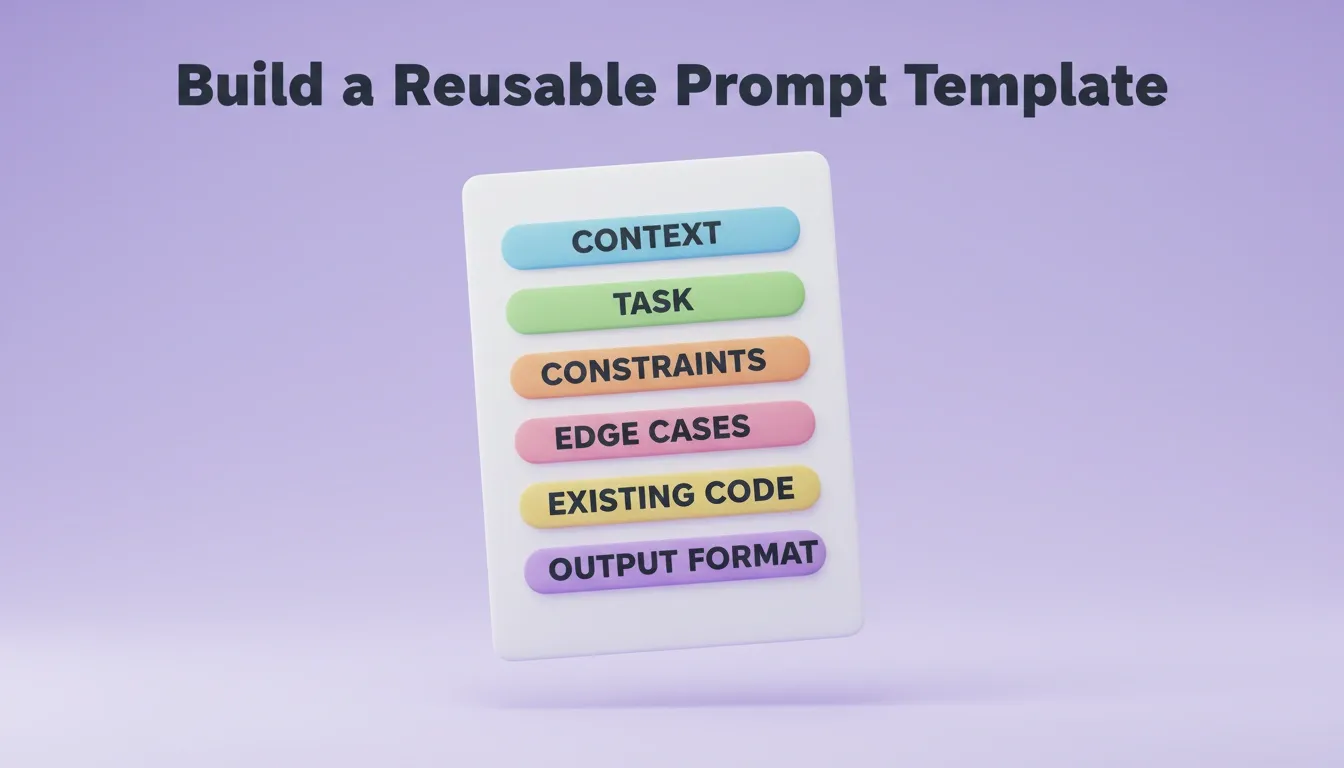
Build a Reusable Prompt Template — save once, use across every project and team member.
Common Pitfalls and How to Avoid Them
Even experts make mistakes with AI-assisted development. Knowing the most common vibe coding mistakes before you start saves hours of debugging later.
| Pitfall | What goes wrong | How to fix it |
|---|---|---|
| Vague prompt | AI guesses, you spend time fixing | Add role, stack, goal, and constraints |
| Huge request | Breaks context, produces inconsistent code | Break into smaller, focused prompts |
| Skipping tests | Hidden errors and edge cases go unnoticed | Always specify test requirements upfront |
| Ignoring review cycles | You lose control of the entire codebase | Review every generation before continuing |
| No context updates | Results drift as dependencies change | Restate key dependencies in follow-up prompts |
| Accepting first output | First generation is a starting point | Always iterate at least once |
As one Reddit user mentioned:
"I use GPT to discuss and plan out my initial MVP, then move to VS Code with Claude lately. The conversational planning helps refine the idea before coding." — Reddit, r/vibecoding
Treat AI like a pair programming partner, not a black box. The review cycle is where quality is built, not skipped.
Working on Larger Systems with Chained Prompts
Once you are working across layers like APIs, frontend, and deployment, break your requests into smaller prompts. That is how vibe coders keep things modular and efficient.
A chained prompt strategy works like this:
- Architecture prompt: Define services, data flow, and boundaries.
- Backend prompt: Build APIs, database schema, and auth.
- Frontend prompt: Build UI components referencing the API contracts from step 2.
- Integration prompt: Connect frontend to backend and handle errors.
- Testing prompt: Generate test coverage for each layer.
Each prompt is small, focused, and builds on the output of the previous one. Context stays tight. Outputs stay clean.
A complete guide to vibe coding full-stack apps covers how to apply this chained approach across an entire product build. For teams where non-technical stakeholders are involved, vibe coding for product managers shows how the same principles translate across roles.
Try the Chain Yourself: Open a fresh session. Send only the architecture prompt first: "Define the services and data flow for a SaaS dashboard with user auth, analytics, and billing." Once you have the blueprint, send the backend prompt. Then the frontend prompt. Then testing.
Vibe Coding Prompt Examples by Use Case
Professional developers use vibe coding across every domain. As a result, the right prompt focus varies significantly by project type. Here is a quick reference of prompt types by use case:
| Use Case | Prompt Focus | Key Constraints to Include |
|---|---|---|
| Startup MVP | Core user journey, one key feature | Tech stack, deployment target |
| Enterprise dashboard | Data model, role-based access | Security, performance, existing APIs |
| Legacy integration | Existing code context | Preserve interfaces, migration safety |
| Mobile app | Platform (iOS/Android), navigation | Accessibility, offline support |
| AI-powered tool | Model provider, input/output format | Rate limiting, error handling, costs |
| Internal tool | User roles, data sources | Auth, audit logging |
Community Insights
Experienced developers are already using these methods in production workflows.
"I use GPT to discuss and plan out my initial MVP, then move to VS Code with Claude lately. I feel the conversational flow helps shape architecture before implementation." — Read the full discussion on Reddit
The conversational rhythm of vibe coding bridges the gap between planning and execution. According to Stack Overflow's 2024 Developer Survey, 76% of developers report using or planning to use AI tools in their development process. Structured prompting is now a core professional skill.
1.5 million people have tried Rocket across 180 countries, from solo founders validating ideas to teams building production-grade apps.
Beyond Vibe Coding: What Is Vibe Solutioning?
Most developers start vibe coding with a prompt. However, the best results come from starting before the prompt, with a clear understanding of what to build and why.
Vibe Solutioning is the practice of thinking rigorously before building, and building from that thinking, all in one platform. Research. Decide. Build. Operate. Grow. One system. One shared context that makes every action smarter than the last.
This distinction matters for prompt quality. When you know what problem you are actually solving, who your users are, and what competitors have already built, your vibe coding prompts become dramatically more precise. You stop guessing at features and start building from evidence.
Rocket is built for exactly this. The platform combines Solve for strategic research, Build for production-ready app generation in Next.js and Flutter, and Intelligence for continuous competitive monitoring, all in one shared workspace. Every build ships with SEO-ready structure, WCAG accessibility compliance, and GDPR coverage by default.
Build a web app with vibe coding in minutes to see how the full workflow, from first prompt to deployed product, comes together on the platform.
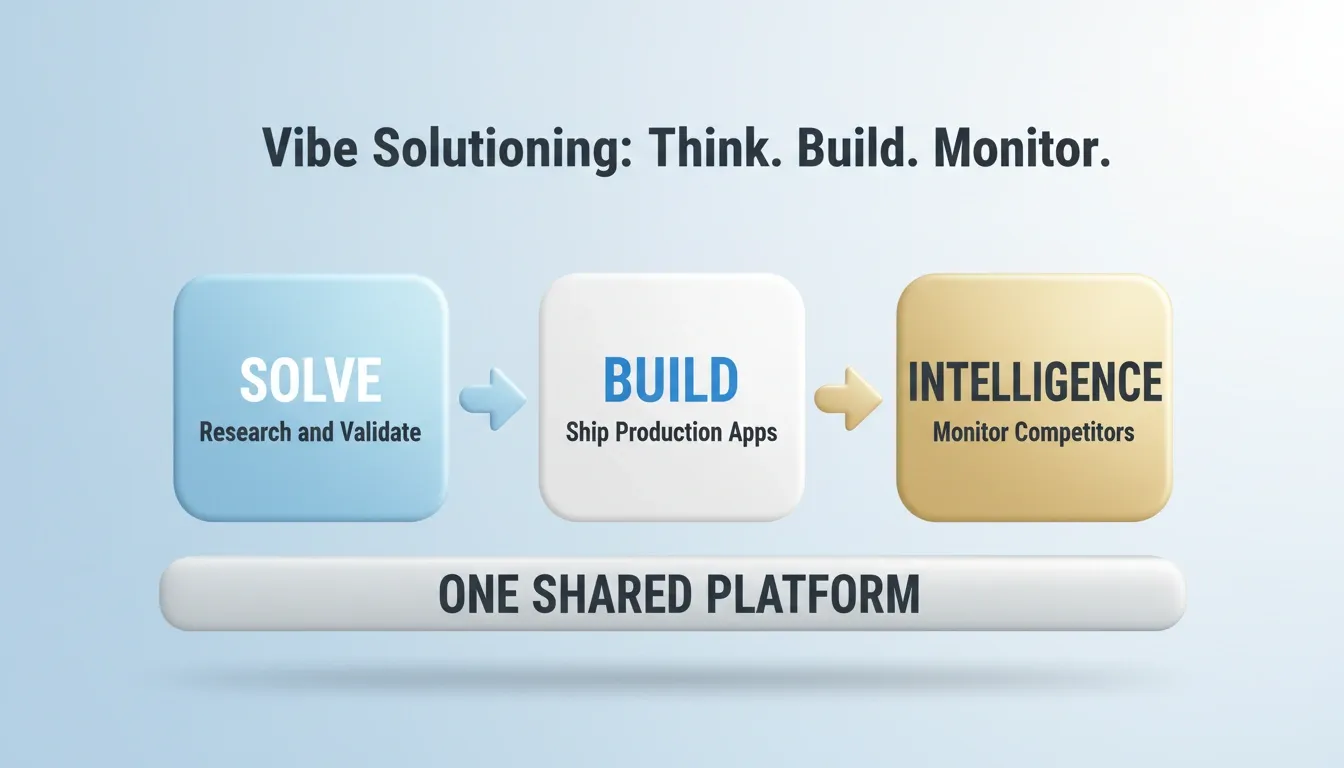
Vibe Solutioning: Think. Build. Monitor. — research, build, and monitor in one shared platform.
The Power of Vibe Coding Prompt Examples
Vibe coding prompts are not just tricks for automation. They are a way to think differently about how code is written, tested, and refined.
The real skill lies in crafting each prompt with purpose. You give the AI clear context, plan for edge cases, and stay involved through reviews. That is what separates expert vibe coders from casual users.
Rocket makes it easier to apply these principles while maintaining your coding conventions and non-functional requirements. You describe the problem. Rocket researches, recommends, and builds from that direction. It generates production-grade code in Next.js or Flutter, with built-in version history, one-click rollback, and live preview so you can iterate without risk.
Keep experimenting, refine your structure, and you will see how fast you can ship without ever losing control of quality.
Start Writing Better Vibe Coding Prompts Today
Vibe coding prompt examples are not shortcuts. They are a discipline. Every prompt you write is a decision about what the AI should prioritize, what it should protect, and what it should produce. As AI coding tools grow more capable, the developers who master structured prompting will consistently outship those who do not.
The future belongs to builders who combine clear intent with fast iteration. You describe the problem. The AI handles the scaffolding. You own the quality.
Ready to put these vibe coding prompt examples to work? Sign up for Rocket.new and run your first prompt today, from idea to deployed app in minutes.
Table of contents
- -How Vibe Coding Differs from Traditional Coding
- -Decoding the Workflow of Vibe Coding
- -Why Prompt Design Matters for Real-World Projects
- -The Anatomy of a High-Quality Vibe Coding Prompt
- -Practical Vibe Coding Prompt Examples
- -Example 1: Microservice API with Authentication
- -Example 2: Frontend Component Library for Mobile Responsiveness
- -Example 3: AI-Assisted Data Processing Pipeline
- -Example 4: Full-Stack SaaS Dashboard
- -Building Reusable Prompts
- -Common Pitfalls and How to Avoid Them
- -Working on Larger Systems with Chained Prompts
- -Vibe Coding Prompt Examples by Use Case
- -Community Insights
- -Beyond Vibe Coding: What Is Vibe Solutioning?
- -The Power of Vibe Coding Prompt Examples
- -Start Writing Better Vibe Coding Prompts Today

