
Glide is great for quick spreadsheet-based apps but hits limits fast. This guide covers the top glide alternatives including Rocket, Bubble, Adalo, FlutterFlow, and Appgyver, with a Rocket vs Glide comparison, migration steps, and a use-case picker.
Glide alternatives help teams move beyond spreadsheet-bound prototypes and build mobile and web apps with deeper logic, native publishing, and real scalability. According to Gartner, by 2026, low-code platforms will account for more than 65% of app development activity.
This guide covers the top options, a direct Rocket vs Glide comparison, migration steps, and a use-case picker to help teams choose fast.
Top glide alternatives compared: Rocket.new, Bubble, Adalo, FlutterFlow, and Appgyver
What is Glide?
Glide is a no-code app builder that lets users create mobile and web apps directly from Google Sheets or other spreadsheet data. It was designed for non-technical users who want to turn existing data into a functional app without writing code.
Who it is for: Operations teams, small businesses, and individuals who already live in Google Sheets and want a quick internal tool or simple client-facing app.
How it works: Glide reads rows and columns from a connected spreadsheet and maps them to UI components such as lists, forms, and detail views. The spreadsheet acts as both the database and the data source, which keeps setup fast but limits structural flexibility.
Typical users: HR teams building employee directories, small retailers creating product catalogs, and project managers building lightweight trackers. The core constraint is that Glide's spreadsheet-first architecture makes anything requiring relational data, custom backend logic, or native mobile deployment hit platform limits quickly.
Why Do People Leave Glide?
Teams that start with Glide often hit the same friction points as their apps grow. These are the most common reasons builders look for a glide alternative:
- Scaling limitations: Glide apps slow down noticeably when spreadsheets grow beyond a few hundred rows, because the platform was not designed for large or relational datasets.
- Vendor lock-in: Data lives in the Glide ecosystem. Exporting a fully functional app with its logic intact is not straightforward.
- Native app limitations: Glide produces Progressive Web Apps (PWAs), not true native iOS or Android apps. Publishing to the Apple App Store or Google Play Store requires workarounds.
- Advanced authentication: Role-based access control and multi-tenant authentication are limited compared with platforms that offer full backend generation.
- Backend customization: Glide does not expose a programmable backend. Teams that need custom API endpoints, webhooks, or server-side logic have no path forward within the platform.
- AI workflow limitations: Glide has limited support for AI-powered features, automated workflows, or LLM integrations, which matters as teams increasingly want to embed AI into their products.
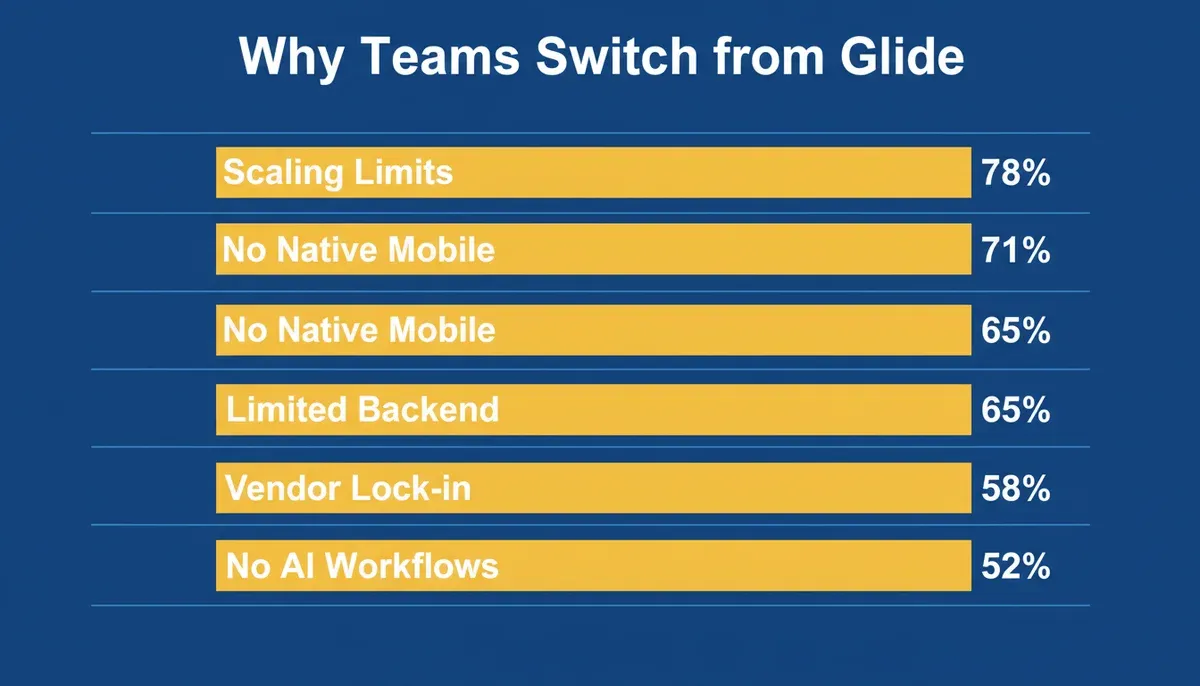
Common reasons teams look for glide alternatives, based on community research and platform reviews
How We Evaluated These Tools
This comparison is based on a review of official product documentation for each platform, published onboarding flows, app store publishing guides, and community discussions. Features were assessed against: AI generation capability, native mobile output, backend flexibility, app store publishing, workflow automation, data source support, and pricing transparency. Low-code platform adoption continues to accelerate globally, making platform selection a strategic decision.
Who Should Switch from Glide?
Different users have different needs. Here is a quick persona-to-platform match:
| User Type | Best Recommendation | Why |
|---|---|---|
| Startup founder | Rocket | AI generation, code export, research-first |
| Internal tools team | Bubble | Complex workflows, relational data |
| Agency building client apps | FlutterFlow | Visual builder, real Flutter output |
| Enterprise operations | Appgyver | API integrations, enterprise depth |
| Solo creator or freelancer | Adalo | Simple native apps, fast to launch |
| Google Sheets power user | Glide (stay) | Spreadsheet-first is still the best fit |
Quick Comparison of Glide Alternatives
| Platform | Best For | Mobile App | Web Apps | App Store Publishing | Workflow Automation | Free Plan |
|---|---|---|---|---|---|---|
| Rocket | AI-first full-stack builds | Flutter (native) | Next.js | Yes (direct) | Yes | Yes |
| Bubble | Complex web workflows | Via wrapper | Yes | Via wrapper | Yes | Yes |
| Adalo | Simple native apps | Yes | Limited | Yes | Medium | Yes |
| FlutterFlow | Mobile-first visual builds | Yes | Some | Yes | High | Yes |
| Appgyver | Enterprise and API apps | Yes | Yes | Some | Medium | Yes |
1. Rocket: AI-First Without Sacrificing Control
Rocket is the strongest glide alternative for teams that want to go from idea to production-ready app without switching tools. It covers three things in one platform: validating what to build (Solve), building it (Build), and tracking what competitors do after launch (Intelligence).
According to Rocket's Build documentation, Build generates web apps in Next.js and mobile apps in Flutter. Mobile apps are real Flutter builds that can be submitted directly to the Apple App Store and Google Play. Most apps generate in one to three minutes.
Features verified from official documentation:
- Prompt to App Creation: Describe an app in plain language and Rocket generates the UI, routes, and logic. You can also start from a Figma file or an existing GitHub repository.
- Figma Import: Converts frames, auto-layouts, and component libraries into production-ready React or Flutter code with pixel accuracy.
- AI-Powered Backend: Rocket generates frontend, backend, database schema, and deployment setup from a single prompt. Teams can further customize through the visual editor or direct code editing.
- 26+ Integrations: Stripe, Supabase, Google Analytics, Airtable, Notion, Linear, HubSpot, Twilio, Mailchimp, and more, all wired directly into generation.
- Code Export and GitHub Sync: Full code ownership with two-way GitHub sync for Next.js TypeScript projects. Continue development outside the platform at any time.
- Custom Domain Support: Publishes projects with automatic HTTPS and branded domain.
- Built-in Analytics: Track visitors, bounce rate, referrers, and Core Web Vitals inside the platform.
- WCAG, GDPR, and SEO defaults: Every build ships with accessibility compliance, GDPR coverage, and SEO-ready structure by default.
- Advisor Agent: A built-in senior architect sub-agent that diagnoses root causes, resolves error loops, and makes architectural decisions automatically.
Pricing (as of 2026):
| Plan | Price | Credits/month | Includes |
|---|---|---|---|
| Free | $0 | 20 (one-time) | Websites, landing pages, web apps, mobile apps |
| Pro | $25/mo | 100 | All Build types |
| Rocket | $50/mo | 250 | Build + Solve + Intelligence |
| Booster | $250/mo | 1,500 | Full suite + SSO, data localisation, premium support |
Where it falls short: Rocket's template and plugin marketplace is less mature than Bubble's, which has years of community-built plugins. Teams that need a very large pre-built component library may find Bubble's ecosystem richer today.
Rocket is a strong choice for teams building no-code apps for startups that need to move from research to production without rebuilding context between tools.
2. Bubble: Deep Logic and Workflow Power
Bubble is a heavy hitter when the task gets more complex than a simple app. It focuses on web apps first, with powerful logic, database models, and built-in automation. The learning curve is real because Bubble's logic system has its own mental model, but it offers more control than most other no-code platforms.
Where Bubble shines:
- Complex data structures and relational databases
- Conditional logic and multi-step automation
- Large plugin marketplace with hundreds of community-built integrations
- Deep customization for web applications
Pricing: Free plan available. Paid plans scale based on capacity and features, starting around $29/month.
Limitations: Mobile app support is not native. Apps often need to be wrapped for the Google Play Store or Apple App Store. Pricing scales with usage and can become expensive as apps grow.
3. Adalo: Simple Native App Focus
Adalo is a no-code platform focused on native mobile apps. The interface is clean and the drag-and-drop editor is genuinely beginner-friendly. If you need to get a simple mobile app into the App Store without writing code, Adalo is one of the faster paths to get there.
Good fit if:
- You want a simple native mobile app with push notifications
- You prefer a clean drag-and-drop interface
- You are building basic CRUD workflows
Pricing: Free plan available. Paid plans start at $36/month and are required to remove platform branding and publish to app stores.
Limitations: Backend control is limited for anything beyond basic CRUD operations. Complex data logic requires workarounds. Not ideal for apps that need a custom database schema.
Adalo also integrates with Google Sheets and other data sources, making it a solid bridge for teams migrating from Glide.
4. FlutterFlow: Visual Builder With Real Mobile Output
FlutterFlow is one of the strongest tools for teams that want clean mobile builds plus app store publishing. It uses a visual builder with real Flutter output and still generates real Flutter code in the background, which means apps can be submitted directly to app stores.
Where FlutterFlow shines:
- Full native mobile support with real Flutter code generation
- Better performance than most web wrappers
- Real control over UI and logic
- Tight integration with Firebase and other backend services
Pricing: Free tier available. Premium plans unlock more actions and integrations.
Limitations: More features mean more learning. Not as simple for non-technical users compared with very basic drag-and-drop tools. Web app support is limited compared with mobile.
Community Insight From Real Builders
Builders comparing Glide and FlutterFlow often cite flexibility and native output as the deciding factors.
"FlutterFlow gives you way more control than Glide, especially when you need real logic and app store builds." - Reddit
This reflects a common takeaway: FlutterFlow is often chosen when teams outgrow Glide's simplicity and need production-ready mobile apps.
5. Appgyver: Enterprise and Integration Focus
Appgyver is a solid option when app size or complexity starts growing. It supports both mobile and web apps and connects well with real databases, APIs, and external systems. That makes it a good fit for internal tools and client portals that teams use daily.
It works well for:
- Internal tools with complex workflows
- Client portals with role-based access
- Apps that rely on external APIs and live data
- Business apps used by operations teams
Pricing: Appgyver offers a free plan for building and testing apps. Some advanced services or enterprise connections may involve additional costs depending on usage.
Limitations: The learning curve is steeper than with beginner-friendly tools like Glide. Non-technical users may need more time to understand app structure, logic flows, and data handling.
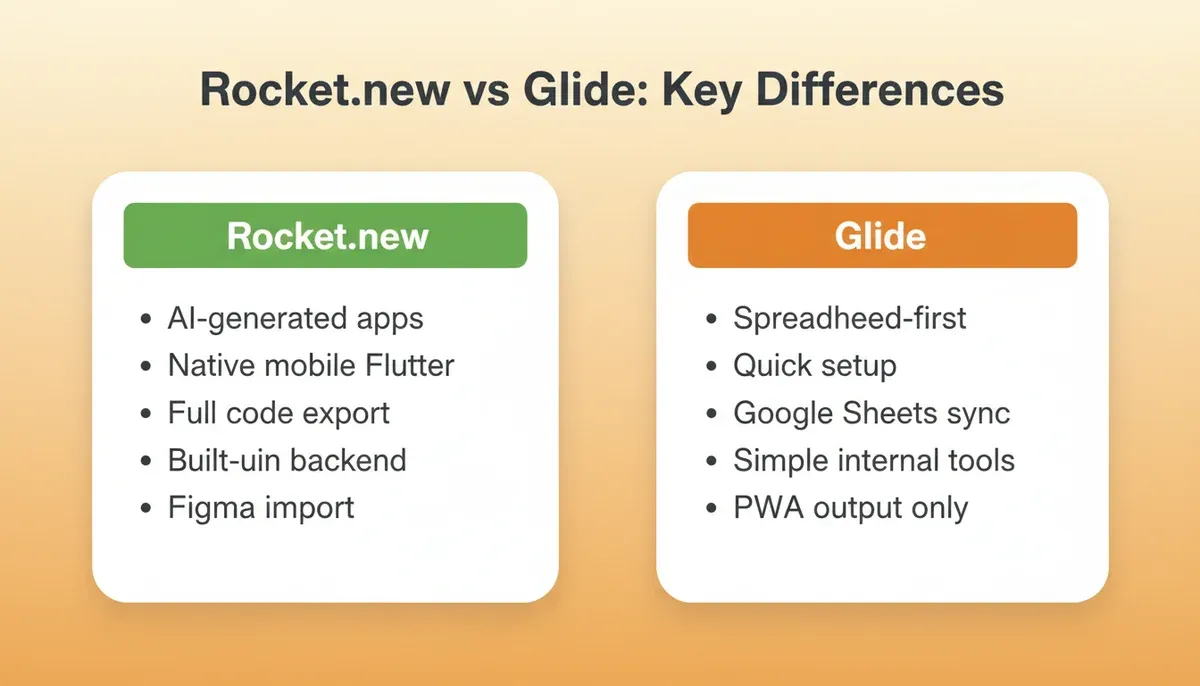
Rocket.new vs Glide feature comparison at a glance
Rocket vs Glide: A Direct Comparison
This section targets teams specifically evaluating whether to switch from Glide to Rocket.
| Feature | Glide | Rocket |
|---|---|---|
| Approach | Spreadsheet-driven app builder | AI-generated apps from prompts and context |
| Best for | Internal tools, simple business apps | Custom products, startups, advanced workflows |
| Code access | Limited access to underlying code | Exportable code with full code ownership |
| Data sources | Google Sheets, databases, connectors | Built-in backend, database, 26+ integrations |
| Mobile support | PWA (not native) | Native Flutter apps, direct App Store submission |
| Customization | More limited | High flexibility with visual and code editing |
| AI generation | Limited | Full UI, backend, database from a single prompt |
| Figma import | No | Yes, pixel-accurate to React or Flutter |
| Backend | Spreadsheet as database | AI-generated backend with Supabase, APIs, edge functions |
| Pricing model | Tiered user and feature plans | Usage-based credits, free plan available |
The core difference: Glide starts from existing data. Rocket starts from the problem you are trying to solve, generates the data model, and builds the product around it.
Teams building low-code platforms for automation workflows consistently find that Rocket's research-first approach produces products better aligned with real market needs.
Best Glide Alternative by Use Case
Instead of one generic list, here is a structured breakdown by what you are actually building:
| Use Case | Best Tool | Why |
|---|---|---|
| Internal operations tool | Bubble | Complex workflows, relational data |
| Native mobile app | Rocket or FlutterFlow | Real Flutter output, App Store ready |
| Startup MVP | Rocket | Research-first, AI generation, code ownership |
| AI-powered app | Rocket | LLM integrations, automated workflows |
| Enterprise internal system | Appgyver | API depth, security, enterprise workflows |
| Client portal | Bubble | Role-based access, complex data |
| Simple data-driven tool | Adalo | Quick native mobile, beginner-friendly |
How to Migrate from Glide
People searching for how to migrate from Glide typically need a clear, step-by-step path. Here is the practical process:
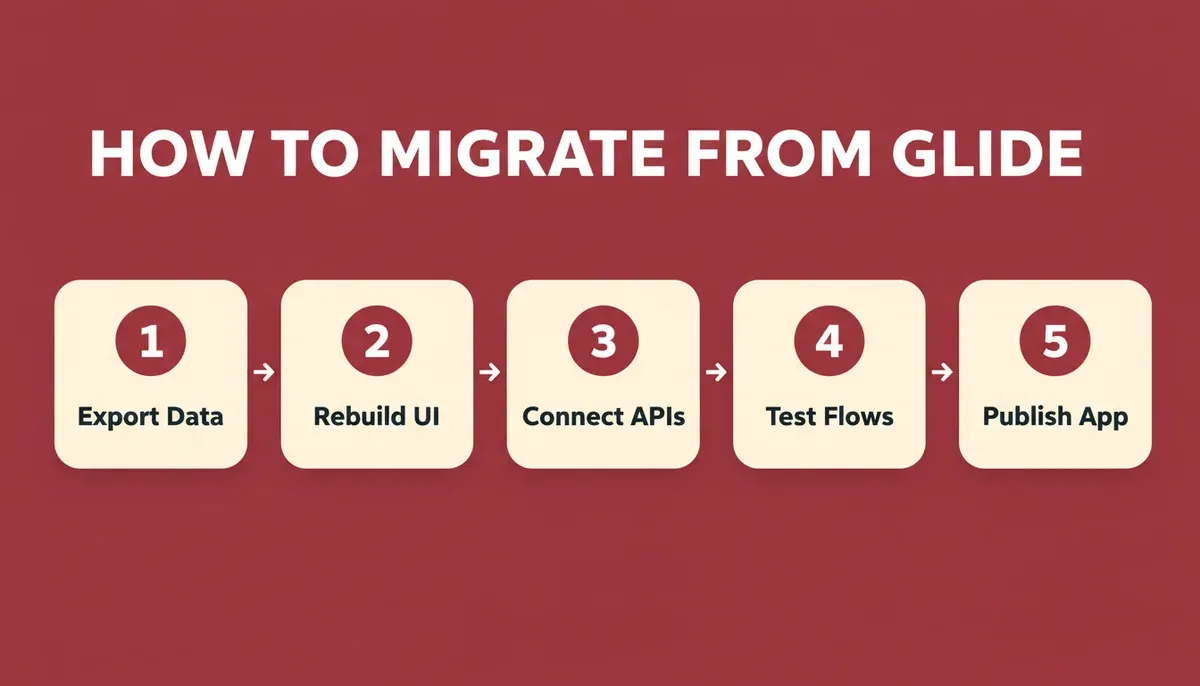
Five steps to migrate from Glide to a more scalable app builder
Step 1: Export your data. Download your Google Sheets data as CSV or connect directly to your new platform via API. Document all column structures, relationships, and computed fields before you start rebuilding.
Step 2: Rebuild the UI. Use your new platform's visual editor or Figma import to recreate screens. Do not try to replicate Glide's layout exactly; use the migration as an opportunity to improve the UX.
Step 3: Connect APIs and integrations. Re-establish any external connections such as payment processors, email services, or authentication providers. Platforms like Rocket support 26+ direct integrations that wire into generation automatically.
Step 4: Test thoroughly. Run through every user flow, edge case, and permission level before going live. Test on both web and mobile if your new platform supports both.
Step 5: Publish. Deploy to your custom domain and, if applicable, submit to the Apple App Store and Google Play Store. Rocket's native mobile app builder supports direct app store submission from the same project.
How to Pick the Right Glide Alternative
Choosing the right tool is not about what is trending. It is about what actually fits your app, your team, and where you are going next.
Before switching, ask these practical questions:
- Does the app need to be native iOS and Android, or is a responsive web app sufficient?
- How complex is the data model: simple lists or relational data with roles and permissions?
- Does your team write code, or does it need to stay no-code end to end?
- Do you need the tool to help you figure out what to build, or do you already know?
- What happens after launch: do you need to track how competitors respond?
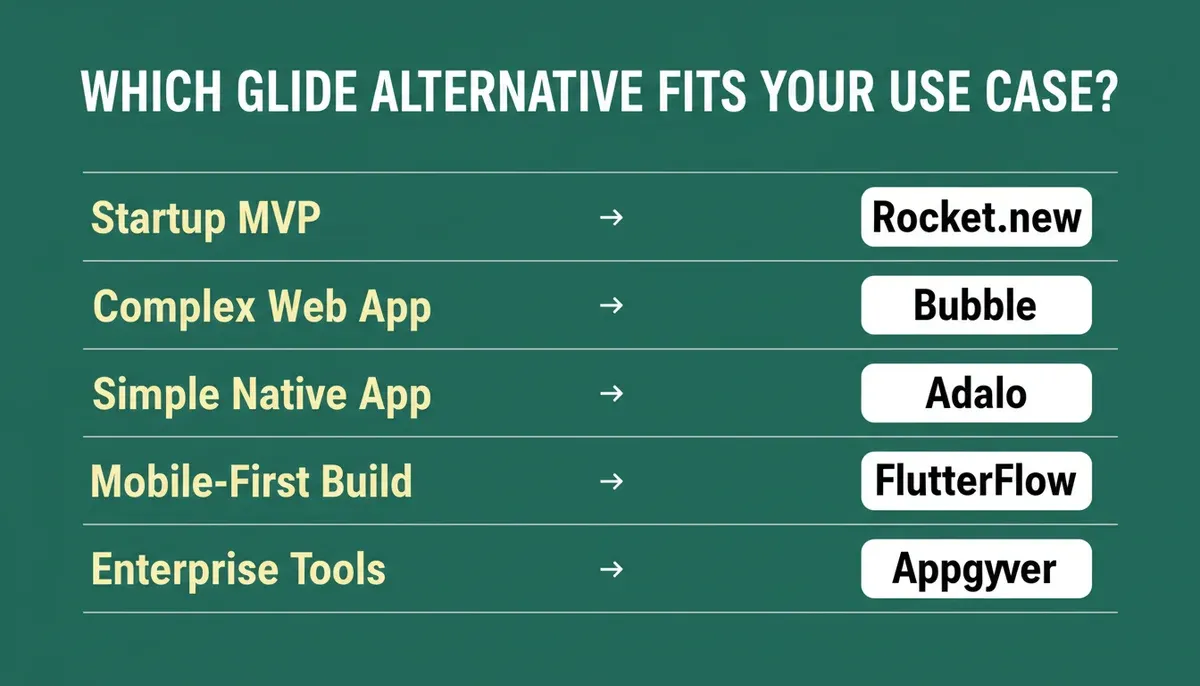
Match your use case to the right glide alternative before committing
The best glide alternative is the one that supports where your app is going next, not just where it is today. Pick for scale, complexity, and users, not hype.
Teams evaluating AI-powered mobile app development consistently find that starting with research before building reduces costly rebuilds later.
When Does Glide Still Make Sense?
Let's be honest: Glide still fits some needs well.
It is great when:
- You want something fast and simple with zero learning curve
- Your data already lives in Google Sheets and you want to keep it there
- You are testing an app idea before investing more time or money
- You do not need native mobile publishing yet
- Non-technical users will maintain the app long-term
Glide is like a bicycle: fun and quick. But when the terrain gets rough and the road gets long, most teams reach for stronger wheels.
Choosing the Best Glide Alternative
Glide can feel cozy at first, but it starts to strain under data complexity, logic limits, and native mobile deployment. Powerful tools like Rocket, Bubble, FlutterFlow, and others let teams build mobile and web apps with deeper logic, app store publishing, and stronger automation.
The right glide alternatives give teams control without stress. For teams that want to understand the full spectrum of no-code capabilities, exploring what you can build with a full-stack AI app builder shows how far the category has evolved beyond spreadsheet-based tools.
If you have reached the point where spreadsheet-based app builders are limiting your workflows, Rocket.new offers an AI-first approach that helps you move from an idea to a production-ready application faster. Start with a prompt, refine visually, connect your backend, and publish across platforms as your project grows. Start building for free and see how fast your next app can ship.
Table of contents
- -What is Glide?
- -Why Do People Leave Glide?
- -How We Evaluated These Tools
- -Who Should Switch from Glide?
- -Quick Comparison of Glide Alternatives
- -1. Rocket: AI-First Without Sacrificing Control
- -2. Bubble: Deep Logic and Workflow Power
- -3. Adalo: Simple Native App Focus
- -4. FlutterFlow: Visual Builder With Real Mobile Output
- -Community Insight From Real Builders
- -5. Appgyver: Enterprise and Integration Focus
- -Rocket vs Glide: A Direct Comparison
- -Best Glide Alternative by Use Case
- -How to Migrate from Glide
- -How to Pick the Right Glide Alternative
- -When Does Glide Still Make Sense?
- -Choosing the Best Glide Alternative