

Why are low-code and no-code platforms gaining so much attention? Let's see the basics, key differences, and how beginners use visual tools to build applications faster as adoption continues to grow.
What exactly is low-code no-code development?
It is a way to build software without deep coding skills, using visual tools and smart platforms that make app creation faster and friendlier for non‑technical people.
In the ‘Cloud Will Be the Centerpiece of New Digital Experiences’ press release, Gartner predicts that by 2025, the use of low‑code and no‑code technologies will nearly triple, with approximately 70% of new applications developed by organizations built using these platforms, up from less than 25% in 2020.
This blog breaks down what low-code and no-code really mean, how they differ, and why beginners are paying attention to them today.
What Low Code and No Code Really Mean?
Why all the buzz around no-code and low-code development?
Simply put, they let anyone build apps without deep coding skills.
- No code means you don’t need programming languages to build apps. Visual tools and templates do the work.
- Low-code still requires some coding, but it eliminates most manual coding.
Both approaches let business users and citizen developers create software without hiring entire teams of professional developers.
You’ll hear words like no-code tools, low-code platform, and drag-and-drop interface a lot. These are just ways to describe the tools that replace manual coding with easy building blocks.
Think of It Like Building With Blocks
If traditional coding is like sculpting from raw marble, no-code platforms are like building with Lego bricks. Low-code solutions might let you tweak a few custom pieces here and there, but you don’t start with a chisel and hammer.
A low-code platform provides templates, prebuilt components, and drag-and-drop features. That means fewer technical skills are needed, and more ideas can become real apps fast.
Who Uses Low Code No Code?
Not just developers. Honestly.
Business users love these tools because they can build apps without deep technical knowledge.
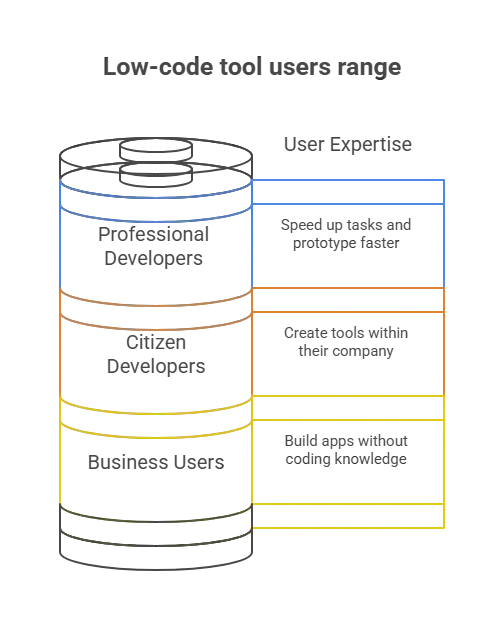
Why Business Users Love No-Code Platforms
Here’s why non‑tech teams and business users are drawn to this approach:
- Fast turnaround: Apps that once took months can be ready in days.
- Fewer resources needed than traditional development.
- Visual tools make things intuitive.
- No-code apps can quickly solve daily business problems.
- Drag and drop interfaces make building fun.
But it’s not magic. Some complex applications might still require custom code or a professional developer’s assistance.
| Benefit | Who It Helps Most |
|---|---|
| Fast app creation | Business users |
| Easy changes without coding knowledge | Citizen developers |
| Internal tool building | Business and IT teams |
| Rapid prototyping | Both low code and no code use cases |
| Lower development cost | Small teams and startups |
So while no code platforms make life easier for business users, remember they work best when the app’s needs aren’t too complex. Think of them as a fast lane for ideas, not a replacement for heavy-duty coding.
How Low Code vs No Code Really Works?
There’s a bit of confusion around low-code and no-code development platforms, so let’s break it down.
Low Code Development Platforms
- Let you build apps quickly.
- Allow small bits of manual coding to fine‑tune features.
- Great for flexibility without heavy lifting.
- Ideal for apps that may occasionally require custom code.
No Code Development Platforms
- Remove the need for any manual coding.
- Rely entirely on visual building blocks and choices.
- Perfect for business users or citizen developers who want quick results.
- Best suited for simpler apps or internal tools.
Key Difference
- Low-code keeps the door open to coding tweaks.
- No code locks that door; you’re limited to what the platform allows.
Both approaches accelerate development, but they serve different needs based on the app’s complexity and the user’s technical skills.
Think of it like this: low code is a hybrid car: you get efficiency, but can switch to power mode when needed. No code is an electric scooter: quick, easy, and fun, but not made for heavy lifting.
What People Say About Low Code No Code
Here’s a slice of real community insight from Reddit:
“If you truly want low‑code to spread widely… there needs to be at least one open‑source low‑code platform.”
Meet Rocket.new: A Fresh No Code Twist
Now let’s talk about Rocket.new and why it gets attention.
Rocket.new is a creative take on no-code apps. It lets you describe what you want in plain text, and the platform builds an entire app around it without requiring you to learn programming languages.
That means business users, founders, and designers can go from concept to a real application web or mobile without ever needing to write code.
Top Features
- One prompt app generation: Describe your idea and let the system build both front end and back end.
- Design to code: Import Figma and turn designs into real apps.
- Live previews: Watch your creation as it forms.
- Responsive apps: For web and mobile.
- Third‑party integrations: Like Stripe, Supabase, and APIs.
Rocket.new blends no-code development platforms with smart automation, so even complex pieces like authentication and database setup happen behind the scenes with no manual coding needed.
Where No Code Shines and Where It Doesn’t
When should you choose no-code?
Great for:
- Simple business apps
- Prototypes and MVPs
- Internal tools
- Small web or mobile apps
But if you need advanced features, complex logic, or custom performance optimizations, you might reach the limits of no-code and consider low-code or even traditional code.
That’s why many teams start with no-code platforms and later move to low-code tools or traditional development. It’s like learning wheels on a bike. You start easy, then unlock new tricks when ready.
Low Code No Code Development
Low-code/no-code development is changing how apps are built. It lets business users and citizen developers create useful apps without coding expertise. At the same time, professional developers can still do serious work with low-code tools. This mix gives everyone more power to build, test, and launch software faster.
No code isn’t perfect for every case, but it makes the world of software a friendlier place for people who just have ideas.
Table of contents
- -What Low Code and No Code Really Mean?
- -Think of It Like Building With Blocks
- -Who Uses Low Code No Code?
- -Why Business Users Love No-Code Platforms
- -How Low Code vs No Code Really Works?
- -Low Code Development Platforms
- -No Code Development Platforms
- -Key Difference
- -What People Say About Low Code No Code
- -Meet Rocket.new: A Fresh No Code Twist
- -Top Features
- -Where No Code Shines and Where It Doesn’t
- -Low Code No Code Development

