Want to know how to do vibe coding? See how vibe coding combines AI assistance with human creativity, enabling developers to generate, test, and refine code quickly while keeping full control of their workflow.
Coding has changed fast.
Not long ago, developers spent hours writing code, debugging, and connecting features. Every small change meant hunting down lines of code, checking dependencies, and repeating the process.
Today, AI tools can assist at almost every step, making the workflow faster but sometimes messy.
So how can you work with AI without losing your creative flow? That’s where vibe coding comes in. It’s about collaboration, not replacement.
This article shows how to do vibe coding. By syncing your work with AI, you can generate code, test ideas, and iterate quickly while staying in control.
Understanding Vibe Coding
Vibe coding is more than a trend; it’s a mindset. It’s about merging human creativity with AI efficiency.
Think of it as collaborating with an intelligent partner who suggests functions, spots errors, or even writes entire modules based on your prompts.
The approach relies on natural language prompts. Developers describe what they want, and AI generates vibe code accordingly. This allows teams to move faster, avoiding the friction of manually writing every single line.
- Smooth collaboration: AI-assisted coding tools act like a pair programmer, suggesting functions, files, or even full modules.
- Rapid prototyping: Generate code snippets quickly and test ideas without writing everything manually.
- Adaptive workflows: Teams can pivot faster, adding features or integrating new technologies without overhauling existing code.
Vibe coding fits all kinds of projects. For throwaway weekend projects, it helps prototype ideas quickly. In larger enterprise applications, it maintains flow, enabling developers to focus on architecture and user experience rather than repetitive coding tasks.
How AI Transforms Coding Speed?
AI has become more than autocomplete.
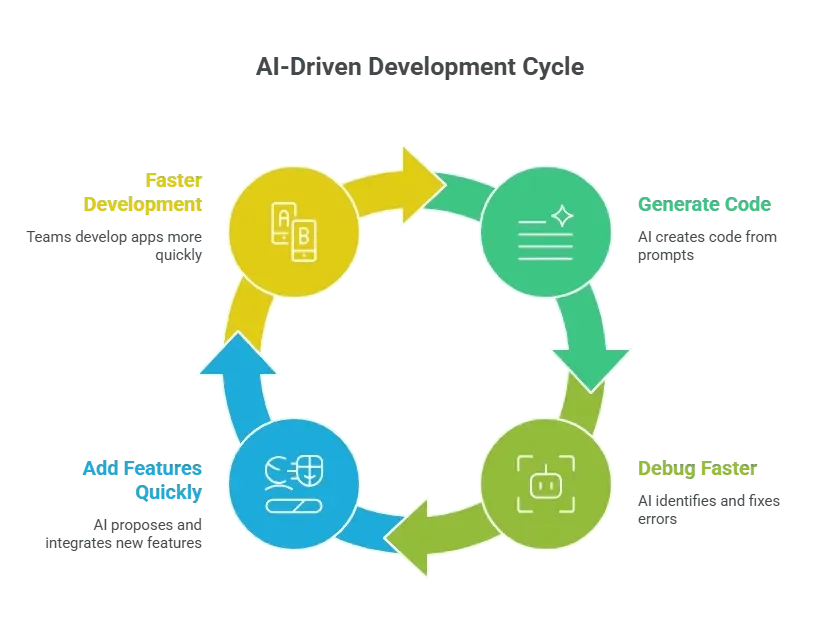
Large language models generate entire sections of code from natural language. This doesn’t mean developers stop thinking. Instead, AI handles repetitive or boilerplate tasks while humans focus on architecture, logic, and usability.
Vibe Coding Workflow
Vibe coding blends manual coding with AI-assisted workflows.
Here’s a step-by-step look:
- Conceptualize: Start with a clear idea or user story. Think about the core functionality before asking AI for help.
- Prompt the AI: Describe the desired functionality in natural language. The AI generates functional code snippets that fit your app.
- Integrate: Merge the generated code into your existing files, making any necessary adjustments.
- Test & debug: AI tools can assist by highlighting bugs or suggesting fixes, while developers ensure the code matches design goals.
- Iterate: Refine features, add new functionality, or tweak existing modules based on user feedback or team input.
This workflow maintains speed without sacrificing code quality. Developers still retain control but spend less time on repetitive tasks.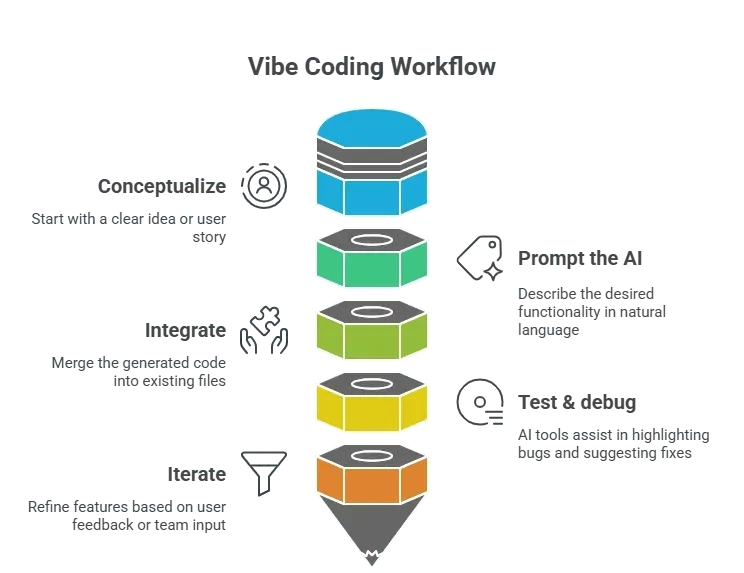
Tools for Vibe Coding
AI tools are the backbone of vibe coding. They range from code completion assistants to fully generative platforms.
Here’s a table summarizing some of the most common ones:
Using multiple AI tools together maximizes efficiency. Some excel at generating code, others at debugging, and some at integration. Combined, they streamline app building and reduce friction in manual coding.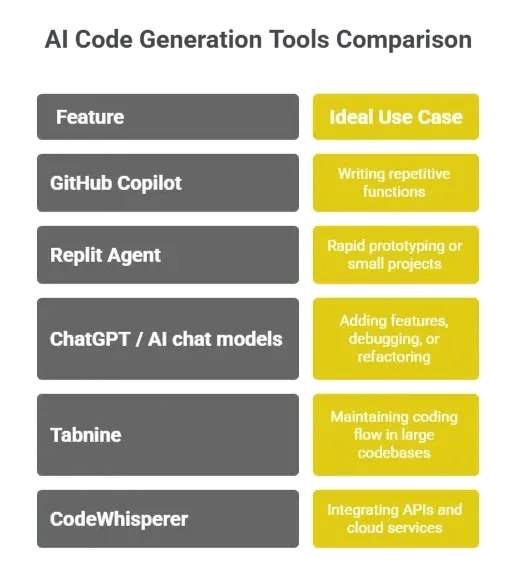
Real-World Application of Vibe Coding
In real-world app development, AI affects more than speed. It changes planning, collaboration, and feature rollouts. Developers can generate functional code in advance, leaving time for user experience design, integration, and testing.
- Team impact: Teams can handle more parallel projects because repetitive coding tasks are offloaded to AI.
- Workflow impact: Smooth transitions between modules allow for faster feature integration and less downtime.
- User impact: Applications roll out updates more quickly, with new features accessible faster and bugs fixed in record time.
The practical advantage is clear: apps are more adaptable. Development cycles shrink, and teams respond quickly to feedback or market needs.
Community Insights
One Reddit post highlights:
“Switching to AI-assisted coding changed how we approach app building. I can prototype in a day what used to take a week.”
Users often describe AI as a pair programmer that never sleeps. Yet, they emphasize the importance of reviewing generated code to maintain code quality. It’s collaborative, not hands-off.
Integrating AI in Software Development
AI is not just for generating code snippets. It helps teams integrate databases, test functionality, and deploy apps. This makes app development feel more iterative and less linear.
- Rapid prototyping: Developers test new ideas quickly. AI generates modules and features in minutes, allowing faster experimentation.
- Code quality: While AI generates code, human oversight ensures it meets standards and aligns with design goals.
- Smooth transitions: Adding new features or refactoring old ones becomes easier. Developers focus on higher-level design rather than boilerplate code.
Even complex applications benefit. AI handles repetitive tasks, freeing developers to focus on architecture, user experience, and testing real-world applications.
Rocket: AI-Powered Vibe Coding Platform
Rocket is a vibe solutioning platform designed specifically for vibe coding. It integrates AI tools to streamline app development, from code generation to app deployment.
Features:
- Generate code from prompts: Use natural language to quickly create modules.
- Debug suggestions: AI scans code for errors and offers fixes.
- Integration assistance: Connect APIs and databases efficiently.
- Rapid prototyping: Launch small apps or new features in minutes.
Rocket keeps the entire vibe coding workflow under one roof, from idea to deployment.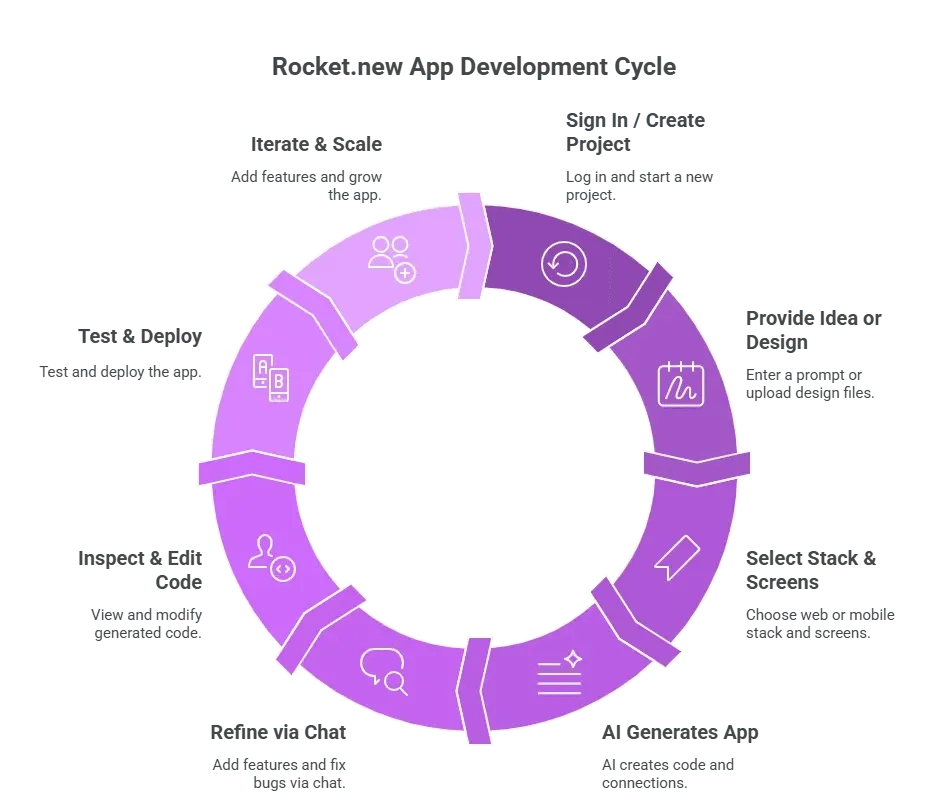
Tips for Effective Vibe Coding
Vibe coding works best when developers follow certain principles:
- Keep prompts precise: The AI generates better code when instructions are clear.
- Review code: Even functional code requires human oversight to maintain quality and reliability.
- Mix manual coding: Complex algorithms, critical components, and custom logic often need manual input.
- Iterate quickly: Prototype first, refine later. Speed matters more than perfection at initial stages.
- Combine tools: Different AI tools excel at different tasks—code generation, debugging, or integration.
The balance between AI and human oversight defines the success of a vibe coding workflow.
Benefits of Vibe Coding for Teams
Vibe coding reshapes team dynamics. Developers spend less time on repetitive tasks and more on designing features, improving user experience, and testing real-world applications.
- Faster development cycles: Teams move from concept to working app in days instead of weeks.
- Reduced friction: AI-generated code allows smooth transitions between features and modules.
- Improved productivity: Developers can handle multiple projects simultaneously.
- Higher user satisfaction: Rapid updates and bug fixes make applications more responsive.
Teams that adopt vibe coding report feeling less “stuck” during development, maintaining flow and creativity without losing control over the codebase.
Mastering How to Do Vibe Coding
Vibe coding changes software development. It moves coding from tedious, repetitive work to a collaborative, fluid process. Developers retain control while AI handles routine tasks, generates functional code, and accelerates app building. Teams can iterate faster, deploy entire applications more quickly, and deliver new features without losing quality.
Learning how to do vibe coding is about finding the balance between AI-generated suggestions and human oversight. Those who master it can maintain creative flow, improve workflows, and accelerate software development.
Table of contents
- -Understanding Vibe Coding
- -How AI Transforms Coding Speed?
- -Vibe Coding Workflow
- -Tools for Vibe Coding
- -Real-World Application of Vibe Coding
- -Community Insights
- -Integrating AI in Software Development
- -Rocket: AI-Powered Vibe Coding Platform
- -Tips for Effective Vibe Coding
- -Benefits of Vibe Coding for Teams
- -Mastering How to Do Vibe Coding