
Which mobile app platform fits your idea best? Explore major development platforms, their strengths and limits, and learn how goals, skills, budget, and speed shape the right choice for success.
Starting a mobile app project feels exciting. But the moment you begin planning, the confusion sets in.
Too many tools. Too many opinions. One wrong decision can slow things down or drain your budget. That is where choosing wisely matters.
So how do you pick a mobile app development platform that truly fits your idea? The answer depends on your goals, your skills, and how fast you want to move.
Let's explain the main platform options, their strengths, and limits.
Why Your Choice of Mobile App Development Platform Matters?
Before diving into tools, it’s worth understanding why the platform matters. The right platform affects cost, development time, user experience, and even the success of your app in stores.
A mobile app development platform shapes everything from design to deployment. Choosing poorly can slow down your development process or force you to rewrite apps for different operating systems.
A good choice, on the other hand, lets you create apps faster, test ideas quickly, and even support multiple platforms.
- Speed: Some platforms let you go from idea to prototype in hours.
- Performance: Native tools give you smooth, high-speed apps.
- Cross-Platform Reach: Some let you run a single codebase across iOS, Android, and even web apps.
- Skill Requirements: You can pick based on your comfort with writing code or using a no-code app builder.
Think of it like picking a car for a road trip. If you need off-road ruggedness, you don’t take a scooter. The right platform ensures your app works smoothly for your users and your team.
Traditional vs No-Code App Development
The first big fork in the road is deciding whether you want to write code or not. Both approaches have their perks, and knowing the difference early saves headaches later.
| Feature | Traditional Code | No Code App Builder |
|---|---|---|
| Writing Code | Required | Not required |
| Speed | Slower | Faster |
| Custom Logic | Full Control | Limited |
| Best For | Powerful apps | Simple apps, MVPs |
| Learning Curve | High | Low |
- Traditional Development is great for apps that need high performance or access to advanced native device features. Tools include Android Studio, React Native, and Swift/Xcode.
- No-Code App Builders let anyone build apps without technical skills. They are faster, perfect for MVPs, internal tools, or simple mobile applications.
- AI-assisted Platforms combine no-code and automation to enable rapid app development.
Your choice here sets the tone for the entire project. If speed matters more than ultimate control, no code or AI platform is your friend. If performance and advanced features matter, traditional development is the way.
Native Tools: Maximum Control and Performance
Native tools mean working directly with Android or iOS systems. This path gives total control and access to all device capabilities.
Android Studio
Android Studio is perfect if you want deep access to Android devices. App developers can leverage full OS features, smooth UI components, and robust debugging tools. You write code in Java or Kotlin.
Pros: Full device access, performance, and debugging tools.
Cons: Learning curve, Android-only.
Swift and Xcode for iOS
iPhone apps use Swift with Xcode. They are built for the Apple App Store and offer excellent performance and tight hardware integration.
Pros: Optimized for Apple devices, native UX, smooth performance.
Cons: Mac-only, iOS-only.
Native tools are best for serious apps needing advanced features. They require patience, but the results are polished, high-performance native apps.
Cross-Platform Tools: One Codebase, Many Devices
What if you want to reach iOS and Android users without maintaining two codebases? That’s where cross-platform mobile development comes in.
React Native
Developers can write code once and deploy it on Android and iOS. This saves time and resources.
Pros: Large community, reusable code, near-native performance.
Cons: Some native device features still need extra modules.
Flutter
Flutter uses the Dart language. It creates smooth, visually consistent apps and supports hot reload, which speeds testing.
Pros: Beautiful UI components, fast development, consistent design.
Cons: Smaller ecosystem, Dart learning curve.
Cross-platform is a sweet spot for startups and businesses targeting multiple platforms without doubling costs or dev time.
No-Code App Builders: Build Apps Without Coding
Not everyone wants to write code. That’s where no-code app builder platforms shine.
Subtopics Explained:
- Drag-and-Drop Interfaces: Build apps by dragging and dropping elements on a canvas.
- Templates and Pre-Built Components: Quickly create user flows.
- Progressive Web Apps and Mobile Apps: Deploy on web or app stores with minimal hassle.
- Internal Tools: Great for client portals, dashboards, and simple enterprise apps.
No code tools make app building accessible. The trade-off is limited customization compared to native apps, but for many projects, this is more than enough.
Rocket.new: Vibe Solutioning Platform
AI is changing the way apps are built. Rocket.new lets you describe your app in plain language, then it creates the structure, backend, and UI.
Top Features:
- One‑Prompt App Generation: Describe your app and get frontend, backend, and integrations automatically.
- Design to Code: Import Figma designs and turn them into working app code.
- Automatic Backend Setup: Database, authentication, and cloud setup happen automatically.
- Multi‑Platform Output: Build web apps, Android, and iOS from the same prompt.
- Third‑Party Integrations: Easily connect tools like Stripe, Supabase, and Netlify.
- Live Preview & Editing: Adjust screens or logic in real time using simple prompts.
Use Cases:
- Startup MVP Creation: Founders can quickly build a fully functional minimum viable product, test features, and validate ideas without advanced technical skills.
- Agency Prototypes: Agencies can build client prototypes fast with UI designs, backend workflows, and user flows already in place, saving hours of manual coding.
- Side Projects & Experiments: Creators or solo builders can turn ideas into real apps without hiring developers or learning complex tools.
- Internal Tools & Dashboards: Business teams can create apps like dashboards, admin panels, or internal workflows without relying on IT teams.
- Web + Mobile App Pairing: Build both web and mobile apps from a single design or prompt, ensuring consistency across platforms.
- Prebuilt Template Acceleration: Use Rocket.new’s templates to start common projects faster, like landing pages or branded internal tools, cutting initial setup time.
Rocket.new dramatically shortens the development process. It’s perfect for those who want speed, simplicity, and AI-assisted automation.
Low-Code App Development
Low-code platforms fall between no-code and full traditional development. They let you write code if needed, but rely on visual interfaces for most tasks.
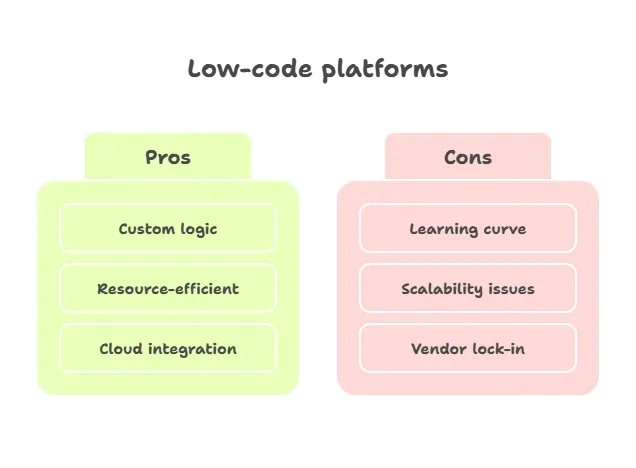 Low-code offers flexibility for teams that want more than a no-code platform but less than full coding responsibility.
Progressive Web Apps and Web Apps
Not every app needs to hit the Apple App Store or Google Play. Progressive web apps (PWAs) and web apps can run in browsers while feeling like mobile apps.
- Installable from the browser without app stores.
- Works offline or with poor connectivity.
- Cheaper to build and maintain.
PWAs are a cost-effective choice for consumer apps or internal tools. They may not replace full native apps, but they can solve many problems efficiently.
Choosing Based on Your App Idea
Every platform has strengths and weaknesses. Picking the right one depends on your goals, resources, and timeline.
Checklist:
- Who is the target user?
- Which operating systems should you support?
- How complex are your app features?
- Will you rely on a no-code app builder or write code?
- Do you want cross-platform apps or a native mobile app experience?
Align your choice with the app’s purpose. Sometimes fast deployment wins. Other times, performance and advanced features matter more.
Community Insights
A developer talking about React Native and using a single codebase for multiple platforms:
“We are debating switching to react‑native to have a single code base that we can leverage across web, iOS and Android apps.” Reddit discussion about React Native development.
Development Process Tips
Regardless of platform, a smooth development process makes life easier.
- Test early on multiple devices.
- Use version control for updates.
- Monitor data storage and app performance.
- Plan for push notifications, form submissions, and authentication.
A solid process ensures your app launches smoothly and adapts to user needs quickly.
Choosing the Best Mobile App Development Platform
Picking a mobile app development platform requires balancing speed, control, and reach. Native tools offer performance, cross-platform tools save time, and no-code tools simplify work. Focus on your goals, your app idea, and your users. The right choice will make building apps more productive, less stressful, and maybe even fun.
It’s also worth remembering that no single platform fits every project. Sometimes, starting with a no-code tool helps test your idea quickly, while more complex projects might benefit from native or low-code solutions. Thinking about how fast you want to launch and how many devices you need to support will make the decision much clearer.
Table of contents
- -Why Your Choice of Mobile App Development Platform Matters?
- -Traditional vs No-Code App Development
- -Native Tools: Maximum Control and Performance
- -Android Studio
- -Swift and Xcode for iOS
- -Cross-Platform Tools: One Codebase, Many Devices
- -React Native
- -Flutter
- -No-Code App Builders: Build Apps Without Coding
- -Rocket.new: Vibe Solutioning Platform
- -Low-Code App Development
- -Progressive Web Apps and Web Apps
- -Choosing Based on Your App Idea
- -Community Insights
- -Development Process Tips
- -Choosing the Best Mobile App Development Platform