
Confused about selecting the right software architecture? This blog explains key architectural patterns, selection criteria, trade-offs, and practical examples to help teams design scalable, maintainable, high-performing systems.
What goes into choosing the right software architectural patterns for a project?
It’s about aligning your product's goals with proven software architecture approaches that make development smoother, scaling easier, and the system simpler to maintain and evolve over time. Choosing well reduces risk and supports clear long-term paths for your systems.
Stats show that poor architectural decisions cause project delays and bugs. A World Quality Report found 52% of project failures are linked to inadequate design early on**.**
Now let’s dig into how to pick software architectural patterns that fit your system's needs, team size, and future plans, such as scaling or adding new features.
What is Software Architecture and Why Does It Matter?
Software architecture refers to the structured solution that meets all major technical and operational requirements. It works at the level of the entire application, not just one part of the code.
Think of it as the blueprint or framework that guides how pieces like user interface, data handling, and system components fit together.
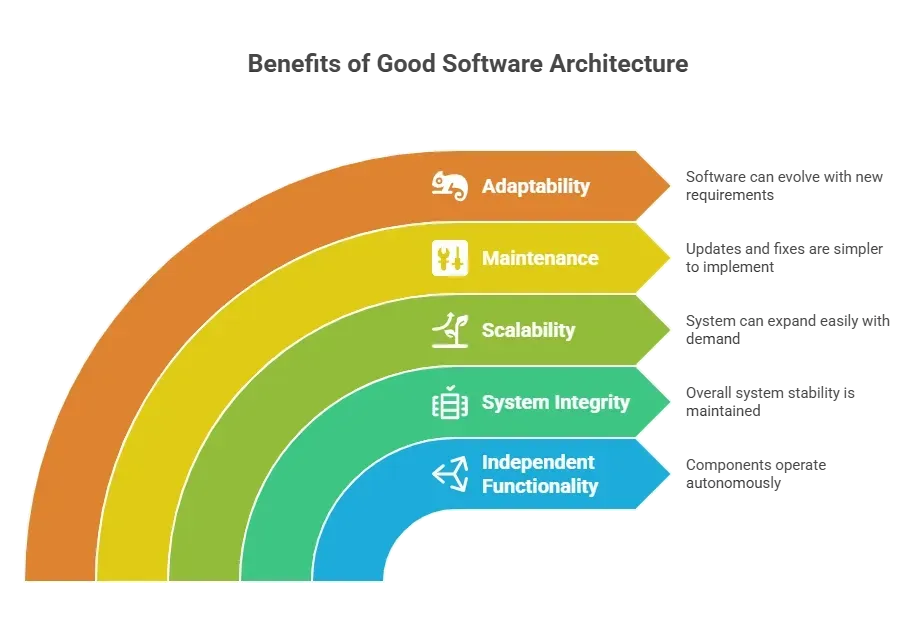
Picking the right architectural pattern early makes your life easier throughout the development process.
What are Software Architectural Patterns?
Choosing the right system structure can be tricky.
That’s where software architectural patterns come in. They act as ready-made templates that guide how different parts of a system interact, making complex decisions much easier.
Key Points About Architectural Patterns:
- Reusable Solutions: Patterns are proven ways to solve recurring problems in system design.
- Blueprints for Systems: They help organize system components in a way that’s predictable and maintainable.
- Match Your Needs: Each pattern has its strengths and weaknesses. Choosing the right one depends on your business requirements, team setup, and system scale.
- Support Multiple Layers: Patterns can dictate how user interface, business logic layer, and data access are separated or connected.
- Aid in Scaling: Certain patterns, such as microservice or event-driven architectures, make it easier to scale across multiple systems or applications.
In short, architectural patterns aren’t just rules—they’re smart guides. Picking the right one helps make your software architecture more organized, easier to maintain, and ready for growth.
Layered Architecture
This is one of the most common software architecture patterns in web applications. It organizes code into logical layers.
Typical layers include:
| Layer | Purpose |
|---|---|
| Presentation | Handles user interface and display |
| Business Logic Layer | Processes rules and workflows |
| Data Access | Handles data storage and retrieval |
So, with a layered architecture, each layer has one job. You read data from storage through the data access layer, then apply business logic, and then present it to the user. This pattern makes the app easier to maintain and easier for new team members to learn.
When to use it:
- Web applications (standard CRUD systems)
- Projects with a clear separation between the interface and server
- Teams that prefer a simple, step-by-step flow
Benefits:
- Good separation of concerns
- Easier to test and adapt
Limitations:
- Can get slow if layers are too strict
- Not ideal for distributed systems where parts must scale independently
Layered architecture is perfect when clarity and maintainability matter more than ultra-high scalability. It keeps each part of your system clean and predictable, making life easier for development teams and new developers alike.
Monolithic Architecture
A monolithic architecture means the entire application is built as one single unit. That includes user interface, business logic, and all data access. Many small projects start this way because it’s simple.
Why developers pick it:
- A single place to run and deploy
- Fewer moving pieces
- No complicated orchestration
Example: A monolithic application might include everything from web pages to routing and database access in a single service.
When it works best:
- Small teams
- Simple web applications
- Projects without heavy scaling needs
Drawbacks:
- Harder to update parts independently
- Team members may step on each other’s work
- Growth can lead to increased complexity
Monolithic architecture is great for small, focused projects where simplicity rules. It keeps the entire application together, making deployment easy and reducing coordination headaches, but it can become a headache itself as the system grows.
Microservices Architecture
A microservices architecture breaks a system into multiple services. Each service handles one business capability. They communicate with one another, often through APIs.
This approach contradicts the single unit of a monolithic approach. Instead of one codebase, you get multiple microservices that can be deployed independently.
Major points:
- Each service owns its own data
- Teams can choose different tech stacks per service
- Services scale independently
Best fits systems that:
- Expect growth in traffic or features
- Need frequent deployments
- Have separate domains (like billing, login, catalog)
Pros:
- Independent deployment
- Fault tolerance (one service fails but the rest can run)
- Useful for distributed systems
Cons:
- Complexity in coordination
- More overhead in deployment and monitoring
Microservices shine when a system needs flexibility and scale. They let development teams work on individual services without stepping on each other’s toes, making growth manageable. But, don’t forget this freedom comes with added complexity, so planning and monitoring are key.
Event Driven Architecture
Event-driven architecture centers on events that represent changes in state. Instead of functions calling each other directly, components react to events.
Think of events like messages: a user signs up → an event fires → other services respond (e.g., send a welcome email, update analytics, etc.).
Where it shines:
- Systems with frequent changes or lots of triggers
- Distributed systems with independent components
- Scenarios needing event producers and consumers
This is great for handling async nature of modern systems. Event based pipelines handle peak loads better because components don’t wait on each other.
Challenges:
- Harder to debug paths through events
- Increased design overhead on message schemas
Event driven architecture is perfect for systems that need to react quickly and scale efficiently. It keeps services decoupled, so one component failing doesn’t bring down the entire system.
The trade-off is more upfront design work, but the payoff is smoother handling of dynamic content and complex workflows.
Service Oriented Architecture
A service-oriented architecture, or SOA, is a precursor to microservices architecture. SOA bundles related functionality into fewer, often larger services than microservices.
It still focuses on service boundaries, but not every tiny piece. You might see SOA in enterprise systems connecting multiple web applications and backend systems.
Consider SOA when your system needs to connect multiple legacy systems or share common services across teams.
Hexagonal Architecture
Hexagonal architecture (also called ports-and-adapters) reverses the direction of control. Instead of your core depending on UI or database details, it depends on simple interfaces. The external world plugs into those interfaces.
Think of it like a hub with adapter spokes. Your business logic sits in the inner circle, untouched by outside changes.
Benefits include:
- Clear logical separation
- Easy to swap external systems (like databases or APIs)
- Better test isolation
This is solid when you need to live with external dependencies or swap parts later.
Choosing Based on Data Patterns
Now let’s talk about data access decisions and data distribution. Different patterns change how you handle data consistency.
- Monolithic systems often use a shared database like SQL server or others
- Microservices give each service its own store, improving scaling but challenging consistency
- Event systems often trade strong consistency for speed and flexibility
If you value strong transactional data consistency, layered or hexagonal architectures make it easier to enforce rules in a single place. If you choose microservices, plan for eventual consistency across boundaries.
When to Pick What
Choosing the right software architecture isn’t about finding a perfect pattern because there isn’t one. It’s about matching the architecture to your system’s needs, team, and growth plans. Here’s a quick guide to help make that decision easier.
Team size
- Small teams do better with monolithic or layered architecture at first
- Large teams benefit from splitting into microservices
Rate of change
- Frequent releases push toward independently deployable units
- Stable apps can stay monolithic
Scaling needs
- Heavy load systems may need microservices or event patterns
- Smaller load stays comfortable with layered
Other services
- If linking to partner systems, consider SOA or hexagonal for clearer isolation
In short, the right architecture comes down to context. Think about your development teams, growth plans, and the type of systems you’re building. The better the match, the smoother the development process and the easier it is to scale or change later.
What Design Patterns Help in Architecture
Design patterns are smaller solutions that help within larger architectural patterns. Think of patterns like:
- Simple data transfer objects for moving data between layers
- Repository patterns for abstracting data access
- Adapter or Facade patterns for hiding complexities
These don’t replace architecture. They sit inside the structure and improve clarity.
Community Insight
Here’s a valid, specific Reddit link you can use for your community insight quote that matches the theme of moving from a monolithic architecture toward microservices:
“We made so many mistakes trying to mimic FAANG and adopt microservices back when the approach was new and cool. … No pattern is a silver bullet for all use cases. Monoliths aren’t evil.”
How Rocket.new Fits Software Architectural Patterns?
Rocket.new is a platform that helps teams plan, prototype, and build with clarity. While it is not itself an architecture, it provides tools to manage decisions about application architecture and component layouts.
Think of Rocket.new like a sandbox for your system design ideas. It doesn’t enforce a specific architecture, but it lets teams visualize system components, experiment with software architecture patterns, and plan how pieces like user interface, business logic, and data access fit together before writing a single line of code.
Top Features:
- Prompt to App Creation: Builds apps directly from single prompts
- Figma Import: Converts design files into live, editable layouts
- AI-Powered Backend: Automatically handles logic, data, and workflows
- Custom Domain Support: Publishes projects with a branded domain
- Code Export: Allows developers to extend or customize later
- Live Preview: Shows instant updates while editing
How Teams Use It in Practice?
-
Planning a microservices architecture
Teams can map out services, visualize boundaries between multiple microservices, and link API contracts. This helps reduce the complexity before any code is written.
-
Documenting event streams in event driven architecture
Instead of whiteboard scribbles, teams create persistent diagrams that show event schemas and producer rules. That keeps everyone aligned with how events travel across services.
-
Migrating a legacy monolithic application
Using Rocket.new, you can map features, define modules, and plan phased service splits with less guesswork. It becomes easier when the path is clear.
Rocket.new brings structure to planning so teams hit the right pattern early and communicate choices with clarity.
How to Choose Software Architectural Patterns?
Teams often start coding without a solid software architecture decision. This leads to messy interconnected systems, painful changes, and frustrated devs.
Match your business requirements and team skills with an architectural pattern that fits. Start with simpler patterns, such as layered or monolithic. Move toward microservices or event-driven architecture when scaling and data access needs grow.
Picking the right architecture early saves time, reduces bugs, and keeps developers happy. Thoughtful choices help systems scale and adapt without painful rewrites.
Table of contents
- -What is Software Architecture and Why Does It Matter?
- -What are Software Architectural Patterns?
- -Layered Architecture
- -Monolithic Architecture
- -Microservices Architecture
- -Event Driven Architecture
- -Service Oriented Architecture
- -Hexagonal Architecture
- -Choosing Based on Data Patterns
- -When to Pick What
- -What Design Patterns Help in Architecture
- -Community Insight
- -How Rocket.new Fits Software Architectural Patterns?
- -How to Choose Software Architectural Patterns?