

Build a news website by picking a niche, signing up to Rocket, entering a prompt, and generating a Next.js site with Supabase auth and Strapi CMS in hours. Use slash commands to add ads, subscriptions, and push notifications without coding.
To build a news website, choose a publishing platform, define your content categories, generate your frontend and backend with an AI builder, connect a headless CMS like Strapi or Directus for article management, add authentication and push notifications, then launch and promote on Google News and social media. Rocket makes this entire news website development process achievable in hours, not weeks.
Why Start a News Website Today
Digital journalism has changed how people read news. Many readers now prefer online news instead of traditional newspapers. Phones, tablets, and laptops make news easily accessible anytime.
Many companies and small news organizations now launch their own news portals to publish stories, share current events, and build a trusted news platform.
Large outlets like the New York Times started as traditional news outlets but expanded into strong online news platforms. Smaller companies can follow the same idea on a different scale.
According to the Reuters Digital News Report, about 71% of people in India rely on online media for news, and nearly half access it through social media platforms. A separate Pew Research study found that more than 86% of US adults get news from digital devices. Meanwhile, Statista projects global digital news revenue to surpass $25 billion by 2027.
Whether you run a small media company, a startup business, or a niche online news platform, the right technology makes a huge difference.
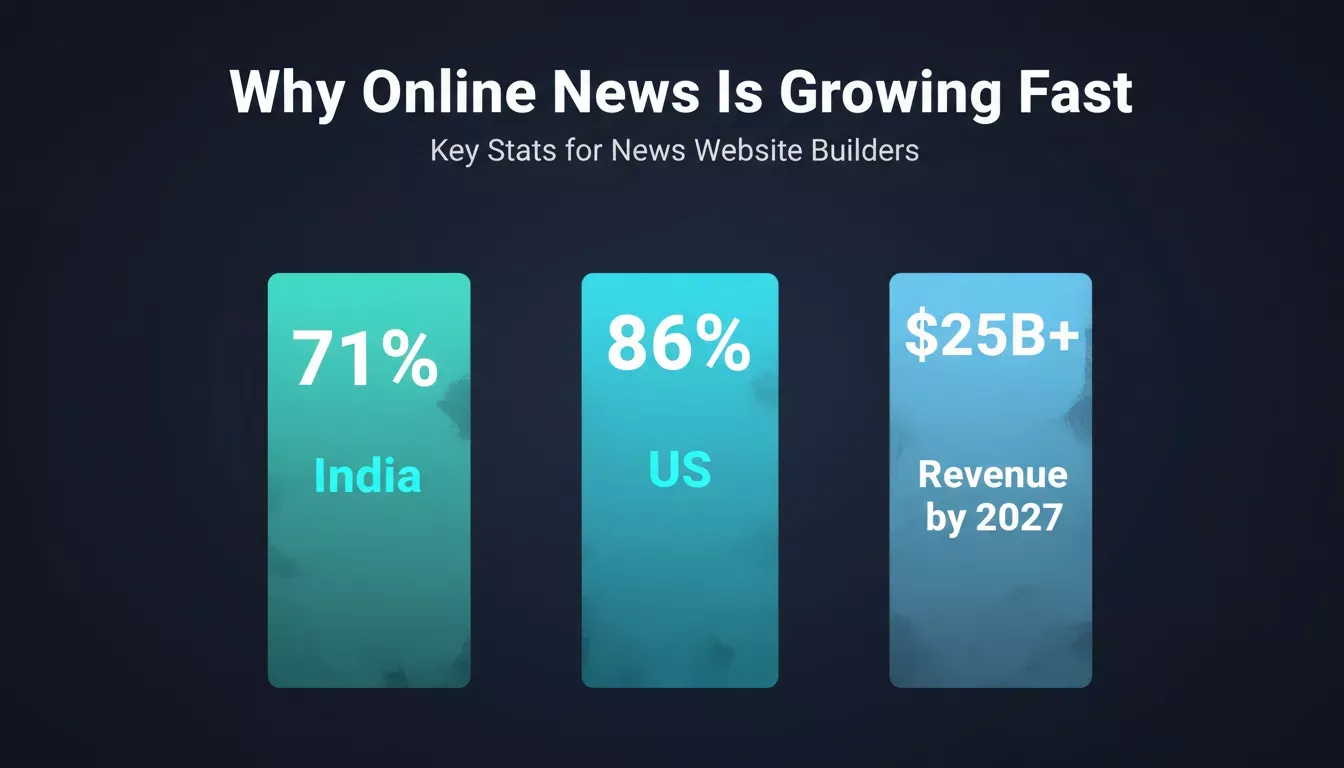
Global online news readership is growing fast. These numbers explain why launching a news website today is a better bet than waiting.
Core Features Every News Website Needs
A professional news website should do more than just publish articles. Readers expect speed, clear navigation, and fresh news throughout the day.
Fast Publishing System: A strong content management system such as Strapi or Directus, connected via the /Add CMS Content command, allows editors to publish news stories, upload images, and add videos quickly without dealing with complex coding.
Mobile-Friendly Layout: Many people read online news on their phones. A responsive design built on Next.js (for web) or Flutter (for mobile) adjusts to any screen size, improving the reading experience and time spent on the website.
Push Notifications: Push notifications matter more than most teams expect. A reader who opts in and gets pinged the moment a story breaks comes back that day, often within minutes. That said, overdo it and they unsubscribe fast. One or two alerts per day is usually the ceiling before readers start tuning out.
Social Media Connection: Social media plays a big role in distributing online news. Your site should support simple sharing so readers can easily share news stories with others.
Comment Section: A comment section lets readers respond to stories and discuss news topics. Worth noting: comment sections require active moderation, or they become a liability. Factor that into your team's capacity before enabling them.
Multimedia Content: Modern journalism often includes videos, images, and short articles explaining current events. Multimedia content helps engage readers and makes online news more engaging.
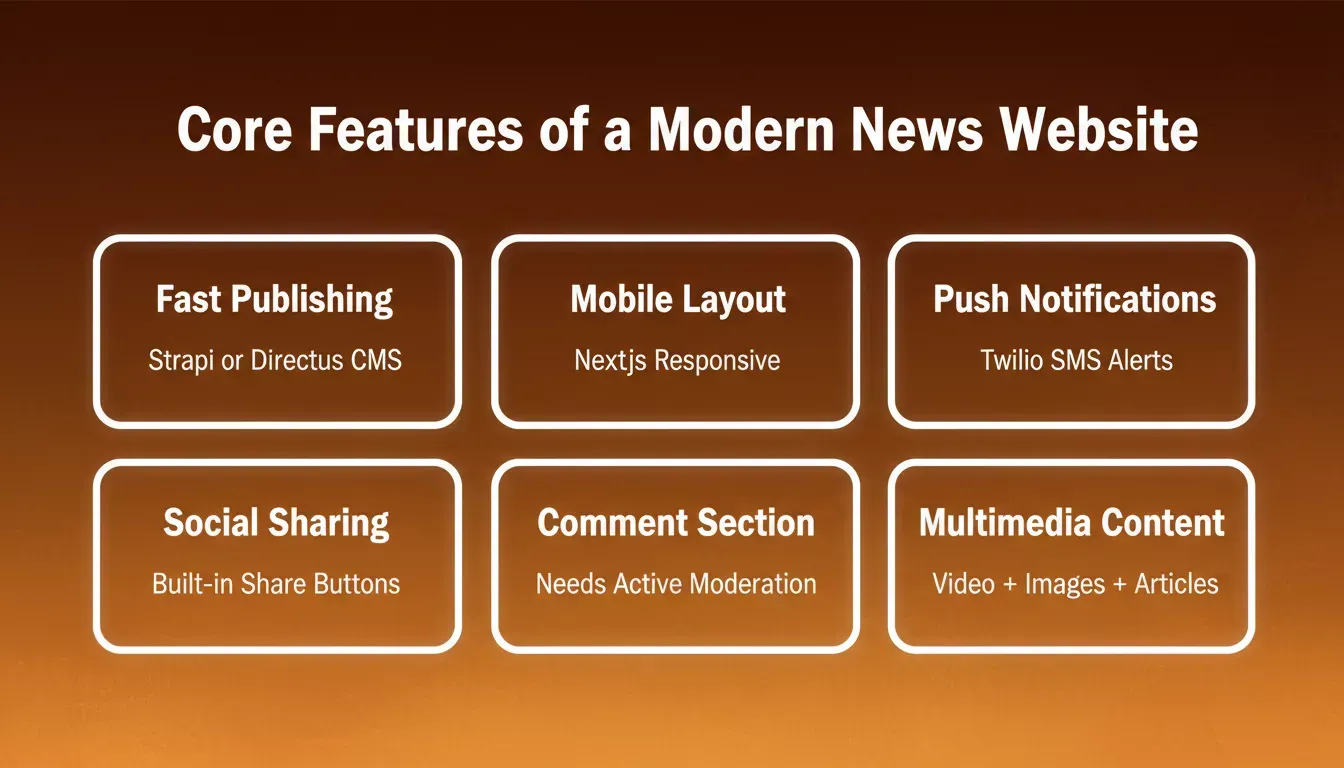
Six features that separate a professional news platform from a basic blog. All six are buildable in Rocket without writing code.
Rocket vs. Traditional Development vs. No-Code Alternatives
| Approach | Time to Launch | Tech Stack | CMS Support | Cost |
|---|---|---|---|---|
| Rocket (AI builder) | Hours to days | Next.js / Flutter + Supabase | Strapi, Directus | Low |
| Hiring a dev agency | Weeks to months | Custom stack | Custom integration | High |
| WordPress + plugins | Days to weeks | PHP/MySQL | Built-in WP CMS | Low to medium |
| Ghost (headless CMS) | Days | Node.js | Ghost CMS only | Medium |
| No-code drag-and-drop | Hours | Proprietary | Limited or none | Low |
A note on Ghost: if you are a solo writer launching a personal newsletter-style news site, Ghost is genuinely excellent and probably simpler than Rocket for that use case. Rocket makes more sense when you need a team editorial workflow, custom screens, or integrations like Stripe subscriptions and Supabase auth baked in from the start.
Rocket generates production-ready Next.js (web) or Flutter (mobile) code backed by Supabase. You own real, exportable code, not a locked proprietary system.
How to Build a News Website with Rocket.new
Creating a modern news website used to require large teams, complicated programming languages, and long development cycles. Rocket.new changes that process.
Rocket is a vibe solutioning platform with three pillars:
- Solve: run market research before building to validate your news niche, size the audience, and analyze competing news portals
- Build: generate your complete news website from a prompt using Next.js and Supabase
- Intelligence: start tracking rival news outlets continuously so you know when competitors launch new features or attract new audiences
For a news site, this means you can use Solve to validate whether a "local tech news" niche has enough search demand, Build to generate the site itself, and Intelligence to monitor outlets like TechCrunch or The Verge for strategic signals, all inside one platform.
Step 1: Define Your News Focus
Pick a niche and stick to it. A clear direction helps attract the right audience and keeps your content strategy consistent.
Many news portals focus on specific topics, such as:
- Technology news
- Local community news
- Entertainment news
- Finance and markets news
Some news portals focus on a local community, while others target a broad global audience. Clear direction also helps editors produce better stories and keeps readers engaged.
Pro tip: Use Rocket's Solve pillar to run a market analysis on your chosen niche before building. Ask: "What is the audience size and competitive landscape for [niche] news in [region]?" and get a structured research report in minutes.
Step 2: Sign Up to Rocket
Create your free Rocket account in 30 seconds. Sign in with Google, SSO, or email; no credit card required.
Open the platform dashboard and start a new project. The system prepares the base structure for your website with no manual server setup and no complex configuration.
Step 3: Enter a Prompt or Choose a News Website Template
Describe the type of news site you want to build in plain language.
Example prompt:
"Create a news website for technology news with login, category pages, trending news, push notifications, and article publishing tools. Use Supabase for authentication and Strapi for the CMS."
You can also choose ready-to-use news website templates to start faster. Browsing and remixing templates consume zero credits.
Type your news website requirements in plain language. Rocket reads the prompt and generates the full site structure instantly.
Step 4: Select the News Website Screens
Decide which sections your news website should include.
Typical news portals include the following screens:
- Homepage with trending news
- Category pages for different topics (Technology, Sports, Finance, Local)
- Article reading page with multimedia support
- Login and user profile powered by Supabase backend integration
- Admin dashboard for editors
- Comment section for readers
These screens form the backbone of a news platform. They allow editors to publish articles, manage news stories, and organize online news clearly.
Step 5: Watch the Website Build in Real Time
The platform automatically starts building the site using Next.js for the web frontend and Supabase for the backend database and authentication. Fast.
The system typically creates:
- Next.js frontend pages with responsive layouts
- Publishing dashboard for editors
- Supabase Postgres database structure for articles, categories, and authors
- Authentication system with email, Google, or social login via Supabase
This step normally takes weeks when handled by a development company. Rocket handles the setup much faster, and you get real, exportable code.
Step 6: Review the Generated News Platform
Take time to review the project. Check the site's main sections carefully.
Ask questions like:
- Do category pages display news properly?
- Are images showing correctly inside articles?
- Are videos loading properly?
- Does navigation help readers find news quickly?
Testing helps avoid future technical issues and helps adjust the website structure to match reader preferences.
Step 7: Modify Using Commands
Type / in the chat input to see the full command menu. Here are the commands most relevant to a news website:
| Command | Purpose for News Sites |
|---|---|
| /Restructure Screen Layout | Rearrange the homepage to a three-column news grid |
| /Generate Image | Replace placeholders with AI-generated article card visuals |
| /Add Supabase Authentication | Add full login, signup, and password reset screens |
| /Add Social Authentication | Add Google or GitHub sign-in to the reader login flow |
| /Add CMS Content | Connect Strapi, so article lists pull live CMS data |
| /Add Dynamic Config | Drive homepage banners from Airtable or Strapi config |
| /Setup AdSense | Place Google AdSense ad units across news pages |
| /Add Email Sign-up | Subscribe readers via Mailchimp, Brevo, or MailerLite |
| /Improve SEO | Implement SEO improvements across metadata and sitemaps |
| /Improve GEO And AEO | Optimize for AI answer engines and generative search |
For the full list, visit the Rocket command center documentation.
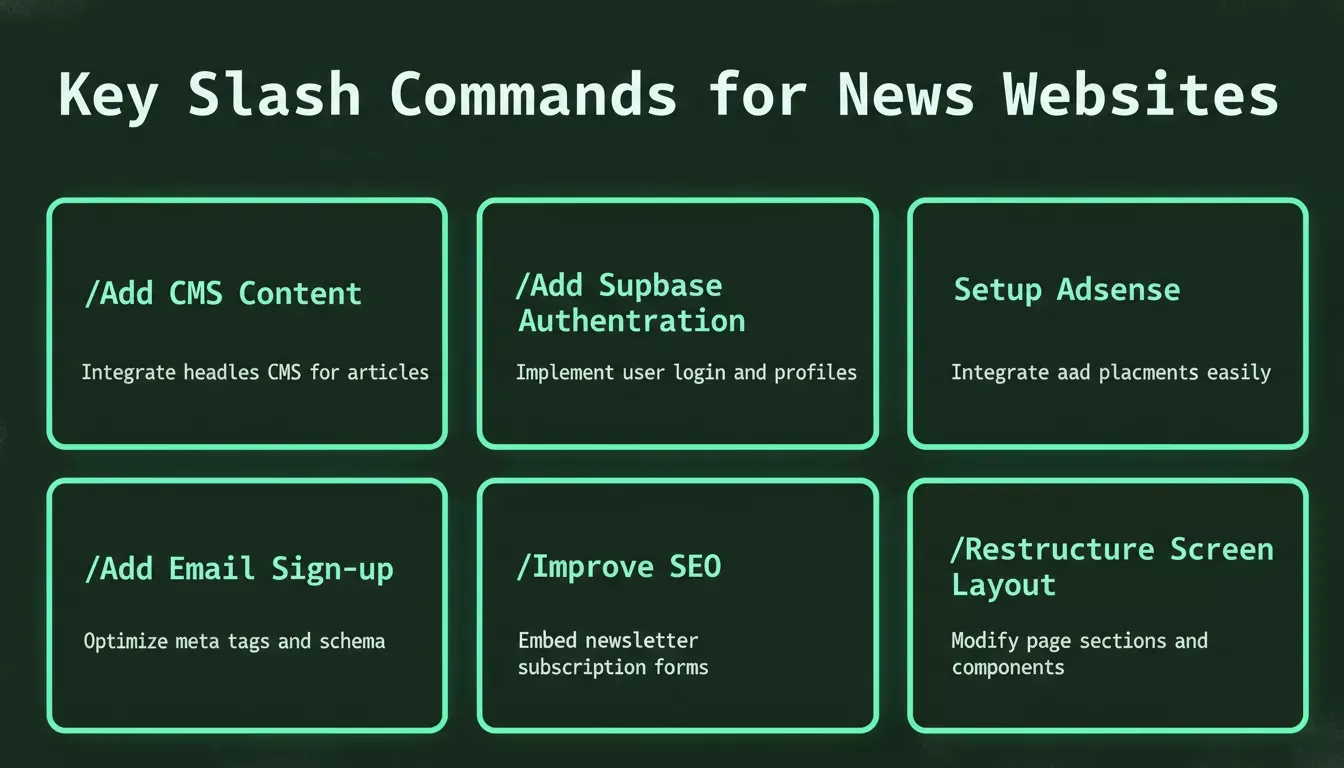
The most useful slash commands for building a news website. Type / in the Rocket. Chat input to access all of them.
Step 8: Test News Publishing and Reader Experience
Test the publishing workflow end-to-end before going live.
Editors should test the following tasks:
- Publishing articles through the CMS
- Adding images and videos to article pages
- Scheduling news updates
- Sending push notifications to subscribers
- Reviewing the comment section and moderation tools
Good testing improves the time spent on the website and keeps the audience engaged.
Step 9: Launch the News Website
Review the entire website and confirm everything works correctly.
Check:
- Homepage news layout and category navigation
- Article readability on mobile and desktop
- Navigation between pages
- Social media sharing buttons
- Mobile responsive design (Next.js handles this automatically)
- GDPR/cookie consent banner (use /Implement Privacy Compliance if needed)
After this final check, launch the news site. Start promoting the online news platform using social media, Google News Publisher Center, and other channels. With regular news updates, strong stories, and consistent publishing, your news platform can attract new readers and grow into a trusted news source.
News Website Development Workflow
Here is a simplified overview of the full news website development process from niche validation through to launch:
- Validate niche with Solve
- Sign up and enter a prompt
- Select screens and generate the site
- Review output; modify with slash commands if needed
- Test, launch, and promote
Simplified news website development flow: from niche validation in Solve, through Build, to launch and promotion
News Website Monetization Options
Running successful news portals also requires a clear business model. Here are the most common monetization methods and how Rocket's connectors support each one.
Advertising: Use the /Setup Adsense command to place banner ads, in-article ads, and in-feed units across your news pages. Advertising works best once you have consistent traffic. Don't bother setting it up on day one.
Subscription Models: Use /Add Stripe Payments to set up recurring subscription payments directly in your news site. Major outlets like the New York Times rely primarily on subscriptions. Smaller portals typically start with advertising and add subscriptions once they have an established readership worth billing.
Newsletter Revenue: Use /Add Email Sign-up to build a subscriber list via Mailchimp, Brevo, or MailerLite, then monetize through sponsored newsletter placements or premium email tiers.
Sponsored Content: Brands collaborate with news portals to publish sponsored content. Works well when the audience trusts the news site and engages with its stories.
Courses and Learning: A few news platforms offer online courses related to journalism, media skills, or market trends. This is a secondary revenue stream that works once you have an audience that trusts your expertise.
None of these need to be set up on day one. Start with auth and a CMS. Add Stripe once you actually have subscribers worth billing.
Key Tools Needed for a News Website
| Component | Purpose | Rocket Connector |
|---|---|---|
| Content management system | Manage articles and media | Strapi or Directus via /Add CMS Content |
| Authentication | Secure reader login and editor access | Supabase via /Add Supabase Authentication |
| Web hosting | Global CDN with automatic HTTPS | Netlify one-click deploy |
| Push notifications | Send breaking news alerts | Twilio SMS via /Add Text Messages (SMS) |
| Email newsletters | Grow and engage reader audience | Mailchimp or Brevo via /Add Email Sign-up |
| Analytics | Track reader preferences and traffic | Google Analytics via /Setup Google Analytics |
| Ad monetization | Display ads across article pages | Google AdSense via /Setup Adsense |
| Subscription payments | Paid reader tiers | Stripe via /Add Stripe Payments |
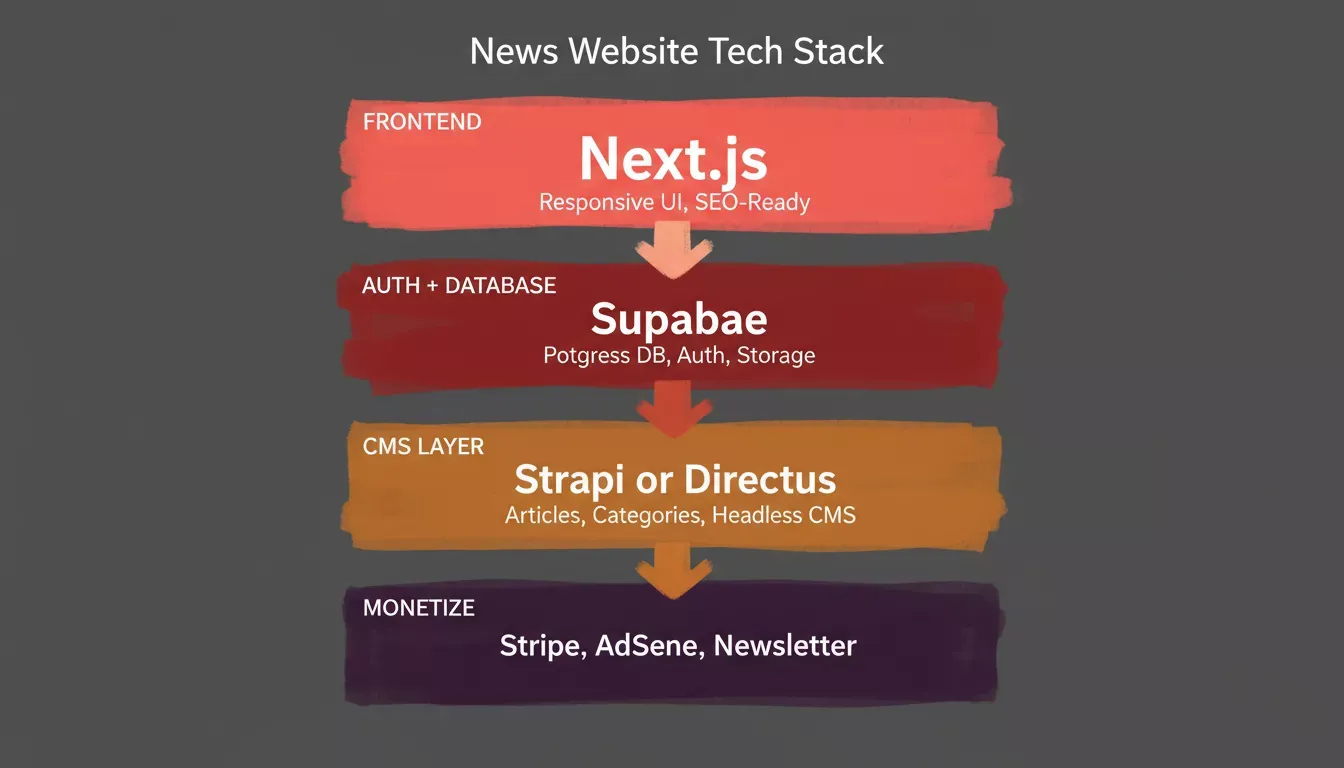
The full tech stack Rocket generates for a news website. Each layer connects automatically. No manual wiring required.
Community Insight
Here is an example from a Reddit discussion about starting a news website:
"If your goal is Google News, tools matter way less than structure and consistency." Source
Rocket's Next.js output is already structured for Google News eligibility. Semantic HTML, proper article metadata, author pages, and sitemap generation are handled automatically. You can also run /Improve SEO to check your built-in SEO optimization against best practices before launch.
Building a Successful News Website
Many people want to launch a professional news website, but the process can feel confusing. Setting up the website, managing articles, publishing news, and keeping readers informed can become difficult without the right tools and structure.
Rocket simplifies this journey. With a Strapi CMS for article management, Supabase for authentication, Stripe for subscription payments, and a fast, SEO-ready Next.js frontend, all generated from a single prompt, teams can focus on creating reliable news, growing their audience, and building a stable business.
Learning how to build news website projects successfully is less about complicated systems and more about publishing consistent stories, understanding reader preferences, and building a loyal community around your news platform.
Ready to launch your own news website without the complexity? Rocket gives you everything you need: a Next.js frontend, Supabase backend, Strapi CMS integration, Google AdSense support, Stripe subscriptions, and a responsive design, all generated from a single prompt.
Start building your news website with Rocket today and go from idea to live news portal faster than ever.
Table of contents
- -Why Start a News Website Today
- -Core Features Every News Website Needs
- -Rocket vs. Traditional Development vs. No-Code Alternatives
- -How to Build a News Website with Rocket.new
- -Step 1: Define Your News Focus
- -Step 2: Sign Up to Rocket
- -Step 3: Enter a Prompt or Choose a News Website Template
- -Step 4: Select the News Website Screens
- -Step 5: Watch the Website Build in Real Time
- -Step 6: Review the Generated News Platform
- -Step 7: Modify Using Commands
- -Step 8: Test News Publishing and Reader Experience
- -Step 9: Launch the News Website
- -News Website Development Workflow
- -News Website Monetization Options
- -Key Tools Needed for a News Website
- -Community Insight
- -Building a Successful News Website

