
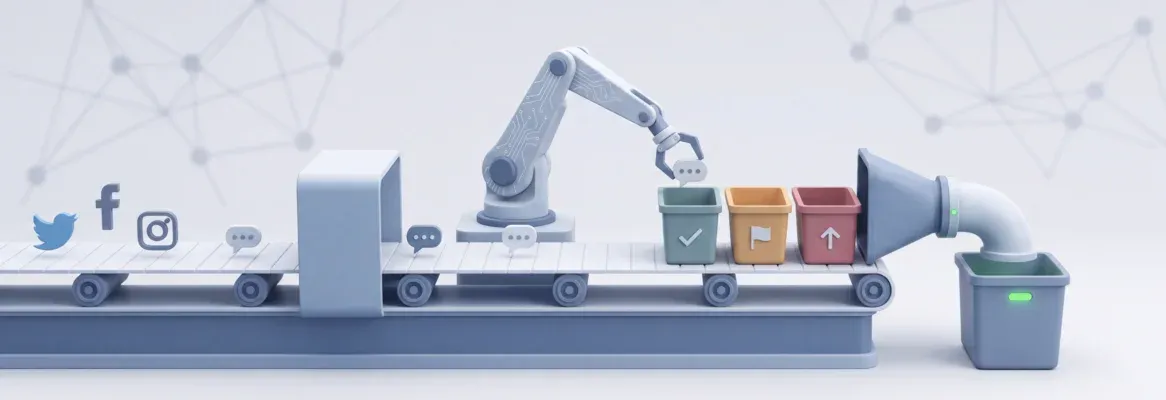
Auto-reply bots classify comment intent and automatically draft brand-matched replies, replacing manual responses across Instagram, Facebook, TikTok, and YouTube, all from one Rocket-built app. AI intent classification catches what keyword bots miss: purchase questions in slang, complaints without trigger words, and ambiguous comments that need human review.
An auto-reply bot for social media comments is a system that reads incoming comments, identifies what the commenter wants, and automatically sends a relevant reply. The most effective bots classify comment intent (question, complaint, compliment, or spam) rather than matching fixed keywords, so they respond to what people actually mean, not just what they type.
This guide is for business owners, social media managers, and e-commerce brands whose comment volume has outpaced what any team can handle manually. Comments pile up, slow replies damage algorithmic reach, and manually responding does not scale.
Rocket generates a full-stack bot, database, API, and interface from one prompt, covering every platform your brand uses from a single dashboard. Building with Rocket eliminates per-contact SaaS fees entirely, giving you full ownership of the code, logic, and data at any scale.
Key Takeaways
- An auto-reply bot for social media comments reads each comment, classifies intent, drafts a brand-matched reply, and optionally holds it for human approval before posting
- Building your own bot with Rocket eliminates per-contact SaaS fees; you own the app, the logic, and the data
- This guide covers Instagram, Facebook, TikTok, and YouTube in one unified build
- The biggest brand-safety risk in comment automation is replying without a human-approval layer; Rocket's architecture addresses this by design
What Is an Auto Reply Bot for Social Media Comments?
An auto-reply bot for social media comments is software that monitors your posts for new comments, processes each comment's meaning, and sends a pre-drafted or AI-generated response automatically. Unlike keyword-trigger bots that only respond to exact phrases like "LINK" or "PRICE," modern AI-powered bots understand the intent behind any comment and reply accordingly.
How a comment bot works, step by step
- A new comment is posted on your Instagram, Facebook, TikTok, or YouTube content
- A webhook fires instantly, sending the comment text to your bot
- The bot classifies the comment's intent (purchase question, complaint, compliment, spam, or support request)
- A reply is drafted using your brand voice templates or an AI model
- The reply is either auto-sent (for low-risk intents) or queued for human approval (for complaints and edge cases)
- The approved reply is posted via the platform's official API
Keyword trigger bot vs. AI intent bot: what's the difference?
| Feature | Keyword trigger bot | AI intent bot |
|---|---|---|
| How it reads comments | Exact keyword match | Semantic intent understanding |
| Example: "where can I buy?" | Missed, no keyword | Detected as purchase intent |
| Setup | Rule list | Prompt / model configuration |
| Handles typos and slang | No | Yes |
| Examples | ManyChat basic, InstantDM | Rocket-generated, AI agents |
The gap matters at scale. A keyword bot misses every natural-language variation of a purchase question. An AI intent bot catches them all and routes each to the right reply flow.
Why Slow Comment Replies Cost You Followers and Revenue
Platform algorithms track how fast you reply to comments on social media. When your response time drags, engagement drops, the algorithm shows your post to fewer people, and new followers stop coming.
- A late reply signals disinterest. When someone leaves a comment and gets nothing back for hours, they scroll past your next post. Social media engagement depends on that back-and-forth moment between you and your audience. The longer you wait, the smaller the window for a real conversation.
- Algorithms reward fast reactions. Instagram, Facebook, and TikTok all weight comment replies as engagement signals. More replies in the first hour mean the platform pushes your content to more users and new followers. Fewer replies mean your post fades from feeds.
- Reply speed is now a growth metric, not just a service metric. Pages that reply to comments within one hour see three to five times higher engagement rates compared to slow-response accounts. Instagram's algorithm treats rapid comment engagement as a quality signal for organic reach.
- Search interest confirms the trend. Search interest in Instagram auto-reply has grown 230% year-over-year as of August 2026, reflecting how many brands are now actively looking for automation solutions.
- Followers notice patterns. If a brand consistently ignores comments, many followers start to disengage. That creates a cycle: fewer interactions lead to lower reach, which leads to fewer comments.
- 70 to 85% of social media replies can be automated with AI agents based on engagement benchmarks from 2026, meaning the majority of your comment volume is already within reach of a well-configured bot.
Speed matters. The gap between what followers expect and what most brands deliver on social media is only getting wider.
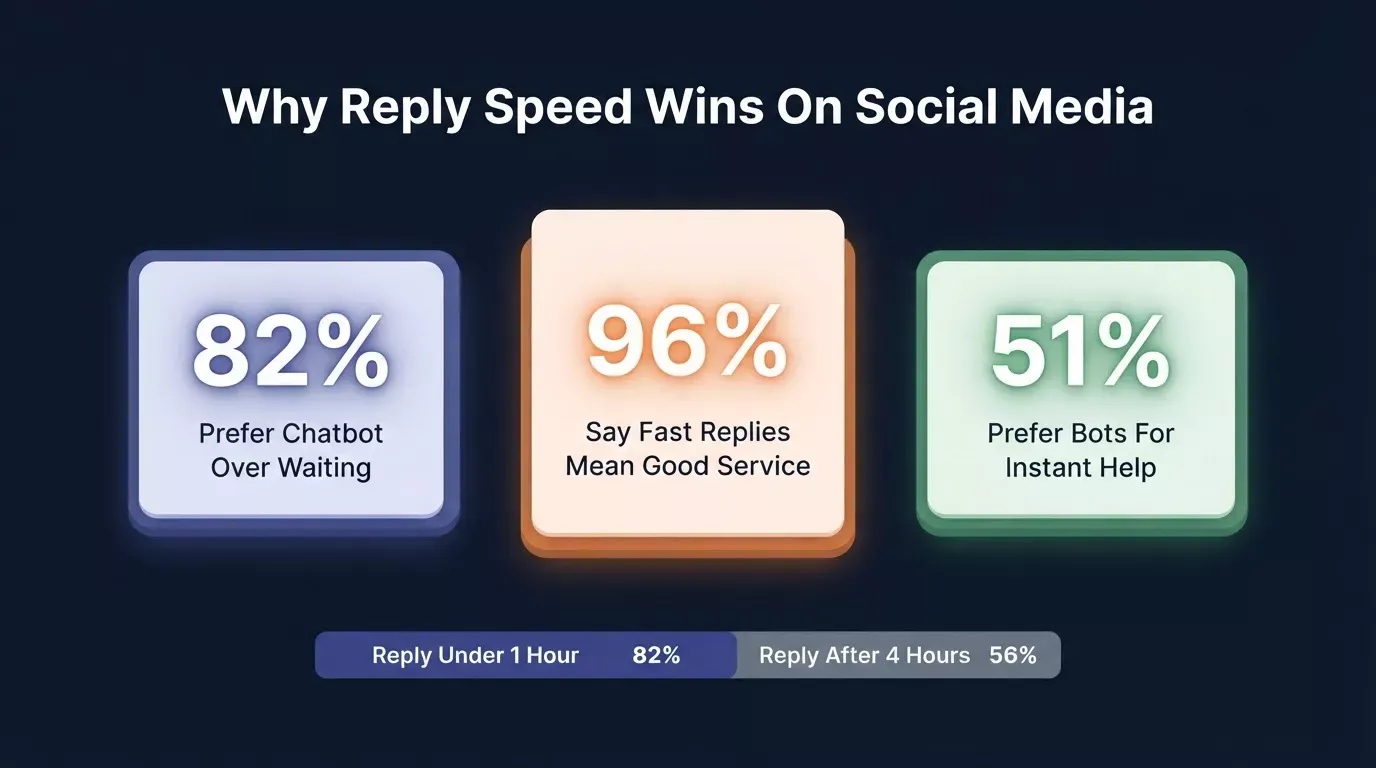
Reply speed directly shapes follower trust, engagement rate, and algorithmic reach.
What Instagram, Facebook, TikTok, and YouTube Allow in 2026
All four major platforms allow comment automation through their official APIs, but only through official channels. Using unauthorized scraper tools violates Meta's Terms of Service and can result in permanent account suspension.
A bot built on Rocket uses the official API endpoints each platform provides, which keeps your accounts compliant.
Instagram: what's allowed via the Graph API
The Instagram Graph API is the only compliant path for comment automation on Instagram. Meta's enforcement wave in late 2025 banned thousands of accounts using unauthorized scraper-based tools; official API users were not affected.
- What it allows: public comment reply, comment-to-DM trigger (keyword-based), story reply automation
- Critical rule: 7-day private reply window; Meta returns Error 551 on private replies to comments older than 7 days. Build your webhook to check comment age before triggering private replies.
- Rate limit: approximately 200 automated actions per hour per account is the safe operational ceiling. Build queue and retry logic into your bot from day one.
- Permissions required:
instagram_basic,instagram_manage_comments, andpages_manage_engagementfor comment-to-DM flows - What to avoid: any tool that accesses Instagram through browser automation, session hijacking, or unofficial APIs
Facebook: Page comment automation
- Official tool: Facebook Graph API (Pages API, Comment reply endpoint)
- What it allows: automated replies to Page post comments, comment-to-Messenger trigger
- Key detail: applies to Facebook Pages only; personal profile comment bots violate Terms of Service
- Works with: Page posts and ad comments (boosted posts)
- Limitation: Facebook Groups API does not support comment reply automation
TikTok: keyword DM automation (not public reply)
TikTok's official Business Suite automation triggers direct messages, not public comment replies. This is the most commonly misunderstood distinction in comment automation.
- What it allows: when someone comments a specific keyword, the system sends them a DM; the public comment itself is not replied to automatically
- Requirement: A verified Business Account is required for automation access
- What it does not support: automated public comment replies through the official API (as of May 2026)
YouTube: comment reply via Data API
- Official tool: YouTube Data API v3 (Comments.insert method)
- What it allows: automated replies to video comments under your own channel
- Rate limit: YouTube Data API enforces quota-based limits; configure daily quota monitoring in your dashboard
| Platform | Public comment reply | Comment-to-DM | Official API | Rate limit |
|---|---|---|---|---|
| Yes | Yes (7-day window) | Instagram Graph API | ~200/hr | |
| Yes (Pages only) | Yes (Messenger) | Facebook Graph API | ~200/hr | |
| TikTok | No | Yes (keyword trigger) | TikTok Business Suite | Per account |
| YouTube | Yes | No | YouTube Data API v3 | Quota-based |
How AI Intent Classification Makes Your Bot Smarter Than Keyword Matching
Most social media bots respond to keywords; when someone comments "PRICE," the bot replies with pricing info. AI intent classification goes further: it understands that "how much does this cost?" and "is this affordable?" and "do you ship to Canada?" are all purchase-intent questions, even without a trigger keyword, and routes each to the right response.
An auto-reply bot monitors incoming comments, classifies each by intent, generates a contextually appropriate reply, and routes it through an approval step before posting. The same architecture is used to build AI agents without code for business automation.
A basic auto-reply that sends the same message to every comment looks spammy and drives people away. The real value comes from a system that reads each comment, figures out what kind of message it is, and responds differently based on intent.
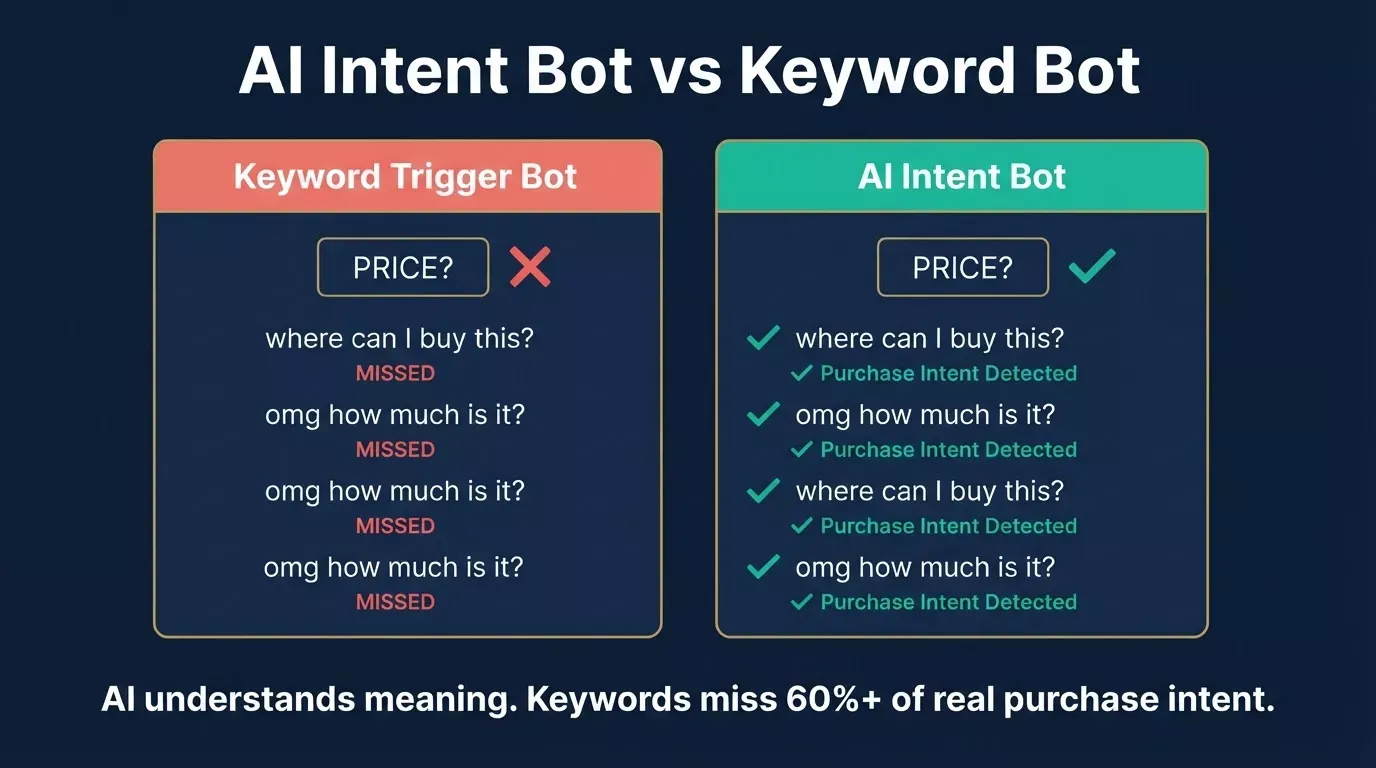
Keyword bots miss 60%+ of real purchase intent. AI intent bots catch every variation, including slang and typos.
The 5 comment intent categories your bot should classify
| Intent category | Example comments | Recommended bot action |
|---|---|---|
| Purchase intent | "Where can I buy?" "Do you ship to Europe?" "What's the price?" | Auto-reply with product link + DM with offer details |
| Question / support | "Does this work for sensitive skin?" "How long does delivery take?" | Auto-reply with FAQ answer or escalate to human |
| Compliment | "This is amazing!" "Love this brand" | Auto-reply with a warm thank-you (rotate 3 variants) |
| Complaint | "My order never arrived." "This broke after one day." | Flag for immediate human review; never auto-reply |
| Spam / irrelevant | "Follow me back!" "Check my page" | Auto-hide or ignore, do not reply |
Why keyword bots miss purchase intent, with real examples
Comment: "Is this still available in large?"
Keyword bot: No match, no trigger word. No reply sent.
AI intent bot: Purchase intent detected. Reply sent with size availability and product link.
Comment: "omg where do u get this from"
Keyword bot: No match, "buy" not present.
AI intent bot: Purchase intent detected despite slang. Reply sent with store link.
Comment: "been waiting 3 weeks for my order"
Keyword bot: No match, no complaint keyword configured.
AI intent bot: Complaint detected. Routed to human review queue immediately.
That intent classification layer is what separates a reply bot that people appreciate from one they report as spam.
How to train your bot to match your brand voice
- Start with tone rules. Define your brand voice in plain language: friendly, slightly casual, uses humor, avoids corporate speak. Feed these rules into every prompt template so the bot generates replies that match how you actually talk.
- Give examples of good and bad replies. Show the bot five approved reply examples and five replies you would never send. This creates guardrails that are easier for the automation to follow than abstract tone descriptions.
- Add personalization tokens. Use the commenter's name, reference their specific words, or mention the post topic. Even small touches of personalization make automated replies feel like they came from a real person.
- Include reply variations. Write three to five variations for each intent category so the same automation does not send the exact same reply to every comment on a post. Rotating templates, adjusting sentence length, and swapping opening phrases keep things fresh; variant rotation is the single most effective anti-spam lever in comment automation.
- Test with real comment samples. Before going live, run real comments from your Facebook page and Instagram account through the bot. Review every draft reply and edit the prompt templates based on what feels off.
Every reply should read as if you wrote it in the moment, even when automation handles the workload.
How to Build an Auto Reply Bot for Social Media Comments with Rocket
Rocket builds a full-stack auto-reply bot, comment monitoring, intent classification engine, reply drafting, approval queue, and multi-platform webhook, from a plain English prompt. Describe your platforms, intent categories, and brand voice, and Rocket generates the entire app, including database, API, and interface.
Web apps ship on Next.js; mobile apps ship on Flutter.
Step 1: Write your bot prompt in plain English
The prompt is the foundation. Here is a sample prompt you can use directly:
"Build an auto-reply bot for social media comments. It should: monitor Instagram and Facebook comments via webhook, classify each comment into one of five intents (purchase, support question, compliment, complaint, spam), draft a reply using my brand voice (warm, direct, no exclamation points), route complaints to a human approval queue, and auto-send approved replies for low-risk intents. Include a dashboard showing all incoming comments, their classified intent, and reply status."
What Rocket generates from this prompt: a webhook listener endpoint, a Supabase database with a comments table (columns: comment text, platform, intent classification, drafted reply, status, timestamp), an AI classification API call, an approval queue UI with approve/edit/reject controls, and a reply dispatch function that posts via the platform's official API.
Step 2: Configure your intent categories and brand voice
- Intent categories: write two to three example comments per category as training examples. The more specific your examples, the more accurately the AI classifies edge cases.
- Brand voice: write a three-sentence tone description. Example: "We are a direct-to-consumer skincare brand. Our tone is warm and knowledgeable, never clinical. We use first names when available and avoid exclamation points."
- Reply templates: write three to five variants per intent category. Variant rotation prevents your replies from looking automated to followers and to platform spam detectors.
Step 3: Set up the approval workflow
- Auto-send: compliments (confidence above 90%), FAQ answers (confidence above 85%)
- Human review queue: complaints, purchase conversations, any comment below 75% confidence
- The approval queue UI: each queued item shows the original comment, classified intent, drafted reply, and three buttons: approve, edit, or reject
- Why this matters for brand safety: a single bad auto-reply to a public complaint can generate more negative attention than 1,000 correct ones. The approval layer is not optional for any brand that cares about its reputation.
Step 4: Connect to your social media platforms via webhook
- Instagram and Facebook: generate the webhook URL from within your Rocket-generated app, then paste it into Meta's developer console under your app's webhook configuration
- TikTok: connect to TikTok Business Suite keyword automation and point the DM trigger to your webhook endpoint
- YouTube: configure the YouTube Data API v3 polling interval in your app's settings; the app checks for new comments at your specified frequency and processes each through the classification pipeline
Step 5: Test, deploy, and monitor
- Staging environment: test with sample comments before going live. Run at least 20 real comments through the classification engine and review every drafted reply.
- One-click deploy to production: Rocket deploys your app to a production URL with a single click
- Dashboard metrics: comments received, intents classified, auto-sent versus queued, average reply speed, and reply accuracy rate (based on human edits)
- Iteration: add new intent categories, adjust tone, update templates, all without redeployment. Changes to prompt templates and brand voice rules take effect immediately.
Every comment is classified, confidence-checked, and either auto-sent or routed to human review before posting.
AI connectors for reply drafting: Rocket supports OpenAI, Anthropic, and Gemini as AI providers, each connected via an API key at the task level. Use OpenAI (GPT) for general-purpose reply generation, Anthropic (Claude) for nuanced tone matching, or Gemini for multimodal tasks.
Supabase for data persistence: Supabase connects via OAuth at the workspace level; authorize it once, and it is available across all your Rocket projects. It handles your Postgres database for comment logs, user authentication, and file storage.
Setting Up Your Bot Platform-by-Platform
The same Rocket-generated bot can handle comment automation across Instagram, Facebook, TikTok, and YouTube simultaneously. Each platform uses a different API and has different rules; this section covers the exact setup for each.
Instagram: comment reply and comment-to-DM
Instagram supports two parallel automation flows from the same Rocket app.
Public comment reply flow: webhook receives new comment event, bot classifies intent and drafts reply, reply posted via Instagram Graph API comment reply endpoint. Rate limit: stay below 200 actions per hour.
Comment-to-DM flow (runs in parallel): the same webhook event triggers a check: does this comment match a purchase-intent pattern? If yes, the bot sends a Private Reply DM with a product link or offer. 7-day window applies; check the comment timestamp before triggering. Requires pages_manage_engagement permission.
Facebook: Page comment automation
- Access token: requires a Facebook Page access token (separate from your personal account token). Generate this in Meta's developer console under your app's Page permissions.
- Works with: Page posts and ad comments on boosted posts
- Comment-to-Messenger: configure a Messenger webhook alongside the comment webhook to trigger DM flows for purchase-intent comments
- Limitation: Facebook Groups API does not support comment reply automation; this flow only works on Page content
TikTok: keyword DM automation
TikTok does not support automated public comment replies through the official API. The automation triggers a DM when someone comments a specific keyword — the public comment is not replied to automatically. Most content gets this wrong; understanding the distinction prevents compliance issues.
YouTube: comment reply automation
YouTube Data API v3 allows both reading and writing comments on your own channel's videos. The app fetches new comments via comments.list, classifies each, drafts a reply, and posts via comments.insert. Monitor daily API quota in your Rocket dashboard. YouTube enforces strict quota limits.
Building a social media scheduler alongside your reply bot creates a complete social media automation stack from a single Rocket workspace.
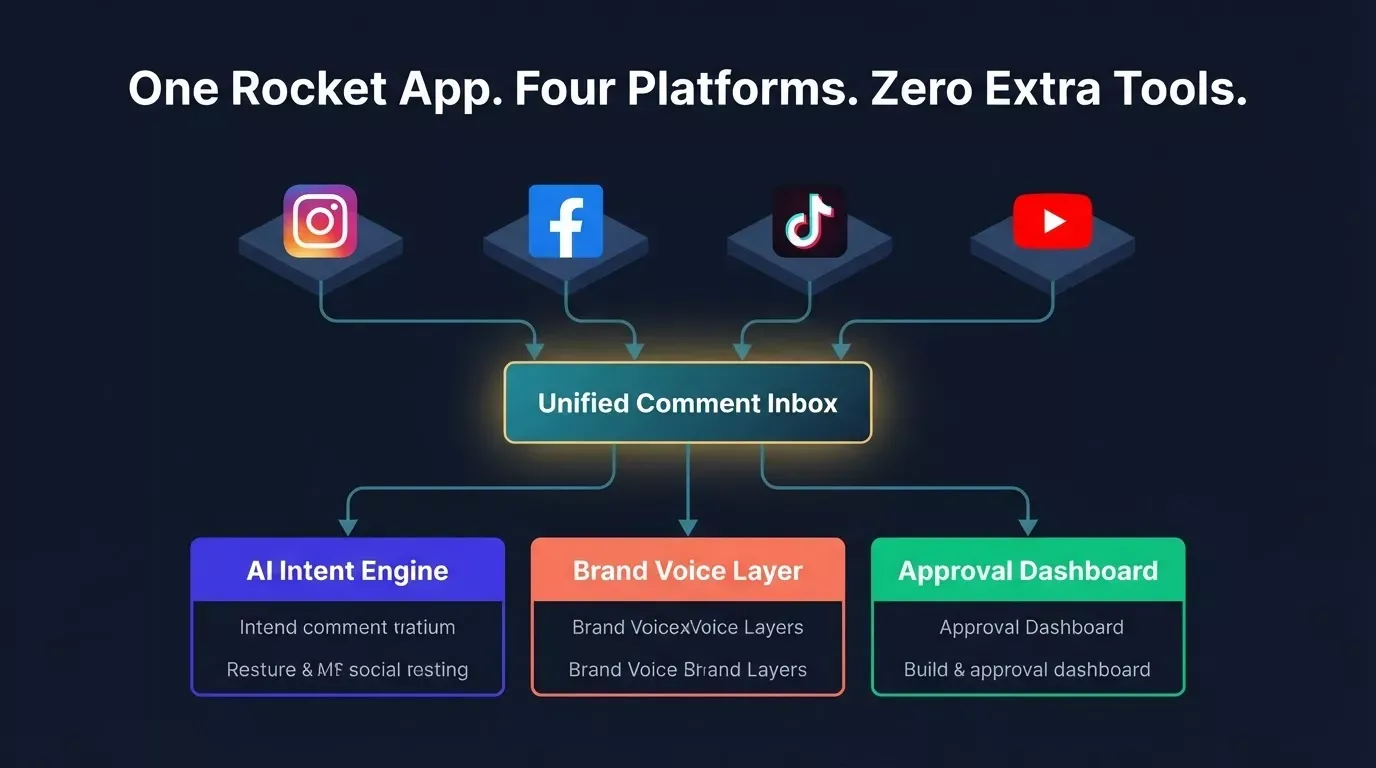
One Rocket app. Four platforms. Zero extra tools, all managed from a single unified dashboard.
What Not to Automate: The 80/20 Rule for Human Escalation
Automate 80% of comment replies, compliments, common questions, and purchase prompts. Keep 20% for humans: complaints, refund requests, crisis comments, high-value customer responses. The risk of auto-replying to a public complaint is reputational. The risk of auto-replying to a purchase question is nearly zero. Configure your bot to tell the difference.
Comments that should never be auto-replied to
Complaints about orders, quality, or service. Auto-replies to complaints signal that you do not care. Live chat is the natural escalation path for complaints. A complaint that receives a generic automated response often escalates publicly. Route every complaint to a human review queue with a real-time notification.
Crisis comments. Brand controversy, product safety issues, and public relations situations require human judgment. Your bot should detect crisis-level language (safety, lawsuit, news, viral) and escalate immediately, not reply.
High-value account engagement. When a creator, influencer, or high-follower account comments on your content, that interaction has outsized reach. Flag these for personal attention rather than automated response.
Anything ambiguous. When the intent classifier confidence falls below your threshold (recommended: 75%), route to a human rather than guess. A wrong auto-reply is worse than a slightly delayed human reply.
Sensitive topics. Mental health references, political content, and anything involving personal safety should always go to a human.
How to configure escalation triggers in Rocket
- Threshold-based routing: set your confidence threshold in the dashboard. Intents classified as "complaint" always route to the queue regardless of confidence score.
- Notification settings: configure real-time Slack or email alerts for queued comments, so your team responds within your SLA window.
- The approval queue dashboard: one screen shows the original comment, classified intent, drafted reply, and approve/edit/reject controls. Your team can process a queued comment in under 30 seconds.
- SLA target: queued comments should receive human review within two hours for brand safety.
| Comment type | Auto-reply | Human review | Why |
|---|---|---|---|
| Compliment | Yes (rotate 3 variants) | No | Zero brand risk |
| FAQ / support question | Yes (from knowledge base) | Only if below threshold | Low risk, high volume |
| Purchase intent | Yes (product link) | Only if below threshold | Revenue opportunity |
| Complaint | Never | Always | Reputational risk |
| Crisis / safety | Never | Always + immediate alert | Existential risk |
| High-value account | No | Always | Relationship opportunity |
| Ambiguous / low confidence | No | Always | Unknown risk |
Build Your Own vs. Use a SaaS Tool, Real Cost Comparison
ManyChat restructured its pricing on March 2, 2026, reducing the free tier from 1,000 contacts to just 25 active contacts and introducing per-contact billing. This triggered a surge in searches for ManyChat alternatives. Rocket is the only option in this comparison that has zero per-contact fees, ever.
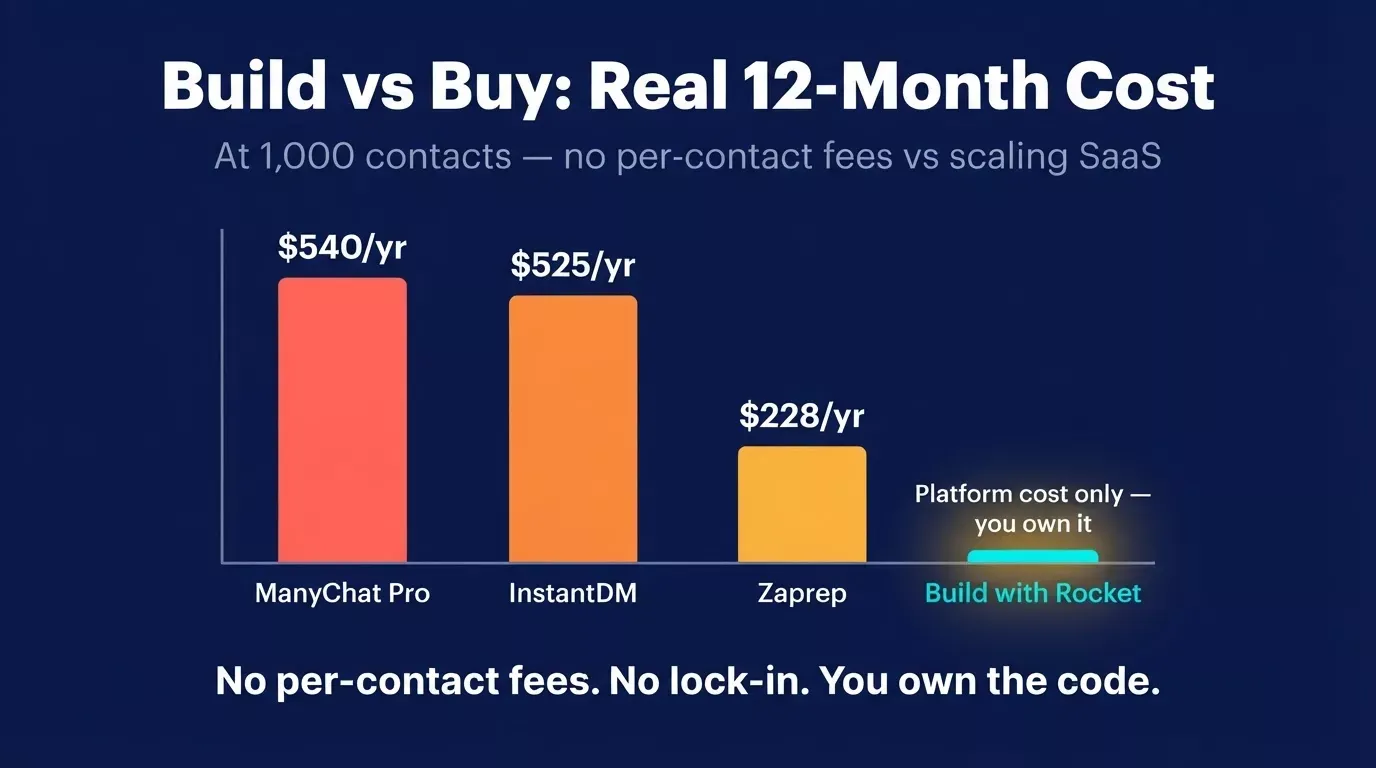
At 1,000 contacts, building with Rocket costs a fraction of any SaaS alternative, and you own the code.
| Tool | Free tier | Paid starts at | Per-contact fees | Year 1 at 1,000 contacts | Platform lock-in |
|---|---|---|---|---|---|
| ManyChat Pro | 25 contacts | $15/mo | Yes — scales with contacts | ~$540+/yr | Yes |
| InstantDM | 50 replies/mo | $29/mo | Yes | ~$350–700/yr | Yes |
| Zaprep | 100/mo | $19/mo | Yes | ~$228+/yr | Yes |
| Self-hosted (OpenReply) | Unlimited | $5/mo VPS | No | ~$60/yr | No |
| Build with Rocket | — | Platform cost | No | Platform cost only | You own it |
ManyChat has strong Instagram DM automation maturity and is faster to set up for simple keyword flows. InstantDM is well-suited for basic Facebook comment automation. The tradeoff is customization depth: neither gives you a full working app with custom intent classification logic, a review dashboard, and multi-platform deployment from one build.
Use ManyChat or a SaaS tool if: you want zero build time, you have under 25 contacts, or you need native platform integrations running in minutes with no configuration.
Build with Rocket if: you need custom intent classification logic, you want no per-contact fees at any scale, you need Instagram, Facebook, TikTok, and YouTube in one app, or you want to own the code and data outright.
Most tools limit you to one channel or require separate setups per account. Rocket lets you build once and run across every platform your brand uses.
Your Comment Section Is a Growth Channel Waiting to Happen
Most brands treat social media comments as a chore. The ones growing fastest treat them as a pipeline.
Every comment is a signal. Someone asking about the price is a warm lead. Someone complaining is a retention opportunity. Someone leaving a compliment is a brand advocate waiting to be activated. The difference between brands that capture those moments and brands that miss them is not team size or budget. It is a system that reads, classifies, and responds before the window closes.
You now have the full blueprint: platform compliance for all four major networks, AI intent classification that catches what keyword bots miss, brand voice training that makes every reply sound human, a human approval layer that keeps quality high, and a scaling strategy that works across Instagram, Facebook, TikTok, and YouTube simultaneously.
Rocket turns that blueprint into a working app from a single prompt. No separate tools to wire together. No developer handoff. No months of setup. Describe your auto-reply bot for social media comments, and Rocket generates the frontend, backend, and approval dashboard ready to deploy.
Start building your auto-reply bot on Rocket.new and go from idea to live system before your next post goes up.
Table of contents
- -
- -How a comment bot works, step by step
- -Keyword trigger bot vs. AI intent bot: what's the difference?
- -Why Slow Comment Replies Cost You Followers and Revenue
- -What Instagram, Facebook, TikTok, and YouTube Allow in 2026
- -Instagram: what's allowed via the Graph API
- -Facebook: Page comment automation
- -TikTok: keyword DM automation (not public reply)
- -
- -How AI Intent Classification Makes Your Bot Smarter Than Keyword Matching
- -The 5 comment intent categories your bot should classify
- -Why keyword bots miss purchase intent, with real examples
- -How to train your bot to match your brand voice
- -
- -Step 1: Write your bot prompt in plain English
- -Step 2: Configure your intent categories and brand voice
- -Step 3: Set up the approval workflow
- -Step 4: Connect to your social media platforms via webhook
- -Step 5: Test, deploy, and monitor
- -Setting Up Your Bot Platform-by-Platform
- -
- -Facebook: Page comment automation
- -TikTok: keyword DM automation
- -
- -What Not to Automate: The 80/20 Rule for Human Escalation
- -Comments that should never be auto-replied to
- -How to configure escalation triggers in Rocket
- -Build Your Own vs. Use a SaaS Tool, Real Cost Comparison
- -Your Comment Section Is a Growth Channel Waiting to Happen

