

Pick your platform based on what you're building: Wix for simple sites, WordPress for LMS, Rocket.new for custom platforms with real code. Plan first, build second. Get something live fast, then improve from real student feedback.
You don't need a developer to build an educational website. You need a clear plan, the right platform, and about a day. This guide covers both the general steps every educator follows, and where Rocket.new fits if you want something more than a template.
What counts as an educational website?
An educational website is any site that hosts courses, lessons, or learning resources for students. That could be a one-page tutor profile with a contact form, or a full platform with video lessons, student logins, quizzes, and payments.
An effective education website often needs more detail than a regular business site because it must explain learning offers, outcomes, and access clearly. The planning step determines which one you actually need, and skipping it is how people end up rebuilding six months later.
Who needs what in a website builder
Before picking a tool, be honest about what you're building.
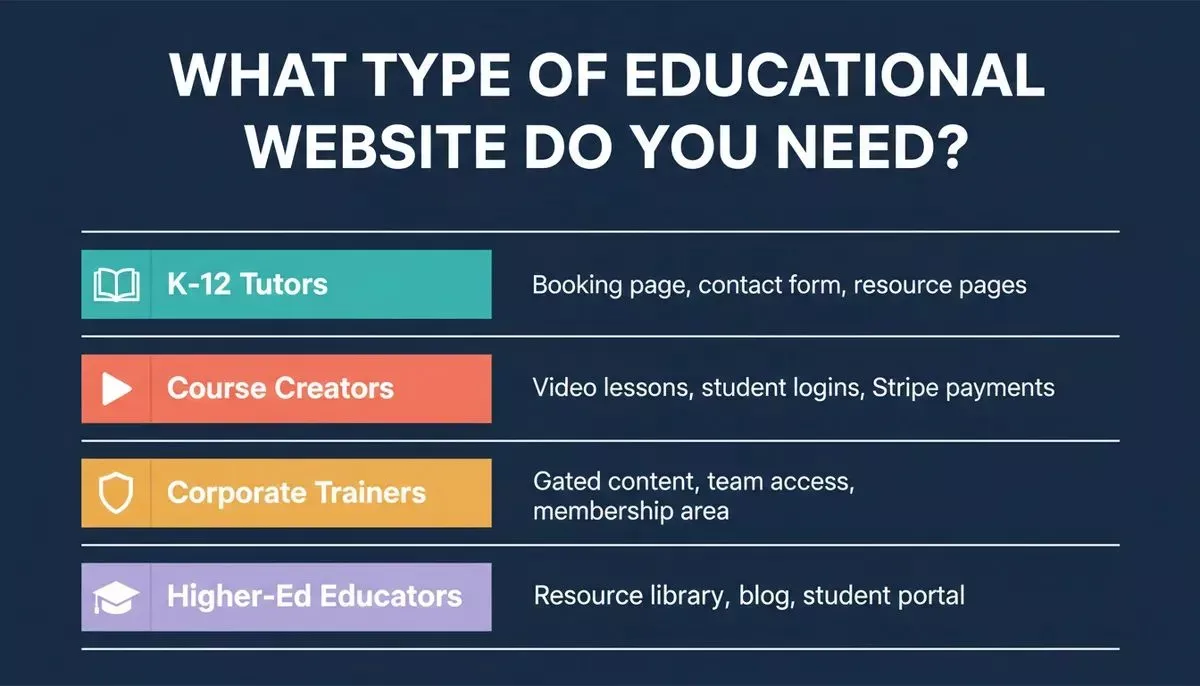
Match your audience to the right feature set before choosing a platform.
| Audience | What you actually need |
|---|---|
| K-12 Tutors | Booking page, contact form, resource pages |
| Course Creators | Video lessons, student logins, payment integration |
| Corporate Trainers | Gated content, team access, membership area |
| Higher-Ed Educators | Resource library, blog, student portal |
The answer changes which platform makes sense. A Wix site is fine for a tutor profile. It's the wrong choice if you need a student login system with role-based access and Stripe subscriptions.
The tools, compared honestly
| Builder | Free Tier | Output Type | Best For | Starts At |
|---|---|---|---|---|
| Rocket.new | Yes, 20 free credits | Next.js web app + Flutter mobile app | Custom platforms, course sites, tutoring apps | Free / $25/mo |
| WordPress | Yes, hosting extra | CMS site with LMS plugins | Traditional course platforms | Free |
| Wix | Yes | Drag-and-drop template site | Simple tutor profiles, beginner sites | Free / $17/mo |
| Squarespace | Trial only | Design-forward template site | Portfolio-style course pages | $16/mo |
| Webflow | Yes, limited | CMS site with visual editor | Designers wanting code-level control | Free / $14/mo |
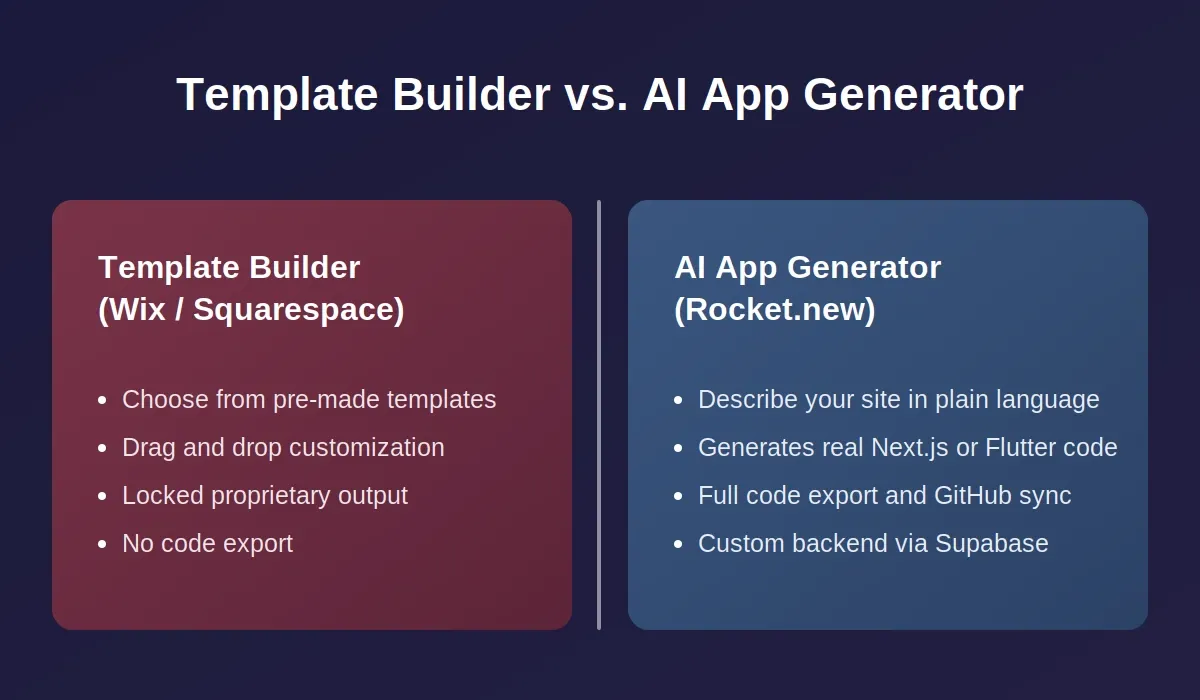
One thing worth saying plainly: Rocket.new is not a template gallery. You describe what you want to build in plain language, or import a Figma design, and it generates a working Next.js web app or Flutter mobile app with real code you can export, sync to GitHub, and deploy. That's a different category from Wix or Squarespace, where you're customizing a locked template.
Step 1: Plan before you build
Most educators skip this step and pay for it later.
The questions that matter:
- Who are your students: K-12, adult learners, corporate teams?
- What do you need them to do on the site? Watch videos? Book sessions? Pay for courses?
- Do you need student logins and progress tracking?
- Will you sell courses? If yes, you need payment integration from day one, not as an afterthought.
- Do you want a companion mobile app for iOS and Android?
A basic site structure usually covers: homepage, about page, courses page, contact page. Your answers above determine what goes on top of that foundation.
If you're using Rocket.new: Before touching Build, run a Solve task first. Type something like: "What do parents look for in an online tutoring platform for middle school math?
What are the gaps in existing platforms?" Solve returns a structured research report in minutes. That report becomes the brief you hand to Build, so the first version of your site reflects actual market thinking, not guesswork.
Step 2: Choose your platform
The right choice depends on what you decided in Step 1.
Want a simple, fast site: Wix or Squarespace. Both have education templates and let you publish without touching code. Wix is easier for beginners; Squarespace looks better out of the box.
Looking for a traditional LMS: WordPress with LearnDash or Tutor LMS. More setup, more flexibility, a large plugin ecosystem. The tradeoff is maintenance; you own the hosting, updates, and security.
Need a custom platform with real code: Rocket.new. You describe your tutoring site in plain language, and Rocket.new generates the UI, routes, database schema via Supabase, and logic. You can then visually edit any element, view the source code, sync to GitHub, and deploy.
Understanding the difference helps you pick the right tool for your actual needs.
Things to check before committing:
- Does it support the integrations you need- Stripe, Calendly, Mailchimp?
- Can you use a custom domain?
- Is the mobile experience solid, or an afterthought?
- Can you export your content if you want to leave?
Step 3: Design your professional website
Most platforms give you templates as a starting point. Pick one that's close to what you need; don't spend hours finding the perfect one.
What to look for in a template:
- Mobile-responsive, most students will find you on a phone
- Clean layout with clear navigation
- Space for course descriptions, video embeds, and a contact form
In Rocket.new, the equivalent of a template is your first prompt.
Describe the layout you want: "a tutoring site for high school math with a homepage, courses page, and booking section." The first generation gives you something to react to.
From there, you iterate by chatting: "Make the course cards larger. Add a progress indicator. Change the color scheme to navy and white." You can also click any element in the live preview and edit it directly using Visual Edit.
Step 4: Add your educational content
This is where most people underestimate the time. The platform is the easy part. The content takes longer.
What an educational website typically needs:
- Course pages with descriptions, learning outcomes, and pricing
- Video lessons, embed from YouTube or Vimeo, or host directly
- Downloadable resources: worksheets, PDFs, templates
- A blog or resource section if you want organic search traffic
- A student FAQ
One thing worth doing early: write your course descriptions before you start building. Placeholder content makes it hard to judge whether the design is actually working. In Rocket.new, you can wire in Supabase Storage for file uploads and media hosting from a single prompt, no separate storage setup required.
Step 5: Connect the tools students and you will actually use
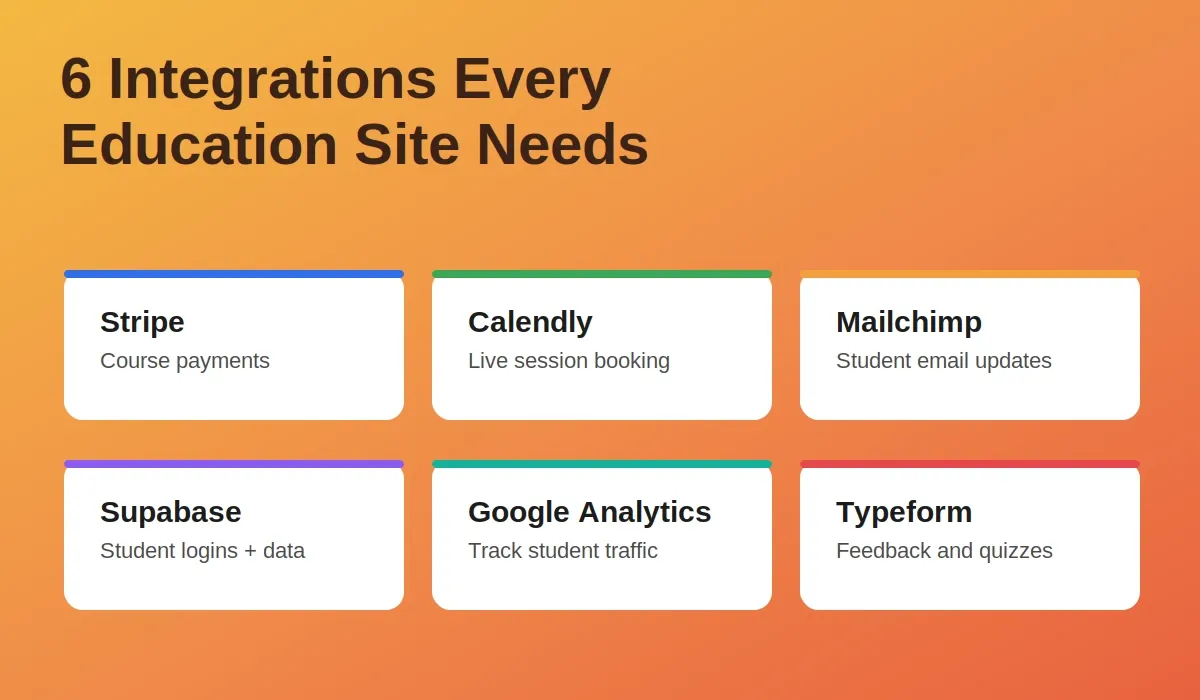
These six integrations cover payments, bookings, email, data, analytics, and feedback, the full stack for an education site.
The integrations that matter for education sites:
- Stripe: for course sales and subscriptions. Rocket.new wires this in from a single prompt.
- Calendly: for live tutoring session bookings. Students pick a slot; it lands in your calendar.
- Mailchimp: for course announcements and student updates. Rocket.new connects to Mailchimp, MailerLite, and Brevo natively.
- Supabase: for student logins, progress data, and file storage. Scaffolded automatically in Rocket.new.
- Google Analytics: to see where students come from and what they do on the site.
- Typeform or Tally: for student intake forms, feedback surveys, or quiz embeds.
On accessibility and compliance: If your site serves US students under 13, COPPA applies. For higher education or corporate training, WCAG 2.1 AA accessibility standards are worth building to from the start. Rocket.new includes an automated accessibility audit and GDPR/CCPA compliance tools built into the Build workflow; these ship as defaults, not optional extras.
Step 6: Connect your domain and go live
A custom domain makes the site look professional and costs around $10 to $15 per year. Most platforms walk you through domain connection: buy the domain, update DNS records to point to your site, wait for propagation, usually under an hour, then publish.
In Rocket.new, you can buy a domain directly in the editor. Registration, DNS, and HTTPS are handled automatically. For mobile, Rocket.new Flutter apps can be submitted directly to the Apple App Store and Google Play Store. That's relevant if you're building a tutoring platform where students want a companion app, not something Wix or Squarespace can offer.
What other educators have found
A discussion on Reddit captures a common experience. One educator planning a learning platform asked the community for guidance. The consistent advice: start with a simple site, get content live, and add complexity only when students ask for it.
How the build process works end-to-end
The Rocket.new path from research to live app, six steps, no developer required.
What Rocket.new actually does (and doesn't do)
Rocket.new is built around three pillars that are interconnected.
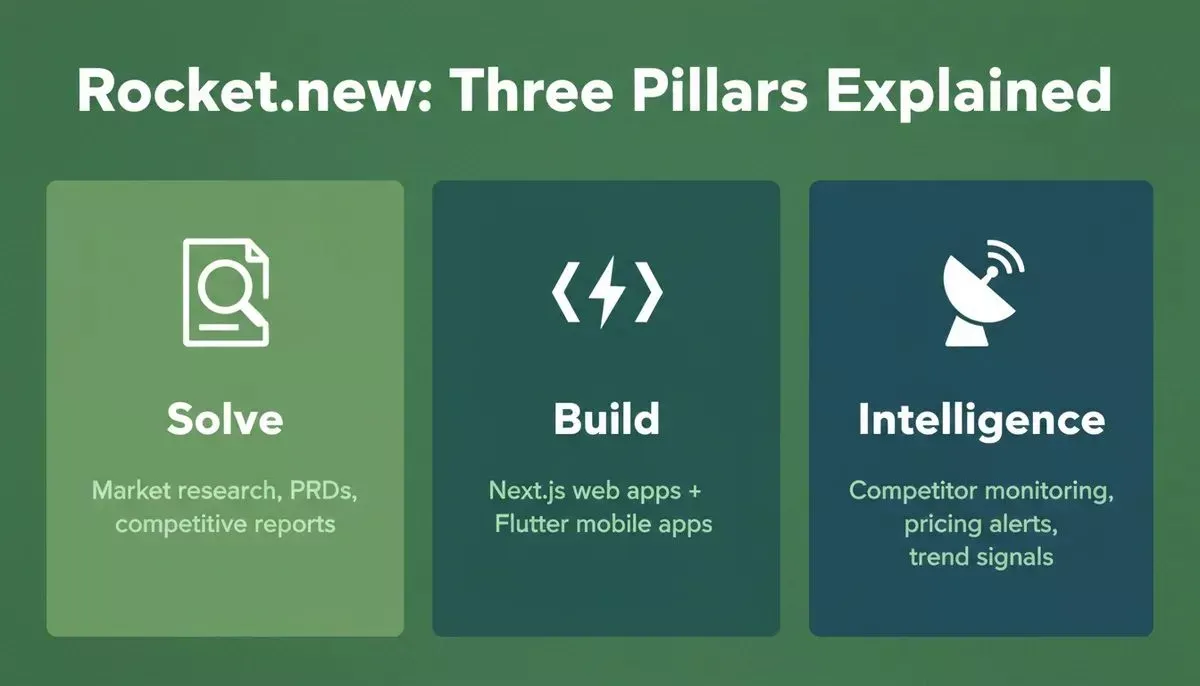
Each pillar works independently, but together they cover the full arc from idea to live product to ongoing monitoring.
| Pillar | What It Does | How Educators Use It |
|---|---|---|
| Solve | Structured market research and evidence-backed reports | Validate your course idea, analyze competitor platforms, generate a product brief |
| Build | Generates production-ready Next.js web apps and Flutter mobile apps | Build your tutoring site, course platform, or student portal without coding |
| Intelligence | Monitors competitors across nine signal categories | Track what other tutoring platforms are shipping, pricing, and marketing |
The three connect. Research from Solve flows into Build as context. What you learn from Intelligence informs what you build next. That's different from using three separate tools that don't talk to each other.
What Rocket.new generates when you build
When you describe your educational website in Rocket.new Build, you get:
- Production-ready Next.js code for web or Flutter code for mobile, not a locked template
- A Supabase backend with Postgres database, user authentication, file storage, and edge functions, scaffolded automatically
- Visual Edit to click and update any element without touching code
- GitHub sync, two-way, so your team can collaborate on the codebase
- 26+ integrations wired from a single prompt: Stripe, Mailchimp, Calendly, Google Analytics, and more
- One-click deployment to a live URL with automatic HTTPS
You can also start from a Figma design, Rocket.new converts frames and component libraries into production-ready React code with pixel accuracy.
Pricing (verified from docs)
| Plan | Price | Credits | What's Included |
|---|---|---|---|
| Free | $0 | 20 one-time | Build web apps, mobile apps, landing pages |
| Pro | $25/mo | 100/mo | Build web and mobile apps |
| Rocket | $50/mo | 250/mo | Build + Solve research + Intelligence monitoring |
| Booster | $250/mo | 1,500/mo | Full suite + SSO + premium support |
No credit card required to start. Full details at docs.rocket.new/getting-started/pricing.
The market context
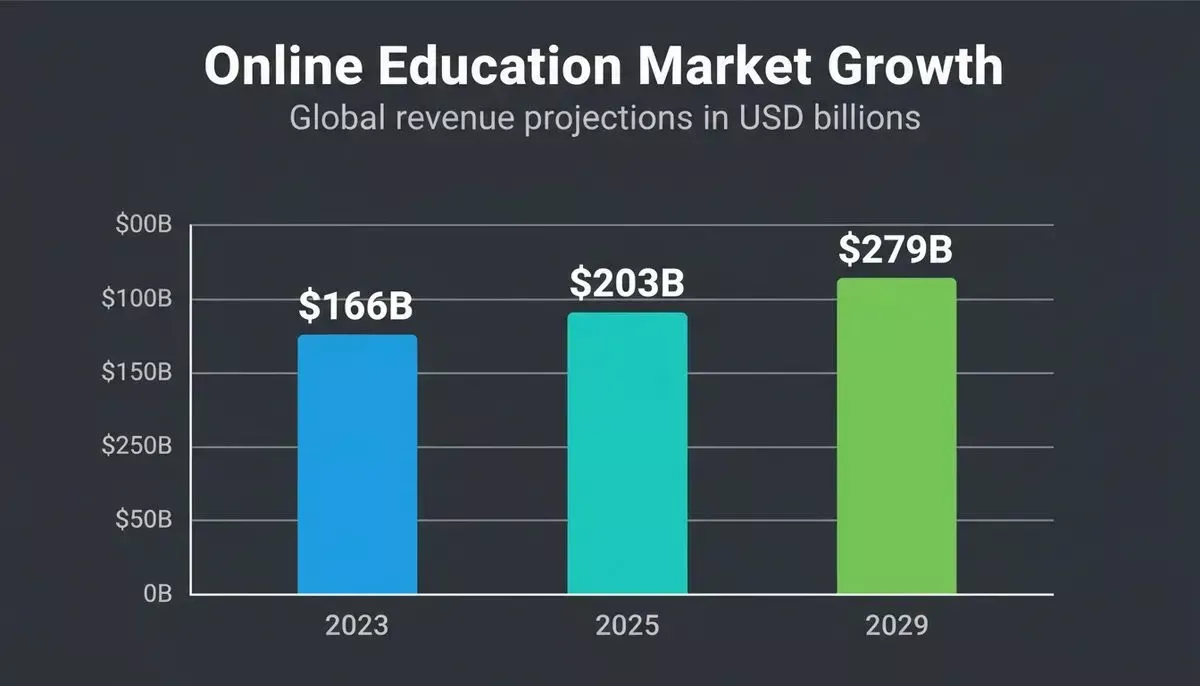
The global online education market is projected to reach $203.81 billion in 2025 and $279.30 billion by 2029. The e-learning industry is also expected to surpass $1 trillion by 2032.
That's not an argument for building something mediocre and hoping the market carries it. It's an argument for building something specific, for a specific audience, with a clear reason to exist.
The online education market is growing consistently; the window to establish a platform is now.
The educators who do well online aren't the ones with the most polished sites. They're the ones who understood their students before they started building.
What to do next
If you're still deciding which platform to use and still in the research phase: build a simple version on Wix or Squarespace first. Get content live. Then optimize for search engines with relevant keywords and content that's useful to students. Strong SEO starts with user experience and useful, relevant content.
See what students actually ask for. Add metadata to every page, use clean descriptive URLs, and create internal links between related pages. Submit an XML sitemap so search engines can crawl and understand the site. Backlinks from reputable sites also help build authority. Then upgrade to something custom when you know what you need.
Well, if you don't have time for the above and want to understand your market before writing a single line of code, start with Rocket.new Solve to validate your idea; it is built exactly for that.
If you already know you need a custom platform, student logins, course payments, a mobile app, integrations, start with Rocket.new's guide on how to create a no-code website, then run a Solve task to define what you're building before you write your first Build prompt. If your platform includes built-in seo tools, use them early, and make sure your web hosting is fast and reliable.
For teams who want to go further, the rapid prototyping guide in Rocket.new walks through validating an idea in Solve, prototyping it in Build, and shipping the finished product to production, all in one connected flow. If the site handles personal data, use SSL encryption, secure login portals, and regular backups.
Ready to build?
You have a subject you know well and students who need it. The website is the part that connects them. Pick the tool that matches what you're actually building, get something live, and improve it from there.
If you want to build a real platform, not a template, start with Rocket.new for free.
Describe what you're building, run a Solve task to validate it, and have a working first version to react to by the end of the day.
Table of contents
- -What counts as an educational website?
- -Who needs what in a website builder
- -The tools, compared honestly
- -Step 1: Plan before you build
- -Step 2: Choose your platform
- -Step 3: Design your professional website
- -Step 4: Add your educational content
- -Step 5: Connect the tools students and you will actually use
- -Step 6: Connect your domain and go live
- -What other educators have found
- -How the build process works end-to-end
- -What Rocket.new actually does (and doesn't do)
- -What Rocket.new generates when you build
- -Pricing (verified from docs)
- -The market context
- -What to do next
- -Ready to build?

