
Ever noticed chats disappearing on apps like Instagram or Snapchat? Disappearing messages automatically delete conversations after a set time, enhancing privacy. This blog explains their purpose and outlines practical steps for designing and building them effectively.
Why do messages sometimes vanish on apps like Instagram or Snapchat?
Well, that’s not magic, it’s a feature called disappearing messages. This feature makes chats more private by automatically deleting messages after a set time.
According to Statista, with over 3.6 billion people worldwide regularly using chat and messaging services, underscoring their centrality to everyday communication.
This blog will help you understand not just what a disappearing messages feature is, but how to design and build it from the ground up for a real‑world social media app.
What are Disappearing Messages?
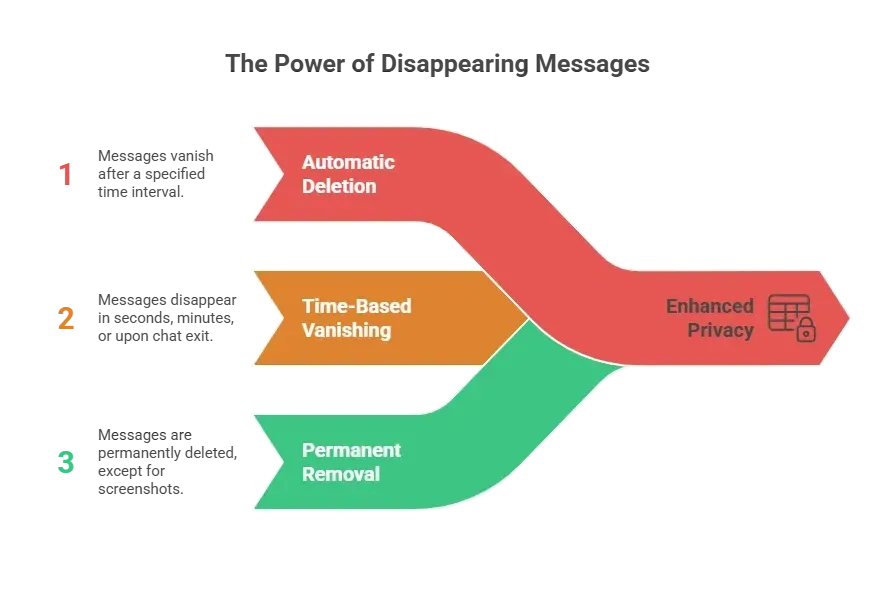
Disappearing messages are chats, photos, or videos that automatically delete after a set period. This makes private conversations easier to manage.
They can vanish in seconds, minutes, or as soon as a user leaves the chat. This keeps conversations tidy and reduces digital clutter.
Core Components Needed to Build Disappearing Messages
Before diving into the nuts and bolts, it helps to know that disappearing messages aren’t just about deleting text. A few key pieces work together behind the scenes to make the feature smooth, private, and reliable.
So, how do you actually build this feature? Here’s the breakdown:
- Timer Functionality: Every message needs a timer. When a user sends a message, the app notes the send time and the disappear time. Once the timer ends, the message is removed from the database.
- Message Storage: Decide whether messages are stored temporarily on the device or synced to the server. Server-side storage ensures messages disappear even if the user changes devices.
- Notifications: Users should get subtle alerts when messages disappear. This can be a small “Message deleted” notice in the chat.
- Forward and Copy Restrictions: Some apps prevent users from forwarding disappearing messages or copying their content. It’s a simple privacy layer.
- Media Handling: Disappearing messages aren’t just texts, they can be photos and videos too. Media needs the same timer logic. After disappearing, media files should be removed from storage.
These components work together to create a seamless disappearing messages experience. When each piece—timers, storage, notifications, and media handling is properly implemented, users get private, clutter-free chats without even thinking about it.
Step-by-Step Guide to Building the Feature
Before jumping into the steps, it helps to remember that building disappearing messages is about more than timers. You need careful handling of chats, media, and device sync to make the feature feel seamless and private for users.
Step 1: Set Up the Disappearing Messages Setting
Start with a toggle in the chat interface that lets users enable disappearing messages for the conversation. This is often called vanish mode. Once activated, every message in that chat uses the disappearing logic.
- Include a timer selector (e.g., 5 seconds, 1 minute, 1 hour).
- Display a visual cue to indicate the mode is on.
Step 2: Store Messages with Metadata
Each message needs metadata like:
| Metadata Key | Purpose |
|---|---|
| message_id | Unique identifier for the message |
| user_id | Sender of the message |
| timestamp | When it was sent |
| expire_time | When it should disappear |
| type | Text, photo, video |
This helps the app determine which messages to automatically delete.
Step 3: Implement the Timer Logic
Once a message is sent, start a countdown. You can implement this on the server for synced deletion or on the device for local deletion. The server approach is safer because it covers multiple devices.
- Check every few seconds for expired messages.
- Delete messages from the database and any device caches.
- Optional: show a notification like “Message disappeared.”
Step 4: Handle Media Files
Photos and videos need extra care. When a media message disappears:
- Delete the file from cloud storage.
- Remove any local cache on the device.
- Ensure thumbnails in chat also vanish.
This prevents any traces left behind.
Step 5: Prevent Screenshots or Forwarding
You can’t fully stop screenshots, but apps like Instagram alert users if one is taken. Also, block forwarding of disappearing messages to other chats.
- Add a flag to detect screenshot actions (platform-dependent).
- Restrict the “copy link” feature for disappearing content.
Step 6: Sync Across Devices
If a user is logged in on multiple devices, disappearing messages must disappear everywhere.
- Sync timers across devices.
- Ensure that messages deleted on one device are removed from all others.
- Use push notifications to update the UI in real-time.
By following these steps, disappearing messages work reliably across text, photos, and videos. When vanish mode, timers, media handling, and device syncing all work together, users get a smooth, private chat experience every time.
Community Insight
Many developers and Reddit users have strong opinions about disappearing messages. Some love the feature but find parts of it tricky to use in real apps:
“Disappearing messages and view‑once media have a lot of potential but currently lack features. Ideally, messages could be toggled quickly without diving into settings each time.”
Clearly, privacy‑focused users enjoy the idea of disappear‑on‑timer chats, but real‑world implementation has its quirks and trade‑offs.
Disappearing Photos and Videos
Photos and videos are slightly trickier than text. Here’s why:
- Media files take more storage, so deletion must be thorough.
- Videos might be cached in background apps.
- Some devices automatically backup media, so disappearing messages need to bypass standard backup.
Tip: Compress media before sending to speed deletion and reduce storage use.
Managing Disappearing Messages Settings
Before giving users these controls, it helps to remember that flexibility is key. People like disappearing messages, but they also want to feel in control of when and how they vanish.
Give users control.
Let them:
- Enable/disable vanish mode per conversation.
- Select timers for messages, photos, and videos.
- Review notifications about disappearing content.
- Decide who can forward or reply to messages.
Clear options make users feel in control without overcomplicating things.
Providing thoughtful settings ensures users trust the feature. When users can manage timers, notifications, and permissions, disappearing messages feel private, convenient, and stress-free.
Recommended Timer Settings
Before choosing timers, it’s worth remembering that different messages need different lifespans. Quick snaps don’t need long, while detailed instructions or videos might need more time.
| Timer Option | Ideal For | Notes |
|---|---|---|
| 5 seconds | Quick snaps | Best for fleeting selfies or jokes |
| 30 seconds | Short text | Quick chats without leaving traces |
| 1 minute | Normal messages | Gives users time to read before deletion |
| 1 hour | Longer media | Useful for videos or longer instructions |
| End of chat | Maximum privacy | Messages disappear once chat is closed |
Providing clear timer options makes disappearing messages predictable and user-friendly. Users can choose how long content stays visible without worrying about messages lingering longer than intended.
Privacy and Device Considerations
It’s important to think about where data lives. Messages aren’t just text they can leave traces in caches, backups, or background files if you’re not careful.
Messages should vanish from the device and the server.
Pay attention to:
- Local device caches
- Background media files
- Cloud backups
Users want disappearing messages, not disappearing privacy.
Properly handling device and server data ensures that disappearing messages actually disappear. This keeps chats private, media secure, and user trust intact.
Disappearing Messages Done Right
Messaging apps need privacy options for users, but messages lingering on devices or servers can cause worry.
Implement disappearing messages with timers, vanish mode, media handling, and cross-device sync. Give users control over settings, notifications, and media privacy.
Disappearing messages are a smart feature that balances privacy and convenience. With careful timer logic, media cleanup, and device syncing, users get a clean chat experience without worrying about old messages sticking around.
Table of contents