
Looking for the best low code platforms for building custom automation workflows? Let's see the features, benefits, and tools that help teams automate workflows, reduce effort, and support business needs.
Are low-code platforms really the easiest way to build custom automation workflows today?
Low-code platforms for building custom automation workflows allow organizations to design workflow automation without relying heavily on programming skills.
Low-code automation has gained attention because it simplifies development and shortens delivery timelines.
Visual builders, automation tools, and pre-built templates help teams automate business processes while keeping control in the hands of business teams.
Key Features and Benefits
Low-code platforms are built to feel approachable from the first login. They focus on clarity, speed, and flexibility, making workflow automation accessible across teams.
Common key features found in most low code platforms include:
- Drag and drop interface that makes workflow creation visual and easy
- Pre built templates that support common business workflows
- Integration capabilities that connect third party tools and existing systems
- Low code automation tools that allow optional custom code
- User friendly interface that lowers the learning curve
These key features translate into clear benefits. Business users can build automation solutions without waiting for technical teams. Non technical users feel confident managing low code workflows. Repetitive tasks run in the background, saving time and reducing manual errors.
Low code workflow automation also supports growth. Simple workflows can gradually evolve into complex apps as needs change. This flexibility keeps business processes aligned with real world demands.
Low Code Development and Automation
Low code development relies on visual modeling instead of traditional development methods. Teams assemble workflows using drag-and-drop tools, reusable components, and logic blocks rather than writing extensive scripts.
Most low code automation platforms provide:
- Workflow automation tools for visual process mapping
- Version control for tracking workflow changes
- Audit logs for transparency and accountability
- Support for custom code when advanced behavior is needed
This setup helps simplify development while maintaining structure. Business teams can build and adjust their own workflows. Technical teams can focus on complex logic and more advanced features. Collaboration becomes smoother and faster.
Low-code development also supports web and mobile apps. Many platforms allow the same workflows to run across web apps and mobile apps. This keeps business processes consistent across devices and departments.
How Low-Code Platforms Support Business Processes
So, how does this impact daily operations?
Low code platforms directly support business processes by reducing friction and manual effort.
Process automation replaces repetitive workflows with automated workflows that run consistently. Data moves between systems without manual handoffs. Approvals happen faster. Errors decrease over time.
Low code workflow automation improves business workflows in several ways:
- Automates repetitive tasks such as data entry and alerts
- Supports process automation across departments
- Helps with process optimization through visual monitoring
- Connects existing workflows without disrupting systems
- Improves service delivery and response times
| Feature | How It Helps Business Processes |
|---|---|
| Drag and drop interface | Allows business users to design workflows easily |
| Pre built templates | Reduces setup time |
| API integrations | Connects third party tools |
| Version control | Manages changes safely |
| Audit logs | Supports accountability |
Low code automation tools make it easier to automate tasks while keeping the existing tech stack intact.
Rocket.new and Custom Workflow Creation
Rocket.new works well for teams that want to build custom automation workflows fast using a low code approach. It helps business users and non technical teams turn ideas into working workflows and apps without heavy setup or long development cycles.
Top features:
- One prompt app generation that creates front end and back end automatically
- Figma import that turns designs into usable workflows and screens
- Built in backend with database and authentication support
- Live preview that shows workflow and app changes instantly
- Third party integrations for tools like Stripe, Supabase, and OpenAI
- Deployment support with GitHub sync and custom domains
These features make Rocket.new a practical choice for building custom workflows with minimal coding and clear visual control.
Supporting Non-Technical Users and Teams
One of the strongest advantages of low-code platforms is accessibility. Non-technical users can create workflows without learning programming languages or complex syntax.
Low-code platforms support non-technical teams by providing:
- Intuitive interface that feels familiar
- Visual logic that is easy to understand
- Minimal coding requirements
- Simple updates to existing workflows
This approach reduces dependency on technical teams and shortens the learning curve. Business users gain confidence managing their own workflows and improving business processes independently.
Handling Complex Apps and Advanced Needs
Low-code tools are not limited to basic automation. Many platforms support complex apps, and more complex apps as requirements grow.
Teams can extend functionality using custom code when needed. This allows technical teams to add advanced features without rebuilding entire workflows. Code workflow automation supports complex logic while preserving the visual design.
Low-code automation platforms often include paid plans and enterprise pricing. These options support scaling, premium features, and advanced controls for larger organizations.
Low Code Automation and Digital Transformation
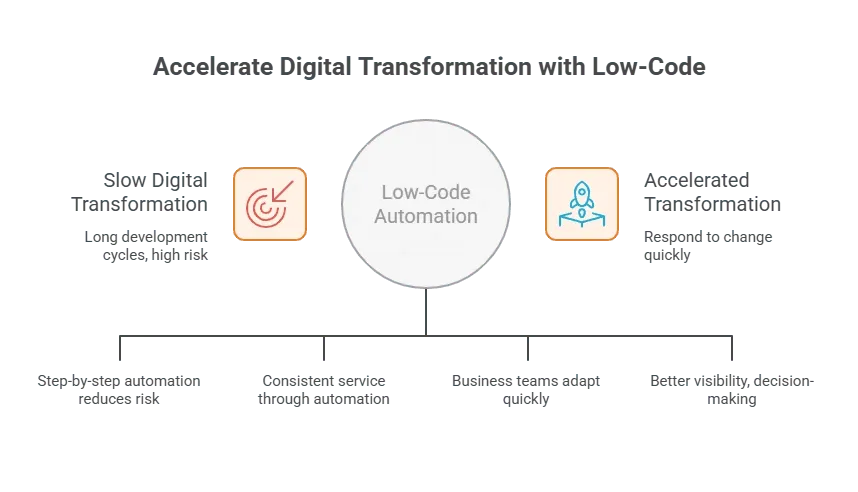
Low-code automation plays a clear role in digital transformation. Organizations modernize business processes without long development cycles. Existing workflows can be automated step by step, reducing risk.
Low Code Platforms for Automation Workflows
Low-code platforms for building custom automation workflows offer a practical way to manage workflow automation, process automation, and evolving business processes without heavy technical demands. They support non-technical users, scale with growth, and help teams automate tasks while keeping development approachable and flexible.
Table of contents
- -Key Features and Benefits
- -Low Code Development and Automation
- -How Low-Code Platforms Support Business Processes
- -Rocket.new and Custom Workflow Creation
- -Supporting Non-Technical Users and Teams
- -Handling Complex Apps and Advanced Needs
- -Low Code Automation and Digital Transformation
- -Low Code Platforms for Automation Workflows