
Why do businesses rely on APIs for seamless operations? APIs enable secure, automated, and consistent data exchange between apps, streamlining workflows. Let's see tools and platforms that simplify integration without extra noise.
How do apps communicate reliably with each other?
Apps communicate with each other via API integrations.
An API defines clear rules for how one system can request data or trigger actions in another, what to ask for, how to ask, and what response to expect. This standardization lets systems exchange data automatically, securely, and consistently, without manual work or late-night firefighting.
According to the 2025 connectivity benchmark report, 99 % of organizations now use APIs to streamline and automate business processes.
So let’s talk about API integration tools, what actually works, and which platforms make life easier instead of louder.
Why API Integration Became Part of My Daily Reality?
At some point, every product or business hits the same wall.
Tools multiply. Teams grow. Data starts living in too many places.
I’ve seen software systems struggle because nothing connects cleanly. One app tracks users. Another tracks payments. A third holds analytics. None of them talks nicely.
This is where API integration shows up and quietly saves the day.
API integration connects apps so they can exchange data, share logic, and stop acting like strangers. It removes manual intervention, reduces errors, and keeps business processes moving without drama.
When it works, nobody notices.
When it doesn’t, everyone complains.
What to Look for in API Integration Tools?
After working with several integration tools, a pattern became clear. A good API integration tool doesn’t just connect apps. It respects time and sanity.
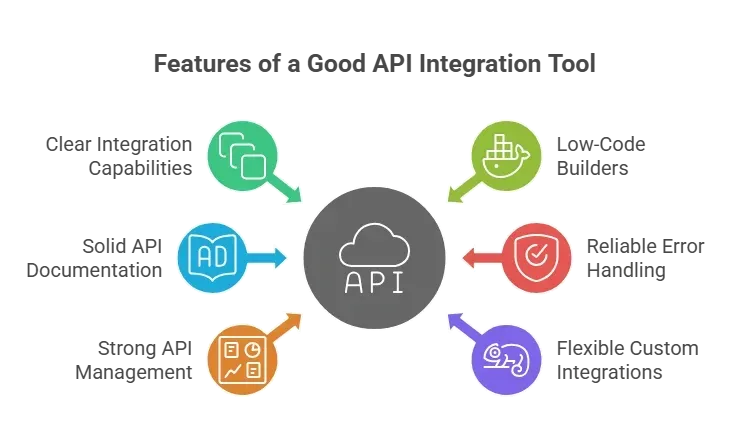
If a tool fails at these, the setup might work once. Then it breaks quietly. And nobody enjoys that.
API Integration Tools Compared at a Glance
Each tool listed here solves a slightly different problem. The key is matching the tool’s strengths to how your systems actually work, not to how the brochure says they should.
| Tool | Works Best For | Strength | Low Code |
|---|---|---|---|
| MuleSoft | Large stacks | Deep connectors | Medium |
| Zapier | Small teams | Quick automation | High |
| Workato | Process flows | Conditional logic | High |
| Power Automate | Microsoft users | Office apps | High |
| Apache Camel | Developers | Custom routes | Low |
| IBM API Connect | Enterprise APIs | Full api lifecycle | Medium |
| Oracle Cloud | Cloud systems | Scalable solution | Medium |
This table helped me cut through the noise fast. Instead of overthinking tools, I could match real needs with real strengths and move forward without second-guessing.
Top API Integration Platforms That Actually Deliver
No platform here is “perfect.”
Each one shines in a specific setup. The real win comes from choosing what matches your team’s skills and how your systems already behave.
- MuleSoft: MuleSoft feels like a heavyweight integration platform. It handles complex workflows, large data volumes, and deep routing logic. It shines when multiple systems need to be coordinated. The trade-off is complexity. You’ll need some technical expertise to unlock its full potential.
- Zapier: The friendly one. It helps automate tasks across multiple apps using triggers and actions. I like it because it respects speed. With drag-and-drop flows and tons of pre-built connectors, things get moving fast.
- Workato: Workato sits between business and engineering teams. It handles integration processes with logic, approvals, and structured workflows. It’s powerful without feeling heavy. That balance matters.
- Microsoft Power Automate: If your day already revolves around Excel, Outlook, or Teams, Power Automate fits naturally into your workflow. It helps automate processes across Microsoft services with minimal effort.
At this point, the pattern becomes clear. The best platforms don’t try to do everything. They focus on removing friction, cutting manual work, and keeping systems talking without constant babysitting.
IBM API Connect and Oracle Cloud Integration
These platforms lean more toward structure and control than speed. They work best when stability, compliance, and long-term planning matter more than quick setup.
IBM API Connect
IBM API Connect focuses on governance, security, and visibility. It supports the entire API lifecycle, from API creation to API operations.
For organizations that care about enterprise-grade security and long-term maintenance, this platform earns respect.
Oracle Cloud Integration
Oracle Cloud tools handle data movement, large data pipelines, and enterprise workloads. They shine when performance and scale matter more than simplicity.
Both tools are built for scale and discipline. They may feel heavier at first, but once systems grow and traffic increases, that structure starts paying off quietly.
Low Code vs Custom Code: A Real Choice
I’ve seen teams argue over this more times than I can count.
Low-code tools help non-technical users move fast. They rely on drag-and-drop, templates, and pre-built connectors.
On the other hand, custom code and scripts provide control and flexibility. They need more technical expertise, but solve edge cases better.
Both work. The trick is choosing based on context, not ego.
Community Insight
While browsing Reddit, one comment stuck with me:
“In terms of documentation, stability, and developer experience, the best API I’ve ever worked with is Stripe. It’s extremely well-documented and easy to integrate.”
That line says a lot. Clear docs reduce stress. Clean APIs reduce mistakes. A good platform respects developers and users alike.
Rocket.new & API Integrations
This is where my workflow changed.
Most platforms treat APIs as a problem to be solved later. Rocket.new doesn’t.
API integration is built into the app from the start, not bolted on at the end.
With a single prompt, Rocket.new can generate a working internal dashboard—frontend, backend, auth, and API connections included. No tool-hopping. No fragile glue code.
Building Internal Tools With APIs
Rocket.new’s internal tools template is designed to work with live data from day one.
It creates dashboards that pull data directly from APIs and display it in a clean, reactive UI. The API layer is already wired, so data flows immediately, and updates feel natural, not patched together later.
You can see a similar setup here:
This shows how API integrations can stay invisible while still doing the heavy lifting.
Top Features
- API-first app generation – API connections are mapped during app creation
- Low-code API setup – Configure integrations without heavy scripting
- Built-in backend logic – Validation, routing, and data handling are included
- Exportable codebase – Take full control without rebuilding from scratch
Choosing the Right API Integration Platform
Here’s what I ask before choosing the right api integration tool:
- Who maintains it?
- How complex are the integration processes?
- Do we need APIVgateway features?
- How much data movement happens daily?
Answering these upfront keeps decisions practical. It helps avoid rework, frustration, and quiet regret once real usage begins.
Best API Integration Tools
Disconnected systems slow teams down. Data gets trapped. Manual work creeps in quietly. The best API integration tools remove friction, support growth, and keep systems talking without constant supervision.
Choosing wisely saves time, energy, and patience. The right tools help teams focus on actual work instead of babysitting connections. They reduce errors, make workflows predictable, and keep everyone from constantly asking “Did the data sync?” Good tools don’t shout. They just work.
Table of contents
- -Why API Integration Became Part of My Daily Reality?
- -What to Look for in API Integration Tools?
- -API Integration Tools Compared at a Glance
- -Top API Integration Platforms That Actually Deliver
- -IBM API Connect and Oracle Cloud Integration
- -IBM API Connect
- -Oracle Cloud Integration
- -Low Code vs Custom Code: A Real Choice
- -Community Insight
- -Rocket.new & API Integrations
- -Building Internal Tools With APIs
- -Top Features
- -Choosing the Right API Integration Platform
- -Best API Integration Tools