
An AI workflow builder automates multi-step processes, connects apps, and reduces manual work. This guide covers how they work, how to choose one, and how Rocket.new's Solve-Build-Intelligence loop serves as a complete product workflow platform.
An AI workflow builder is software that lets teams design, automate, and manage multi-step processes, connecting apps, routing data, and reducing manual work without writing custom code. The right AI workflow builder cuts turnaround time on repetitive tasks, eliminates context loss between tools, and lets both technical and non-technical team members build processes that scale.
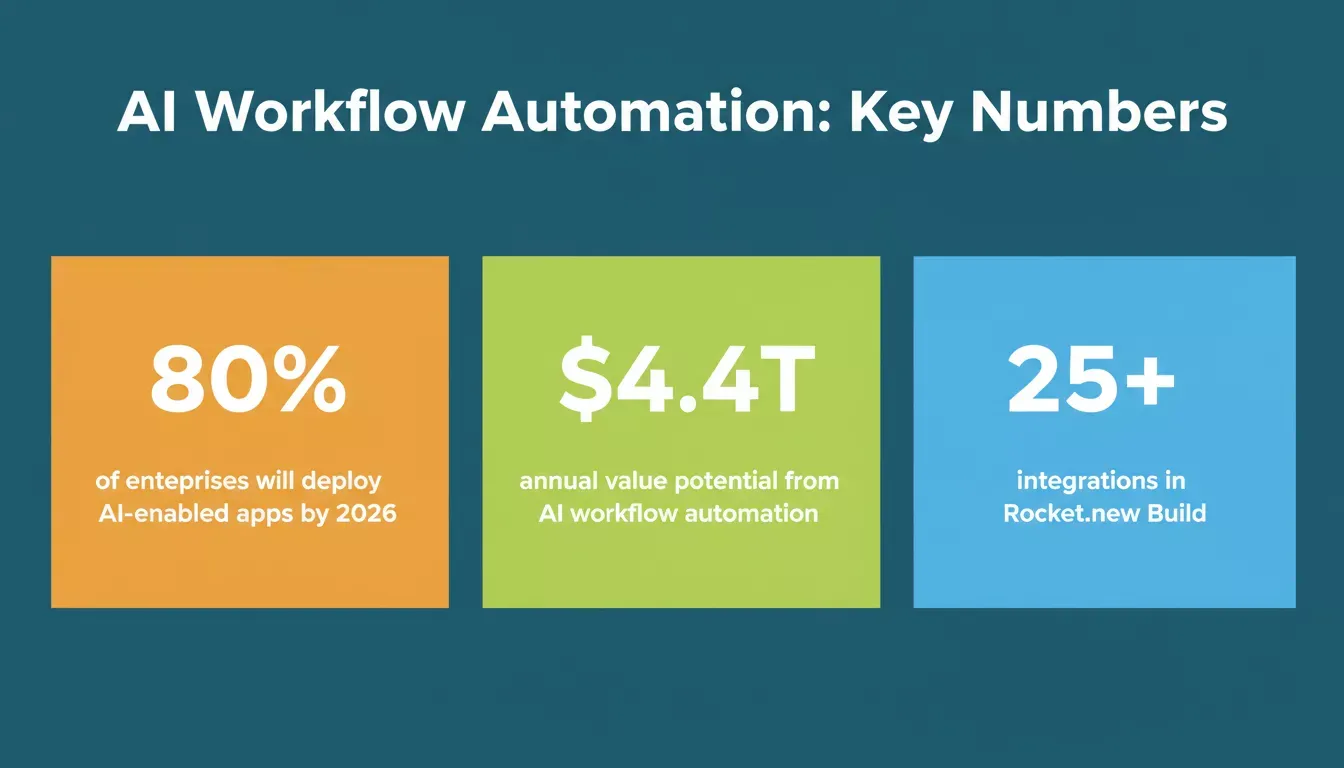
Key statistics shaping the AI workflow automation landscape in 2026.
Why AI Workflow Builders Matter
Workflows must keep pace with fast-moving business requirements.
AI workflow automation provides a framework for structuring processes, managing branching conditions, and reducing manual work. Teams benefit from tools that allow both non-technical users and technical teams to collaborate on building complex workflows without a steep learning curve.
Key advantages include:
- Flexibility: Teams can adjust workflows as requirements change without breaking existing automation.
- Integration: Connect multiple apps, internal tools, and AI models to ensure seamless data flow.
- Efficiency: Automating repetitive tasks saves time and reduces errors.
- Collaboration: Non-technical users can participate in workflow creation using natural language prompts.
AI workflow builders support more complex processes while providing a clear interface for building, monitoring, and managing automation. They also allow AI agents to operate across multi-step sequences, adding sophistication and decision-making capabilities that older rule-based systems lacked.
How AI Workflow Builders Work
An AI workflow builder typically starts with a trigger- an event, a form submission, a data change, or a scheduled time- that kicks off a chain of automated actions. The system routes data through logic steps, applies conditional branching, calls external services, and delivers an output without human intervention at each stage.
Modern AI builders go further by embedding AI models directly into those steps. Instead of simple if/then rules, the workflow can interpret natural language, classify content, generate text, or make routing decisions based on context. This turns a static automation into an adaptive process that handles edge cases a rule-based system would miss.
Teams use AI workflow tools to:
- Connect multiple apps through standardized triggers and actions.
- Incorporate custom variables for conditional logic.
- Implement error handling to ensure tasks complete reliably.
- Build scalable workflows that reflect business needs.
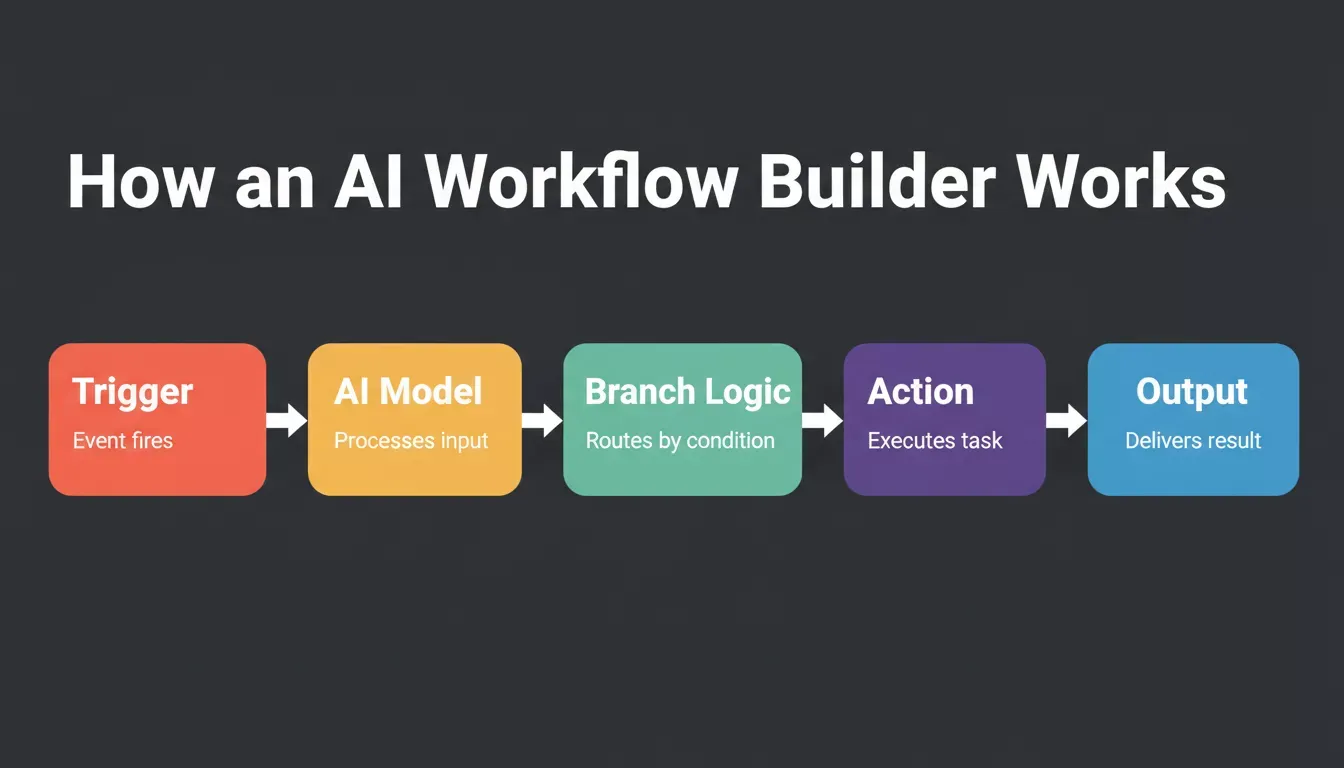
The five-step flow from trigger to output that powers every modern AI workflow.
AI workflow automation enables teams to respond to changing data, trigger downstream actions, and continuously improve processes without manual intervention. Building internal tools on top of these workflows is one of the fastest-growing use cases for teams looking to replace manual coordination.
What Teams Look For
Observations across organizations show several consistent requirements when evaluating an ai workflow builder.
Clarity means a visual overview of workflows that helps teams track progress and catch errors before they cascade. Control refers to the ability to adjust branching logic, add custom variables, and manage error handling without having to rebuild from scratch.
Adaptability covers support for integrating different AI models and updating workflows as business needs change. Speed means automation that executes quickly, processing triggers and delivering outputs efficiently. Collaboration ensures both non-technical and technical team members can contribute to building and refining workflows.
Modern tools address these requirements through drag-and-drop interfaces, pre-built templates, and natural-language commands. The best AI builders reduce the learning curve without sacrificing depth for teams that need precise control.
Comparing AI Workflow Builder Types
Different tools serve different use cases. The table below maps the major categories of ai workflow builder to their strengths:
| Platform Type | Core Strength | Best Workflow Type | Ideal For |
|---|---|---|---|
| Trigger-action automation | Broad app library, fast setup | Simple to mid-level data routing | Teams needing quick integrations |
| Developer orchestration | Full code control, self-hostable | Complex, long-running technical workflows | Engineering teams |
| AI-native workflow builders | Embeds LLMs into workflow steps | Decision-heavy, context-aware processes | Mixed technical/non-technical teams |
| Vibe Solutioning platforms | Research, build, and monitor in one loop | End-to-end product development workflows | Founders, product teams, operators |
Pre-built templates in these platforms allow teams to automate tasks efficiently while maintaining structure. Teams can create workflows that span apps, production-ready apps, and complex logic without having to start from scratch.
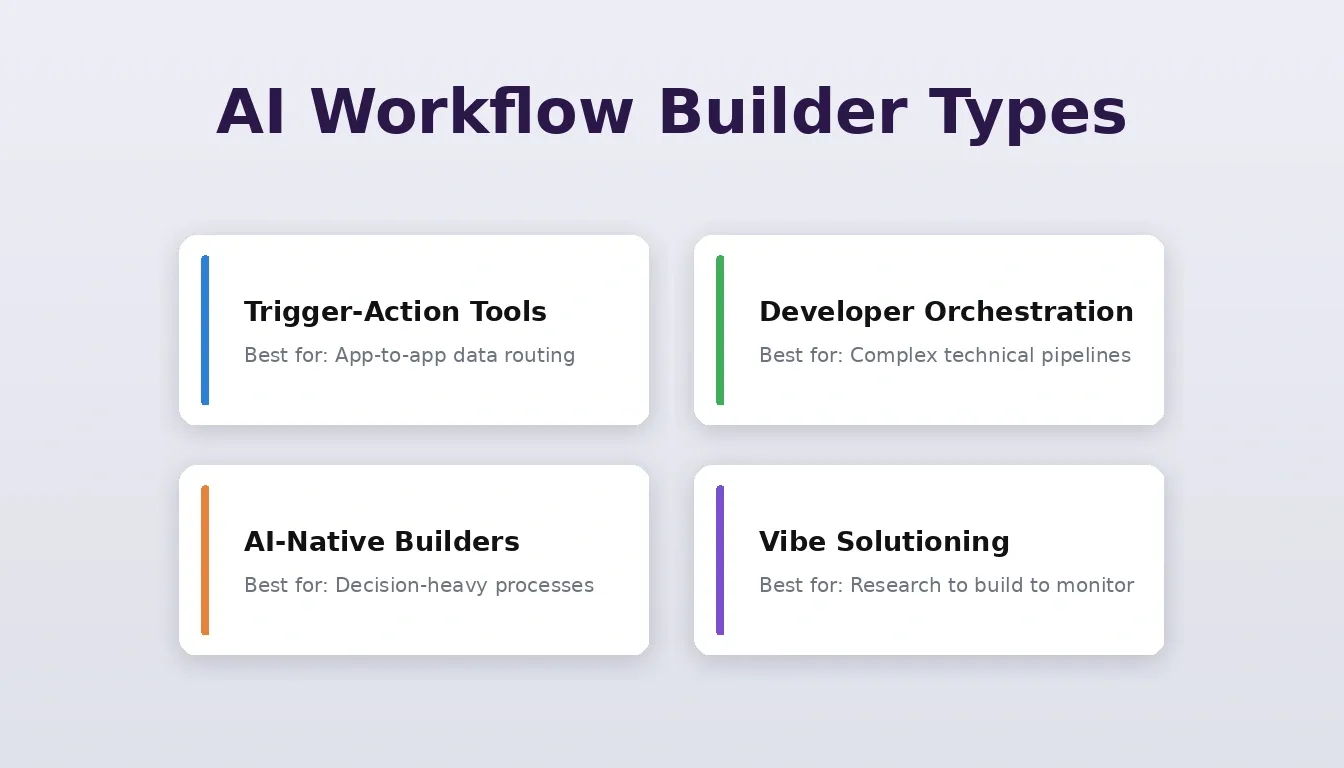
Match the right workflow builder type to your team's actual needs.
Real-World Workflow Patterns
Many organizations implement AI workflow automation to handle tasks such as document processing, notifications, approvals, and data updates across multiple apps. Technical teams often focus on complex multi-step processes to handle branching, while small teams leverage pre-built templates for quick wins.
AI-powered workflows are compressing months of manual coordination into hours of automated execution. Research shows generative AI could add $2.6 trillion to $4.4 trillion annually across analyzed use cases, with workflow automation among the highest-impact categories. Industry analysts forecast that by 2026, more than 80 percent of enterprises will have deployed AI-enabled applications or APIs in production, up from fewer than 5 percent in 2023.
A discussion on Reddit's r/automation community captures what teams consistently report: "Our team moved half our repetitive tasks into AI-driven flows. The time savings surprised us. We didn't expect a few AI agents to replace so much manual work."
The Solve-Build-Intelligence Workflow
Most discussions of AI workflow builders focus on connecting existing apps. But there is a different kind of workflow that product teams run constantly and rarely automate: the cycle of researching what to build, building it, and monitoring whether it is working.
This is the workflow Rocket.new was designed for. Rocket.new is the world's first Vibe Solutioning platform, covering the complete arc from strategic intelligence to execution to ongoing business operation inside a single workspace with shared compound context.
The platform ships three core capabilities that form a connected workflow:
Solve is Rocket's decision intelligence engine. It takes any business question and delivers a complete, structured analytical output in 60 to 90 minutes, running thousands of queries across 150+ sources simultaneously. Findings are tagged by signal strength, and the output becomes the foundation of everything that follows in the project, the PRD is present when the developer opens the Build task.
Build generates production-grade Next.js web apps and Flutter mobile apps from natural language descriptions, Figma files, or existing GitHub repositories. Every build starts from the accumulated intelligence of the project. The result ships with SEO-ready structure, WCAG accessibility compliance, and GDPR coverage by default, with 25+ integrations including Stripe, Supabase, Notion, Airtable, and Mailchimp authenticated once and flowing into every build.
Intelligence handles competitive monitoring continuously, tracking every public platform a competitor operates on and interpreting what signals mean for your business. It delivers daily, weekly, or monthly briefs where your team works, not just what changed, but what it means for your next decision.
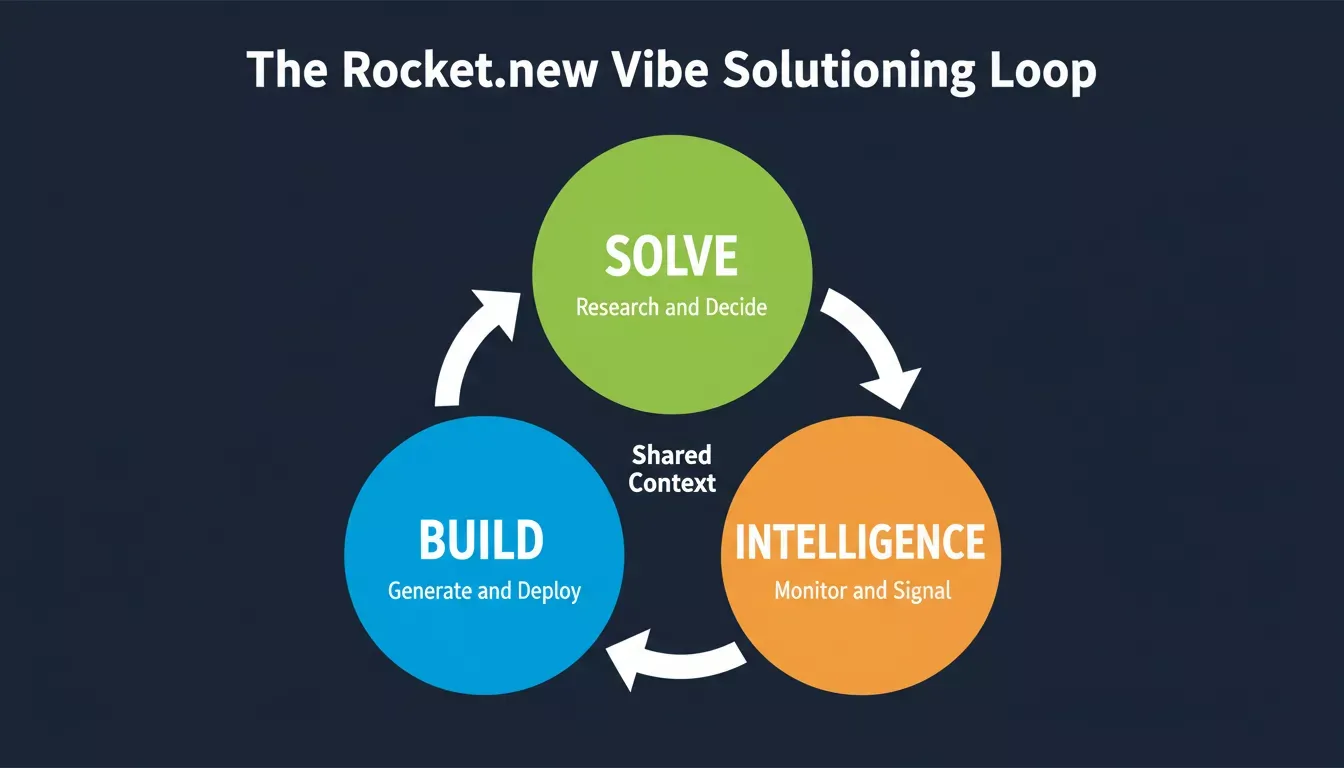
Rocket.new's three-pillar loop: research informs the build, the live product generates signals, and those signals feed the next research cycle.
What makes this a genuine workflow rather than three separate tools is the shared context architecture. The competitive brief is present when the landing page is written. The Intelligence signal from last week informs this week's product decision. Nothing is re-explained, and everything compounds.
Learning Curve Considerations
Even the best AI workflow builders come with learning curves. Some tools rely heavily on natural language, making them accessible to non-technical users, while others require prompt engineering or familiarity with AI models that technical teams handle more comfortably.
The learning curve also depends on the depth and complexity of the workflow. Multi-step processes, custom variables, and error handling can add layers that need careful planning. Teams that pace their adoption, starting simple and layering complexity over time, consistently outperform teams that try to automate everything at once.
Teams often balance two approaches:
- Quick wins: Start with simple workflows using templates and natural language prompts. For Rocket.new users, this means running a Solve task on a well-defined question before touching Build, so the first generation already reflects real product thinking.
- Advanced automation: Gradually incorporate multi-step processes, branching logic, and custom integrations as teams gain confidence. Rocket.new's shared context architecture means each task makes the next one smarter without requiring teams to re-brief the system.
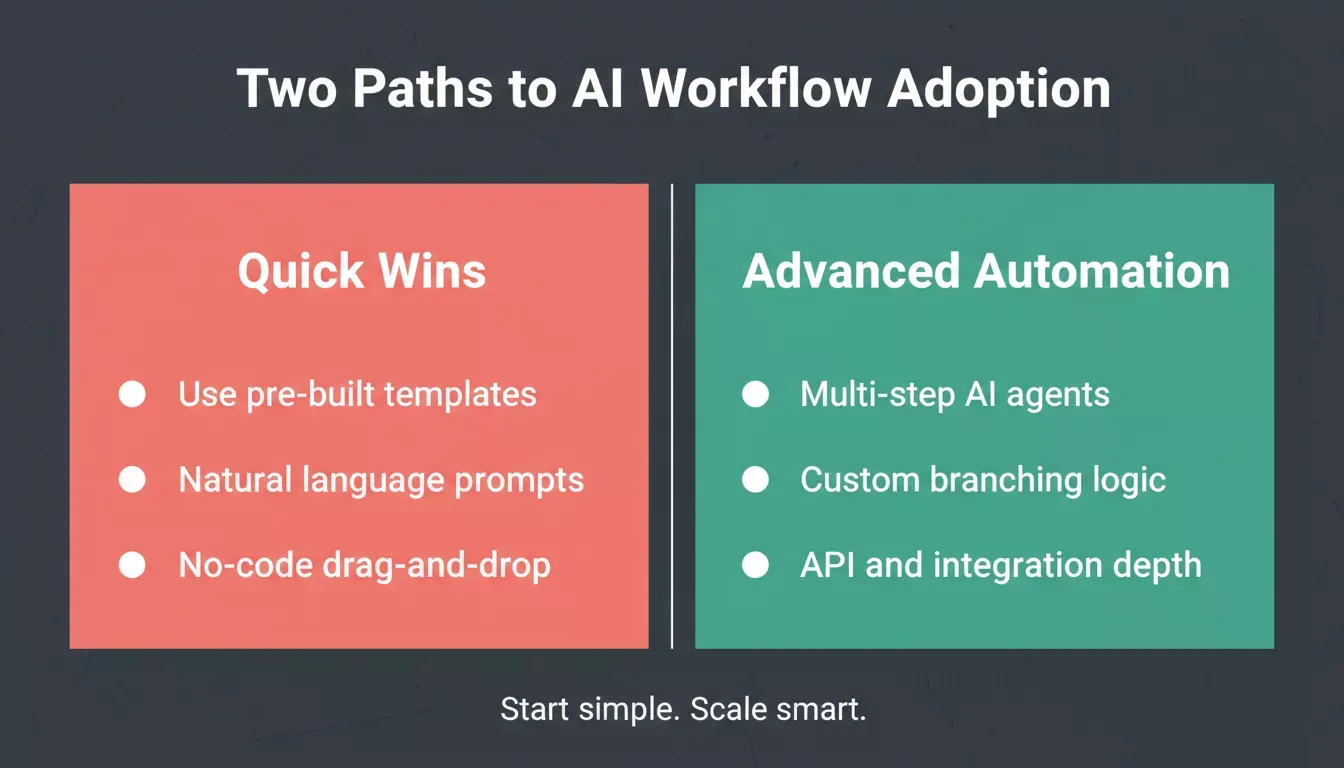
Start with quick wins using templates and natural language, then scale to advanced automation as confidence grows.
How to Choose the Right AI Workflow Builder
Selecting an AI workflow builder requires careful consideration of team structure, task complexity, and integration requirements. The right answer depends on what kind of workflow problem you are actually solving.
If your primary need is connecting apps and automating data routing, tools purpose-built for trigger-action automation have broad connector libraries and are optimized for that use case. If your primary need is building AI-powered products and automating the product development workflow, the question is whether your team needs a point tool or a platform that connects research, building, and monitoring in one place.
Some guiding questions for any evaluation:
- Integration scope: Does the tool connect to all the apps your team relies on?
- AI capabilities: Are AI models embedded into workflow steps, or bolted on as an afterthought?
- Team expertise: Can both technical and non-technical members contribute without a steep ramp?
- Context continuity: Does the system remember what was decided in previous steps, or does every task start from zero?
- Scalability: Can workflows handle more complex processes as the business grows?
Teams often adopt multiple tools for different purposes. One tool may handle simple app-to-app automations, while another supports the higher-order workflow of deciding what to build, building it, and monitoring the result. Over time, standardizing on a platform that covers more of this arc simplifies maintenance and ensures consistency across processes. Explore how vibe coding tools shape next-generation workflows to understand where the category is heading.
Ship Faster with the Right Workflow
The teams that move fastest are not the ones with the most automation tools; they are the ones whose tools share context, compound learning, and connect research to execution without losing anything in the handoff. Rocket.new is built for that kind of team.
From the first Solve task that validates your direction to the Build that ships your product to the Intelligence that monitors what happens next, everything runs in one place and everything compounds. Start building for free and see how much faster the right workflow makes your team.
Table of contents