
How does smart API integration drive faster growth? Learn how connecting systems reduces manual work, improves response times, lowers costs, and helps teams scale operations with clear, practical integration strategies.
Can smarter API integration help a business grow quickly?
Yes, when done right, API integration can speed up operations, cut costs, and open new ways to serve customers.
In fact, businesses that automate workflows with integrations often see productivity gains and faster response times compared to manual approaches.
Let’s walk through how API integration can lift your business up. The goal here is to keep things clear, simple, and useful, with real ideas you can apply today.
What is API Integration and Why Does It Matter?
Before anything else, API integration is the process by which two or more software applications communicate with one another without manual data entry.
This enables your systems to share useful information, such as customer data and inventory levels, without manual data entry. This also means teams don’t waste time copying and pasting all day.
Here’s how it works in practice:
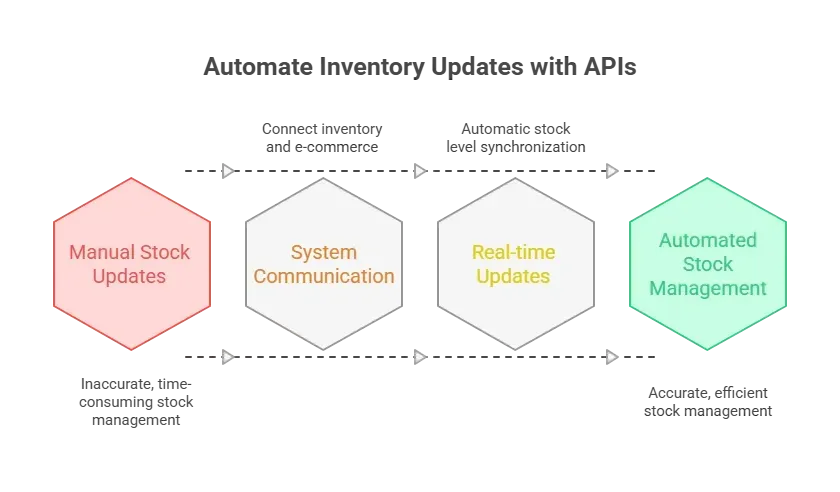 When done well, API integration helps reduce errors, speed up operations, and let your team focus on work that matters. And when systems share data effectively, your business becomes more agile.
Top Strategies to Grow Faster with API Integration
Scaling your business with API integration doesn’t have to be complicated.
The key is knowing where your systems can communicate, which tasks to automate, and which tools will streamline the process. With the right approach, your team spends less time on repetitive work and more time on growth and strategy.
1. Start With an Integration Platform
An integration platform can act as the middleman between different apps or systems. These platforms let you easily link tools (such as your CRM, ERP systems, or marketing tools). Instead of writing extensive custom code, you can use an integration platform to connect components visually.
Think of it as building with Lego blocks rather than carving everything from wood. You retain control and save time. Popular API integration platforms include middleware that supports a wide range of apps.s
Benefits you get:
- Faster setup
- Less custom code
- Easier troubleshooting
Remember, not every business needs a giant project right away. You can start small with a few integrations and scale as you go.
2. Use Prebuilt Connectors When Possible
Some tools already have prebuilt connectors to common software. These are tiny bridges that make integrating a breeze.
For example, connecting your customer support platform to your email tool might take only a few clicks.
These connectors are offered by many API integration platforms. They are like ready-made paths your systems can follow to exchange data.
Good reasons to pick prebuilt connectors:
- Quick setup
- Reduced need for developers
- Less error-prone than building from scratch
Prebuilt connectors save time and headaches, letting your systems exchange data quickly without reinventing the wheel.
3. Build Your Own APIs for Key Systems
Sometimes, existing APIs don’t do exactly what you want. That’s when custom APIs come into play. You or your software developers can build APIs for core systems to fine-tailor how software applications communicate with each other.
This comes with a bit more work but offers greater flexibility.
When building custom APIs:
- Keep clear API documentation, so teams know how to use them
- Stick to common standards like REST APIs or Simple Object Access Protocol, where possible
- Design with the future in mind, don’t just fix the problem of today
Custom APIs provide flexibility and control, ensuring your systems communicate exactly as you need.
4. Don’t Forget Data Formats and Consistency
Different systems use different data formats, such as JSON or XML. When your tools exchange data, format mismatches can break things. Planning for consistent data structures and data consistency helps avoid those hiccups.
For example, if your enterprise resource planning (ERP system needs to sync pricing with your shop’s inventory, you want both systems to speak the same language. A mismatch here means extra debugging.
5. Focus on Real-Time Data Synchronization
For many businesses, real-time information is gold. If your inventory management system updates stock instantly to your e-commerce platform, customers won’t buy what’s already sold out.
Real-time sync also matters for:
- Customer support dashboards
- Marketing automation tools
- Order management
Whenever possible, go for real-time data synchronization. This keeps your teams happy and your customers happier.
Example Use Cases of API Integration
Let’s make this concrete. Here are some API integration examples showing how different businesses use them:
- E-Commerce Platform + Payment Gateway: When your shop integrates with a payment API, purchases occur without redirecting users. This reduces page hops and fewer carts are canceled.
- CRM + Marketing Automation Platform: Customer profiles automatically move from sales systems into marketing campaigns. This means no duplicate entries, fewer mistakes, and smarter targeting.
- ERP System + Transportation Management System: Your enterprise software can send orders directly to logistics partners. That saves time and cuts delivery delays.
Those are just the basics. Many API integration use cases exist, from syncing customer information to automating billing.
Common Integration Tools
Here’s a snapshot of common integration tools you might see in the wild:
| Category | Examples | What They Do |
|---|---|---|
| API Integration Platforms | Zapier, Pipedream | Link apps quickly without code |
| Custom APIs | Built in-house | Tailored connections for unique needs |
| Prebuilt Connectors | CRM plugins | Quick bridges between specific tools |
| Integration Tools | Middleware | Standardize and manage large-scale connections |
This table is just a starting point. You’ll find many blends of these depending on your business needs.
Tips From the Community
People in tech forums often share real thoughts on the value of APIs. One Reddit user wrote about the future of business systems and APIs:
“B2B integrations and APIs can improve customer experience by making it easier for businesses to work together. For example, integrations can automate data transfers between platforms, reducing manual processes and errors.”
Integration Best Practices That Help You Work Better
Here are some practical habits that make API integration work more reliably:
- Know Your Systems: Before wiring everything together, map out your current setup. Learn where data lives and how systems talk today.
- Monitor What You Connect: Even after you set up an integration, watch it. Performance-tracking tools can alert you to failures before anyone notices.
- Plan for Growth: You want connections that can handle more users, bigger data loads, and more services over time.
- Keep Scalability in Mind: When you add new integrations later, keep them organized. Don’t let spaghetti connections take over.
These simple ideas often make the difference between a smooth-growing business and one stuck in repetitive manual fixes.
Rocket.new and API Integration
Rocket.new isn’t your typical API integration platform, but it offers features that align well with how teams build and connect systems. It can help teams plan, visualize, and manage work involving APIs, backend setup, and integrations with other tools, while keeping collaboration smooth and transparent.
Top Features
- Natural Language App Generation: Describe your idea in plain words, and Rocket.new generates a full app with frontend, backend, and ready-to-use code.
- Design-to-Code (Figma Integration): Convert Figma designs directly into responsive, production-ready applications.
- Built-in Backend and Authentication: Automatically sets up databases, authentication, and core backend infrastructure.
- Third-Party Integration Connectors: Easily connect to services such as Supabase, Stripe, GitHub, analytics tools, and AI providers.
- Live Preview and Editing: See real-time previews and make instant changes as you build your app.
- Templates and Smart Suggestions: Use pre-built templates and smart recommendations to plan and build faster.
API Integration Strategies
Integrating your systems via APIs is a practical way to speed up business processes. When done well, it reduces manual work, generates real-time insights, and lays the foundation for smart automation.
Successful strategies mix the right tools, clear formats, and thoughtful planning. The payoff? Happier teams, fewer errors, and faster reactions to whatever comes next in your market.
Table of contents
- -What is API Integration and Why Does It Matter?
- -Top Strategies to Grow Faster with API Integration
- -1. Start With an Integration Platform
- -2. Use Prebuilt Connectors When Possible
- -3. Build Your Own APIs for Key Systems
- -4. Don’t Forget Data Formats and Consistency
- -5. Focus on Real-Time Data Synchronization
- -Example Use Cases of API Integration
- -Common Integration Tools
- -Tips From the Community
- -Integration Best Practices That Help You Work Better
- -Rocket.new and API Integration
- -Top Features
- -API Integration Strategies