Travel Blog & Guide Booking Website Template
Wander is a luxe minimal landing page template built for solo female travel brands. It combines a cinematic panoramic header, a mood-driven interactive destination gallery, and full itinerary detail panels into one elegant, conversion-focused page. Every design detail, from glacier white backgrounds to rose-gold booking buttons, is crafted to speak directly to independent women ready to travel on their own terms.
by Rocket studio
Quick summary
Wander is a gallery and detail landing page template for solo female travel itinerary brands. It opens with a cinematic alpine header, guides visitors through a mood-based destination explorer, and closes each itinerary with a direct booking panel. The design is luxe minimal, built for women who travel with intention and book with confidence.
Who this template is for
This template is built for travel brands and independent operators who sell curated solo itineraries directly to women. It suits anyone whose offer is polished, safety-conscious, and worth a premium price point.
- Solo female travel curators selling pre-planned itineraries with accommodation, transfers, and safety checkpoints included
- Boutique travel designers targeting professional women in their thirties and forties who want a fully handled trip
- Remote-work travel brands offering destination experiences for women who work and wander simultaneously
What problem this template solves
Most travel landing pages feel generic. They show destinations without answering the questions solo women actually ask: Is it safe? What exactly is included? How do I book? This template solves that gap directly.
- It replaces vague inspiration with structured, day-by-day itinerary detail panels that build genuine trust
- It removes friction from the booking path with a two-step checkout built into each itinerary panel
- It captures undecided visitors through a persistent custom trip bar before they leave without converting
What you get with this template
You get a single, complete landing page structure that handles discovery, consideration, and purchase in one scroll. Nothing is left for the visitor to figure out on their own.
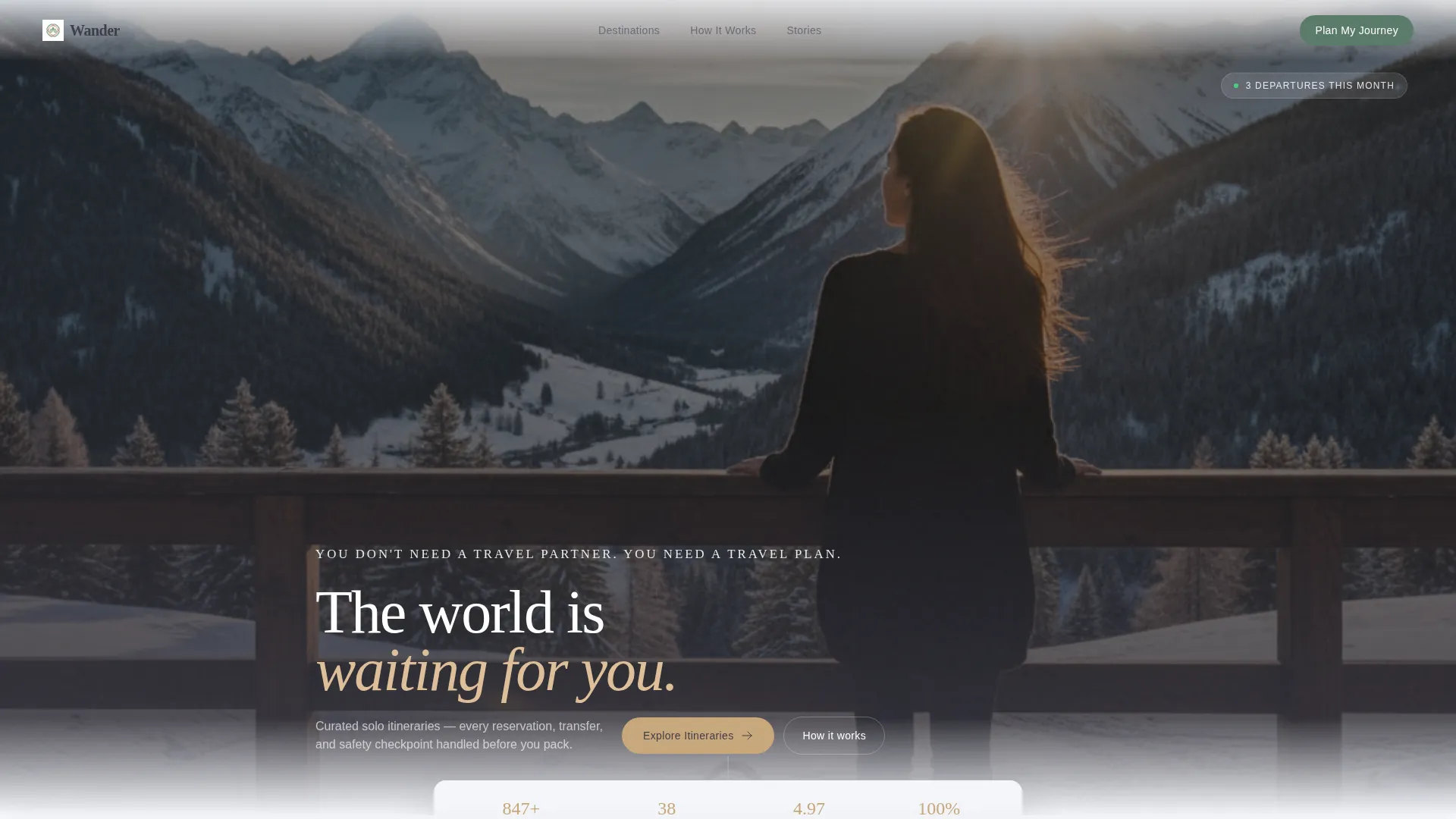
- A cinematic 21:9 panoramic header with a delayed headline fade-in and full edge-to-edge photography
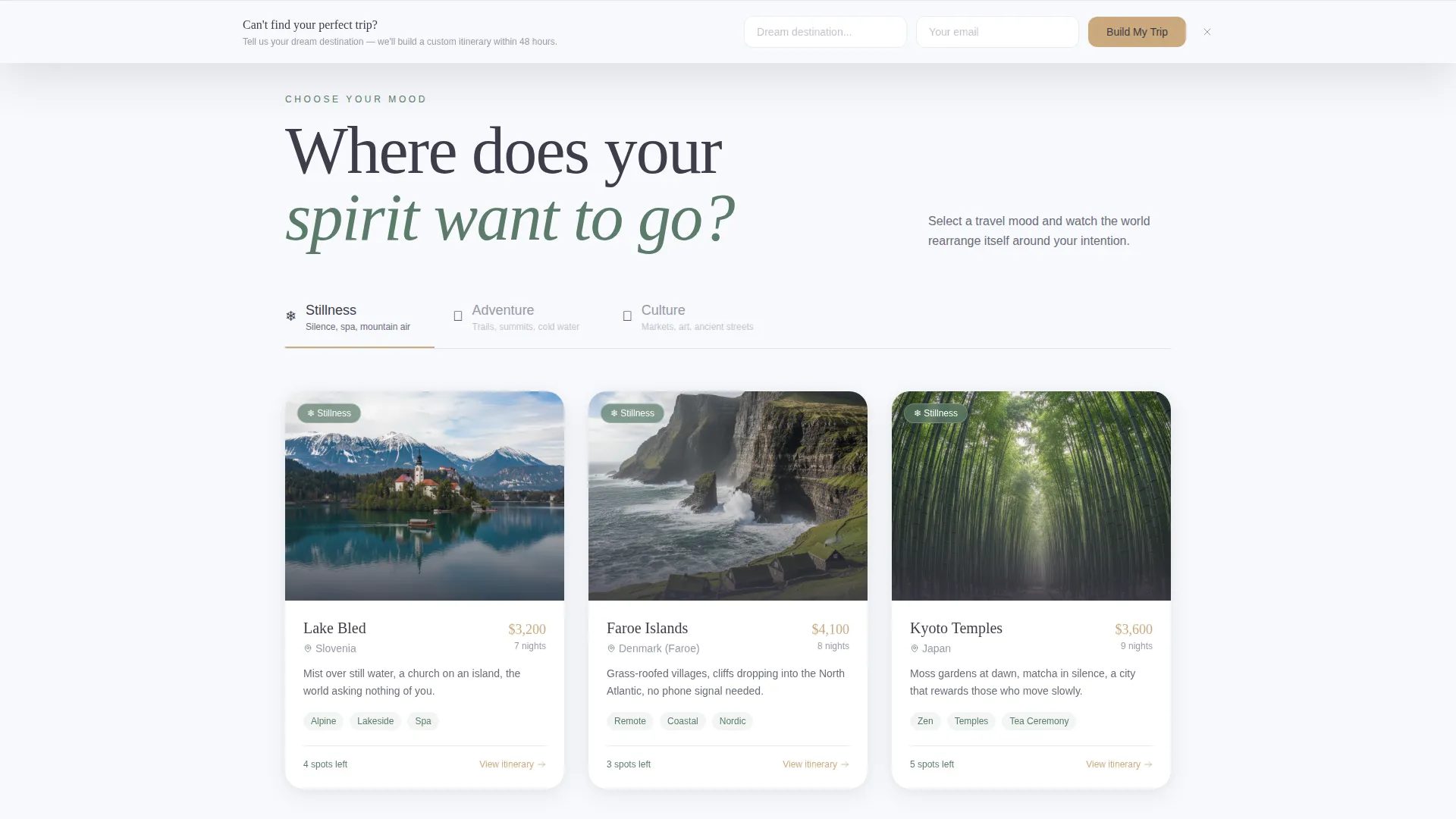
- A mood-selector gallery (Stillness, Adventure, Culture) that reshuffles destination cards dynamically, each card expanding into a full itinerary detail panel
- A two-step booking checkout panel, a persistent custom trip capture bar, and rose-gold call-to-action buttons placed at every natural decision point
Feature list
This template includes purposefully designed features that serve the solo travel buyer journey from first impression to final booking.
Mood-Driven Destination Gallery
Visitors choose a travel mood, Stillness, Adventure, or Culture, and the gallery reshuffles to show relevant destination cards. This keeps the page feeling personal rather than overwhelming.
Expandable Itinerary Detail Panels
Each destination card opens into a full detail panel. It shows a day-by-day breakdown, accommodation photography, and safety notes written specifically for solo women travelers.
Cinematic Panoramic Header
The header uses a nearly 21:9 aspect ratio wide-format photograph. A single headline fades in after two seconds over the sky in thin, tracked-out slate type, creating an immediate emotional connection.
Two-Step Booking Checkout
Each itinerary panel ends with a rose-gold "Book This Journey" button, total price display, and a "What's Included" expandable list. The checkout collects travel dates, name, passport country, dietary needs, and emergency contact in two clean steps.
Persistent Custom Trip Bar
A bottom bar appears for visitors who browse three or more destinations without booking. It captures their email and dream-destination input and sets up a personal itinerary proposal within 48 hours.
Destination Card Micro-Interactions
Hovering a destination card lifts it slightly and reveals the local temperature and best travel month underneath. These small interactions reward curiosity and keep visitors engaged deeper into the page.
Page sections overview
| Section | Purpose |
|---|---|
| Panoramic Hero Header | Opens with a full-width cinematic photograph and a delayed fade-in headline |
| Mood Selector Bar | Lets visitors filter the gallery by travel mood before scrolling |
| Destination Gallery Grid | Displays reshuffled destination cards based on selected mood |
| Itinerary Detail Panel | Expands per destination with day-by-day plan, photos, and safety notes |
| Booking Checkout Panel | Handles date selection and guest details in two focused steps |
| Custom Trip Capture Bar | Persistent bottom bar that collects email and dream destination input |
Design & branding system
The visual identity follows a Luxe Minimal theme using the Alpine Fresh color system. Every color has a clear role, and nothing competes for attention without earning it.
- Glacier white (#F7F9FC) backgrounds and generous negative space keep the layout calm and editorial; soft pine (#5B7B6A) anchors section dividers and iconography
- Slate rock (#3D3D4A) carries all body text for clean legibility against the white canvas
- Rose-gold (#C9A87C) appears only on pricing, call-to-action buttons, and hover states, making every appearance feel intentional and rewarding
Mobile & speed optimization
The template is designed to translate its editorial desktop experience cleanly to smaller screens. The gallery, detail panels, and booking flow all adapt without losing their sense of quality.
- The cinematic header scales gracefully on mobile, preserving the wide-format photograph crop and the delayed headline animation
- Destination cards stack vertically in a single column on smaller screens, keeping the mood-filter and card interactions fully accessible by touch
- The persistent custom trip bar remains visible on mobile scroll without obscuring the main content area
How this template helps you convert
Every design and layout decision in Wander points toward one outcome: a visitor who arrives curious leaves with a booking or a qualified lead captured.
- The mood selector creates an immediate sense of personalisation, reducing the feeling that the visitor is browsing a generic catalogue and increasing time spent on relevant itineraries
- Each itinerary detail panel ends with a clear price, a "What's Included" list, and a prominent rose-gold booking button, removing the need for a visitor to navigate away to find what they need
- The persistent custom trip bar acts as a secondary conversion path, ensuring that even undecided visitors leave a usable lead rather than simply bouncing
Other information about this template
This template is part of a gallery and detail landing page style, designed for direct sales within the Travel and Hospitality category. It is specifically matched to the Solo Female Travel niche and the Travel Blog and Guide subcategory.
- The template style is Gallery and Detail, meaning it combines a browsable collection view with deep per-item content panels in a single page structure
- The Interactive Explorer creative direction is baked into the mood selector and card expansion mechanics, making the scroll feel like a guided journey rather than a static brochure
- The Panoramic and Wide header concept is implemented at a cinematic 21:9 aspect ratio, a deliberate choice that sets the emotional register of the entire page from the first second
Theme
Luxe Minimal
Creative direction
Interactive Explorer
Color system
Alpine Fresh
Style
Gallery + Detail
Direction
Direct Sales
Page Sections
Mood-driven Destination Gallery
Expandable Itinerary Detail Panels
Cinematic Panoramic Header
Two-step Booking Checkout Panel
Persistent Custom Trip Capture Bar
Destination Card Micro-interactions
Related questions
What kind of travel brand is this template designed for?
Can I replace the destination cards and itinerary panels with my own trips?
How does the two-step booking checkout work?
What triggers the custom trip capture bar at the bottom of the page?
How are destinations assigned to the mood-filter gallery?