Vow - Elegant Coordinator Landing Page Template
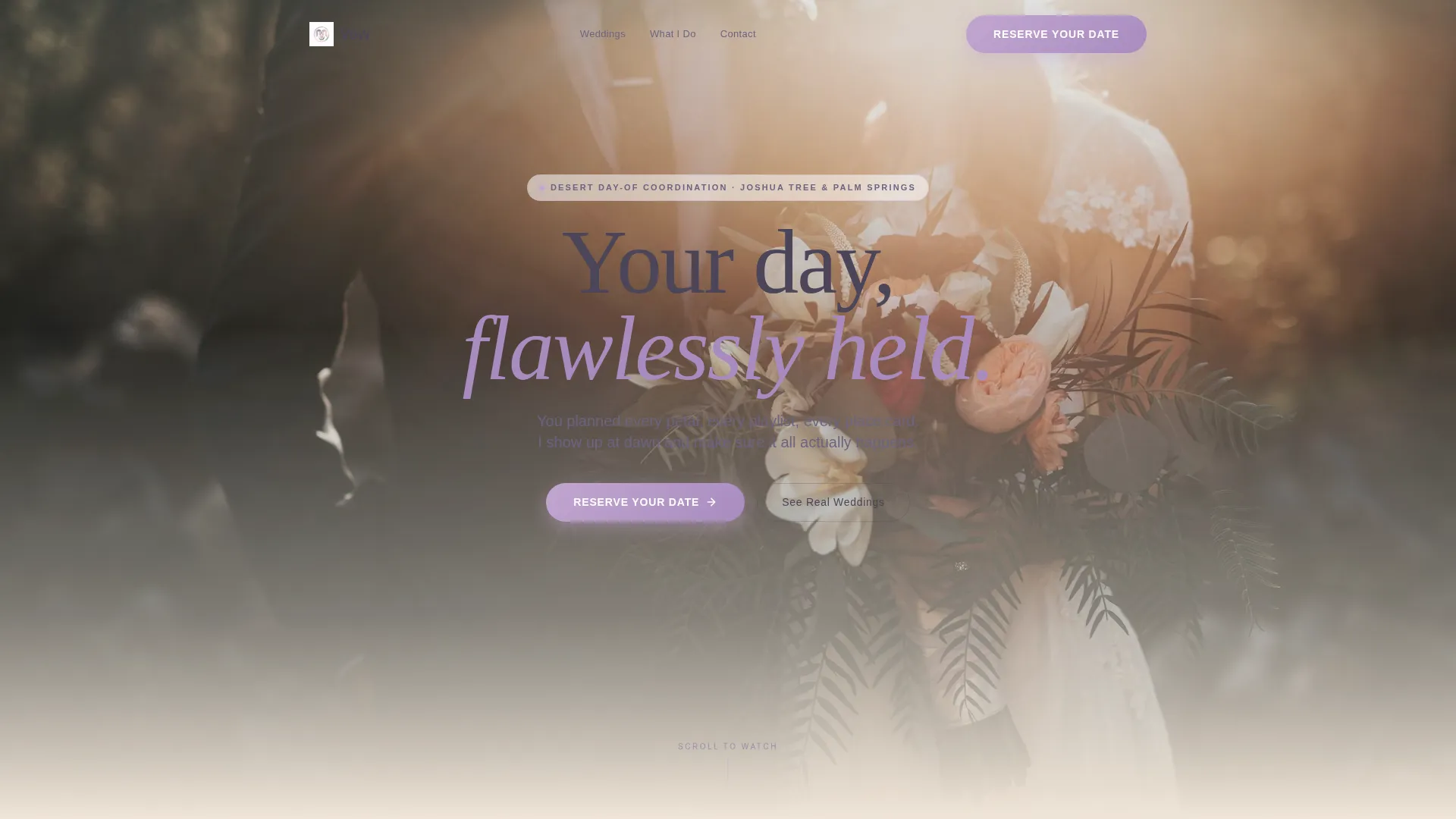
Vow is an overlap/layered landing page template built for desert wedding day-of coordinators. It combines a scroll-triggered video header, a community gallery of layered wedding cards, and a focused lead generation form. The warm Lavender Dream color palette and soft gradient design give the page a golden-hour feel that builds immediate trust with couples.
by Rocket studio
Quick summary
Vow is a single-page template designed for a desert wedding day-of coordinator. It opens with a scroll-controlled video of an empty ceremony setup, then walks visitors through a layered gallery of past weddings. Every section builds confidence and moves couples toward one clear action: reserving their date.
Who this template is for
This template is built for a working day-of coordinator serving couples at desert venues. It speaks directly to the people who planned every detail themselves but need a calm professional to run the day.
- Couples who have handled their own planning but need expert execution on the wedding day
- The DIY bride with a detailed spreadsheet, the anxious groom, and the involved mother-of-the-bride
- A solo coordinator or small coordination team operating in desert or outdoor venue markets
What problem this template solves
Most coordinator websites struggle to communicate the emotional value of having someone hold the clipboard while you exhale. Generic portfolio pages fail to show couples the real, lived experience of working with a coordinator.
- Couples can't picture what "day-of coordination" actually looks like until they see real weddings and real results
- Coordinators lose leads because their contact forms ask too much too soon, before trust is established
- A coordinator's warmth and competence are hard to convey with static text and a basic gallery grid
What you get with this template
This template delivers a complete, single-page lead generation experience tailored to desert wedding coordination. Every section is purposeful, warm, and built around social proof.
- A scroll-triggered video header that plays through the arc of a wedding day as the visitor scrolls
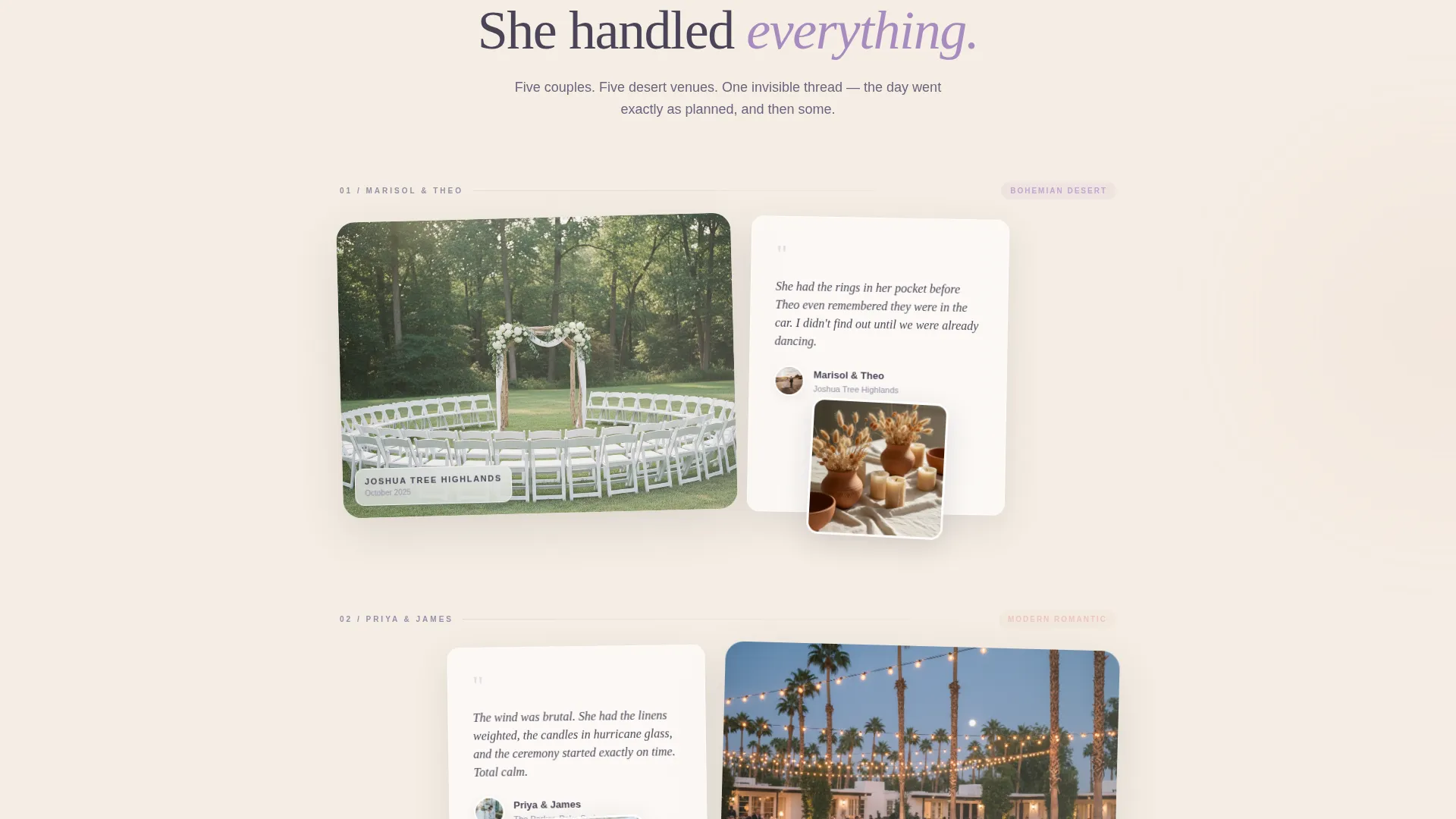
- A community gallery section with layered, overlapping cards showing past couples' weddings, photos, and testimonials
- A lead capture form asking for wedding date, venue, guest count, and a vision field, plus a secondary PDF checklist opt-in
Feature list
This template is assembled from purpose-built sections that work together to earn trust and generate qualified inquiries. Each feature serves a specific role in the visitor's journey from arrival to action.
Scroll-Triggered Video Header
The page opens on a still, sun-drenched wide shot of a desert ceremony setup. As the visitor scrolls, the video advances frame by frame, showing a coordinator adjusting details, guests arriving, and the scene resolving into a perfect first look. Scroll speed controls the timeline.
Layered Community Gallery
Past weddings are presented as stacked card layers. Each entry shows a couple's photo overlapping their testimonial, which in turn overlaps a detail shot of their tablescape. Five or six wedding entries scroll in sequence, each from a different desert venue, each feeling like a personal album shared by a friend.
Floating and Anchored Call-to-Action
A "Reserve Your Date" button appears as a floating element after the third gallery card. It then reappears as the anchor of the final page section. This dual placement ensures the primary action is always within reach without feeling aggressive.
Qualifying Lead Capture Form
The form asks for wedding date first, treating urgency as the natural opening question. It then collects venue name or location, estimated guest count, and a free-text "Tell me about your vision" field. The form closes with the line: "I'll respond personally within 24 hours."
Secondary PDF Opt-In Path
A second conversion path lets couples download a "Desert Wedding Day-Of Checklist" PDF in exchange for their email address. This captures visitors who are still in the planning phase and not yet ready to book, keeping them in the coordinator's orbit.
Soft Gradient Overlap Layout
Cards and sections are layered using a frosted lilac treatment that creates visual depth. Hover states shift into deeper violet tones. Backgrounds transition in gradients from warm sand to pale desert rose, giving the page its distinctive watercolor-on-linen feel.
Page sections overview
| Section | Purpose |
|---|---|
| Scroll-Triggered Header | Opens the page with a scroll-controlled desert ceremony video |
| Coordinator Introduction | Establishes the coordinator's voice, presence, and specialty |
| Community Gallery Cards | Builds trust through layered real-wedding stories and testimonials |
| Floating Reserve Button | Surfaces the primary call-to-action mid-scroll without interrupting flow |
| Lead Generation Form | Qualifies and captures couples ready to reserve their date |
| PDF Checklist Opt-In | Converts early-stage planners with a useful, low-commitment offer |
| Footer Anchor Section | Reinforces the primary call-to-action and closes the page |
Design & branding system
The Lavender Dream palette is built around four tones that mirror the desert landscape at golden hour. The visual treatment feels handcrafted rather than corporate, making the coordinator feel approachable and skilled.
- Colors: dusty lilac (#C3A6D1), pale desert rose (#E8C8C0), warm sand veil (#F5EDE3), and deep twilight sage (#4A4458) for text and anchoring elements
- Backgrounds shift in gradients from sand to rose, with frosted lilac cards floating above the base layer
- Hover states bloom from soft lilac into deeper violet, responding to interaction like a desert wildflower opening at dusk
Mobile & speed optimization
The overlap and layered card design is structured to translate cleanly across screen sizes. The scroll-triggered video header and stacked gallery cards are built for a smooth experience on both desktop and mobile viewports.
- Layered card stacks reflow gracefully for smaller screens without losing the scrapbook depth effect
- The floating "Reserve Your Date" button remains accessible during mobile scroll, keeping the primary action visible
- The lead form fields are ordered by priority, keeping the most important question first regardless of screen size
How this template helps you convert
Vow is designed around a single business outcome: turning a curious couple into a qualified inquiry. Every design and content decision supports that goal without pressure or confusion.
- The scroll-triggered video and community gallery build emotional confidence before any ask is made, so by the time visitors reach the form they already feel like they know the coordinator
- The two-path conversion strategy captures both ready-to-book couples through the "Reserve Your Date" form and early-stage planners through the PDF checklist opt-in, maximizing the value of every visit
Other information about this template
This template is part of the Wedding and Events category, sitting within the Wedding Venue Services subcategory. It is built specifically for the desert wedding venue day-of coordinator niche.
- Template style: Overlap/Layered with a Soft Gradient theme
- Creative direction: Community Gallery, using real wedding stories as the primary trust mechanism
- Header concept: Scroll-Triggered Video, giving visitors a cinematic introduction to the coordinator's work
- Color system: Lavender Dream, a four-tone desert palette designed to feel warm, intimate, and professionally distinct
- The template is matched to a Lead Generation landing page direction, meaning every section has a role in moving visitors toward the contact form or the PDF opt-in

Theme
Soft Gradient
Creative direction
Community Gallery
Color system
Lavender Dream
Style
Overlap/Layered
Direction
Lead Generation
Page Sections
Scroll-triggered Video Header
Layered Community Gallery
Dual Call-to-action Placement
Qualifying Lead Capture Form
PDF Checklist Opt-in Path
Soft Gradient Overlap Design
Related questions
Can I replace the scroll-triggered video with a photo if I don't have footage?
How many past weddings can I feature in the community gallery?
What information does the lead capture form collect?
Can the template capture leads from couples who are not ready to book?
Does this template include pricing tiers or service packages?



