Voice-Activated CPQ Comparison Table Landing Page
Voicequote is a voice-activated CPQ comparison table landing page template built for industrial sales teams who quote on-site and at speed. Sales reps speak product specs aloud, watch line items populate in real time, and send polished proposals without touching a dropdown. The template covers hero, comparison table, spec sheet, workflow, testimonials, and app download sections in one focused page.
by Rocket studio
Quick summary
Voicequote is a focused, single-page template designed for teams that live and die by quote speed. Field sales engineers, inside sales reps, and channel partners can watch the entire configure-price-quote (CPQ) flow unfold through spoken commands. The template bundles a hero screenshot, animated comparison table, metric-led spec sheet, three-step workflow, social proof, and a friction-light app download call to action into one high-impact page.
Who this template is for
This template is built for B2B sales professionals and the teams that support them. It targets people who generate complex industrial quotes under real time and location constraints. The design and copy framework assumes users are busy, mobile-first, and highly motivated by measurable speed gains.
- Field sales engineers who quote complex industrial assemblies on-site without access to a desktop catalog
- Inside sales teams burning through fifty or more quotes per shift and looking for any way to reduce the click-and-scroll stress of nested dropdown navigation
- Channel partners who need accurate pricing and discount tiers without memorizing every product configuration
What problem this template solves
Most traditional CPQ tools force users to navigate layer after layer of dropdown menus. That mentality works fine in an office. It breaks down entirely the moment a field engineer is standing in a plant, holding a tablet, and trying to close a deal in under five minutes. The stress of manual data entry compounds across a full shift. Errors creep in. Deals slow down. Rep adoption suffers.
This template directly addresses those friction points. It creates a visual case for switching to voice-activated quoting by showing the evidence clearly and immediately.
- Removes dropdown navigation stress by demonstrating how speaking a spec populates line items without any clicking
- Makes the speed advantage visible through an animated comparison table that contrasts voice quoting against manual entry and traditional CPQ on speed, error rate, and rep adoption
- Reduces onboarding barriers by walking users through a simple three-step workflow: Speak, Populate, and Send
What you get with this template
The template delivers a complete, production-ready landing page layout. Every section has a defined purpose and a clear visual direction. You get structured content blocks, pre-built component zones, and a consistent design system that you can immediately apply to a live CPQ product page.
- Five core content sections including a hero dashboard screenshot, animated comparison table, spec sheet with four metric blocks, sticky three-step workflow, and a social proof plus app download block
- A sticky mobile call to action bar with the primary download button anchored at the bottom of the screen for field users on mobile devices
- App store badges, a QR code zone, and a single email input field that keep the conversion path short and the friction limited to one step
Feature list
This template was built to display a voice-activated CPQ platform in the most compelling, data-dense format possible. Each feature block below reflects a specific design or functional component present in the template.
Animated Hero Dashboard Screenshot
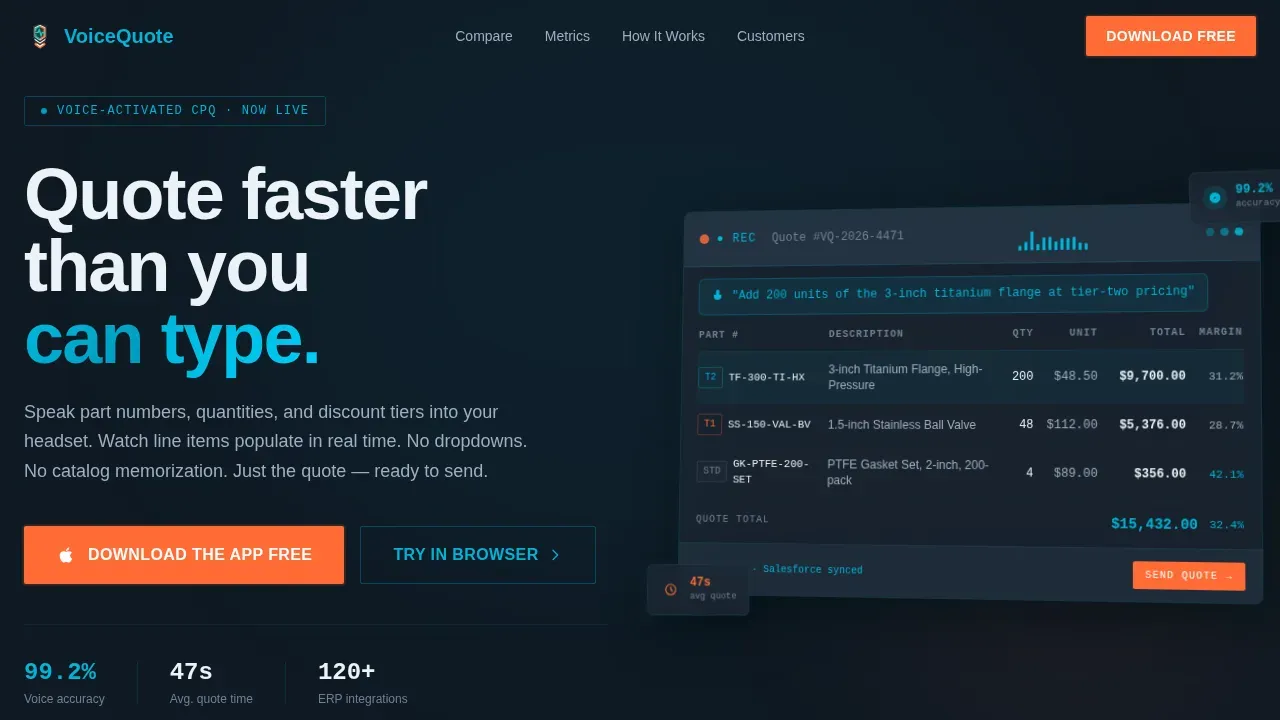
The hero section display opens with a pixel-perfect CPQ dashboard screenshot placed at a subtle isometric angle. A microphone waveform pulses in the top bar. Three line items are already populated with part numbers, unit costs, and margin percentages. A speech bubble floats above the waveform reading a spoken quote command. The corresponding row highlights in teal as numbers animate into place. The headline beside it reads: "Quote faster than you can type." This opening frame is designed to draw users in within the first two seconds and make the core value proposition immediately obvious.
Animated CPQ Comparison Table
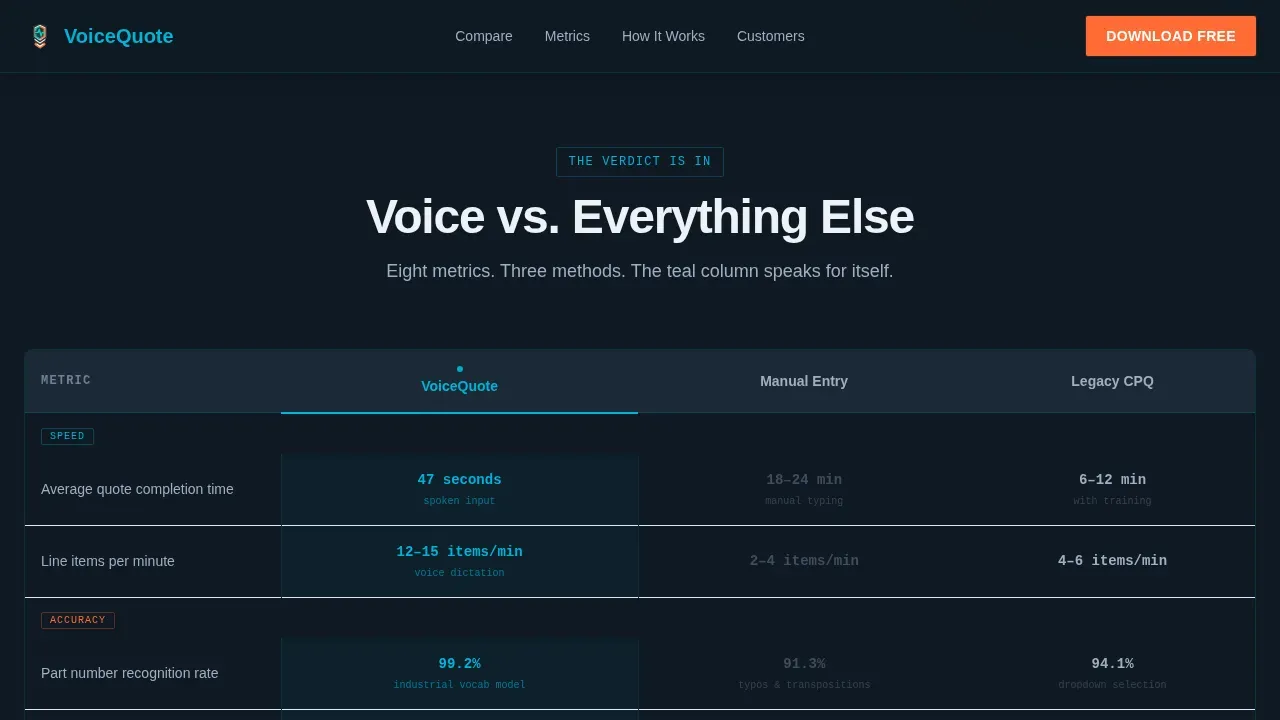
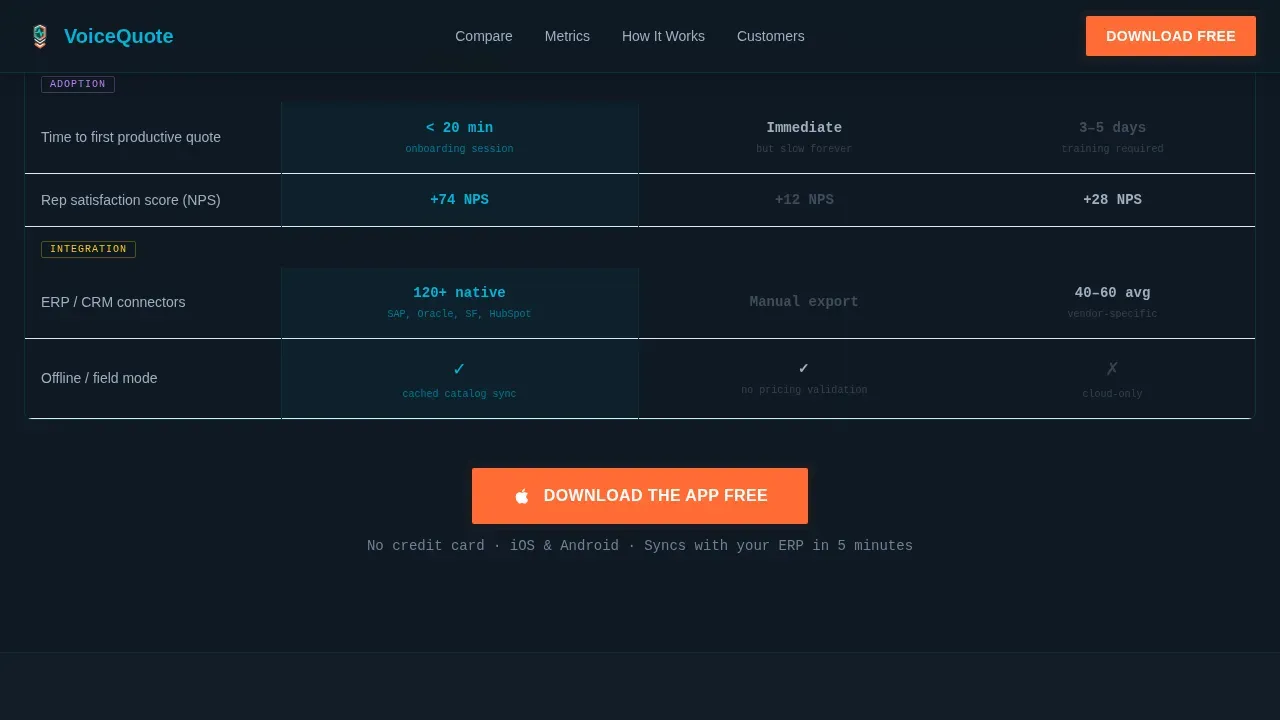
The comparison table section is the strategic centerpiece of this template. It pits voice-activated quoting against manual entry and traditional CPQ across three key dimensions: speed, error rate, and rep adoption. Teal check marks identify the winning data points. Grayed-out Xs flag the gaps in competing approaches. The table animates on scroll so each row reveals itself as the user reads down the page. This format makes the verdict instant without requiring the visitor to process lengthy paragraphs.
Spec Sheet Metric Blocks
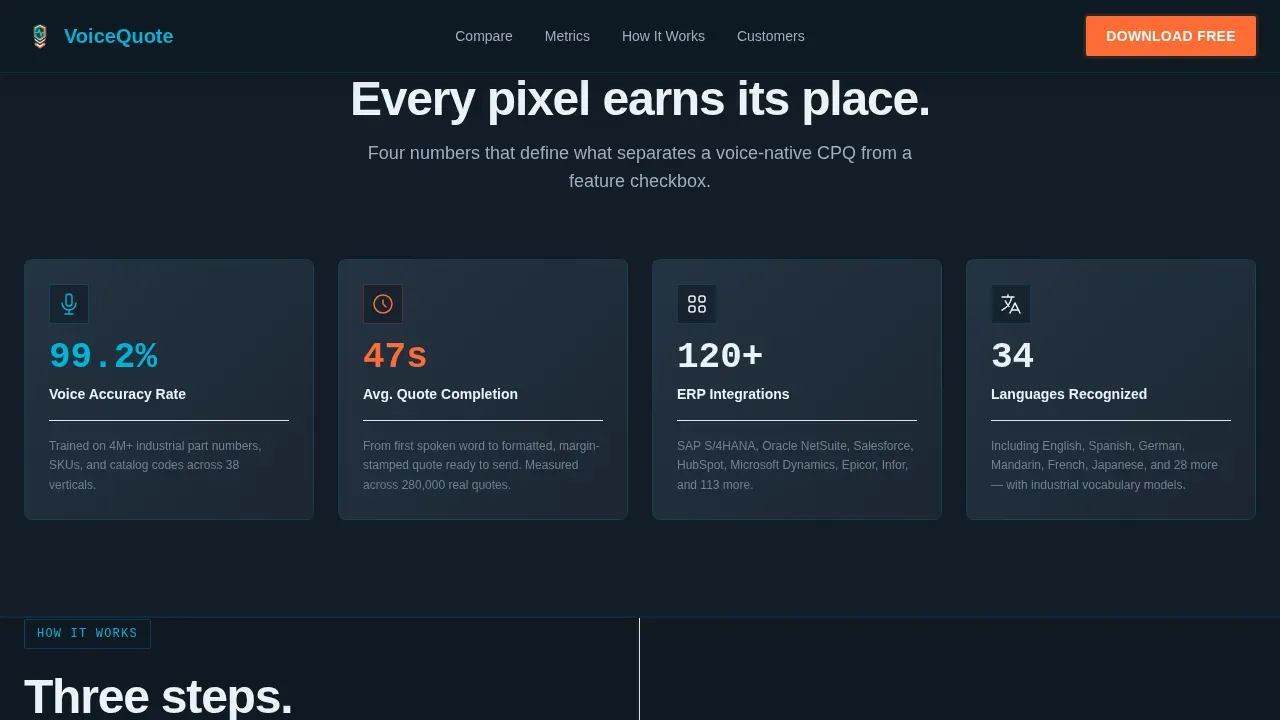
The spec sheet section bundles four metric blocks into a data-dense layout. Each block displays a headline metric, a micro-screenshot, and a one-line capability statement. The four metrics cover voice accuracy rate (99.2%), average quote completion time (47 seconds), ERP integrations supported, and languages recognized. This section emphasizes proof over promise and helps validating buyers confirm that the platform performs at the level their operations require. Each metric is set in JetBrains Mono for that data-terminal authenticity that tech-forward industrial sales teams recognize immediately.
Sticky Three-Step Workflow Section
The workflow section uses a sticky split layout to walk users through the entire CPQ process in three labeled steps: Speak, Populate, and Send. As the user scrolls, the active step stays anchored while the detail panel updates beside it. This format is particularly effective for users who are navigating a new product and need to understand the process before committing. The workflow section breaks down what could feel like a complex implementation into a sequence any rep can picture doing on their next call.
Social Proof and Testimonial Block
The social proof section uses role-specific testimonials paired with company names and specific performance metrics. Each testimonial is tied to a recognizable sales role, so prospective users can find someone who reflects their own situation. This section is positioned just before the final call to action block. It serves as the final layer of validating evidence before a visitor decides to sign up or download the app.
App Download Call to Action Block
The app download section reduces conversion friction to its absolute minimum. The primary call to action button reads "Download the App Free" and appears in conversion orange. It is anchored in a sticky bottom bar on mobile and repeated after the comparison table and final testimonial block. A secondary call to action offers "Try Voice Quoting in Browser" for desktop visitors not ready to install. App store badges for iOS and Android sit beside a QR code. The only form field is a work email input for account sync.
Page sections overview
| Section | Purpose |
|---|---|
| Hero Dashboard | Opens with waveform screenshot and headline to create immediate product clarity |
| CPQ Comparison Table | Contrasts voice, manual, and traditional CPQ across speed, error, and adoption |
| Spec Sheet Metrics | Displays four quantified capability blocks with accuracy, time, integrations, and languages |
| Sticky Workflow Steps | Walks users through the Speak, Populate, and Send process in a sticky split layout |
| Social Proof Block | Delivers role-specific testimonials with named companies and performance data |
| App Download call to action | Anchors the conversion path with orange call to action button, app badges, QR code, and single email input |
| Linear Footer | Closes the page with a single-row footer following Pattern 1 layout |
Design & branding system
The visual identity follows the Dashboard Pro theme with the Teal Catalyst color system. The overall feel is mission-control dark: data-dense, focused, and built to make every bright pixel earn its place. The palette and typography choices reinforce the product's positioning as a serious industrial sales tool, not a consumer app.
- Color palette: Deep command-center charcoal (#1B2631) as the primary background, catalyst teal (#00B4D8) for active states and data highlights, signal white (#EDF2F7) on card surfaces, and conversion orange (#FF6B35) reserved exclusively for call to action buttons and alert badges
- Typography: DM Sans for all headings and body copy to keep reading clean and fast; JetBrains Mono for data values, metrics, and code-style display fields to reinforce the technical precision of the CPQ platform
- Visual style: Isometric screenshot angles, subtle charcoal drop shadows, animated waveform pulse, scroll-triggered number count-up animations, and beam animations on active state transitions
Mobile & speed optimization
A mobile-first responsive design is essential for voice interactions. Field sales engineers are rarely sitting at a desk when they need to quote. They are standing on a plant floor, walking a warehouse, or sitting in a vehicle between site visits. The template is built with that physical context in mind. Touch-friendly buttons and layout width choices make the template usable with one hand on a mobile screen.
- Sticky mobile call to action bar: The "Download the App Free" button stays anchored at the bottom of the mobile screen throughout the scroll, so users never have to hunt for the next step
- Server and client component split: Static sections like the hero and footer use server components for faster initial display; interactive sections like the animated comparison table and waveform use client components to keep animations smooth without blocking the page load
How this template helps you convert
Effective call to action strategies guide potential consumers through the buying journey. This template is structured to move a skeptical sales leader from curiosity to conviction without ever asking them to do more than one thing at a time. Focusing on a single primary call to action can increase clicks by up to 371% and sales by up to 1617%, which is exactly why the template reserves conversion orange for the download button only.
- The hero creates immediate context. A visitor lands, sees the CPQ dashboard mid-quote, reads the headline, and understands the core value proposition in under three seconds. No paragraph of text is required.
- The comparison table removes objections. By the time a visitor reaches the animated table, they can see exactly how voice quoting stacks up against the tools they already use. The teal check marks and grayed-out Xs do the convincing. Using high-contrast colors for call to action buttons and data indicators enhances visibility and drives faster decisions.
- The app download block closes the loop. The final section brings a visitor to a decision point with minimal friction: one email field, one primary button, one QR code. calls to action should be simple and clear, and "Download the App Free" meets that standard directly. A/B testing different call to action designs on this block can help teams find which button copy or badge layout performs best for their specific audience.
Other information about this template
This section covers additional context that helps buyers understand how this template fits into the broader CPQ software landscape and what to expect during implementation and use.
Voice-activated CPQ solutions streamline the quoting process by allowing users to create quotes through natural language interactions. CPQ adoption typically results in a 105% increase in average deal size, which emphasizes why the comparison table section of this template focuses so heavily on deal speed and rep adoption data. Salesforce CPQ provides tools for creating customized quote templates to enhance proposal documents, and template content records in Salesforce CPQ allow admins to build a library of reusable pieces. The Voicequote voice activated CPQ comparison table landing page template is designed to support teams navigating that kind of environment, whether they run Salesforce CPQ, a custom ERP integration, or another platform entirely.
Users can access Salesforce data and manage opportunities through voice commands in voice-activated CPQ solutions. The implementation of voice-activated CPQ solutions typically takes three to six weeks, depending on the complexity of the existing CPQ setup. Salesforce CPQ's implementation timeline for customized quote templates typically ranges similarly, from three to six weeks. Salesforce CPQ enables the use of merge fields to dynamically insert data into quote templates during proposal generation, and the AI capabilities in Salesforce CPQ can automate the quote creation process, reducing the need for manual input and navigation. Salesforce CPQ allows users to create multiple quotes in one request, streamlining the quoting process for sales teams. Organizations already in the Salesforce ecosystem will find these capabilities align well with what the template's comparison section is designed to highlight.
The architecture of voice-activated CPQ solutions respects existing business rules and security requirements while enhancing user experience. Security and compliance concerns are real for industrial sales organizations, and this template's design framework anticipates that by keeping the conversion path to a single email input with no unnecessary data collection points. Voice-activated CPQ solutions can integrate with various communication platforms, allowing users to interact with CPQ data flexibly. The template's infrastructure assumptions are compatible with teams that already bundle their CPQ with ERP or CRM systems.
- Workplace stress context: Research shows seventy-five percent of Nigerian employees experience significant work-related stress well above the global average, and digital tool adoption in high-stress sales environments faces similar resistance. Women in Nigeria face 8% higher burnout rates compared to men due to caregiving responsibilities and workplace bias, which is a relevant reference point for organizations designing inclusive sales tools and training programs. Stress reduces the willingness to adopt new tools, which is why this template emphasizes how few steps it takes to generate a quote by voice.
- Template style and theme: This template uses the Comparison Table style with the Dashboard Pro theme, making it directly suited for companies that need to display competitive positioning data in a visually compelling, data-dense format.
- Customization and code: The template uses DM Sans and JetBrains Mono as its type system. Admins can review and update color values and copy blocks to match their brand without needing to rewrite the underlying code structure. Users interested in deeper customization can access the component-level code directly.
- call to action design research: Personalized calls to action perform 202% better than basic calls to action. Creating a sense of urgency in calls to action can encourage the audience to act promptly. Using action verbs in calls to action can increase conversion rates by up to 12.7%. Pop-ups can capture attention effectively and have an estimated conversion rate of 1 to 8%. These principles are built into the template's sticky mobile bar and repeated call to action placement strategy.
- Industries and use cases: This template is suited for companies operating in industrial manufacturing, distribution, aerospace components, and related industries where field quoting is a daily operational requirement. Retail and consumer-facing sales teams may find the dashboard aesthetic less aligned with their brand, but the comparison table framework can serve any business that needs to draw a clear contrast against competing solutions.
- Future expansion: The page layout is designed with future section additions in mind. Teams interested in adding video demos, ROI calculators, or additional testimonial rows can do so within the existing design framework without breaking the visual hierarchy.
- PROS Smart CPQ focuses on AI-driven dynamic pricing and optimization for margin-sensitive products. NetSuite CPQ features an AI assistant that provides personalized product recommendations based on natural language interactions. Salesforce CPQ is recommended for organizations already in the Salesforce ecosystem needing quick adoption of an AI overlay. These are reference points for buyers evaluating where this template fits within the competitive CPQ landscape.
Theme
Dashboard Pro
Creative direction
Spec Sheet
Color system
Teal Catalyst
Style
Comparison Table
Direction
App Download
Page Sections
Animated Hero Dashboard Screenshot
Scroll-triggered CPQ Comparison Table
Spec Sheet Metric Blocks
Sticky Three-step Workflow Layout
Role-specific Social Proof Block
Friction-light App Download Call to Action Block
Related questions
What sections are included in this template?
Can I use this template without a live voice-activated CPQ product?
How does the animated comparison table display data?
How much effort does customizing this template require?
Is this template optimized for mobile users?



