Expert Eye Care Practice Landing Page Template
Optic is a single-page optometry directory landing page built around a live comparison table, interactive filters, and a code-snippet header animation. It maps eye care providers by insurance, language, availability, and lens specialty. The template targets app launches, directory products, and local eye care services, designed to convert visitors into app downloads before they ever leave the page.
by Rocket studio
Quick summary
Optic is a bold, dark-themed optometry directory landing page. It opens with a terminal animation that types a real search query and resolves it into provider cards. Visitors then explore a live comparison table, a radius map, and a lens-type filter tool, three interactive layers that prove the product's value before any install prompt appears.
Who this template is for
This template fits anyone building a directory or listing product in the eye care space. It is equally useful for app developers, healthcare startups, and local service aggregators who want a high-impact single-page launch presence.
- App founders launching an optometry directory or eye care search tool
- Healthcare product teams promoting a local provider listing service
- Optometry marketing agencies building a conversion-focused landing page for a client
What problem this template solves
Finding a nearby eye doctor who accepts your insurance, speaks your language, and has same-day openings is frustrating. Most people give up before they find the right answer. This template shows visitors that the search problem is already solved, before asking them to download anything.
- Visitors land with no context and leave without converting when a page only describes features
- A static page cannot show how a filterable directory actually feels to use
- Without proof of depth, an app install feels like a leap of faith
What you get with this template
You get a complete, single-page landing page layout built around interactive demonstration and a clear app download path. Every section is designed to let visitors experience the product rather than just read about it.
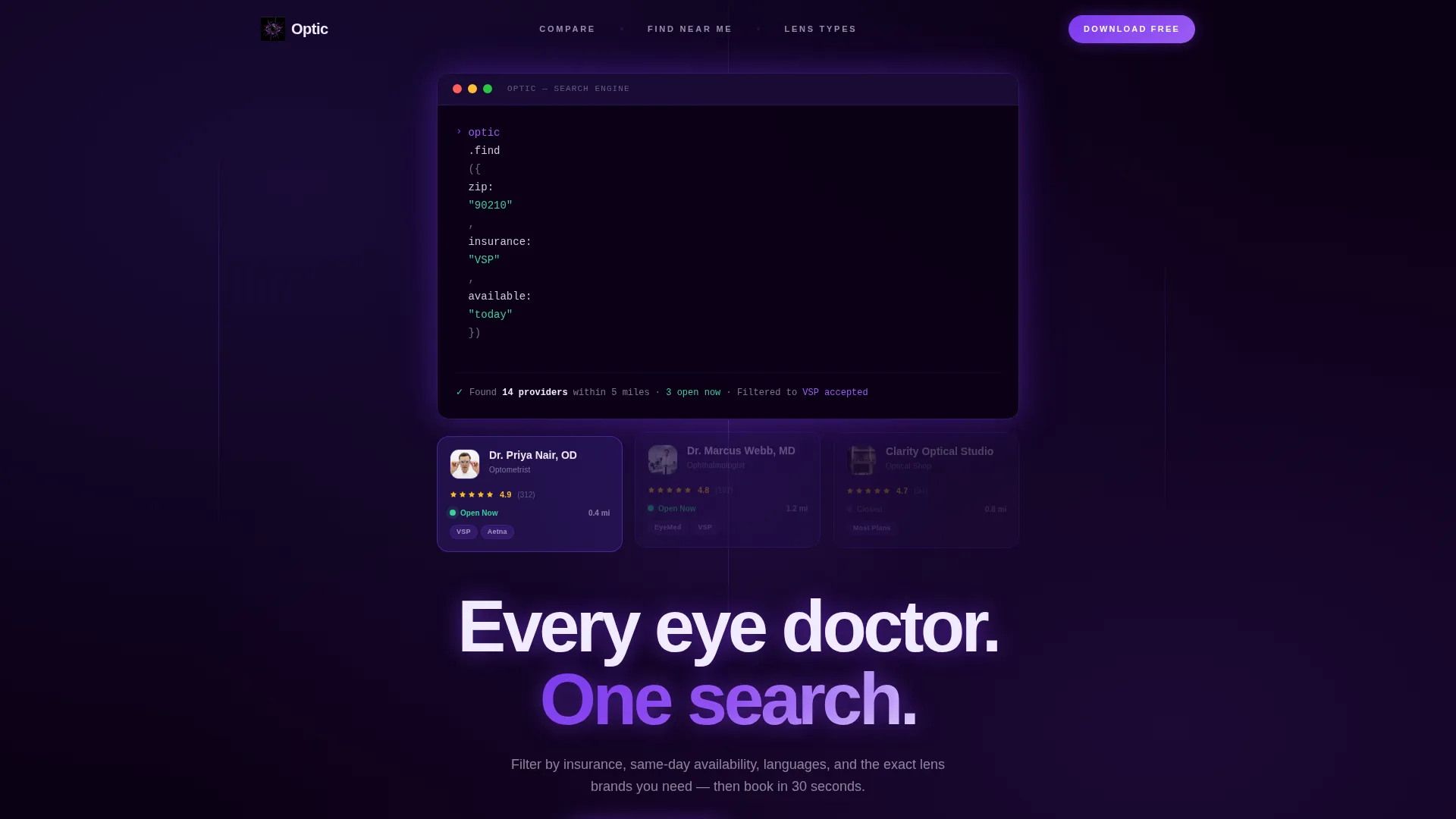
- A code-snippet header animation that live-types a search query and resolves it into real provider cards
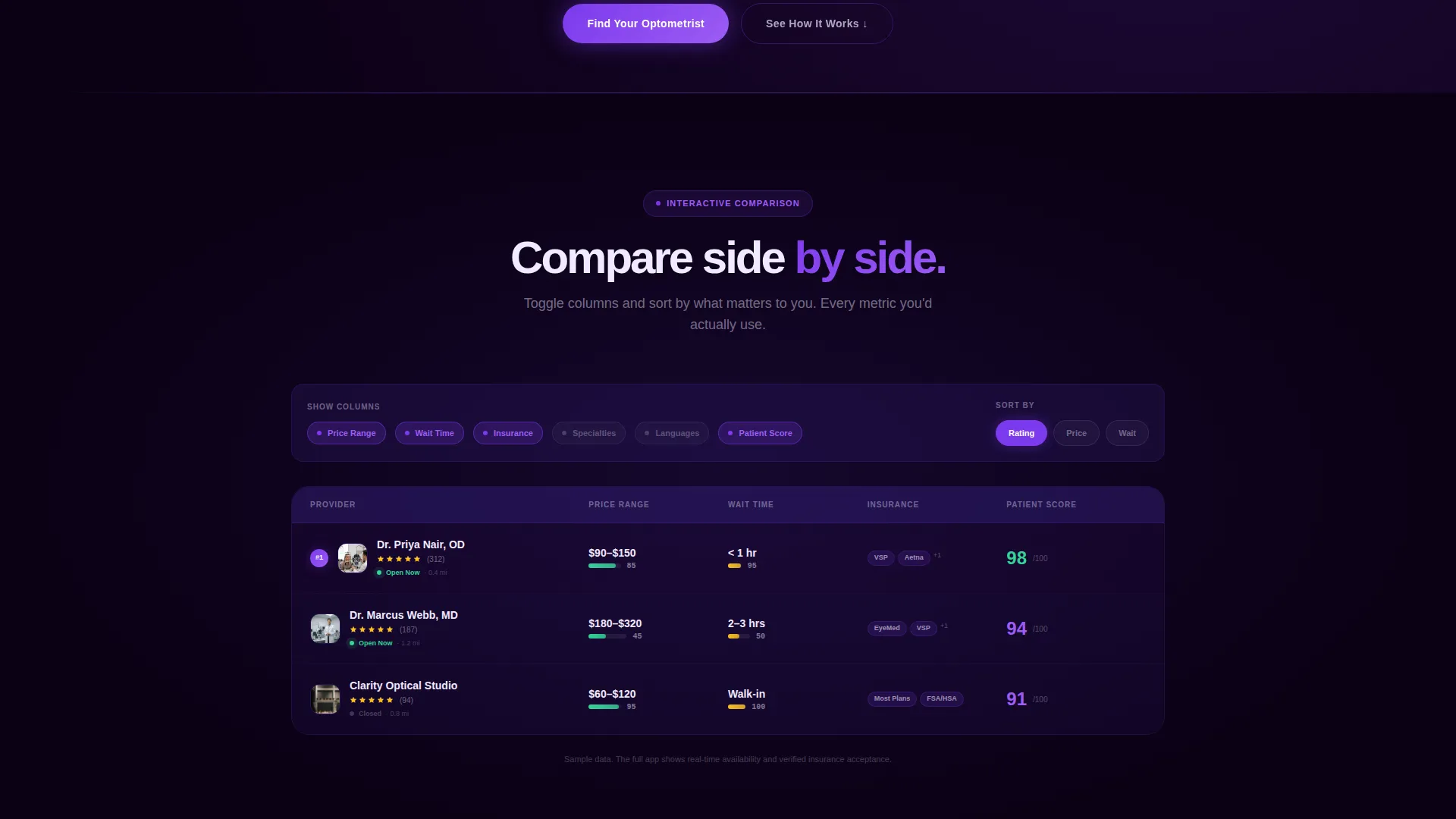
- A comparison table with toggleable columns covering price range, wait times, specialties, and patient ratings
- A radius map section, a lens-type explorer, and a persistent mobile call-to-action bar linking to the App Store and Google Play
Feature list
A focused set of built-in components powers the Optic template. Each one earns its place by directly serving the directory use case.
Animated Code Snippet Header
A stylized terminal window floats over the void-black background. It live-types a search query using realistic syntax, then resolves into a JSON response that populates optometrist cards with names, ratings, distances, and open-now indicators. The four-second animation sells the search engine before a single button is clicked.
Live Comparison Table
Three sample optometrist profiles sit inside a toggleable comparison table. Visitors switch columns between price range, wait times, specialties, and patient ratings. Rows reorder live as filters change, making the table feel like a working product demo rather than a static feature grid.
Interactive Radius Map
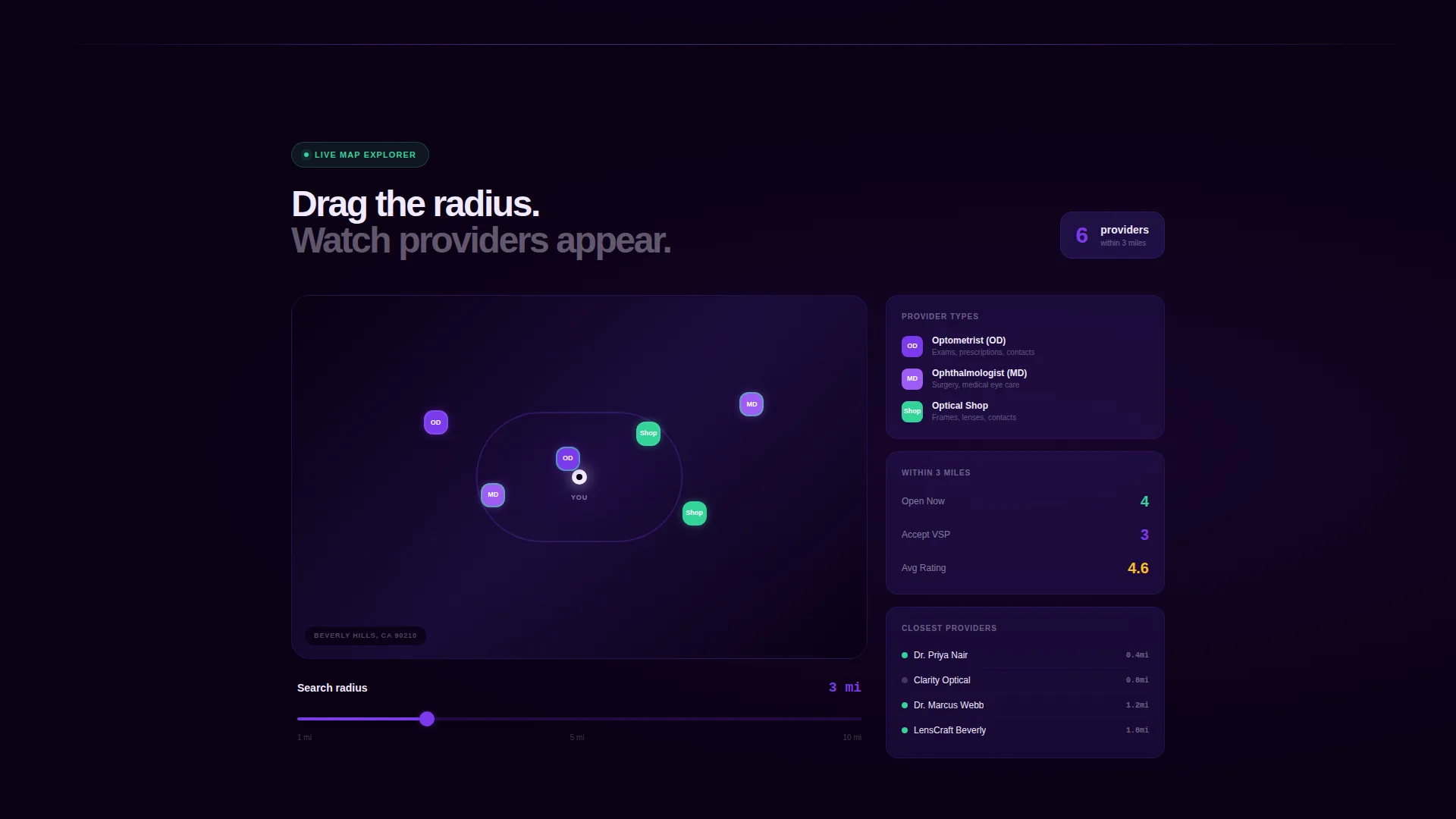
A dedicated section presents a map view with a draggable radius slider. Adjusting the slider populates map pins in real time, visually communicating how the directory scales from a tight neighborhood search to a broader city-wide view.
Lens-Type Filter Explorer
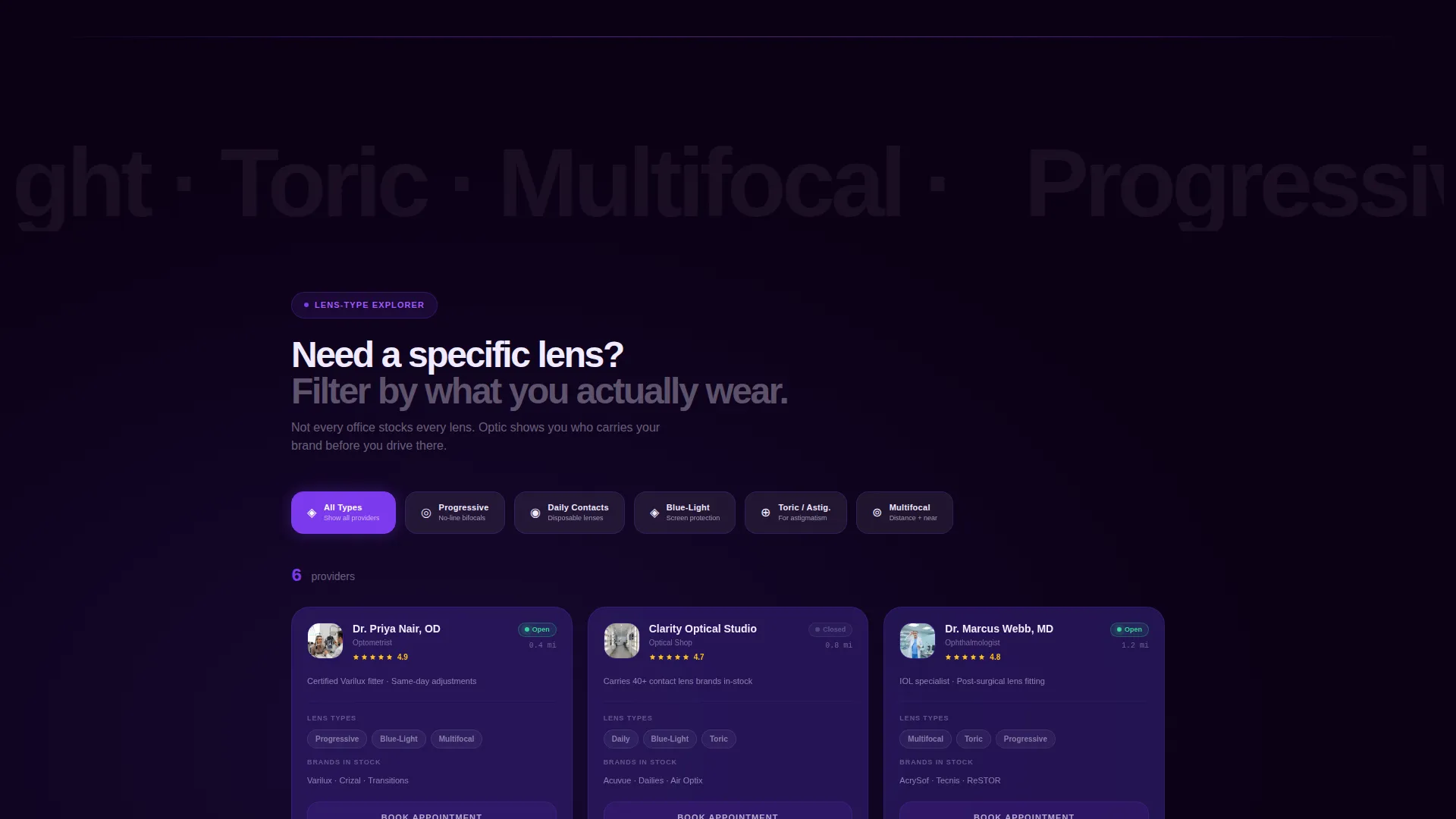
A tappable filter strip lets visitors select lens categories including progressive lenses, daily contact lenses, and blue-light lenses. The directory view updates instantly, demonstrating the specialty filter system that sets this directory apart from generic provider listings.
Persistent App Download Bar
On mobile, a fixed bottom bar stays visible throughout the entire scroll. It carries the primary call-to-action "Find Your Optometrist" with smart OS detection routing visitors to the correct app store. Desktop visitors see a secondary "Text Me the Link" option with a single phone number input field.
Void and Violet Color System
Electric violet hover states, toggle switches, and ranking badges fire against an absolute void-black background. Deep ultraviolet defines card surfaces and table rows. Lens-flare white keeps all typography clinical and sharp. The palette creates contrast that makes every interactive element feel intentional and precise.
Page sections overview
| Section | Purpose |
|---|---|
| Code Snippet Header | Opens with a live-typing terminal animation that resolves into provider cards |
| Comparison Table | Lets visitors toggle columns and reorder provider rows interactively |
| Radius Map View | Shows real-time pin population as the radius slider is dragged |
| Lens-Type Explorer | Filters the directory by lens category with instant visual feedback |
| App Download Bar | Drives installs via a persistent mobile bar and a desktop SMS link option |
Design & branding system
The Tech Glass visual theme treats the interface as a precision instrument. Dark surfaces, luminous accents, and high-contrast typography combine to make every component feel both clinical and futuristic.
- Color system: absolute void black (#0B0014) for backgrounds, deep ultraviolet (#2D1B69) for cards and table rows, electric violet (#7C3AED) for interactive states, and lens-flare white (#F0EAFF) for all text
- Interactive accents: electric violet fires on hover states, toggle switches, and ranking badges throughout the comparison table and filter explorer
- Typography: lens-flare white keeps body copy and data labels razor-legible against the dark palette, maintaining clinical clarity at every scroll depth
Mobile & speed optimization
The template is structured with mobile visitors as the primary conversion audience. The persistent bottom bar replaces the need to scroll back to a call-to-action, and the SMS fallback captures desktop visitors who are not ready to switch devices.
- Persistent bottom navigation bar keeps the "Find Your Optometrist" call-to-action visible at all times on smaller screens
- Smart OS detection routes mobile taps directly to the correct app store without an intermediate step
- Desktop "Text Me the Link" field gives users a frictionless way to move the experience to their phone
How this template helps you convert
The conversion strategy is built on earned trust. Visitors use three interactive tools before they ever see a download prompt. By the time the install call-to-action appears, the product has already proved its value.
- The code-snippet header immediately demonstrates search intelligence, turning an abstract concept into a visible, working result within four seconds of arrival.
- The comparison table and lens-type explorer let visitors filter and interact with real-looking data, so the app feels familiar rather than unknown before it is downloaded.
- The persistent mobile bar and SMS desktop fallback remove every friction point from the final conversion step, meeting each visitor at the right device without extra clicks.
Other information about this template
Optic is built specifically for the optometry directory and listing site niche. It suits teams that need a polished launch page for a tech-forward eye care search product.
- The template style is a comparison table landing page, meaning the interactive table is the structural centerpiece of the scroll experience
- The header concept follows a code snippet format, making it a strong fit for tech-positioned healthcare products targeting digitally confident users
- Template theme is Tech Glass, which pairs well with app-launch contexts where precision and modernity need to come through immediately
- The creative direction is Interactive Explorer, rewarding scroll depth with new tools rather than repeating the same call-to-action
- The landing page direction is App Download, so every design decision flows toward the install moment rather than a form submission or a contact request
Theme
Tech Glass
Creative direction
Interactive Explorer
Color system
Void & Violet
Style
Comparison Table
Direction
App Download
Page Sections
Live-typing Code Snippet Header
Toggleable Comparison Table
Radius Slider Map Section
Lens-type Filter Explorer
Persistent App Download Bar
Related questions
What type of product is this template designed for?
Can I customize the comparison table columns and provider data?
Does the template support both mobile and desktop visitors?
What interactive elements are included in the template?
Is this template suitable for a single eye care practice or clinic?



