IT Services Company Reviews Website Template
Uptime is a dark-theme, card grid landing page built for IT services teams that need to earn trust fast. It combines a terminal typewriter hero, data-profile team cards with cert badges and real-time-styled stats, service capability briefings, and a three-panel app preview that drives Portal App downloads and live dashboard trials.
by Rocket studio
Quick summary
Uptime is a single-page, modular card grid landing page for B2B IT services teams. It opens with a terminal animation hero, moves through engineer data-profile cards and service capability briefings, and closes with a device-aware app download call to action. The design follows a Data Command aesthetic built for credibility and conversion.
Who this template is for
This template is built for IT services businesses that need to present their engineering team as a credible, battle-tested operation. It speaks directly to buyers who are evaluating managed infrastructure providers under pressure.
- CTOs at mid-market firms who recently lost their in-house sysadmin and need an immediate trust signal
- Startup founders whose infrastructure has outgrown ad-hoc fixes and who need a proven team fast
- Office managers who have been handed IT responsibility and want to understand what they are buying before they commit
What problem this template solves
Most IT services pages look like every other corporate site. They lead with stock photography, generic bullet points, and a contact form that goes nowhere. That approach fails buyers who need proof, not polish.
- Buyers cannot assess engineering credibility from a headshot grid and a list of buzzwords
- There is no visible evidence that the team has actually solved problems at scale
- The path from "interested" to "signed up" is too long, with no clear next step
What you get with this template
You get a fully structured, single-page layout that presents your team and services the way a technical buyer expects: with data, specifics, and a direct action to take. Every section is modular and designed to be edited to fit your team's real stats and service areas.
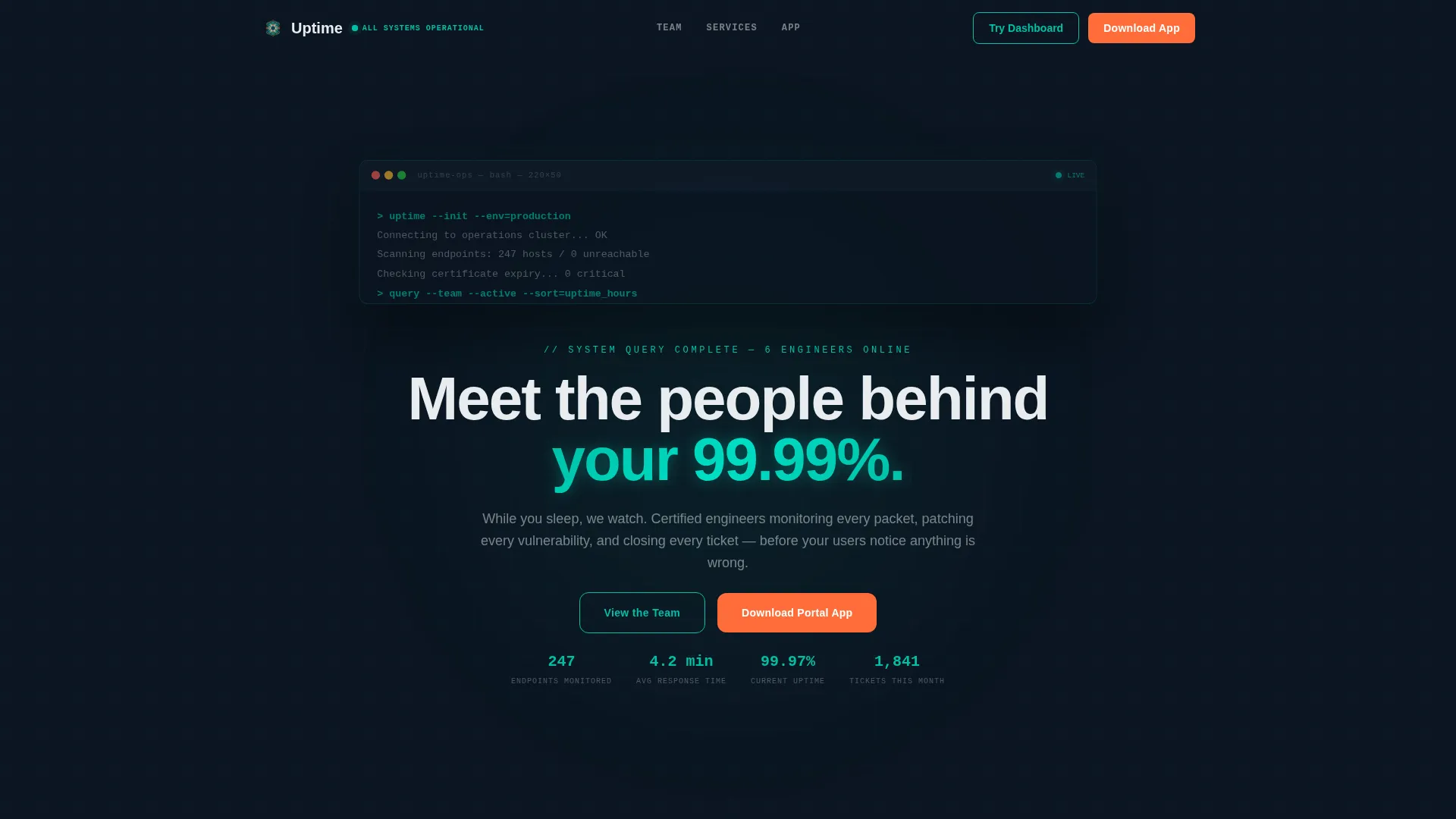
- A terminal typewriter hero section that animates team member handles before revealing the primary headline
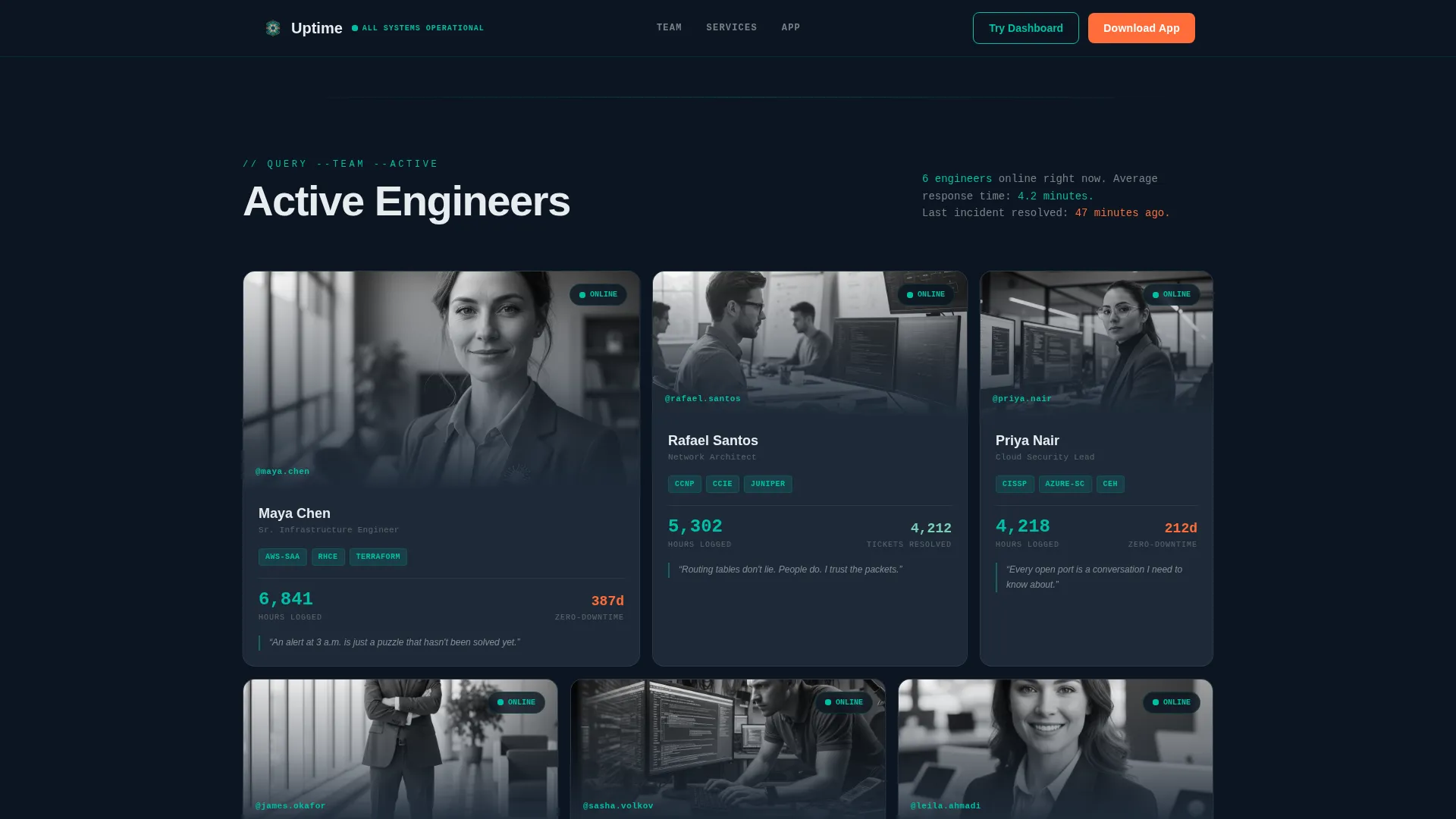
- A bento-style team grid where each card shows name, role, certification badges, a key performance stat, and a personal one-liner
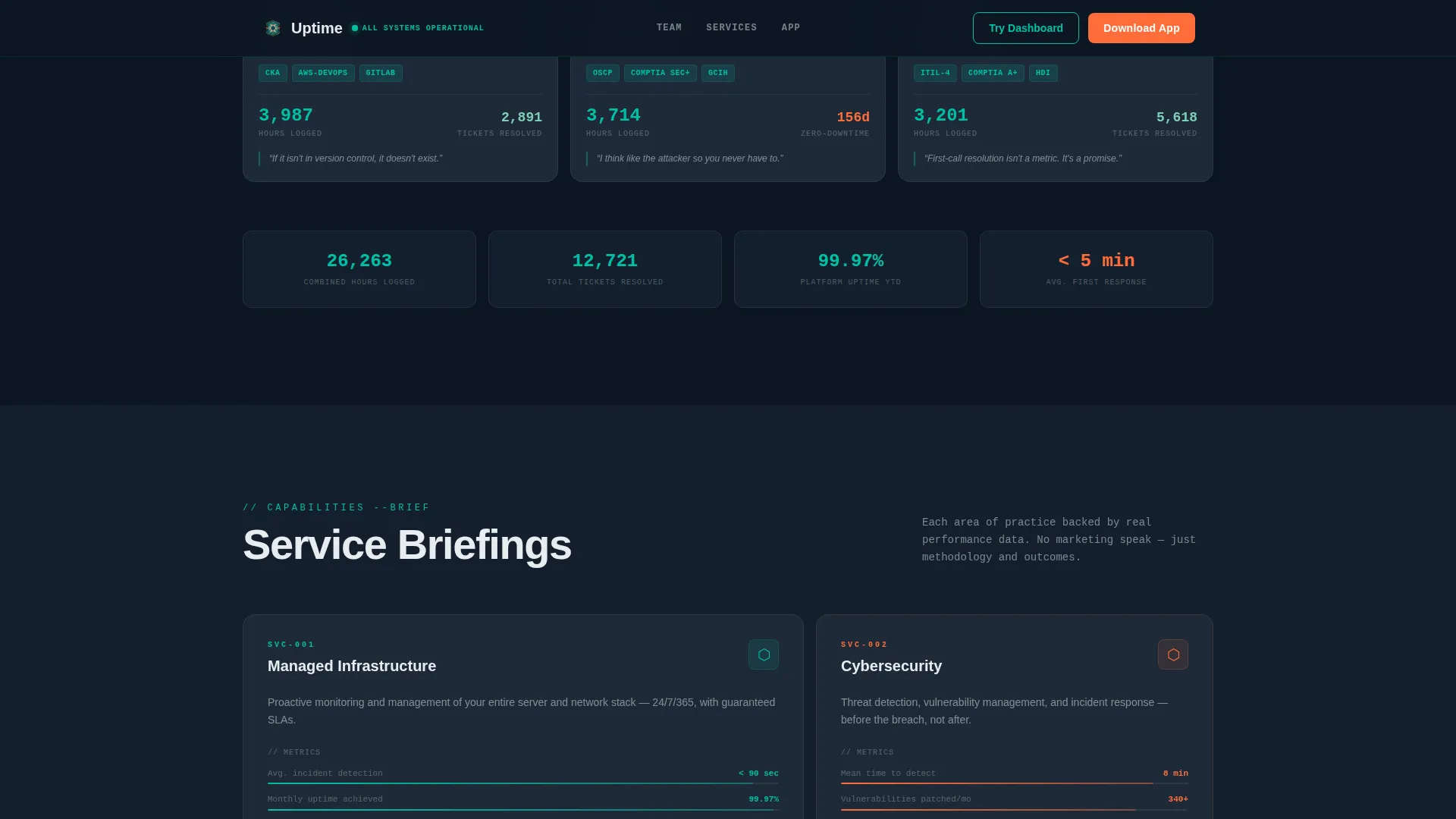
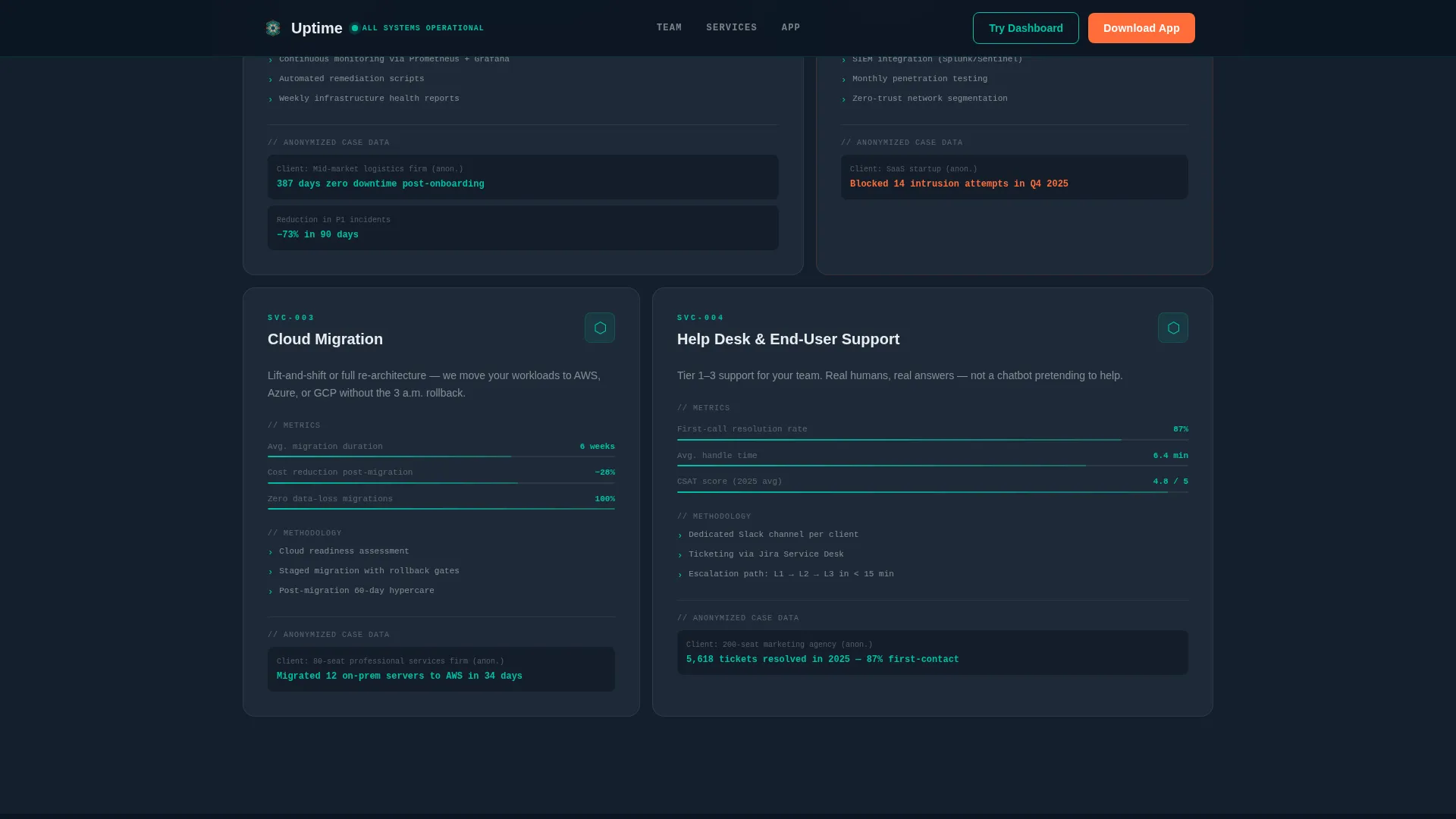
- A capability briefing section with service cards for areas like managed infrastructure, cybersecurity, cloud migration, and help desk
- A three-panel app preview mid-scroll showing ticket tracking, team availability, and one-tap escalation
- A device-detect call-to-action section serving the correct App Store or Google Play badge alongside an inline dashboard trial prompt
Feature list
This section covers the core built-in capabilities that make Uptime function as a conversion-focused team page for IT services companies.
Terminal Typewriter Hero Animation
The hero opens as a full-width terminal emulator. A diagnostic script types out character by character, pinging endpoints and returning team member handles as system responses. After four seconds the terminal minimizes and the headline "Meet the people behind your 99.99%" is revealed.
Data Profile Team Cards
Each team card is built as a data profile, not a standard headshot. Cards display the engineer's name, role, certifications rendered as protocol badges such as AWS, CCNA (Cisco Certified Network Associate), and Azure, a real-time-styled stat like a zero-downtime streak or ticket count, and a one-sentence personal philosophy.
Service Capability Briefing Cards
Below the team grid, the layout shifts to capability cards. Each card covers a service area with a metrics summary, methodology description, and anonymized case data. This gives buyers a briefing-document feel that builds trust as they scroll.
Three-Panel App Preview
A mid-scroll app preview section shows three interface panels: real-time ticket tracking, team availability status, and one-tap escalation. This section exists to prove the Portal App is a working control center before asking the visitor to download it.
Device-Detect App Download Call to Action
The primary call-to-action section detects the visitor's device and serves the correct App Store or Google Play badge automatically. A secondary inline call to action, "Try the Live Dashboard," prompts visitors to enter their email and open a browser-based preview.
Staggered Scroll Reveal Animations
The template uses scroll-triggered stagger reveals, glowing pulse effects on active teal elements, and tab-style interactivity on the app preview. These animations are high-intensity by design, matching the network operations center aesthetic.
Page sections overview
| Section | Purpose |
|---|---|
| Terminal Hero | Animate team reveal, show headline |
| Team Profile Grid | Display engineer data cards |
| Capability Briefing Cards | Present services with metrics |
| App Preview Panels | Demonstrate portal app features |
| App Download Call to Action | Drive download and dashboard trial |
| Single-Row Footer | Close with minimal navigation |
Design & branding system
The visual identity follows a Data Command theme inspired by a network operations center at midnight. Every color choice is intentional: the palette signals control, reliability, and technical depth without saying a word.
- Deep terminal black (#0B1521) as the page background, slate panel gray (#1E2A38) for card surfaces, and signal white (#E8ECEF) for body text keep the layout readable in dark conditions
- Active teal (#00BFA6) is the primary brand color used on interactive elements, borders, and glowing stat highlights, while catalyst orange (#FF6D3A) marks call-to-action buttons and alert-level interactive states
- Typography pairs JetBrains Mono for all terminal and code-styled elements with Plus Jakarta Sans for standard interface text, reinforcing the split between machine output and human communication
Mobile & speed optimization
The template is built desktop-first to match the network operations center aesthetic that technical buyers expect. Mobile responsiveness is included so the layout holds up when buyers switch devices.
- Desktop layout prioritizes the full bento-card grid and the wide terminal hero animation at their intended visual weight
- Mobile layouts reflow the card grid and scale down animation intensity to keep the page functional on smaller screens
- Static sections use server component patterns for fast initial load, while animated and interactive sections are handled client-side to keep animations smooth
How this template helps you convert
The page is structured as a progressive trust-building sequence. Each scroll step gives the visitor more evidence before asking them to act.
- The terminal animation and team data cards establish engineering credibility in the first few seconds, addressing the primary objection that most IT services pages cannot prove who is actually doing the work.
- The capability briefing cards with real-time-styled metrics and anonymized case data deepen confidence mid-scroll, making the service offering feel proven rather than promotional.
- The app preview panels and device-detect call to action remove the final friction point by showing the tool in action and offering a low-commitment entry point through the inline dashboard trial before asking for the full app download.
Other information about this template
This template is part of a broader set of IT services company website templates designed for technology businesses that need to present technical credibility to a B2B audience. It is particularly well suited for IT services company team page use cases where the engineering staff is itself a key differentiator.
- The template is categorized under Technology and the IT Services Company Website Templates subcategory, making it straightforward to find within a template marketplace
- Localization defaults are set to English, United States Dollar pricing format, and US date format
- The layout style is Card Grid (Modular), meaning individual sections and cards can be rearranged or swapped out to match your team's size and service mix
- Animation intensity is set to high by default, including typewriter effects, stagger reveals, glowing pulses, and scroll triggers, all of which can be adjusted to suit a lower-motion preference
Theme
Data Command
Creative direction
Industry Report
Color system
Teal Catalyst
Style
Card Grid (Modular)
Direction
App Download
Page Sections
Terminal Typewriter Hero Animation
Engineer Data Profile Cards
Service Capability Briefing Cards
Three-panel App Preview
Device-detect App Download Section
Staggered Scroll Reveal System
Related questions
Who is this landing page template designed for?
Can I edit the team cards to match my actual engineers?
What does the device-detect call to action actually do?
Do I need the Portal App to use this template?
Is this template suitable for a small IT team?



