Self-Hosted Enterprise Software Directory Website Template
Uptime is a dashboard-style landing page template built for self-hosted enterprise asset management platforms. It targets plant engineers, IT directors, and facilities managers who need full data ownership. The Tech Glass visual identity, Problem-to-Solution scroll arc, and two-path lead generation model make it ready to convert serious infrastructure buyers from the first scroll.
by Rocket studio
Quick summary
Uptime is a single-page lead generation template designed for self-hosted enterprise asset management software. It combines a dark Tech Glass aesthetic with a Problem-to-Solution scroll arc, live-styled dashboard mockups, and a two-path conversion model. The result is a landing page that speaks directly to technical buyers who prioritize data ownership over convenience.
Who this template is for
This template is built for teams selling or deploying self-hosted asset management systems. It speaks the language of infrastructure-first buyers who are skeptical of cloud-only vendors.
- Plant engineers at mid-size manufacturers who have outgrown spreadsheets and need a system they fully control
- IT directors at utilities who cannot send SCADA (Supervisory Control and Data Acquisition) data to third-party servers
- Facilities managers at hospitals who require strict control over every inspection record and equipment log
What problem this template solves
Most asset management software is sold as a cloud service. That model creates real risks for regulated industries and security-conscious organizations. This template gives those concerns a visible, structured home on the page.
- Vendor lock-in, recurring per-seat costs, and data residency violations have no clear answer on typical SaaS marketing pages
- Technical buyers leave pages that feel like brochures rather than tools built for their infrastructure environment
- Without a clear conversion path, interested visitors who are not ready for a sales call have nowhere to go
What you get with this template
You get a complete, single-page layout that moves a technical visitor from skepticism to action. Every section is designed around evidence and specificity, not marketing generalities.
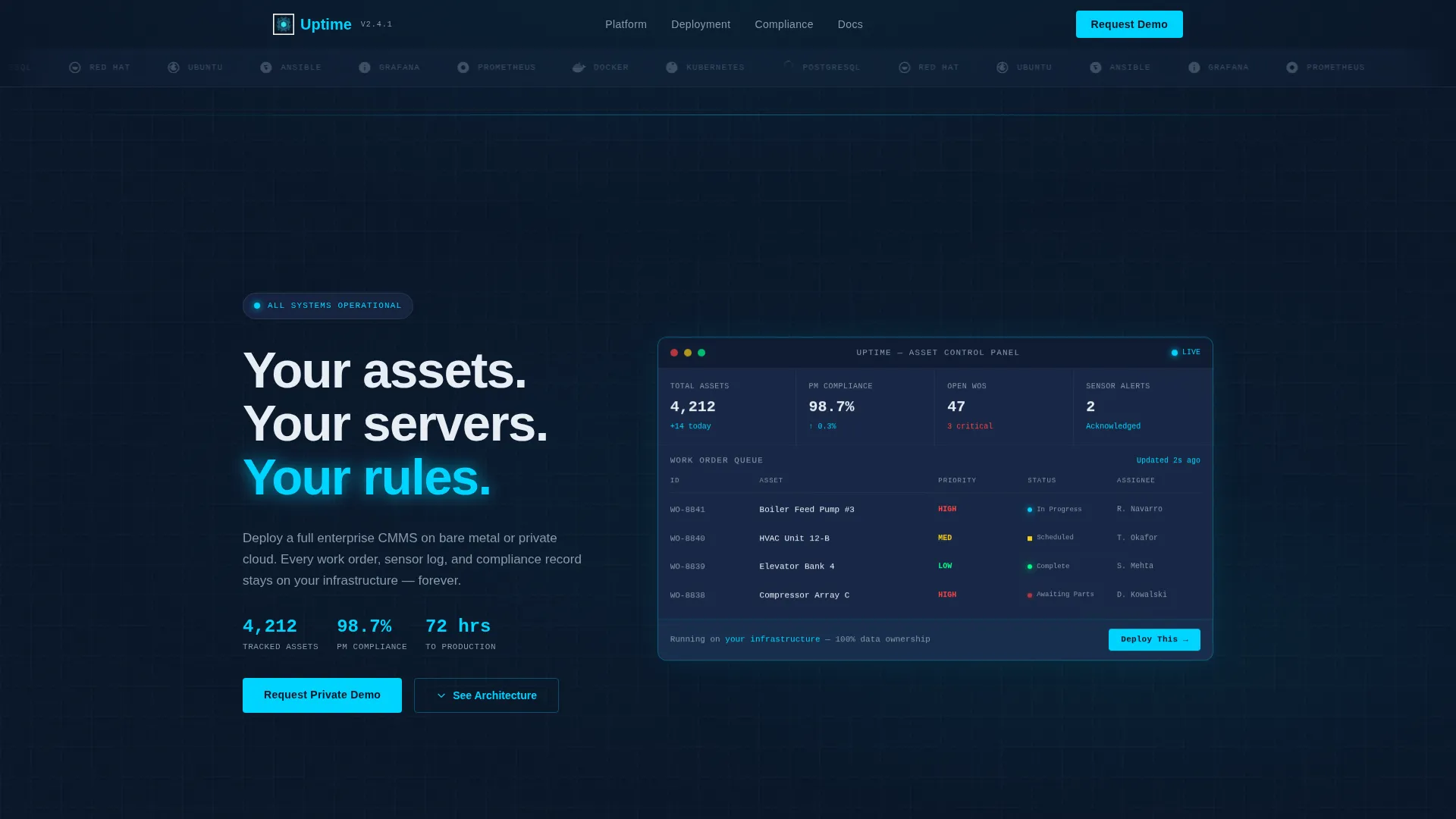
- A live-styled dashboard mockup showing formatted data points: 4,212 tracked assets, 98.7% preventive maintenance compliance, and a work order queue
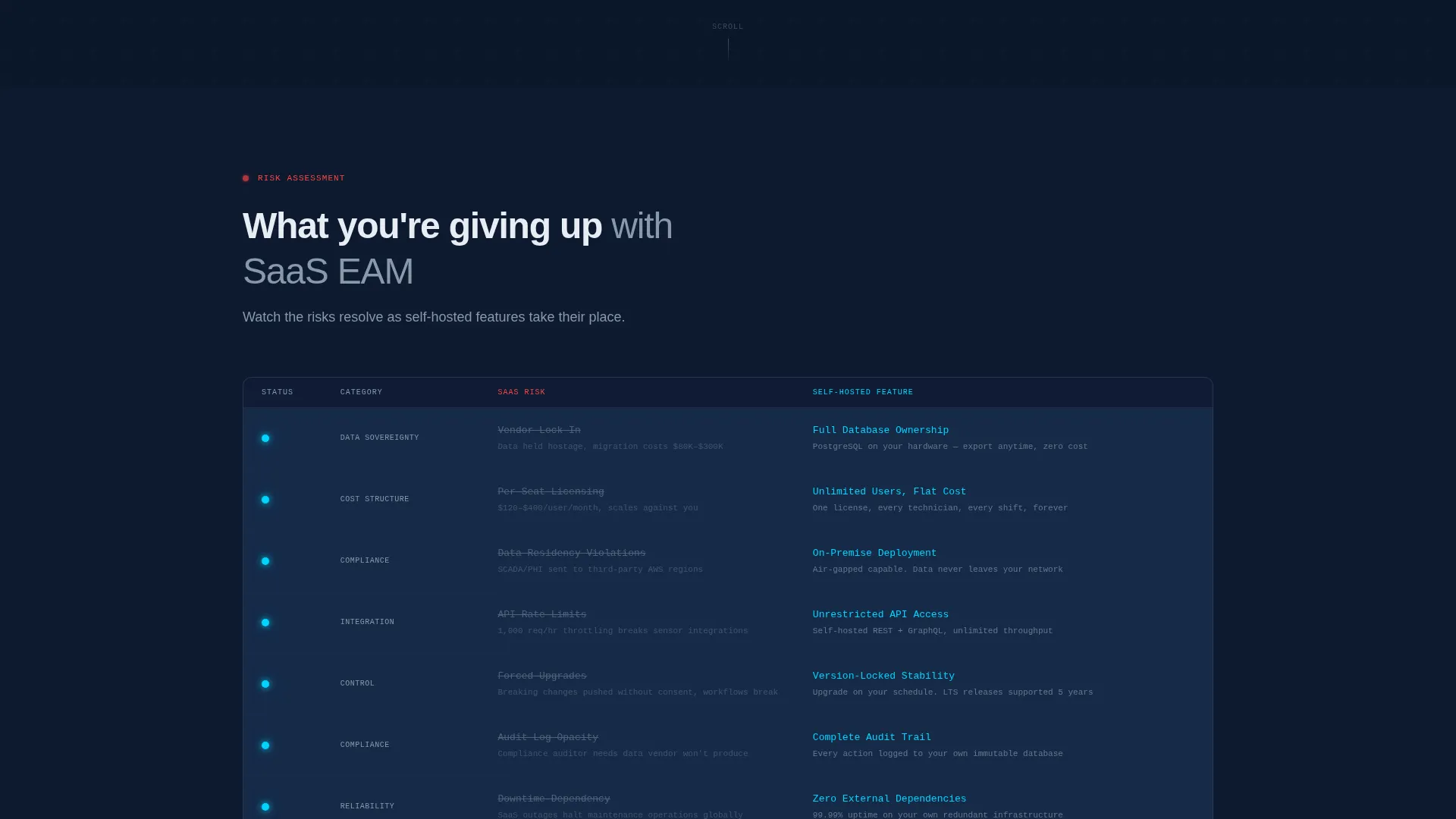
- A Problem-to-Solution scroll arc with an animated data grid that flips risk rows into feature rows as the visitor scrolls
- A two-path conversion model with a detailed demo request form and a quieter PDF download path for leads not yet ready to talk
Feature list
This template is built around components that serve a specific technical audience. Each one earns its place on the page.
Integration Logo Bar Header
A horizontal row of deployment and integration logos rendered in monochrome steel sits above the headline. It establishes infrastructure credibility before any copy is read.
Live-Styled Dashboard Mockup
The hero section includes a dashboard mockup formatted with real-looking data points. The primary call-to-action button is embedded inside the mockup itself, so clicking it feels like interacting with the product.
Animated Problem-to-Solution Data Grid
The first scroll section opens with a dark panel listing SaaS risks, each row marked with a red status dot. As the visitor scrolls, the dots flip to cyan and each row resolves into a self-hosted feature, turning concern into clarity.
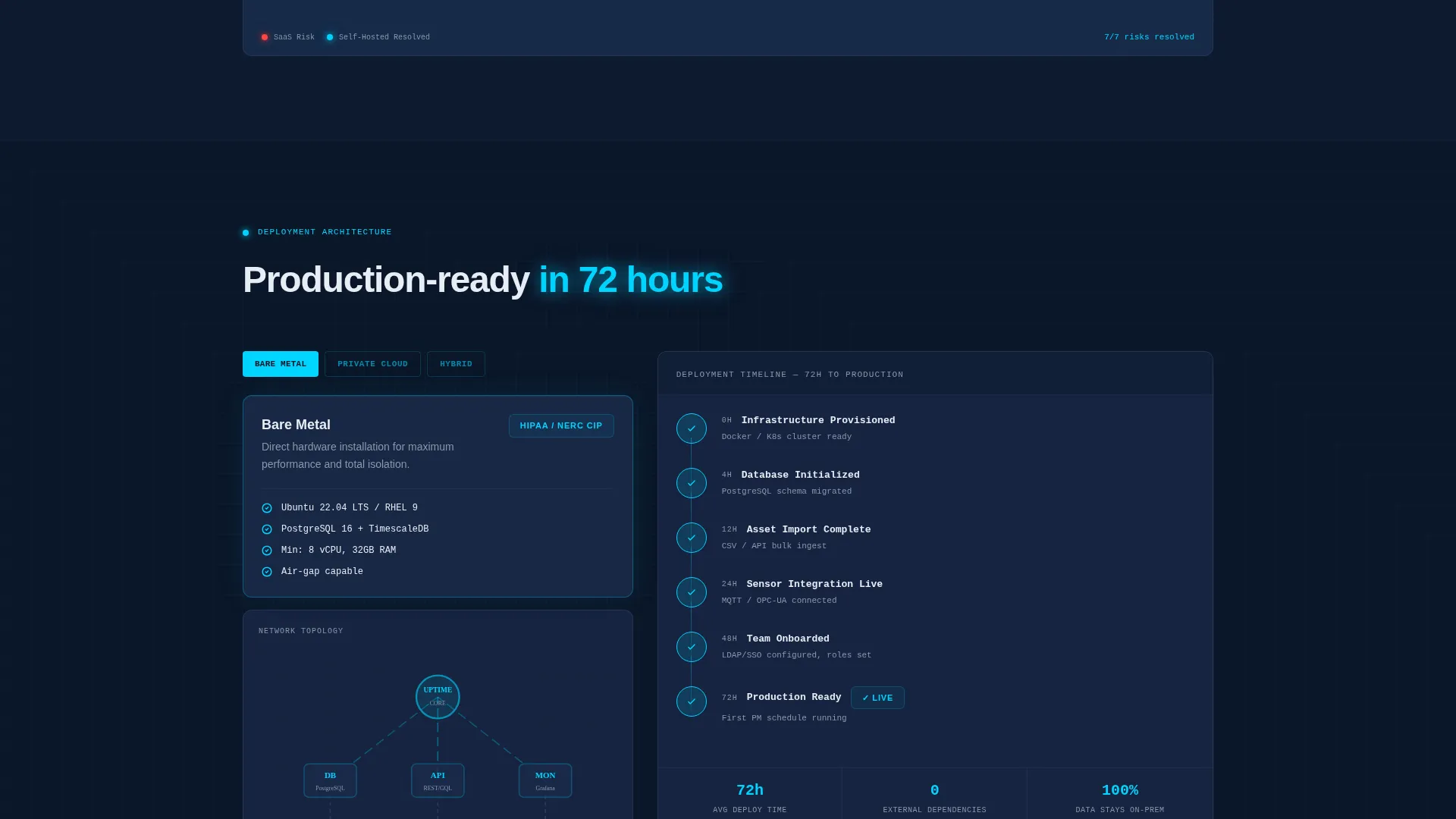
Architecture Diagram Section
A dedicated section presents a concrete architecture diagram alongside a deployment timeline. The timeline shows a production-ready deployment in 72 hours, grounding the promise in a specific, believable number.
Two-Path Lead Capture
The primary path is a frosted-glass form collecting company name, infrastructure type, asset count range, and work email. The secondary path captures only an email in exchange for a self-hosting guide PDF, nurturing leads at an earlier stage of consideration.
Tech Glass Panel System
Every card surface uses translucent panel blue with frosted-glass blur so panels appear to float above the deep navy background. Status-glow cyan highlights active metrics and hover states, keeping the visual hierarchy clear and data-focused.
Page sections overview
| Section | Purpose |
|---|---|
| Integration Logo Bar | Establish deployment credibility before copy |
| Hero Dashboard Mockup | Show real-formatted data and primary call to action |
| SaaS Risk Grid | Surface the pain of vendor-dependent systems |
| Self-Hosted Feature Arc | Resolve each risk into a concrete platform benefit |
| Architecture Diagram | Visualize the deployment stack and timeline |
| Demo Request Form | Capture qualified leads with infrastructure context |
| PDF Download Path | Nurture early-stage leads with a low-commitment offer |
Design & branding system
The visual identity follows a Tech Glass theme built on a Midnight Blue color system. Every design decision reinforces the feeling of a control room at midnight where only meaningful data emits light.
- Deep terminal navy (#0A1628) as the primary background, translucent panel blue (#1B2A4A) for card surfaces, status-glow cyan (#00D4FF) for active metrics and hover states, and muted steel (#8899AA) for secondary text and grid lines
- Frosted-glass blur layers panels above each other, creating depth without visual weight
- The headline appears in status-glow cyan, and all status indicators use red-to-cyan color transitions that reinforce the Problem-to-Solution narrative
Mobile & speed optimization
The template layout is structured for clarity on any screen size. The data-heavy sections remain readable and scannable even on smaller viewports.
- The dashboard mockup and data grid scale responsively so key numbers and status indicators remain legible on mobile
- Frosted-glass panel layering is implemented with lightweight CSS blur so the visual depth effect does not require heavy assets
How this template helps you convert
The conversion model is built around how infrastructure buyers actually make decisions. They research before they talk, and they need a reason to trust before they fill out any form.
- The dashboard mockup with an embedded call-to-action button makes the first interaction feel like product use rather than a marketing form, lowering the psychological barrier to clicking
- The Problem-to-Solution scroll arc keeps the visitor engaged by resolving each stated risk with a concrete feature, building trust incrementally rather than asserting it all at once
- The two-path form model captures both sales-ready leads through the demo request and research-stage leads through the PDF download, so no qualified visitor leaves empty-handed
Other information about this template
This template is categorized under Technology and the Self-Hosted Enterprise Software subcategory, targeting the self-hosted enterprise asset management niche. It is designed for teams positioning their platform against incumbent cloud-based EAM (Enterprise Asset Management) vendors.
- The template style is Dashboard and Data Grid, making it well-suited for platforms that need to demonstrate data depth and operational credibility at first glance
- The creative direction follows a strict Problem-to-Solution Arc, meaning the page is structured as a narrative journey rather than a feature list
- The header concept is a Logo Bar featuring deployment tools such as Docker, Kubernetes, PostgreSQL, Red Hat, and Ubuntu, which signal on-premises and private cloud readiness to a technical audience
Theme
Tech Glass
Creative direction
Problem→Solution Arc
Color system
Midnight Blue
Style
Dashboard/Data Grid
Direction
Lead Generation
Page Sections
Integration Logo Bar Header
Live-styled Dashboard Hero Mockup
Animated Problem-to-solution Data Grid
Architecture Diagram with Deployment Timeline
Two-path Lead Capture System
Tech Glass Panel and Color System
Related questions
Who is this landing page template designed for?
Can I adapt the demo request form fields to match my own qualification process?
Does this template include both a primary and a secondary conversion path?
How does the Problem-to-Solution scroll arc work visually?
Is the deployment timeline shown as a fixed number or a customizable element?



