Uplink - Dynamic Itservices Landing Page Template
Uplink is a split-screen landing page template built for IT services community forums. It targets sysadmins, managed service provider owners, and helpdesk leads who need a credible, high-energy home base for their community. The design pairs dark terminal surfaces with bold catalyst-green metrics to front-load activity proof and drive sign-ups with near-zero friction.
by Rocket studio
Quick summary
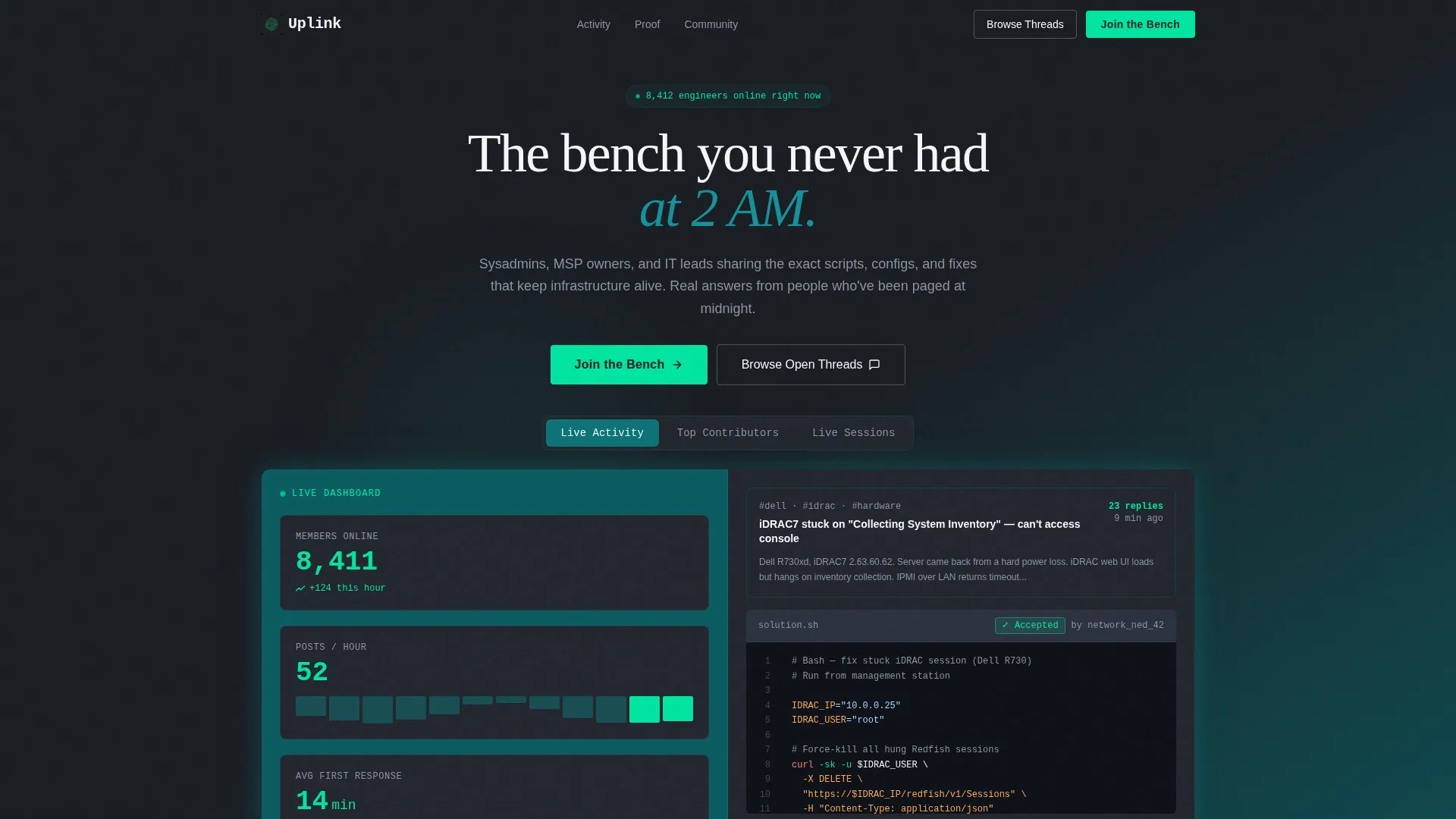
Uplink is a single-page, split-screen landing page template designed for IT services community forums. It leads with live-style activity metrics, a three-tab feature switcher in the header, and a click-through conversion flow that keeps friction low. The Teal Catalyst color system gives it a sharp, dashboard-at-midnight aesthetic that resonates with technical audiences.
Who this template is for
This template was built for people who run or are launching an IT-focused online community. It speaks the language of practitioners, not marketers, so the right audience feels at home immediately.
- Solo IT consultants managing multiple client networks who want a professional hub for peer support
- Managed service provider (MSP) founders and helpdesk leads looking to grow an engaged community around real-world troubleshooting
- In-house IT teams and network engineers who want to position their community as a credible, active resource
What problem this template solves
Most community landing pages describe what a forum offers without showing that it already works. For a technical audience, that gap destroys trust before anyone clicks. Uplink closes that gap by making activity visible from the very first scroll.
- Technical visitors distrust vague benefit claims and abandon pages that lack proof of real engagement
- Forum operators struggle to convert skeptical IT professionals who want to evaluate quality before committing
- Standard landing page templates lack the dark-surface, data-forward aesthetic that feels native to IT and operations audiences
What you get with this template
You get a fully structured, single-page landing page layout with every section pre-built and ready to customize. The layout is designed to move a technical visitor from first impression to registration click in one continuous, accelerating scroll.
- A three-tab Feature Tab Switcher header with hard horizontal wipe transitions and split-screen content panels
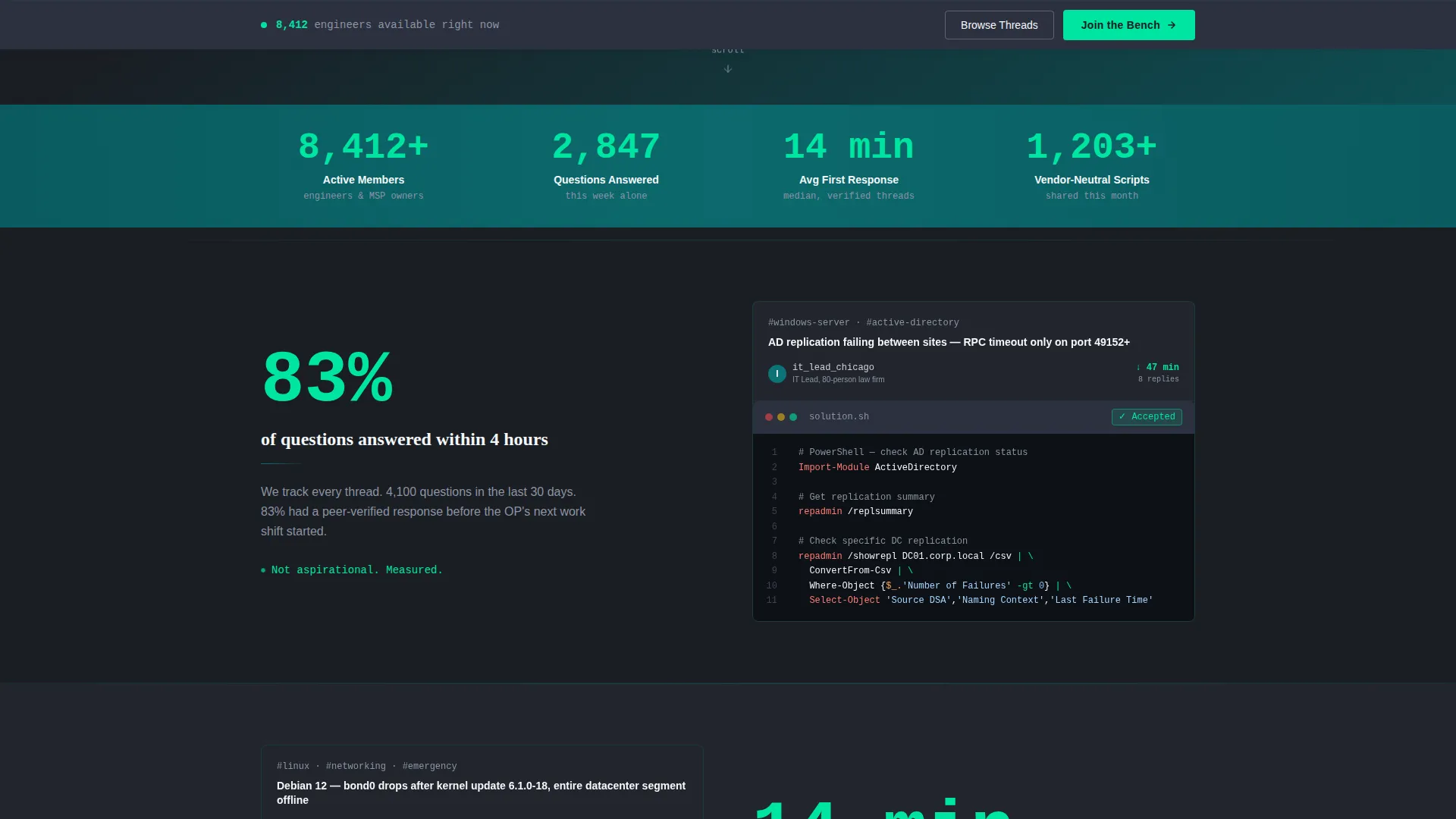
- A full-width animated counter bar, stat-and-proof content rhythm, and a sticky bottom call-to-action (call to action) bar that appears after 40 percent scroll
- Two call to action paths: a primary "Join the Bench" button routing to registration, and a secondary ghost-button "Browse Open Threads" for low-commitment exploration
Feature list
This template is built around a set of purpose-designed components. Each one serves the goal of turning a skeptical IT professional into a confident community member.
Three-Tab Feature Switcher Header
The header contains three clickable tabs, each revealing a unique split-screen scene. Tab one shows a real-time member count and posts-per-hour ticker alongside a live-rendered thread preview with syntax-highlighted code blocks. Tab two surfaces a contributor leaderboard with reputation scores next to a peer-answered question with a verified-solution badge. Tab three presents a calendar of upcoming live troubleshooting sessions alongside a looping screen-share collaboration clip.
Animated Stats Counter Bar
Immediately below the header, a full-width counter bar displays active members, questions answered that week, average first-response time in minutes, and vendor-neutral solutions shared. All numbers animate on scroll-enter, counting upward rapidly in catalyst green. This section establishes credibility before visitors read a single line of descriptive copy.
Stat-and-Proof Content Rhythm
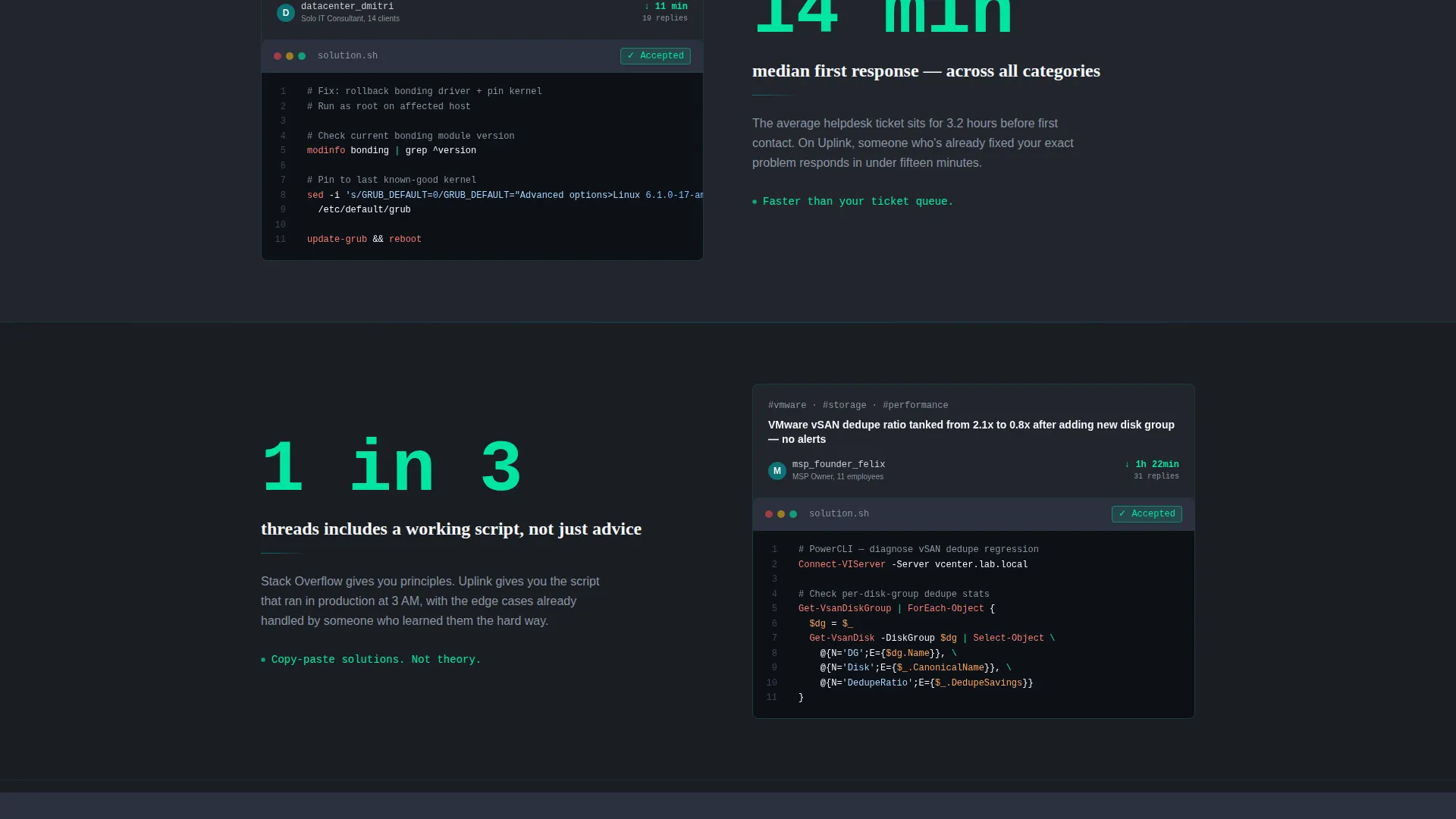
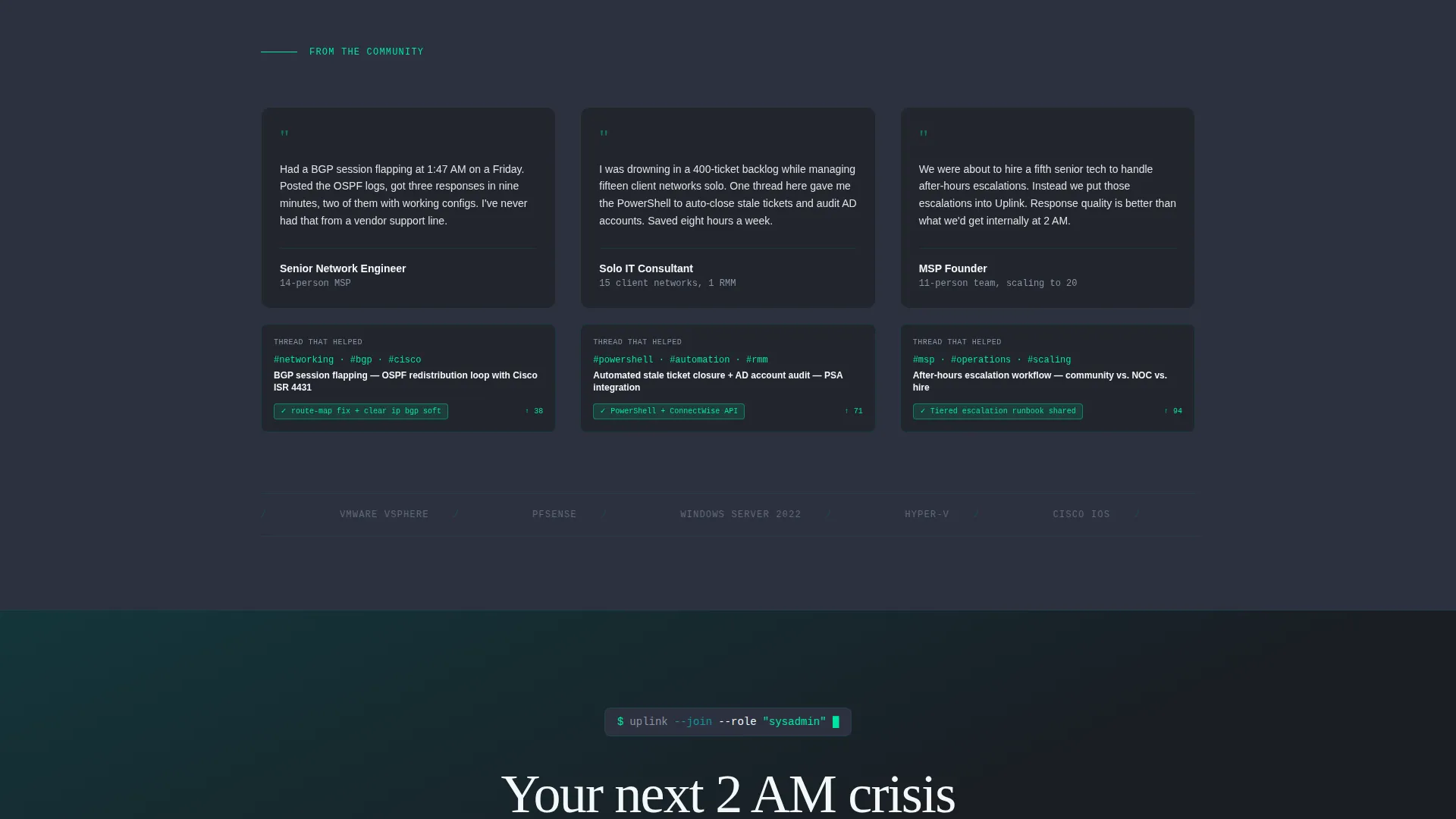
Each content section pairs a bold, specific data point on one side with a real anonymized thread screenshot on the other. The layout alternates direction midway through the page: community testimonials from named roles appear on the left, with the specific thread that helped them on the right. This rhythm builds a continuous, evidence-based case for the community.
Sticky Click-Through call to action Bar
After a visitor scrolls past 40 percent of the page, a sticky bottom bar appears carrying the primary "Join the Bench" call to action. The bar stays visible without blocking content, providing a persistent conversion path without adding form fields to the landing page itself.
Split-Screen 50/50 Layout
Every section uses a disciplined 50/50 horizontal split. One side carries data, proof, or social evidence; the other carries visual context such as thread previews, leaderboard panels, or session calendars. The rhythm accelerates toward the bottom, with each section becoming shorter and more urgent, mirroring the pace of a deployment pipeline.
Ghost-Button Secondary call to action
A secondary "Browse Open Threads" ghost-button call to action runs parallel to the primary action throughout the page. It gives skeptical visitors a low-commitment on-ramp to preview real discussions before deciding to register, reducing abandonment from prospects who are not yet ready to sign up.
Page sections overview
| Section | Purpose |
|---|---|
| Feature Tab Header | Showcase community activity through three interactive split-screen tabs |
| Stats Counter Bar | Animate key forum metrics on scroll to establish immediate credibility |
| Stat and Proof Pairs | Alternate data points with thread screenshots to prove community quality |
| Role Testimonials Split | Display named-role testimonials alongside the forum threads that helped them |
| Sticky call to action Bar | Persist the primary registration call to action after 40 percent scroll depth |
Design & branding system
The Teal Catalyst color system drives every visual decision in this template. It is built to feel like a live operations dashboard, not a generic marketing page.
- Deep terminal teal (#0D7377) dominates section backgrounds and navigation elements; dark ops charcoal (#1A1D23) grounds all body typography for high contrast readability
- Electric catalyst green (#00E5A0) activates on hover states, call to action buttons, and all animated stat counters, creating a clear visual hierarchy between passive content and interactive elements
- Clean whiteboard (#F4F7F9) is applied to card components and content wells, preventing the dark palette from feeling enclosed or claustrophobic
Mobile & speed optimization
The split-screen layout is structured to reflow cleanly on smaller screens, keeping the data-first content hierarchy intact across devices.
- The 50/50 column grid stacks vertically on mobile so stat panels and thread previews remain legible without horizontal scrolling
- Tab transitions and scroll-triggered counter animations are defined in the template to remain lightweight and non-blocking on mobile viewports
How this template helps you convert
Uplink is engineered around a single conversion goal: get a technical visitor to click through to the registration page. Every design and copy decision supports that outcome.
- The animated metrics counter bar front-loads social proof before any descriptive claims appear, so skeptical visitors see activity evidence within seconds of arriving
- The sticky "Join the Bench" call to action bar maintains a persistent, low-friction path to registration throughout the entire scroll journey without interrupting the content experience
Other information about this template
This template suits any IT services community forum that wants to present itself as an already-active, peer-driven resource rather than an aspirational project. It is part of the Startup Velocity theme family, which pairs bold data-forward layouts with minimal friction conversion flows.
- The "Join the Bench" and "Browse Open Threads" call to action labels are fully editable and can be replaced with copy that matches your community's voice
- The template is built on a click-through model, meaning no form fields appear on the landing page itself, keeping the path to registration as direct as possible
- The Teal Catalyst palette and Startup Velocity theme make this template a natural fit for IT services digital presence contexts, including forums for remote monitoring and management (RMM) users, helpdesk communities, and network operations groups
Theme
Startup Velocity
Creative direction
Stats-First Impact
Color system
Teal Catalyst
Style
Split Screen (50/50)
Direction
Click-Through
Page Sections
Three-tab Feature Switcher Header
Animated Stats Counter Bar
Stat-and-proof Content Rhythm
Sticky Click-through Call to Action Bar
Ghost-button Secondary Call to Action
50/50 Accelerating Split Layout
Related questions
Does this template include any form fields?
Can I edit the content inside the three-tab header switcher?
What is the purpose of the secondary ghost-button call to action?
Who is this landing page template designed for?
Can I update the Teal Catalyst color palette to match my brand?



