InsurTech Startup Professional Website Template
Underwrite is a coming-soon landing page template built for insurtech founders, managing general agents, and independent insurance agents. It combines a live micro-dashboard hero, an animated comparison table, and an interactive quoting sandbox to show visitors exactly what the platform does before asking them to sign up.
by Rocket studio
Quick summary
Underwrite is a single-page, early-access landing page template designed for insurtech platforms replacing manual insurance workflows. It opens with a functioning micro-dashboard, walks visitors through an animated before-and-after comparison table, and converts them through a role-aware early access form. The template is desktop-first, data-dense, and built to let the product speak for itself.
Who this template is for
This template is purpose-built for teams launching insurance technology products to professional audiences. It speaks directly to the people who live inside submission backlogs and carrier portals every day.
- Managing general agents (MGAs) who need to show pipeline visibility to early adopters
- Independent insurance agents tired of toggling between multiple carrier portals
- Insurtech founders ready to move waitlist visitors from curiosity to signup
What problem this template solves
Insurance professionals distrust vague product promises. They need to see the tool working before they hand over their email. A generic coming-soon page with a countdown timer will not cut it for this audience.
- Static mockups fail to communicate a data-dense dashboard product
- Manual workflows such as emailed quotes and PDF binders look invisible on a landing page without direct contrast
- Role-diverse visitors need messaging that speaks to their specific pain point before they convert
What you get with this template
You get a fully structured, single-page early-access landing page with interactive components baked in. Every section is designed to earn trust before asking for a commitment.
- A functioning micro-dashboard hero pre-loaded with sample book-of-business data
- An animated scroll-triggered comparison table contrasting old workflows with the platform
- An interactive quoting sandbox where visitors drag sample risks and watch carrier responses populate
- A role-selector early access form with dual call-to-action paths and role-specific confirmation messaging
Feature list
This template delivers interactive, data-forward components that demonstrate an insurtech product rather than describe it. Each feature below is present in the template as described in the source brief.
Live Micro-Dashboard Hero
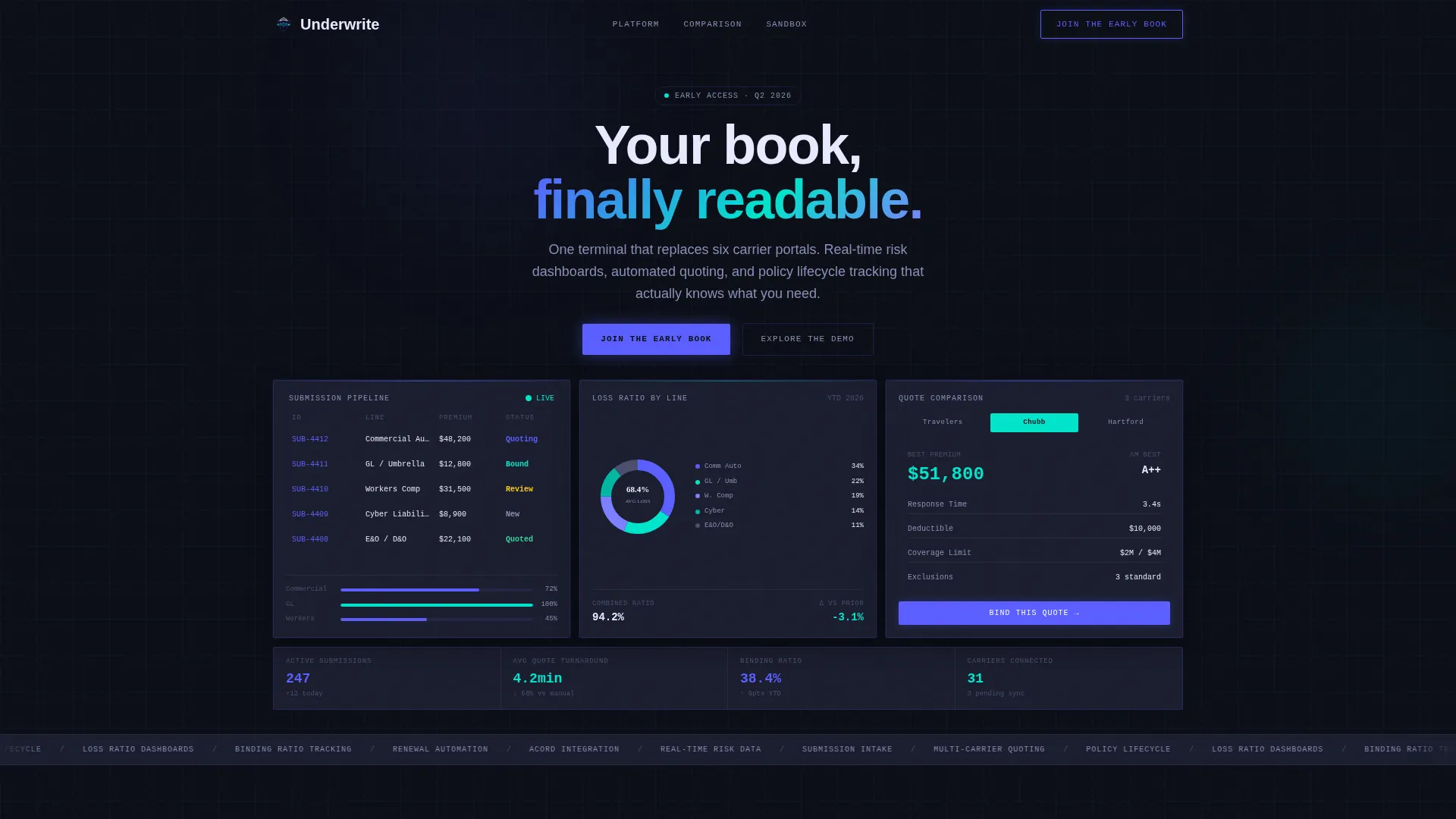
The header embeds a functioning micro-dashboard directly in the viewport. It displays a live submission pipeline on the left, a canvas-rendered donut chart breaking down loss ratios by line of business, and a quote comparison card mid-animation. Visitors can hover cells and toggle between carrier panels before reading a single headline.
Scroll-Triggered Comparison Table
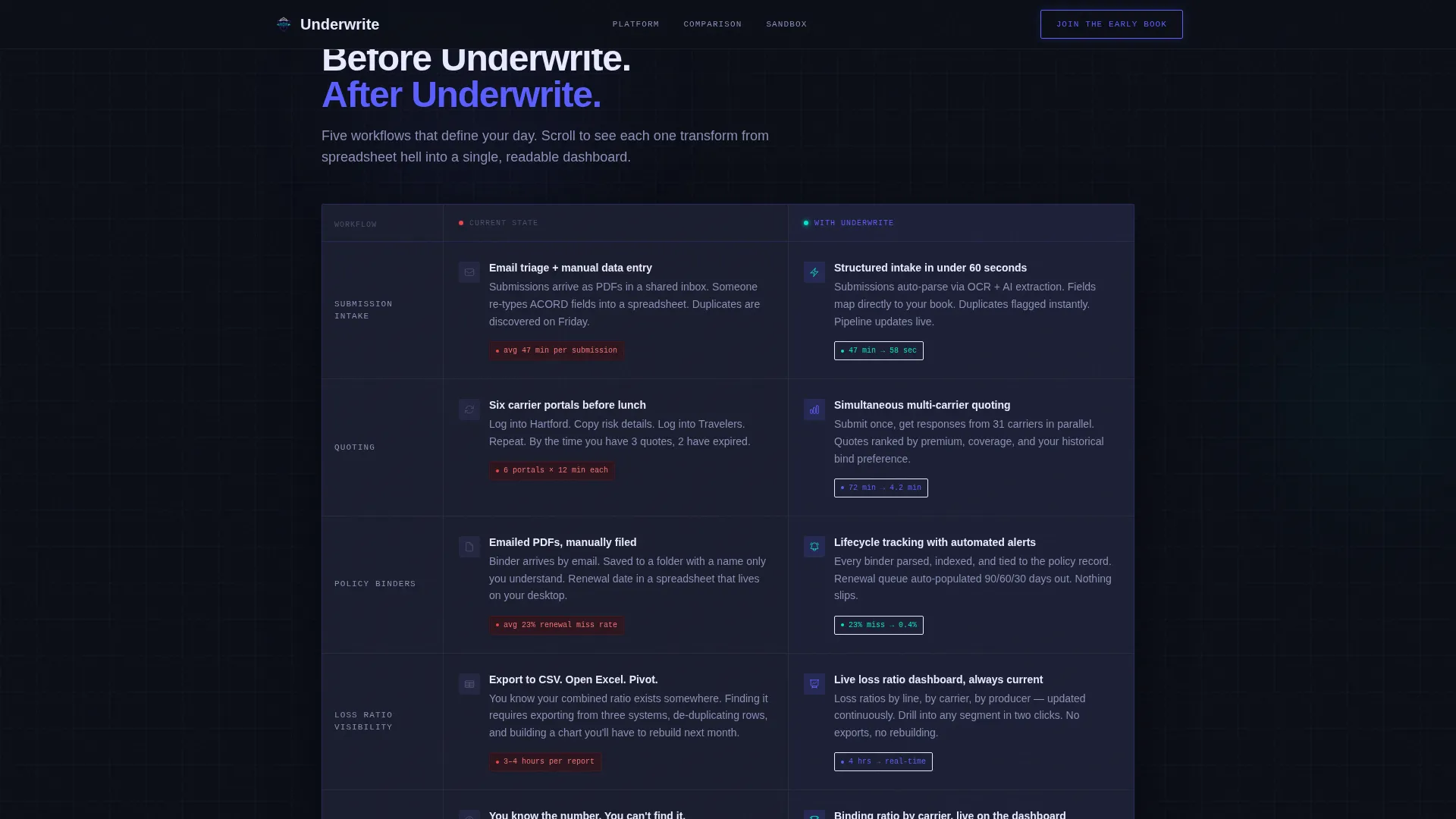
The comparison table section presents five animated rows. Each row contrasts a legacy insurance workflow (manual submission intake, emailed quotes, PDF binders) against the platform equivalent. As the visitor scrolls, the "before" pain point animates into the "after" dashboard view, making the value shift impossible to miss.
Interactive Quoting Sandbox
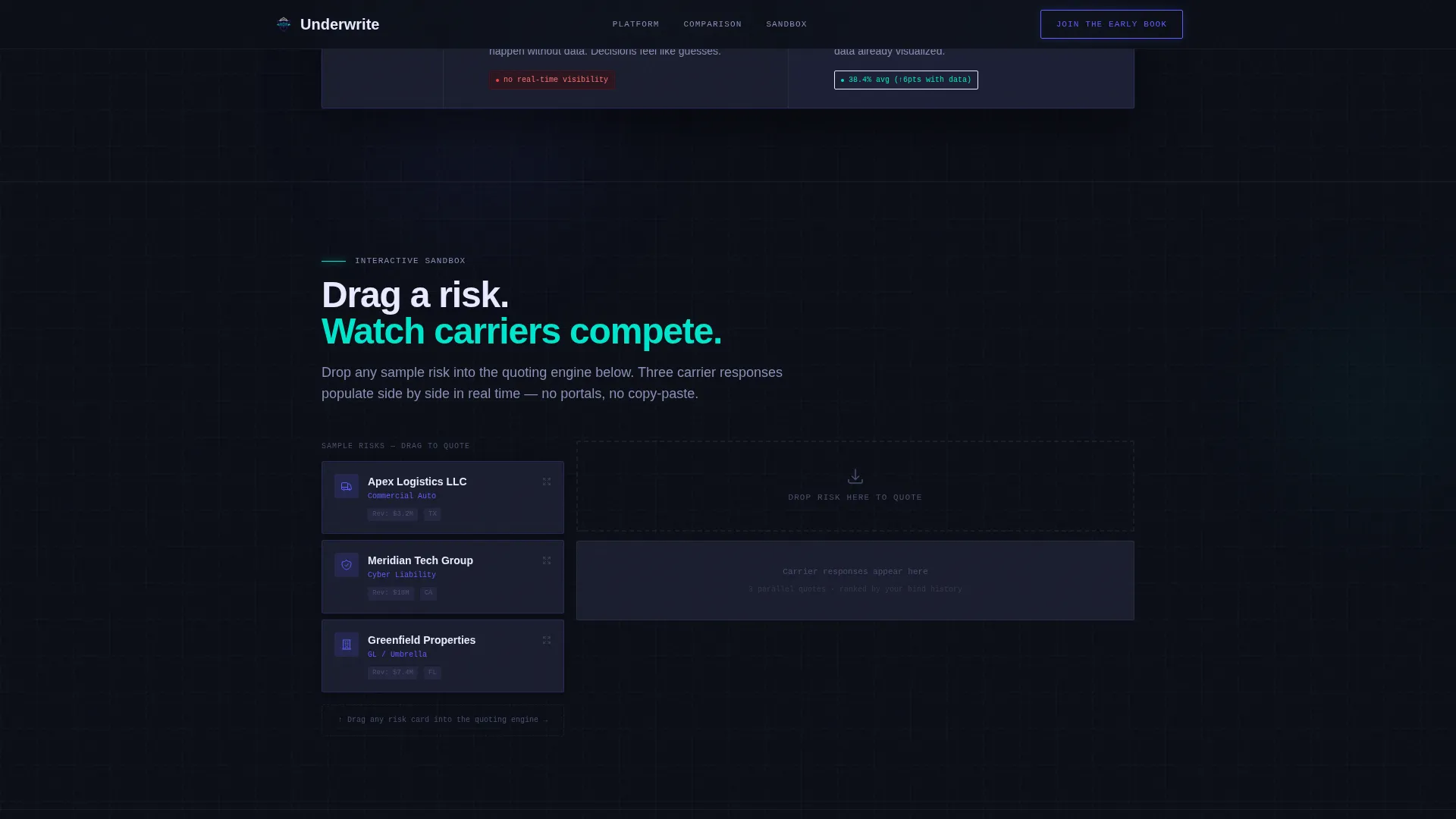
Below the comparison table sits a drag-to-quote sandbox. Visitors drag sample risks into a quoting engine and watch three carrier responses populate side by side. This interactive layer lets the product demonstrate itself a third time before any signup prompt appears.
Role-Aware Early Access Form
The primary call to action reads "Join the Early Book" and includes a single email field paired with a role selector. Roles include MGA, Agent, Carrier, and Broker. The confirmation message adjusts based on the selected role, making each visitor feel the platform was built for them specifically.
Dual Call-to-Action Paths
A secondary call to action, "Explore the Demo," drops visitors into a sandboxed dashboard version with anonymized data. This gives hesitant visitors a no-commitment path deeper into the product before they commit to the waitlist.
Role-Specific Social Proof Tabs
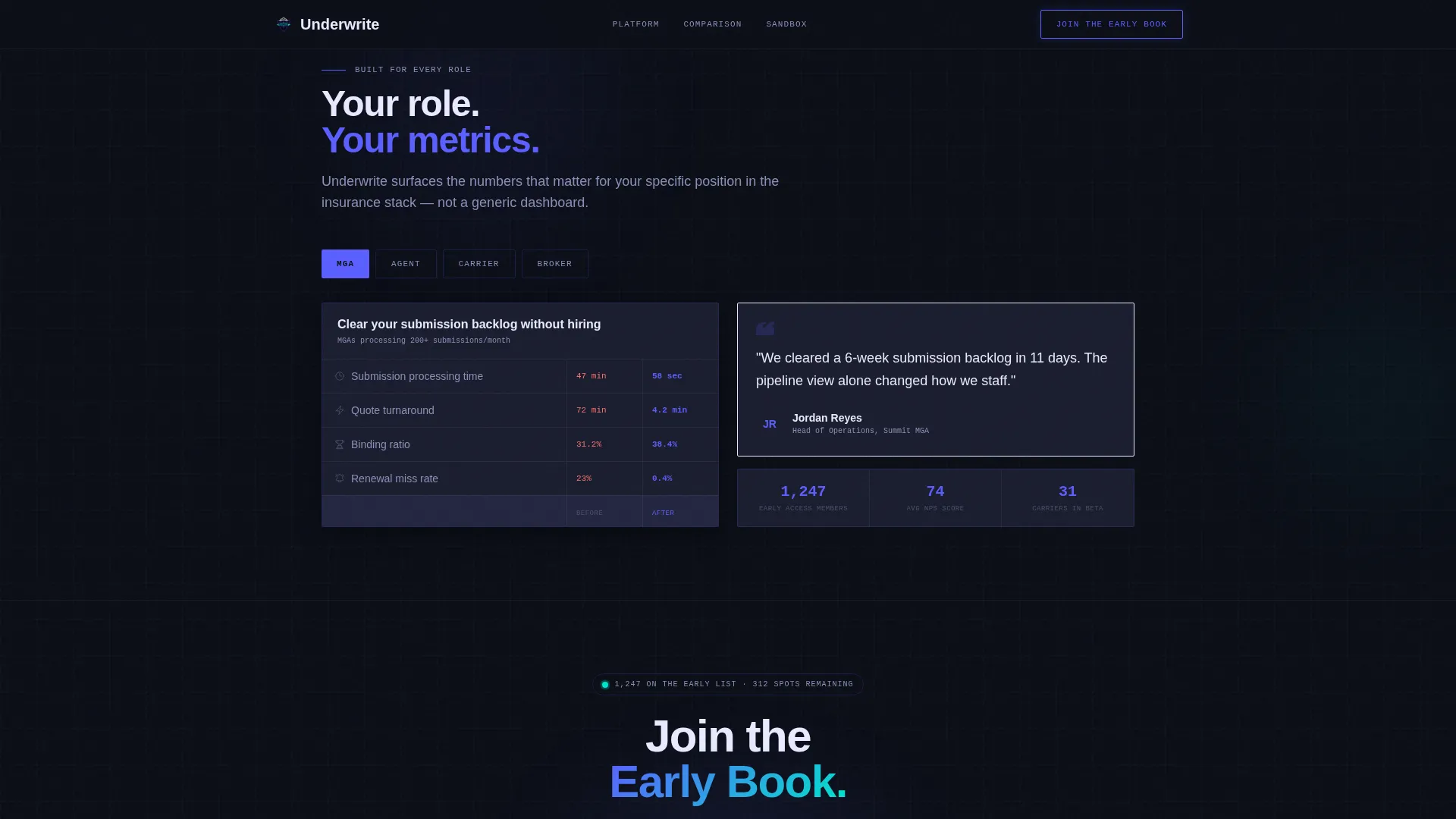
A dedicated section presents tabbed social proof by role. Each tab surfaces waitlist count, early partner quotes, and specific binding ratio metrics relevant to that audience segment. The data reinforces urgency without relying on generic testimonials.
Page sections overview
| Section | Purpose |
|---|---|
| Hero Dashboard | Functioning micro-dashboard with submission pipeline, donut chart, and quote card |
| Comparison Table | Animated before-and-after rows contrasting legacy workflow with the platform |
| Quoting Sandbox | Drag-and-drop risk input with live carrier response columns |
| Role-Specific Value | Tabbed social proof and value messaging for MGA, Agent, Carrier, and Broker |
| Early Access call to action | Email field, role selector, dual call to action paths, and role-adjusted confirmation |
| Footer | Linear single-row footer pattern |
Design & branding system
The visual identity follows a Dashboard Pro theme built around an Electric Indigo color system. The aesthetic is described in the brief as a Bloomberg terminal redesigned by someone who actually sleeps: precise and data-dense but never punishing.
- Color palette: deep void black (#0B0E17) as the base, electric indigo (#5B5FFF) as the primary accent, cool interface gray (#1A1D2E) for panel backgrounds, and signal cyan (#00E5CC) reserved for live-data accents and hover states
- Typography: Manrope for headlines and display text, JetBrains Mono for data labels and dashboard values
- Interactive glow and highlight states are triggered only by genuine interactivity underneath, keeping visual noise low
Mobile & speed optimization
This template is designed desktop-first. The data-dense dashboard layout and Bloomberg-terminal aesthetic are optimized for wider viewports where side-by-side panels and comparison columns can breathe.
- Static layout sections use server component architecture for fast initial render
- Interactive dashboard components are isolated as client-side elements to avoid blocking the first paint
- High-animation sections including scroll-triggered rows, live counters, and canvas charts are scoped to interactive client components
How this template helps you convert
The conversion strategy is built around letting visitors touch the product three times before being asked for credentials. Each interaction layer adds trust before the ask.
- The hero micro-dashboard gives visitors immediate hands-on experience with sample data, carrier panel toggling, and live premium calculations before the headline even appears.
- The animated comparison table makes the before-and-after value shift visceral and scroll-driven, keeping visitors engaged longer while building the case for signing up.
- The role-selector early access form personalizes the confirmation message by role, so every visitor receives a response that speaks directly to their professional context.
Other information about this template
This template belongs to the Startup and Launch category and is specifically scoped to the InsurTech Coming Soon Page niche. It was designed under an Interactive Explorer creative direction, meaning the scroll itself is the sales motion.
- The template style is a Comparison Table landing page with an Interactive Preview header concept
- The conversion model is Freemium and Trial, reframed as early access rather than a free-tier pitch
- Typography and color pairings are drawn from the Dashboard Pro theme within the Electric Indigo color system
- All animation targets are high: scroll-triggered row transitions, live counter updates, canvas donut chart rendering, and CSS keyframe dashboard widgets are all specified in the brief
- Device priority is desktop-first, reflecting the Bloomberg-terminal aesthetic and the data-density requirements of the MGA and independent agent audience
- Localization is set to English (United States) with USD currency and MM/DD/YYYY date formatting
Theme
Dashboard Pro
Creative direction
Interactive Explorer
Color system
Electric Indigo
Style
Comparison Table
Direction
Freemium/Trial
Page Sections
Live Micro-dashboard Hero
Scroll-triggered Comparison Table
Drag-to-quote Sandbox
Role-aware Early Access Form
Dual Call-to-action Paths
Tabbed Role-specific Social Proof
Related questions
Who is this landing page template designed for?
Does the template include actual interactive dashboard functionality?
Can I customize the role selector and confirmation messages?
What makes the comparison table different from a standard feature grid?
Is this template suitable for a product that is not yet live?



