Umami - Immersive Culinary Landing Page Template
Umami is a masonry-style culinary landing page built for Japan food tour companies. It blends a cinematic search header, a progressively loading tour card grid, and region-by-region atmospheric storytelling. Designed for honeymoon couples, solo food travelers, and corporate groups, it turns browsing into an immersive foraging expedition that naturally moves visitors toward booking.
by Rocket studio
Quick summary
Umami is a single-page culinary tour marketplace template built around an immersive masonry grid and a cinematic search experience. Visitors browse tour cards by region, open experience details in a smooth drawer, and book inline without leaving the page. The design pulls from a deep rainforest palette that feels alive, tactile, and unmistakably Japanese in spirit.
Who this template is for
This template is built for culinary tour operators and food travel companies focused on Japan. It suits businesses that run multi-experience catalogues across several cities and need one page to hold everything together.
- Japan food tour companies offering yakitori, kaiseki, ramen, and street food experiences
- Boutique travel platforms targeting honeymoon couples, solo food travelers, and corporate groups
- Marketplace operators who want visitors to browse first and commit when ready
What problem this template solves
Most food tour pages force visitors into a narrow funnel too early. Umami fixes this by making browsing the core value proposition. Visitors explore at their own pace, and by the time they reach the third row of cards, the question has already shifted from whether to book to which experience to book first.
- Generic tour pages overwhelm visitors with text before they feel the atmosphere
- Multi-city operators struggle to present Tokyo, Osaka, Kyoto, Hokkaido, and Okinawa without creating a confusing navigation maze
- Inline booking flows and custom itinerary tools are rarely combined cleanly in one scrolling page
What you get with this template
You get a fully structured single-page layout with every visual and interactive element described below. The template is ready to be populated with your tour catalogue, imagery, and copy.
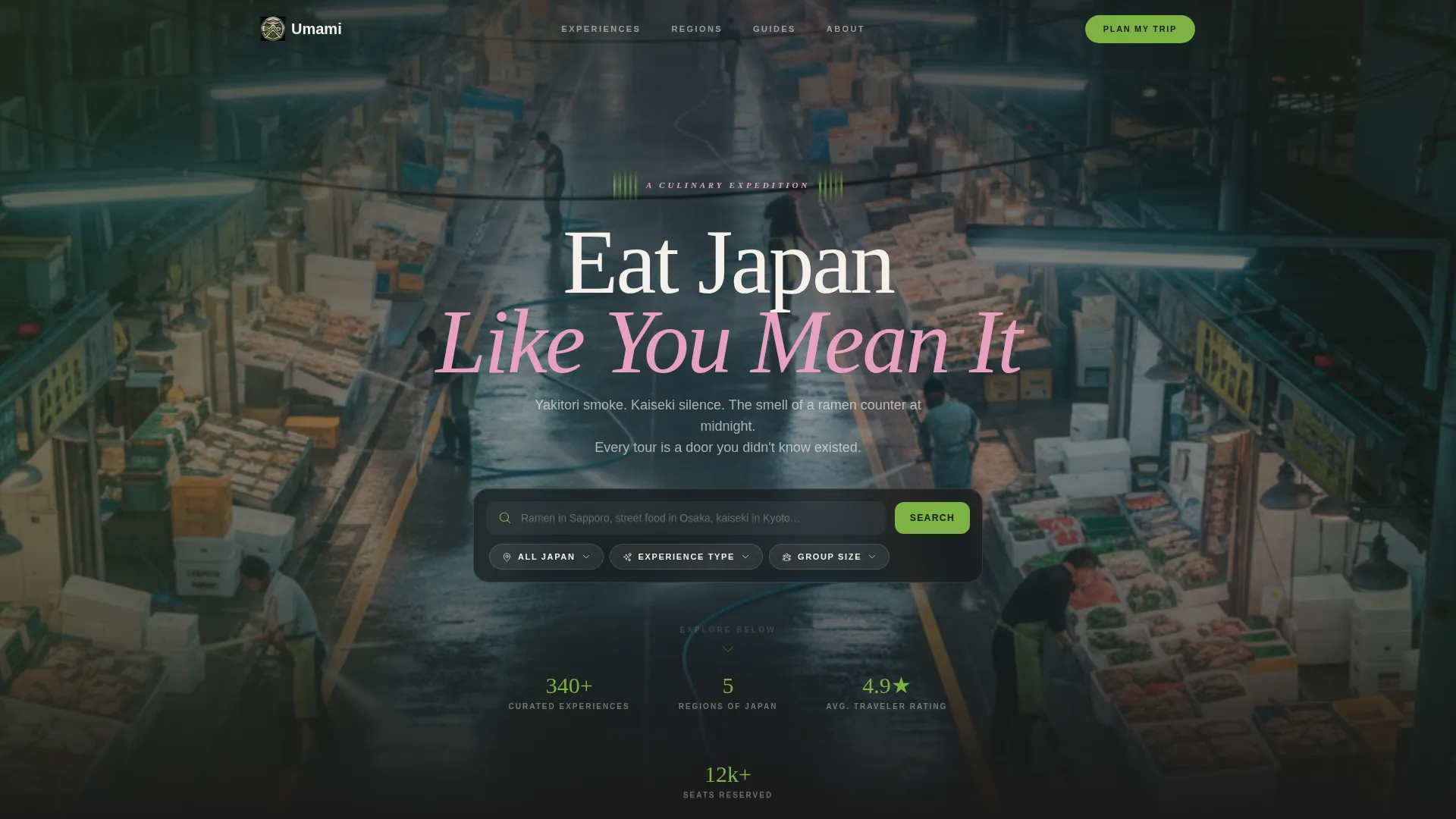
- A cinematic drone-footage header with a frosted-glass search box, ghost text, and three filter chips (Region, Experience Type, Group Size)
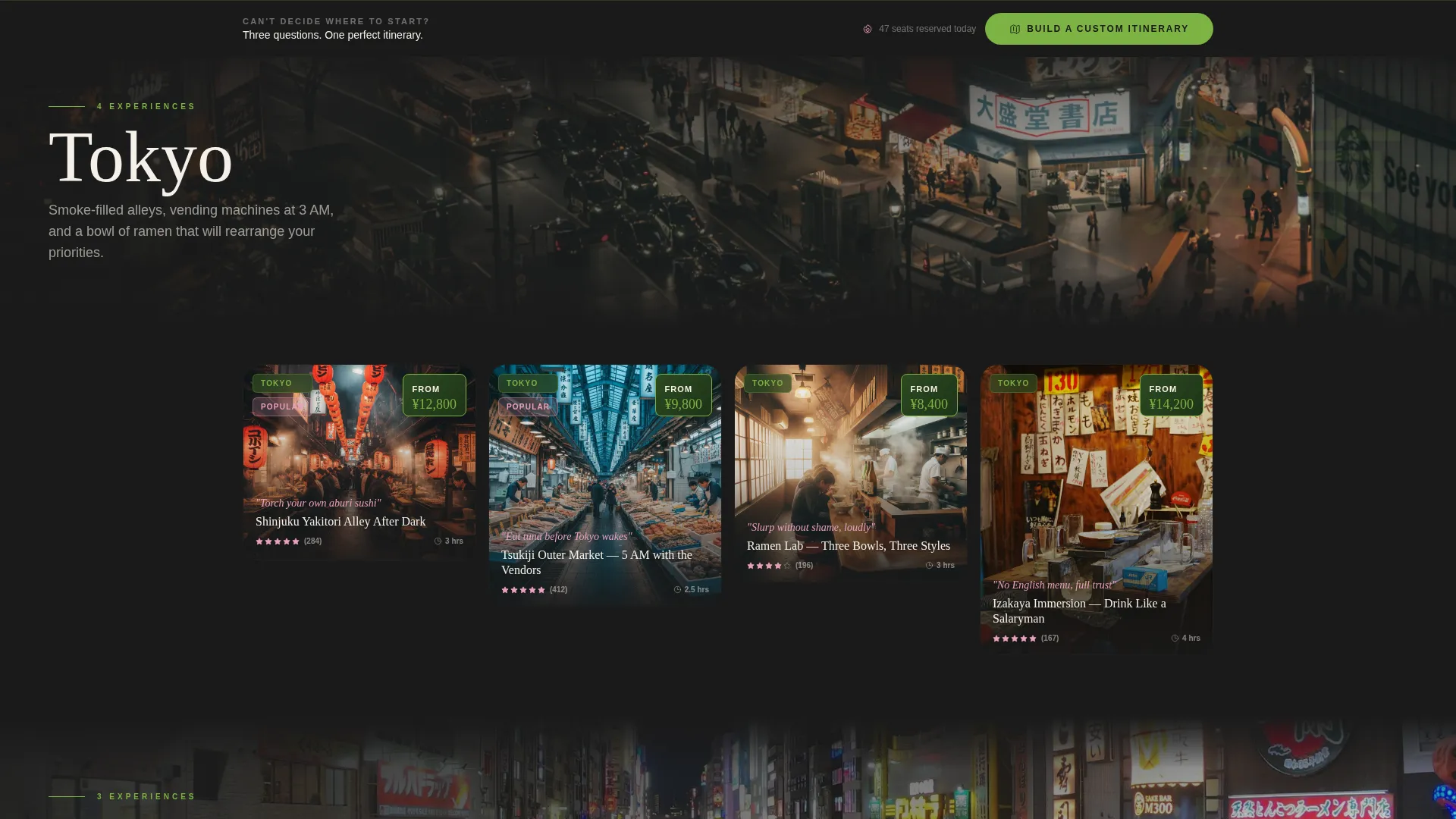
- A progressively loading masonry tour card grid organized by region, with hover tilt, dual-image reveal, price badges, location tags, and sensory hook lines
- A sticky bottom bar with a "Build a Custom Itinerary" call to action that opens a three-question guided quiz
Feature list
This template delivers a tightly scoped set of interactive and visual features, all grounded in the source brief.
Cinematic Drone-Footage Header
The header plays a slow-panning aerial shot over Tsukiji's outer market at 5 a.m. A frosted-glass search box sits centered over the footage with ghost placeholder text and three filter chips beneath it. The effect places the visitor inside the scene before they have read a single word.
Progressive Masonry Card Grid
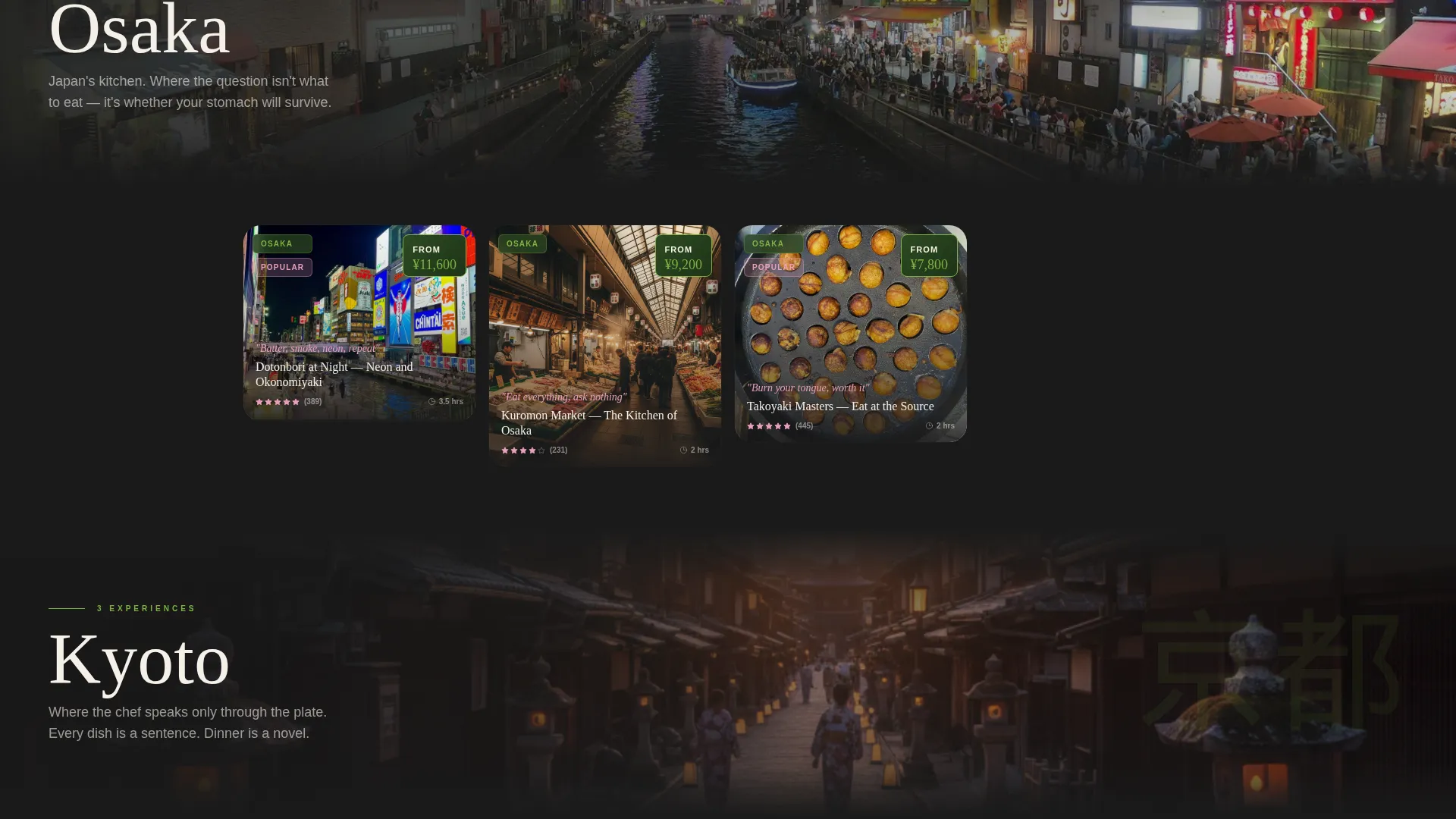
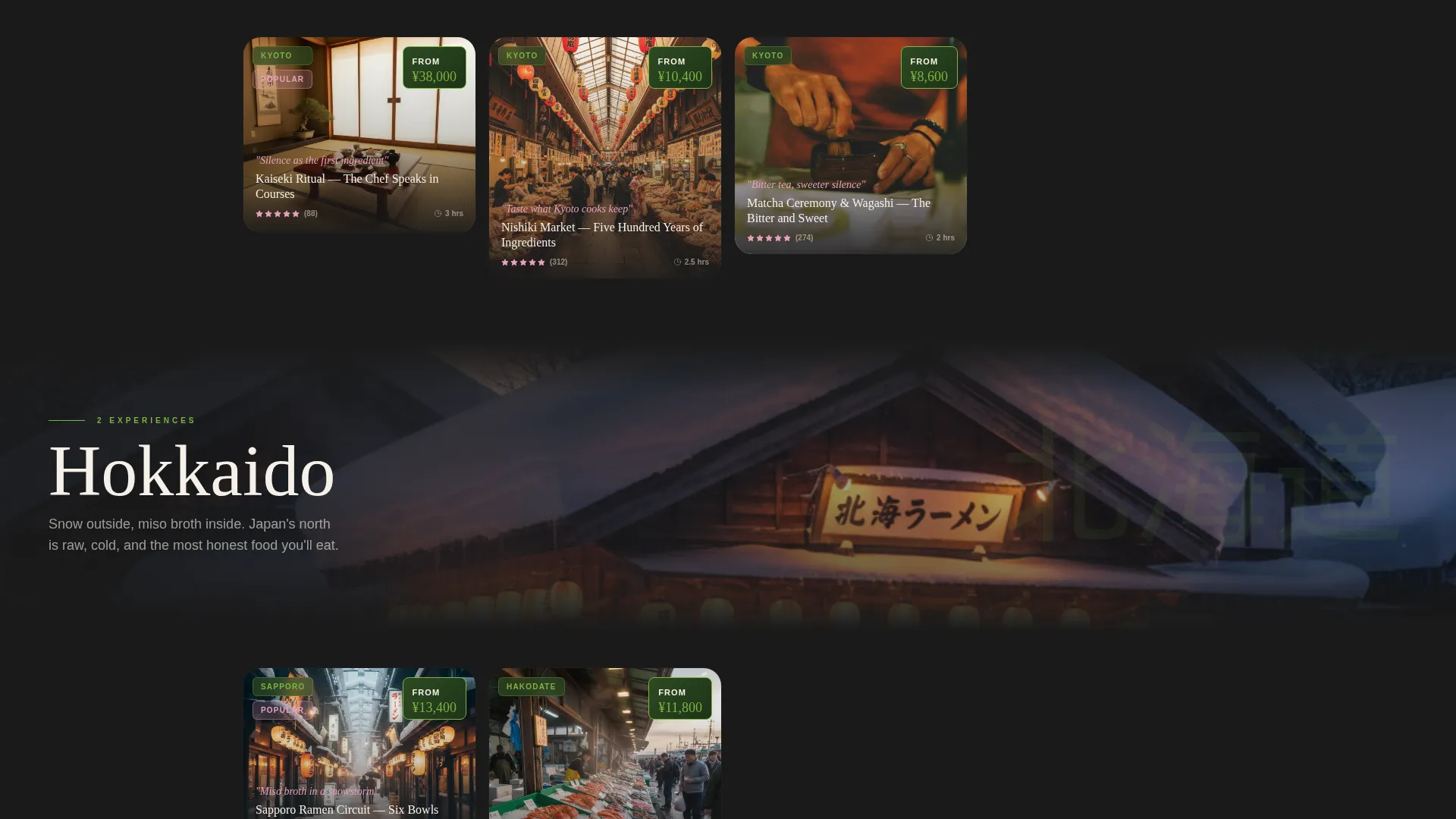
Tour cards load as the visitor scrolls, forming a Pinterest-style mosaic. Each card carries a location tag, price badge, and a five-word sensory hook such as "Torch your own aburi sushi." The grid resets visually at each new region with a full-width atmospheric chapter photo.
Hover Tilt and Dual-Image Reveal
Cards tilt subtly when hovered, flipping to reveal a close-up dish photo with visible steam. The wasabi-green border blooms around the card edge on hover, reinforcing the Rainforest color system with a tactile, organic feel.
Inline Drawer Experience Detail
Clicking any card opens a slide-in drawer rather than navigating to a new page. This keeps visitors inside the browsing flow and reduces drop-off between card discovery and booking intent.
Inline Reservation with Date Picker
Every card carries a primary "Reserve Your Seat" call to action. Tapping it reveals a date picker and a party-size stepper directly within the card, so visitors can commit to a booking without leaving the catalogue view.
Custom Itinerary Quiz Bar
A sticky bottom bar holds the secondary call to action, "Build a Custom Itinerary." This opens a three-question quiz covering preferred cities, number of days, and one food the visitor refuses to skip. It converts undecided browsers into qualified leads.
Page sections overview
| Section | Purpose |
|---|---|
| Drone footage header | Establishes cinematic atmosphere and search entry point |
| Frosted search box | Lets visitors filter by region, experience type, and group size |
| Tokyo card mosaic | Showcases Tokyo yakitori and street food tours |
| Osaka card mosaic | Features Dotonbori stalls and Osaka food experiences |
| Kyoto card mosaic | Presents kaiseki and silent culinary room experiences |
| Hokkaido card mosaic | Highlights northern Japan seasonal food tours |
| Okinawa card mosaic | Covers southern island food and culture experiences |
| Region chapter breaks | Full-width atmospheric photos that reset the eye between regions |
| Inline booking drawer | Handles seat reservation and party-size selection in flow |
| Sticky itinerary bar | Anchors the custom itinerary quiz call to action on scroll |
Design & branding system
The visual identity follows an Adventure Terrain theme expressed through a Rainforest color system. Every color choice references a real texture from the Japanese natural and culinary world, keeping the palette grounded and coherent rather than decorative.
- Deep matcha canopy (#2D4A22) and charred cedar bark (#1A1A1A) form the background range, keeping the page dark, rich, and immersive
- Pickled ginger blush (#E8A0BF) provides warmth in accent elements, while wasabi highlight (#7CB342) activates interactive cards, hover states, and border blooms
- Body text runs in warm white (#F5F0E8), described in the brief as the color of steamed rice, maintaining readability against deep backgrounds without feeling clinical
Mobile & speed optimization
The template is structured for comfortable browsing on smaller screens. The masonry grid and drawer interactions are designed to translate naturally to touch-based navigation.
- The progressive card loading pattern means content appears as the visitor scrolls rather than all at once, keeping the initial view fast and uncluttered
- Filter chips, the search box, and the sticky itinerary bar are all positioned for thumb-friendly use on mobile viewports
- The inline drawer replaces full-page navigation, which reduces the number of load transitions a mobile visitor experiences
How this template helps you convert
The template is built on a browse-first philosophy. Visitors are given the full catalogue before they are asked to commit, which builds confidence and natural momentum toward booking.
- The immersive header and search filters qualify visitor intent immediately, connecting them to the right region and experience type before they reach the first card
- The progressive masonry grid, sensory card hooks, and dual-image hover reveal build desire progressively so that by the third row, the decision is which tour to book, not whether to book at all
- The inline date picker, party-size stepper, and sticky itinerary quiz bar remove every friction point between discovery and conversion, keeping the visitor on one page from first impression to confirmed reservation
Other information about this template
This template is part of the Masonry/Pinterest template style category within the Travel and Hospitality collection. It is built specifically for Japan food and culinary tour use cases and is well suited to operators running multi-city Japan travel programmes.
- The Interactive Explorer creative direction means the scroll itself is the navigation, replacing traditional menus with region-sequenced content blocks
- The Search Box header concept is central to the template and supports the three filter chips as the primary discovery mechanism
- The Adventure Terrain theme and Rainforest color system are cohesive design decisions, not decorative choices, and should be preserved when customizing tour imagery and card content
- The template is designed as a single landing page, making it straightforward to embed within an existing travel platform or deploy as a standalone campaign page
Theme
Adventure Terrain
Creative direction
Interactive Explorer
Color system
Rainforest
Style
Masonry/Pinterest
Direction
Marketplace/Multi
Page Sections
Cinematic Drone-footage Header
Progressive Masonry Card Grid
Hover Tilt and Dual-image Reveal
Inline Drawer for Experience Details
Inline Reservation with Date Picker
Sticky Custom Itinerary Quiz Bar
Related questions
Can I add more regions beyond the five included in the template?
How does the inline booking drawer work?
Can I customize the three-question itinerary quiz?
Is this template suitable for corporate group bookings?
What image format works best for the tour cards?