Pharmacy Software Comparison Website Template
Triage is a pharmacy help desk landing page template built around a comparison table layout and a dark Dashboard Pro visual identity. It positions a centralized ticketing platform against the fragmented workflows pharmacies rely on today, guiding pharmacy directors, independent owners, and PBM liaisons from problem recognition to a demo request in a single focused scroll.
by Rocket studio
Quick summary
Triage is a single-page lead generation template for a pharmacy help desk and ticketing platform. It uses a dark Electric Indigo color system, a spec-sheet scroll structure, and head-to-head comparison tables to show pharmacy teams exactly why their current workflow is costing them time. The primary call to action is a demo request form.
Who this template is for
This template is built for pharmacy operations teams that need to communicate the value of a structured ticketing system to skeptical, time-pressed buyers. It speaks to people who already feel the pain of disorganized claim resolution and just need a clear summary to act on.
- Pharmacy directors managing large technician teams across multiple locations
- Independent pharmacy owners overwhelmed by payer callbacks and prior authorization follow-ups
- PBM liaisons who require resolution timestamps and audit trails for compliance reporting
What problem this template solves
Pharmacy operations teams lose hours every week to scattered workflows. Rejected claims pile up in email threads, prior authorization (PA) follow-ups live in spreadsheets, and inventory discrepancies have no clear owner. There is no single place to see what is open, what is urgent, and what has been resolved.
- No structured way to track rejected claims or PA bottlenecks from submission to resolution
- No audit trail when payers request proof of follow-up timelines
- No visibility into team workload or escalation status across multiple locations
What you get with this template
You get a fully structured landing page template designed to convert pharmacy operations decision-makers into demo leads. Every section is purpose-built to move the visitor from problem awareness to qualified form submission without friction.
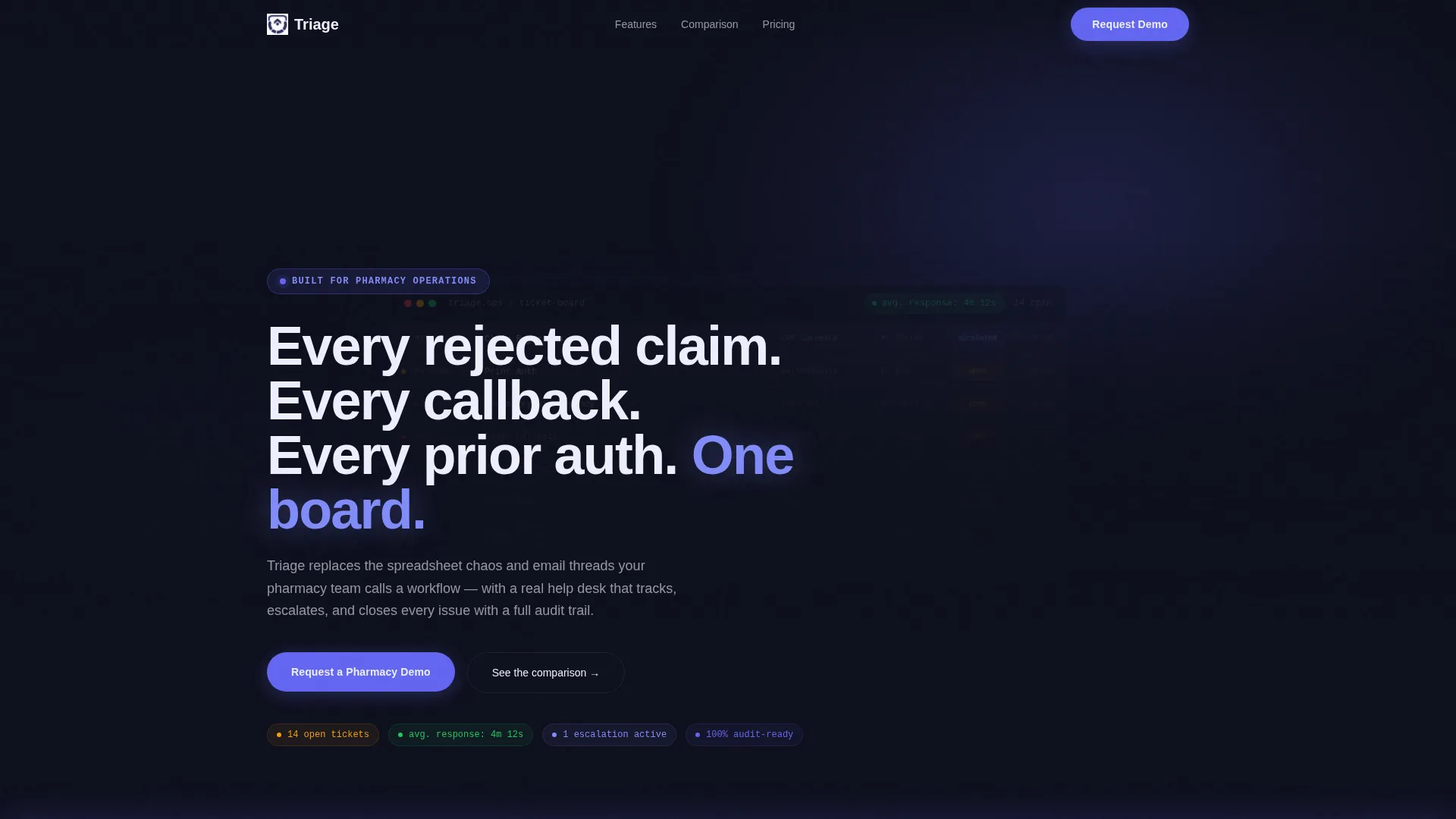
- A full-viewport hero section with a live-dashboard screenshot concept and a headline that names the core pain points directly
- Side-by-side comparison tables contrasting legacy workflows against the platform, with indigo row highlights on the platform column
- A sticky bottom call-to-action bar and a secondary PDF download path requiring only an email address
Feature list
This template delivers a focused set of design and layout features grounded in the source brief. Each one serves a specific conversion or credibility function.
Dark Full-Bleed Hero Section
The header fills the entire viewport with a dark interface screenshot concept showing a live ticket dashboard mid-shift. It includes visual details like open ticket counts, a priority escalation indicator, a resolution timer, and a response-time badge. The headline fades in over the dashboard, naming rejected claims, callbacks, and prior authorizations directly.
Spec Sheet Comparison Tables
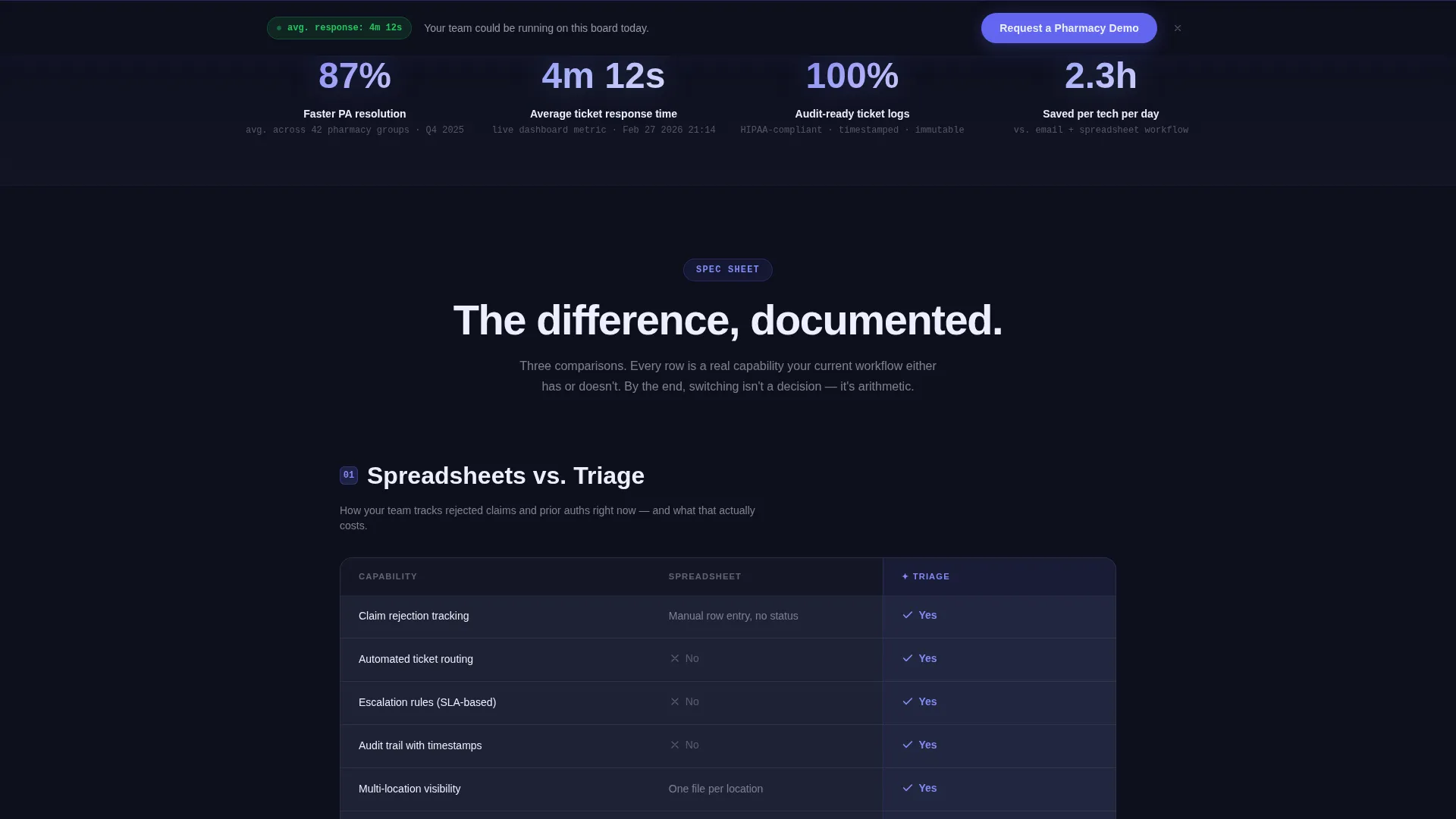
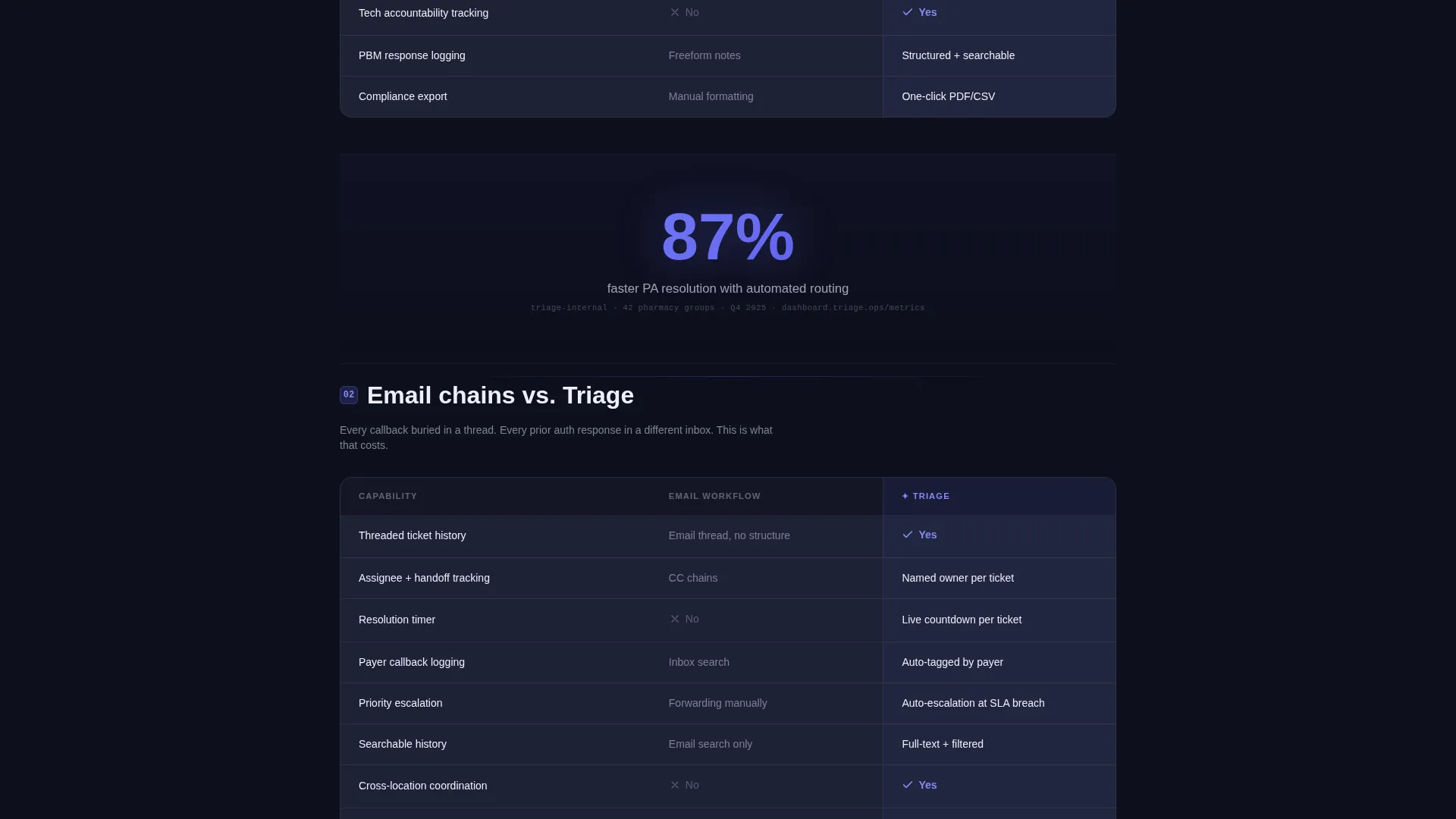
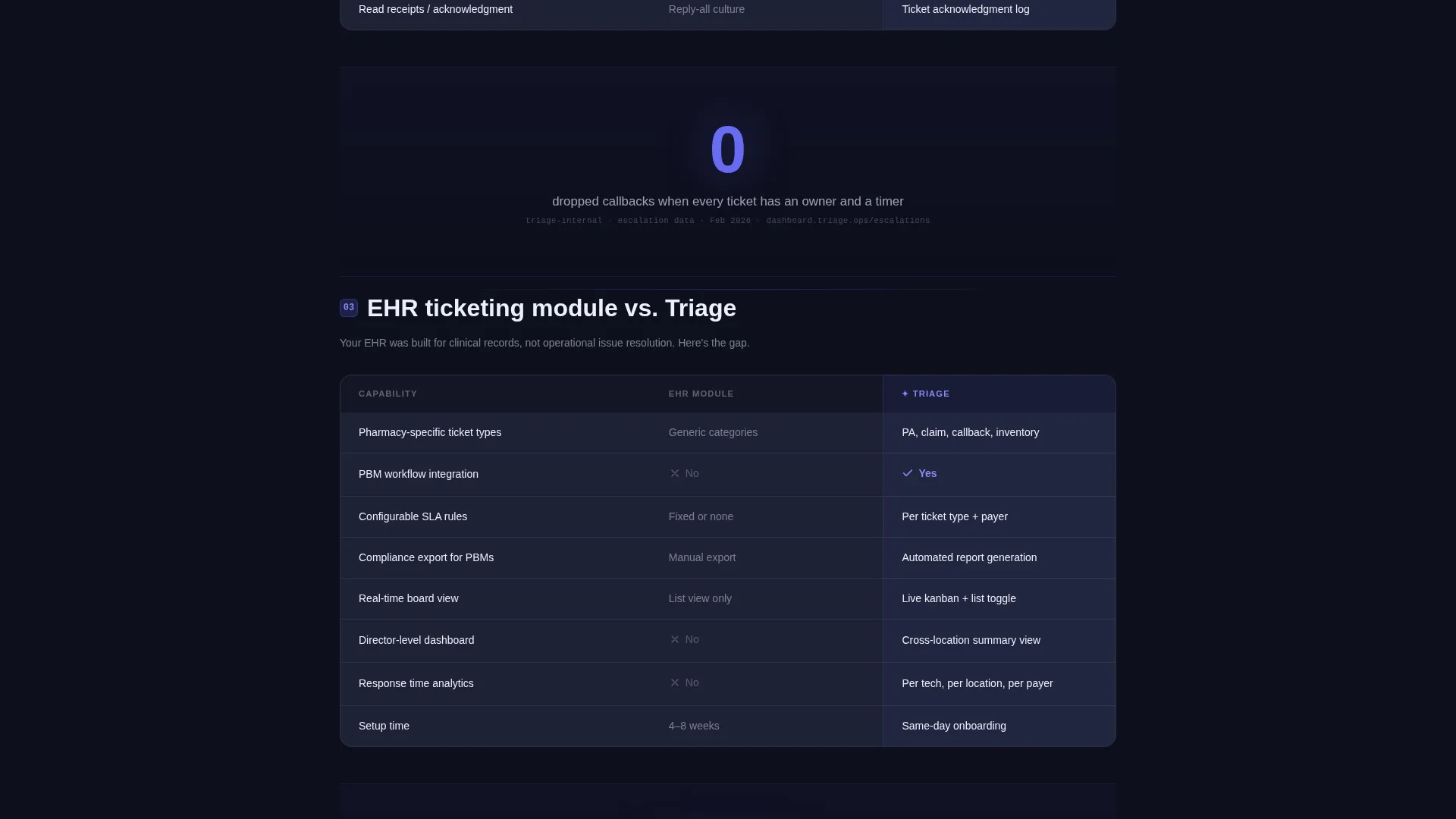
The core scroll structure is built around comparison table rows. Each row pits the platform against a specific legacy workflow: spreadsheets versus automated routing, email chains versus threaded ticket history, and no service-level agreement tracking versus configurable escalation rules. Indigo highlights the platform column; muted slate frames the legacy side.
Single-Stat Callout Blocks
Between comparison table sections, individual metric callouts glow against the dark background. Examples from the brief include "87% faster PA resolution" and "100% audit-ready ticket logs." Each stat is styled to look like a real dashboard metric with a sourced, timestamped appearance.
Sticky Demo Request Form
A lead capture form locks to the bottom of the viewport after the first scroll. It collects pharmacy name, number of locations, current ticketing method via dropdown, and work email. The form stays visible throughout the page without interrupting the comparison content above it.
Secondary PDF Download Path
A second conversion option offers a downloadable Pharmacy Help Desk ROI Calculator PDF. It is gated behind a single email field, giving lower-intent visitors a reason to convert without committing to a full demo request.
Electric Indigo Visual Identity
The color system uses deep terminal black for backgrounds, electric indigo for active states and user interface accents, cool slate for card surfaces and table rows, and clinical white for text and data labels. The palette creates a high-contrast, dashboard-native aesthetic that reinforces the product's operational credibility.
Page sections overview
| Section | Purpose |
|---|---|
| Full-Bleed Hero | Establishes the pain and introduces the platform with a live-dashboard visual concept |
| Headline Fade-In | Names rejected claims, callbacks, and prior authorizations as the core problem |
| Response Badge | Builds immediate credibility with a visible average response-time metric |
| Comparison Table 1 | Contrasts spreadsheet tracking against automated ticket routing |
| Comparison Table 2 | Contrasts email chains against threaded, auditable ticket history |
| Comparison Table 3 | Contrasts no escalation rules against configurable service-level agreement enforcement |
| Stat Callout Blocks | Reinforces the gap between workflows with glowing single-metric proof points |
| Demo Request Form | Captures qualified leads with pharmacy-specific form fields |
| PDF Download Path | Converts lower-intent visitors via a single-field ROI calculator offer |
Design & branding system
The template uses a Dashboard Pro theme built entirely around the Electric Indigo color system. Every color choice is functional, not decorative, connecting visual weight to operational meaning in a way that pharmacy operations teams will read instinctively.
- Deep terminal black (#0D0F1C) for the page background, reinforcing a night-shift dashboard atmosphere
- Electric indigo (#6366F1) for active states, glow accents, row highlights, and call-to-action elements
- Cool slate (#1E2235) for card surfaces, table rows, and secondary containers
- Clinical white (#EDEFFD) for all body text, data labels, and metric readouts
Mobile & speed optimization
The template is structured for clean rendering across screen sizes. The comparison table layout and sticky form bar are designed with responsive behavior in mind, keeping the most critical conversion elements accessible without extra scrolling on smaller displays.
- Comparison tables reflow to single-column stacks on mobile without losing the indigo versus slate color contrast
- The sticky demo form bar remains anchored at the bottom of the viewport on all screen sizes
- Stat callout blocks maintain their glow effect and typographic hierarchy at reduced widths
How this template helps you convert
The page is engineered so that the visitor has already diagnosed their own inefficiency before they reach the form. Conversion is the logical conclusion of the scroll, not a forced interruption.
- The hero section opens with a specific, operational headline that speaks directly to rejected claims and PA follow-up chaos, creating instant recognition for the target buyer.
- The comparison table sequence builds cumulative evidence across three workflow pain points, making the switch feel rational rather than persuasive by the time the form appears.
- The dual conversion path (demo request plus PDF download) captures both high-intent and research-stage visitors, widening the top of the funnel without adding page complexity.
Other information about this template
This template is categorized under Technology, specifically within the Pharmacy Software subcategory and the Pharmacy Help Desk and Ticketing niche. It is a strong fit for teams evaluating their first formal ticketing system or replacing an ad hoc process built on spreadsheets and group emails.
- The template style is Comparison Table, making it well suited for audiences who need to build an internal business case before approving a new platform
- The creative direction follows a Spec Sheet approach, meaning content is presented as data-led evidence rather than marketing narrative
- The header concept is Dark Full-Bleed with Glow, a format that signals serious operational software rather than consumer-facing products
- No stock photography is used anywhere in the template; all visuals are interface-based, reinforcing product authenticity
Theme
Dashboard Pro
Creative direction
Spec Sheet
Color system
Electric Indigo
Style
Comparison Table
Direction
Lead Generation
Page Sections
Dark Full-bleed Hero with Glow
Spec Sheet Comparison Tables
Glowing Single-stat Callouts
Sticky Demo Request Form Bar
Secondary PDF Conversion Path
Related questions
Who is this landing page template designed for?
What lead capture fields does the template include?
Does the template use stock photography?
What layout style does this template use?
Can this template support a pharmacy group with multiple locations?



