Accounting Firm Software Booking Website Template
Ticket is a hub-and-spoke landing page template built for accounting firm help desk and ticketing platforms. It pairs a live-metrics hero with five spec-sheet capability sections, a sticky anchor navigation bar, and a low-friction lead capture form. The result is a single-page experience that guides managing partners and IT coordinators from first glance to booked assessment.
by Rocket studio
Quick summary
Ticket is a single-page, hub-and-spoke landing page template designed for accounting firm help desk and ticketing software. A stats-driven hero anchors the page, five spoke sections detail core capabilities, and a slide-over assessment form closes the loop. The layout reads like a well-indexed reference document, giving operations-minded buyers exactly the density they expect.
Who this template is for
This template is built for B2B software teams selling help desk and ticketing platforms into the accounting sector. It speaks directly to the people who evaluate and approve these tools.
- Managing partners at mid-size CPA firms who need full visibility across forty or more support requests
- IT coordinators managing multiple office locations who need routing logic and service-level enforcement
- Operations managers who have inherited a broken ticketing process and need to show leadership a better path
What problem this template solves
Accounting firms run on precision, but most of their internal IT support runs through shared inboxes and spreadsheet logs that no one officially owns. A help desk platform page needs to prove it solves that specific chaos, not just describe generic features.
- Buyers cannot self-diagnose their gaps without a structured feature reference to compare against
- Generic software landing pages fail to address accounting-specific workflows like tax-season lockouts or reconciliation module failures
- A vague call to action placed before the buyer is ready creates friction and drops conversions
What you get with this template
This template delivers a complete, production-ready landing page structure for an accounting firm ticketing platform. Every section is purposeful and sequenced to move a skeptical buyer toward the assessment form.
- A live-metrics hero section with oversized stat displays, an anchor navigation bar, and five fully structured spoke sections covering ticket routing, service-level agreement management, asset tracking, knowledge base, and reporting
- A slide-over lead capture form with three fields: firm size, current ticketing method (dropdown), and work email
- A Void and Violet visual identity using Fraunces serif display type and DM Sans body labels, with hover states, fade-in-up stagger animation, and an active anchor nav state
Feature list
This template is built around a specific interaction model: browse a spec sheet, confirm a capability, repeat. Each component below supports that rhythm.
Live Stats and Metrics Hero
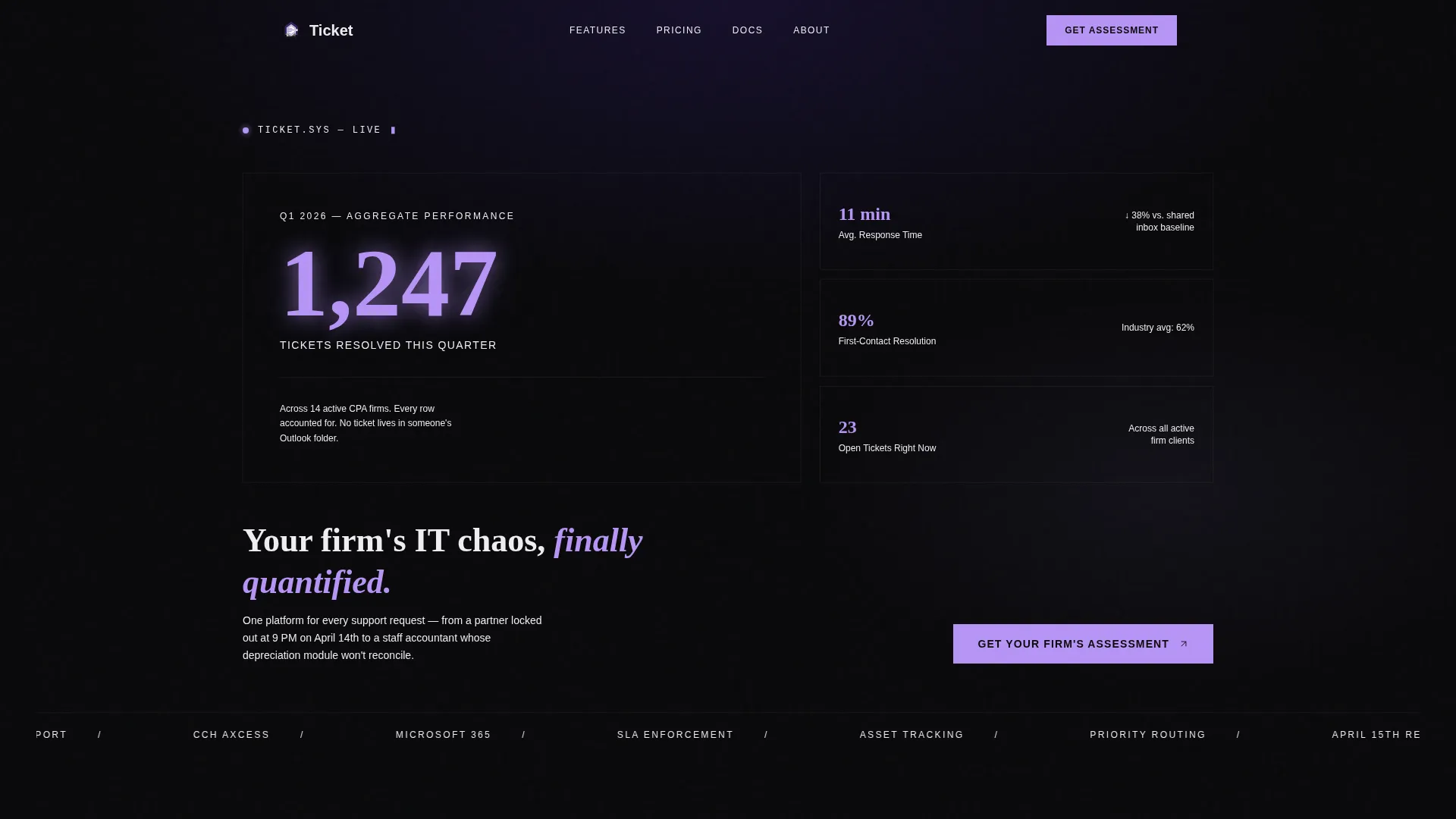
The header displays real-looking performance numbers in oversized phosphor lilac numerals against a void black canvas. Stat cards for average response time, first-contact resolution rate, and open ticket count make the platform feel operational before the buyer reads a single feature description.
Sticky Hub Anchor Navigation
A persistent anchor nav bar anchored in interstellar violet sits at the top of the page as the buyer scrolls. It tracks the active spoke section and allows lateral navigation across all five capability areas without losing page context.
Five Spoke Capability Sections
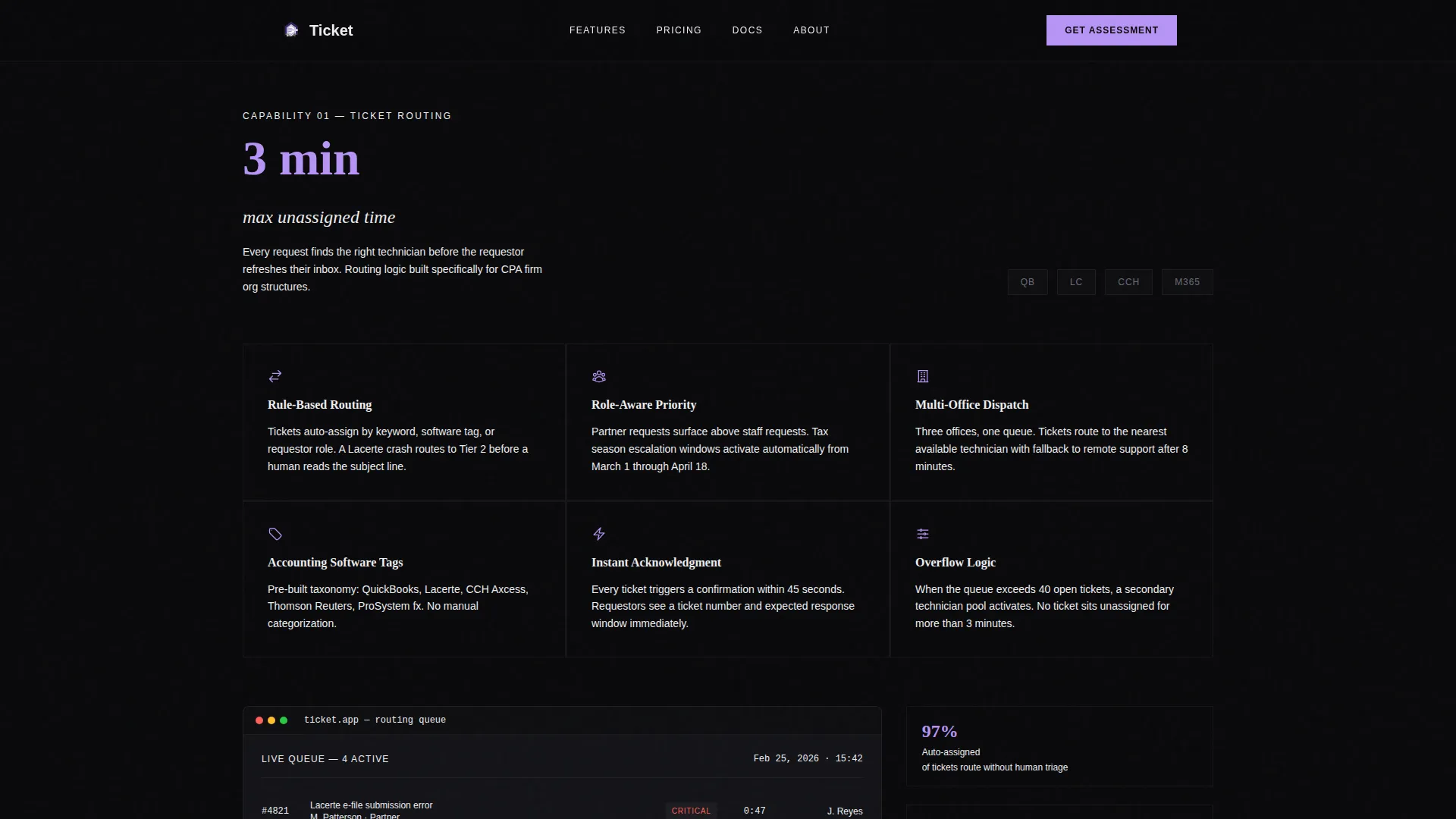
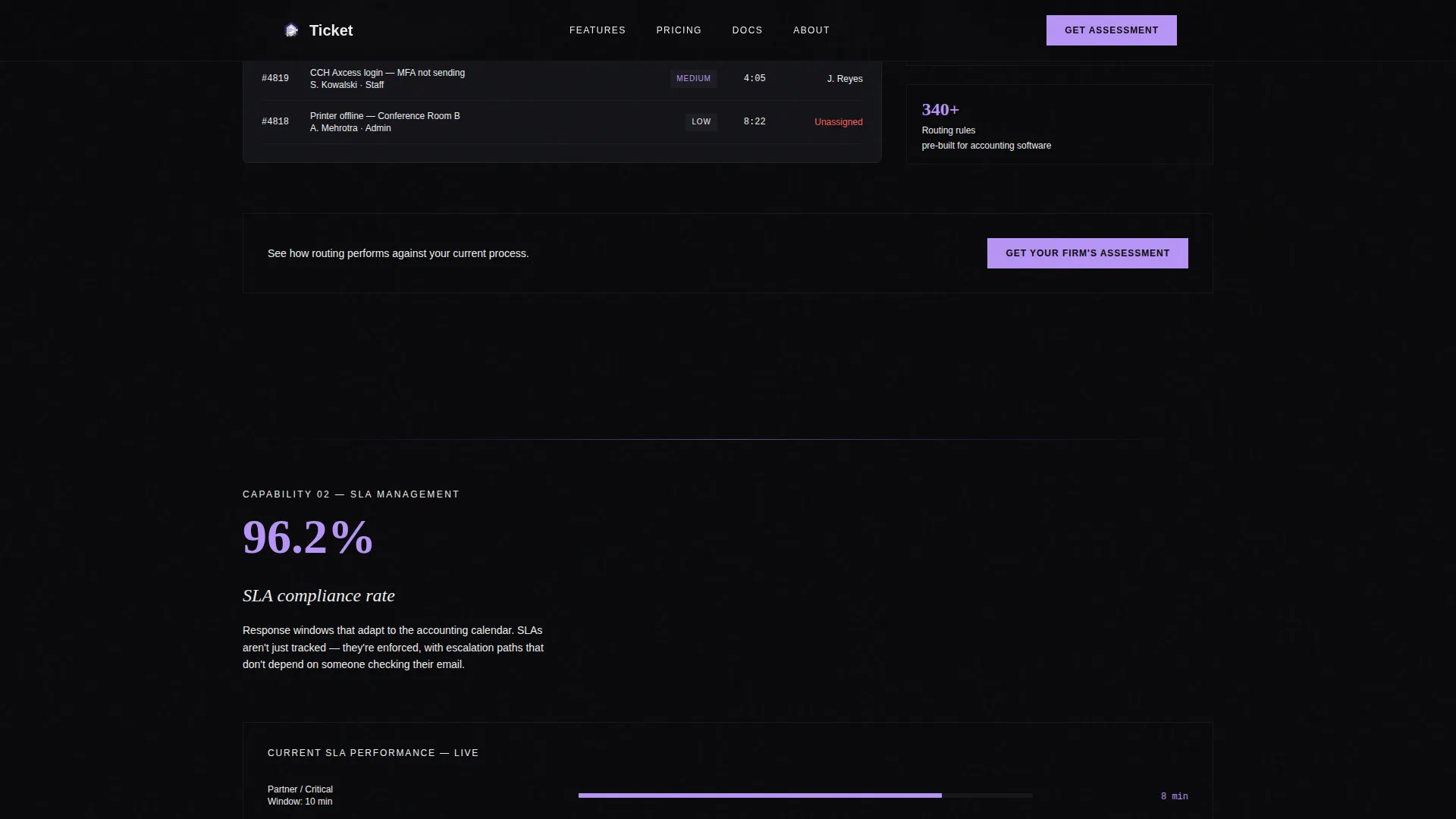
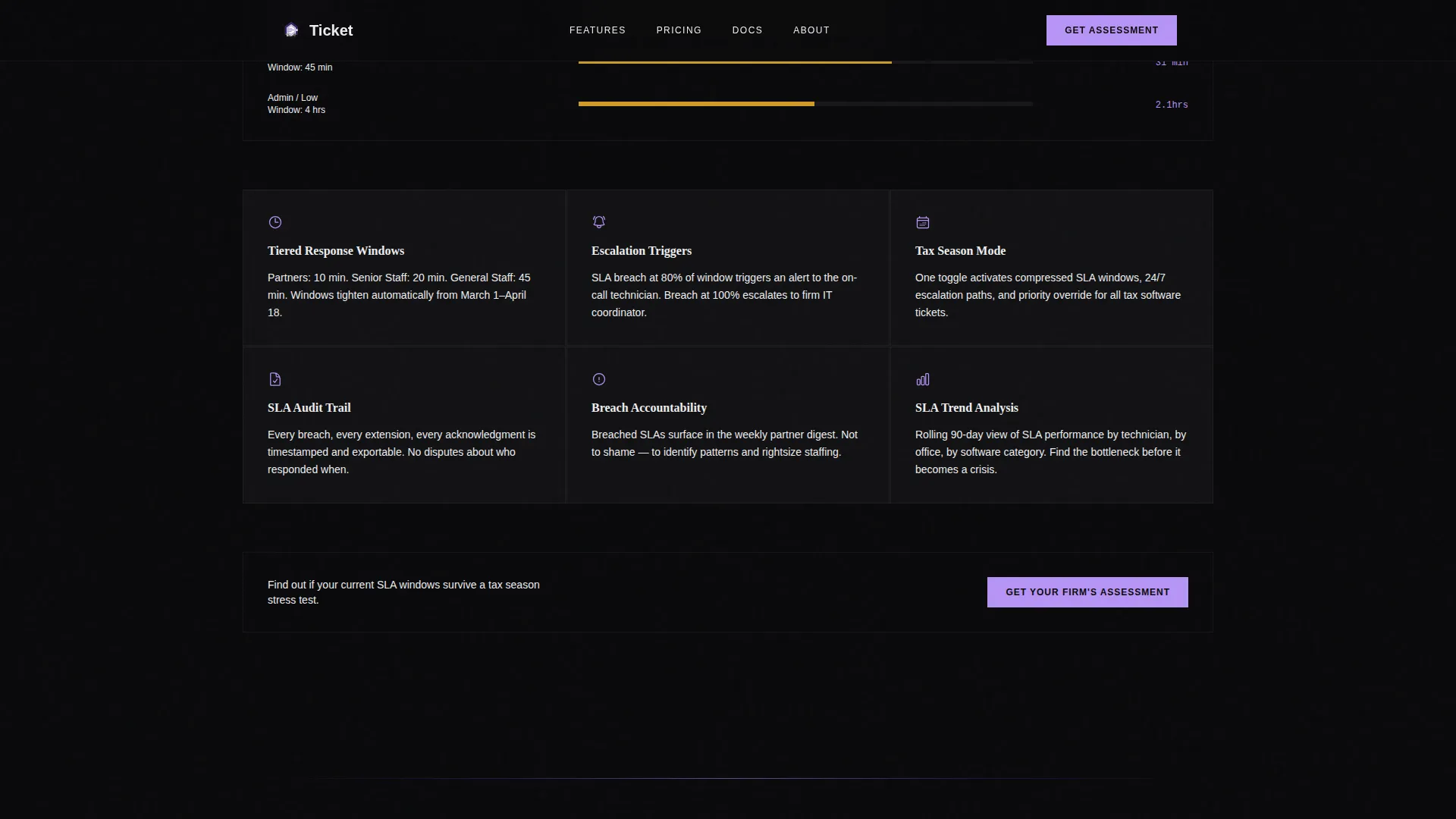
Each spoke opens with a single anchoring metric, followed by a feature grid of short declarative statements, integration logo strips, and one annotated screenshot. The five spokes cover ticket routing, service-level agreement management, asset tracking, knowledge base, and reporting.
Slide-Over Assessment Form
The call-to-action triggers a slide-over panel with three fields only: firm size, current ticketing method via dropdown, and work email. The low-friction form is positioned at the hub center and repeated at the close of every spoke section.
Spec Sheet Creative Direction
The overall layout follows a directory and discovery theme. Sections are formatted with the density of a technical specification, giving buyers the methodical row-by-row reading experience that accounting professionals prefer over narrative persuasion copy.
Quarter-Close Reporting Spoke
The reporting spoke is built around quarter-close dashboards and PDF export functionality. It gives operations managers a concrete preview of the data outputs they will own once the platform is live.
Page sections overview
| Section | Purpose |
|---|---|
| Hero Metrics Dashboard | Opens with live-style stats and the headline to frame platform credibility immediately |
| Sticky Anchor Nav | Lets buyers jump between the five spoke sections without losing scroll position |
| Ticket Routing Spoke | Details smart routing rules and priority logic via a structured feature grid |
| SLA Management Spoke | Covers response time enforcement and escalation path configuration |
| Asset Tracking Spoke | Presents hardware and software inventory capabilities organized by desk |
| Knowledge Base Spoke | Shows self-service article structure and accounting-specific template library |
| Reporting Spoke | Highlights quarter-close dashboards and PDF export for operations reporting |
| Assessment Form call to action | Slide-over panel with firm size, ticketing method dropdown, and work email fields |
| Page Footer | Linear single-row footer closing the page |
Design & branding system
The visual identity follows a terminal and infrastructure aesthetic that signals serious, always-on software. Every color decision reinforces the idea of a system running quietly and reliably in the background.
- Four-color Void and Violet palette: void black (#09090B) for backgrounds and card surfaces, interstellar violet (#2D1B69) for the anchor nav and section dividers, phosphor lilac (#B794F6) for hover states and metric highlights, and status-light white (#EEEEF0) for body text and labels
- Fraunces serif display type for headlines and oversized numerals paired with DM Sans for all body copy, labels, and form fields
- Animation set includes marquee scroll, fade-in-up stagger on section entry, hover border reveals on feature grid cards, and a slide-over panel transition for the form
Mobile & speed optimization
The template is built desktop-first to match the work environment of its primary users, accounting firm operations managers and IT coordinators at their desks. Responsive behavior is still included for completeness.
- Static spoke sections are structured as server components to reduce client-side load, while the anchor navigation and form panel are handled as client components
- Desktop-first layout prioritizes wide feature grids, multi-column stat cards, and side-by-side annotated screenshots that translate to a stacked single-column view on smaller screens
How this template helps you convert
The page earns the form submission by letting buyers self-diagnose before they ever see a call to action. The sequence is deliberate.
- The metrics hero establishes platform credibility in the first three seconds, using real-looking performance data instead of stock imagery or headline promises
- The five spoke sections function as an interactive spec sheet, giving buyers a methodical row-by-row reference they can mentally map against their current process gaps
- The assessment form arrives after five structured capability sections, so the "Get Your Firm's Assessment" call to action feels like the next logical step rather than a cold ask
Other information about this template
This template is designed specifically for the accounting firm software market, where buyers evaluate tools with the same rigor they apply to financial reporting. A few additional details are worth knowing before you build.
- Integration logo strips inside each spoke are designed to display recognized accounting and productivity tools that firm buyers will already associate with their existing stack
- The "Get Your Firm's Assessment" call to action copy is baked into the template at both the hub center and the close of every spoke, giving you seven total conversion touchpoints across the page
- The template uses English copy, United States date formats, and USD-context language throughout, making it ready for the North American CPA firm market without localization adjustments
- Typography pairing of Fraunces and DM Sans is intentional: the serif headline weight signals authority while the sans-serif body type keeps spec-sheet sections fast to scan
Theme
Directory & Discovery
Creative direction
Spec Sheet
Color system
Void & Violet
Style
Hub & Spoke (Anchor Nav)
Direction
Lead Generation
Page Sections
Live Stats and Metrics Hero
Sticky Hub Anchor Navigation
Five Spoke Capability Sections
Slide-over Assessment Form
Spec Sheet Layout and Direction
Quarter-close Reporting Spoke
Related questions
What kind of software company should use this template?
Can I customize the spoke sections for different product capabilities?
How does the lead capture form work?
Is the template built for desktop or mobile users?
Do I need to supply my own statistics for the hero section?



