Complete Retail Software Comparison Website Template
Ticket is a retail help desk landing page template built around a live-style ticketing dashboard. It targets ops managers, franchise support directors, and store managers who need a single, scannable command center for multi-location support issues. The layout uses animated data grids, a comparison table, and a benchmark call to action to turn visitor interest into a qualified conversion.
by Rocket studio
Quick summary
Ticket is a single-page retail help desk template that looks and behaves like the platform it sells. A pixel-perfect animated dashboard greets every visitor with real-looking ticket data, SLA countdowns, and status badges. The layout flows through capability cards, a head-to-head comparison table, and a short benchmark form designed to qualify leads from the first scroll.
Who this template is for
This template is built for retail software companies and platform teams marketing a help desk or ticketing solution to multi-location retail operations. It speaks directly to the people who feel the pain of managing support chaos across dozens of stores every day.
- Regional retail chain operations managers handling point-of-sale (POS) issues across forty or more locations
- Franchise support directors managing seasonal hiring surges and escalation queues
- Store managers who currently track complaints in shared spreadsheets and want something better
What problem this template solves
Multi-location retail support is genuinely hard to communicate in a static product page. Prospects need to feel the relief of order before they trust a new platform. This template solves that credibility gap visually, making the product's value undeniable before a single line of body copy is read.
- Support teams lose time and accountability when complaints live in spreadsheets and email chains
- Traditional landing pages fail to show real-time workflow benefits in a way that resonates with ops-minded buyers
- Retail decision-makers need side-by-side proof that a new tool beats their current process
What you get with this template
You get a fully structured, single-page landing page built around a Dynamic Motion design system and a Dashboard Preview header. Every section is a self-contained capability module that walks prospects from awareness to conversion in a logical, data-driven flow.
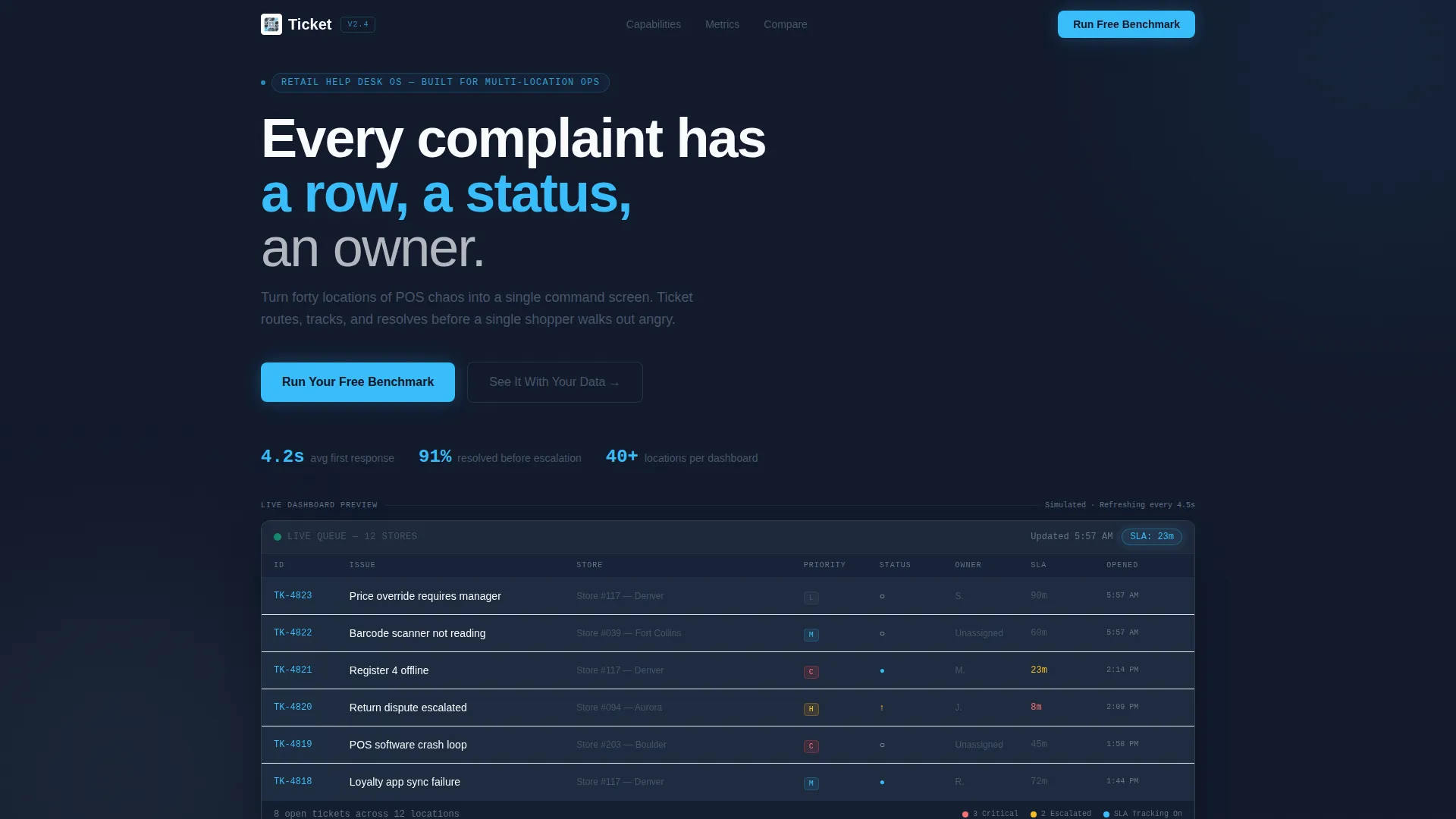
- An animated ticket grid header with realistic retail data, SLA countdown badges, and status animations
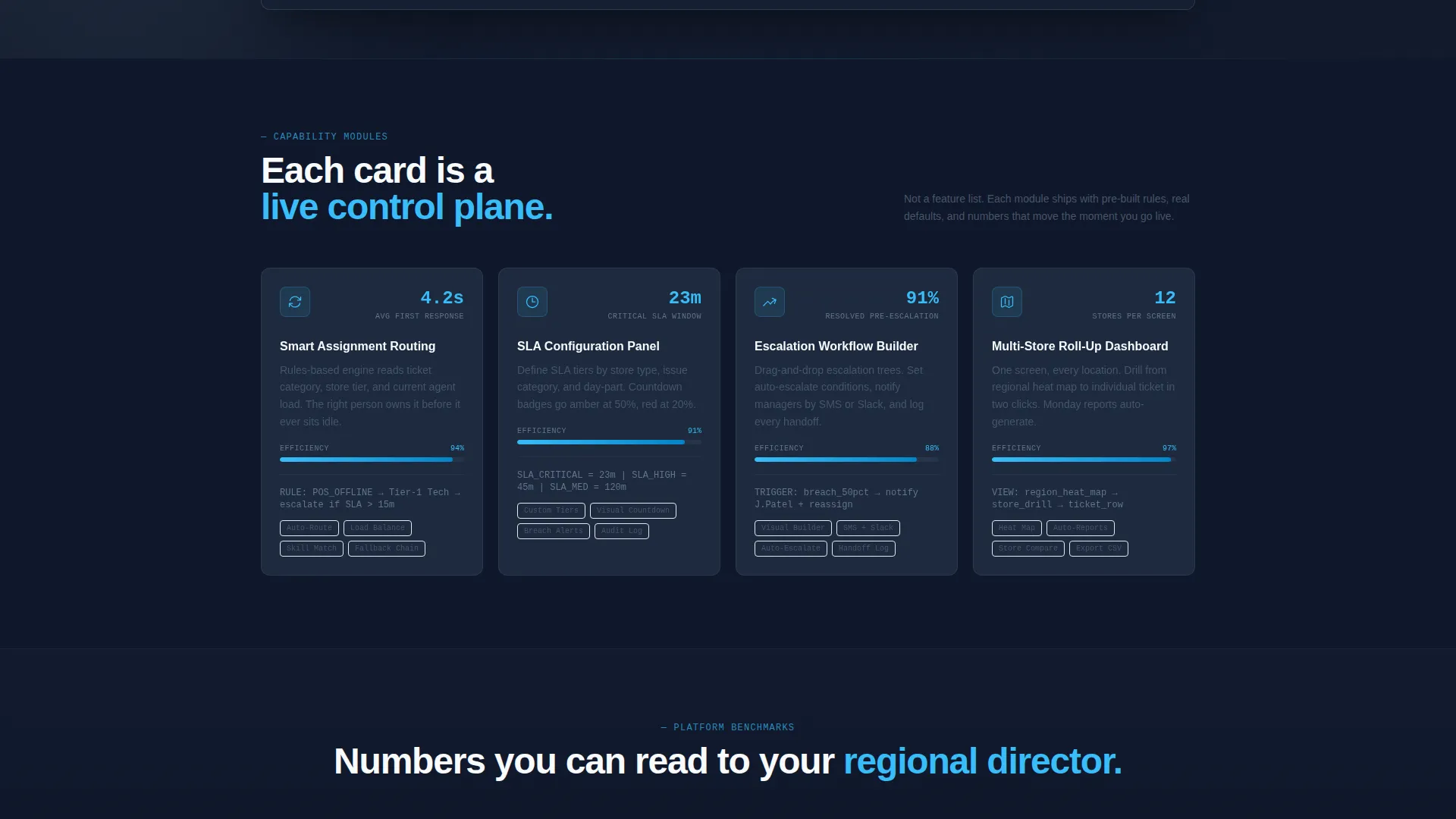
- A series of capability cards covering routing logic, SLA configuration, escalation workflow, and multi-store roll-up views
- A sticky head-to-head comparison table and a dual-call to action lead capture section with a benchmark form and guided demo option
Feature list
This template packages several distinct design and conversion features that work together to build trust and move buyers toward action.
Animated Dashboard Preview Header
The header renders a pixel-perfect ticketing grid populated with realistic retail data. Entries like "Register 4 offline" and "Return dispute escalated" appear with live-style timestamps. A new ticket slides in from the top while a resolved row fades to green and collapses, making the product feel alive before any copy is read.
Spec Sheet Capability Cards
Each scroll section is a discrete data module card presenting one platform capability. Numbers lead every card: "4.2 seconds average first response," "91 percent resolution before escalation," "12 stores monitored per screen." Motion carries the message as elements slide, counters increment, and status badges flip on viewport entry.
SLA Countdown Badge
An animated sky-blue SLA badge pulses inside the header grid at 23 minutes remaining. It reinforces urgency and signals that the platform tracks time-sensitive service level agreement (SLA) performance in real time, a critical proof point for retail ops buyers.
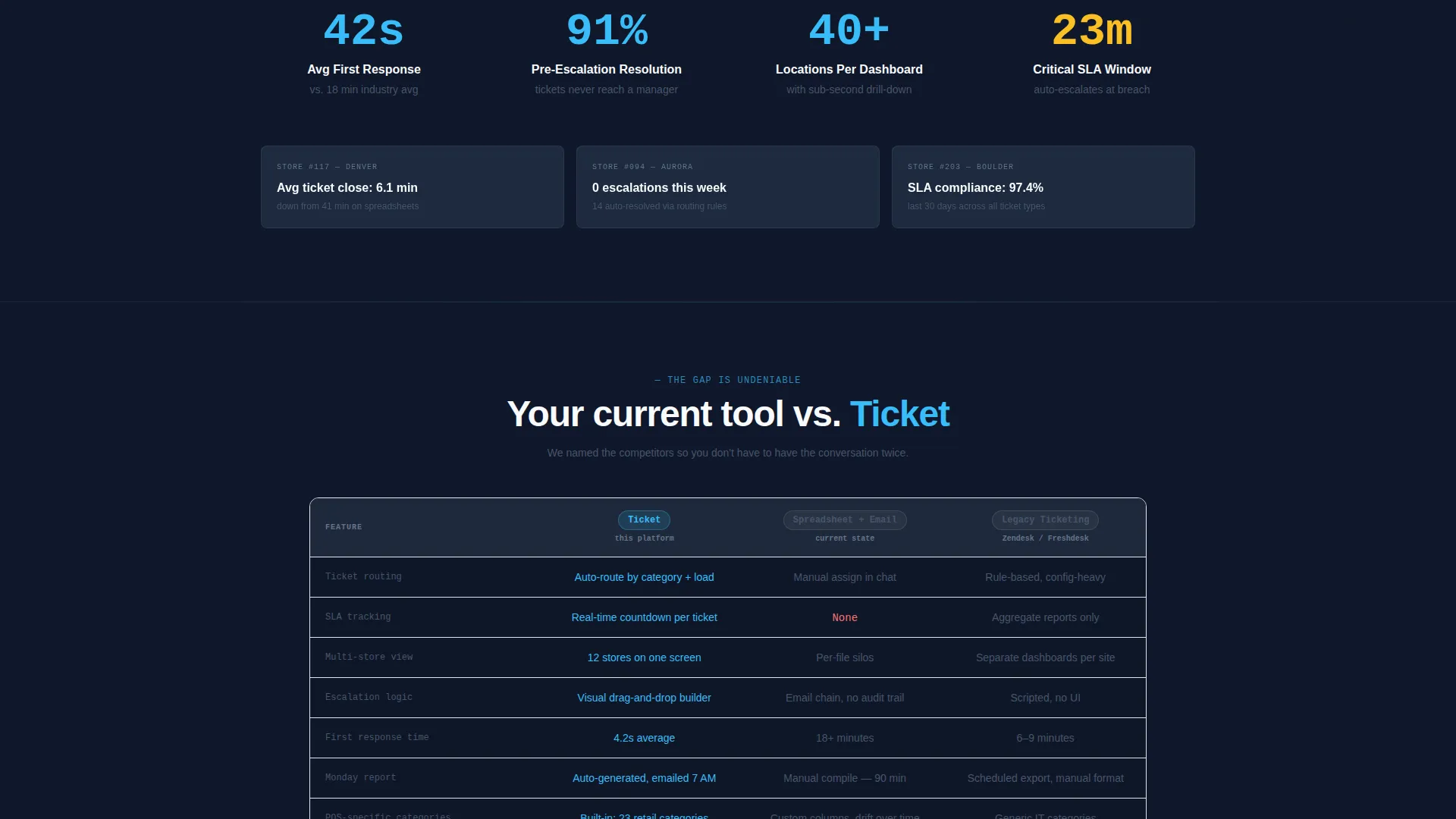
Sticky Comparison Table
A two-column comparison table locks to the page mid-scroll and benchmarks the platform against spreadsheets and email alongside a named legacy competitor. Rows cover auto-routing versus manual assignment, real-time SLA tracking versus none, and multi-location roll-up versus per-store silos.
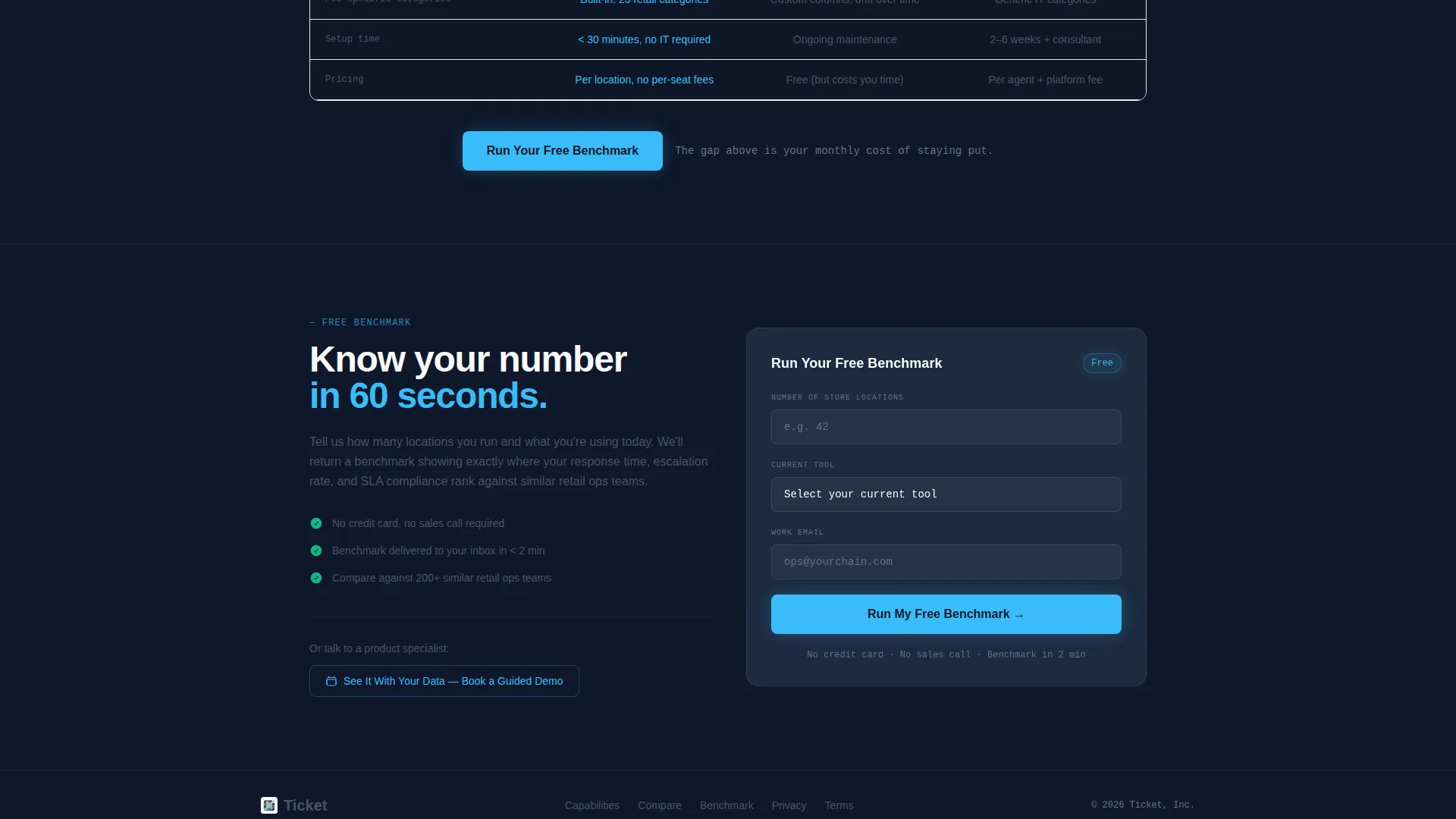
Dual-Path Lead Capture
The primary call to action reads "Run Your Free Benchmark" and opens a short form asking for number of store locations, current tool choice from a dropdown, and work email. A secondary path offers "See It With Your Data" for prospects who prefer a guided demo before committing.
Multi-Store Roll-Up Dashboard Card
A dedicated capability card visualizes the multi-store roll-up dashboard, showing how twelve stores can be monitored on a single screen. This section speaks directly to franchise support directors and regional ops managers who need a bird's-eye view of all open issues at once.
Page sections overview
| Section | Purpose |
|---|---|
| Animated header grid | Show live ticket data and SLA countdown to prove product value instantly |
| Assignment routing card | Explain auto-routing logic with motion-triggered stats and status badge flips |
| SLA configuration card | Display SLA panel design and reinforce 4.2-second first-response metric |
| Escalation workflow card | Walk through the escalation builder with animated step progression |
| Multi-store roll-up card | Visualize 12-store monitoring view for regional and franchise buyers |
| Comparison table | Pin platform against spreadsheets and legacy competitor row by row |
| Benchmark call to action form | Capture lead with store count, current tool dropdown, and work email |
| Guided demo path | Offer a secondary conversion for prospects not ready for the form |
Design & branding system
The visual identity uses a Slate and Sky color system built for rapid scanning and high-contrast readability. The palette feels like a dispatch tower overlooking a calm runway: controlled, luminous, and precise.
- Deep operations slate (#1E293B) for backgrounds, mid-tone desk gray (#475569) for secondary text and dividers, open-sky blue (#38BDF8) for active states, progress bars, and SLA badges
- Cloud white (#F8FAFC) for card surfaces and data cell backgrounds, keeping the grid clean and easy to read at a glance
- Dynamic Motion theme drives all transitions: tickets slide in, resolved rows collapse, counters increment, and badges flip as sections enter the viewport
Mobile & speed optimization
The template is structured for a responsive single-column flow on smaller screens. The animated dashboard header and capability cards are designed to scale down without losing their core visual impact.
- The sticky comparison table reflows to a readable stacked layout on narrow viewports so prospects can still evaluate the side-by-side data on mobile
- Motion effects are scoped to viewport entry events, keeping the experience purposeful and controlled rather than distracting on any screen size
How this template helps you convert
The entire page is engineered as a conversion funnel that earns each click through visible proof rather than marketing claims.
- The animated dashboard header builds immediate product credibility by showing realistic ticket data and SLA performance before the visitor scrolls, reducing the effort needed to explain the platform's value in words.
- The sticky comparison table confronts the prospect's existing process directly, making the gap between their current spreadsheet or legacy tool and the platform undeniable right before the benchmark form appears.
- The dual-path call to action removes friction by offering both a self-serve benchmark form and a guided demo option, so buyers at different stages of readiness both have a clear next step.
Other information about this template
This template is designed specifically for the retail software category and sits at the intersection of retail help desk tools and multi-location operations management. It is a strong fit for product teams positioning against tools like Zendesk or Freshdesk in the retail vertical.
- The comparison table is built to name legacy competitors directly, making it well-suited for campaigns targeting buyers who are evaluating Zendesk or Freshdesk as alternatives
- The benchmark form dropdown includes spreadsheet, email, Zendesk, Freshdesk, and other as current-tool options, pre-qualifying leads by existing workflow
- The template style is Dashboard and Data Grid, aligned with a Dynamic Motion theme and a Spec Sheet creative direction for a technology product in the retail software subcategory
Theme
Dynamic Motion
Creative direction
Spec Sheet
Color system
Slate & Sky
Style
Dashboard/Data Grid
Direction
Comparison/Versus
Page Sections
Animated Ticket Grid Header
Spec Sheet Capability Cards
Sticky Comparison Table
Dual-path Lead Capture
Multi-store Roll-up Card
SLA Countdown Badge
Related questions
Who is this template designed for?
Can I update the ticket data in the animated header?
Does the comparison table support any competitor name?
What information does the benchmark form collect?
Is this a single-page layout?



